JB
Jon Bondy
Tue, Apr 28, 2026 10:57 PM
I created a oval by using scale(). I would like to position screw holes
along the oval, but I can't see how to use scale() to change the x/y
values for translate().
Thanks
Jon
--
This email has been checked for viruses by AVG antivirus software.
www.avg.com
I created a oval by using scale(). I would like to position screw holes
along the oval, but I can't see how to use scale() to change the x/y
values for translate().
Thanks
Jon
--
This email has been checked for viruses by AVG antivirus software.
www.avg.com

AM
Adrian Mariano
Tue, Apr 28, 2026 11:15 PM
To do that you put scale outside (in front of) the translate. But I
wouldn't recommend it: the scale will turn your screw hole into ovals, so
you'll need a second scale inside to undo it and turn them back into
circles, which seems like a complicated and error-prone way to do things.
On Tue, Apr 28, 2026 at 6:57 PM Jon Bondy via Discuss <
discuss@lists.openscad.org> wrote:
I created a oval by using scale(). I would like to position screw holes
along the oval, but I can't see how to use scale() to change the x/y
values for translate().
Thanks
Jon
--
This email has been checked for viruses by AVG antivirus software.
www.avg.com
OpenSCAD mailing list
To unsubscribe send an email to discuss-leave@lists.openscad.org
To do that you put scale outside (in front of) the translate. But I
wouldn't recommend it: the scale will turn your screw hole into ovals, so
you'll need a second scale inside to undo it and turn them back into
circles, which seems like a complicated and error-prone way to do things.
On Tue, Apr 28, 2026 at 6:57 PM Jon Bondy via Discuss <
discuss@lists.openscad.org> wrote:
> I created a oval by using scale(). I would like to position screw holes
> along the oval, but I can't see how to use scale() to change the x/y
> values for translate().
>
> Thanks
>
> Jon
>
>
> --
> This email has been checked for viruses by AVG antivirus software.
> www.avg.com
> _______________________________________________
> OpenSCAD mailing list
> To unsubscribe send an email to discuss-leave@lists.openscad.org
JB
Jon Bondy
Tue, Apr 28, 2026 11:23 PM
Adrian:
Thanks. Yes, I tried it that way, and it did scale the screw holes.
So, no obvious sophisticated way to do this. I may well do the double
scale() thing.
:)
On 4/28/2026 7:15 PM, Adrian Mariano via Discuss wrote:
To do that you put scale outside (in front of) the translate. But I
wouldn't recommend it: the scale will turn your screw hole into ovals,
so you'll need a second scale inside to undo it and turn them back
into circles, which seems like a complicated and error-prone way to do
things.
On Tue, Apr 28, 2026 at 6:57 PM Jon Bondy via Discuss
discuss@lists.openscad.org wrote:
 I created a oval by using scale().  I would like to position screw
 holes
 along the oval, but I can't see how to use scale() to change the x/y
 values for translate().

 Thanks

 Jon


 --
 This email has been checked for viruses by AVG antivirus software.
 www.avg.com
 <https://urldefense.proofpoint.com/v2/url?u=http-3A__www.avg.com&d=DwMFaQ&c=euGZstcaTDllvimEN8b7jXrwqOf-v5A_CdpgnVfiiMM&r=AsrE-c7ZR7B2Kyr3qgfvvppkCEBVsNmwEMndcrRSuOI&m=XjIb2bwF4ZzaTsUwFS3I0_Yp7gVxr2HTX02m4cAKQOccSAM9hUjqUC5YBFj3BAm5&s=XR7kSBloVwISX_wr3F67AbG5HKxK4o939R_26bYN0RY&e=>
 _______________________________________________
 OpenSCAD mailing list
 To unsubscribe send an email to discuss-leave@lists.openscad.org
OpenSCAD mailing list
To unsubscribe send an email todiscuss-leave@lists.openscad.org
Adrian:
Thanks. Yes, I tried it that way, and it did scale the screw holes.
So, no obvious sophisticated way to do this. I may well do the double
scale() thing.
:)
On 4/28/2026 7:15 PM, Adrian Mariano via Discuss wrote:
> To do that you put scale outside (in front of) the translate. But I
> wouldn't recommend it: the scale will turn your screw hole into ovals,
> so you'll need a second scale inside to undo it and turn them back
> into circles, which seems like a complicated and error-prone way to do
> things.
>
>
> On Tue, Apr 28, 2026 at 6:57 PM Jon Bondy via Discuss
> <discuss@lists.openscad.org> wrote:
>
> I created a oval by using scale(). I would like to position screw
> holes
> along the oval, but I can't see how to use scale() to change the x/y
> values for translate().
>
> Thanks
>
> Jon
>
>
> --
> This email has been checked for viruses by AVG antivirus software.
> www.avg.com
> <https://urldefense.proofpoint.com/v2/url?u=http-3A__www.avg.com&d=DwMFaQ&c=euGZstcaTDllvimEN8b7jXrwqOf-v5A_CdpgnVfiiMM&r=AsrE-c7ZR7B2Kyr3qgfvvppkCEBVsNmwEMndcrRSuOI&m=XjIb2bwF4ZzaTsUwFS3I0_Yp7gVxr2HTX02m4cAKQOccSAM9hUjqUC5YBFj3BAm5&s=XR7kSBloVwISX_wr3F67AbG5HKxK4o939R_26bYN0RY&e=>
> _______________________________________________
> OpenSCAD mailing list
> To unsubscribe send an email to discuss-leave@lists.openscad.org
>
>
> _______________________________________________
> OpenSCAD mailing list
> To unsubscribe send an email todiscuss-leave@lists.openscad.org

ME
Mark Erbaugh
Wed, Apr 29, 2026 12:32 AM
I would use trigonometry. Here’s a short code snippet to give you an idea.
scale = 0.75;
r = 10; // radius of holes
eps = 0.001;
$fn = 60;
difference()
{
linear_extrude(1)
scale([1,0.75,1])
circle(r + 2);
 for (i=[0:45:359])
 {
     x = cos(i) * r;
     y = sin(i) * r * scale;
     translate([x,y, -eps])
     linear_extrude(1 + 2 * eps)
     circle(1);
 }
}
On Apr 28, 2026, at 6:57 PM, Jon Bondy via Discuss discuss@lists.openscad.org wrote:
I created a oval by using scale(). I would like to position screw holes along the oval, but I can't see how to use scale() to change the x/y values for translate().
Thanks
Jon
--
This email has been checked for viruses by AVG antivirus software.
www.avg.com
OpenSCAD mailing list
To unsubscribe send an email to discuss-leave@lists.openscad.org
I would use trigonometry. Here’s a short code snippet to give you an idea.
> scale = 0.75;
> r = 10; // radius of holes
> eps = 0.001;
> $fn = 60;
>
> difference()
> {
> linear_extrude(1)
> scale([1,0.75,1])
> circle(r + 2);
>
> for (i=[0:45:359])
> {
> x = cos(i) * r;
> y = sin(i) * r * scale;
> translate([x,y, -eps])
> linear_extrude(1 + 2 * eps)
> circle(1);
> }
> }
> On Apr 28, 2026, at 6:57 PM, Jon Bondy via Discuss <discuss@lists.openscad.org> wrote:
>
> I created a oval by using scale(). I would like to position screw holes along the oval, but I can't see how to use scale() to change the x/y values for translate().
>
> Thanks
>
> Jon
>
>
> --
> This email has been checked for viruses by AVG antivirus software.
> www.avg.com
> _______________________________________________
> OpenSCAD mailing list
> To unsubscribe send an email to discuss-leave@lists.openscad.org

JB
Jordan Brown
Wed, Apr 29, 2026 12:55 AM
On 4/28/2026 4:23 PM, Jon Bondy via Discuss wrote:
So, no obvious sophisticated way to do this. I may well do the double
scale() thing.
Remember also that scaling a translate is the same as multiplying the
translate value by the scale.
That is, if you have squished a 100-unit-radius circle by half:
scale([1, 0.5]) circle(r=100);
and you want to position a 10-unit-radius circle 10 units in from the +Y
side of the ellipse, you could do this:
scale([1, 0.5]) translate([0, (100/2-10-10)*2]) scale([1, 2]) circle(r=10);
But that hurts my brain; to come up with it I had to figure out where
the top of the ellipse was, and how far down we wanted to pull the hole
(10 for the margin, and 10 for the radius), and then descale it back to
the scale of the original circle.
I would do this:
translate([0, 100/2 - 10 - 10]) circle(r=10);
That's 100 for the radius of the original circle, divided by two to get
the height (minor radius) of the ellipse, less 10 for the margin, less
10 for the radius of the hole. (And do not do that math yourself to
get 30; have OpenSCAD do it so that the reader can see what's been done.)
Here's a parameterized program that will create an ellipse of a
specified size, and cut a hole of a specified size at a specified
distance from the top. Cutting holes in other places is left as an
exercise for the reader. Cutting holes that are not aligned on the axes
would require ... care.
majorR = 100;
minorR = 50;
margin = 10;
holeR = 10;

yscale = minorR/majorR;

difference() {
     scale([1, yscale]) circle(r=majorR);
     translate([0, majorR*yscale - margin - holeR]) circle(r=holeR);
}
On 4/28/2026 4:23 PM, Jon Bondy via Discuss wrote:
>
> So, no obvious sophisticated way to do this. I may well do the double
> scale() thing.
>
Remember also that scaling a translate is the same as multiplying the
translate value by the scale.
That is, if you have squished a 100-unit-radius circle by half:
scale([1, 0.5]) circle(r=100);
and you want to position a 10-unit-radius circle 10 units in from the +Y
side of the ellipse, you could do this:
scale([1, 0.5]) translate([0, (100/2-10-10)*2]) scale([1, 2]) circle(r=10);
But that hurts my brain; to come up with it I had to figure out where
the top of the ellipse was, and how far down we wanted to pull the hole
(10 for the margin, and 10 for the radius), and then descale it back to
the scale of the original circle.
I would do this:
translate([0, 100/2 - 10 - 10]) circle(r=10);
That's 100 for the radius of the original circle, divided by two to get
the height (minor radius) of the ellipse, less 10 for the margin, less
10 for the radius of the hole. (And do *not* do that math yourself to
get 30; have OpenSCAD do it so that the reader can see what's been done.)
Here's a parameterized program that will create an ellipse of a
specified size, and cut a hole of a specified size at a specified
distance from the top. Cutting holes in other places is left as an
exercise for the reader. Cutting holes that are not aligned on the axes
would require ... care.
majorR = 100;
minorR = 50;
margin = 10;
holeR = 10;
yscale = minorR/majorR;
difference() {
scale([1, yscale]) circle(r=majorR);
translate([0, majorR*yscale - margin - holeR]) circle(r=holeR);
}
AM
Adrian Mariano
Wed, Apr 29, 2026 12:55 AM
That's essentially the solution I was suggesting written out in detail. I
wonder if OP had in mind that the holes were being created without explicit
trig, like maybe for(ang=[0:45:359]) rotate([0,0,ang])
translate([radius,0,0]) hole(). If that's how you're placing holes then an
approach like that doesn't work because the coordinates are hidden by the
rotate.
On Tue, Apr 28, 2026 at 8:33 PM Mark Erbaugh via Discuss <
discuss@lists.openscad.org> wrote:
I would use trigonometry. Here’s a short code snippet to give you an idea.
scale = 0.75;
r = 10; // radius of holes
eps = 0.001;
$fn = 60;
difference()
{
linear_extrude(1)
scale([1,0.75,1])
circle(r + 2);
 for (i=[0:45:359])
 {
     x = cos(i) * r;
     y = sin(i) * r * scale;
     translate([x,y, -eps])
     linear_extrude(1 + 2 * eps)
     circle(1);
 }
}
On Apr 28, 2026, at 6:57 PM, Jon Bondy via Discuss <
I created a oval by using scale(). I would like to position screw holes
along the oval, but I can't see how to use scale() to change the x/y values
for translate().
That's essentially the solution I was suggesting written out in detail. I
wonder if OP had in mind that the holes were being created without explicit
trig, like maybe for(ang=[0:45:359]) rotate([0,0,ang])
translate([radius,0,0]) hole(). If that's how you're placing holes then an
approach like that doesn't work because the coordinates are hidden by the
rotate.
On Tue, Apr 28, 2026 at 8:33 PM Mark Erbaugh via Discuss <
discuss@lists.openscad.org> wrote:
> I would use trigonometry. Here’s a short code snippet to give you an idea.
>
> > scale = 0.75;
> > r = 10; // radius of holes
> > eps = 0.001;
> > $fn = 60;
> >
> > difference()
> > {
> > linear_extrude(1)
> > scale([1,0.75,1])
> > circle(r + 2);
> >
> > for (i=[0:45:359])
> > {
> > x = cos(i) * r;
> > y = sin(i) * r * scale;
> > translate([x,y, -eps])
> > linear_extrude(1 + 2 * eps)
> > circle(1);
> > }
> > }
>
>
>
>
> > On Apr 28, 2026, at 6:57 PM, Jon Bondy via Discuss <
> discuss@lists.openscad.org> wrote:
> >
> > I created a oval by using scale(). I would like to position screw holes
> along the oval, but I can't see how to use scale() to change the x/y values
> for translate().
> >
> > Thanks
> >
> > Jon
> >
> >
> > --
> > This email has been checked for viruses by AVG antivirus software.
> > www.avg.com
> > _______________________________________________
> > OpenSCAD mailing list
> > To unsubscribe send an email to discuss-leave@lists.openscad.org
>
> _______________________________________________
> OpenSCAD mailing list
> To unsubscribe send an email to discuss-leave@lists.openscad.org
JB
Jon Bondy
Wed, Apr 29, 2026 1:01 AM
Yes. Exactly. I wanted to use a for() and rotate() to spread the holes
around the circle and then scale() it to get them in the right
location. Nice concept. Not easy to implement.
Mark's trig approach seems like the best so far
On 4/28/2026 8:55 PM, Adrian Mariano via Discuss wrote:
That's essentially the solution I was suggesting written out in
detail. I wonder if OP had in mind that the holes were being created
without explicit trig, like maybe for(ang=[0:45:359])
rotate([0,0,ang]) translate([radius,0,0]) hole(). If that's how
you're placing holes then an approach like that doesn't work because
the coordinates are hidden by the rotate.
On Tue, Apr 28, 2026 at 8:33 PM Mark Erbaugh via Discuss
discuss@lists.openscad.org wrote:
 I would use trigonometry. Here’s a short code snippet to give you
 an idea.
scale = 0.75;
r = 10; // radius of holes
eps = 0.001;
$fn = 60;
difference()
{
linear_extrude(1)
scale([1,0.75,1])
circle(r + 2);
for (i=[0:45:359])
{
x = cos(i) * r;
y = sin(i) * r * scale;
translate([x,y, -eps])
linear_extrude(1 + 2 * eps)
circle(1);
}
}
On Apr 28, 2026, at 6:57 PM, Jon Bondy via Discuss
<discuss@lists.openscad.org> wrote:
I created a oval by using scale(). I would like to position
 screw holes along the oval, but I can't see how to use scale() to
 change the x/y values for translate().
Thanks
Jon
--
This email has been checked for viruses by AVG antivirus software.
www.avg.com
<https://urldefense.proofpoint.com/v2/url?u=http-3A__www.avg.com&d=DwMFaQ&c=euGZstcaTDllvimEN8b7jXrwqOf-v5A_CdpgnVfiiMM&r=AsrE-c7ZR7B2Kyr3qgfvvppkCEBVsNmwEMndcrRSuOI&m=Zicdb__WJhezn_NNl5wVrcLu86feFjXm-CSuPqAIYI4b6t9sLGU7Tbu2nkD5tsMP&s=bnSq0f3RNiejGZVqUcMU32hOMz0WSBygNWcVL3W0BR8&e=>
 _______________________________________________
 OpenSCAD mailing list
 To unsubscribe send an email to discuss-leave@lists.openscad.org
OpenSCAD mailing list
To unsubscribe send an email todiscuss-leave@lists.openscad.org
--
This email has been checked for viruses by AVG antivirus software.
www.avg.com
Yes. Exactly. I wanted to use a for() and rotate() to spread the holes
around the circle and then scale() it to get them in the right
location. Nice concept. Not easy to implement.
Mark's trig approach seems like the best so far
On 4/28/2026 8:55 PM, Adrian Mariano via Discuss wrote:
> That's essentially the solution I was suggesting written out in
> detail. I wonder if OP had in mind that the holes were being created
> without explicit trig, like maybe for(ang=[0:45:359])
> rotate([0,0,ang]) translate([radius,0,0]) hole(). If that's how
> you're placing holes then an approach like that doesn't work because
> the coordinates are hidden by the rotate.
>
> On Tue, Apr 28, 2026 at 8:33 PM Mark Erbaugh via Discuss
> <discuss@lists.openscad.org> wrote:
>
> I would use trigonometry. Here’s a short code snippet to give you
> an idea.
>
> > scale = 0.75;
> > r = 10; // radius of holes
> > eps = 0.001;
> > $fn = 60;
> >
> > difference()
> > {
> > linear_extrude(1)
> > scale([1,0.75,1])
> > circle(r + 2);
> >
> > for (i=[0:45:359])
> > {
> > x = cos(i) * r;
> > y = sin(i) * r * scale;
> > translate([x,y, -eps])
> > linear_extrude(1 + 2 * eps)
> > circle(1);
> > }
> > }
>
>
>
>
> > On Apr 28, 2026, at 6:57 PM, Jon Bondy via Discuss
> <discuss@lists.openscad.org> wrote:
> >
> > I created a oval by using scale(). I would like to position
> screw holes along the oval, but I can't see how to use scale() to
> change the x/y values for translate().
> >
> > Thanks
> >
> > Jon
> >
> >
> > --
> > This email has been checked for viruses by AVG antivirus software.
> > www.avg.com
> <https://urldefense.proofpoint.com/v2/url?u=http-3A__www.avg.com&d=DwMFaQ&c=euGZstcaTDllvimEN8b7jXrwqOf-v5A_CdpgnVfiiMM&r=AsrE-c7ZR7B2Kyr3qgfvvppkCEBVsNmwEMndcrRSuOI&m=Zicdb__WJhezn_NNl5wVrcLu86feFjXm-CSuPqAIYI4b6t9sLGU7Tbu2nkD5tsMP&s=bnSq0f3RNiejGZVqUcMU32hOMz0WSBygNWcVL3W0BR8&e=>
> > _______________________________________________
> > OpenSCAD mailing list
> > To unsubscribe send an email to discuss-leave@lists.openscad.org
>
> _______________________________________________
> OpenSCAD mailing list
> To unsubscribe send an email to discuss-leave@lists.openscad.org
>
>
> _______________________________________________
> OpenSCAD mailing list
> To unsubscribe send an email todiscuss-leave@lists.openscad.org
--
This email has been checked for viruses by AVG antivirus software.
www.avg.com
JB
Jordan Brown
Wed, Apr 29, 2026 1:45 AM
On 4/28/2026 6:01 PM, Jon Bondy via Discuss wrote:
Yes. Exactly. I wanted to use a for() and rotate() to spread the
holes around the circle and then scale() it to get them in the right
location. Nice concept. Not easy to implement.
Mark's trig approach seems like the best so far
Note that the trig approach does not yield evenly spaced holes, except
in some distorted-angle sense.
I messed around for a while trying to find a for()-rotate() answer, but
failed. It seems like there ought to be one, probably pretty ugly, but
I'm not coming up with it.
On 4/28/2026 6:01 PM, Jon Bondy via Discuss wrote:
>
> Yes. Exactly. I wanted to use a for() and rotate() to spread the
> holes around the circle and then scale() it to get them in the right
> location. Nice concept. Not easy to implement.
>
> Mark's trig approach seems like the best so far
>
Note that the trig approach does not yield evenly spaced holes, except
in some distorted-angle sense.
I messed around for a while trying to find a for()-rotate() answer, but
failed. It seems like there ought to be one, probably pretty ugly, but
I'm not coming up with it.
AM
Adrian Mariano
Wed, Apr 29, 2026 2:25 AM
See, I was just assuming that you were starting with the point centers
where you wanted the holes. In BOSL2 you can still use rot() to produce
those without needing explicit trig. So something like
pts = [for(ang=lerpn(0,360,8,endpoint=false) zrot(ang,[a,0])];
Then you can loop over pts and translate them with an x factor, or even use
xscale in the loop.
Jordan, There is no "easy" way to put holes evenly along an ellipse. That
requires ellipse arc length which is well known as a problem with no closed
form solution. Furthermore, if you want constant inset, the solution is no
longer even an ellipse. That's why I suggested the method I did: inset
an elliptical path with the BOSL2 offset function and then use path_copies
to put holes on it at uniform spacing, which "solves" the ellipse arc
length problem by using the path and directly measuring the lengths of all
the segments.
include<BOSL2/std.scad>
$fs=.1;
$fa=1;
a=10;
b=7;
path = ellipse([a,b]);
inset = offset(path, delta=-1.5);
polygon(path);
color("black")
path_copies(inset, n=8,closed=true) circle(d=1);
[image: image.png]
On Tue, Apr 28, 2026 at 9:45 PM Jordan Brown via Discuss <
discuss@lists.openscad.org> wrote:
On 4/28/2026 6:01 PM, Jon Bondy via Discuss wrote:
Yes. Exactly. I wanted to use a for() and rotate() to spread the holes
around the circle and then scale() it to get them in the right location.
Nice concept. Not easy to implement.
Mark's trig approach seems like the best so far
Note that the trig approach does not yield evenly spaced holes, except in
some distorted-angle sense.
I messed around for a while trying to find a for()-rotate() answer, but
failed. It seems like there ought to be one, probably pretty ugly, but I'm
not coming up with it.
OpenSCAD mailing list
To unsubscribe send an email to discuss-leave@lists.openscad.org
See, I was just assuming that you were starting with the point centers
where you wanted the holes. In BOSL2 you can still use rot() to produce
those without needing explicit trig. So something like
pts = [for(ang=lerpn(0,360,8,endpoint=false) zrot(ang,[a,0])];
Then you can loop over pts and translate them with an x factor, or even use
xscale in the loop.
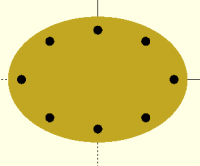
Jordan, There is no "easy" way to put holes evenly along an ellipse. That
requires ellipse arc length which is well known as a problem with no closed
form solution. Furthermore, if you want constant inset, the solution is no
longer even an ellipse. That's why I suggested the method I did: inset
an elliptical path with the BOSL2 offset function and then use path_copies
to put holes on it at uniform spacing, which "solves" the ellipse arc
length problem by using the path and directly measuring the lengths of all
the segments.
include<BOSL2/std.scad>
$fs=.1;
$fa=1;
a=10;
b=7;
path = ellipse([a,b]);
inset = offset(path, delta=-1.5);
polygon(path);
color("black")
path_copies(inset, n=8,closed=true) circle(d=1);
[image: image.png]
On Tue, Apr 28, 2026 at 9:45 PM Jordan Brown via Discuss <
discuss@lists.openscad.org> wrote:
> On 4/28/2026 6:01 PM, Jon Bondy via Discuss wrote:
>
> Yes. Exactly. I wanted to use a for() and rotate() to spread the holes
> around the circle and then scale() it to get them in the right location.
> Nice concept. Not easy to implement.
>
> Mark's trig approach seems like the best so far
>
> Note that the trig approach does not yield evenly spaced holes, except in
> some distorted-angle sense.
>
>
> I messed around for a while trying to find a for()-rotate() answer, but
> failed. It seems like there ought to be one, probably pretty ugly, but I'm
> not coming up with it.
>
>
>
> _______________________________________________
> OpenSCAD mailing list
> To unsubscribe send an email to discuss-leave@lists.openscad.org
JJ
jon jonbondy.com
Wed, Apr 29, 2026 11:08 AM
Interesting that something so apparently simple is not.
On 4/28/2026 9:45 PM, Jordan Brown wrote:
On 4/28/2026 6:01 PM, Jon Bondy via Discuss wrote:
Yes. Exactly. I wanted to use a for() and rotate() to spread the
holes around the circle and then scale() it to get them in the right
location. Nice concept. Not easy to implement.
Mark's trig approach seems like the best so far
Note that the trig approach does not yield evenly spaced holes, except
in some distorted-angle sense.
I messed around for a while trying to find a for()-rotate() answer,
but failed. It seems like there ought to be one, probably pretty
ugly, but I'm not coming up with it.
Interesting that something so apparently simple is not.
On 4/28/2026 9:45 PM, Jordan Brown wrote:
> On 4/28/2026 6:01 PM, Jon Bondy via Discuss wrote:
>>
>> Yes. Exactly. I wanted to use a for() and rotate() to spread the
>> holes around the circle and then scale() it to get them in the right
>> location. Nice concept. Not easy to implement.
>>
>> Mark's trig approach seems like the best so far
>>
> Note that the trig approach does not yield evenly spaced holes, except
> in some distorted-angle sense.
>
>
> I messed around for a while trying to find a for()-rotate() answer,
> but failed. It seems like there ought to be one, probably pretty
> ugly, but I'm not coming up with it.
>
>
>