


discuss@lists.openscad.org

OpenSCAD general discussion Mailing-list

View all threads

Ovals

RD
Revar Desmera
Tue, Sep 4, 2018 8:41 PM

On Sep 4, 2018, at 8:44 AM, jsc jsc@alum.mit.edu wrote:

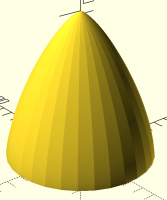
On the subject of rocket nosecones, I created an OpenSCAD model some time ago
to generate Haack series shapes:

https://www.thingiverse.com/thing:804129

These shapes are calculated to minimize drag in supersonic flows, so not
something that is functionally useful for model rockets. Still, I thought it
might be of interest.

Some work would need to be done to make it suitable for fitting to a rocket.

Of course I only see this post AFTER I wrote my own.  :)
Well, I might as well post it:

pi = 3.1415926536;

function haack(x, L, R, C) = let(
h = acos(1-(2x/L))
) (R/sqrt(pi)) * sqrt(h
pi/180 - sin(2h)/2 + Cpow(sin(h),3));

function haack_series(L, R, C, steps) = [
for(i = [0:steps]) let(x = i*L/steps) [x, haack(x, L, R, C)]
];

// L is the length of the nosecone.
// R is the radius of the nosecone base.
// C should be 0 for a Von-Kármán ogive.
// steps is the granularity of the shape along the length.
module haack_nosecone(L, R, C=0, steps=100) {
pts=concat(
haack_series(L, R, C, steps),
[[L, R], [L, 0], [0, 0]]
);
translate([0,0,L]) {
rotate_extrude(angle=360, convexity=2) {
rotate([0,0,-90]) polygon(points=pts);
}
}
}

haack_nosecone(L=80, R=50, C=0);

  • Revar
> On Sep 4, 2018, at 8:44 AM, jsc <jsc@alum.mit.edu> wrote: > > On the subject of rocket nosecones, I created an OpenSCAD model some time ago > to generate Haack series shapes: > > https://www.thingiverse.com/thing:804129 > > These shapes are calculated to minimize drag in supersonic flows, so not > something that is functionally useful for model rockets. Still, I thought it > might be of interest. > > Some work would need to be done to make it suitable for fitting to a rocket. > Of course I only see this post AFTER I wrote my own. :) Well, I might as well post it: pi = 3.1415926536; function haack(x, L, R, C) = let( h = acos(1-(2*x/L)) ) (R/sqrt(pi)) * sqrt(h*pi/180 - sin(2*h)/2 + C*pow(sin(h),3)); function haack_series(L, R, C, steps) = [ for(i = [0:steps]) let(x = i*L/steps) [x, haack(x, L, R, C)] ]; // L is the length of the nosecone. // R is the radius of the nosecone base. // C should be 0 for a Von-Kármán ogive. // steps is the granularity of the shape along the length. module haack_nosecone(L, R, C=0, steps=100) { pts=concat( haack_series(L, R, C, steps), [[L, R], [L, 0], [0, 0]] ); translate([0,0,L]) { rotate_extrude(angle=360, convexity=2) { rotate([0,0,-90]) polygon(points=pts); } } } haack_nosecone(L=80, R=50, C=0); - Revar
F
FourthDr
Wed, Sep 5, 2018 12:16 AM

RevarBat:

Thanks for the code. I'll have to tinker with it a while. I also found this
code on another discussion forum, I added the sphere and was trying to merge
it with the cone.

// rotate-extrude test
// by Oliver Fenn
$fn=64; // Bem .: 2nd power

// Shaping function x from [x0: xe], steadily increasing in [x0: xe]
x0=0.0;
xe=1.0;
// Examples:
// x, xx, xxx,
// 1-sin(acos(x)), 1-cos(90x), 1-cos(180x), sin(90x)
// log(x+1), 1-1/(x+1)
function f(x) = 1-sin(acos(x)); // ball, at half the height of the diameter!

// Two-dimensional polygon determined by f (x), x from [x0: xe]
module shape (start, end, to)
{
steps = (end-start)/to;
polygon
(
[
for(x=[start:steps:(end+steps)])
(x<=end)?[x-start, f(x)-f(start)]:[0, f(end)-f(start)]
]
);
} // shape

// cone over radius and height
module cone_r (rad, height)
{
hfact = height/(f(xe)-f(x0));
translate([34, 34, height])
mirror([0, 0, 1])
scale([rad/(xe-x0), rad/(xe-x0), hfact]) // Scale the cone to size
rotate_extrude()
shape(x0, xe, $fn);
} // cone_r

// construction
{
//added by FourthDr
translate([34,34,112.5])
sphere(3., $fn=100);
}
cone_r(16.945, 114.94);
// join cone_r and sphere

--
Sent from: http://forum.openscad.org/

RevarBat: Thanks for the code. I'll have to tinker with it a while. I also found this code on another discussion forum, I added the sphere and was trying to merge it with the cone. // rotate-extrude test // by Oliver Fenn $fn=64; // Bem .: 2nd power // Shaping function x from [x0: xe], steadily increasing in [x0: xe] x0=0.0; xe=1.0; // Examples: // x, xx, xxx, // 1-sin(acos(x)), 1-cos(90x), 1-cos(180x), sin(90x) // log(x+1), 1-1/(x+1) function f(x) = 1-sin(acos(x)); // ball, at half the height of the diameter! // Two-dimensional polygon determined by f (x), x from [x0: xe] module shape (start, end, to) { steps = (end-start)/to; polygon ( [ for(x=[start:steps:(end+steps)]) (x<=end)?[x-start, f(x)-f(start)]:[0, f(end)-f(start)] ] ); } // shape // cone over radius and height module cone_r (rad, height) { hfact = height/(f(xe)-f(x0)); translate([34, 34, height]) mirror([0, 0, 1]) scale([rad/(xe-x0), rad/(xe-x0), hfact]) // Scale the cone to size rotate_extrude() shape(x0, xe, $fn); } // cone_r // construction { //added by FourthDr translate([34,34,112.5]) sphere(3., $fn=100); } cone_r(16.945, 114.94); // join cone_r and sphere -- Sent from: http://forum.openscad.org/
F
FourthDr
Wed, Sep 5, 2018 1:02 AM

The whole reason for this exercise in the first place is because I needed to
cut the part into two to fit my printer using the pizzlecut library. I think
I can eventually get this working since it's just basically a geometric
shape problem.

But with other models, this is a huge problem. I can't just easily redesign
more complex designs/shapes. Especially, since I don't always have the
original design files just an stl file. So any time there is some problem no
matter how small with the model OpenSCAD throws a hissyfit. Sometimes I can
"fix" the model where OpenSCAD will accept it. Bust most of the time not.

Case and point, I have two models attached below that I need cut into two
parts. They both look and preview fine. My slic3r has no problems. But when
I try to cut them, OpenSCAD will not render them. And in worst case such as
with the nose cone will actually crash OpenSCAD with a C++ error.

It's too bad there is not a way to just cut with defects and all. It just
needs to be accepted by a slicer and look ok to the eye. A diagnostic tool
of some sort that could fix these problem would be great. Or that could
point out problems and give suggestions on fixing them so OpenSCAD will
accept the file.

I'm trying to get these two attached stl files split by tomorrow. I've been
tinkering with them for months. So far without success. Any one interested
in seeing if they can find and correct the two files for me? And maybe give
some tips and or suggest some software tools I have not already tried?
Cryptic CGAL errors don't really help me find and fix what OpenSCAD is
complaining about.

back-cover-no-stand-2.stl
http://forum.openscad.org/file/t1425/back-cover-no-stand-2.stl
LCD_face_plate_LCD_hole_open(repaired).stl
http://forum.openscad.org/file/t1425/_LCD_face_plate_LCD_hole_open_%28repaired%29.stl
puzzlecutlib3.scad http://forum.openscad.org/file/t1425/puzzlecutlib3.scad

Thanks for all the help.

--
Sent from: http://forum.openscad.org/

The whole reason for this exercise in the first place is because I needed to cut the part into two to fit my printer using the pizzlecut library. I think I can eventually get this working since it's just basically a geometric shape problem. But with other models, this is a huge problem. I can't just easily redesign more complex designs/shapes. Especially, since I don't always have the original design files just an stl file. So any time there is some problem no matter how small with the model OpenSCAD throws a hissyfit. Sometimes I can "fix" the model where OpenSCAD will accept it. Bust most of the time not. Case and point, I have two models attached below that I need cut into two parts. They both look and preview fine. My slic3r has no problems. But when I try to cut them, OpenSCAD will not render them. And in worst case such as with the nose cone will actually crash OpenSCAD with a C++ error. It's too bad there is not a way to just cut with defects and all. It just needs to be accepted by a slicer and look ok to the eye. A diagnostic tool of some sort that could fix these problem would be great. Or that could point out problems and give suggestions on fixing them so OpenSCAD will accept the file. I'm trying to get these two attached stl files split by tomorrow. I've been tinkering with them for months. So far without success. Any one interested in seeing if they can find and correct the two files for me? And maybe give some tips and or suggest some software tools I have not already tried? Cryptic CGAL errors don't really help me find and fix what OpenSCAD is complaining about. back-cover-no-stand-2.stl <http://forum.openscad.org/file/t1425/back-cover-no-stand-2.stl> _LCD_face_plate_LCD_hole_open_(repaired).stl <http://forum.openscad.org/file/t1425/_LCD_face_plate_LCD_hole_open_%28repaired%29.stl> puzzlecutlib3.scad <http://forum.openscad.org/file/t1425/puzzlecutlib3.scad> Thanks for all the help. -- Sent from: http://forum.openscad.org/
CM
christophe malvasio
Wed, Sep 5, 2018 6:26 AM

i suggest you to code in openscad the entire objects/parts from your
view of the stl
it will make you print faster ;)
Le mer. 5 sept. 2018 à 03:03, FourthDr who_doctor@hotmail.com a écrit :

The whole reason for this exercise in the first place is because I needed to
cut the part into two to fit my printer using the pizzlecut library. I think
I can eventually get this working since it's just basically a geometric
shape problem.

But with other models, this is a huge problem. I can't just easily redesign
more complex designs/shapes. Especially, since I don't always have the
original design files just an stl file. So any time there is some problem no
matter how small with the model OpenSCAD throws a hissyfit. Sometimes I can
"fix" the model where OpenSCAD will accept it. Bust most of the time not.

Case and point, I have two models attached below that I need cut into two
parts. They both look and preview fine. My slic3r has no problems. But when
I try to cut them, OpenSCAD will not render them. And in worst case such as
with the nose cone will actually crash OpenSCAD with a C++ error.

It's too bad there is not a way to just cut with defects and all. It just
needs to be accepted by a slicer and look ok to the eye. A diagnostic tool
of some sort that could fix these problem would be great. Or that could
point out problems and give suggestions on fixing them so OpenSCAD will
accept the file.

I'm trying to get these two attached stl files split by tomorrow. I've been
tinkering with them for months. So far without success. Any one interested
in seeing if they can find and correct the two files for me? And maybe give
some tips and or suggest some software tools I have not already tried?
Cryptic CGAL errors don't really help me find and fix what OpenSCAD is
complaining about.

back-cover-no-stand-2.stl
http://forum.openscad.org/file/t1425/back-cover-no-stand-2.stl
LCD_face_plate_LCD_hole_open(repaired).stl
http://forum.openscad.org/file/t1425/_LCD_face_plate_LCD_hole_open_%28repaired%29.stl
puzzlecutlib3.scad http://forum.openscad.org/file/t1425/puzzlecutlib3.scad

Thanks for all the help.

--
Sent from: http://forum.openscad.org/


OpenSCAD mailing list
Discuss@lists.openscad.org
http://lists.openscad.org/mailman/listinfo/discuss_lists.openscad.org

i suggest you to code in openscad the entire objects/parts from your view of the stl it will make you print faster ;) Le mer. 5 sept. 2018 à 03:03, FourthDr <who_doctor@hotmail.com> a écrit : > > The whole reason for this exercise in the first place is because I needed to > cut the part into two to fit my printer using the pizzlecut library. I think > I can eventually get this working since it's just basically a geometric > shape problem. > > But with other models, this is a huge problem. I can't just easily redesign > more complex designs/shapes. Especially, since I don't always have the > original design files just an stl file. So any time there is some problem no > matter how small with the model OpenSCAD throws a hissyfit. Sometimes I can > "fix" the model where OpenSCAD will accept it. Bust most of the time not. > > Case and point, I have two models attached below that I need cut into two > parts. They both look and preview fine. My slic3r has no problems. But when > I try to cut them, OpenSCAD will not render them. And in worst case such as > with the nose cone will actually crash OpenSCAD with a C++ error. > > It's too bad there is not a way to just cut with defects and all. It just > needs to be accepted by a slicer and look ok to the eye. A diagnostic tool > of some sort that could fix these problem would be great. Or that could > point out problems and give suggestions on fixing them so OpenSCAD will > accept the file. > > I'm trying to get these two attached stl files split by tomorrow. I've been > tinkering with them for months. So far without success. Any one interested > in seeing if they can find and correct the two files for me? And maybe give > some tips and or suggest some software tools I have not already tried? > Cryptic CGAL errors don't really help me find and fix what OpenSCAD is > complaining about. > > back-cover-no-stand-2.stl > <http://forum.openscad.org/file/t1425/back-cover-no-stand-2.stl> > _LCD_face_plate_LCD_hole_open_(repaired).stl > <http://forum.openscad.org/file/t1425/_LCD_face_plate_LCD_hole_open_%28repaired%29.stl> > puzzlecutlib3.scad <http://forum.openscad.org/file/t1425/puzzlecutlib3.scad> > > Thanks for all the help. > > > > > > -- > Sent from: http://forum.openscad.org/ > > _______________________________________________ > OpenSCAD mailing list > Discuss@lists.openscad.org > http://lists.openscad.org/mailman/listinfo/discuss_lists.openscad.org
EN
Ed Nisley
Wed, Sep 5, 2018 2:46 PM

On 09/04/2018 09:02 PM, FourthDr wrote:

They both look and preview fine.

Meshlab shows both have the usual assortment of mesh errors and are
non-manifold: hot death on a stick for further operations.

My (admittedly limited) experience with automatic mesh repair suggests
the algorithms generally make the choices I expect, but sometimes
produce weirdly shaped patches, if not completely bizarre shapes, around
the non-manifold geometry. The fact a "repaired" STL file still contains
geometry errors shows the automation doesn't always get it right.

Agreed, OpenSCAD shouldn't fall over dead when handed a broken STL file,
but AFAICT the explosion happens deep in the CGAL machinery where it's
out of anyone's control. The only defense seems to be not handing it
non-manifold models.

Which rules out many attractive STLs scattered around the Interwebs ...

--
Ed
https://softsolder.com

On 09/04/2018 09:02 PM, FourthDr wrote: > They both look and preview fine. Meshlab shows both have the usual assortment of mesh errors and are non-manifold: hot death on a stick for further operations. My (admittedly limited) experience with automatic mesh repair suggests the algorithms generally make the choices I expect, but sometimes produce weirdly shaped patches, if not completely bizarre shapes, around the non-manifold geometry. The fact a "repaired" STL file still contains geometry errors shows the automation doesn't always get it right. Agreed, OpenSCAD shouldn't fall over dead when handed a broken STL file, but AFAICT the explosion happens deep in the CGAL machinery where it's out of anyone's control. The only defense seems to be not handing it non-manifold models. Which rules out many attractive STLs scattered around the Interwebs ... -- Ed https://softsolder.com
F
FourthDr
Wed, Sep 5, 2018 2:49 PM

That's simply not possible. I don't have the ability or programming skills to
do that. I would need to have the help of some sort of automated tool to
repair any model I might need to print. Or lots of help from some one that
is highly skilled in OpenSCAD.

--
Sent from: http://forum.openscad.org/

That's simply not possible. I don't have the ability or programming skills to do that. I would need to have the help of some sort of automated tool to repair any model I might need to print. Or lots of help from some one that is highly skilled in OpenSCAD. -- Sent from: http://forum.openscad.org/
NH
nop head
Wed, Sep 5, 2018 2:51 PM

Or manifold STL files with vertices closer than the OpenSCAD grid. They
actually become non-manifold during import.

On 5 September 2018 at 15:46, Ed Nisley ed.nisley@pobox.com wrote:

On 09/04/2018 09:02 PM, FourthDr wrote:

They both look and preview fine.

Meshlab shows both have the usual assortment of mesh errors and are
non-manifold: hot death on a stick for further operations.

My (admittedly limited) experience with automatic mesh repair suggests the
algorithms generally make the choices I expect, but sometimes produce
weirdly shaped patches, if not completely bizarre shapes, around the
non-manifold geometry. The fact a "repaired" STL file still contains
geometry errors shows the automation doesn't always get it right.

Agreed, OpenSCAD shouldn't fall over dead when handed a broken STL file,
but AFAICT the explosion happens deep in the CGAL machinery where it's out
of anyone's control. The only defense seems to be not handing it
non-manifold models.

Which rules out many attractive STLs scattered around the Interwebs ...

--
Ed
https://softsolder.com


OpenSCAD mailing list
Discuss@lists.openscad.org
http://lists.openscad.org/mailman/listinfo/discuss_lists.openscad.org

Or manifold STL files with vertices closer than the OpenSCAD grid. They actually become non-manifold during import. On 5 September 2018 at 15:46, Ed Nisley <ed.nisley@pobox.com> wrote: > On 09/04/2018 09:02 PM, FourthDr wrote: > >> They both look and preview fine. >> > > Meshlab shows both have the usual assortment of mesh errors and are > non-manifold: hot death on a stick for further operations. > > My (admittedly limited) experience with automatic mesh repair suggests the > algorithms generally make the choices I expect, but sometimes produce > weirdly shaped patches, if not completely bizarre shapes, around the > non-manifold geometry. The fact a "repaired" STL file still contains > geometry errors shows the automation doesn't always get it right. > > Agreed, OpenSCAD shouldn't fall over dead when handed a broken STL file, > but AFAICT the explosion happens deep in the CGAL machinery where it's out > of anyone's control. The only defense seems to be not handing it > non-manifold models. > > Which rules out many attractive STLs scattered around the Interwebs ... > > -- > Ed > https://softsolder.com > > > _______________________________________________ > OpenSCAD mailing list > Discuss@lists.openscad.org > http://lists.openscad.org/mailman/listinfo/discuss_lists.openscad.org >
F
FourthDr
Wed, Sep 5, 2018 3:13 PM

What I don't understand is how it can preview a broken stl with no problem.
But a render, which you would think uses the same process fails.

There needs to be some kind of built-in utility that can tell you just where
in the mesh it is having a problems. It's impossible to figure out a
problem, if the cause it shrouded inside of a black box. There is basically
no visualization of problem areas. Or helpful error messages.

The only way I was able to see one of the major flaws in the nose cone was
when I imported it into Tinkercad and tried to slice the cone off the base.
It was then that by chance after separating the cone from the base that I
saw a ton of artifact triangles still connected to the cone-less base. Then
I knew there where major issues with the model. But OpenSCAD said nothing
about it other than crashing when I tried to render.

So once I know there are problems. What's the easiest way to identify and
repair them without being an export. Every time I try to manually repair an
stl it breaks another part of the model in some way.

--
Sent from: http://forum.openscad.org/

What I don't understand is how it can preview a broken stl with no problem. But a render, which you would think uses the same process fails. There needs to be some kind of built-in utility that can tell you just where in the mesh it is having a problems. It's impossible to figure out a problem, if the cause it shrouded inside of a black box. There is basically no visualization of problem areas. Or helpful error messages. The only way I was able to see one of the major flaws in the nose cone was when I imported it into Tinkercad and tried to slice the cone off the base. It was then that by chance after separating the cone from the base that I saw a ton of artifact triangles still connected to the cone-less base. Then I knew there where major issues with the model. But OpenSCAD said nothing about it other than crashing when I tried to render. So once I know there are problems. What's the easiest way to identify and repair them without being an export. Every time I try to manually repair an stl it breaks another part of the model in some way. -- Sent from: http://forum.openscad.org/
F
FourthDr
Wed, Sep 5, 2018 3:28 PM

NopHead:

You've mentioned OpenSCAD's grid a few times before. But is that actually
documented anywhere? For example, if the designer of a model was made aware
that any export to stl needed to have triangles of a specific maximum size
there would be one less problem to deal with.

That is exactly what's needed, guide lines. Any shared stl should have the
following traits. Right now you have no idea what program the stl was
originally exported from or what settings where used.

If some one could document exact minimum traits an stl file needs to be
successfully imported, manipulated, and then exported from OpenSCAD that
would be very helpful.

--
Sent from: http://forum.openscad.org/

NopHead: You've mentioned OpenSCAD's grid a few times before. But is that actually documented anywhere? For example, if the designer of a model was made aware that any export to stl needed to have triangles of a specific maximum size there would be one less problem to deal with. That is exactly what's needed, guide lines. Any shared stl should have the following traits. Right now you have no idea what program the stl was originally exported from or what settings where used. If some one could document exact minimum traits an stl file needs to be successfully imported, manipulated, and then exported from OpenSCAD that would be very helpful. -- Sent from: http://forum.openscad.org/
NH
nop head
Wed, Sep 5, 2018 3:47 PM

But a render, which you would think uses the same process fails.

No preview is a totally different process to render. Preview just draws all
the triangles in the correct order to show a pixel representation of the
object. render calculates the geometry if there are any CSG ops (including
the implict union) and then draws that. It uses the GCAL library and that
expects it to be 2-manifold, without degenerate triangles.

The grid is defined here:
https://github.com/openscad/openscad/blob/c6a485651fa29f1a878ea454558192492f7467ec/src/grid.h#L14

I have never had much success with other people's STLs for 3D printing.
Even if they are manifold they are often not correct for 3D printing on my
machines. I mostly design everything I print from scratch in OpenSCAD.

On 5 September 2018 at 16:28, FourthDr who_doctor@hotmail.com wrote:

NopHead:

You've mentioned OpenSCAD's grid a few times before. But is that actually
documented anywhere? For example, if the designer of a model was made aware
that any export to stl needed to have triangles of a specific maximum size
there would be one less problem to deal with.

That is exactly what's needed, guide lines. Any shared stl should have the
following traits. Right now you have no idea what program the stl was
originally exported from or what settings where used.

If some one could document exact minimum traits an stl file needs to be
successfully imported, manipulated, and then exported from OpenSCAD that
would be very helpful.

--
Sent from: http://forum.openscad.org/


OpenSCAD mailing list
Discuss@lists.openscad.org
http://lists.openscad.org/mailman/listinfo/discuss_lists.openscad.org

>But a render, which you would think uses the same process fails. No preview is a totally different process to render. Preview just draws all the triangles in the correct order to show a pixel representation of the object. render calculates the geometry if there are any CSG ops (including the implict union) and then draws that. It uses the GCAL library and that expects it to be 2-manifold, without degenerate triangles. The grid is defined here: https://github.com/openscad/openscad/blob/c6a485651fa29f1a878ea454558192492f7467ec/src/grid.h#L14 I have never had much success with other people's STLs for 3D printing. Even if they are manifold they are often not correct for 3D printing on my machines. I mostly design everything I print from scratch in OpenSCAD. On 5 September 2018 at 16:28, FourthDr <who_doctor@hotmail.com> wrote: > NopHead: > > You've mentioned OpenSCAD's grid a few times before. But is that actually > documented anywhere? For example, if the designer of a model was made aware > that any export to stl needed to have triangles of a specific maximum size > there would be one less problem to deal with. > > That is exactly what's needed, guide lines. Any shared stl should have the > following traits. Right now you have no idea what program the stl was > originally exported from or what settings where used. > > If some one could document exact minimum traits an stl file needs to be > successfully imported, manipulated, and then exported from OpenSCAD that > would be very helpful. > > > > -- > Sent from: http://forum.openscad.org/ > > _______________________________________________ > OpenSCAD mailing list > Discuss@lists.openscad.org > http://lists.openscad.org/mailman/listinfo/discuss_lists.openscad.org >