KT
Kevin Toppenberg
Tue, Feb 12, 2019 12:25 PM
Hey all,
I have recently been working on a project where I created an object with
OpenSCAD and then printed it out with my 3D printer. But my ultimate goal
was to use traditional metal machining techniques (i.e. milling machine and
lathe) to create a metal version of the part.
I then realized OpenSCAD's shortcoming in creating paper plans that I could
use when machining. There are no visible dimensions of key points. And
using the scale on the axes is not precise enough. What I ended up doing
was to echo all the information I needed to the console log, and then
printing out a screen capture of the display and manually drawing the
coordinates by hand. It seems so me that the computer should be able to
help me do this. Perhaps I am trying to make the application do something
it is not designed for, but to me it does seem in the scope of the
program. And maybe this has already been solved. If so, please let me
know.
Here is my idea. I would like to change OpenSCAD such that there is a way
to add a display label. Perhaps like this:
DisplayLabel([x,y,z],"My Text", <color>, <
font>, <size>);
This would not put anything into the 3D object (and thus would not be
output when exporting an .STL file), but would just be visible on the
screen. The text would always face the camera. I have seen some
libraries that insert text rendered in 3D shapes (though I can't remember
where). But that 3D text object is actually part of the design, and
flipping the view around to the back would show the backside of the text.
To me is seems less professional to do things that way.
Another helpful tool would be:
DisplayLine(Points = [v1,v2,v3], <color>, <thickness>);
This would just draw a line on the display screen -- not added to the 3D
object. This would allow, for example, one to draw a line between a key
point on the design and the Display label above.
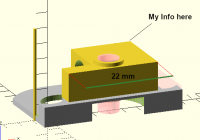
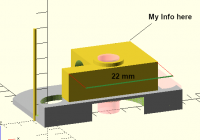
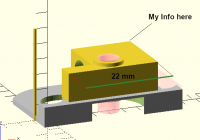
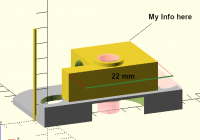
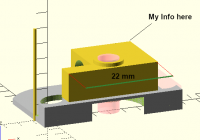
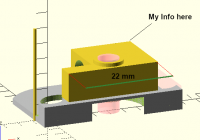
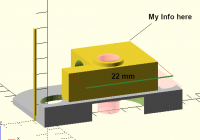
An example of how I would use this is as below, made by altering a screen
shot.
[image: Screen Shot 2019-02-12 at 7.09.16 AM.png]
The downside of this approach is that the designer has to manually set up
everything they want output on the design display. But it seems much
easier (from an OpenSCAD programming change approach) than trying to figure
out how to have the program output schematics like Fusion 360 does.
I know that the usual way to go about this, in an open source situation,
would be to make the change myself. I don't have the bandwidth, however,
to learn out how to make the changes myself. So I would have to depend on
others.
Has this problem already been solved?
Would there be any support for such a change? Does anyone else think it
would be helpful?
Thanks in advance,
K. Toppenberg
Hey all,
I have recently been working on a project where I created an object with
OpenSCAD and then printed it out with my 3D printer. But my ultimate goal
was to use traditional metal machining techniques (i.e. milling machine and
lathe) to create a metal version of the part.
I then realized OpenSCAD's shortcoming in creating paper plans that I could
use when machining. There are no visible dimensions of key points. And
using the scale on the axes is not precise enough. What I ended up doing
was to echo all the information I needed to the console log, and then
printing out a screen capture of the display and manually drawing the
coordinates by hand. It seems so me that the computer should be able to
help me do this. Perhaps I am trying to make the application do something
it is not designed for, but to me it does seem in the scope of the
program. And maybe this has already been solved. If so, please let me
know.
Here is my idea. I would like to change OpenSCAD such that there is a way
to add a display label. Perhaps like this:
DisplayLabel([x,y,z],"My Text", <color>, <
font>, <size>);
This would not put anything into the 3D object (and thus would not be
output when exporting an .STL file), but would just be visible on the
screen. The text would always face the camera. I have seen some
libraries that insert text rendered in 3D shapes (though I can't remember
where). But that 3D text object is actually part of the design, and
flipping the view around to the back would show the backside of the text.
To me is seems less professional to do things that way.
Another helpful tool would be:
DisplayLine(Points = [v1,v2,v3], <color>, <thickness>);
This would just draw a line on the display screen -- not added to the 3D
object. This would allow, for example, one to draw a line between a key
point on the design and the Display label above.
An example of how I would use this is as below, made by altering a screen
shot.
[image: Screen Shot 2019-02-12 at 7.09.16 AM.png]
The downside of this approach is that the designer has to manually set up
everything they want output on the design display. But it seems much
easier (from an OpenSCAD programming change approach) than trying to figure
out how to have the program output schematics like Fusion 360 does.
I know that the usual way to go about this, in an open source situation,
would be to make the change myself. I don't have the bandwidth, however,
to learn out how to make the changes myself. So I would have to depend on
others.
Has this problem already been solved?
Would there be any support for such a change? Does anyone else think it
would be helpful?
Thanks in advance,
K. Toppenberg

NH
nop head
Tue, Feb 12, 2019 1:17 PM
You can add things to the display without them being part of the object
with the % operator.
You can make things always face the camera using $vpr and fix the size with
$vpd.
So I think you can do what you want in user space, without any mods to
OpenSCAD.
Another way is to export an STL and measure it with NetFabb studio.
I haven't done it myself because my lathe and mill are CNC.
On Tue, 12 Feb 2019 at 12:26, Kevin Toppenberg kdtop3@gmail.com wrote:
Hey all,
I have recently been working on a project where I created an object with
OpenSCAD and then printed it out with my 3D printer. But my ultimate goal
was to use traditional metal machining techniques (i.e. milling machine and
lathe) to create a metal version of the part.
I then realized OpenSCAD's shortcoming in creating paper plans that I
could use when machining. There are no visible dimensions of key points.
And using the scale on the axes is not precise enough. What I ended up
doing was to echo all the information I needed to the console log, and then
printing out a screen capture of the display and manually drawing the
coordinates by hand. It seems so me that the computer should be able to
help me do this. Perhaps I am trying to make the application do something
it is not designed for, but to me it does seem in the scope of the
program. And maybe this has already been solved. If so, please let me
know.
Here is my idea. I would like to change OpenSCAD such that there is a way
to add a display label. Perhaps like this:
DisplayLabel([x,y,z],"My Text", <color>, <
font>, <size>);
This would not put anything into the 3D object (and thus would not be
output when exporting an .STL file), but would just be visible on the
screen. The text would always face the camera. I have seen some
libraries that insert text rendered in 3D shapes (though I can't remember
where). But that 3D text object is actually part of the design, and
flipping the view around to the back would show the backside of the text.
To me is seems less professional to do things that way.
Another helpful tool would be:
DisplayLine(Points = [v1,v2,v3], <color>, <thickness>);
This would just draw a line on the display screen -- not added to the 3D
object. This would allow, for example, one to draw a line between a key
point on the design and the Display label above.
An example of how I would use this is as below, made by altering a screen
shot.
[image: Screen Shot 2019-02-12 at 7.09.16 AM.png]
The downside of this approach is that the designer has to manually set up
everything they want output on the design display. But it seems much
easier (from an OpenSCAD programming change approach) than trying to figure
out how to have the program output schematics like Fusion 360 does.
I know that the usual way to go about this, in an open source situation,
would be to make the change myself. I don't have the bandwidth, however,
to learn out how to make the changes myself. So I would have to depend on
others.
Has this problem already been solved?
Would there be any support for such a change? Does anyone else think it
would be helpful?
Thanks in advance,
K. Toppenberg
OpenSCAD mailing list
Discuss@lists.openscad.org
http://lists.openscad.org/mailman/listinfo/discuss_lists.openscad.org
You can add things to the display without them being part of the object
with the % operator.
You can make things always face the camera using $vpr and fix the size with
$vpd.
So I think you can do what you want in user space, without any mods to
OpenSCAD.
Another way is to export an STL and measure it with NetFabb studio.
I haven't done it myself because my lathe and mill are CNC.
On Tue, 12 Feb 2019 at 12:26, Kevin Toppenberg <kdtop3@gmail.com> wrote:
> Hey all,
>
> I have recently been working on a project where I created an object with
> OpenSCAD and then printed it out with my 3D printer. But my ultimate goal
> was to use traditional metal machining techniques (i.e. milling machine and
> lathe) to create a metal version of the part.
>
> I then realized OpenSCAD's shortcoming in creating paper plans that I
> could use when machining. There are no visible dimensions of key points.
> And using the scale on the axes is not precise enough. What I ended up
> doing was to echo all the information I needed to the console log, and then
> printing out a screen capture of the display and manually drawing the
> coordinates by hand. It seems so me that the computer should be able to
> help me do this. Perhaps I am trying to make the application do something
> it is not designed for, but to me it does seem in the scope of the
> program. And maybe this has already been solved. If so, please let me
> know.
>
> Here is my idea. I would like to change OpenSCAD such that there is a way
> to add a display label. Perhaps like this:
>
> DisplayLabel([x,y,z],"My Text", <color>, <
> font>, <size>);
>
> This would not put anything into the 3D object (and thus would not be
> output when exporting an .STL file), but would just be visible on the
> screen. The text would always face the camera. I have seen some
> libraries that insert text rendered in 3D shapes (though I can't remember
> where). But that 3D text object is actually part of the design, and
> flipping the view around to the back would show the backside of the text.
> To me is seems less professional to do things that way.
>
> Another helpful tool would be:
>
> DisplayLine(Points = [v1,v2,v3], <color>, <thickness>);
>
> This would just draw a line on the display screen -- not added to the 3D
> object. This would allow, for example, one to draw a line between a key
> point on the design and the Display label above.
>
> An example of how I would use this is as below, made by altering a screen
> shot.
>
> [image: Screen Shot 2019-02-12 at 7.09.16 AM.png]
>
> The downside of this approach is that the designer has to manually set up
> everything they want output on the design display. But it seems much
> easier (from an OpenSCAD programming change approach) than trying to figure
> out how to have the program output schematics like Fusion 360 does.
>
> I know that the usual way to go about this, in an open source situation,
> would be to make the change myself. I don't have the bandwidth, however,
> to learn out how to make the changes myself. So I would have to depend on
> others.
>
> Has this problem already been solved?
> Would there be any support for such a change? Does anyone else think it
> would be helpful?
>
> Thanks in advance,
>
> K. Toppenberg
>
>
>
>
> _______________________________________________
> OpenSCAD mailing list
> Discuss@lists.openscad.org
> http://lists.openscad.org/mailman/listinfo/discuss_lists.openscad.org
>

WA
William Adams
Tue, Feb 12, 2019 1:53 PM
Neat!
FWIW, I've been working on a system where I preserve the critical
dimensions of a piece (in the JSON file generated by the OpenSCAD
customizer), then create a PDF drawing using LuaLaTeX/METAPOST, and am
working on a similar technique which instead uses TPL (Tool Path Language,
see tplang.org)
Alternately, you could just export an STL and use a traditional 3D CAM tool
such as pyCAM (my current project has geometry which I can't find a
traditional tool to do G-Code for reasonably).
William
On Tue, Feb 12, 2019 at 8:18 AM nop head nop.head@gmail.com wrote:
You can add things to the display without them being part of the object
with the % operator.
You can make things always face the camera using $vpr and fix the size
with $vpd.
So I think you can do what you want in user space, without any mods to
OpenSCAD.
Another way is to export an STL and measure it with NetFabb studio.
I haven't done it myself because my lathe and mill are CNC.
On Tue, 12 Feb 2019 at 12:26, Kevin Toppenberg kdtop3@gmail.com wrote:
Hey all,
I have recently been working on a project where I created an object with
OpenSCAD and then printed it out with my 3D printer. But my ultimate goal
was to use traditional metal machining techniques (i.e. milling machine and
lathe) to create a metal version of the part.
I then realized OpenSCAD's shortcoming in creating paper plans that I
could use when machining. There are no visible dimensions of key points.
And using the scale on the axes is not precise enough. What I ended up
doing was to echo all the information I needed to the console log, and then
printing out a screen capture of the display and manually drawing the
coordinates by hand. It seems so me that the computer should be able to
help me do this. Perhaps I am trying to make the application do something
it is not designed for, but to me it does seem in the scope of the
program. And maybe this has already been solved. If so, please let me
know.
Here is my idea. I would like to change OpenSCAD such that there is a
way to add a display label. Perhaps like this:
DisplayLabel([x,y,z],"My Text", <color>, <
font>, <size>);
This would not put anything into the 3D object (and thus would not be
output when exporting an .STL file), but would just be visible on the
screen. The text would always face the camera. I have seen some
libraries that insert text rendered in 3D shapes (though I can't remember
where). But that 3D text object is actually part of the design, and
flipping the view around to the back would show the backside of the text.
To me is seems less professional to do things that way.
Another helpful tool would be:
DisplayLine(Points = [v1,v2,v3], <color>, <thickness>);
This would just draw a line on the display screen -- not added to the 3D
object. This would allow, for example, one to draw a line between a key
point on the design and the Display label above.
An example of how I would use this is as below, made by altering a screen
shot.
[image: Screen Shot 2019-02-12 at 7.09.16 AM.png]
The downside of this approach is that the designer has to manually set up
everything they want output on the design display. But it seems much
easier (from an OpenSCAD programming change approach) than trying to figure
out how to have the program output schematics like Fusion 360 does.
I know that the usual way to go about this, in an open source situation,
would be to make the change myself. I don't have the bandwidth, however,
to learn out how to make the changes myself. So I would have to depend on
others.
Has this problem already been solved?
Would there be any support for such a change? Does anyone else think it
would be helpful?
Thanks in advance,
K. Toppenberg
OpenSCAD mailing list
Discuss@lists.openscad.org
http://lists.openscad.org/mailman/listinfo/discuss_lists.openscad.org
Neat!
FWIW, I've been working on a system where I preserve the critical
dimensions of a piece (in the JSON file generated by the OpenSCAD
customizer), then create a PDF drawing using LuaLaTeX/METAPOST, and am
working on a similar technique which instead uses TPL (Tool Path Language,
see tplang.org)
Alternately, you could just export an STL and use a traditional 3D CAM tool
such as pyCAM (my current project has geometry which I can't find a
traditional tool to do G-Code for reasonably).
William
On Tue, Feb 12, 2019 at 8:18 AM nop head <nop.head@gmail.com> wrote:
> You can add things to the display without them being part of the object
> with the % operator.
>
> You can make things always face the camera using $vpr and fix the size
> with $vpd.
>
> So I think you can do what you want in user space, without any mods to
> OpenSCAD.
>
> Another way is to export an STL and measure it with NetFabb studio.
>
> I haven't done it myself because my lathe and mill are CNC.
>
> On Tue, 12 Feb 2019 at 12:26, Kevin Toppenberg <kdtop3@gmail.com> wrote:
>
>> Hey all,
>>
>> I have recently been working on a project where I created an object with
>> OpenSCAD and then printed it out with my 3D printer. But my ultimate goal
>> was to use traditional metal machining techniques (i.e. milling machine and
>> lathe) to create a metal version of the part.
>>
>> I then realized OpenSCAD's shortcoming in creating paper plans that I
>> could use when machining. There are no visible dimensions of key points.
>> And using the scale on the axes is not precise enough. What I ended up
>> doing was to echo all the information I needed to the console log, and then
>> printing out a screen capture of the display and manually drawing the
>> coordinates by hand. It seems so me that the computer should be able to
>> help me do this. Perhaps I am trying to make the application do something
>> it is not designed for, but to me it does seem in the scope of the
>> program. And maybe this has already been solved. If so, please let me
>> know.
>>
>> Here is my idea. I would like to change OpenSCAD such that there is a
>> way to add a display label. Perhaps like this:
>>
>> DisplayLabel([x,y,z],"My Text", <color>, <
>> font>, <size>);
>>
>> This would not put anything into the 3D object (and thus would not be
>> output when exporting an .STL file), but would just be visible on the
>> screen. The text would always face the camera. I have seen some
>> libraries that insert text rendered in 3D shapes (though I can't remember
>> where). But that 3D text object is actually part of the design, and
>> flipping the view around to the back would show the backside of the text.
>> To me is seems less professional to do things that way.
>>
>> Another helpful tool would be:
>>
>> DisplayLine(Points = [v1,v2,v3], <color>, <thickness>);
>>
>> This would just draw a line on the display screen -- not added to the 3D
>> object. This would allow, for example, one to draw a line between a key
>> point on the design and the Display label above.
>>
>> An example of how I would use this is as below, made by altering a screen
>> shot.
>>
>> [image: Screen Shot 2019-02-12 at 7.09.16 AM.png]
>>
>> The downside of this approach is that the designer has to manually set up
>> everything they want output on the design display. But it seems much
>> easier (from an OpenSCAD programming change approach) than trying to figure
>> out how to have the program output schematics like Fusion 360 does.
>>
>> I know that the usual way to go about this, in an open source situation,
>> would be to make the change myself. I don't have the bandwidth, however,
>> to learn out how to make the changes myself. So I would have to depend on
>> others.
>>
>> Has this problem already been solved?
>> Would there be any support for such a change? Does anyone else think it
>> would be helpful?
>>
>> Thanks in advance,
>>
>> K. Toppenberg
>>
>>
>>
>>
>> _______________________________________________
>> OpenSCAD mailing list
>> Discuss@lists.openscad.org
>> http://lists.openscad.org/mailman/listinfo/discuss_lists.openscad.org
>>
> _______________________________________________
> OpenSCAD mailing list
> Discuss@lists.openscad.org
> http://lists.openscad.org/mailman/listinfo/discuss_lists.openscad.org
>

HL
Hans L
Tue, Feb 12, 2019 4:49 PM
Neat!
FWIW, I've been working on a system where I preserve the critical
dimensions of a piece (in the JSON file generated by the OpenSCAD
customizer), then create a PDF drawing using LuaLaTeX/METAPOST, and am
working on a similar technique which instead uses TPL (Tool Path Language,
see tplang.org)
Alternately, you could just export an STL and use a traditional 3D CAM
tool such as pyCAM (my current project has geometry which I can't find a
traditional tool to do G-Code for reasonably).
William
On Tue, Feb 12, 2019 at 8:18 AM nop head nop.head@gmail.com wrote:
You can add things to the display without them being part of the object
with the % operator.
You can make things always face the camera using $vpr and fix the size
with $vpd.
So I think you can do what you want in user space, without any mods to
OpenSCAD.
Another way is to export an STL and measure it with NetFabb studio.
I haven't done it myself because my lathe and mill are CNC.
On Tue, 12 Feb 2019 at 12:26, Kevin Toppenberg kdtop3@gmail.com wrote:
Hey all,
I have recently been working on a project where I created an object with
OpenSCAD and then printed it out with my 3D printer. But my ultimate goal
was to use traditional metal machining techniques (i.e. milling machine and
lathe) to create a metal version of the part.
I then realized OpenSCAD's shortcoming in creating paper plans that I
could use when machining. There are no visible dimensions of key points.
And using the scale on the axes is not precise enough. What I ended up
doing was to echo all the information I needed to the console log, and then
printing out a screen capture of the display and manually drawing the
coordinates by hand. It seems so me that the computer should be able to
help me do this. Perhaps I am trying to make the application do something
it is not designed for, but to me it does seem in the scope of the
program. And maybe this has already been solved. If so, please let me
know.
Here is my idea. I would like to change OpenSCAD such that there is a
way to add a display label. Perhaps like this:
DisplayLabel([x,y,z],"My Text", <color>, <
font>, <size>);
This would not put anything into the 3D object (and thus would not be
output when exporting an .STL file), but would just be visible on the
screen. The text would always face the camera. I have seen some
libraries that insert text rendered in 3D shapes (though I can't remember
where). But that 3D text object is actually part of the design, and
flipping the view around to the back would show the backside of the text.
To me is seems less professional to do things that way.
Another helpful tool would be:
DisplayLine(Points = [v1,v2,v3], <color>, <thickness>);
This would just draw a line on the display screen -- not added to the 3D
object. This would allow, for example, one to draw a line between a key
point on the design and the Display label above.
An example of how I would use this is as below, made by altering a
screen shot.
[image: Screen Shot 2019-02-12 at 7.09.16 AM.png]
The downside of this approach is that the designer has to manually set
up everything they want output on the design display. But it seems much
easier (from an OpenSCAD programming change approach) than trying to figure
out how to have the program output schematics like Fusion 360 does.
I know that the usual way to go about this, in an open source situation,
would be to make the change myself. I don't have the bandwidth, however,
to learn out how to make the changes myself. So I would have to depend on
others.
Has this problem already been solved?
Would there be any support for such a change? Does anyone else think it
would be helpful?
Thanks in advance,
K. Toppenberg
OpenSCAD mailing list
Discuss@lists.openscad.org
http://lists.openscad.org/mailman/listinfo/discuss_lists.openscad.org
I created a similar thread a few years ago with my own solution, and was
quickly shown that there were many other solutions already at that time:
http://forum.openscad.org/Dimension-Parameter-labeling-for-part-diagrams-td15172.html
Also note that in more recent dev snapshots (or upcoming release), you can
use "if($preview)" when you want to selectively display this sort of info
in F5 preview mode, and not during F6 rendering.
On Tue, Feb 12, 2019 at 7:54 AM William Adams <will.adams@frycomm.com>
wrote:
> Neat!
>
> FWIW, I've been working on a system where I preserve the critical
> dimensions of a piece (in the JSON file generated by the OpenSCAD
> customizer), then create a PDF drawing using LuaLaTeX/METAPOST, and am
> working on a similar technique which instead uses TPL (Tool Path Language,
> see tplang.org)
>
> Alternately, you could just export an STL and use a traditional 3D CAM
> tool such as pyCAM (my current project has geometry which I can't find a
> traditional tool to do G-Code for reasonably).
>
> William
>
>
> On Tue, Feb 12, 2019 at 8:18 AM nop head <nop.head@gmail.com> wrote:
>
>> You can add things to the display without them being part of the object
>> with the % operator.
>>
>> You can make things always face the camera using $vpr and fix the size
>> with $vpd.
>>
>> So I think you can do what you want in user space, without any mods to
>> OpenSCAD.
>>
>> Another way is to export an STL and measure it with NetFabb studio.
>>
>> I haven't done it myself because my lathe and mill are CNC.
>>
>> On Tue, 12 Feb 2019 at 12:26, Kevin Toppenberg <kdtop3@gmail.com> wrote:
>>
>>> Hey all,
>>>
>>> I have recently been working on a project where I created an object with
>>> OpenSCAD and then printed it out with my 3D printer. But my ultimate goal
>>> was to use traditional metal machining techniques (i.e. milling machine and
>>> lathe) to create a metal version of the part.
>>>
>>> I then realized OpenSCAD's shortcoming in creating paper plans that I
>>> could use when machining. There are no visible dimensions of key points.
>>> And using the scale on the axes is not precise enough. What I ended up
>>> doing was to echo all the information I needed to the console log, and then
>>> printing out a screen capture of the display and manually drawing the
>>> coordinates by hand. It seems so me that the computer should be able to
>>> help me do this. Perhaps I am trying to make the application do something
>>> it is not designed for, but to me it does seem in the scope of the
>>> program. And maybe this has already been solved. If so, please let me
>>> know.
>>>
>>> Here is my idea. I would like to change OpenSCAD such that there is a
>>> way to add a display label. Perhaps like this:
>>>
>>> DisplayLabel([x,y,z],"My Text", <color>, <
>>> font>, <size>);
>>>
>>> This would not put anything into the 3D object (and thus would not be
>>> output when exporting an .STL file), but would just be visible on the
>>> screen. The text would always face the camera. I have seen some
>>> libraries that insert text rendered in 3D shapes (though I can't remember
>>> where). But that 3D text object is actually part of the design, and
>>> flipping the view around to the back would show the backside of the text.
>>> To me is seems less professional to do things that way.
>>>
>>> Another helpful tool would be:
>>>
>>> DisplayLine(Points = [v1,v2,v3], <color>, <thickness>);
>>>
>>> This would just draw a line on the display screen -- not added to the 3D
>>> object. This would allow, for example, one to draw a line between a key
>>> point on the design and the Display label above.
>>>
>>> An example of how I would use this is as below, made by altering a
>>> screen shot.
>>>
>>> [image: Screen Shot 2019-02-12 at 7.09.16 AM.png]
>>>
>>> The downside of this approach is that the designer has to manually set
>>> up everything they want output on the design display. But it seems much
>>> easier (from an OpenSCAD programming change approach) than trying to figure
>>> out how to have the program output schematics like Fusion 360 does.
>>>
>>> I know that the usual way to go about this, in an open source situation,
>>> would be to make the change myself. I don't have the bandwidth, however,
>>> to learn out how to make the changes myself. So I would have to depend on
>>> others.
>>>
>>> Has this problem already been solved?
>>> Would there be any support for such a change? Does anyone else think it
>>> would be helpful?
>>>
>>> Thanks in advance,
>>>
>>> K. Toppenberg
>>>
>>>
>>>
>>>
>>> _______________________________________________
>>> OpenSCAD mailing list
>>> Discuss@lists.openscad.org
>>> http://lists.openscad.org/mailman/listinfo/discuss_lists.openscad.org
>>>
>> _______________________________________________
>> OpenSCAD mailing list
>> Discuss@lists.openscad.org
>> http://lists.openscad.org/mailman/listinfo/discuss_lists.openscad.org
>>
> _______________________________________________
> OpenSCAD mailing list
> Discuss@lists.openscad.org
> http://lists.openscad.org/mailman/listinfo/discuss_lists.openscad.org
>
KT
Kevin Toppenberg
Tue, Feb 12, 2019 5:17 PM
Thanks for the reply. See below
Kevin T
On Tue, Feb 12, 2019 at 8:18 AM nop head nop.head@gmail.com wrote:
You can add things to the display without them being part of the object
with the % operator.
I am used to thinking of the % operator as a debugging tool, to turn
objects transparent. I see that with F6 render, they are not included.
It seems that having machine measurements rendered in semi-transparency
would be odd. Is there functionality that I am not aware of?
You can make things always face the camera using $vpr and fix the size
with $vpd.
So I think you can do what you want in user space, without any mods to
OpenSCAD.
Another way is to export an STL and measure it with NetFabb studio.
I haven't done it myself because my lathe and mill are CNC.
Yeah, CNC is so much nicer. I'm going to buy a good one right after I win
the lottery. :-)
Hey all,
I have recently been working on a project where I created an object with
OpenSCAD and then printed it out with my 3D printer. But my ultimate goal
was to use traditional metal machining techniques (i.e. milling machine and
lathe) to create a metal version of the part.
I then realized OpenSCAD's shortcoming in creating paper plans that I
could use when machining. There are no visible dimensions of key points.
And using the scale on the axes is not precise enough. What I ended up
doing was to echo all the information I needed to the console log, and then
printing out a screen capture of the display and manually drawing the
coordinates by hand. It seems so me that the computer should be able to
help me do this. Perhaps I am trying to make the application do something
it is not designed for, but to me it does seem in the scope of the
program. And maybe this has already been solved. If so, please let me
know.
Here is my idea. I would like to change OpenSCAD such that there is a
way to add a display label. Perhaps like this:
DisplayLabel([x,y,z],"My Text", <color>, <
font>, <size>);
This would not put anything into the 3D object (and thus would not be
output when exporting an .STL file), but would just be visible on the
screen. The text would always face the camera. I have seen some
libraries that insert text rendered in 3D shapes (though I can't remember
where). But that 3D text object is actually part of the design, and
flipping the view around to the back would show the backside of the text.
To me is seems less professional to do things that way.
Another helpful tool would be:
DisplayLine(Points = [v1,v2,v3], <color>, <thickness>);
This would just draw a line on the display screen -- not added to the 3D
object. This would allow, for example, one to draw a line between a key
point on the design and the Display label above.
An example of how I would use this is as below, made by altering a screen
shot.
[image: Screen Shot 2019-02-12 at 7.09.16 AM.png]
The downside of this approach is that the designer has to manually set up
everything they want output on the design display. But it seems much
easier (from an OpenSCAD programming change approach) than trying to figure
out how to have the program output schematics like Fusion 360 does.
I know that the usual way to go about this, in an open source situation,
would be to make the change myself. I don't have the bandwidth, however,
to learn out how to make the changes myself. So I would have to depend on
others.
Has this problem already been solved?
Would there be any support for such a change? Does anyone else think it
would be helpful?
Thanks in advance,
K. Toppenberg
OpenSCAD mailing list
Discuss@lists.openscad.org
http://lists.openscad.org/mailman/listinfo/discuss_lists.openscad.org
Thanks for the reply. See below
Kevin T
On Tue, Feb 12, 2019 at 8:18 AM nop head <nop.head@gmail.com> wrote:
> You can add things to the display without them being part of the object
> with the % operator.
>
I am used to thinking of the % operator as a debugging tool, to turn
objects transparent. I see that with F6 render, they are not included.
It seems that having machine measurements rendered in semi-transparency
would be odd. Is there functionality that I am not aware of?
> You can make things always face the camera using $vpr and fix the size
> with $vpd.
>
This is very cool. I was not aware of this. I found documentation about
it here:
https://en.wikibooks.org/wiki/OpenSCAD_User_Manual/Other_Language_Features#$vpr,_$vpt_and_$vpd
I found that rotate($vpr) cube([10,20,30]); causes the top surface to
always point towards the camera after render.
> So I think you can do what you want in user space, without any mods to
> OpenSCAD.
>
It seems you are right.
>
> Another way is to export an STL and measure it with NetFabb studio.
>
I wasn't familiar with this. I found this older video describing that
NetFabb basic was now difficult to get:
https://www.youtube.com/watch?v=2QRvS9xdNzw
> I haven't done it myself because my lathe and mill are CNC.
>
Yeah, CNC is so much nicer. I'm going to buy a good one right after I win
the lottery. :-)
>
> On Tue, 12 Feb 2019 at 12:26, Kevin Toppenberg <kdtop3@gmail.com> wrote:
>
>> Hey all,
>>
>> I have recently been working on a project where I created an object with
>> OpenSCAD and then printed it out with my 3D printer. But my ultimate goal
>> was to use traditional metal machining techniques (i.e. milling machine and
>> lathe) to create a metal version of the part.
>>
>> I then realized OpenSCAD's shortcoming in creating paper plans that I
>> could use when machining. There are no visible dimensions of key points.
>> And using the scale on the axes is not precise enough. What I ended up
>> doing was to echo all the information I needed to the console log, and then
>> printing out a screen capture of the display and manually drawing the
>> coordinates by hand. It seems so me that the computer should be able to
>> help me do this. Perhaps I am trying to make the application do something
>> it is not designed for, but to me it does seem in the scope of the
>> program. And maybe this has already been solved. If so, please let me
>> know.
>>
>> Here is my idea. I would like to change OpenSCAD such that there is a
>> way to add a display label. Perhaps like this:
>>
>> DisplayLabel([x,y,z],"My Text", <color>, <
>> font>, <size>);
>>
>> This would not put anything into the 3D object (and thus would not be
>> output when exporting an .STL file), but would just be visible on the
>> screen. The text would always face the camera. I have seen some
>> libraries that insert text rendered in 3D shapes (though I can't remember
>> where). But that 3D text object is actually part of the design, and
>> flipping the view around to the back would show the backside of the text.
>> To me is seems less professional to do things that way.
>>
>> Another helpful tool would be:
>>
>> DisplayLine(Points = [v1,v2,v3], <color>, <thickness>);
>>
>> This would just draw a line on the display screen -- not added to the 3D
>> object. This would allow, for example, one to draw a line between a key
>> point on the design and the Display label above.
>>
>> An example of how I would use this is as below, made by altering a screen
>> shot.
>>
>> [image: Screen Shot 2019-02-12 at 7.09.16 AM.png]
>>
>> The downside of this approach is that the designer has to manually set up
>> everything they want output on the design display. But it seems much
>> easier (from an OpenSCAD programming change approach) than trying to figure
>> out how to have the program output schematics like Fusion 360 does.
>>
>> I know that the usual way to go about this, in an open source situation,
>> would be to make the change myself. I don't have the bandwidth, however,
>> to learn out how to make the changes myself. So I would have to depend on
>> others.
>>
>> Has this problem already been solved?
>> Would there be any support for such a change? Does anyone else think it
>> would be helpful?
>>
>> Thanks in advance,
>>
>> K. Toppenberg
>>
>>
>>
>>
>> _______________________________________________
>> OpenSCAD mailing list
>> Discuss@lists.openscad.org
>> http://lists.openscad.org/mailman/listinfo/discuss_lists.openscad.org
>>
> _______________________________________________
> OpenSCAD mailing list
> Discuss@lists.openscad.org
> http://lists.openscad.org/mailman/listinfo/discuss_lists.openscad.org
>

P
Parkinbot
Tue, Feb 12, 2019 5:33 PM
Very easy to implement. Just to give you a kick-off:
cube([10, 10, 20]);
label("A", pos = [0, 10, 20], dpos=[-10, 0, 10]);
label("B", pos = [0, 0, 20], dpos=[-10, 0, 10]);
label("C", pos = [10, 0, 20]);
label("D", pos = [10, 10, 20]);
module label (text = "label", textsize = 3, pos=[0,0,0], dpos=[10,0,10],
linesize = .2, length =20, anglexyz=[0,45,90])
{
p1 = pos + dpos;
line(pos, p1, linesize);
translate(p1)rotate([90,0,$vpr[2]])text(text, size = textsize);
}
module line(p1=[0,0,0], p2=[0,0,10], r=.1)
hull()
{
translate(p1) sphere(r);
translate(p2) sphere(r);
}
--
Sent from: http://forum.openscad.org/
Very easy to implement. Just to give you a kick-off:
cube([10, 10, 20]);
label("A", pos = [0, 10, 20], dpos=[-10, 0, 10]);
label("B", pos = [0, 0, 20], dpos=[-10, 0, 10]);
label("C", pos = [10, 0, 20]);
label("D", pos = [10, 10, 20]);
module label (text = "label", textsize = 3, pos=[0,0,0], dpos=[10,0,10],
linesize = .2, length =20, anglexyz=[0,45,90])
{
p1 = pos + dpos;
line(pos, p1, linesize);
translate(p1)rotate([90,0,$vpr[2]])text(text, size = textsize);
}
module line(p1=[0,0,0], p2=[0,0,10], r=.1)
hull()
{
translate(p1) sphere(r);
translate(p2) sphere(r);
}
--
Sent from: http://forum.openscad.org/
NH
nop head
Tue, Feb 12, 2019 6:09 PM
It seems that having machine measurements rendered in semi-transparency
would be odd.
% makes things semi transparent grey by default but you can override that
with color().
On Tue, 12 Feb 2019 at 17:37, Parkinbot rudolf@digitaldocument.de wrote:
Very easy to implement. Just to give you a kick-off:
cube([10, 10, 20]);
label("A", pos = [0, 10, 20], dpos=[-10, 0, 10]);
label("B", pos = [0, 0, 20], dpos=[-10, 0, 10]);
label("C", pos = [10, 0, 20]);
label("D", pos = [10, 10, 20]);
module label (text = "label", textsize = 3, pos=[0,0,0], dpos=[10,0,10],
linesize = .2, length =20, anglexyz=[0,45,90])
{
p1 = pos + dpos;
line(pos, p1, linesize);
translate(p1)rotate([90,0,$vpr[2]])text(text, size = textsize);
}
module line(p1=[0,0,0], p2=[0,0,10], r=.1)
hull()
{
translate(p1) sphere(r);
translate(p2) sphere(r);
}
--
Sent from: http://forum.openscad.org/
OpenSCAD mailing list
Discuss@lists.openscad.org
http://lists.openscad.org/mailman/listinfo/discuss_lists.openscad.org
> It seems that having machine measurements rendered in semi-transparency
would be odd.
% makes things semi transparent grey by default but you can override that
with color().
On Tue, 12 Feb 2019 at 17:37, Parkinbot <rudolf@digitaldocument.de> wrote:
> Very easy to implement. Just to give you a kick-off:
>
> cube([10, 10, 20]);
> label("A", pos = [0, 10, 20], dpos=[-10, 0, 10]);
> label("B", pos = [0, 0, 20], dpos=[-10, 0, 10]);
> label("C", pos = [10, 0, 20]);
> label("D", pos = [10, 10, 20]);
>
> module label (text = "label", textsize = 3, pos=[0,0,0], dpos=[10,0,10],
> linesize = .2, length =20, anglexyz=[0,45,90])
> {
> p1 = pos + dpos;
> line(pos, p1, linesize);
> translate(p1)rotate([90,0,$vpr[2]])text(text, size = textsize);
> }
>
> module line(p1=[0,0,0], p2=[0,0,10], r=.1)
> hull()
> {
> translate(p1) sphere(r);
> translate(p2) sphere(r);
> }
>
>
>
>
> --
> Sent from: http://forum.openscad.org/
>
> _______________________________________________
> OpenSCAD mailing list
> Discuss@lists.openscad.org
> http://lists.openscad.org/mailman/listinfo/discuss_lists.openscad.org
>
KT
Kevin Toppenberg
Tue, Feb 12, 2019 6:29 PM
This thread was VERY helpful Thanks so much. I'm going to research some
of the libraries mentioned.
Kevin T
Also note that in more recent dev snapshots (or upcoming release), you can
use "if($preview)" when you want to selectively display this sort of info
in F5 preview mode, and not during F6 rendering.
On Tue, Feb 12, 2019 at 7:54 AM William Adams will.adams@frycomm.com
wrote:
Neat!
FWIW, I've been working on a system where I preserve the critical
dimensions of a piece (in the JSON file generated by the OpenSCAD
customizer), then create a PDF drawing using LuaLaTeX/METAPOST, and am
working on a similar technique which instead uses TPL (Tool Path Language,
see tplang.org)
Alternately, you could just export an STL and use a traditional 3D CAM
tool such as pyCAM (my current project has geometry which I can't find a
traditional tool to do G-Code for reasonably).
William
On Tue, Feb 12, 2019 at 8:18 AM nop head nop.head@gmail.com wrote:
You can add things to the display without them being part of the object
with the % operator.
You can make things always face the camera using $vpr and fix the size
with $vpd.
So I think you can do what you want in user space, without any mods to
OpenSCAD.
Another way is to export an STL and measure it with NetFabb studio.
I haven't done it myself because my lathe and mill are CNC.
On Tue, 12 Feb 2019 at 12:26, Kevin Toppenberg kdtop3@gmail.com wrote:
Hey all,
I have recently been working on a project where I created an object
with OpenSCAD and then printed it out with my 3D printer. But my ultimate
goal was to use traditional metal machining techniques (i.e. milling
machine and lathe) to create a metal version of the part.
I then realized OpenSCAD's shortcoming in creating paper plans that I
could use when machining. There are no visible dimensions of key points.
And using the scale on the axes is not precise enough. What I ended up
doing was to echo all the information I needed to the console log, and then
printing out a screen capture of the display and manually drawing the
coordinates by hand. It seems so me that the computer should be able to
help me do this. Perhaps I am trying to make the application do something
it is not designed for, but to me it does seem in the scope of the
program. And maybe this has already been solved. If so, please let me
know.
Here is my idea. I would like to change OpenSCAD such that there is a
way to add a display label. Perhaps like this:
DisplayLabel([x,y,z],"My Text", <color>, <
font>, <size>);
This would not put anything into the 3D object (and thus would not be
output when exporting an .STL file), but would just be visible on the
screen. The text would always face the camera. I have seen some
libraries that insert text rendered in 3D shapes (though I can't remember
where). But that 3D text object is actually part of the design, and
flipping the view around to the back would show the backside of the text.
To me is seems less professional to do things that way.
Another helpful tool would be:
DisplayLine(Points = [v1,v2,v3], <color>, <thickness>);
This would just draw a line on the display screen -- not added to the
3D object. This would allow, for example, one to draw a line between a
key point on the design and the Display label above.
An example of how I would use this is as below, made by altering a
screen shot.
[image: Screen Shot 2019-02-12 at 7.09.16 AM.png]
The downside of this approach is that the designer has to manually set
up everything they want output on the design display. But it seems much
easier (from an OpenSCAD programming change approach) than trying to figure
out how to have the program output schematics like Fusion 360 does.
I know that the usual way to go about this, in an open source
situation, would be to make the change myself. I don't have the bandwidth,
however, to learn out how to make the changes myself. So I would have to
depend on others.
Has this problem already been solved?
Would there be any support for such a change? Does anyone else think
it would be helpful?
Thanks in advance,
K. Toppenberg
OpenSCAD mailing list
Discuss@lists.openscad.org
http://lists.openscad.org/mailman/listinfo/discuss_lists.openscad.org
See below.
On Tue, Feb 12, 2019 at 11:51 AM Hans L <thehans@gmail.com> wrote:
> I created a similar thread a few years ago with my own solution, and was
> quickly shown that there were many other solutions already at that time:
>
> http://forum.openscad.org/Dimension-Parameter-labeling-for-part-diagrams-td15172.html
>
>
This thread was VERY helpful Thanks so much. I'm going to research some
of the libraries mentioned.
Kevin T
> Also note that in more recent dev snapshots (or upcoming release), you can
> use "if($preview)" when you want to selectively display this sort of info
> in F5 preview mode, and not during F6 rendering.
>
> On Tue, Feb 12, 2019 at 7:54 AM William Adams <will.adams@frycomm.com>
> wrote:
>
>> Neat!
>>
>> FWIW, I've been working on a system where I preserve the critical
>> dimensions of a piece (in the JSON file generated by the OpenSCAD
>> customizer), then create a PDF drawing using LuaLaTeX/METAPOST, and am
>> working on a similar technique which instead uses TPL (Tool Path Language,
>> see tplang.org)
>>
>> Alternately, you could just export an STL and use a traditional 3D CAM
>> tool such as pyCAM (my current project has geometry which I can't find a
>> traditional tool to do G-Code for reasonably).
>>
>> William
>>
>>
>> On Tue, Feb 12, 2019 at 8:18 AM nop head <nop.head@gmail.com> wrote:
>>
>>> You can add things to the display without them being part of the object
>>> with the % operator.
>>>
>>> You can make things always face the camera using $vpr and fix the size
>>> with $vpd.
>>>
>>> So I think you can do what you want in user space, without any mods to
>>> OpenSCAD.
>>>
>>> Another way is to export an STL and measure it with NetFabb studio.
>>>
>>> I haven't done it myself because my lathe and mill are CNC.
>>>
>>> On Tue, 12 Feb 2019 at 12:26, Kevin Toppenberg <kdtop3@gmail.com> wrote:
>>>
>>>> Hey all,
>>>>
>>>> I have recently been working on a project where I created an object
>>>> with OpenSCAD and then printed it out with my 3D printer. But my ultimate
>>>> goal was to use traditional metal machining techniques (i.e. milling
>>>> machine and lathe) to create a metal version of the part.
>>>>
>>>> I then realized OpenSCAD's shortcoming in creating paper plans that I
>>>> could use when machining. There are no visible dimensions of key points.
>>>> And using the scale on the axes is not precise enough. What I ended up
>>>> doing was to echo all the information I needed to the console log, and then
>>>> printing out a screen capture of the display and manually drawing the
>>>> coordinates by hand. It seems so me that the computer should be able to
>>>> help me do this. Perhaps I am trying to make the application do something
>>>> it is not designed for, but to me it does seem in the scope of the
>>>> program. And maybe this has already been solved. If so, please let me
>>>> know.
>>>>
>>>> Here is my idea. I would like to change OpenSCAD such that there is a
>>>> way to add a display label. Perhaps like this:
>>>>
>>>> DisplayLabel([x,y,z],"My Text", <color>, <
>>>> font>, <size>);
>>>>
>>>> This would not put anything into the 3D object (and thus would not be
>>>> output when exporting an .STL file), but would just be visible on the
>>>> screen. The text would always face the camera. I have seen some
>>>> libraries that insert text rendered in 3D shapes (though I can't remember
>>>> where). But that 3D text object is actually part of the design, and
>>>> flipping the view around to the back would show the backside of the text.
>>>> To me is seems less professional to do things that way.
>>>>
>>>> Another helpful tool would be:
>>>>
>>>> DisplayLine(Points = [v1,v2,v3], <color>, <thickness>);
>>>>
>>>> This would just draw a line on the display screen -- not added to the
>>>> 3D object. This would allow, for example, one to draw a line between a
>>>> key point on the design and the Display label above.
>>>>
>>>> An example of how I would use this is as below, made by altering a
>>>> screen shot.
>>>>
>>>> [image: Screen Shot 2019-02-12 at 7.09.16 AM.png]
>>>>
>>>> The downside of this approach is that the designer has to manually set
>>>> up everything they want output on the design display. But it seems much
>>>> easier (from an OpenSCAD programming change approach) than trying to figure
>>>> out how to have the program output schematics like Fusion 360 does.
>>>>
>>>> I know that the usual way to go about this, in an open source
>>>> situation, would be to make the change myself. I don't have the bandwidth,
>>>> however, to learn out how to make the changes myself. So I would have to
>>>> depend on others.
>>>>
>>>> Has this problem already been solved?
>>>> Would there be any support for such a change? Does anyone else think
>>>> it would be helpful?
>>>>
>>>> Thanks in advance,
>>>>
>>>> K. Toppenberg
>>>>
>>>>
>>>>
>>>>
>>>> _______________________________________________
>>>> OpenSCAD mailing list
>>>> Discuss@lists.openscad.org
>>>> http://lists.openscad.org/mailman/listinfo/discuss_lists.openscad.org
>>>>
>>> _______________________________________________
>>> OpenSCAD mailing list
>>> Discuss@lists.openscad.org
>>> http://lists.openscad.org/mailman/listinfo/discuss_lists.openscad.org
>>>
>> _______________________________________________
>> OpenSCAD mailing list
>> Discuss@lists.openscad.org
>> http://lists.openscad.org/mailman/listinfo/discuss_lists.openscad.org
>>
> _______________________________________________
> OpenSCAD mailing list
> Discuss@lists.openscad.org
> http://lists.openscad.org/mailman/listinfo/discuss_lists.openscad.org
>
KT
Kevin Toppenberg
Tue, Feb 12, 2019 6:34 PM
Thanks for this reply, but it still puts the text INTO the scene which
seems clunky to me.
The end result is that there are many work arounds that can be done, and
that this problem comes up periodically and people write libraries to
address it. I'll just need to get one working for me.
Thanks
Kevin
On Tue, Feb 12, 2019 at 12:37 PM Parkinbot rudolf@digitaldocument.de
wrote:
Very easy to implement. Just to give you a kick-off:
cube([10, 10, 20]);
label("A", pos = [0, 10, 20], dpos=[-10, 0, 10]);
label("B", pos = [0, 0, 20], dpos=[-10, 0, 10]);
label("C", pos = [10, 0, 20]);
label("D", pos = [10, 10, 20]);
module label (text = "label", textsize = 3, pos=[0,0,0], dpos=[10,0,10],
linesize = .2, length =20, anglexyz=[0,45,90])
{
p1 = pos + dpos;
line(pos, p1, linesize);
translate(p1)rotate([90,0,$vpr[2]])text(text, size = textsize);
}
module line(p1=[0,0,0], p2=[0,0,10], r=.1)
hull()
{
translate(p1) sphere(r);
translate(p2) sphere(r);
}
--
Sent from: http://forum.openscad.org/
OpenSCAD mailing list
Discuss@lists.openscad.org
http://lists.openscad.org/mailman/listinfo/discuss_lists.openscad.org
Thanks for this reply, but it still puts the text INTO the scene which
seems clunky to me.
The end result is that there are many work arounds that can be done, and
that this problem comes up periodically and people write libraries to
address it. I'll just need to get one working for me.
Thanks
Kevin
On Tue, Feb 12, 2019 at 12:37 PM Parkinbot <rudolf@digitaldocument.de>
wrote:
> Very easy to implement. Just to give you a kick-off:
>
> cube([10, 10, 20]);
> label("A", pos = [0, 10, 20], dpos=[-10, 0, 10]);
> label("B", pos = [0, 0, 20], dpos=[-10, 0, 10]);
> label("C", pos = [10, 0, 20]);
> label("D", pos = [10, 10, 20]);
>
> module label (text = "label", textsize = 3, pos=[0,0,0], dpos=[10,0,10],
> linesize = .2, length =20, anglexyz=[0,45,90])
> {
> p1 = pos + dpos;
> line(pos, p1, linesize);
> translate(p1)rotate([90,0,$vpr[2]])text(text, size = textsize);
> }
>
> module line(p1=[0,0,0], p2=[0,0,10], r=.1)
> hull()
> {
> translate(p1) sphere(r);
> translate(p2) sphere(r);
> }
>
>
>
>
> --
> Sent from: http://forum.openscad.org/
>
> _______________________________________________
> OpenSCAD mailing list
> Discuss@lists.openscad.org
> http://lists.openscad.org/mailman/listinfo/discuss_lists.openscad.org
>
KT
Kevin Toppenberg
Tue, Feb 12, 2019 8:13 PM
I had not heard of TPL / TPLANG before. Looks very interesting. I am in a
class right now that is doing some teaching on this. The teacher wants me
to be able to read the Gcodes. I feel like I am looking at assembly
language! :-)
Thanks!
Kevin T
On Tue, Feb 12, 2019 at 8:54 AM William Adams will.adams@frycomm.com
wrote:
Neat!
FWIW, I've been working on a system where I preserve the critical
dimensions of a piece (in the JSON file generated by the OpenSCAD
customizer), then create a PDF drawing using LuaLaTeX/METAPOST, and am
working on a similar technique which instead uses TPL (Tool Path Language,
see tplang.org)
Alternately, you could just export an STL and use a traditional 3D CAM
tool such as pyCAM (my current project has geometry which I can't find a
traditional tool to do G-Code for reasonably).
William
On Tue, Feb 12, 2019 at 8:18 AM nop head nop.head@gmail.com wrote:
You can add things to the display without them being part of the object
with the % operator.
You can make things always face the camera using $vpr and fix the size
with $vpd.
So I think you can do what you want in user space, without any mods to
OpenSCAD.
Another way is to export an STL and measure it with NetFabb studio.
I haven't done it myself because my lathe and mill are CNC.
On Tue, 12 Feb 2019 at 12:26, Kevin Toppenberg kdtop3@gmail.com wrote:
Hey all,
I have recently been working on a project where I created an object with
OpenSCAD and then printed it out with my 3D printer. But my ultimate goal
was to use traditional metal machining techniques (i.e. milling machine and
lathe) to create a metal version of the part.
I then realized OpenSCAD's shortcoming in creating paper plans that I
could use when machining. There are no visible dimensions of key points.
And using the scale on the axes is not precise enough. What I ended up
doing was to echo all the information I needed to the console log, and then
printing out a screen capture of the display and manually drawing the
coordinates by hand. It seems so me that the computer should be able to
help me do this. Perhaps I am trying to make the application do something
it is not designed for, but to me it does seem in the scope of the
program. And maybe this has already been solved. If so, please let me
know.
Here is my idea. I would like to change OpenSCAD such that there is a
way to add a display label. Perhaps like this:
DisplayLabel([x,y,z],"My Text", <color>, <
font>, <size>);
This would not put anything into the 3D object (and thus would not be
output when exporting an .STL file), but would just be visible on the
screen. The text would always face the camera. I have seen some
libraries that insert text rendered in 3D shapes (though I can't remember
where). But that 3D text object is actually part of the design, and
flipping the view around to the back would show the backside of the text.
To me is seems less professional to do things that way.
Another helpful tool would be:
DisplayLine(Points = [v1,v2,v3], <color>, <thickness>);
This would just draw a line on the display screen -- not added to the 3D
object. This would allow, for example, one to draw a line between a key
point on the design and the Display label above.
An example of how I would use this is as below, made by altering a
screen shot.
[image: Screen Shot 2019-02-12 at 7.09.16 AM.png]
The downside of this approach is that the designer has to manually set
up everything they want output on the design display. But it seems much
easier (from an OpenSCAD programming change approach) than trying to figure
out how to have the program output schematics like Fusion 360 does.
I know that the usual way to go about this, in an open source situation,
would be to make the change myself. I don't have the bandwidth, however,
to learn out how to make the changes myself. So I would have to depend on
others.
Has this problem already been solved?
Would there be any support for such a change? Does anyone else think it
would be helpful?
Thanks in advance,
K. Toppenberg
OpenSCAD mailing list
Discuss@lists.openscad.org
http://lists.openscad.org/mailman/listinfo/discuss_lists.openscad.org
I had not heard of TPL / TPLANG before. Looks very interesting. I am in a
class right now that is doing some teaching on this. The teacher wants me
to be able to read the Gcodes. I feel like I am looking at assembly
language! :-)
Thanks!
Kevin T
On Tue, Feb 12, 2019 at 8:54 AM William Adams <will.adams@frycomm.com>
wrote:
> Neat!
>
> FWIW, I've been working on a system where I preserve the critical
> dimensions of a piece (in the JSON file generated by the OpenSCAD
> customizer), then create a PDF drawing using LuaLaTeX/METAPOST, and am
> working on a similar technique which instead uses TPL (Tool Path Language,
> see tplang.org)
>
> Alternately, you could just export an STL and use a traditional 3D CAM
> tool such as pyCAM (my current project has geometry which I can't find a
> traditional tool to do G-Code for reasonably).
>
> William
>
>
> On Tue, Feb 12, 2019 at 8:18 AM nop head <nop.head@gmail.com> wrote:
>
>> You can add things to the display without them being part of the object
>> with the % operator.
>>
>> You can make things always face the camera using $vpr and fix the size
>> with $vpd.
>>
>> So I think you can do what you want in user space, without any mods to
>> OpenSCAD.
>>
>> Another way is to export an STL and measure it with NetFabb studio.
>>
>> I haven't done it myself because my lathe and mill are CNC.
>>
>> On Tue, 12 Feb 2019 at 12:26, Kevin Toppenberg <kdtop3@gmail.com> wrote:
>>
>>> Hey all,
>>>
>>> I have recently been working on a project where I created an object with
>>> OpenSCAD and then printed it out with my 3D printer. But my ultimate goal
>>> was to use traditional metal machining techniques (i.e. milling machine and
>>> lathe) to create a metal version of the part.
>>>
>>> I then realized OpenSCAD's shortcoming in creating paper plans that I
>>> could use when machining. There are no visible dimensions of key points.
>>> And using the scale on the axes is not precise enough. What I ended up
>>> doing was to echo all the information I needed to the console log, and then
>>> printing out a screen capture of the display and manually drawing the
>>> coordinates by hand. It seems so me that the computer should be able to
>>> help me do this. Perhaps I am trying to make the application do something
>>> it is not designed for, but to me it does seem in the scope of the
>>> program. And maybe this has already been solved. If so, please let me
>>> know.
>>>
>>> Here is my idea. I would like to change OpenSCAD such that there is a
>>> way to add a display label. Perhaps like this:
>>>
>>> DisplayLabel([x,y,z],"My Text", <color>, <
>>> font>, <size>);
>>>
>>> This would not put anything into the 3D object (and thus would not be
>>> output when exporting an .STL file), but would just be visible on the
>>> screen. The text would always face the camera. I have seen some
>>> libraries that insert text rendered in 3D shapes (though I can't remember
>>> where). But that 3D text object is actually part of the design, and
>>> flipping the view around to the back would show the backside of the text.
>>> To me is seems less professional to do things that way.
>>>
>>> Another helpful tool would be:
>>>
>>> DisplayLine(Points = [v1,v2,v3], <color>, <thickness>);
>>>
>>> This would just draw a line on the display screen -- not added to the 3D
>>> object. This would allow, for example, one to draw a line between a key
>>> point on the design and the Display label above.
>>>
>>> An example of how I would use this is as below, made by altering a
>>> screen shot.
>>>
>>> [image: Screen Shot 2019-02-12 at 7.09.16 AM.png]
>>>
>>> The downside of this approach is that the designer has to manually set
>>> up everything they want output on the design display. But it seems much
>>> easier (from an OpenSCAD programming change approach) than trying to figure
>>> out how to have the program output schematics like Fusion 360 does.
>>>
>>> I know that the usual way to go about this, in an open source situation,
>>> would be to make the change myself. I don't have the bandwidth, however,
>>> to learn out how to make the changes myself. So I would have to depend on
>>> others.
>>>
>>> Has this problem already been solved?
>>> Would there be any support for such a change? Does anyone else think it
>>> would be helpful?
>>>
>>> Thanks in advance,
>>>
>>> K. Toppenberg
>>>
>>>
>>>
>>>
>>> _______________________________________________
>>> OpenSCAD mailing list
>>> Discuss@lists.openscad.org
>>> http://lists.openscad.org/mailman/listinfo/discuss_lists.openscad.org
>>>
>> _______________________________________________
>> OpenSCAD mailing list
>> Discuss@lists.openscad.org
>> http://lists.openscad.org/mailman/listinfo/discuss_lists.openscad.org
>>
> _______________________________________________
> OpenSCAD mailing list
> Discuss@lists.openscad.org
> http://lists.openscad.org/mailman/listinfo/discuss_lists.openscad.org
>