discuss@lists.openscad.org

OpenSCAD general discussion Mailing-list

View all threads

OpenSCAD screen shots for fun and profit

SP
Sanjeev Prabhakar
Fri, Oct 24, 2025 1:34 AM

Is there some way of getting a clean image that would also print on

paper with lines as specified in the code?

You have to write your own code for drawing lines in openscad and then it
should be possible to sketch whatever is intended.

One of the example :

[image: Screenshot 2025-10-24 at 7.03.01 AM.png]

On Fri, 24 Oct 2025 at 01:08, Caddiy via Discuss discuss@lists.openscad.org
wrote:

Jordan Brown wrote:

On 10/22/2025 1:23 PM, Jeffrey Hayes via Discuss wrote:

why not just use menu Edit > Copy Viewport Image .. that puts the image
onto the clipboard and you can paste that directly into a GitHub editor to
have it automatically upload

As I said in the original message... image size.  Win+Shift+S lets you
pick a rectangle to snip, which is usually a lot more convenient than
resizing your window so that CVI will grab the size you want.

Also, CVI has a small bug that messes up the top pixel or so and the right
pixel or so.

Also, historically, CVI has copied transparency - when you had a
transparent object on the screen, the resulting image would be transparent
and the final display would be not at all what you wanted.  Ref #3828
https://github.com/openscad/openscad/issues/3828.  I can't duplicate that
problem now, so presumably something has changed, but I can't replicate it
even on an older OpenSCAD and that suggests that it's a platform difference
of some kind, rather than something that's been fixed in OpenSCAD.

or on windows use the builtin Snipping Tool to screen shot the whole
screen, a window, or a selection it is much better than what Print Screen
used to do (or, i guess that should be present tense.

I believe that Win+Shift+S, my primary recommendation, is the Snipping
Tool.

and for Mac OS there are a dozen great snapshot tools - is this discussion
not about reinventing the wheel ? it is possible i have not read deeply
enough and so have missed something .. sorry if so but i think these tools
already exist

The point was not about reinventing anything, but about discussing the
existing alternatives.

Plus the fact that if you get the image into the clipboard, you can just
paste it into GitHub or email without worrying about file formats.

I am now using Win+Shift+S instead of Print and Copy Viewport. It’s very
convenient and offers four modes instead of one.

However, all these methods read what’s on the monitor screen, giving a
more or less pixellated image, depending on how many pixels the image is
given.

See the jagged elliptogon and the spur gear with lines of different widths
and some teeth missing altogether in the attached image. It looks messy.

It would also be nice to be able to do the outline of the gear with
thicker lines, and the teeth with thinner lines, but that’s not possible.

Is there some way of getting a clean image that would also print on paper
with lines as specified in the code?


OpenSCAD mailing list
To unsubscribe send an email to discuss-leave@lists.openscad.org
>> Is there some way of getting a clean image that would also print on paper with lines as specified in the code? You have to write your own code for drawing lines in openscad and then it should be possible to sketch whatever is intended. One of the example : [image: Screenshot 2025-10-24 at 7.03.01 AM.png] On Fri, 24 Oct 2025 at 01:08, Caddiy via Discuss <discuss@lists.openscad.org> wrote: > Jordan Brown wrote: > > On 10/22/2025 1:23 PM, Jeffrey Hayes via Discuss wrote: > > why not just use menu Edit > Copy Viewport Image .. that puts the image > onto the clipboard and you can paste that directly into a GitHub editor to > have it automatically upload > > As I said in the original message... image size. Win+Shift+S lets you > pick a rectangle to snip, which is usually a lot more convenient than > resizing your window so that CVI will grab the size you want. > > Also, CVI has a small bug that messes up the top pixel or so and the right > pixel or so. > > Also, historically, CVI has copied transparency - when you had a > transparent object on the screen, the resulting image would be transparent > and the final display would be not at all what you wanted. Ref #3828 > https://github.com/openscad/openscad/issues/3828. I can't duplicate that > problem now, so presumably something has changed, but I can't replicate it > even on an older OpenSCAD and that suggests that it's a platform difference > of some kind, rather than something that's been fixed in OpenSCAD. > > or on windows use the builtin Snipping Tool to screen shot the whole > screen, a window, or a selection it is much better than what Print Screen > used to do (or, i guess that should be present tense. > > I believe that Win+Shift+S, my primary recommendation, *is* the Snipping > Tool. > > and for Mac OS there are a dozen great snapshot tools - is this discussion > not about reinventing the wheel ? it is possible i have not read deeply > enough and so have missed something .. sorry if so but i think these tools > already exist > > The point was not about reinventing anything, but about discussing the > existing alternatives. > > Plus the fact that if you get the image into the clipboard, you can just > paste it into GitHub or email without worrying about file formats. > > I am now using Win+Shift+S instead of Print and Copy Viewport. It’s very > convenient and offers four modes instead of one. > > However, all these methods read what’s on the monitor screen, giving a > more or less pixellated image, depending on how many pixels the image is > given. > > See the jagged elliptogon and the spur gear with lines of different widths > and some teeth missing altogether in the attached image. It looks messy. > > It would also be nice to be able to do the outline of the gear with > thicker lines, and the teeth with thinner lines, but that’s not possible. > > Is there some way of getting a clean image that would also print on paper > with lines as specified in the code? > _______________________________________________ > OpenSCAD mailing list > To unsubscribe send an email to discuss-leave@lists.openscad.org
JB
Jordan Brown
Fri, Oct 24, 2025 2:46 AM

On 10/23/2025 6:34 PM, Sanjeev Prabhakar via Discuss wrote:

Is there some way of getting a clean image that would also print on

paper with lines as specified in the code?

You have to write your own code for drawing lines in openscad and then
it should be possible to sketch whatever is intended.

Sorry, yes, you can certainly do that.  I was thinking of getting images
of an existing model, but you could "draw" your own 2D model, and export
that to SVG.

I thought a little more about projection(), and it really won't help in
the general case because it loses colors.

I don't think there's a way to get from a 3D model to a 2D non-pixel
export, while retaining "internal" lines.

On 10/23/2025 6:34 PM, Sanjeev Prabhakar via Discuss wrote: > >> Is there some way of getting a clean image that would also print on > paper with lines as specified in the code? > > You have to write your own code for drawing lines in openscad and then > it should be possible to sketch whatever is intended. Sorry, yes, you can certainly do that.  I was thinking of getting images of an existing model, but you could "draw" your own 2D model, and export that to SVG. I thought a little more about projection(), and it really won't help in the general case because it loses colors. I don't think there's a way to get from a 3D model to a 2D non-pixel export, while retaining "internal" lines.
M
mikeonenine@web.de
Fri, Oct 24, 2025 5:19 AM

Sanjeev Prabhakar wrote:

You have to write your own code for drawing lines in openscad and then it
should be possible to sketch whatever is intended.

One of the example :

[image: Screenshot 2025-10-24 at 7.03.01 AM.png]

SHOCK! HORROR!

All those numbers! I like polygons, but this takes them from the sublime to the ridiculous!

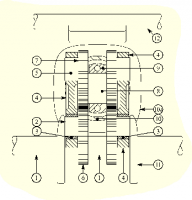
My poor little laptop still with Windows 10 would surely suffer a meltdown, because the drawing contains not just one gear, it’s a machine with lots of parts - see the image below with drastically reduced number of pixels to illustrate the problem.

But an interesting idea anyway!
Sanjeev Prabhakar wrote: > You have to write your own code for drawing lines in openscad and then it > should be possible to sketch whatever is intended. > > One of the example : > > \[image: Screenshot 2025-10-24 at 7.03.01 AM.png\] SHOCK! HORROR! All those numbers! I like polygons, but this takes them from the sublime to the ridiculous! My poor little laptop still with Windows 10 would surely suffer a meltdown, because the drawing contains not just one gear, it’s a machine with lots of parts - see the image below with drastically reduced number of pixels to illustrate the problem. But an interesting idea anyway!
M
mikeonenine@web.de
Fri, Oct 24, 2025 5:35 AM

Jordan Brown wrote:

OpenSCAD doesn't really do 2D, not in the sense of a program like
Inkscape.

Inkscape looks interesting and it is free. I would hate to pay for something only to find that it doesn’t do what I want.

As it turns out, there are a number of drawing programs. It’s just a matter of downloading some, hoping they don’t contain viruses, and learning to use them.

I like OpenSCAD and the way things fall precisely into place when you get it right, which happens increasingly often. I just thought there might be some way of getting an image before it gets cut up into pixels.

Jordan Brown wrote: > OpenSCAD doesn't really do 2D, not in the sense of a program like \ > Inkscape. Inkscape looks interesting and it is free. I would hate to pay for something only to find that it doesn’t do what I want. As it turns out, there are a number of drawing programs. It’s just a matter of downloading some, hoping they don’t contain viruses, and learning to use them. I like OpenSCAD and the way things fall precisely into place when you get it right, which happens increasingly often. I just thought there might be some way of getting an image before it gets cut up into pixels.
JB
Jordan Brown
Fri, Oct 24, 2025 6:13 AM

On 10/23/2025 10:35 PM, Caddiy via Discuss wrote:

I like OpenSCAD and the way things fall precisely into place when you
get it right, which happens increasingly often. I just thought there
might be some way of getting an image before it gets cut up into pixels.

Sure.  Just not 2D.  The 3D exports are in terms of lines, not pixels.

There are two ways that 3D models turn into 2D representations.

Inside the model, there's projection(), but that destroys color
information and any internal lines.

Other than that, what you see on the screen never exists in a 2D form
that isn't pixels.  It is created on a pixel-by-pixel basis. Even for a
fully rendered model, OpenSCAD itself doesn't even know which faces are
in front and which are in back, or what's hidden behind what.  That's
all figured out by the graphics stack, and it's on a pixel-by-pixel basis.

Not that we couldn't possibly have an appropriate feature, but we don't
have one today.

On 10/23/2025 10:35 PM, Caddiy via Discuss wrote: > > I like OpenSCAD and the way things fall precisely into place when you > get it right, which happens increasingly often. I just thought there > might be some way of getting an image before it gets cut up into pixels. > Sure.  Just not 2D.  The 3D exports are in terms of lines, not pixels. There are two ways that 3D models turn into 2D representations. Inside the model, there's projection(), but that destroys color information and any internal lines. Other than that, what you see on the screen never exists in a 2D form that isn't pixels.  It is created on a pixel-by-pixel basis. Even for a fully rendered model, OpenSCAD itself doesn't even know which faces are in front and which are in back, or what's hidden behind what.  That's all figured out by the graphics stack, and it's on a pixel-by-pixel basis. Not that we couldn't possibly have an appropriate feature, but we don't have one today.
M
mikeonenine@web.de
Fri, Oct 24, 2025 7:11 AM

Jordan Brown wrote:

Not that we couldn't possibly have an appropriate feature, but we don't
have one today.

It must be possible. Windows, or is it Word, has a dreadfully cumbersome drawing program, but it does give absolutely sharp, clean prints (I’m talking about 2D on paper, of course).

How does the PC get the printer to do that? The technology must have been around for years.

Jordan Brown wrote: > Not that we couldn't possibly have an appropriate feature, but we don't > have one today. It must be possible. Windows, or is it Word, has a dreadfully cumbersome drawing program, but it does give absolutely sharp, clean prints (I’m talking about 2D on paper, of course). How does the PC get the printer to do that? The technology must have been around for years.
SP
Sanjeev Prabhakar
Fri, Oct 24, 2025 4:44 PM

I think this can be done but it will be complicated.
Need to find a simpler solution to this problem.

On Fri, 24 Oct 2025 at 10:49, Caddiy via Discuss discuss@lists.openscad.org
wrote:

Sanjeev Prabhakar wrote:

You have to write your own code for drawing lines in openscad and then it
should be possible to sketch whatever is intended.

One of the example :

[image: Screenshot 2025-10-24 at 7.03.01 AM.png]

SHOCK! HORROR!

All those numbers! I like polygons, but this takes them from the sublime
to the ridiculous!

My poor little laptop still with Windows 10 would surely suffer a
meltdown, because the drawing contains not just one gear, it’s a machine
with lots of parts - see the image below with drastically reduced number of
pixels to illustrate the problem.

But an interesting idea anyway!


OpenSCAD mailing list
To unsubscribe send an email to discuss-leave@lists.openscad.org

I think this can be done but it will be complicated. Need to find a simpler solution to this problem. On Fri, 24 Oct 2025 at 10:49, Caddiy via Discuss <discuss@lists.openscad.org> wrote: > Sanjeev Prabhakar wrote: > > You have to write your own code for drawing lines in openscad and then it > should be possible to sketch whatever is intended. > > One of the example : > > [image: Screenshot 2025-10-24 at 7.03.01 AM.png] > > SHOCK! HORROR! > > All those numbers! I like polygons, but this takes them from the sublime > to the ridiculous! > > My poor little laptop still with Windows 10 would surely suffer a > meltdown, because the drawing contains not just one gear, it’s a machine > with lots of parts - see the image below with drastically reduced number of > pixels to illustrate the problem. > > But an interesting idea anyway! > _______________________________________________ > OpenSCAD mailing list > To unsubscribe send an email to discuss-leave@lists.openscad.org
JB
Jordan Brown
Fri, Oct 24, 2025 5:23 PM

On 10/24/2025 12:11 AM, Caddiy via Discuss wrote:

Jordan Brown wrote:

 Not that we couldn't possibly have an appropriate feature, but we
 don't have one today.

It must be possible. Windows, or is it Word, has a dreadfully
cumbersome drawing program, but it does give absolutely sharp, clean
prints (I’m talking about 2D on paper, of course).

How does the PC get the printer to do that? The technology must have
been around for years.

That aspect isn't the problem.  Yes, the "technology" has been around
for years - more than 60, possibly a hundred or more, maybe even
thousands.  An ancient mathematician could do it if they had a reason
to, and might have done it for tile art.  You just represent the lines
as mathematical lines, and only turn them into pixels at the last
moment, when you must, so that you can turn them into exactly the
smallest pixels that the display can produce.

OpenSCAD does that all the time with 3D solids and 2D filled shapes. 
You can get perfectly clean 2D prints from OpenSCAD by creating a 2D
design and exporting it as an SVG or a PDF.

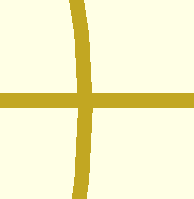
Here's a screen shot from OpenSCAD, enlarged:

Obvious jaggies, right?

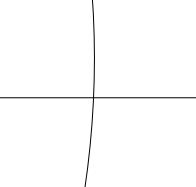
Enclosed please find PDF and SVG exports.  Note that they are perfect;
you can zoom in as far as you like and you never see jaggies.  (Well, of
course there are jaggies, because you've viewing them on a pixel screen,
but they're coming from your view, not from the file.)  Print them out
on your 1000dpi printer, and you'll need a microscope to see the
jaggies.  (If you can see them at all, because of anti-aliasing and
print fuzziness.)

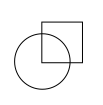
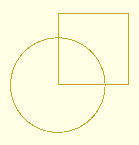
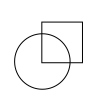
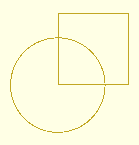
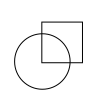
The problem is that OpenSCAD isn't a drawing program.  Here's a
snippet that I drew trivially in Inkscape:

OpenSCAD can't draw that, can't draw that box overlapping a circle.

OpenSCAD doesn't have lines, and doesn't have unfilled shapes.  It has
only filled shapes.  And the rendering process that's required before
export, that resolves things like unions and differences, destroys all
color information and (because the result is a filled shape) destroys
all internal lines.

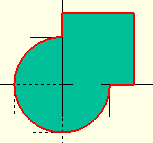
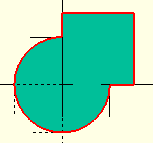
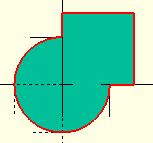
You might think that

circle(10);
square(15);

would produce that figure, but it won't, not even if you make them
different colors, because the rendered output will be

with the interior lines destroyed - because a filled shape by definition
doesn't have interior lines.

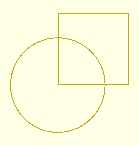
With a bit of tedium (or with an appropriate library), you can do this:

$fa = 1;
$fs = 1;

t = 0.2;

difference() {
    circle(10);
    circle(10-t);
}
difference() {
    square(15);
    translate([t,t])
        square(15-t*2);
}

and it'll look sort of right:

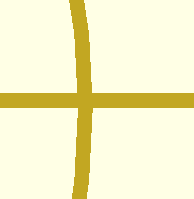
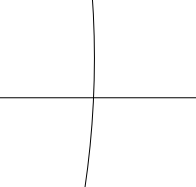
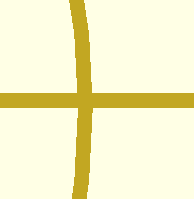
But now let's zoom in... OpenSCAD on the left and Inkscape on the right.

The "lines" that were drawn with OpenSCAD got thicker, because they are
really filled shapes.  The lines drawn with Inkscape stay thin, because
they are really lines.

So, net, yes, you can use OpenSCAD to draw black and white drawings that
have no jaggies, if you're careful to draw your own lines using really
skinny 2D shapes and you don't zoom in very much.  But you have to draw
them as 2D shapes.  If you have a 3D model that you want a 2D image
of, this technique is no help at all, and OpenSCAD doesn't have tools
that will help you.

On 10/24/2025 12:11 AM, Caddiy via Discuss wrote: > > Jordan Brown wrote: > > Not that we couldn't possibly have an appropriate feature, but we > don't have one today. > > It must be possible. Windows, or is it Word, has a dreadfully > cumbersome drawing program, but it does give absolutely sharp, clean > prints (I’m talking about 2D on paper, of course). > > How does the PC get the printer to do that? The technology must have > been around for years. > That aspect isn't the problem.  Yes, the "technology" has been around for years - more than 60, possibly a hundred or more, maybe even thousands.  An ancient mathematician could do it if they had a reason to, and might have done it for tile art.  You just represent the lines as mathematical lines, and only turn them into pixels at the last moment, when you must, so that you can turn them into exactly the smallest pixels that the display can produce. OpenSCAD does that all the time with 3D solids and 2D filled shapes.  You can get perfectly clean 2D prints from OpenSCAD by creating a 2D design and exporting it as an SVG or a PDF. Here's a screen shot from OpenSCAD, enlarged: Obvious jaggies, right? Enclosed please find PDF and SVG exports.  Note that they are perfect; you can zoom in as far as you like and you never see jaggies.  (Well, of course there are jaggies, because you've viewing them on a pixel screen, but they're coming from your view, not from the file.)  Print them out on your 1000dpi printer, and you'll need a microscope to see the jaggies.  (If you can see them at all, because of anti-aliasing and print fuzziness.) The problem is that OpenSCAD *isn't* a drawing program.  Here's a snippet that I drew trivially in Inkscape: OpenSCAD can't draw that, can't draw that box overlapping a circle. OpenSCAD doesn't have lines, and doesn't have unfilled shapes.  It has only filled shapes.  And the rendering process that's required before export, that resolves things like unions and differences, destroys all color information and (because the result is a filled shape) destroys all internal lines. You might think that circle(10); square(15); would produce that figure, but it won't, not even if you make them different colors, because the rendered output will be with the interior lines destroyed - because a filled shape by definition doesn't have interior lines. With a bit of tedium (or with an appropriate library), you can do this: $fa = 1; $fs = 1; t = 0.2; difference() { circle(10); circle(10-t); } difference() { square(15); translate([t,t]) square(15-t*2); } and it'll look sort of right: But now let's zoom in... OpenSCAD on the left and Inkscape on the right. The "lines" that were drawn with OpenSCAD got thicker, because they are really filled shapes.  The lines drawn with Inkscape stay thin, because they are really lines. So, net, yes, you can use OpenSCAD to draw black and white drawings that have no jaggies, if you're careful to draw your own lines using really skinny 2D shapes and you don't zoom in very much.  But you have to draw them *as* 2D shapes.  If you have a 3D model that you want a 2D image of, this technique is no help at all, and OpenSCAD doesn't have tools that will help you.
CC
Cory Cross
Fri, Oct 24, 2025 5:47 PM

On 10/23/25 4:22 PM, Jordan Brown via Discuss wrote:

but when you collapse the shape on the right to a 2D object all of
those interior lines will go away.

Could the "no top level union" of lazy union resolve this? It seems to
not work on 2D like it does 3D.

  • Cory
On 10/23/25 4:22 PM, Jordan Brown via Discuss wrote: > but when you collapse the shape on the right to a 2D object all of > those interior lines will go away. Could the "no top level union" of lazy union resolve this? It seems to not work on 2D like it does 3D. - Cory
SP
Sanjeev Prabhakar
Fri, Oct 24, 2025 5:55 PM

Work around in openscad could be to draw lines with chain hull of spheres
with diameter appropriate for the sketch.

This method i am using for quite a long time and works well for me.

Any color can be given to the edges that way. But yes then you need to
create models with points list and not with openscad primitives. Maybe this
is right now is the issue with most of the people as thinking in terms of
points list is a challenge initially for first few models. Apart from that
there could be a fear of writing too much code for drawing through points,
which is not quite True as per my experience and finally it will turn out
to be far more productive.

On Fri, 24 Oct, 2025, 10:54 pm Jordan Brown via Discuss, <
discuss@lists.openscad.org> wrote:

On 10/24/2025 12:11 AM, Caddiy via Discuss wrote:

Jordan Brown wrote:

Not that we couldn't possibly have an appropriate feature, but we don't
have one today.

It must be possible. Windows, or is it Word, has a dreadfully cumbersome
drawing program, but it does give absolutely sharp, clean prints (I’m
talking about 2D on paper, of course).

How does the PC get the printer to do that? The technology must have been
around for years.

That aspect isn't the problem.  Yes, the "technology" has been around for
years - more than 60, possibly a hundred or more, maybe even thousands.  An
ancient mathematician could do it if they had a reason to, and might have
done it for tile art.  You just represent the lines as mathematical lines,
and only turn them into pixels at the last moment, when you must, so that
you can turn them into exactly the smallest pixels that the display can
produce.

OpenSCAD does that all the time with 3D solids and 2D filled shapes.  You
can get perfectly clean 2D prints from OpenSCAD by creating a 2D design and
exporting it as an SVG or a PDF.

Here's a screen shot from OpenSCAD, enlarged:

Obvious jaggies, right?

Enclosed please find PDF and SVG exports.  Note that they are perfect; you
can zoom in as far as you like and you never see jaggies.  (Well, of course
there are jaggies, because you've viewing them on a pixel screen, but
they're coming from your view, not from the file.)  Print them out on your
1000dpi printer, and you'll need a microscope to see the jaggies.  (If you
can see them at all, because of anti-aliasing and print fuzziness.)

The problem is that OpenSCAD isn't a drawing program.  Here's a snippet
that I drew trivially in Inkscape:

OpenSCAD can't draw that, can't draw that box overlapping a circle.

OpenSCAD doesn't have lines, and doesn't have unfilled shapes.  It has
only filled shapes.  And the rendering process that's required before
export, that resolves things like unions and differences, destroys all
color information and (because the result is a filled shape) destroys all
internal lines.

You might think that

circle(10);
square(15);

would produce that figure, but it won't, not even if you make them
different colors, because the rendered output will be

with the interior lines destroyed - because a filled shape by definition
doesn't have interior lines.

With a bit of tedium (or with an appropriate library), you can do this:

$fa = 1;
$fs = 1;

t = 0.2;

difference() {
circle(10);
circle(10-t);
}
difference() {
square(15);
translate([t,t])
square(15-t*2);
}

and it'll look sort of right:

But now let's zoom in... OpenSCAD on the left and Inkscape on the right.

The "lines" that were drawn with OpenSCAD got thicker, because they are
really filled shapes.  The lines drawn with Inkscape stay thin, because
they are really lines.

So, net, yes, you can use OpenSCAD to draw black and white drawings that
have no jaggies, if you're careful to draw your own lines using really
skinny 2D shapes and you don't zoom in very much.  But you have to draw
them as 2D shapes.  If you have a 3D model that you want a 2D image of,
this technique is no help at all, and OpenSCAD doesn't have tools that will
help you.

OpenSCAD mailing list
To unsubscribe send an email to discuss-leave@lists.openscad.org
Work around in openscad could be to draw lines with chain hull of spheres with diameter appropriate for the sketch. This method i am using for quite a long time and works well for me. Any color can be given to the edges that way. But yes then you need to create models with points list and not with openscad primitives. Maybe this is right now is the issue with most of the people as thinking in terms of points list is a challenge initially for first few models. Apart from that there could be a fear of writing too much code for drawing through points, which is not quite True as per my experience and finally it will turn out to be far more productive. On Fri, 24 Oct, 2025, 10:54 pm Jordan Brown via Discuss, < discuss@lists.openscad.org> wrote: > On 10/24/2025 12:11 AM, Caddiy via Discuss wrote: > > Jordan Brown wrote: > > Not that we couldn't possibly have an appropriate feature, but we don't > have one today. > > It must be possible. Windows, or is it Word, has a dreadfully cumbersome > drawing program, but it does give absolutely sharp, clean prints (I’m > talking about 2D on paper, of course). > > How does the PC get the printer to do that? The technology must have been > around for years. > > > That aspect isn't the problem. Yes, the "technology" has been around for > years - more than 60, possibly a hundred or more, maybe even thousands. An > ancient mathematician could do it if they had a reason to, and might have > done it for tile art. You just represent the lines as mathematical lines, > and only turn them into pixels at the last moment, when you must, so that > you can turn them into exactly the smallest pixels that the display can > produce. > > OpenSCAD does that all the time with 3D solids and 2D filled shapes. You > can get perfectly clean 2D prints from OpenSCAD by creating a 2D design and > exporting it as an SVG or a PDF. > > Here's a screen shot from OpenSCAD, enlarged: > > > Obvious jaggies, right? > > Enclosed please find PDF and SVG exports. Note that they are perfect; you > can zoom in as far as you like and you never see jaggies. (Well, of course > there are jaggies, because you've viewing them on a pixel screen, but > they're coming from your view, not from the file.) Print them out on your > 1000dpi printer, and you'll need a microscope to see the jaggies. (If you > can see them at all, because of anti-aliasing and print fuzziness.) > > The problem is that OpenSCAD *isn't* a drawing program. Here's a snippet > that I drew trivially in Inkscape: > > OpenSCAD can't draw that, can't draw that box overlapping a circle. > > OpenSCAD doesn't have lines, and doesn't have unfilled shapes. It has > only filled shapes. And the rendering process that's required before > export, that resolves things like unions and differences, destroys all > color information and (because the result is a filled shape) destroys all > internal lines. > > You might think that > > circle(10); > square(15); > > would produce that figure, but it won't, not even if you make them > different colors, because the rendered output will be > > > with the interior lines destroyed - because a filled shape by definition > doesn't have interior lines. > > With a bit of tedium (or with an appropriate library), you can do this: > > $fa = 1; > $fs = 1; > > t = 0.2; > > difference() { > circle(10); > circle(10-t); > } > difference() { > square(15); > translate([t,t]) > square(15-t*2); > } > > and it'll look sort of right: > > But now let's zoom in... OpenSCAD on the left and Inkscape on the right. > > The "lines" that were drawn with OpenSCAD got thicker, because they are > really filled shapes. The lines drawn with Inkscape stay thin, because > they are really lines. > > So, net, yes, you can use OpenSCAD to draw black and white drawings that > have no jaggies, if you're careful to draw your own lines using really > skinny 2D shapes and you don't zoom in very much. But you have to draw > them *as* 2D shapes. If you have a 3D model that you want a 2D image of, > this technique is no help at all, and OpenSCAD doesn't have tools that will > help you. > > _______________________________________________ > OpenSCAD mailing list > To unsubscribe send an email to discuss-leave@lists.openscad.org