

why will the # not work for this module?????

here is my code below works for the other modules but with this one
it's driving me to distraction Help!!!!!!!!!!!!!!
<code>
#translate([108,0,0])three();
module three(){
difference(){
union(){
cube([108,140,2]);
translate([0,7,0])cube([1.5,140,5]);
cube([108,1.5,5]);
translate([102.5,0,0])cube([5.5,150,5]);
translate([0,7,0])cube([25.5,5,5]);
translate([35.5,7,0])cube([40,5,5]);
translate([85.5,7,0])cube([22.5,5,5]);
translate([0,139.9,0])cube([1.5,10.1,5]);
}
translate([101.4,4.5,3.3])rotate([0,90,0])cylinder(r=1.5,h=10,$fn=64);
translate([-0.1,-0.1,-0.1])cube([4.1,1.61,5.2]);
}
}
</code>

What's not working?
-----Original Message-----
From: terramir [mailto:terramircomputers@gmail.com]
Sent: Mon, 21 Feb 2022 16:06
To: OpenSCAD general discussion
Subject: [OpenSCAD] why will the # not work for this module?????
here is my code below works for the other modules but with this one
it's driving me to distraction Help!!!!!!!!!!!!!!
<code>
#translate([108,0,0])three();
module three(){
difference(){
union(){
cube([108,140,2]);
translate([0,7,0])cube([1.5,140,5]);
cube([108,1.5,5]);
translate([102.5,0,0])cube([5.5,150,5]);
translate([0,7,0])cube([25.5,5,5]);
translate([35.5,7,0])cube([40,5,5]);
translate([85.5,7,0])cube([22.5,5,5]);
translate([0,139.9,0])cube([1.5,10.1,5]);
}
translate([101.4,4.5,3.3])rotate([0,90,0])cylinder(r=1.5,h=10,$fn=64);
translate([-0.1,-0.1,-0.1])cube([4.1,1.61,5.2]);
}
}
</code>
OpenSCAD mailing list
To unsubscribe send an email to discuss-leave@lists.openscad.org
--
This email has been checked for viruses by AVG.
https://www.avg.com
it won't highlight red when I add the # but all other modules it will
I thought I screwed up somewhere in the code and so I copied the
"three" module in a new windows same deal and I dunno why module one
and two highlight on F5 just fine
On Sun, Feb 20, 2022 at 9:14 PM MichaelAtOz oz.at.michael@gmail.com wrote:
What's not working?
-----Original Message-----
From: terramir [mailto:terramircomputers@gmail.com]
Sent: Mon, 21 Feb 2022 16:06
To: OpenSCAD general discussion
Subject: [OpenSCAD] why will the # not work for this module?????here is my code below works for the other modules but with this one
it's driving me to distraction Help!!!!!!!!!!!!!!
<code>
#translate([108,0,0])three();module three(){
difference(){
union(){
cube([108,140,2]);
translate([0,7,0])cube([1.5,140,5]);
cube([108,1.5,5]);
translate([102.5,0,0])cube([5.5,150,5]);
translate([0,7,0])cube([25.5,5,5]);
translate([35.5,7,0])cube([40,5,5]);
translate([85.5,7,0])cube([22.5,5,5]);
translate([0,139.9,0])cube([1.5,10.1,5]);
}
translate([101.4,4.5,3.3])rotate([0,90,0])cylinder(r=1.5,h=10,$fn=64);
translate([-0.1,-0.1,-0.1])cube([4.1,1.61,5.2]);}
}
</code>
OpenSCAD mailing list
To unsubscribe send an email to discuss-leave@lists.openscad.org
--
This email has been checked for viruses by AVG.
https://www.avg.com
OpenSCAD mailing list
To unsubscribe send an email to discuss-leave@lists.openscad.org
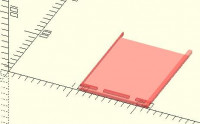
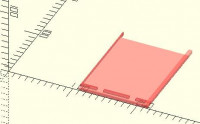
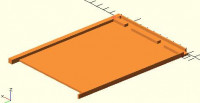
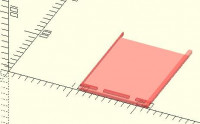
Hmmm...I get this, which is not red/translucent.
If I add another object, cube(1), I get red/translucent.
I don't think it is meant to do the former.
-----Original Message-----
From: terramir [mailto:terramircomputers@gmail.com]
Sent: Mon, 21 Feb 2022 16:37
To: OpenSCAD general discussion
Subject: [OpenSCAD] Re: why will the # not work for this module?????
it won't highlight red when I add the # but all other modules it will
I thought I screwed up somewhere in the code and so I copied the
"three" module in a new windows same deal and I dunno why module one
and two highlight on F5 just fine
On Sun, Feb 20, 2022 at 9:14 PM MichaelAtOz oz.at.michael@gmail.com wrote:
What's not working?
-----Original Message-----
From: terramir [mailto:terramircomputers@gmail.com]
Sent: Mon, 21 Feb 2022 16:06
To: OpenSCAD general discussion
Subject: [OpenSCAD] why will the # not work for this module?????
here is my code below works for the other modules but with this one
it's driving me to distraction Help!!!!!!!!!!!!!!
#translate([108,0,0])three();
module three(){
difference(){
union(){
cube([108,140,2]);
translate([0,7,0])cube([1.5,140,5]);
cube([108,1.5,5]);
translate([102.5,0,0])cube([5.5,150,5]);
translate([0,7,0])cube([25.5,5,5]);
translate([35.5,7,0])cube([40,5,5]);
translate([85.5,7,0])cube([22.5,5,5]);
translate([0,139.9,0])cube([1.5,10.1,5]);
}
translate([101.4,4.5,3.3])rotate([0,90,0])cylinder(r=1.5,h=10,$fn=64);
translate([-0.1,-0.1,-0.1])cube([4.1,1.61,5.2]);
}
}
OpenSCAD mailing list
To unsubscribe send an email to discuss-leave@lists.openscad.org
--
This email has been checked for viruses by AVG.
OpenSCAD mailing list
To unsubscribe send an email to discuss-leave@lists.openscad.org
OpenSCAD mailing list
To unsubscribe send an email to discuss-leave@lists.openscad.org
--
This email has been checked for viruses by AVG.
https://www.avg.com
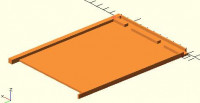
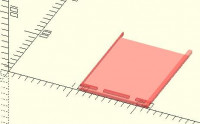
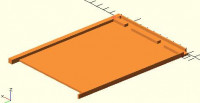
That was 2021.01 on Windows-7, but it is the same with 2022.02.13 on Debian.
From: MichaelAtOz [mailto:oz.at.michael@gmail.com]
Sent: Mon, 21 Feb 2022 17:02
To: 'OpenSCAD general discussion'
Subject: [OpenSCAD] Re: why will the # not work for this module?????
Hmmm...I get this, which is not red/translucent.
If I add another object, cube(1), I get red/translucent.
I don't think it is meant to do the former.
-----Original Message-----
From: terramir [mailto:terramircomputers@gmail.com]
Sent: Mon, 21 Feb 2022 16:37
To: OpenSCAD general discussion
Subject: [OpenSCAD] Re: why will the # not work for this module?????
it won't highlight red when I add the # but all other modules it will
I thought I screwed up somewhere in the code and so I copied the
"three" module in a new windows same deal and I dunno why module one
and two highlight on F5 just fine
On Sun, Feb 20, 2022 at 9:14 PM MichaelAtOz oz.at.michael@gmail.com wrote:
What's not working?
-----Original Message-----
From: terramir [mailto:terramircomputers@gmail.com]
Sent: Mon, 21 Feb 2022 16:06
To: OpenSCAD general discussion
Subject: [OpenSCAD] why will the # not work for this module?????
here is my code below works for the other modules but with this one
it's driving me to distraction Help!!!!!!!!!!!!!!
#translate([108,0,0])three();
module three(){
difference(){
union(){
cube([108,140,2]);
translate([0,7,0])cube([1.5,140,5]);
cube([108,1.5,5]);
translate([102.5,0,0])cube([5.5,150,5]);
translate([0,7,0])cube([25.5,5,5]);
translate([35.5,7,0])cube([40,5,5]);
translate([85.5,7,0])cube([22.5,5,5]);
translate([0,139.9,0])cube([1.5,10.1,5]);
}
translate([101.4,4.5,3.3])rotate([0,90,0])cylinder(r=1.5,h=10,$fn=64);
translate([-0.1,-0.1,-0.1])cube([4.1,1.61,5.2]);
}
}
OpenSCAD mailing list
To unsubscribe send an email to discuss-leave@lists.openscad.org
--
This email has been checked for viruses by AVG.
OpenSCAD mailing list
To unsubscribe send an email to discuss-leave@lists.openscad.org
OpenSCAD mailing list
To unsubscribe send an email to discuss-leave@lists.openscad.org
<http://www.avg.com/email-signature?utm_medium=email&utm_source=link&utm_campaign=sig-email&utm_con
tent=emailclient>
Virus-free.
<http://www.avg.com/email-signature?utm_medium=email&utm_source=link&utm_campaign=sig-email&utm_con
tent=emailclient> www.avg.com
--
This email has been checked for viruses by AVG.
https://www.avg.com

On 2/20/2022 9:36 PM, terramir wrote:
it won't highlight red when I add the # but all other modules it will
I thought I screwed up somewhere in the code and so I copied the
"three" module in a new windows same deal and I dunno why module one
and two highlight on F5 just fine
Hmm. In experimenting to try to make a guess, I found a behavior that
sure looks like a bug.
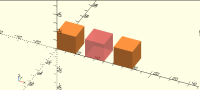
Consider these three cubes, one ordinary, one negative and highlighted,
and one normal and highlighted:
cube(20);
translate([30,0,0]) difference() { union(); #cube(20); }
translate([60,0,0]) #cube(20);
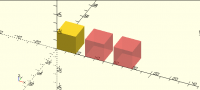
Now let's highlight the first one:
#cube(20);
translate([30,0,0]) difference() { union(); #cube(20); }
translate([60,0,0]) #cube(20);
Note that the only difference is the addition of the # on the first line.
What the heck happened to the third cube?
(I see the same behavior if I omit the second cube, but it makes for
good color contrast.)
In some ways I think the orange-ish color, ugly as it may be, is better
for a highlighted solid object, to make the distinction between a
highlighted solid object and a highlighted empty space clearer. But
that doesn't excuse changing the color displayed for an unrelated object!
in what line did you add that cube(1);?
On Sun, Feb 20, 2022 at 10:05 PM MichaelAtOz oz.at.michael@gmail.com
wrote:
That was 2021.01 on Windows-7, but it is the same with 2022.02.13 on
Debian.
From: MichaelAtOz [mailto:oz.at.michael@gmail.com]
Sent: Mon, 21 Feb 2022 17:02
To: 'OpenSCAD general discussion'
Subject: [OpenSCAD] Re: why will the # not work for this module?????
Hmmm...I get this, which is not red/translucent.
If I add another object, cube(1), I get red/translucent.
I don't think it is meant to do the former.
-----Original Message-----
From: terramir [mailto:terramircomputers@gmail.com]
Sent: Mon, 21 Feb 2022 16:37
To: OpenSCAD general discussion
Subject: [OpenSCAD] Re: why will the # not work for this module?????
it won't highlight red when I add the # but all other modules it will
I thought I screwed up somewhere in the code and so I copied the
"three" module in a new windows same deal and I dunno why module one
and two highlight on F5 just fine
On Sun, Feb 20, 2022 at 9:14 PM MichaelAtOz oz.at.michael@gmail.com
wrote:
What's not working?
-----Original Message-----
From: terramir [mailto:terramircomputers@gmail.com]
Sent: Mon, 21 Feb 2022 16:06
To: OpenSCAD general discussion
Subject: [OpenSCAD] why will the # not work for this module?????
here is my code below works for the other modules but with this one
it's driving me to distraction Help!!!!!!!!!!!!!!
#translate([108,0,0])three();
module three(){
difference(){
union(){
cube([108,140,2]);
translate([0,7,0])cube([1.5,140,5]);
cube([108,1.5,5]);
translate([102.5,0,0])cube([5.5,150,5]);
translate([0,7,0])cube([25.5,5,5]);
translate([35.5,7,0])cube([40,5,5]);
translate([85.5,7,0])cube([22.5,5,5]);
translate([0,139.9,0])cube([1.5,10.1,5]);
}
translate([101.4,4.5,3.3])rotate([0,90,0])cylinder(r=1.5,h=10,$fn=64);
translate([-0.1,-0.1,-0.1])cube([4.1,1.61,5.2]);
}
}
OpenSCAD mailing list
To unsubscribe send an email to discuss-leave@lists.openscad.org
--
This email has been checked for viruses by AVG.
OpenSCAD mailing list
To unsubscribe send an email to discuss-leave@lists.openscad.org
OpenSCAD mailing list
To unsubscribe send an email to discuss-leave@lists.openscad.org
Virus-free. www.avg.com
http://www.avg.com/email-signature?utm_medium=email&utm_source=link&utm_campaign=sig-email&utm_content=emailclient
<#m_5491020026075440700_DAB4FAD8-2DD7-40BB-A1B8-4E2AA1F9FDF2>
OpenSCAD mailing list
To unsubscribe send an email to discuss-leave@lists.openscad.org
translate([108,0,0]) three();
cube(1);
module three(){...
From: terramir [mailto:terramircomputers@gmail.com]
Sent: Mon, 21 Feb 2022 17:13
To: OpenSCAD general discussion
Subject: [OpenSCAD] Re: why will the # not work for this module?????
in what line did you add that cube(1);?
On Sun, Feb 20, 2022 at 10:05 PM MichaelAtOz oz.at.michael@gmail.com wrote:
That was 2021.01 on Windows-7, but it is the same with 2022.02.13 on Debian.
From: MichaelAtOz [mailto:oz.at.michael@gmail.com]
Sent: Mon, 21 Feb 2022 17:02
To: 'OpenSCAD general discussion'
Subject: [OpenSCAD] Re: why will the # not work for this module?????
Hmmm...I get this, which is not red/translucent.
If I add another object, cube(1), I get red/translucent.
I don't think it is meant to do the former.
-----Original Message-----
From: terramir [mailto:terramircomputers@gmail.com]
Sent: Mon, 21 Feb 2022 16:37
To: OpenSCAD general discussion
Subject: [OpenSCAD] Re: why will the # not work for this module?????
it won't highlight red when I add the # but all other modules it will
I thought I screwed up somewhere in the code and so I copied the
"three" module in a new windows same deal and I dunno why module one
and two highlight on F5 just fine
On Sun, Feb 20, 2022 at 9:14 PM MichaelAtOz oz.at.michael@gmail.com wrote:
What's not working?
-----Original Message-----
From: terramir [mailto:terramircomputers@gmail.com]
Sent: Mon, 21 Feb 2022 16:06
To: OpenSCAD general discussion
Subject: [OpenSCAD] why will the # not work for this module?????
here is my code below works for the other modules but with this one
it's driving me to distraction Help!!!!!!!!!!!!!!
#translate([108,0,0])three();
module three(){
difference(){
union(){
cube([108,140,2]);
translate([0,7,0])cube([1.5,140,5]);
cube([108,1.5,5]);
translate([102.5,0,0])cube([5.5,150,5]);
translate([0,7,0])cube([25.5,5,5]);
translate([35.5,7,0])cube([40,5,5]);
translate([85.5,7,0])cube([22.5,5,5]);
translate([0,139.9,0])cube([1.5,10.1,5]);
}
translate([101.4,4.5,3.3])rotate([0,90,0])cylinder(r=1.5,h=10,$fn=64);
translate([-0.1,-0.1,-0.1])cube([4.1,1.61,5.2]);
}
}
OpenSCAD mailing list
To unsubscribe send an email to discuss-leave@lists.openscad.org
--
This email has been checked for viruses by AVG.
OpenSCAD mailing list
To unsubscribe send an email to discuss-leave@lists.openscad.org
OpenSCAD mailing list
To unsubscribe send an email to discuss-leave@lists.openscad.org
Virus-free. http://www.avg.com/email-signature?utm_medium=email&utm_source=link&utm_campaign=sig-email&utm_content=emailclient www.avg.com
OpenSCAD mailing list
To unsubscribe send an email to discuss-leave@lists.openscad.org
--
This email has been checked for viruses by AVG.
https://www.avg.com
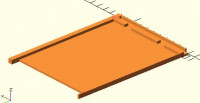
The translucency is important for debugging.
From: Jordan Brown [mailto:openscad@jordan.maileater.net]
In some ways I think the orange-ish color, ugly as it may be, is better for a highlighted solid object, to make the distinction between a highlighted solid object and a highlighted empty space clearer. But that doesn't excuse changing the color displayed for an unrelated object!
--
This email has been checked for viruses by AVG.
https://www.avg.com

The orange colour is because it is drawing it twice, once solid yellow and
then transparent pink.
CSG before normalization:
(cube2 + cube8)
CSG after normalization:
(cube2 + cube8)
CSG rendering chain:
+cube2
+cube8
Highlights CSG rendering chain:
+cube6
+cube2
+cube8
Without the first # it does this:
CSG before normalization:
cube2
CSG after normalization:
cube2
CSG rendering chain:
+cube2
Highlights CSG rendering chain:
+cube6
+cube8
I.e. it draws cube2 normally and highlights the other two. It only seems to
go wrong when all cubes are highlighted. Adding an extra one fixes it until
you also highlight that.
On Mon, 21 Feb 2022 at 06:27, MichaelAtOz oz.at.michael@gmail.com wrote:
The translucency is important for debugging.
From: Jordan Brown [mailto:openscad@jordan.maileater.net]
In some ways I think the orange-ish color, ugly as it may be, is better
for a highlighted solid object, to make the distinction between a
highlighted solid object and a highlighted empty space clearer. But that
doesn't excuse changing the color displayed for an unrelated object!
http://www.avg.com/email-signature?utm_medium=email&utm_source=link&utm_campaign=sig-email&utm_content=emailclient Virus-free.
www.avg.com
http://www.avg.com/email-signature?utm_medium=email&utm_source=link&utm_campaign=sig-email&utm_content=emailclient
<#m_8842330204752686170_DAB4FAD8-2DD7-40BB-A1B8-4E2AA1F9FDF2>
OpenSCAD mailing list
To unsubscribe send an email to discuss-leave@lists.openscad.org