JB
Jordan Brown
Mon, Mar 2, 2026 11:26 PM
I just recently got around to configuring a local slicer for F8, so now
instead of saving my model as an STL or 3MF and then loading it into the
slicer, I can just hit F8 and poof, it appears in Prusaslicer.
That's really cool. At least until I need to make a change in the
slicer config for the project, and also a change in the model itself.
Then I hit F8 and poof, the model appears in the slicer... in a new
context, with all-default settings.
Does anybody have a workflow - configuration plus procedures - that lets
a second F8 update the same Prusaslicer project with a new model file?
I just recently got around to configuring a local slicer for F8, so now
instead of saving my model as an STL or 3MF and then loading it into the
slicer, I can just hit F8 and poof, it appears in Prusaslicer.
That's really cool. At least until I need to make a change in the
slicer config for the project, and also a change in the model itself.
Then I hit F8 and poof, the model appears in the slicer... in a new
context, with all-default settings.
Does anybody have a workflow - configuration plus procedures - that lets
a second F8 update the same Prusaslicer project with a new model file?
TP
Torsten Paul
Mon, Mar 2, 2026 11:29 PM
On 03.03.26 00:26, Jordan Brown via Discuss wrote:
Does anybody have a workflow - configuration plus procedures - that lets
a second F8 update the same Prusaslicer project with a new model file?
--single-instance
I wish there would be a --clear-build-plate too, I never got around
asking for it. Or maybe I have not found it yet. Currently I just
clear the build plate myself before exporting again.
ciao,
Torsten.
On 03.03.26 00:26, Jordan Brown via Discuss wrote:
> Does anybody have a workflow - configuration plus procedures - that lets
> a second F8 update the same Prusaslicer project with a new model file?
--single-instance
I wish there would be a --clear-build-plate too, I never got around
asking for it. Or maybe I have not found it yet. Currently I just
clear the build plate myself before exporting again.
ciao,
Torsten.
JB
Jordan Brown
Tue, Mar 3, 2026 12:13 AM
On 3/2/2026 3:29 PM, Torsten Paul via Discuss wrote:
On 03.03.26 00:26, Jordan Brown via Discuss wrote:
Does anybody have a workflow - configuration plus procedures - that
lets a second F8 update the same Prusaslicer project with a new model
file?
Thanks! A definite improvement, I think. (I had looked at Prusa's very
short web page on their CLI, and at the Slic3r page they pointed at, but
for some reason hadn't tried --help.)
I wish there would be a --clear-build-plate too, I never got around
asking for it. Or maybe I have not found it yet. Currently I just
clear the build plate myself before exporting again.
Based on the behavior of delete-all and New Project, I wouldn't be
optimistic about getting the desired results.
For the project I was just working on, I needed three things preserved:
- Extrusion multiplier
- Pause at a particular layer
- Multiple instances
I think that delete-all and New Project both wipe out at least the
latter two, if not all of them.
But --single-instance will at least preserve the first two, if I
individually delete the old model rather than wiping the build plate.
What I really want is for it to understand that I'm replacing that
model, and drop the new one into the same slot, preserving placement,
duplication, scaling, rotation, et cetera. Preserving painted-on
supports would probably be difficult because the model could have
changed arbitrarily, but it would be nice too.
What I really really want, I think, is a unified experience where I can
set all of the slicer params from OpenSCAD as part of the model. (But
maybe I wouldn't want that as much if I had two printers, or routinely
printed the same model in multiple materials.)
Ah, maybe I can work on that after I retire.
On 3/2/2026 3:29 PM, Torsten Paul via Discuss wrote:
> On 03.03.26 00:26, Jordan Brown via Discuss wrote:
>> Does anybody have a workflow - configuration plus procedures - that
>> lets a second F8 update the same Prusaslicer project with a new model
>> file?
>
> --single-instance
Thanks! A definite improvement, I think. (I had looked at Prusa's very
short web page on their CLI, and at the Slic3r page they pointed at, but
for some reason hadn't tried --help.)
> I wish there would be a --clear-build-plate too, I never got around
> asking for it. Or maybe I have not found it yet. Currently I just
> clear the build plate myself before exporting again.
Based on the behavior of delete-all and New Project, I wouldn't be
optimistic about getting the desired results.
For the project I was just working on, I needed three things preserved:
- Extrusion multiplier
- Pause at a particular layer
- Multiple instances
I think that delete-all and New Project both wipe out at least the
latter two, if not all of them.
But --single-instance will at least preserve the first two, if I
individually delete the old model rather than wiping the build plate.
What I really want is for it to understand that I'm replacing that
model, and drop the new one into the same slot, preserving placement,
duplication, scaling, rotation, et cetera. Preserving painted-on
supports would probably be difficult because the model could have
changed arbitrarily, but it would be nice too.
What I really really want, I think, is a unified experience where I can
set all of the slicer params from OpenSCAD as part of the model. (But
maybe I wouldn't want that as much if I had two printers, or routinely
printed the same model in multiple materials.)
Ah, maybe I can work on that after I retire.
JB
Jon Bondy
Tue, Mar 3, 2026 2:19 AM
Where can I learn more about this F8 feature, please?
On 3/2/2026 6:26 PM, Jordan Brown via Discuss wrote:
I just recently got around to configuring a local slicer for F8, so
now instead of saving my model as an STL or 3MF and then loading it
into the slicer, I can just hit F8 and poof, it appears in Prusaslicer.
That's really cool. At least until I need to make a change in the
slicer config for the project, and also a change in the model itself.
Then I hit F8 and poof, the model appears in the slicer... in a new
context, with all-default settings.
Does anybody have a workflow - configuration plus procedures - that
lets a second F8 update the same Prusaslicer project with a new model
file?
OpenSCAD mailing list
To unsubscribe send an email to discuss-leave@lists.openscad.org
--
This email has been checked for viruses by AVG antivirus software.
www.avg.com
Where can I learn more about this F8 feature, please?
On 3/2/2026 6:26 PM, Jordan Brown via Discuss wrote:
> I just recently got around to configuring a local slicer for F8, so
> now instead of saving my model as an STL or 3MF and then loading it
> into the slicer, I can just hit F8 and poof, it appears in Prusaslicer.
>
> That's really cool. At least until I need to make a change in the
> slicer config for the project, and also a change in the model itself.
> Then I hit F8 and poof, the model appears in the slicer... in a new
> context, with all-default settings.
>
> Does anybody have a workflow - configuration plus procedures - that
> lets a second F8 update the same Prusaslicer project with a new model
> file?
>
>
> _______________________________________________
> OpenSCAD mailing list
> To unsubscribe send an email to discuss-leave@lists.openscad.org
--
This email has been checked for viruses by AVG antivirus software.
www.avg.com
JB
Jordan Brown
Tue, Mar 3, 2026 3:33 AM
On 3/2/2026 6:19 PM, Jon Bondy wrote:
Where can I learn more about this F8 feature, please?
I don't see anything in the documentation per se. (Which is no
surprise; little of the UI is documented.)
It's Design / 3D Print. You configure what it does with Edit /
Preferences / 3D Print.
That lets you configure a connection to OctoPrint (a local 3D print
server) or a couple of commercial services, or a local application.
Using a local application requires that you know how to invoke the local
application to get the results you want (hence my original question).
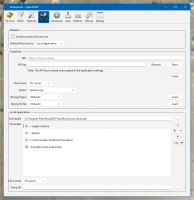
Here's my configuration:
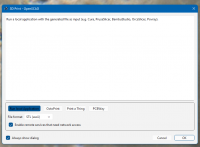
When you punch F8 it pops a dialog that confirms what you want to do and
allows you to select other options:
Unchecking that "Always show dialog" checkbox bypasses this dialog in
the future; you can restore it at Edit/Preferences/Dialogs.
Note: checking the "Enable remote services" box in the confirmation
dialog appears to have immediate effect; checking it in the Preferences
dialog seems to require restarting the application to get them to appear
in the menu.
On 3/2/2026 6:19 PM, Jon Bondy wrote:
> Where can I learn more about this F8 feature, please?
I don't see anything in the documentation per se. (Which is no
surprise; little of the UI is documented.)
It's Design / 3D Print. You configure what it does with Edit /
Preferences / 3D Print.
That lets you configure a connection to OctoPrint (a local 3D print
server) or a couple of commercial services, or a local application.
Using a local application requires that you know how to invoke the local
application to get the results you want (hence my original question).
Here's my configuration:
When you punch F8 it pops a dialog that confirms what you want to do and
allows you to select other options:
Unchecking that "Always show dialog" checkbox bypasses this dialog in
the future; you can restore it at Edit/Preferences/Dialogs.
Note: checking the "Enable remote services" box in the confirmation
dialog appears to have immediate effect; checking it in the Preferences
dialog seems to require restarting the application to get them to appear
in the menu.
GH
gene heskett
Tue, Mar 3, 2026 6:00 AM
On 3/2/26 18:29, Torsten Paul via Discuss wrote:
On 03.03.26 00:26, Jordan Brown via Discuss wrote:
Does anybody have a workflow - configuration plus procedures - that
lets a second F8 update the same Prusaslicer project with a new model
file?
--single-instance
I wish there would be a --clear-build-plate too, I never got around
asking for it. Or maybe I have not found it yet. Currently I just
clear the build plate myself before exporting again.
That is IF you can find that option in your fav slicer. The latest
2.3.2-dev version of OrcaSlicer doesn't have it. Or, if its still in
there, I haven't found it either, so I have to quit and cold restart the
slicer to clear the build plate. On this busted bookworm install,
that's two minutes wasted, minimum.
Cheers, Gene Heskett, CET.
"There are four boxes to be used in defense of liberty:
soap, ballot, jury, and ammo. Please use in that order."
-Ed Howdershelt (Author, 1940)
If we desire respect for the law, we must first make the law respectable.
- Louis D. Brandeis
Don't poison our oceans, interdict drugs at the src.
On 3/2/26 18:29, Torsten Paul via Discuss wrote:
> On 03.03.26 00:26, Jordan Brown via Discuss wrote:
>> Does anybody have a workflow - configuration plus procedures - that
>> lets a second F8 update the same Prusaslicer project with a new model
>> file?
>
> --single-instance
>
> I wish there would be a --clear-build-plate too, I never got around
> asking for it. Or maybe I have not found it yet. Currently I just
> clear the build plate myself before exporting again.
That is IF you can find that option in your fav slicer. The latest
2.3.2-dev version of OrcaSlicer doesn't have it. Or, if its still in
there, I haven't found it either, so I have to quit and cold restart the
slicer to clear the build plate. On this busted bookworm install,
that's two minutes wasted, minimum.
>
> ciao,
> Torsten.
> _______________________________________________
> OpenSCAD mailing list
> To unsubscribe send an email to discuss-leave@lists.openscad.org
> .
Cheers, Gene Heskett, CET.
--
"There are four boxes to be used in defense of liberty:
soap, ballot, jury, and ammo. Please use in that order."
-Ed Howdershelt (Author, 1940)
If we desire respect for the law, we must first make the law respectable.
- Louis D. Brandeis
Don't poison our oceans, interdict drugs at the src.
TP
Torsten Paul
Tue, Mar 3, 2026 10:21 AM
Just to follow up on the setup for Linux, as PrusaSlicer is now shipped
as Flatpak, the setup is a bit different.
I have:
Executable:
flatpak
Parameters:
run
com.prusa3d.PrusaSlicer
--single-instance
<full path to the output file>
File Format:
3MF
Temp Dir:
/home/tp/tmp
It is also important to either set the Temp-Dir to something in the
home folder as the flatpak per default has no access to folders like
the global /tmp
This can be changed by setting an override (for a global flatpak
installation, remove the --user):
flatpak override --user --filesystem=/tmp com.prusa3d.PrusaSlicer
Now if the OpenSCAD also runs as Flatpak, things get even more fun,
in this case it needs to use the flatpak-spawn magic:
Executable:
flatpak-spawn
Parameters:
--host
flatpak
--filesystem=/tmp
run
com.prusa3d.PrusaSlicer
--single-instance
<full path to the output file>
ciao,
Torsten.
Just to follow up on the setup for Linux, as PrusaSlicer is now shipped
as Flatpak, the setup is a bit different.
I have:
Executable:
flatpak
Parameters:
run
com.prusa3d.PrusaSlicer
--single-instance
<full path to the output file>
File Format:
3MF
Temp Dir:
/home/tp/tmp
It is also important to either set the Temp-Dir to something in the
home folder as the flatpak per default has no access to folders like
the global /tmp
This can be changed by setting an override (for a global flatpak
installation, remove the --user):
flatpak override --user --filesystem=/tmp com.prusa3d.PrusaSlicer
Now if the OpenSCAD also runs as Flatpak, things get even more fun,
in this case it needs to use the flatpak-spawn magic:
Executable:
flatpak-spawn
Parameters:
--host
flatpak
--filesystem=/tmp
run
com.prusa3d.PrusaSlicer
--single-instance
<full path to the output file>
ciao,
Torsten.
JL
Jamie Larkby-Lahet
Tue, Mar 3, 2026 3:12 PM
it's clunkier than F8, but you can right click and reload a model in the
slicer and preserve settings, placement rotations/place on face, etc.
if it's a small enough change painted supports and seams are preserved as
well, but even if they aren't the model has them listed so you can't really
tell if they were wiped without checking.
maybe we should add a dbus interface to prusaslicer to expose plates and
models and let us trigger the reloads programmatically :)
On Mon, Mar 2, 2026, 18:13 Jordan Brown via Discuss <
discuss@lists.openscad.org> wrote:
On 3/2/2026 3:29 PM, Torsten Paul via Discuss wrote:
On 03.03.26 00:26, Jordan Brown via Discuss wrote:
Does anybody have a workflow - configuration plus procedures - that lets a
second F8 update the same Prusaslicer project with a new model file?
--single-instance
Thanks! A definite improvement, I think. (I had looked at Prusa's very
short web page on their CLI, and at the Slic3r page they pointed at, but
for some reason hadn't tried --help.)
I wish there would be a --clear-build-plate too, I never got around
asking for it. Or maybe I have not found it yet. Currently I just
clear the build plate myself before exporting again.
Based on the behavior of delete-all and New Project, I wouldn't be
optimistic about getting the desired results.
For the project I was just working on, I needed three things preserved:
- Extrusion multiplier
- Pause at a particular layer
- Multiple instances
I think that delete-all and New Project both wipe out at least the latter
two, if not all of them.
But --single-instance will at least preserve the first two, if I
individually delete the old model rather than wiping the build plate.
What I really want is for it to understand that I'm replacing that model,
and drop the new one into the same slot, preserving placement, duplication,
scaling, rotation, et cetera. Preserving painted-on supports would
probably be difficult because the model could have changed arbitrarily, but
it would be nice too.
What I really really want, I think, is a unified experience where I can
set all of the slicer params from OpenSCAD as part of the model. (But
maybe I wouldn't want that as much if I had two printers, or routinely
printed the same model in multiple materials.)
Ah, maybe I can work on that after I retire.
OpenSCAD mailing list
To unsubscribe send an email to discuss-leave@lists.openscad.org

it's clunkier than F8, but you can right click and reload a model in the
slicer and preserve settings, placement rotations/place on face, etc.
if it's a small enough change painted supports and seams are preserved as
well, but even if they aren't the model has them listed so you can't really
tell if they were wiped without checking.
maybe we should add a dbus interface to prusaslicer to expose plates and
models and let us trigger the reloads programmatically :)
On Mon, Mar 2, 2026, 18:13 Jordan Brown via Discuss <
discuss@lists.openscad.org> wrote:
> On 3/2/2026 3:29 PM, Torsten Paul via Discuss wrote:
>
> On 03.03.26 00:26, Jordan Brown via Discuss wrote:
>
> Does anybody have a workflow - configuration plus procedures - that lets a
> second F8 update the same Prusaslicer project with a new model file?
>
>
> --single-instance
>
>
> Thanks! A definite improvement, I think. (I had looked at Prusa's very
> short web page on their CLI, and at the Slic3r page they pointed at, but
> for some reason hadn't tried --help.)
>
> I wish there would be a --clear-build-plate too, I never got around
> asking for it. Or maybe I have not found it yet. Currently I just
> clear the build plate myself before exporting again.
>
>
> Based on the behavior of delete-all and New Project, I wouldn't be
> optimistic about getting the desired results.
>
> For the project I was just working on, I needed three things preserved:
> - Extrusion multiplier
> - Pause at a particular layer
> - Multiple instances
>
> I think that delete-all and New Project both wipe out at least the latter
> two, if not all of them.
>
> But --single-instance will at least preserve the first two, if I
> individually delete the old model rather than wiping the build plate.
>
> What I really want is for it to understand that I'm replacing that model,
> and drop the new one into the same slot, preserving placement, duplication,
> scaling, rotation, et cetera. Preserving painted-on supports would
> probably be difficult because the model could have changed arbitrarily, but
> it would be nice too.
>
> What I really really want, I think, is a unified experience where I can
> set all of the slicer params from OpenSCAD as part of the model. (But
> maybe I wouldn't want that as much if I had two printers, or routinely
> printed the same model in multiple materials.)
>
> Ah, maybe I can work on that after I retire.
> _______________________________________________
> OpenSCAD mailing list
> To unsubscribe send an email to discuss-leave@lists.openscad.org
L
larry
Tue, Mar 3, 2026 4:47 PM
On Tue, 2026-03-03 at 01:00 -0500, gene heskett via Discuss wrote:
That is IF you can find that option in your fav slicer. The latest
2.3.2-dev version of OrcaSlicer doesn't have it. Or, if its still
in there, I haven't found it either, so I have to quit and cold
restart the slicer to clear the build plate. On this busted bookworm
install, that's two minutes wasted, minimum.
Doesn't Orca have it? Prusa, Orca, and Bambu Studio have a lot in
common, and I know Bambu Studio will allow importing a 3MF which will
clear the current one and replace it with the imported one.
When you import, it asks if you want to import geometry only or the
whole project.
On Tue, 2026-03-03 at 01:00 -0500, gene heskett via Discuss wrote:
> That is IF you can find that option in your fav slicer. The latest
> 2.3.2-dev version of OrcaSlicer doesn't have it. Or, if its still
> in there, I haven't found it either, so I have to quit and cold
> restart the slicer to clear the build plate. On this busted bookworm
> install, that's two minutes wasted, minimum.
>
Doesn't Orca have it? Prusa, Orca, and Bambu Studio have a lot in
common, and I know Bambu Studio will allow importing a 3MF which will
clear the current one and replace it with the imported one.
When you import, it asks if you want to import geometry only or the
whole project.
GH
gene heskett
Tue, Mar 3, 2026 6:05 PM
On 3/3/26 11:48, larry via Discuss wrote:
On Tue, 2026-03-03 at 01:00 -0500, gene heskett via Discuss wrote:
That is IF you can find that option in your fav slicer. The latest
2.3.2-dev version of OrcaSlicer doesn't have it. Or, if its still
in there, I haven't found it either, so I have to quit and cold
restart the slicer to clear the build plate. On this busted bookworm
install, that's two minutes wasted, minimum.
Doesn't Orca have it? Prusa, Orca, and Bambu Studio have a lot in
common, and I know Bambu Studio will allow importing a 3MF which will
clear the current one and replace it with the imported one.
I get doubled loads from a locally built 2.3.2-dev version. one
slightly offset from the other.
When fine tuning a fit by .1mm, no way can the diffs be
seen. This I believe is as much from linux's
caching as opposed to an intentional thing. What it is on
my busted bookworm install, is a time wasting Pain between
my no longer padded hip joints. The stop time is 2 secs, the restart
is around 2 minutes. Every library it has to open is another 30
second system freeze until it finally paints the screen. Then
everything runs normally.
Thanks Larry.
When you import, it asks if you want to import geometry only or the
whole project.
OpenSCAD mailing list
To unsubscribe send an email to discuss-leave@lists.openscad.org
Cheers, Gene Heskett, CET.
"There are four boxes to be used in defense of liberty:
soap, ballot, jury, and ammo. Please use in that order."
-Ed Howdershelt (Author, 1940)
If we desire respect for the law, we must first make the law respectable.
- Louis D. Brandeis
Don't poison our oceans, interdict drugs at the src.
On 3/3/26 11:48, larry via Discuss wrote:
> On Tue, 2026-03-03 at 01:00 -0500, gene heskett via Discuss wrote:
>> That is IF you can find that option in your fav slicer. The latest
>> 2.3.2-dev version of OrcaSlicer doesn't have it. Or, if its still
>> in there, I haven't found it either, so I have to quit and cold
>> restart the slicer to clear the build plate. On this busted bookworm
>> install, that's two minutes wasted, minimum.
>>
> Doesn't Orca have it? Prusa, Orca, and Bambu Studio have a lot in
> common, and I know Bambu Studio will allow importing a 3MF which will
> clear the current one and replace it with the imported one.
I get doubled loads from a locally built 2.3.2-dev version. one
slightly offset from the other.
When fine tuning a fit by .1mm, no way can the diffs be
seen. This I believe is as much from linux's
caching as opposed to an intentional thing. What it is on
my busted bookworm install, is a time wasting Pain between
my no longer padded hip joints. The stop time is 2 secs, the restart
is around 2 minutes. Every library it has to open is another 30
second system freeze until it finally paints the screen. Then
everything runs normally.
Thanks Larry.
>
> When you import, it asks if you want to import geometry only or the
> whole project.
>
> _______________________________________________
> OpenSCAD mailing list
> To unsubscribe send an email to discuss-leave@lists.openscad.org
Cheers, Gene Heskett, CET.
--
"There are four boxes to be used in defense of liberty:
soap, ballot, jury, and ammo. Please use in that order."
-Ed Howdershelt (Author, 1940)
If we desire respect for the law, we must first make the law respectable.
- Louis D. Brandeis
Don't poison our oceans, interdict drugs at the src.