discuss@lists.openscad.org

OpenSCAD general discussion Mailing-list

View all threads

packing objects in 2 space

J
jon
Sat, Feb 12, 2022 2:22 AM

I am generating perhaps 100 2D objects with varying sizes and shapes
(they are not all the same width as depth).  I want to place the objects
in a fairly tightly packed array for printing, with perhaps 2 mm between
each object.  I know the 2D bounding box of each item.  In a "regular"
programming language I would have X and Y variables which I incremented
as I added each object.  Is there a nice way to do this in OpenSCAD?

I am generating perhaps 100 2D objects with varying sizes and shapes (they are not all the same width as depth).  I want to place the objects in a fairly tightly packed array for printing, with perhaps 2 mm between each object.  I know the 2D bounding box of each item.  In a "regular" programming language I would have X and Y variables which I incremented as I added each object.  Is there a nice way to do this in OpenSCAD?
AM
Adrian Mariano
Sat, Feb 12, 2022 2:30 AM

I don't know if it's "nice", but it OpenSCAD the way to do that is
with recursion.  You write a function to generate the positions of all
the objects.  It does one object at a time and the state information
(x, y, which objects are left, and the list of positions determined)
is passed to a recursive call.  When there are no objects left you
return the list of positions.

On Fri, Feb 11, 2022 at 9:23 PM jon jon@jonbondy.com wrote:

I am generating perhaps 100 2D objects with varying sizes and shapes
(they are not all the same width as depth).  I want to place the objects
in a fairly tightly packed array for printing, with perhaps 2 mm between
each object.  I know the 2D bounding box of each item.  In a "regular"
programming language I would have X and Y variables which I incremented
as I added each object.  Is there a nice way to do this in OpenSCAD?


OpenSCAD mailing list
To unsubscribe send an email to discuss-leave@lists.openscad.org

I don't know if it's "nice", but it OpenSCAD the way to do that is with recursion. You write a function to generate the positions of all the objects. It does one object at a time and the state information (x, y, which objects are left, and the list of positions determined) is passed to a recursive call. When there are no objects left you return the list of positions. On Fri, Feb 11, 2022 at 9:23 PM jon <jon@jonbondy.com> wrote: > > I am generating perhaps 100 2D objects with varying sizes and shapes > (they are not all the same width as depth). I want to place the objects > in a fairly tightly packed array for printing, with perhaps 2 mm between > each object. I know the 2D bounding box of each item. In a "regular" > programming language I would have X and Y variables which I incremented > as I added each object. Is there a nice way to do this in OpenSCAD? > _______________________________________________ > OpenSCAD mailing list > To unsubscribe send an email to discuss-leave@lists.openscad.org
DP
David Phillip Oster
Sat, Feb 12, 2022 3:07 AM

You might also check for 2D-packing algorithms like:
https://github.com/Jack000/SVGnest

On Fri, Feb 11, 2022 at 6:31 PM Adrian Mariano avm4@cornell.edu wrote:

I don't know if it's "nice", but it OpenSCAD the way to do that is
with recursion.  You write a function to generate the positions of all
the objects.  It does one object at a time and the state information
(x, y, which objects are left, and the list of positions determined)
is passed to a recursive call.  When there are no objects left you
return the list of positions.

On Fri, Feb 11, 2022 at 9:23 PM jon jon@jonbondy.com wrote:

I am generating perhaps 100 2D objects with varying sizes and shapes
(they are not all the same width as depth).  I want to place the objects
in a fairly tightly packed array for printing, with perhaps 2 mm between
each object.  I know the 2D bounding box of each item.  In a "regular"
programming language I would have X and Y variables which I incremented
as I added each object.  Is there a nice way to do this in OpenSCAD?


OpenSCAD mailing list
To unsubscribe send an email to discuss-leave@lists.openscad.org


OpenSCAD mailing list
To unsubscribe send an email to discuss-leave@lists.openscad.org

You might also check for 2D-packing algorithms like: https://github.com/Jack000/SVGnest On Fri, Feb 11, 2022 at 6:31 PM Adrian Mariano <avm4@cornell.edu> wrote: > I don't know if it's "nice", but it OpenSCAD the way to do that is > with recursion. You write a function to generate the positions of all > the objects. It does one object at a time and the state information > (x, y, which objects are left, and the list of positions determined) > is passed to a recursive call. When there are no objects left you > return the list of positions. > > On Fri, Feb 11, 2022 at 9:23 PM jon <jon@jonbondy.com> wrote: > > > > I am generating perhaps 100 2D objects with varying sizes and shapes > > (they are not all the same width as depth). I want to place the objects > > in a fairly tightly packed array for printing, with perhaps 2 mm between > > each object. I know the 2D bounding box of each item. In a "regular" > > programming language I would have X and Y variables which I incremented > > as I added each object. Is there a nice way to do this in OpenSCAD? > > _______________________________________________ > > OpenSCAD mailing list > > To unsubscribe send an email to discuss-leave@lists.openscad.org > _______________________________________________ > OpenSCAD mailing list > To unsubscribe send an email to discuss-leave@lists.openscad.org >
J
jon
Sat, Feb 12, 2022 3:25 AM

Adrian:

Thank you!

Imagine I am creating a series of cookies.  Some are of Santa. Some are
of reindeer.  Some are Christmas tree ornaments. So there are three
different cookie generators, one for Santas, one for reindeer, and one
for ornaments.  Each generator creates a series of sizes, so each
generator might create 5 different objects, for a total of 15.

How would I do this?  Create each object in each generator and stuff the
15 into some data structure, and then pass the data structure into the
recursive routine?  The part of your suggestion that has me stuck is the
"it does one object at a time".  They are not all generated from one
piece of code, but from three, and I don't see how to store them for
processing by the recursion.

On 2/11/2022 9:30 PM, Adrian Mariano wrote:

I don't know if it's "nice", but it OpenSCAD the way to do that is
with recursion.  You write a function to generate the positions of all
the objects.  It does one object at a time and the state information
(x, y, which objects are left, and the list of positions determined)
is passed to a recursive call.  When there are no objects left you
return the list of positions.

On Fri, Feb 11, 2022 at 9:23 PM jon jon@jonbondy.com wrote:

I am generating perhaps 100 2D objects with varying sizes and shapes
(they are not all the same width as depth).  I want to place the objects
in a fairly tightly packed array for printing, with perhaps 2 mm between
each object.  I know the 2D bounding box of each item.  In a "regular"
programming language I would have X and Y variables which I incremented
as I added each object.  Is there a nice way to do this in OpenSCAD?


OpenSCAD mailing list
To unsubscribe send an email to discuss-leave@lists.openscad.org


OpenSCAD mailing list
To unsubscribe send an email to discuss-leave@lists.openscad.org
Adrian: Thank you! Imagine I am creating a series of cookies.  Some are of Santa. Some are of reindeer.  Some are Christmas tree ornaments. So there are three different cookie generators, one for Santas, one for reindeer, and one for ornaments.  Each generator creates a series of sizes, so each generator might create 5 different objects, for a total of 15. How would I do this?  Create each object in each generator and stuff the 15 into some data structure, and then pass the data structure into the recursive routine?  The part of your suggestion that has me stuck is the "it does one object at a time".  They are not all generated from one piece of code, but from three, and I don't see how to store them for processing by the recursion. On 2/11/2022 9:30 PM, Adrian Mariano wrote: > I don't know if it's "nice", but it OpenSCAD the way to do that is > with recursion. You write a function to generate the positions of all > the objects. It does one object at a time and the state information > (x, y, which objects are left, and the list of positions determined) > is passed to a recursive call. When there are no objects left you > return the list of positions. > > On Fri, Feb 11, 2022 at 9:23 PM jon <jon@jonbondy.com> wrote: >> I am generating perhaps 100 2D objects with varying sizes and shapes >> (they are not all the same width as depth). I want to place the objects >> in a fairly tightly packed array for printing, with perhaps 2 mm between >> each object. I know the 2D bounding box of each item. In a "regular" >> programming language I would have X and Y variables which I incremented >> as I added each object. Is there a nice way to do this in OpenSCAD? >> _______________________________________________ >> OpenSCAD mailing list >> To unsubscribe send an email to discuss-leave@lists.openscad.org > _______________________________________________ > OpenSCAD mailing list > To unsubscribe send an email to discuss-leave@lists.openscad.org
SP
Sanjeev Prabhakar
Sat, Feb 12, 2022 5:23 PM

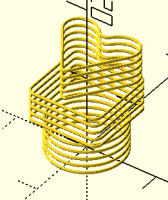
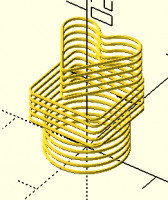
does this come close to what you are thinking?[image: Screenshot 2022-02-12
at 10.51.29 PM.png]

On Sat, 12 Feb 2022 at 08:55, jon jon@jonbondy.com wrote:

Adrian:

Thank you!

Imagine I am creating a series of cookies.  Some are of Santa. Some are
of reindeer.  Some are Christmas tree ornaments. So there are three
different cookie generators, one for Santas, one for reindeer, and one
for ornaments.  Each generator creates a series of sizes, so each
generator might create 5 different objects, for a total of 15.

How would I do this?  Create each object in each generator and stuff the
15 into some data structure, and then pass the data structure into the
recursive routine?  The part of your suggestion that has me stuck is the
"it does one object at a time".  They are not all generated from one
piece of code, but from three, and I don't see how to store them for
processing by the recursion.

On 2/11/2022 9:30 PM, Adrian Mariano wrote:

I don't know if it's "nice", but it OpenSCAD the way to do that is
with recursion.  You write a function to generate the positions of all
the objects.  It does one object at a time and the state information
(x, y, which objects are left, and the list of positions determined)
is passed to a recursive call.  When there are no objects left you
return the list of positions.

On Fri, Feb 11, 2022 at 9:23 PM jon jon@jonbondy.com wrote:

I am generating perhaps 100 2D objects with varying sizes and shapes
(they are not all the same width as depth).  I want to place the objects
in a fairly tightly packed array for printing, with perhaps 2 mm between
each object.  I know the 2D bounding box of each item.  In a "regular"
programming language I would have X and Y variables which I incremented
as I added each object.  Is there a nice way to do this in OpenSCAD?


OpenSCAD mailing list
To unsubscribe send an email to discuss-leave@lists.openscad.org


OpenSCAD mailing list
To unsubscribe send an email to discuss-leave@lists.openscad.org


OpenSCAD mailing list
To unsubscribe send an email to discuss-leave@lists.openscad.org

does this come close to what you are thinking?[image: Screenshot 2022-02-12 at 10.51.29 PM.png] On Sat, 12 Feb 2022 at 08:55, jon <jon@jonbondy.com> wrote: > Adrian: > > Thank you! > > Imagine I am creating a series of cookies. Some are of Santa. Some are > of reindeer. Some are Christmas tree ornaments. So there are three > different cookie generators, one for Santas, one for reindeer, and one > for ornaments. Each generator creates a series of sizes, so each > generator might create 5 different objects, for a total of 15. > > How would I do this? Create each object in each generator and stuff the > 15 into some data structure, and then pass the data structure into the > recursive routine? The part of your suggestion that has me stuck is the > "it does one object at a time". They are not all generated from one > piece of code, but from three, and I don't see how to store them for > processing by the recursion. > > > On 2/11/2022 9:30 PM, Adrian Mariano wrote: > > I don't know if it's "nice", but it OpenSCAD the way to do that is > > with recursion. You write a function to generate the positions of all > > the objects. It does one object at a time and the state information > > (x, y, which objects are left, and the list of positions determined) > > is passed to a recursive call. When there are no objects left you > > return the list of positions. > > > > On Fri, Feb 11, 2022 at 9:23 PM jon <jon@jonbondy.com> wrote: > >> I am generating perhaps 100 2D objects with varying sizes and shapes > >> (they are not all the same width as depth). I want to place the objects > >> in a fairly tightly packed array for printing, with perhaps 2 mm between > >> each object. I know the 2D bounding box of each item. In a "regular" > >> programming language I would have X and Y variables which I incremented > >> as I added each object. Is there a nice way to do this in OpenSCAD? > >> _______________________________________________ > >> OpenSCAD mailing list > >> To unsubscribe send an email to discuss-leave@lists.openscad.org > > _______________________________________________ > > OpenSCAD mailing list > > To unsubscribe send an email to discuss-leave@lists.openscad.org > _______________________________________________ > OpenSCAD mailing list > To unsubscribe send an email to discuss-leave@lists.openscad.org >
J
jon
Sat, Feb 12, 2022 6:29 PM

Thanks, Sanjeev, but no.  It's more like putting a bunch of cookies of
various sizes on a cookie sheet.

Adrian pointed out that if I can create each cookie as a separate STL,
then I can use my slicer to solve the problem, so I am automating the
STL generation using scripts at the OS level.

Jon

On 2/12/2022 12:23 PM, Sanjeev Prabhakar wrote:

does this come close to what you are thinking?Screenshot 2022-02-12 at
10.51.29 PM.png

On Sat, 12 Feb 2022 at 08:55, jon jon@jonbondy.com wrote:

 Adrian:

 Thank you!

 Imagine I am creating a series of cookies.  Some are of Santa.
 Some are
 of reindeer.  Some are Christmas tree ornaments. So there are three
 different cookie generators, one for Santas, one for reindeer, and
 one
 for ornaments.  Each generator creates a series of sizes, so each
 generator might create 5 different objects, for a total of 15.

 How would I do this?  Create each object in each generator and
 stuff the
 15 into some data structure, and then pass the data structure into
 the
 recursive routine?  The part of your suggestion that has me stuck
 is the
 "it does one object at a time".  They are not all generated from one
 piece of code, but from three, and I don't see how to store them for
 processing by the recursion.


 On 2/11/2022 9:30 PM, Adrian Mariano wrote:

I don't know if it's "nice", but it OpenSCAD the way to do that is
with recursion.  You write a function to generate the positions

 of all

the objects.  It does one object at a time and the state information
(x, y, which objects are left, and the list of positions determined)
is passed to a recursive call.   When there are no objects left you
return the list of positions.

On Fri, Feb 11, 2022 at 9:23 PM jon jon@jonbondy.com wrote:

I am generating perhaps 100 2D objects with varying sizes and

 shapes

(they are not all the same width as depth).  I want to place

 the objects

in a fairly tightly packed array for printing, with perhaps 2

 mm between

each object.  I know the 2D bounding box of each item.  In a

 "regular"

programming language I would have X and Y variables which I

 incremented

as I added each object.  Is there a nice way to do this in

 OpenSCAD?

OpenSCAD mailing list
To unsubscribe send an email to discuss-leave@lists.openscad.org


OpenSCAD mailing list
To unsubscribe send an email to discuss-leave@lists.openscad.org

 _______________________________________________
 OpenSCAD mailing list
 To unsubscribe send an email to discuss-leave@lists.openscad.org

OpenSCAD mailing list
To unsubscribe send an email todiscuss-leave@lists.openscad.org
Thanks, Sanjeev, but no.  It's more like putting a bunch of cookies of various sizes on a cookie sheet. Adrian pointed out that if I can create each cookie as a separate STL, then I can use my slicer to solve the problem, so I am automating the STL generation using scripts at the OS level. Jon On 2/12/2022 12:23 PM, Sanjeev Prabhakar wrote: > does this come close to what you are thinking?Screenshot 2022-02-12 at > 10.51.29 PM.png > > On Sat, 12 Feb 2022 at 08:55, jon <jon@jonbondy.com> wrote: > > Adrian: > > Thank you! > > Imagine I am creating a series of cookies.  Some are of Santa. > Some are > of reindeer.  Some are Christmas tree ornaments. So there are three > different cookie generators, one for Santas, one for reindeer, and > one > for ornaments.  Each generator creates a series of sizes, so each > generator might create 5 different objects, for a total of 15. > > How would I do this?  Create each object in each generator and > stuff the > 15 into some data structure, and then pass the data structure into > the > recursive routine?  The part of your suggestion that has me stuck > is the > "it does one object at a time".  They are not all generated from one > piece of code, but from three, and I don't see how to store them for > processing by the recursion. > > > On 2/11/2022 9:30 PM, Adrian Mariano wrote: > > I don't know if it's "nice", but it OpenSCAD the way to do that is > > with recursion.  You write a function to generate the positions > of all > > the objects.  It does one object at a time and the state information > > (x, y, which objects are left, and the list of positions determined) > > is passed to a recursive call.   When there are no objects left you > > return the list of positions. > > > > On Fri, Feb 11, 2022 at 9:23 PM jon <jon@jonbondy.com> wrote: > >> I am generating perhaps 100 2D objects with varying sizes and > shapes > >> (they are not all the same width as depth).  I want to place > the objects > >> in a fairly tightly packed array for printing, with perhaps 2 > mm between > >> each object.  I know the 2D bounding box of each item.  In a > "regular" > >> programming language I would have X and Y variables which I > incremented > >> as I added each object.  Is there a nice way to do this in > OpenSCAD? > >> _______________________________________________ > >> OpenSCAD mailing list > >> To unsubscribe send an email to discuss-leave@lists.openscad.org > > _______________________________________________ > > OpenSCAD mailing list > > To unsubscribe send an email to discuss-leave@lists.openscad.org > _______________________________________________ > OpenSCAD mailing list > To unsubscribe send an email to discuss-leave@lists.openscad.org > > > _______________________________________________ > OpenSCAD mailing list > To unsubscribe send an email todiscuss-leave@lists.openscad.org
JB
Jordan Brown
Sat, Feb 12, 2022 8:36 PM

Here's an implementation.  Given a list of sizes, returns a list of
positions.  Note that the algorithm is quite stupid; it lines objects up
across a row, and when it runs out of space it moves up to the next
row.  There is no attempt to reorganize pieces so that they will fit
better, use "wasted" space when a tall object is next to a short object,
et cetera.  Doing something smarter is ... hard.  See
https://en.wikipedia.org/wiki/Packing_problems .

// Given an array of [x,y] sizes, the maximum dimensions of the array,
// and the gap (in both X and Y), return a list of positions.
// pos, height, and i are used for recursion; the original caller does
// not supply them.
// pos is the proposed position of the next object.
// height is the maximum height of objects on the current row.
// i is index of the next item to process.
function pack(sizes, dims, gap, pos=[0,0], height=0, i=0) =
    i >= len(sizes)
    ?
        // Done!
        []
    :
        // Make sure the object even has a chance of fitting.
        assert(sizes[i].x <= dims.x, str("item ", i, " is too wide"))
        assert(sizes[i].y <= dims.y, str("item ", i, " is too tall"))
        // Make sure the object fits in the vertical space remaining.
        assert(pos.y + sizes[i].y <= dims.y, str("item ", i, " does not fit"))
        // Try to position the object on this row.
        let (right = pos.x + sizes[i].x)
        right <= dims.x
        ?
            // It fits.  The result is this position, plus the
            // results for the rest of the objects, starting to the
            // right of this one.  Keep track of the tallest object
            // on this row.
            concat([pos],
                pack(sizes, dims, gap,
                    pos = [right+gap, pos.y],
                    height = max(height, sizes[i].y),
                    i = i + 1))
        :
            // It doesn't fit.  Step up to the next row,
            // and try again.
            let (top = pos.y + height)
            pack(sizes, dims, gap,
                pos = [0, top + gap],
                height=0,
                i = i);

Here's a test program that exercises it.  Note that it deliberately
doesn't always succeed - it tries to pack 36 objects that are one to
five units in each dimension, with a gap of 1, into a 30x30 space.  If
everything is the maximum size, there's only enough space for 25 objects.

Note that in OpenSCAD assignments are done before module invocations, so
an ordinary echo executes after the call to pack(), and so if the call
to pack fails the echo wouldn't happen.  Using the expression echo gets
the echo of "sizes" to happen before the call to pack.

function irand (min, max) = floor(rands(min, max+1, 1)[0]);

sizes = [ for(i=[0:35]) [irand(1,5), irand(1,5)] ];

junk = echo(sizes=sizes) 0;
pos = pack(sizes, [30,30], 1);
assert(len(pos) == len(sizes));
echo(pos=pos);
for (i = [0:len(sizes)-1]) {
    translate(pos[i]) square(sizes[i]);
}

Note that for random objects like this, the result is only a bit better
than using a straightforward grid at the maximum size, because each row
is probably the maximum size.  For non-random objects, grouping
similar-height objects together will improve the packing density.

One more or less simple optimization would be to sort the objects by
their height.
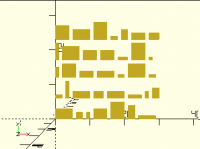
Here's an implementation.  Given a list of sizes, returns a list of positions.  Note that the algorithm is quite stupid; it lines objects up across a row, and when it runs out of space it moves up to the next row.  There is no attempt to reorganize pieces so that they will fit better, use "wasted" space when a tall object is next to a short object, et cetera.  Doing something smarter is ... hard.  See https://en.wikipedia.org/wiki/Packing_problems . // Given an array of [x,y] sizes, the maximum dimensions of the array, // and the gap (in both X and Y), return a list of positions. // pos, height, and i are used for recursion; the original caller does // not supply them. // pos is the proposed position of the next object. // height is the maximum height of objects on the current row. // i is index of the next item to process. function pack(sizes, dims, gap, pos=[0,0], height=0, i=0) = i >= len(sizes) ? // Done! [] : // Make sure the object even has a chance of fitting. assert(sizes[i].x <= dims.x, str("item ", i, " is too wide")) assert(sizes[i].y <= dims.y, str("item ", i, " is too tall")) // Make sure the object fits in the vertical space remaining. assert(pos.y + sizes[i].y <= dims.y, str("item ", i, " does not fit")) // Try to position the object on this row. let (right = pos.x + sizes[i].x) right <= dims.x ? // It fits. The result is this position, plus the // results for the rest of the objects, starting to the // right of this one. Keep track of the tallest object // on this row. concat([pos], pack(sizes, dims, gap, pos = [right+gap, pos.y], height = max(height, sizes[i].y), i = i + 1)) : // It doesn't fit. Step up to the next row, // and try again. let (top = pos.y + height) pack(sizes, dims, gap, pos = [0, top + gap], height=0, i = i); Here's a test program that exercises it.  Note that it deliberately doesn't always succeed - it tries to pack 36 objects that are one to five units in each dimension, with a gap of 1, into a 30x30 space.  If everything is the maximum size, there's only enough space for 25 objects. Note that in OpenSCAD assignments are done before module invocations, so an ordinary echo executes after the call to pack(), and so if the call to pack fails the echo wouldn't happen.  Using the expression echo gets the echo of "sizes" to happen before the call to pack. function irand (min, max) = floor(rands(min, max+1, 1)[0]); sizes = [ for(i=[0:35]) [irand(1,5), irand(1,5)] ]; junk = echo(sizes=sizes) 0; pos = pack(sizes, [30,30], 1); assert(len(pos) == len(sizes)); echo(pos=pos); for (i = [0:len(sizes)-1]) { translate(pos[i]) square(sizes[i]); } Note that for random objects like this, the result is only a bit better than using a straightforward grid at the maximum size, because each row is probably the maximum size.  For non-random objects, grouping similar-height objects together will improve the packing density. One more or less simple optimization would be to sort the objects by their height.
JB
Jordan Brown
Sat, Feb 12, 2022 11:40 PM

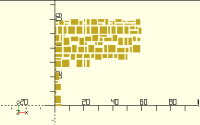
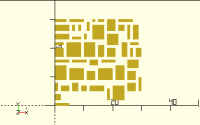
Just for fun, and to see if I could do it, and to see how well it works,
I put together something that does 2-D fitting.  Given an area, it finds
a place for the first block.  (The origin, duh.)  Then given the
remaining area, it finds a place for the next block.  And so on.

It gets appreciably better density than the row-based variant - it will
pretty reliably pack 50 of those one-to-five-unit objects into a 30x30
area with a 1-unit gap, where the previous one was only good for about
36.  Behavior is random, because the list of blocks to be placed is
random.  Of course, for any given list the result is the same.  Note
again that if all of the blocks are the maximum size of 5x5, a 30x30
area can only hold 25.

It uses a "first fit" scheme; a "best fit" scheme might yield better
results.

For 50 entries, it executes in 2-3 seconds on my machine.  Its free
lists can get quite large - for 50 objects, typical is around 5-6
thousand entries.  One could imagine deduplicating the free lists; that
might improve performance.  Also, I didn't try to optimize for tail
recursion.

// Given the size of a block, and a list of blocks
// of free space, find the first free block that will hold
// the block, and return its position.
function find(size, free) =
    let(matches = [
        for (f = free)
            let (botleft = f[0])
            let (topright = f[1])
            let (dim = topright - botleft)
            if (size.x <= dim.x && size.y <= dim.y)
                botleft
    ])
    assert(len(matches) > 0, str("item ", size, " does not fit"))
    // Note that we could do a "best fit" here, rather
    // than just returning the first match.
    matches[0];

// Given a [[x1,y1],[x2,y2]] block, and a list of such blocks,
// return a list of blocks with the given block removed.
// Note that the return list usually includes overlapping blocks,
// because we don't know which orientation we'll need free space
// in.
//
// That is, if we are removing the X from
//     ABC
//     DXF
//     GHI
// the result list will be GHI, ABC, ADG, and CFI.
//
// Similarly, if we are removing the 4-X block from
//      AB
//     XXD
//     XX
// the result will be AB, BD.
//
// Note that a free block that is completely enclosed by the
// block being removed, is totally removed from the list.
function remove(block, free) = 
    let (botleft = block[0])
    let (bot = botleft.y)
    let (left = botleft.x)
    let (topright = block[1])
    let (top = topright.y)
    let (right = topright.x)
    [
        each for (f = free)
            let (fbl = f[0])
            let (fb = fbl.y)
            let (fl = fbl.x)
            let (ftr = f[1])
            let (ft = ftr.y)
            let (fr = ftr.x)
            if (left >= fr
                || right <= fl
                || bot >= ft
                || top <= fb)
                    // Doesn't overlap.
                    [ f ]
            else [
                // Overlaps.
                // Emit the remaining area above, below,
                // left, and right of the block being removed,
                // if any.
                if (ft > top) [ [ fl, top ], [ fr, ft ] ],
                if (fb < bot) [ [ fl, fb ], [ fr, bot ] ],
                if (fl < left) [ [ fl, fb ], [ left, ft ] ],
                if (fr > right) [ [ right, fb ], [ fr, ft ] ],
            ]
    ];

// Given a list of block sizes and the dimensions of an area to
// fit them into, return a list of positions.
// free and i are used internally for recursion.
// dims is really a short-cut for supplying a free list consisting
// of a single block at the origin.
function fit(sizes, dims, free, i=0) =
    let (free = is_undef(free) ? [[ [0,0], dims ]] : free)
    // This runs slow enough that it's interesting to watch
    // progress.
    echo(i=i, free=len(free))
    i >= len(sizes)
    ?
        // Done.
        []
    :
        // Place a block, and recurse with the remaining
        // blocks and the remaining free space.
        let (b = sizes[i])
        let(found = find(b, free))
        concat(
            [ found ],
            fit(
                sizes = sizes,
                dims = undef,
                free = remove([found, found+b], free),
                i = i+1
            )
        );

And here's the test program that exercises it...

// Note that the fit functions don't know anything about gaps.
// We simulate them  here by putting a gap to the top and right of
// each block, and making the area be one gap larger than it needs
// to be.
function irand (min, max) = floor(rands(min, max+1, 1)[0]);

gap = 1;
area = [30,30];
sizes = [ for(i=[1:50]) [irand(1,5), irand(1,5)] ];
junk = echo(sizes=sizes) 0;
sizes_with_gaps = [ for (b = sizes) b + [gap,gap] ];
pos = fit(sizes_with_gaps, area + [gap,gap]);
assert(len(sizes) == len(pos));
echo(pos=pos);
for (i = [0:len(sizes)-1]) {
    translate(pos[i])
        square(sizes[i]);
}

Fitting 100 objects into a 60x60 area got really slow; at the end it was
taking several seconds per block and had nearly 250k entries on its free
list.  But it did complete, in 2m31s:

Why it clusters that way is left as an exercise for the reader.
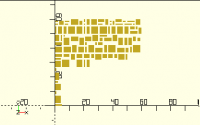
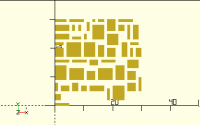
Just for fun, and to see if I could do it, and to see how well it works, I put together something that does 2-D fitting.  Given an area, it finds a place for the first block.  (The origin, duh.)  Then given the remaining area, it finds a place for the next block.  And so on. It gets appreciably better density than the row-based variant - it will pretty reliably pack 50 of those one-to-five-unit objects into a 30x30 area with a 1-unit gap, where the previous one was only good for about 36.  Behavior is random, because the list of blocks to be placed is random.  Of course, for any given list the result is the same.  Note again that if all of the blocks are the maximum size of 5x5, a 30x30 area can only hold 25. It uses a "first fit" scheme; a "best fit" scheme might yield better results. For 50 entries, it executes in 2-3 seconds on my machine.  Its free lists can get quite large - for 50 objects, typical is around 5-6 thousand entries.  One could imagine deduplicating the free lists; that might improve performance.  Also, I didn't try to optimize for tail recursion. // Given the size of a block, and a list of blocks // of free space, find the first free block that will hold // the block, and return its position. function find(size, free) = let(matches = [ for (f = free) let (botleft = f[0]) let (topright = f[1]) let (dim = topright - botleft) if (size.x <= dim.x && size.y <= dim.y) botleft ]) assert(len(matches) > 0, str("item ", size, " does not fit")) // Note that we could do a "best fit" here, rather // than just returning the first match. matches[0]; // Given a [[x1,y1],[x2,y2]] block, and a list of such blocks, // return a list of blocks with the given block removed. // Note that the return list usually includes overlapping blocks, // because we don't know which orientation we'll need free space // in. // // That is, if we are removing the X from // ABC // DXF // GHI // the result list will be GHI, ABC, ADG, and CFI. // // Similarly, if we are removing the 4-X block from // AB // XXD // XX // the result will be AB, BD. // // Note that a free block that is completely enclosed by the // block being removed, is totally removed from the list. function remove(block, free) = let (botleft = block[0]) let (bot = botleft.y) let (left = botleft.x) let (topright = block[1]) let (top = topright.y) let (right = topright.x) [ each for (f = free) let (fbl = f[0]) let (fb = fbl.y) let (fl = fbl.x) let (ftr = f[1]) let (ft = ftr.y) let (fr = ftr.x) if (left >= fr || right <= fl || bot >= ft || top <= fb) // Doesn't overlap. [ f ] else [ // Overlaps. // Emit the remaining area above, below, // left, and right of the block being removed, // if any. if (ft > top) [ [ fl, top ], [ fr, ft ] ], if (fb < bot) [ [ fl, fb ], [ fr, bot ] ], if (fl < left) [ [ fl, fb ], [ left, ft ] ], if (fr > right) [ [ right, fb ], [ fr, ft ] ], ] ]; // Given a list of block sizes and the dimensions of an area to // fit them into, return a list of positions. // free and i are used internally for recursion. // dims is really a short-cut for supplying a free list consisting // of a single block at the origin. function fit(sizes, dims, free, i=0) = let (free = is_undef(free) ? [[ [0,0], dims ]] : free) // This runs slow enough that it's interesting to watch // progress. echo(i=i, free=len(free)) i >= len(sizes) ? // Done. [] : // Place a block, and recurse with the remaining // blocks and the remaining free space. let (b = sizes[i]) let(found = find(b, free)) concat( [ found ], fit( sizes = sizes, dims = undef, free = remove([found, found+b], free), i = i+1 ) ); And here's the test program that exercises it... // Note that the fit functions don't know anything about gaps. // We simulate them here by putting a gap to the top and right of // each block, and making the area be one gap larger than it needs // to be. function irand (min, max) = floor(rands(min, max+1, 1)[0]); gap = 1; area = [30,30]; sizes = [ for(i=[1:50]) [irand(1,5), irand(1,5)] ]; junk = echo(sizes=sizes) 0; sizes_with_gaps = [ for (b = sizes) b + [gap,gap] ]; pos = fit(sizes_with_gaps, area + [gap,gap]); assert(len(sizes) == len(pos)); echo(pos=pos); for (i = [0:len(sizes)-1]) { translate(pos[i]) square(sizes[i]); } Fitting 100 objects into a 60x60 area got really slow; at the end it was taking several seconds per block and had nearly 250k entries on its free list.  But it did complete, in 2m31s: Why it clusters that way is left as an exercise for the reader.
FH
Father Horton
Sat, Feb 12, 2022 11:49 PM

Interesting. If you randomly permute the list of objects, how widely spread
are the results? If there’s a considerable range, and if you need to
minimize the total area, that could be something to try.

Interesting. If you randomly permute the list of objects, how widely spread are the results? If there’s a considerable range, and if you need to minimize the total area, that could be something to try.
J
jon
Sun, Feb 13, 2022 12:08 AM

Wow.  I can't even begin to comprehend what you did.  But I am
grateful!   I hope this helps others going forward

Jon

On 2/12/2022 6:40 PM, Jordan Brown wrote:

Just for fun, and to see if I could do it, and to see how well it
works, I put together something that does 2-D fitting.  Given an area,
it finds a place for the first block.  (The origin, duh.) Then given
the remaining area, it finds a place for the next block.  And so on.

It gets appreciably better density than the row-based variant - it
will pretty reliably pack 50 of those one-to-five-unit objects into a
30x30 area with a 1-unit gap, where the previous one was only good for
about 36.  Behavior is random, because the list of blocks to be placed
is random.  Of course, for any given list the result is the same. 
Note again that if all of the blocks are the maximum size of 5x5, a
30x30 area can only hold 25.

It uses a "first fit" scheme; a "best fit" scheme might yield better
results.

For 50 entries, it executes in 2-3 seconds on my machine.  Its free
lists can get quite large - for 50 objects, typical is around 5-6
thousand entries.  One could imagine deduplicating the free lists;
that might improve performance.  Also, I didn't try to optimize for
tail recursion.

 // Given the size of a block, and a list of blocks
 // of free space, find the first free block that will hold
 // the block, and return its position.
 function find(size, free) =
      let(matches = [
          for (f = free)
              let (botleft = f[0])
              let (topright = f[1])
              let (dim = topright - botleft)
              if (size.x <= dim.x && size.y <= dim.y)
                  botleft
      ])
      assert(len(matches) > 0, str("item ", size, " does not fit"))
      // Note that we could do a "best fit" here, rather
      // than just returning the first match.
      matches[0];

 // Given a [[x1,y1],[x2,y2]] block, and a list of such blocks,
 // return a list of blocks with the given block removed.
 // Note that the return list usually includes overlapping blocks,
 // because we don't know which orientation we'll need free space
 // in.
 //
 // That is, if we are removing the X from
 //     ABC
 //     DXF
 //     GHI
 // the result list will be GHI, ABC, ADG, and CFI.
 //
 // Similarly, if we are removing the 4-X block from
 //      AB
 //     XXD
 //     XX
 // the result will be AB, BD.
 //
 // Note that a free block that is completely enclosed by the
 // block being removed, is totally removed from the list.
 function remove(block, free) =
      let (botleft = block[0])
      let (bot = botleft.y)
      let (left = botleft.x)
      let (topright = block[1])
      let (top = topright.y)
      let (right = topright.x)
      [
          each for (f = free)
              let (fbl = f[0])
              let (fb = fbl.y)
              let (fl = fbl.x)
              let (ftr = f[1])
              let (ft = ftr.y)
              let (fr = ftr.x)
              if (left >= fr
                  || right <= fl
                  || bot >= ft
                  || top <= fb)
                      // Doesn't overlap.
                      [ f ]
              else [
                  // Overlaps.
                  // Emit the remaining area above, below,
                  // left, and right of the block being removed,
                  // if any.
                  if (ft > top) [ [ fl, top ], [ fr, ft ] ],
                  if (fb < bot) [ [ fl, fb ], [ fr, bot ] ],
                  if (fl < left) [ [ fl, fb ], [ left, ft ] ],
                  if (fr > right) [ [ right, fb ], [ fr, ft ] ],
              ]
      ];

 // Given a list of block sizes and the dimensions of an area to
 // fit them into, return a list of positions.
 // free and i are used internally for recursion.
 // dims is really a short-cut for supplying a free list consisting
 // of a single block at the origin.
 function fit(sizes, dims, free, i=0) =
      let (free = is_undef(free) ? [[ [0,0], dims ]] : free)
      // This runs slow enough that it's interesting to watch
      // progress.
      echo(i=i, free=len(free))
      i >= len(sizes)
      ?
          // Done.
          []
      :
          // Place a block, and recurse with the remaining
          // blocks and the remaining free space.
          let (b = sizes[i])
          let(found = find(b, free))
          concat(
              [ found ],
              fit(
                  sizes = sizes,
                  dims = undef,
                  free = remove([found, found+b], free),
                  i = i+1
              )
          );

And here's the test program that exercises it...

 // Note that the fit functions don't know anything about gaps.
 // We simulate them  here by putting a gap to the top and right of
 // each block, and making the area be one gap larger than it needs
 // to be.
 function irand (min, max) = floor(rands(min, max+1, 1)[0]);

 gap = 1;
 area = [30,30];
 sizes = [ for(i=[1:50]) [irand(1,5), irand(1,5)] ];
 junk = echo(sizes=sizes) 0;
 sizes_with_gaps = [ for (b = sizes) b + [gap,gap] ];
 pos = fit(sizes_with_gaps, area + [gap,gap]);
 assert(len(sizes) == len(pos));
 echo(pos=pos);
 for (i = [0:len(sizes)-1]) {
      translate(pos[i])
          square(sizes[i]);
 }

Fitting 100 objects into a 60x60 area got really slow; at the end it
was taking several seconds per block and had nearly 250k entries on
its free list.  But it did complete, in 2m31s:

Why it clusters that way is left as an exercise for the reader.

Wow.  I can't even begin to comprehend what you did.  But I am grateful!   I hope this helps others going forward Jon On 2/12/2022 6:40 PM, Jordan Brown wrote: > Just for fun, and to see if I could do it, and to see how well it > works, I put together something that does 2-D fitting.  Given an area, > it finds a place for the first block.  (The origin, duh.) Then given > the remaining area, it finds a place for the next block.  And so on. > > It gets appreciably better density than the row-based variant - it > will pretty reliably pack 50 of those one-to-five-unit objects into a > 30x30 area with a 1-unit gap, where the previous one was only good for > about 36.  Behavior is random, because the list of blocks to be placed > is random.  Of course, for any given list the result is the same.  > Note again that if all of the blocks are the maximum size of 5x5, a > 30x30 area can only hold 25. > > It uses a "first fit" scheme; a "best fit" scheme might yield better > results. > > For 50 entries, it executes in 2-3 seconds on my machine.  Its free > lists can get quite large - for 50 objects, typical is around 5-6 > thousand entries.  One could imagine deduplicating the free lists; > that might improve performance.  Also, I didn't try to optimize for > tail recursion. > > // Given the size of a block, and a list of blocks > // of free space, find the first free block that will hold > // the block, and return its position. > function find(size, free) = > let(matches = [ > for (f = free) > let (botleft = f[0]) > let (topright = f[1]) > let (dim = topright - botleft) > if (size.x <= dim.x && size.y <= dim.y) > botleft > ]) > assert(len(matches) > 0, str("item ", size, " does not fit")) > // Note that we could do a "best fit" here, rather > // than just returning the first match. > matches[0]; > > // Given a [[x1,y1],[x2,y2]] block, and a list of such blocks, > // return a list of blocks with the given block removed. > // Note that the return list usually includes overlapping blocks, > // because we don't know which orientation we'll need free space > // in. > // > // That is, if we are removing the X from > // ABC > // DXF > // GHI > // the result list will be GHI, ABC, ADG, and CFI. > // > // Similarly, if we are removing the 4-X block from > // AB > // XXD > // XX > // the result will be AB, BD. > // > // Note that a free block that is completely enclosed by the > // block being removed, is totally removed from the list. > function remove(block, free) = > let (botleft = block[0]) > let (bot = botleft.y) > let (left = botleft.x) > let (topright = block[1]) > let (top = topright.y) > let (right = topright.x) > [ > each for (f = free) > let (fbl = f[0]) > let (fb = fbl.y) > let (fl = fbl.x) > let (ftr = f[1]) > let (ft = ftr.y) > let (fr = ftr.x) > if (left >= fr > || right <= fl > || bot >= ft > || top <= fb) > // Doesn't overlap. > [ f ] > else [ > // Overlaps. > // Emit the remaining area above, below, > // left, and right of the block being removed, > // if any. > if (ft > top) [ [ fl, top ], [ fr, ft ] ], > if (fb < bot) [ [ fl, fb ], [ fr, bot ] ], > if (fl < left) [ [ fl, fb ], [ left, ft ] ], > if (fr > right) [ [ right, fb ], [ fr, ft ] ], > ] > ]; > > // Given a list of block sizes and the dimensions of an area to > // fit them into, return a list of positions. > // free and i are used internally for recursion. > // dims is really a short-cut for supplying a free list consisting > // of a single block at the origin. > function fit(sizes, dims, free, i=0) = > let (free = is_undef(free) ? [[ [0,0], dims ]] : free) > // This runs slow enough that it's interesting to watch > // progress. > echo(i=i, free=len(free)) > i >= len(sizes) > ? > // Done. > [] > : > // Place a block, and recurse with the remaining > // blocks and the remaining free space. > let (b = sizes[i]) > let(found = find(b, free)) > concat( > [ found ], > fit( > sizes = sizes, > dims = undef, > free = remove([found, found+b], free), > i = i+1 > ) > ); > > And here's the test program that exercises it... > > // Note that the fit functions don't know anything about gaps. > // We simulate them here by putting a gap to the top and right of > // each block, and making the area be one gap larger than it needs > // to be. > function irand (min, max) = floor(rands(min, max+1, 1)[0]); > > gap = 1; > area = [30,30]; > sizes = [ for(i=[1:50]) [irand(1,5), irand(1,5)] ]; > junk = echo(sizes=sizes) 0; > sizes_with_gaps = [ for (b = sizes) b + [gap,gap] ]; > pos = fit(sizes_with_gaps, area + [gap,gap]); > assert(len(sizes) == len(pos)); > echo(pos=pos); > for (i = [0:len(sizes)-1]) { > translate(pos[i]) > square(sizes[i]); > } > > > > Fitting 100 objects into a 60x60 area got really slow; at the end it > was taking several seconds per block and had nearly 250k entries on > its free list.  But it did complete, in 2m31s: > > Why it clusters that way is left as an exercise for the reader. > >