

Getting more information

I'm still trying to debug my own code but am frustrated in that I can't see
where the problem exists. I get some errors and other messages from
OpenScad but unfortunately they don't point to what it was in my code that
triggered it:
ERROR: CGAL error in CGAL_Nef_polyhedron3(): CGAL ERROR: assertion
violation! Expr: e_below != SHalfedge_handle() File:
/opt/mxe/usr/x86_64-w64-mingw32.static.posix/include/CGAL/Nef_3/SNC_FM_decorator.h
Line: 426
Likewise, I sometimes get this warning:
DEPRECATED: Using ranges of the form [begin:end] with begin value greater
than the end value is deprecated.
But I can't see any loop where the starting value is bigger than the end
value.
Is there a way that I can get OpenSCAD to indicate where in my code is
triggering these problems?

DanS wrote
I'm still trying to debug my own code but am frustrated in that I can't
see
where the problem exists. I get some errors and other messages from
OpenScad but unfortunately they don't point to what it was in my code that
triggered it:
ERROR: CGAL error in CGAL_Nef_polyhedron3(): CGAL ERROR: assertion
violation! Expr: e_below != SHalfedge_handle() File:
/opt/mxe/usr/x86_64-w64-mingw32.static.posix/include/CGAL/Nef_3/SNC_FM_decorator.h
Line: 426
I don't recognize this error specifically, but typically if you get errors
relating to polyhedra it means you have constructed an invalid polyhedron
with the polyhedron module. You can select View->Thrown Together in preview
which will show reversed faces. But otherwise you just have to work through
your construction.
Likewise, I sometimes get this warning:
DEPRECATED: Using ranges of the form [begin:end] with begin value greater
than the end value is deprecated.
Yeah, this one is extremely annoying. There appears to be no way to get
OpenSCAD to give you more information about this. It can be anywhere in
your code, or anything that you include. It could be a degenerate case, in
which case you can solve the problem by replacing every occurrence of [a:b]
in your code with [a:1:b]. But if it's a mistake in your code, that will
just cause the loop to not run---it won't tell you where the problem is.
--
Sent from: http://forum.openscad.org/
Thanks for the tips!
I'm not sure I understand "It could be a degenerate case, in which case you
can solve the problem by replacing every occurrence of [a:b] in your code
with [a:1:b]"
I thought the way loops worked in openscad was [start:increment:end] or if
two arguments were used they were assumed to be only start and end and
increment was assumed to be 1.
I will try your suggestion but don't understand why it would sometimes be a
problem and sometimes not. I'd like to understand it since it would give
me a better picture how to use OpenSCAD. When you say "degenerate" do you
mean in the case start = end; or do you mean the interpreter sometimes
screws up and interprets two arguments as [start:increment] and gives end
some weird garbage value?
On Thu, Jul 4, 2019 at 11:03 AM adrianv avm4@cornell.edu wrote:
DanS wrote
I'm still trying to debug my own code but am frustrated in that I can't
see
where the problem exists. I get some errors and other messages from
OpenScad but unfortunately they don't point to what it was in my code
that
triggered it:
ERROR: CGAL error in CGAL_Nef_polyhedron3(): CGAL ERROR: assertion
violation! Expr: e_below != SHalfedge_handle() File:
/opt/mxe/usr/x86_64-w64-mingw32.static.posix/include/CGAL/Nef_3/SNC_FM_decorator.h
Line: 426
I don't recognize this error specifically, but typically if you get errors
relating to polyhedra it means you have constructed an invalid polyhedron
with the polyhedron module. You can select View->Thrown Together in
preview
which will show reversed faces. But otherwise you just have to work
through
your construction.
Likewise, I sometimes get this warning:
DEPRECATED: Using ranges of the form [begin:end] with begin value greater
than the end value is deprecated.
Yeah, this one is extremely annoying. There appears to be no way to get
OpenSCAD to give you more information about this. It can be anywhere in
your code, or anything that you include. It could be a degenerate case, in
which case you can solve the problem by replacing every occurrence of [a:b]
in your code with [a:1:b]. But if it's a mistake in your code, that will
just cause the loop to not run---it won't tell you where the problem is.
--
Sent from: http://forum.openscad.org/
OpenSCAD mailing list
Discuss@lists.openscad.org
http://lists.openscad.org/mailman/listinfo/discuss_lists.openscad.org
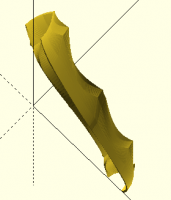
I'm not sure how to use View->Thrown Together properly
If I do render. I see this:
[image: image.png]
If right after that I go into View and select Thrown Together I don't see
anything in the console that indicates work is being done, my object
entirely disappears. I was expecting that if it will take some time it
might indicate it is calculating. Likewise, I thought the end result would
be the same drawing but with some facets in a different color (indicating
maybe missing / degenerate vertices caused things to be inside out). What
is the proper way to use View -> Throw Together
On Thu, Jul 4, 2019 at 11:03 AM adrianv avm4@cornell.edu wrote:
DanS wrote
I'm still trying to debug my own code but am frustrated in that I can't
see
where the problem exists. I get some errors and other messages from
OpenScad but unfortunately they don't point to what it was in my code
that
triggered it:
ERROR: CGAL error in CGAL_Nef_polyhedron3(): CGAL ERROR: assertion
violation! Expr: e_below != SHalfedge_handle() File:
/opt/mxe/usr/x86_64-w64-mingw32.static.posix/include/CGAL/Nef_3/SNC_FM_decorator.h
Line: 426
I don't recognize this error specifically, but typically if you get errors
relating to polyhedra it means you have constructed an invalid polyhedron
with the polyhedron module. You can select View->Thrown Together in
preview
which will show reversed faces. But otherwise you just have to work
through
your construction.
Likewise, I sometimes get this warning:
DEPRECATED: Using ranges of the form [begin:end] with begin value greater
than the end value is deprecated.
Yeah, this one is extremely annoying. There appears to be no way to get
OpenSCAD to give you more information about this. It can be anywhere in
your code, or anything that you include. It could be a degenerate case, in
which case you can solve the problem by replacing every occurrence of [a:b]
in your code with [a:1:b]. But if it's a mistake in your code, that will
just cause the loop to not run---it won't tell you where the problem is.
--
Sent from: http://forum.openscad.org/
OpenSCAD mailing list
Discuss@lists.openscad.org
http://lists.openscad.org/mailman/listinfo/discuss_lists.openscad.org
If you write [a:1:b] then this steps from a to be in increments of 1. If b<a
then you get zero steps and nothing happens. This is exactly what you
expect this syntax to do. It is always correct and it won't produce any
warnings. If you write general code (such as might be in a library) it may
encounter degenerate cases where a>b and you want the loop to do nothing.
If, on the other hand, you're coding up a specific model, you probably don't
want to write a loop that does nothing.
If you write [a:b] then it steps from min(a,b) to max(a,b) in steps of 1.
If a>b most likely you have a bug in your code. The latest version of
OpenSCAD warns about this but doesn't tell you where the problem is.
So by changing all occurrences of [a:b] to [a:1:b] you will make your code
behave in what is arguably the correct manner. But it doesn't mean you code
is actually correct. It depends on why you had a>b. Does that clear
things up?
DanS wrote
Thanks for the tips!
I'm not sure I understand "It could be a degenerate case, in which case
you
can solve the problem by replacing every occurrence of [a:b] in your code
with [a:1:b]"
I thought the way loops worked in openscad was [start:increment:end] or if
two arguments were used they were assumed to be only start and end and
increment was assumed to be 1.
I will try your suggestion but don't understand why it would sometimes be
a
problem and sometimes not. I'd like to understand it since it would give
me a better picture how to use OpenSCAD. When you say "degenerate" do you
mean in the case start = end; or do you mean the interpreter sometimes
screws up and interprets two arguments as [start:increment] and gives end
some weird garbage value?
On Thu, Jul 4, 2019 at 11:03 AM adrianv <
avm4@
> wrote:
DanS wrote
I'm still trying to debug my own code but am frustrated in that I can't
see
where the problem exists. I get some errors and other messages from
OpenScad but unfortunately they don't point to what it was in my code
that
triggered it:
ERROR: CGAL error in CGAL_Nef_polyhedron3(): CGAL ERROR: assertion
violation! Expr: e_below != SHalfedge_handle() File:
/opt/mxe/usr/x86_64-w64-mingw32.static.posix/include/CGAL/Nef_3/SNC_FM_decorator.h
Line: 426
I don't recognize this error specifically, but typically if you get
errors
relating to polyhedra it means you have constructed an invalid polyhedron
with the polyhedron module. You can select View->Thrown Together in
preview
which will show reversed faces. But otherwise you just have to work
through
your construction.
Likewise, I sometimes get this warning:
DEPRECATED: Using ranges of the form [begin:end] with begin value
greater
than the end value is deprecated.
Yeah, this one is extremely annoying. There appears to be no way to get
OpenSCAD to give you more information about this. It can be anywhere in
your code, or anything that you include. It could be a degenerate case,
in
which case you can solve the problem by replacing every occurrence of
[a:b]
in your code with [a:1:b]. But if it's a mistake in your code, that will
just cause the loop to not run---it won't tell you where the problem is.
--
Sent from: http://forum.openscad.org/
OpenSCAD mailing list
Discuss@.openscad
Discuss@.openscad
--
Sent from: http://forum.openscad.org/
The typical behavior when a polyhedron is invalid is that it works in preview
but fails in render. Use the "thrown together" option with preview, not
render. Faces that are incorrectly oriented will appear in purple.
There's an example here, along with other advice on debugging polyhedra:
https://en.wikibooks.org/wiki/OpenSCAD_User_Manual/The_OpenSCAD_Language#Debugging_polyhedra
DanS wrote
I'm not sure how to use View->Thrown Together properly
If I do render. I see this:
[image: image.png]
If right after that I go into View and select Thrown Together I don't see
anything in the console that indicates work is being done, my object
entirely disappears. I was expecting that if it will take some time it
might indicate it is calculating. Likewise, I thought the end result
would
be the same drawing but with some facets in a different color (indicating
maybe missing / degenerate vertices caused things to be inside out). What
is the proper way to use View -> Throw Together
On Thu, Jul 4, 2019 at 11:03 AM adrianv <
avm4@
> wrote:
DanS wrote
I'm still trying to debug my own code but am frustrated in that I can't
see
where the problem exists. I get some errors and other messages from
OpenScad but unfortunately they don't point to what it was in my code
that
triggered it:
ERROR: CGAL error in CGAL_Nef_polyhedron3(): CGAL ERROR: assertion
violation! Expr: e_below != SHalfedge_handle() File:
/opt/mxe/usr/x86_64-w64-mingw32.static.posix/include/CGAL/Nef_3/SNC_FM_decorator.h
Line: 426
I don't recognize this error specifically, but typically if you get
errors
relating to polyhedra it means you have constructed an invalid polyhedron
with the polyhedron module. You can select View->Thrown Together in
preview
which will show reversed faces. But otherwise you just have to work
through
your construction.
Likewise, I sometimes get this warning:
DEPRECATED: Using ranges of the form [begin:end] with begin value
greater
than the end value is deprecated.
Yeah, this one is extremely annoying. There appears to be no way to get
OpenSCAD to give you more information about this. It can be anywhere in
your code, or anything that you include. It could be a degenerate case,
in
which case you can solve the problem by replacing every occurrence of
[a:b]
in your code with [a:1:b]. But if it's a mistake in your code, that will
just cause the loop to not run---it won't tell you where the problem is.
--
Sent from: http://forum.openscad.org/
OpenSCAD mailing list
Discuss@.openscad
Discuss@.openscad
http://lists.openscad.org/mailman/listinfo/discuss_lists.openscad.org
image.png (27K)
<http://forum.openscad.org/attachment/26707/0/image.png>
--
Sent from: http://forum.openscad.org/
Thanks.
Ok that makes sense if you meant start>end is degenerate; I typically
thought of "degenerate" as in more than one thing being the same such as
start = end. I have changed all my loops to have increment specified as 1.
On the preview:
If I do render before preview does that mess things up? And if so how do I
fix it? I have now done preview; thrown together; preview and find I can
still see my object but when I try to rotate it or zoom in and out things
aren't behaving like they did with render. For instance, zoom in and out
the X Y Z axis get bigger and smaller but the object stays the same size.
Rotating around also doesn't seem to behave the same as it did for render.
The manual page you sent has this tidbit
"When you select 'Thrown together' from the view menu and compile the
design (not compile and render!) you will see a preview with the
mis-oriented polygons highlighted. Unfortunately this highlighting is not
possible in the OpenCSG preview mode because it would interfere with the
way the OpenCSG preview mode is implemented.)"
I did select Thrown Together and I did a preview before and after. I'm
assuming compile is included in both render and preview.
On Thu, Jul 4, 2019 at 11:44 AM adrianv avm4@cornell.edu wrote:
If you write [a:1:b] then this steps from a to be in increments of 1. If
b<a
then you get zero steps and nothing happens. This is exactly what you
expect this syntax to do. It is always correct and it won't produce any
warnings. If you write general code (such as might be in a library) it may
encounter degenerate cases where a>b and you want the loop to do nothing.
If, on the other hand, you're coding up a specific model, you probably
don't
want to write a loop that does nothing.
If you write [a:b] then it steps from min(a,b) to max(a,b) in steps of 1.
If a>b most likely you have a bug in your code. The latest version of
OpenSCAD warns about this but doesn't tell you where the problem is.
So by changing all occurrences of [a:b] to [a:1:b] you will make your code
behave in what is arguably the correct manner. But it doesn't mean you
code
is actually correct. It depends on why you had a>b. Does that clear
things up?
DanS wrote
Thanks for the tips!
I'm not sure I understand "It could be a degenerate case, in which case
you
can solve the problem by replacing every occurrence of [a:b] in your code
with [a:1:b]"
I thought the way loops worked in openscad was [start:increment:end] or
if
two arguments were used they were assumed to be only start and end and
increment was assumed to be 1.
I will try your suggestion but don't understand why it would sometimes be
a
problem and sometimes not. I'd like to understand it since it would give
me a better picture how to use OpenSCAD. When you say "degenerate" do
you
mean in the case start = end; or do you mean the interpreter sometimes
screws up and interprets two arguments as [start:increment] and gives end
some weird garbage value?
On Thu, Jul 4, 2019 at 11:03 AM adrianv <
avm4@
> wrote:
DanS wrote
I'm still trying to debug my own code but am frustrated in that I
can't
see
where the problem exists. I get some errors and other messages from
OpenScad but unfortunately they don't point to what it was in my code
that
triggered it:
ERROR: CGAL error in CGAL_Nef_polyhedron3(): CGAL ERROR: assertion
violation! Expr: e_below != SHalfedge_handle() File:
/opt/mxe/usr/x86_64-w64-mingw32.static.posix/include/CGAL/Nef_3/SNC_FM_decorator.h
Line: 426
I don't recognize this error specifically, but typically if you get
errors
relating to polyhedra it means you have constructed an invalid
polyhedron
with the polyhedron module. You can select View->Thrown Together in
preview
which will show reversed faces. But otherwise you just have to work
through
your construction.
Likewise, I sometimes get this warning:
DEPRECATED: Using ranges of the form [begin:end] with begin value
greater
than the end value is deprecated.
Yeah, this one is extremely annoying. There appears to be no way to get
OpenSCAD to give you more information about this. It can be anywhere in
your code, or anything that you include. It could be a degenerate case,
in
which case you can solve the problem by replacing every occurrence of
[a:b]
in your code with [a:1:b]. But if it's a mistake in your code, that
will
just cause the loop to not run---it won't tell you where the problem is.
--
Sent from: http://forum.openscad.org/
OpenSCAD mailing list
Discuss@.openscad
Discuss@.openscad
--
Sent from: http://forum.openscad.org/
OpenSCAD mailing list
Discuss@lists.openscad.org
http://lists.openscad.org/mailman/listinfo/discuss_lists.openscad.org

My suggestion is not very clever but it is a debugging aid that will point
the problematic 'for' out. The function:
function checkLimits(a,b,i) =
a>b ? echo(a=a, b=b, for_number=i) 0 : 0;
may be called just before each suspicious 'for' in a module:
for203 = checkLimits(a,b, 203);
for(i=[a:b]) dosomething ;
or in a function:
let( ...
for24 = checkLimits(a,b,24),
x = [for(i=[a:b} ...],
...
Em qui, 4 de jul de 2019 às 16:20, Dan Shriver tabbydan@gmail.com
escreveu:
I'm not sure I understand "It could be a degenerate case, in which case
you can solve the problem by replacing every occurrence of [a:b] in your
code with [a:1:b]"
I thought the way loops worked in openscad was [start:increment:end] or if
two arguments were used they were assumed to be only start and end and
increment was assumed to be 1.
I will try your suggestion but don't understand why it would sometimes be
a problem and sometimes not. I'd like to understand it since it would give
me a better picture how to use OpenSCAD. When you say "degenerate" do you
mean in the case start = end; or do you mean the interpreter sometimes
screws up and interprets two arguments as [start:increment] and gives end
some weird garbage value?
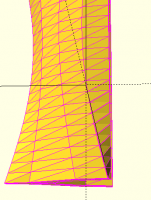
When I finally get to view things in preview, it looks like the whole
structure has yellow or black facets with all the edges being purple. I
find this confusing. Shouldn't some of the facets be yellow or black and
others be purple. Why should any of the edges be purple? I'm not
understanding this.
[image: image.png]
On Thu, Jul 4, 2019 at 11:51 AM adrianv avm4@cornell.edu wrote:
The typical behavior when a polyhedron is invalid is that it works in
preview
but fails in render. Use the "thrown together" option with preview, not
render. Faces that are incorrectly oriented will appear in purple.
There's an example here, along with other advice on debugging polyhedra:
https://en.wikibooks.org/wiki/OpenSCAD_User_Manual/The_OpenSCAD_Language#Debugging_polyhedra
DanS wrote
I'm not sure how to use View->Thrown Together properly
If I do render. I see this:
[image: image.png]
If right after that I go into View and select Thrown Together I don't
see
anything in the console that indicates work is being done, my object
entirely disappears. I was expecting that if it will take some time it
might indicate it is calculating. Likewise, I thought the end result
would
be the same drawing but with some facets in a different color (indicating
maybe missing / degenerate vertices caused things to be inside out).
What
is the proper way to use View -> Throw Together
On Thu, Jul 4, 2019 at 11:03 AM adrianv <
avm4@
> wrote:
DanS wrote
I'm still trying to debug my own code but am frustrated in that I
can't
see
where the problem exists. I get some errors and other messages from
OpenScad but unfortunately they don't point to what it was in my code
that
triggered it:
ERROR: CGAL error in CGAL_Nef_polyhedron3(): CGAL ERROR: assertion
violation! Expr: e_below != SHalfedge_handle() File:
/opt/mxe/usr/x86_64-w64-mingw32.static.posix/include/CGAL/Nef_3/SNC_FM_decorator.h
Line: 426
I don't recognize this error specifically, but typically if you get
errors
relating to polyhedra it means you have constructed an invalid
polyhedron
with the polyhedron module. You can select View->Thrown Together in
preview
which will show reversed faces. But otherwise you just have to work
through
your construction.
Likewise, I sometimes get this warning:
DEPRECATED: Using ranges of the form [begin:end] with begin value
greater
than the end value is deprecated.
Yeah, this one is extremely annoying. There appears to be no way to get
OpenSCAD to give you more information about this. It can be anywhere in
your code, or anything that you include. It could be a degenerate case,
in
which case you can solve the problem by replacing every occurrence of
[a:b]
in your code with [a:1:b]. But if it's a mistake in your code, that
will
just cause the loop to not run---it won't tell you where the problem is.
--
Sent from: http://forum.openscad.org/
OpenSCAD mailing list
Discuss@.openscad
Discuss@.openscad
http://lists.openscad.org/mailman/listinfo/discuss_lists.openscad.org
image.png (27K)
<http://forum.openscad.org/attachment/26707/0/image.png>
--
Sent from: http://forum.openscad.org/
OpenSCAD mailing list
Discuss@lists.openscad.org
http://lists.openscad.org/mailman/listinfo/discuss_lists.openscad.org

On Thu, 4 Jul 2019, 10:28 Dan Shriver, tabbydan@gmail.com wrote:
Likewise, I sometimes get this warning:
DEPRECATED: Using ranges of the form [begin:end] with begin value greater
than the end value is deprecated.
But I can't see any loop where the starting value is bigger than the end
value.
I mostly get this message when I do a for over an empty array. I consider
this behaviour to be a bug, really