discuss@lists.openscad.org

OpenSCAD general discussion Mailing-list

View all threads

Math Behind the Code

FH
Father Horton
Wed, Apr 15, 2026 1:12 AM

I have learned (the hard way) that you have to be really, really precise in
giving instructions to AI coders. I have found:

  1. Have it give you a detailed spec for what you're building before you
    start. Give it a broad statement: "Give me a tight spec for modeling a
    steam locomotive." Don't let it code anything until you agree on what it
    thinks it's going to do.

  2. Similarly, when you encounter an issue, tell it: "Don't code anything
    yet. Here's the problem. What do you suggest?"

It will still do strange things, but this will cut down on them.

On Tue, Apr 14, 2026 at 7:01 PM Glenn Butcher via Discuss <
discuss@lists.openscad.org> wrote:

The claude code gives a precise 4" board, yay.

It also declares and computes face_length, but doesn't use it.  I wonder
the "thought process" behind that...

That said, the behavior of the code is more intuitive, to this
bear-of-little-brain.

But the part I really worry about all this is the effort over and above
what one asks for.  I've got a vintage photo that I wanted to use to
validate mortar lines between stones in a wall, so I fed it to Gemini (Nano
Banana???) with a specific task statement to enhance the mortar lines.  It
first wanted to make the stones bricks; took a few iterations to talk it
into working on the stones actually depicted in the picture.  But then, it
also on its own decided to colorize the black and white image, and to
replace the smudges that were people's faces with faces from somewhere
else.  Wasn't going to trust the mortar lines with that behavior...
On 4/14/2026 5:26 PM, Leonard Martin Struttmann via Discuss wrote:

Here's what Claude came up with:

module test( S, L, W )
{
inner = sqrt(S * S + L * L - W * W);
factor = (S * inner - L * W) / (S * S - W * W);

face_length  = S * factor;  // d: long diagonal sides
stud_contact = W * factor;  // h: short vertical sides

points = [ [ 0,0 ],
[ 0, stud_contact ],
[ S, L ],
[ S, L-stud_contact ]] ;

rotate( [ 90, 0, 0 ])
rotate( [ 0, 90, 0 ])
linear_extrude(height = 2, center = false, convexity = 10, twist = 0,
slices = 20, scale = 1.0)
polygon(points = points);
}
T=96;  //ggb: how tall is the framing
S=28;  //ggb: spacing between the framing members

translate([0,-2,0])cube([4,2,T]);
translate([0,S,0]) cube([4,2,T]);

#v2x4_diagonal(S, T);

test( S, T, 4 );

On Tue, Apr 14, 2026 at 4:37 PM Glenn Butcher via Discuss <
discuss@lists.openscad.org> wrote:

Leonard,

Ooh, that's helpful.  I've been eyeballing it, didn't notice that
difference in width.

I've been OpenSCAD-ing various building components, roofs (rise:run),
brick arches (span:height), even polygon curves (min-circle), and I've
readily found the requisite math to do such, but this parallelogram has
just stumped me.  Not a fan of this 'vibe coding' thing, but I've tried
'gimme-example' tasks and I've learned about things like OpenGL rendering
that way.  I get your disdain, too easy for folk to just wing it, so I'm
trying not to blindly rely on it for this problem.

Talking about the math, there seems to not be enough information in the
parameters to which I've constrained the problem, for the parallelogram
that would be its height (the 4" board dimension), and the diagonal length
(sqrt(SS + TT)).  Or, am I just too ill-informed to see it.

Regards,
Glenn
Skeptical ex-software person
On 4/14/2026 3:10 PM, Leonard Martin Struttmann via Discuss wrote:

And, on top of that, it doesn't seem to be correct.  When I ran that
code, the diagonal brace turned out to be 2x4.63 instead of the specified
2x4.

On Tue, Apr 14, 2026 at 3:59 PM Ari Diacou via Discuss <
discuss@lists.openscad.org> wrote:

Hi Glenn,

This is a first. I have never seen AI written code before. Thank you for
introducing me to this absolute abomination. You cannot read it because it
is terrible. I haven't run the code, because I'm on my phone, and because
my curiosity of AI hallucinations does not overcome my mistrust of them.
But based on your description, this should be about 8 lines of vector
algebra (I estimate 4 lines of declaration, 4 lines of calculation, and one
line of something like linear_extrude () difference()...)

This is using vector calculus naming conventions for vector algebra.
Like, I can see how it could be right, but I can also see how no programmer
would ever write this garbage*. It took me about a minute to absolutely
fear for civilization if we are firing human programmers in favor of
algorithms that write this garbage*.

*By garbage I of course mean at least 10 explative adjectives followed
by the vilest noun in the readers native language.

Cheers,
A slightly more Luddite ex-physicist.

On Tue, Apr 14, 2026, 3:10 PM Glenn Butcher via Discuss <
discuss@lists.openscad.org> wrote:

Disclaimer: I'm not a math person.

I'm building a CAD model of a vintage railroad baggage car, to help
with
the visualization of design for a restoration project. In modeling the
framing internal to the walls, I need diagonal members between the
verticals; my first module to do that was 'carpenter style', where I
laid the diagonal between two vertical members and used difference() to
cut it.  This required an angle parameter that I had to 'scooch' around
to get the right angle.

What I wanted was a module that just took the height and spacing
numbers
and made a parallelogram to fit and extruded it to the right
thickness.
So, I spent a few forays into the internets, searching for the math to
do that.  And, I just couldn't find it, even the AI search summaries
didn't complete the solution.  I finally gave in to the vibe coding
thing, and took the problem to Microsoft CoPilot, with which I had some
success building an OpenGL renderer.  To describe the problem I used
compass cardinal points to lay out the space, NE, NW, SE, SW to define
the four corners of the parallelogram.  Took 5 iterations to get it
close, and it still was plotting the NE corner on the wrong side of the
Y axis.  I finally just told it to negate that corner's vertical
component, ta-da, works.

Thing is, I do not understand the methodology.  I've inspected the
intermediate variables and I just don't have the math chops to
understand how the vectors yield the parallelogram sides.  Here's the
code:

//algorithm courtesy Microsoft CoPilot:
module v2x4_diagonal(S, T) {
//ggb: diagonal member dimensions
w=4;  //ggb: height of the parallelogram
t=2;

  // Upper edge endpoints
  NW = [0, T];
  SE = [S, 0];

  // Diagonal direction
  dx = S;
  dy = -T;
  L  = sqrt(dx*dx + dy*dy);

  // Perpendicular unit vector (points downward)
  px = -T / L;
  py = -S / L;

  // Offset vector for lower edge
  ox = w * px;
  oy = w * py;

  // Lower edge parametric line: P(t) = NW + (ox, oy) + t*(dx, dy)

  // Intersection with x = 0 → SW
  t0 = -ox / dx;
  SW = [0,
        T + oy + t0 * dy];

  // Intersection with x = S → NE
  t1 = (S - ox) / dx;
  NE = [S,
        -(T + oy + t1 * dy)];  //ggb: I had to negate the Y

coordinate

  // Correct winding order: NW → NE → SE → SW
  // ggb: extrude works in xy plane, rotate and translate to make it

'vertical',
//        along the wall frame axis, Y.
rotate([90,0,-90])
translate([-S,0,-2])
linear_extrude(height = t)
polygon(points=[NW, NE, SE, SW]);
}

T=96;  //ggb: how tall is the framing
S=28;  //ggb: spacing between the framing members

translate([0,-2,0])cube([4,2,T]);
translate([0,S,0]) cube([4,2,T]);

color("green") v2x4_diagonal(S, T);

I offer this in the public domain, use as you see fit.  All I'd like to
get is some sort of explanation as to how it works...

Thanks,
Glenn Butcher


OpenSCAD mailing list
To unsubscribe send an email to discuss-leave@lists.openscad.org


OpenSCAD mailing list
To unsubscribe send an email to discuss-leave@lists.openscad.org


OpenSCAD mailing list
To unsubscribe send an email to discuss-leave@lists.openscad.org


OpenSCAD mailing list
To unsubscribe send an email to discuss-leave@lists.openscad.org


OpenSCAD mailing list
To unsubscribe send an email to discuss-leave@lists.openscad.org


OpenSCAD mailing list
To unsubscribe send an email to discuss-leave@lists.openscad.org

I have learned (the hard way) that you have to be really, really precise in giving instructions to AI coders. I have found: 1) Have it give you a detailed spec for what you're building before you start. Give it a broad statement: "Give me a tight spec for modeling a steam locomotive." Don't let it code anything until you agree on what it thinks it's going to do. 2) Similarly, when you encounter an issue, tell it: "Don't code anything yet. Here's the problem. What do you suggest?" It will still do strange things, but this will cut down on them. On Tue, Apr 14, 2026 at 7:01 PM Glenn Butcher via Discuss < discuss@lists.openscad.org> wrote: > The claude code gives a precise 4" board, yay. > > It also declares and computes face_length, but doesn't use it. I wonder > the "thought process" behind that... > > That said, the behavior of the code is more intuitive, to this > bear-of-little-brain. > > But the part I really worry about all this is the effort over and above > what one asks for. I've got a vintage photo that I wanted to use to > validate mortar lines between stones in a wall, so I fed it to Gemini (Nano > Banana???) with a specific task statement to enhance the mortar lines. It > first wanted to make the stones bricks; took a few iterations to talk it > into working on the stones actually depicted in the picture. But then, it > also on its own decided to colorize the black and white image, and to > replace the smudges that were people's faces with faces from somewhere > else. Wasn't going to trust the mortar lines with that behavior... > On 4/14/2026 5:26 PM, Leonard Martin Struttmann via Discuss wrote: > > Here's what Claude came up with: > > module test( S, L, W ) > { > inner = sqrt(S * S + L * L - W * W); > factor = (S * inner - L * W) / (S * S - W * W); > > face_length = S * factor; // d: long diagonal sides > stud_contact = W * factor; // h: short vertical sides > > points = [ [ 0,0 ], > [ 0, stud_contact ], > [ S, L ], > [ S, L-stud_contact ]] ; > > rotate( [ 90, 0, 0 ]) > rotate( [ 0, 90, 0 ]) > linear_extrude(height = 2, center = false, convexity = 10, twist = 0, > slices = 20, scale = 1.0) > polygon(points = points); > } > T=96; //ggb: how tall is the framing > S=28; //ggb: spacing between the framing members > > translate([0,-2,0])cube([4,2,T]); > translate([0,S,0]) cube([4,2,T]); > > #v2x4_diagonal(S, T); > > test( S, T, 4 ); > > > On Tue, Apr 14, 2026 at 4:37 PM Glenn Butcher via Discuss < > discuss@lists.openscad.org> wrote: > >> Leonard, >> >> Ooh, that's helpful. I've been eyeballing it, didn't notice that >> difference in width. >> >> I've been OpenSCAD-ing various building components, roofs (rise:run), >> brick arches (span:height), even polygon curves (min-circle), and I've >> readily found the requisite math to do such, but this parallelogram has >> just stumped me. Not a fan of this 'vibe coding' thing, but I've tried >> 'gimme-example' tasks and I've learned about things like OpenGL rendering >> that way. I get your disdain, too easy for folk to just wing it, so I'm >> trying not to blindly rely on it for this problem. >> >> Talking about the math, there seems to not be enough information in the >> parameters to which I've constrained the problem, for the parallelogram >> that would be its height (the 4" board dimension), and the diagonal length >> (sqrt(S*S + T*T)). Or, am I just too ill-informed to see it. >> >> Regards, >> Glenn >> Skeptical ex-software person >> On 4/14/2026 3:10 PM, Leonard Martin Struttmann via Discuss wrote: >> >> And, on top of that, it doesn't seem to be correct. When I ran that >> code, the diagonal brace turned out to be 2x4.63 instead of the specified >> 2x4. >> >> On Tue, Apr 14, 2026 at 3:59 PM Ari Diacou via Discuss < >> discuss@lists.openscad.org> wrote: >> >>> Hi Glenn, >>> >>> This is a first. I have never seen AI written code before. Thank you for >>> introducing me to this absolute abomination. You cannot read it because it >>> is terrible. I haven't run the code, because I'm on my phone, and because >>> my curiosity of AI hallucinations does not overcome my mistrust of them. >>> But based on your description, this should be about 8 lines of vector >>> algebra (I estimate 4 lines of declaration, 4 lines of calculation, and one >>> line of something like linear_extrude () difference()...) >>> >>> This is using vector calculus naming conventions for vector algebra. >>> Like, I can see how it could be right, but I can also see how no programmer >>> would ever write this garbage*. It took me about a minute to absolutely >>> fear for civilization if we are firing human programmers in favor of >>> algorithms that write this garbage*. >>> >>> *By garbage I of course mean at least 10 explative adjectives followed >>> by the vilest noun in the readers native language. >>> >>> Cheers, >>> A slightly more Luddite ex-physicist. >>> >>> On Tue, Apr 14, 2026, 3:10 PM Glenn Butcher via Discuss < >>> discuss@lists.openscad.org> wrote: >>> >>>> Disclaimer: I'm not a math person. >>>> >>>> I'm building a CAD model of a vintage railroad baggage car, to help >>>> with >>>> the visualization of design for a restoration project. In modeling the >>>> framing internal to the walls, I need diagonal members between the >>>> verticals; my first module to do that was 'carpenter style', where I >>>> laid the diagonal between two vertical members and used difference() to >>>> cut it. This required an angle parameter that I had to 'scooch' around >>>> to get the right angle. >>>> >>>> What I wanted was a module that just took the height and spacing >>>> numbers >>>> and made a parallelogram to fit and extruded it to the right >>>> thickness. >>>> So, I spent a few forays into the internets, searching for the math to >>>> do that. And, I just couldn't find it, even the AI search summaries >>>> didn't complete the solution. I finally gave in to the vibe coding >>>> thing, and took the problem to Microsoft CoPilot, with which I had some >>>> success building an OpenGL renderer. To describe the problem I used >>>> compass cardinal points to lay out the space, NE, NW, SE, SW to define >>>> the four corners of the parallelogram. Took 5 iterations to get it >>>> close, and it still was plotting the NE corner on the wrong side of the >>>> Y axis. I finally just told it to negate that corner's vertical >>>> component, ta-da, works. >>>> >>>> Thing is, I do not understand the methodology. I've inspected the >>>> intermediate variables and I just don't have the math chops to >>>> understand how the vectors yield the parallelogram sides. Here's the >>>> code: >>>> >>>> //algorithm courtesy Microsoft CoPilot: >>>> module v2x4_diagonal(S, T) { >>>> //ggb: diagonal member dimensions >>>> w=4; //ggb: height of the parallelogram >>>> t=2; >>>> >>>> // Upper edge endpoints >>>> NW = [0, T]; >>>> SE = [S, 0]; >>>> >>>> // Diagonal direction >>>> dx = S; >>>> dy = -T; >>>> L = sqrt(dx*dx + dy*dy); >>>> >>>> // Perpendicular unit vector (points downward) >>>> px = -T / L; >>>> py = -S / L; >>>> >>>> // Offset vector for lower edge >>>> ox = w * px; >>>> oy = w * py; >>>> >>>> // Lower edge parametric line: P(t) = NW + (ox, oy) + t*(dx, dy) >>>> >>>> // Intersection with x = 0 → SW >>>> t0 = -ox / dx; >>>> SW = [0, >>>> T + oy + t0 * dy]; >>>> >>>> // Intersection with x = S → NE >>>> t1 = (S - ox) / dx; >>>> NE = [S, >>>> -(T + oy + t1 * dy)]; //ggb: I had to negate the Y >>>> coordinate >>>> >>>> // Correct winding order: NW → NE → SE → SW >>>> // ggb: extrude works in xy plane, rotate and translate to make it >>>> 'vertical', >>>> // along the wall frame axis, Y. >>>> rotate([90,0,-90]) >>>> translate([-S,0,-2]) >>>> linear_extrude(height = t) >>>> polygon(points=[NW, NE, SE, SW]); >>>> } >>>> >>>> T=96; //ggb: how tall is the framing >>>> S=28; //ggb: spacing between the framing members >>>> >>>> translate([0,-2,0])cube([4,2,T]); >>>> translate([0,S,0]) cube([4,2,T]); >>>> >>>> color("green") v2x4_diagonal(S, T); >>>> >>>> I offer this in the public domain, use as you see fit. All I'd like to >>>> get is some sort of explanation as to how it works... >>>> >>>> Thanks, >>>> Glenn Butcher >>>> >>>> >>>> >>>> _______________________________________________ >>>> OpenSCAD mailing list >>>> To unsubscribe send an email to discuss-leave@lists.openscad.org >>> >>> _______________________________________________ >>> OpenSCAD mailing list >>> To unsubscribe send an email to discuss-leave@lists.openscad.org >> >> >> _______________________________________________ >> OpenSCAD mailing list >> To unsubscribe send an email to discuss-leave@lists.openscad.org >> >> _______________________________________________ >> OpenSCAD mailing list >> To unsubscribe send an email to discuss-leave@lists.openscad.org > > > _______________________________________________ > OpenSCAD mailing list > To unsubscribe send an email to discuss-leave@lists.openscad.org > > _______________________________________________ > OpenSCAD mailing list > To unsubscribe send an email to discuss-leave@lists.openscad.org
GB
Glenn Butcher
Wed, Apr 15, 2026 1:43 AM

Indeed.  Really, it reminds me of developing requirements statements for
specifications.  At least, dealing with a context-sensitive language and
compiler...

On 4/14/2026 7:12 PM, Father Horton via Discuss wrote:

I have learned (the hard way) that you have to be really, really
precise in giving instructions to AI coders. I have found:

  1. Have it give you a detailed spec for what you're building before
    you start. Give it a broad statement: "Give me a tight spec for
    modeling a steam locomotive." Don't let it code anything until you
    agree on what it thinks it's going to do.

  2. Similarly, when you encounter an issue, tell it: "Don't code
    anything yet. Here's the problem. What do you suggest?"

It will still do strange things, but this will cut down on them.

On Tue, Apr 14, 2026 at 7:01 PM Glenn Butcher via Discuss
discuss@lists.openscad.org wrote:

 The claude code gives a precise 4" board, yay.

 It also declares and computes face_length, but doesn't use it.  I
 wonder the "thought process" behind that...

 That said, the behavior of the code is more intuitive, to this
 bear-of-little-brain.

 But the part I really worry about all this is the effort over and
 above what one asks for.  I've got a vintage photo that I wanted
 to use to validate mortar lines between stones in a wall, so I fed
 it to Gemini (Nano Banana???) with a specific task statement to
 enhance the mortar lines.  It first wanted to make the stones
 bricks; took a few iterations to talk it into working on the
 stones actually depicted in the picture.  But then, it also on its
 own decided to colorize the black and white image, and to replace
 the smudges that were people's faces with faces from somewhere
 else.  Wasn't going to trust the mortar lines with that behavior...

 On 4/14/2026 5:26 PM, Leonard Martin Struttmann via Discuss wrote:
 Here's what Claude came up with:

 module test( S, L, W )
 {
   inner = sqrt(S * S + L * L - W * W);
   factor = (S * inner - L * W) / (S * S - W * W);

   face_length  = S * factor;   // d: long diagonal sides
   stud_contact = W * factor;   // h: short vertical sides

   points = [ [ 0,0 ],
     [ 0, stud_contact ],
     [ S, L ],
     [ S, L-stud_contact ]] ;

   rotate( [ 90, 0, 0 ])
   rotate( [ 0, 90, 0 ])
   linear_extrude(height = 2, center = false, convexity = 10,
 twist = 0, slices = 20, scale = 1.0)
   polygon(points = points);
 }
 T=96;  //ggb: how tall is the framing
 S=28;  //ggb: spacing between the framing members

 translate([0,-2,0])cube([4,2,T]);
 translate([0,S,0]) cube([4,2,T]);

 #v2x4_diagonal(S, T);

 test( S, T, 4 );


 On Tue, Apr 14, 2026 at 4:37 PM Glenn Butcher via Discuss
 <discuss@lists.openscad.org> wrote:

     Leonard,

     Ooh, that's helpful.  I've been eyeballing it, didn't notice
     that difference in width.

     I've been OpenSCAD-ing various building components, roofs
     (rise:run), brick arches (span:height), even polygon curves
     (min-circle), and I've readily found the requisite math to do
     such, but this parallelogram has just stumped me. Not a fan
     of this 'vibe coding' thing, but I've tried 'gimme-example'
     tasks and I've learned about things like OpenGL rendering
     that way.  I get your disdain, too easy for folk to just wing
     it, so I'm trying not to blindly rely on it for this problem.

     Talking about the math, there seems to not be enough
     information in the parameters to which I've constrained the
     problem, for the parallelogram that would be its height (the
     4" board dimension), and the diagonal length (sqrt(S*S +
     T*T)).  Or, am I just too ill-informed to see it.

     Regards,
     Glenn
     Skeptical ex-software person

     On 4/14/2026 3:10 PM, Leonard Martin Struttmann via Discuss
     wrote:
     And, on top of that, it doesn't seem to be correct.  When I
     ran that code, the diagonal brace turned out to be 2x4.63
     instead of the specified 2x4.

     On Tue, Apr 14, 2026 at 3:59 PM Ari Diacou via Discuss
     <discuss@lists.openscad.org> wrote:

         Hi Glenn,

         This is a first. I have never seen AI written code
         before. Thank you for introducing me to this absolute
         abomination. You cannot read it because it is terrible.
         I haven't run the code, because I'm on my phone, and
         because my curiosity of AI hallucinations does not
         overcome my mistrust of them. But based on your
         description, this should be about 8 lines of vector
         algebra (I estimate 4 lines of declaration, 4 lines of
         calculation, and one line of something like
         linear_extrude () difference()...)

         This is using vector calculus naming conventions for
         vector algebra. Like, I can see how it could be right,
         but I can also see how no programmer would ever write
         this garbage*. It took me about a minute to absolutely
         fear for civilization if we are firing human programmers
         in favor of algorithms that write this garbage*.

         *By garbage I of course mean at least 10 explative
         adjectives followed by the vilest noun in the readers
         native language.

         Cheers,
         A slightly more Luddite ex-physicist.

         On Tue, Apr 14, 2026, 3:10 PM Glenn Butcher via Discuss
         <discuss@lists.openscad.org> wrote:

             Disclaimer: I'm not a math person.

             I'm building a CAD model of a vintage railroad
             baggage car, to help with
             the visualization of design for a restoration
             project. In modeling the
             framing internal to the walls, I need diagonal
             members between the
             verticals; my first module to do that was 'carpenter
             style', where I
             laid the diagonal between two vertical members and
             used difference() to
             cut it.  This required an angle parameter that I had
             to 'scooch' around
             to get the right angle.

             What I wanted was a module that just took the height
             and spacing numbers
             and made a parallelogram to fit and extruded it to
             the right thickness.
             So, I spent a few forays into the internets,
             searching for the math to
             do that.  And, I just couldn't find it, even the AI
             search summaries
             didn't complete the solution.  I finally gave in to
             the vibe coding
             thing, and took the problem to Microsoft CoPilot,
             with which I had some
             success building an OpenGL renderer. To describe the
             problem I used
             compass cardinal points to lay out the space, NE,
             NW, SE, SW to define
             the four corners of the parallelogram.  Took 5
             iterations to get it
             close, and it still was plotting the NE corner on
             the wrong side of the
             Y axis.  I finally just told it to negate that
             corner's vertical
             component, ta-da, works.

             Thing is, I do not understand the methodology.  I've
             inspected the
             intermediate variables and I just don't have the
             math chops to
             understand how the vectors yield the parallelogram
             sides.  Here's the code:

             //algorithm courtesy Microsoft CoPilot:
             module v2x4_diagonal(S, T) {
                  //ggb: diagonal member dimensions
                  w=4;  //ggb: height of the parallelogram
                  t=2;

                  // Upper edge endpoints
                  NW = [0, T];
                  SE = [S, 0];

                  // Diagonal direction
                  dx = S;
                  dy = -T;
                  L  = sqrt(dx*dx + dy*dy);

                  // Perpendicular unit vector (points downward)
                  px = -T / L;
                  py = -S / L;

                  // Offset vector for lower edge
                  ox = w * px;
                  oy = w * py;

                  // Lower edge parametric line: P(t) = NW + (ox,
             oy) + t*(dx, dy)

                  // Intersection with x = 0 → SW
                  t0 = -ox / dx;
                  SW = [0,
                        T + oy + t0 * dy];

                  // Intersection with x = S → NE
                  t1 = (S - ox) / dx;
                  NE = [S,
                        -(T + oy + t1 * dy)]; //ggb: I had to
             negate the Y coordinate

                  // Correct winding order: NW → NE → SE → SW
                  // ggb: extrude works in xy plane, rotate and
             translate to make it
             'vertical',
                  //        along the wall frame axis, Y.
                  rotate([90,0,-90])
                      translate([-S,0,-2])
                          linear_extrude(height = t)
                              polygon(points=[NW, NE, SE, SW]);
             }

             T=96;  //ggb: how tall is the framing
             S=28;  //ggb: spacing between the framing members

             translate([0,-2,0])cube([4,2,T]);
             translate([0,S,0]) cube([4,2,T]);

             color("green") v2x4_diagonal(S, T);

             I offer this in the public domain, use as you see
             fit.  All I'd like to
             get is some sort of explanation as to how it works...

             Thanks,
             Glenn Butcher


             _______________________________________________
             OpenSCAD mailing list
             To unsubscribe send an email to
             discuss-leave@lists.openscad.org

         _______________________________________________
         OpenSCAD mailing list
         To unsubscribe send an email to
         discuss-leave@lists.openscad.org


     _______________________________________________
     OpenSCAD mailing list
     To unsubscribe send an email todiscuss-leave@lists.openscad.org
     _______________________________________________
     OpenSCAD mailing list
     To unsubscribe send an email to discuss-leave@lists.openscad.org


 _______________________________________________
 OpenSCAD mailing list
 To unsubscribe send an email todiscuss-leave@lists.openscad.org
 _______________________________________________
 OpenSCAD mailing list
 To unsubscribe send an email to discuss-leave@lists.openscad.org

OpenSCAD mailing list
To unsubscribe send an email todiscuss-leave@lists.openscad.org

Indeed.  Really, it reminds me of developing requirements statements for specifications.  At least, dealing with a context-sensitive language and compiler... On 4/14/2026 7:12 PM, Father Horton via Discuss wrote: > I have learned (the hard way) that you have to be really, really > precise in giving instructions to AI coders. I have found: > > 1) Have it give you a detailed spec for what you're building before > you start. Give it a broad statement: "Give me a tight spec for > modeling a steam locomotive." Don't let it code anything until you > agree on what it thinks it's going to do. > > 2) Similarly, when you encounter an issue, tell it: "Don't code > anything yet. Here's the problem. What do you suggest?" > > It will still do strange things, but this will cut down on them. > > On Tue, Apr 14, 2026 at 7:01 PM Glenn Butcher via Discuss > <discuss@lists.openscad.org> wrote: > > The claude code gives a precise 4" board, yay. > > It also declares and computes face_length, but doesn't use it.  I > wonder the "thought process" behind that... > > That said, the behavior of the code is more intuitive, to this > bear-of-little-brain. > > But the part I really worry about all this is the effort over and > above what one asks for.  I've got a vintage photo that I wanted > to use to validate mortar lines between stones in a wall, so I fed > it to Gemini (Nano Banana???) with a specific task statement to > enhance the mortar lines.  It first wanted to make the stones > bricks; took a few iterations to talk it into working on the > stones actually depicted in the picture.  But then, it also on its > own decided to colorize the black and white image, and to replace > the smudges that were people's faces with faces from somewhere > else.  Wasn't going to trust the mortar lines with that behavior... > > On 4/14/2026 5:26 PM, Leonard Martin Struttmann via Discuss wrote: >> Here's what Claude came up with: >> >> module test( S, L, W ) >> { >>   inner = sqrt(S * S + L * L - W * W); >>   factor = (S * inner - L * W) / (S * S - W * W); >> >>   face_length  = S * factor;   // d: long diagonal sides >>   stud_contact = W * factor;   // h: short vertical sides >> >>   points = [ [ 0,0 ], >>     [ 0, stud_contact ], >>     [ S, L ], >>     [ S, L-stud_contact ]] ; >> >>   rotate( [ 90, 0, 0 ]) >>   rotate( [ 0, 90, 0 ]) >>   linear_extrude(height = 2, center = false, convexity = 10, >> twist = 0, slices = 20, scale = 1.0) >>   polygon(points = points); >> } >> T=96;  //ggb: how tall is the framing >> S=28;  //ggb: spacing between the framing members >> >> translate([0,-2,0])cube([4,2,T]); >> translate([0,S,0]) cube([4,2,T]); >> >> #v2x4_diagonal(S, T); >> >> test( S, T, 4 ); >> >> >> On Tue, Apr 14, 2026 at 4:37 PM Glenn Butcher via Discuss >> <discuss@lists.openscad.org> wrote: >> >> Leonard, >> >> Ooh, that's helpful.  I've been eyeballing it, didn't notice >> that difference in width. >> >> I've been OpenSCAD-ing various building components, roofs >> (rise:run), brick arches (span:height), even polygon curves >> (min-circle), and I've readily found the requisite math to do >> such, but this parallelogram has just stumped me. Not a fan >> of this 'vibe coding' thing, but I've tried 'gimme-example' >> tasks and I've learned about things like OpenGL rendering >> that way.  I get your disdain, too easy for folk to just wing >> it, so I'm trying not to blindly rely on it for this problem. >> >> Talking about the math, there seems to not be enough >> information in the parameters to which I've constrained the >> problem, for the parallelogram that would be its height (the >> 4" board dimension), and the diagonal length (sqrt(S*S + >> T*T)).  Or, am I just too ill-informed to see it. >> >> Regards, >> Glenn >> Skeptical ex-software person >> >> On 4/14/2026 3:10 PM, Leonard Martin Struttmann via Discuss >> wrote: >>> And, on top of that, it doesn't seem to be correct.  When I >>> ran that code, the diagonal brace turned out to be 2x4.63 >>> instead of the specified 2x4. >>> >>> On Tue, Apr 14, 2026 at 3:59 PM Ari Diacou via Discuss >>> <discuss@lists.openscad.org> wrote: >>> >>> Hi Glenn, >>> >>> This is a first. I have never seen AI written code >>> before. Thank you for introducing me to this absolute >>> abomination. You cannot read it because it is terrible. >>> I haven't run the code, because I'm on my phone, and >>> because my curiosity of AI hallucinations does not >>> overcome my mistrust of them. But based on your >>> description, this should be about 8 lines of vector >>> algebra (I estimate 4 lines of declaration, 4 lines of >>> calculation, and one line of something like >>> linear_extrude () difference()...) >>> >>> This is using vector calculus naming conventions for >>> vector algebra. Like, I can see how it could be right, >>> but I can also see how no programmer would ever write >>> this garbage*. It took me about a minute to absolutely >>> fear for civilization if we are firing human programmers >>> in favor of algorithms that write this garbage*. >>> >>> *By garbage I of course mean at least 10 explative >>> adjectives followed by the vilest noun in the readers >>> native language. >>> >>> Cheers, >>> A slightly more Luddite ex-physicist. >>> >>> On Tue, Apr 14, 2026, 3:10 PM Glenn Butcher via Discuss >>> <discuss@lists.openscad.org> wrote: >>> >>> Disclaimer: I'm not a math person. >>> >>> I'm building a CAD model of a vintage railroad >>> baggage car, to help with >>> the visualization of design for a restoration >>> project. In modeling the >>> framing internal to the walls, I need diagonal >>> members between the >>> verticals; my first module to do that was 'carpenter >>> style', where I >>> laid the diagonal between two vertical members and >>> used difference() to >>> cut it.  This required an angle parameter that I had >>> to 'scooch' around >>> to get the right angle. >>> >>> What I wanted was a module that just took the height >>> and spacing numbers >>> and made a parallelogram to fit and extruded it to >>> the right thickness. >>> So, I spent a few forays into the internets, >>> searching for the math to >>> do that.  And, I just couldn't find it, even the AI >>> search summaries >>> didn't complete the solution.  I finally gave in to >>> the vibe coding >>> thing, and took the problem to Microsoft CoPilot, >>> with which I had some >>> success building an OpenGL renderer. To describe the >>> problem I used >>> compass cardinal points to lay out the space, NE, >>> NW, SE, SW to define >>> the four corners of the parallelogram.  Took 5 >>> iterations to get it >>> close, and it still was plotting the NE corner on >>> the wrong side of the >>> Y axis.  I finally just told it to negate that >>> corner's vertical >>> component, ta-da, works. >>> >>> Thing is, I do not understand the methodology.  I've >>> inspected the >>> intermediate variables and I just don't have the >>> math chops to >>> understand how the vectors yield the parallelogram >>> sides.  Here's the code: >>> >>> //algorithm courtesy Microsoft CoPilot: >>> module v2x4_diagonal(S, T) { >>>      //ggb: diagonal member dimensions >>>      w=4;  //ggb: height of the parallelogram >>>      t=2; >>> >>>      // Upper edge endpoints >>>      NW = [0, T]; >>>      SE = [S, 0]; >>> >>>      // Diagonal direction >>>      dx = S; >>>      dy = -T; >>>      L  = sqrt(dx*dx + dy*dy); >>> >>>      // Perpendicular unit vector (points downward) >>>      px = -T / L; >>>      py = -S / L; >>> >>>      // Offset vector for lower edge >>>      ox = w * px; >>>      oy = w * py; >>> >>>      // Lower edge parametric line: P(t) = NW + (ox, >>> oy) + t*(dx, dy) >>> >>>      // Intersection with x = 0 → SW >>>      t0 = -ox / dx; >>>      SW = [0, >>>            T + oy + t0 * dy]; >>> >>>      // Intersection with x = S → NE >>>      t1 = (S - ox) / dx; >>>      NE = [S, >>>            -(T + oy + t1 * dy)]; //ggb: I had to >>> negate the Y coordinate >>> >>>      // Correct winding order: NW → NE → SE → SW >>>      // ggb: extrude works in xy plane, rotate and >>> translate to make it >>> 'vertical', >>>      //        along the wall frame axis, Y. >>>      rotate([90,0,-90]) >>>          translate([-S,0,-2]) >>>              linear_extrude(height = t) >>>                  polygon(points=[NW, NE, SE, SW]); >>> } >>> >>> T=96;  //ggb: how tall is the framing >>> S=28;  //ggb: spacing between the framing members >>> >>> translate([0,-2,0])cube([4,2,T]); >>> translate([0,S,0]) cube([4,2,T]); >>> >>> color("green") v2x4_diagonal(S, T); >>> >>> I offer this in the public domain, use as you see >>> fit.  All I'd like to >>> get is some sort of explanation as to how it works... >>> >>> Thanks, >>> Glenn Butcher >>> >>> >>> >>> _______________________________________________ >>> OpenSCAD mailing list >>> To unsubscribe send an email to >>> discuss-leave@lists.openscad.org >>> >>> _______________________________________________ >>> OpenSCAD mailing list >>> To unsubscribe send an email to >>> discuss-leave@lists.openscad.org >>> >>> >>> _______________________________________________ >>> OpenSCAD mailing list >>> To unsubscribe send an email todiscuss-leave@lists.openscad.org >> _______________________________________________ >> OpenSCAD mailing list >> To unsubscribe send an email to discuss-leave@lists.openscad.org >> >> >> _______________________________________________ >> OpenSCAD mailing list >> To unsubscribe send an email todiscuss-leave@lists.openscad.org > _______________________________________________ > OpenSCAD mailing list > To unsubscribe send an email to discuss-leave@lists.openscad.org > > > _______________________________________________ > OpenSCAD mailing list > To unsubscribe send an email todiscuss-leave@lists.openscad.org
AM
Adrian Mariano
Wed, Apr 15, 2026 1:50 AM

We have done some AI coding for BOSL2 to support interpolation of B-splines
through a list of points or a grid of points (to make a surface).  I have
been impressed by things it came up with.  We did start by saying "use
equation 9.3 from the nurbs book" but we didn't always give it such
detailed instructions, and it proposed some useful methods.  It also did
strange things at times, and this project would not have gone well if I
didn't have a decent at least general understanding of spline math and
linear algebra in general.  I also sometimes gave questions about issues
we faced to chatgpt and then fed chatgpt's advice to claude.  This code was
all written directly in OpenSCAD and it has done a generally reasonable
job.  I mean, the code quality is not always the best, in terms of being
clean and elegant, but it's been correct.  It has, for example, written
algorithms that rely on recursion as one sometimes must do in OpenSCAD.  It
seems like one of the biggest weaknesses is not truly "knowing" all of
BOSL2 and reimplementing stuff that already exists.  Or even reimplementing
things within the one file it's working on.  The file under development is
now more than 3000 lines long of code (plus some documentation and
examples).

I think having a well-defined mathematical problem to attack made this a
well suited task for AI.  "Build a locomotive" is a terrible prompt.

On Tue, Apr 14, 2026 at 9:13 PM Father Horton via Discuss <
discuss@lists.openscad.org> wrote:

I have learned (the hard way) that you have to be really, really precise
in giving instructions to AI coders. I have found:

  1. Have it give you a detailed spec for what you're building before you
    start. Give it a broad statement: "Give me a tight spec for modeling a
    steam locomotive." Don't let it code anything until you agree on what it
    thinks it's going to do.

  2. Similarly, when you encounter an issue, tell it: "Don't code anything
    yet. Here's the problem. What do you suggest?"

It will still do strange things, but this will cut down on them.

On Tue, Apr 14, 2026 at 7:01 PM Glenn Butcher via Discuss <
discuss@lists.openscad.org> wrote:

The claude code gives a precise 4" board, yay.

It also declares and computes face_length, but doesn't use it.  I wonder
the "thought process" behind that...

That said, the behavior of the code is more intuitive, to this
bear-of-little-brain.

But the part I really worry about all this is the effort over and above
what one asks for.  I've got a vintage photo that I wanted to use to
validate mortar lines between stones in a wall, so I fed it to Gemini (Nano
Banana???) with a specific task statement to enhance the mortar lines.  It
first wanted to make the stones bricks; took a few iterations to talk it
into working on the stones actually depicted in the picture.  But then, it
also on its own decided to colorize the black and white image, and to
replace the smudges that were people's faces with faces from somewhere
else.  Wasn't going to trust the mortar lines with that behavior...
On 4/14/2026 5:26 PM, Leonard Martin Struttmann via Discuss wrote:

Here's what Claude came up with:

module test( S, L, W )
{
inner = sqrt(S * S + L * L - W * W);
factor = (S * inner - L * W) / (S * S - W * W);

face_length  = S * factor;  // d: long diagonal sides
stud_contact = W * factor;  // h: short vertical sides

points = [ [ 0,0 ],
[ 0, stud_contact ],
[ S, L ],
[ S, L-stud_contact ]] ;

rotate( [ 90, 0, 0 ])
rotate( [ 0, 90, 0 ])
linear_extrude(height = 2, center = false, convexity = 10, twist = 0,
slices = 20, scale = 1.0)
polygon(points = points);
}
T=96;  //ggb: how tall is the framing
S=28;  //ggb: spacing between the framing members

translate([0,-2,0])cube([4,2,T]);
translate([0,S,0]) cube([4,2,T]);

#v2x4_diagonal(S, T);

test( S, T, 4 );

On Tue, Apr 14, 2026 at 4:37 PM Glenn Butcher via Discuss <
discuss@lists.openscad.org> wrote:

Leonard,

Ooh, that's helpful.  I've been eyeballing it, didn't notice that
difference in width.

I've been OpenSCAD-ing various building components, roofs (rise:run),
brick arches (span:height), even polygon curves (min-circle), and I've
readily found the requisite math to do such, but this parallelogram has
just stumped me.  Not a fan of this 'vibe coding' thing, but I've tried
'gimme-example' tasks and I've learned about things like OpenGL rendering
that way.  I get your disdain, too easy for folk to just wing it, so I'm
trying not to blindly rely on it for this problem.

Talking about the math, there seems to not be enough information in the
parameters to which I've constrained the problem, for the parallelogram
that would be its height (the 4" board dimension), and the diagonal length
(sqrt(SS + TT)).  Or, am I just too ill-informed to see it.

Regards,
Glenn
Skeptical ex-software person
On 4/14/2026 3:10 PM, Leonard Martin Struttmann via Discuss wrote:

And, on top of that, it doesn't seem to be correct.  When I ran that
code, the diagonal brace turned out to be 2x4.63 instead of the specified
2x4.

On Tue, Apr 14, 2026 at 3:59 PM Ari Diacou via Discuss <
discuss@lists.openscad.org> wrote:

Hi Glenn,

This is a first. I have never seen AI written code before. Thank you
for introducing me to this absolute abomination. You cannot read it because
it is terrible. I haven't run the code, because I'm on my phone, and
because my curiosity of AI hallucinations does not overcome my mistrust of
them. But based on your description, this should be about 8 lines of vector
algebra (I estimate 4 lines of declaration, 4 lines of calculation, and one
line of something like linear_extrude () difference()...)

This is using vector calculus naming conventions for vector algebra.
Like, I can see how it could be right, but I can also see how no programmer
would ever write this garbage*. It took me about a minute to absolutely
fear for civilization if we are firing human programmers in favor of
algorithms that write this garbage*.

*By garbage I of course mean at least 10 explative adjectives followed
by the vilest noun in the readers native language.

Cheers,
A slightly more Luddite ex-physicist.

On Tue, Apr 14, 2026, 3:10 PM Glenn Butcher via Discuss <
discuss@lists.openscad.org> wrote:

Disclaimer: I'm not a math person.

I'm building a CAD model of a vintage railroad baggage car, to help
with
the visualization of design for a restoration project. In modeling the
framing internal to the walls, I need diagonal members between the
verticals; my first module to do that was 'carpenter style', where I
laid the diagonal between two vertical members and used difference()
to
cut it.  This required an angle parameter that I had to 'scooch'
around
to get the right angle.

What I wanted was a module that just took the height and spacing
numbers
and made a parallelogram to fit and extruded it to the right
thickness.
So, I spent a few forays into the internets, searching for the math to
do that.  And, I just couldn't find it, even the AI search summaries
didn't complete the solution.  I finally gave in to the vibe coding
thing, and took the problem to Microsoft CoPilot, with which I had
some
success building an OpenGL renderer.  To describe the problem I used
compass cardinal points to lay out the space, NE, NW, SE, SW to define
the four corners of the parallelogram.  Took 5 iterations to get it
close, and it still was plotting the NE corner on the wrong side of
the
Y axis.  I finally just told it to negate that corner's vertical
component, ta-da, works.

Thing is, I do not understand the methodology.  I've inspected the
intermediate variables and I just don't have the math chops to
understand how the vectors yield the parallelogram sides.  Here's the
code:

//algorithm courtesy Microsoft CoPilot:
module v2x4_diagonal(S, T) {
//ggb: diagonal member dimensions
w=4;  //ggb: height of the parallelogram
t=2;

  // Upper edge endpoints
  NW = [0, T];
  SE = [S, 0];

  // Diagonal direction
  dx = S;
  dy = -T;
  L  = sqrt(dx*dx + dy*dy);

  // Perpendicular unit vector (points downward)
  px = -T / L;
  py = -S / L;

  // Offset vector for lower edge
  ox = w * px;
  oy = w * py;

  // Lower edge parametric line: P(t) = NW + (ox, oy) + t*(dx, dy)

  // Intersection with x = 0 → SW
  t0 = -ox / dx;
  SW = [0,
        T + oy + t0 * dy];

  // Intersection with x = S → NE
  t1 = (S - ox) / dx;
  NE = [S,
        -(T + oy + t1 * dy)];  //ggb: I had to negate the Y

coordinate

  // Correct winding order: NW → NE → SE → SW
  // ggb: extrude works in xy plane, rotate and translate to make

it
'vertical',
//        along the wall frame axis, Y.
rotate([90,0,-90])
translate([-S,0,-2])
linear_extrude(height = t)
polygon(points=[NW, NE, SE, SW]);
}

T=96;  //ggb: how tall is the framing
S=28;  //ggb: spacing between the framing members

translate([0,-2,0])cube([4,2,T]);
translate([0,S,0]) cube([4,2,T]);

color("green") v2x4_diagonal(S, T);

I offer this in the public domain, use as you see fit.  All I'd like
to
get is some sort of explanation as to how it works...

Thanks,
Glenn Butcher


OpenSCAD mailing list
To unsubscribe send an email to discuss-leave@lists.openscad.org


OpenSCAD mailing list
To unsubscribe send an email to discuss-leave@lists.openscad.org


OpenSCAD mailing list
To unsubscribe send an email to discuss-leave@lists.openscad.org


OpenSCAD mailing list
To unsubscribe send an email to discuss-leave@lists.openscad.org


OpenSCAD mailing list
To unsubscribe send an email to discuss-leave@lists.openscad.org


OpenSCAD mailing list
To unsubscribe send an email to discuss-leave@lists.openscad.org


OpenSCAD mailing list
To unsubscribe send an email to discuss-leave@lists.openscad.org

We have done some AI coding for BOSL2 to support interpolation of B-splines through a list of points or a grid of points (to make a surface). I have been impressed by things it came up with. We did start by saying "use equation 9.3 from the nurbs book" but we didn't always give it such detailed instructions, and it proposed some useful methods. It also did strange things at times, and this project would not have gone well if I didn't have a decent at least general understanding of spline math and linear algebra in general. I also sometimes gave questions about issues we faced to chatgpt and then fed chatgpt's advice to claude. This code was all written directly in OpenSCAD and it has done a generally reasonable job. I mean, the code quality is not always the best, in terms of being clean and elegant, but it's been correct. It has, for example, written algorithms that rely on recursion as one sometimes must do in OpenSCAD. It seems like one of the biggest weaknesses is not truly "knowing" all of BOSL2 and reimplementing stuff that already exists. Or even reimplementing things within the one file it's working on. The file under development is now more than 3000 lines long of code (plus some documentation and examples). I think having a well-defined mathematical problem to attack made this a well suited task for AI. "Build a locomotive" is a terrible prompt. On Tue, Apr 14, 2026 at 9:13 PM Father Horton via Discuss < discuss@lists.openscad.org> wrote: > I have learned (the hard way) that you have to be really, really precise > in giving instructions to AI coders. I have found: > > 1) Have it give you a detailed spec for what you're building before you > start. Give it a broad statement: "Give me a tight spec for modeling a > steam locomotive." Don't let it code anything until you agree on what it > thinks it's going to do. > > 2) Similarly, when you encounter an issue, tell it: "Don't code anything > yet. Here's the problem. What do you suggest?" > > It will still do strange things, but this will cut down on them. > > On Tue, Apr 14, 2026 at 7:01 PM Glenn Butcher via Discuss < > discuss@lists.openscad.org> wrote: > >> The claude code gives a precise 4" board, yay. >> >> It also declares and computes face_length, but doesn't use it. I wonder >> the "thought process" behind that... >> >> That said, the behavior of the code is more intuitive, to this >> bear-of-little-brain. >> >> But the part I really worry about all this is the effort over and above >> what one asks for. I've got a vintage photo that I wanted to use to >> validate mortar lines between stones in a wall, so I fed it to Gemini (Nano >> Banana???) with a specific task statement to enhance the mortar lines. It >> first wanted to make the stones bricks; took a few iterations to talk it >> into working on the stones actually depicted in the picture. But then, it >> also on its own decided to colorize the black and white image, and to >> replace the smudges that were people's faces with faces from somewhere >> else. Wasn't going to trust the mortar lines with that behavior... >> On 4/14/2026 5:26 PM, Leonard Martin Struttmann via Discuss wrote: >> >> Here's what Claude came up with: >> >> module test( S, L, W ) >> { >> inner = sqrt(S * S + L * L - W * W); >> factor = (S * inner - L * W) / (S * S - W * W); >> >> face_length = S * factor; // d: long diagonal sides >> stud_contact = W * factor; // h: short vertical sides >> >> points = [ [ 0,0 ], >> [ 0, stud_contact ], >> [ S, L ], >> [ S, L-stud_contact ]] ; >> >> rotate( [ 90, 0, 0 ]) >> rotate( [ 0, 90, 0 ]) >> linear_extrude(height = 2, center = false, convexity = 10, twist = 0, >> slices = 20, scale = 1.0) >> polygon(points = points); >> } >> T=96; //ggb: how tall is the framing >> S=28; //ggb: spacing between the framing members >> >> translate([0,-2,0])cube([4,2,T]); >> translate([0,S,0]) cube([4,2,T]); >> >> #v2x4_diagonal(S, T); >> >> test( S, T, 4 ); >> >> >> On Tue, Apr 14, 2026 at 4:37 PM Glenn Butcher via Discuss < >> discuss@lists.openscad.org> wrote: >> >>> Leonard, >>> >>> Ooh, that's helpful. I've been eyeballing it, didn't notice that >>> difference in width. >>> >>> I've been OpenSCAD-ing various building components, roofs (rise:run), >>> brick arches (span:height), even polygon curves (min-circle), and I've >>> readily found the requisite math to do such, but this parallelogram has >>> just stumped me. Not a fan of this 'vibe coding' thing, but I've tried >>> 'gimme-example' tasks and I've learned about things like OpenGL rendering >>> that way. I get your disdain, too easy for folk to just wing it, so I'm >>> trying not to blindly rely on it for this problem. >>> >>> Talking about the math, there seems to not be enough information in the >>> parameters to which I've constrained the problem, for the parallelogram >>> that would be its height (the 4" board dimension), and the diagonal length >>> (sqrt(S*S + T*T)). Or, am I just too ill-informed to see it. >>> >>> Regards, >>> Glenn >>> Skeptical ex-software person >>> On 4/14/2026 3:10 PM, Leonard Martin Struttmann via Discuss wrote: >>> >>> And, on top of that, it doesn't seem to be correct. When I ran that >>> code, the diagonal brace turned out to be 2x4.63 instead of the specified >>> 2x4. >>> >>> On Tue, Apr 14, 2026 at 3:59 PM Ari Diacou via Discuss < >>> discuss@lists.openscad.org> wrote: >>> >>>> Hi Glenn, >>>> >>>> This is a first. I have never seen AI written code before. Thank you >>>> for introducing me to this absolute abomination. You cannot read it because >>>> it is terrible. I haven't run the code, because I'm on my phone, and >>>> because my curiosity of AI hallucinations does not overcome my mistrust of >>>> them. But based on your description, this should be about 8 lines of vector >>>> algebra (I estimate 4 lines of declaration, 4 lines of calculation, and one >>>> line of something like linear_extrude () difference()...) >>>> >>>> This is using vector calculus naming conventions for vector algebra. >>>> Like, I can see how it could be right, but I can also see how no programmer >>>> would ever write this garbage*. It took me about a minute to absolutely >>>> fear for civilization if we are firing human programmers in favor of >>>> algorithms that write this garbage*. >>>> >>>> *By garbage I of course mean at least 10 explative adjectives followed >>>> by the vilest noun in the readers native language. >>>> >>>> Cheers, >>>> A slightly more Luddite ex-physicist. >>>> >>>> On Tue, Apr 14, 2026, 3:10 PM Glenn Butcher via Discuss < >>>> discuss@lists.openscad.org> wrote: >>>> >>>>> Disclaimer: I'm not a math person. >>>>> >>>>> I'm building a CAD model of a vintage railroad baggage car, to help >>>>> with >>>>> the visualization of design for a restoration project. In modeling the >>>>> framing internal to the walls, I need diagonal members between the >>>>> verticals; my first module to do that was 'carpenter style', where I >>>>> laid the diagonal between two vertical members and used difference() >>>>> to >>>>> cut it. This required an angle parameter that I had to 'scooch' >>>>> around >>>>> to get the right angle. >>>>> >>>>> What I wanted was a module that just took the height and spacing >>>>> numbers >>>>> and made a parallelogram to fit and extruded it to the right >>>>> thickness. >>>>> So, I spent a few forays into the internets, searching for the math to >>>>> do that. And, I just couldn't find it, even the AI search summaries >>>>> didn't complete the solution. I finally gave in to the vibe coding >>>>> thing, and took the problem to Microsoft CoPilot, with which I had >>>>> some >>>>> success building an OpenGL renderer. To describe the problem I used >>>>> compass cardinal points to lay out the space, NE, NW, SE, SW to define >>>>> the four corners of the parallelogram. Took 5 iterations to get it >>>>> close, and it still was plotting the NE corner on the wrong side of >>>>> the >>>>> Y axis. I finally just told it to negate that corner's vertical >>>>> component, ta-da, works. >>>>> >>>>> Thing is, I do not understand the methodology. I've inspected the >>>>> intermediate variables and I just don't have the math chops to >>>>> understand how the vectors yield the parallelogram sides. Here's the >>>>> code: >>>>> >>>>> //algorithm courtesy Microsoft CoPilot: >>>>> module v2x4_diagonal(S, T) { >>>>> //ggb: diagonal member dimensions >>>>> w=4; //ggb: height of the parallelogram >>>>> t=2; >>>>> >>>>> // Upper edge endpoints >>>>> NW = [0, T]; >>>>> SE = [S, 0]; >>>>> >>>>> // Diagonal direction >>>>> dx = S; >>>>> dy = -T; >>>>> L = sqrt(dx*dx + dy*dy); >>>>> >>>>> // Perpendicular unit vector (points downward) >>>>> px = -T / L; >>>>> py = -S / L; >>>>> >>>>> // Offset vector for lower edge >>>>> ox = w * px; >>>>> oy = w * py; >>>>> >>>>> // Lower edge parametric line: P(t) = NW + (ox, oy) + t*(dx, dy) >>>>> >>>>> // Intersection with x = 0 → SW >>>>> t0 = -ox / dx; >>>>> SW = [0, >>>>> T + oy + t0 * dy]; >>>>> >>>>> // Intersection with x = S → NE >>>>> t1 = (S - ox) / dx; >>>>> NE = [S, >>>>> -(T + oy + t1 * dy)]; //ggb: I had to negate the Y >>>>> coordinate >>>>> >>>>> // Correct winding order: NW → NE → SE → SW >>>>> // ggb: extrude works in xy plane, rotate and translate to make >>>>> it >>>>> 'vertical', >>>>> // along the wall frame axis, Y. >>>>> rotate([90,0,-90]) >>>>> translate([-S,0,-2]) >>>>> linear_extrude(height = t) >>>>> polygon(points=[NW, NE, SE, SW]); >>>>> } >>>>> >>>>> T=96; //ggb: how tall is the framing >>>>> S=28; //ggb: spacing between the framing members >>>>> >>>>> translate([0,-2,0])cube([4,2,T]); >>>>> translate([0,S,0]) cube([4,2,T]); >>>>> >>>>> color("green") v2x4_diagonal(S, T); >>>>> >>>>> I offer this in the public domain, use as you see fit. All I'd like >>>>> to >>>>> get is some sort of explanation as to how it works... >>>>> >>>>> Thanks, >>>>> Glenn Butcher >>>>> >>>>> >>>>> >>>>> _______________________________________________ >>>>> OpenSCAD mailing list >>>>> To unsubscribe send an email to discuss-leave@lists.openscad.org >>>> >>>> _______________________________________________ >>>> OpenSCAD mailing list >>>> To unsubscribe send an email to discuss-leave@lists.openscad.org >>> >>> >>> _______________________________________________ >>> OpenSCAD mailing list >>> To unsubscribe send an email to discuss-leave@lists.openscad.org >>> >>> _______________________________________________ >>> OpenSCAD mailing list >>> To unsubscribe send an email to discuss-leave@lists.openscad.org >> >> >> _______________________________________________ >> OpenSCAD mailing list >> To unsubscribe send an email to discuss-leave@lists.openscad.org >> >> _______________________________________________ >> OpenSCAD mailing list >> To unsubscribe send an email to discuss-leave@lists.openscad.org > > _______________________________________________ > OpenSCAD mailing list > To unsubscribe send an email to discuss-leave@lists.openscad.org
GB
Glenn Butcher
Wed, Apr 15, 2026 2:14 AM

The overall structure of this code makes sense, computes a factor with
which to modify the board. The factor is quite a bit beyond my ken, but
appears to be related to the span and height, modified to correspond to
the offset, angular and magnitude, specified by the board width.

I keep jonesing to see trig functions in these, because that's all I
know.  But I find it interesting that a lot of this can be done
geometrically.

On 4/14/2026 6:30 PM, Leonard Martin Struttmann via Discuss wrote:

The Claude code computes face_length because I told it to.  Actually,
I first had Claude create a Python function to compute those values. 
I then hand-converted that to OpenSCAD.

On Tue, Apr 14, 2026 at 7:21 PM Lee DeRaud via Discuss
discuss@lists.openscad.org wrote:

 Speaking as someone whose woodworking chops are probably better
 than his OpenSCAD chops…

 Am I the only one chuckling at the idea of a precise 4”-wide 2x4? 😊

 (And now for some reason I can’t get the phrase “measure twice,
 code once” out of my head.)

 *From:*Glenn Butcher via Discuss <discuss@lists.openscad.org>
 *Sent:* Tuesday, April 14, 2026 5:01 PM
 *To:* discuss@lists.openscad.org
 *Cc:* Glenn Butcher <glenn.butcher@gmail.com>
 *Subject:* [OpenSCAD] Re: Math Behind the Code

 The claude code gives a precise 4" board, yay.

 _______________________________________________
 OpenSCAD mailing list
 To unsubscribe send an email to discuss-leave@lists.openscad.org

OpenSCAD mailing list
To unsubscribe send an email todiscuss-leave@lists.openscad.org

The overall structure of this code makes sense, computes a factor with which to modify the board. The factor is quite a bit beyond my ken, but appears to be related to the span and height, modified to correspond to the offset, angular and magnitude, specified by the board width. I keep jonesing to see trig functions in these, because that's all I know.  But I find it interesting that a lot of this can be done geometrically. On 4/14/2026 6:30 PM, Leonard Martin Struttmann via Discuss wrote: > The Claude code computes face_length because I told it to.  Actually, > I first had Claude create a Python function to compute those values.  > I then hand-converted that to OpenSCAD. > > On Tue, Apr 14, 2026 at 7:21 PM Lee DeRaud via Discuss > <discuss@lists.openscad.org> wrote: > > Speaking as someone whose woodworking chops are probably better > than his OpenSCAD chops… > > Am I the only one chuckling at the idea of a precise 4”-wide 2x4? 😊 > > (And now for some reason I can’t get the phrase “measure twice, > code once” out of my head.) > > *From:*Glenn Butcher via Discuss <discuss@lists.openscad.org> > *Sent:* Tuesday, April 14, 2026 5:01 PM > *To:* discuss@lists.openscad.org > *Cc:* Glenn Butcher <glenn.butcher@gmail.com> > *Subject:* [OpenSCAD] Re: Math Behind the Code > > The claude code gives a precise 4" board, yay. > > _______________________________________________ > OpenSCAD mailing list > To unsubscribe send an email to discuss-leave@lists.openscad.org > > > _______________________________________________ > OpenSCAD mailing list > To unsubscribe send an email todiscuss-leave@lists.openscad.org
AM
Adrian Mariano
Wed, Apr 15, 2026 2:10 PM

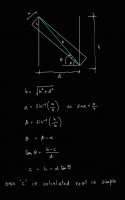
Code is clearly wrong: it assumes the beam is parallel to the diagonal of
the rectangle. It then makes a lot of complexity out of nothing to make the
incorrect beam. The problem can be solved using similar triangles and turns
into a quadratic equation.  I solved for the length of the cut face.

include<BOSL2/std.scad>

function ell(W,H,s) =

real_roots([1-W^2/s^2, -2*H, W^2+H^2]);

ell = max(ell(S,T,4));  // Take biggest root

pts = [[0,0],[0,ell],[S,T],[S,T-ell]];

yrot(90)

zrot(90)

color("green")

linear_extrude(height=2)polygon(pts);

On Tue, Apr 14, 2026 at 22:14 Glenn Butcher via Discuss <
discuss@lists.openscad.org> wrote:

The overall structure of this code makes sense, computes a factor with
which to modify the board. The factor is quite a bit beyond my ken, but
appears to be related to the span and height, modified to correspond to the
offset, angular and magnitude, specified by the board width.

I keep jonesing to see trig functions in these, because that's all I
know.  But I find it interesting that a lot of this can be done
geometrically.
On 4/14/2026 6:30 PM, Leonard Martin Struttmann via Discuss wrote:

The Claude code computes face_length because I told it to.  Actually, I
first had Claude create a Python function to compute those values.  I then
hand-converted that to OpenSCAD.

On Tue, Apr 14, 2026 at 7:21 PM Lee DeRaud via Discuss <
discuss@lists.openscad.org> wrote:

Speaking as someone whose woodworking chops are probably better than his
OpenSCAD chops…

Am I the only one chuckling at the idea of a precise 4”-wide 2x4? 😊

(And now for some reason I can’t get the phrase “measure twice, code
once” out of my head.)

From: Glenn Butcher via Discuss discuss@lists.openscad.org
Sent: Tuesday, April 14, 2026 5:01 PM
To: discuss@lists.openscad.org
Cc: Glenn Butcher glenn.butcher@gmail.com
Subject: [OpenSCAD] Re: Math Behind the Code

The claude code gives a precise 4" board, yay.


OpenSCAD mailing list
To unsubscribe send an email to discuss-leave@lists.openscad.org


OpenSCAD mailing list
To unsubscribe send an email to discuss-leave@lists.openscad.org


OpenSCAD mailing list
To unsubscribe send an email to discuss-leave@lists.openscad.org

Code is clearly wrong: it assumes the beam is parallel to the diagonal of the rectangle. It then makes a lot of complexity out of nothing to make the incorrect beam. The problem can be solved using similar triangles and turns into a quadratic equation. I solved for the length of the cut face. include<BOSL2/std.scad> function ell(W,H,s) = real_roots([1-W^2/s^2, -2*H, W^2+H^2]); ell = max(ell(S,T,4)); // Take biggest root pts = [[0,0],[0,ell],[S,T],[S,T-ell]]; yrot(90) zrot(90) color("green") linear_extrude(height=2)polygon(pts); On Tue, Apr 14, 2026 at 22:14 Glenn Butcher via Discuss < discuss@lists.openscad.org> wrote: > The overall structure of this code makes sense, computes a factor with > which to modify the board. The factor is quite a bit beyond my ken, but > appears to be related to the span and height, modified to correspond to the > offset, angular and magnitude, specified by the board width. > > I keep jonesing to see trig functions in these, because that's all I > know. But I find it interesting that a lot of this can be done > geometrically. > On 4/14/2026 6:30 PM, Leonard Martin Struttmann via Discuss wrote: > > The Claude code computes face_length because I told it to. Actually, I > first had Claude create a Python function to compute those values. I then > hand-converted that to OpenSCAD. > > On Tue, Apr 14, 2026 at 7:21 PM Lee DeRaud via Discuss < > discuss@lists.openscad.org> wrote: > >> Speaking as someone whose woodworking chops are probably better than his >> OpenSCAD chops… >> >> Am I the only one chuckling at the idea of a precise 4”-wide 2x4? 😊 >> >> (And now for some reason I can’t get the phrase “measure twice, code >> once” out of my head.) >> >> >> >> *From:* Glenn Butcher via Discuss <discuss@lists.openscad.org> >> *Sent:* Tuesday, April 14, 2026 5:01 PM >> *To:* discuss@lists.openscad.org >> *Cc:* Glenn Butcher <glenn.butcher@gmail.com> >> *Subject:* [OpenSCAD] Re: Math Behind the Code >> >> >> >> The claude code gives a precise 4" board, yay. >> _______________________________________________ >> OpenSCAD mailing list >> To unsubscribe send an email to discuss-leave@lists.openscad.org >> > > _______________________________________________ > OpenSCAD mailing list > To unsubscribe send an email to discuss-leave@lists.openscad.org > > _______________________________________________ > OpenSCAD mailing list > To unsubscribe send an email to discuss-leave@lists.openscad.org
LM
Leonard Martin Struttmann
Wed, Apr 15, 2026 2:35 PM

Which is pretty much what Claude came up with for me.

On Wed, Apr 15, 2026 at 9:11 AM Adrian Mariano via Discuss <
discuss@lists.openscad.org> wrote:

Code is clearly wrong: it assumes the beam is parallel to the diagonal of
the rectangle. It then makes a lot of complexity out of nothing to make the
incorrect beam. The problem can be solved using similar triangles and turns
into a quadratic equation.  I solved for the length of the cut face.

include<BOSL2/std.scad>

function ell(W,H,s) =

real_roots([1-W^2/s^2, -2*H, W^2+H^2]);

ell = max(ell(S,T,4));  // Take biggest root

pts = [[0,0],[0,ell],[S,T],[S,T-ell]];

yrot(90)

zrot(90)

color("green")

linear_extrude(height=2)polygon(pts);

On Tue, Apr 14, 2026 at 22:14 Glenn Butcher via Discuss <
discuss@lists.openscad.org> wrote:

The overall structure of this code makes sense, computes a factor with
which to modify the board. The factor is quite a bit beyond my ken, but
appears to be related to the span and height, modified to correspond to the
offset, angular and magnitude, specified by the board width.

I keep jonesing to see trig functions in these, because that's all I
know.  But I find it interesting that a lot of this can be done
geometrically.
On 4/14/2026 6:30 PM, Leonard Martin Struttmann via Discuss wrote:

The Claude code computes face_length because I told it to.  Actually, I
first had Claude create a Python function to compute those values.  I then
hand-converted that to OpenSCAD.

On Tue, Apr 14, 2026 at 7:21 PM Lee DeRaud via Discuss <
discuss@lists.openscad.org> wrote:

Speaking as someone whose woodworking chops are probably better than his
OpenSCAD chops…

Am I the only one chuckling at the idea of a precise 4”-wide 2x4? 😊

(And now for some reason I can’t get the phrase “measure twice, code
once” out of my head.)

From: Glenn Butcher via Discuss discuss@lists.openscad.org
Sent: Tuesday, April 14, 2026 5:01 PM
To: discuss@lists.openscad.org
Cc: Glenn Butcher glenn.butcher@gmail.com
Subject: [OpenSCAD] Re: Math Behind the Code

The claude code gives a precise 4" board, yay.


OpenSCAD mailing list
To unsubscribe send an email to discuss-leave@lists.openscad.org


OpenSCAD mailing list
To unsubscribe send an email to discuss-leave@lists.openscad.org


OpenSCAD mailing list
To unsubscribe send an email to discuss-leave@lists.openscad.org


OpenSCAD mailing list
To unsubscribe send an email to discuss-leave@lists.openscad.org

Which is pretty much what Claude came up with for me. On Wed, Apr 15, 2026 at 9:11 AM Adrian Mariano via Discuss < discuss@lists.openscad.org> wrote: > Code is clearly wrong: it assumes the beam is parallel to the diagonal of > the rectangle. It then makes a lot of complexity out of nothing to make the > incorrect beam. The problem can be solved using similar triangles and turns > into a quadratic equation. I solved for the length of the cut face. > > include<BOSL2/std.scad> > > > > function ell(W,H,s) = > > real_roots([1-W^2/s^2, -2*H, W^2+H^2]); > > > > ell = max(ell(S,T,4)); // Take biggest root > > pts = [[0,0],[0,ell],[S,T],[S,T-ell]]; > > > > yrot(90) > > zrot(90) > > color("green") > > linear_extrude(height=2)polygon(pts); > > > > On Tue, Apr 14, 2026 at 22:14 Glenn Butcher via Discuss < > discuss@lists.openscad.org> wrote: > >> The overall structure of this code makes sense, computes a factor with >> which to modify the board. The factor is quite a bit beyond my ken, but >> appears to be related to the span and height, modified to correspond to the >> offset, angular and magnitude, specified by the board width. >> >> I keep jonesing to see trig functions in these, because that's all I >> know. But I find it interesting that a lot of this can be done >> geometrically. >> On 4/14/2026 6:30 PM, Leonard Martin Struttmann via Discuss wrote: >> >> The Claude code computes face_length because I told it to. Actually, I >> first had Claude create a Python function to compute those values. I then >> hand-converted that to OpenSCAD. >> >> On Tue, Apr 14, 2026 at 7:21 PM Lee DeRaud via Discuss < >> discuss@lists.openscad.org> wrote: >> >>> Speaking as someone whose woodworking chops are probably better than his >>> OpenSCAD chops… >>> >>> Am I the only one chuckling at the idea of a precise 4”-wide 2x4? 😊 >>> >>> (And now for some reason I can’t get the phrase “measure twice, code >>> once” out of my head.) >>> >>> >>> >>> *From:* Glenn Butcher via Discuss <discuss@lists.openscad.org> >>> *Sent:* Tuesday, April 14, 2026 5:01 PM >>> *To:* discuss@lists.openscad.org >>> *Cc:* Glenn Butcher <glenn.butcher@gmail.com> >>> *Subject:* [OpenSCAD] Re: Math Behind the Code >>> >>> >>> >>> The claude code gives a precise 4" board, yay. >>> _______________________________________________ >>> OpenSCAD mailing list >>> To unsubscribe send an email to discuss-leave@lists.openscad.org >>> >> >> _______________________________________________ >> OpenSCAD mailing list >> To unsubscribe send an email to discuss-leave@lists.openscad.org >> >> _______________________________________________ >> OpenSCAD mailing list >> To unsubscribe send an email to discuss-leave@lists.openscad.org > > _______________________________________________ > OpenSCAD mailing list > To unsubscribe send an email to discuss-leave@lists.openscad.org
AM
Adrian Mariano
Wed, Apr 15, 2026 3:29 PM

I tried ChatGPT and it made the same mistake as copilot of using the
diagonal of the original rectangle.

On Wed, Apr 15, 2026 at 10:36 Leonard Martin Struttmann via Discuss <
discuss@lists.openscad.org> wrote:

Which is pretty much what Claude came up with for me.

On Wed, Apr 15, 2026 at 9:11 AM Adrian Mariano via Discuss <
discuss@lists.openscad.org> wrote:

Code is clearly wrong: it assumes the beam is parallel to the diagonal of
the rectangle. It then makes a lot of complexity out of nothing to make the
incorrect beam. The problem can be solved using similar triangles and turns
into a quadratic equation.  I solved for the length of the cut face.

include<BOSL2/std.scad>

function ell(W,H,s) =

real_roots([1-W^2/s^2, -2*H, W^2+H^2]);

ell = max(ell(S,T,4));  // Take biggest root

pts = [[0,0],[0,ell],[S,T],[S,T-ell]];

yrot(90)

zrot(90)

color("green")

linear_extrude(height=2)polygon(pts);

On Tue, Apr 14, 2026 at 22:14 Glenn Butcher via Discuss <
discuss@lists.openscad.org> wrote:

The overall structure of this code makes sense, computes a factor with
which to modify the board. The factor is quite a bit beyond my ken, but
appears to be related to the span and height, modified to correspond to the
offset, angular and magnitude, specified by the board width.

I keep jonesing to see trig functions in these, because that's all I
know.  But I find it interesting that a lot of this can be done
geometrically.
On 4/14/2026 6:30 PM, Leonard Martin Struttmann via Discuss wrote:

The Claude code computes face_length because I told it to.  Actually, I
first had Claude create a Python function to compute those values.  I then
hand-converted that to OpenSCAD.

On Tue, Apr 14, 2026 at 7:21 PM Lee DeRaud via Discuss <
discuss@lists.openscad.org> wrote:

Speaking as someone whose woodworking chops are probably better than
his OpenSCAD chops…

Am I the only one chuckling at the idea of a precise 4”-wide 2x4? 😊

(And now for some reason I can’t get the phrase “measure twice, code
once” out of my head.)

From: Glenn Butcher via Discuss discuss@lists.openscad.org
Sent: Tuesday, April 14, 2026 5:01 PM
To: discuss@lists.openscad.org
Cc: Glenn Butcher glenn.butcher@gmail.com
Subject: [OpenSCAD] Re: Math Behind the Code

The claude code gives a precise 4" board, yay.


OpenSCAD mailing list
To unsubscribe send an email to discuss-leave@lists.openscad.org


OpenSCAD mailing list
To unsubscribe send an email to discuss-leave@lists.openscad.org


OpenSCAD mailing list
To unsubscribe send an email to discuss-leave@lists.openscad.org


OpenSCAD mailing list
To unsubscribe send an email to discuss-leave@lists.openscad.org


OpenSCAD mailing list
To unsubscribe send an email to discuss-leave@lists.openscad.org

I tried ChatGPT and it made the same mistake as copilot of using the diagonal of the original rectangle. On Wed, Apr 15, 2026 at 10:36 Leonard Martin Struttmann via Discuss < discuss@lists.openscad.org> wrote: > Which is pretty much what Claude came up with for me. > > > On Wed, Apr 15, 2026 at 9:11 AM Adrian Mariano via Discuss < > discuss@lists.openscad.org> wrote: > >> Code is clearly wrong: it assumes the beam is parallel to the diagonal of >> the rectangle. It then makes a lot of complexity out of nothing to make the >> incorrect beam. The problem can be solved using similar triangles and turns >> into a quadratic equation. I solved for the length of the cut face. >> >> include<BOSL2/std.scad> >> >> >> >> function ell(W,H,s) = >> >> real_roots([1-W^2/s^2, -2*H, W^2+H^2]); >> >> >> >> ell = max(ell(S,T,4)); // Take biggest root >> >> pts = [[0,0],[0,ell],[S,T],[S,T-ell]]; >> >> >> >> yrot(90) >> >> zrot(90) >> >> color("green") >> >> linear_extrude(height=2)polygon(pts); >> >> >> >> On Tue, Apr 14, 2026 at 22:14 Glenn Butcher via Discuss < >> discuss@lists.openscad.org> wrote: >> >>> The overall structure of this code makes sense, computes a factor with >>> which to modify the board. The factor is quite a bit beyond my ken, but >>> appears to be related to the span and height, modified to correspond to the >>> offset, angular and magnitude, specified by the board width. >>> >>> I keep jonesing to see trig functions in these, because that's all I >>> know. But I find it interesting that a lot of this can be done >>> geometrically. >>> On 4/14/2026 6:30 PM, Leonard Martin Struttmann via Discuss wrote: >>> >>> The Claude code computes face_length because I told it to. Actually, I >>> first had Claude create a Python function to compute those values. I then >>> hand-converted that to OpenSCAD. >>> >>> On Tue, Apr 14, 2026 at 7:21 PM Lee DeRaud via Discuss < >>> discuss@lists.openscad.org> wrote: >>> >>>> Speaking as someone whose woodworking chops are probably better than >>>> his OpenSCAD chops… >>>> >>>> Am I the only one chuckling at the idea of a precise 4”-wide 2x4? 😊 >>>> >>>> (And now for some reason I can’t get the phrase “measure twice, code >>>> once” out of my head.) >>>> >>>> >>>> >>>> *From:* Glenn Butcher via Discuss <discuss@lists.openscad.org> >>>> *Sent:* Tuesday, April 14, 2026 5:01 PM >>>> *To:* discuss@lists.openscad.org >>>> *Cc:* Glenn Butcher <glenn.butcher@gmail.com> >>>> *Subject:* [OpenSCAD] Re: Math Behind the Code >>>> >>>> >>>> >>>> The claude code gives a precise 4" board, yay. >>>> _______________________________________________ >>>> OpenSCAD mailing list >>>> To unsubscribe send an email to discuss-leave@lists.openscad.org >>>> >>> >>> _______________________________________________ >>> OpenSCAD mailing list >>> To unsubscribe send an email to discuss-leave@lists.openscad.org >>> >>> _______________________________________________ >>> OpenSCAD mailing list >>> To unsubscribe send an email to discuss-leave@lists.openscad.org >> >> _______________________________________________ >> OpenSCAD mailing list >> To unsubscribe send an email to discuss-leave@lists.openscad.org > > _______________________________________________ > OpenSCAD mailing list > To unsubscribe send an email to discuss-leave@lists.openscad.org
SP
Sanjeev Prabhakar
Wed, Apr 15, 2026 5:29 PM

I would prefer to do this by hand

On Wed, 15 Apr 2026, 00:40 Glenn Butcher via Discuss, <
discuss@lists.openscad.org> wrote:

Disclaimer: I'm not a math person.

I'm building a CAD model of a vintage railroad baggage car, to help with
the visualization of design for a restoration project. In modeling the
framing internal to the walls, I need diagonal members between the
verticals; my first module to do that was 'carpenter style', where I
laid the diagonal between two vertical members and used difference() to
cut it.  This required an angle parameter that I had to 'scooch' around
to get the right angle.

What I wanted was a module that just took the height and spacing numbers
and made a parallelogram to fit and extruded it to the right thickness.
So, I spent a few forays into the internets, searching for the math to
do that.  And, I just couldn't find it, even the AI search summaries
didn't complete the solution.  I finally gave in to the vibe coding
thing, and took the problem to Microsoft CoPilot, with which I had some
success building an OpenGL renderer.  To describe the problem I used
compass cardinal points to lay out the space, NE, NW, SE, SW to define
the four corners of the parallelogram.  Took 5 iterations to get it
close, and it still was plotting the NE corner on the wrong side of the
Y axis.  I finally just told it to negate that corner's vertical
component, ta-da, works.

Thing is, I do not understand the methodology.  I've inspected the
intermediate variables and I just don't have the math chops to
understand how the vectors yield the parallelogram sides.  Here's the code:

//algorithm courtesy Microsoft CoPilot:
module v2x4_diagonal(S, T) {
//ggb: diagonal member dimensions
w=4;  //ggb: height of the parallelogram
t=2;

  // Upper edge endpoints
  NW = [0, T];
  SE = [S, 0];

  // Diagonal direction
  dx = S;
  dy = -T;
  L  = sqrt(dx*dx + dy*dy);

  // Perpendicular unit vector (points downward)
  px = -T / L;
  py = -S / L;

  // Offset vector for lower edge
  ox = w * px;
  oy = w * py;

  // Lower edge parametric line: P(t) = NW + (ox, oy) + t*(dx, dy)

  // Intersection with x = 0 → SW
  t0 = -ox / dx;
  SW = [0,
        T + oy + t0 * dy];

  // Intersection with x = S → NE
  t1 = (S - ox) / dx;
  NE = [S,
        -(T + oy + t1 * dy)];  //ggb: I had to negate the Y coordinate

  // Correct winding order: NW → NE → SE → SW
  // ggb: extrude works in xy plane, rotate and translate to make it

'vertical',
//        along the wall frame axis, Y.
rotate([90,0,-90])
translate([-S,0,-2])
linear_extrude(height = t)
polygon(points=[NW, NE, SE, SW]);
}

T=96;  //ggb: how tall is the framing
S=28;  //ggb: spacing between the framing members

translate([0,-2,0])cube([4,2,T]);
translate([0,S,0]) cube([4,2,T]);

color("green") v2x4_diagonal(S, T);

I offer this in the public domain, use as you see fit.  All I'd like to
get is some sort of explanation as to how it works...

Thanks,
Glenn Butcher


OpenSCAD mailing list
To unsubscribe send an email to discuss-leave@lists.openscad.org
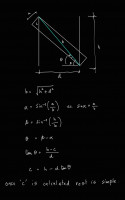
I would prefer to do this by hand On Wed, 15 Apr 2026, 00:40 Glenn Butcher via Discuss, < discuss@lists.openscad.org> wrote: > Disclaimer: I'm not a math person. > > I'm building a CAD model of a vintage railroad baggage car, to help with > the visualization of design for a restoration project. In modeling the > framing internal to the walls, I need diagonal members between the > verticals; my first module to do that was 'carpenter style', where I > laid the diagonal between two vertical members and used difference() to > cut it. This required an angle parameter that I had to 'scooch' around > to get the right angle. > > What I wanted was a module that just took the height and spacing numbers > and made a parallelogram to fit and extruded it to the right thickness. > So, I spent a few forays into the internets, searching for the math to > do that. And, I just couldn't find it, even the AI search summaries > didn't complete the solution. I finally gave in to the vibe coding > thing, and took the problem to Microsoft CoPilot, with which I had some > success building an OpenGL renderer. To describe the problem I used > compass cardinal points to lay out the space, NE, NW, SE, SW to define > the four corners of the parallelogram. Took 5 iterations to get it > close, and it still was plotting the NE corner on the wrong side of the > Y axis. I finally just told it to negate that corner's vertical > component, ta-da, works. > > Thing is, I do not understand the methodology. I've inspected the > intermediate variables and I just don't have the math chops to > understand how the vectors yield the parallelogram sides. Here's the code: > > //algorithm courtesy Microsoft CoPilot: > module v2x4_diagonal(S, T) { > //ggb: diagonal member dimensions > w=4; //ggb: height of the parallelogram > t=2; > > // Upper edge endpoints > NW = [0, T]; > SE = [S, 0]; > > // Diagonal direction > dx = S; > dy = -T; > L = sqrt(dx*dx + dy*dy); > > // Perpendicular unit vector (points downward) > px = -T / L; > py = -S / L; > > // Offset vector for lower edge > ox = w * px; > oy = w * py; > > // Lower edge parametric line: P(t) = NW + (ox, oy) + t*(dx, dy) > > // Intersection with x = 0 → SW > t0 = -ox / dx; > SW = [0, > T + oy + t0 * dy]; > > // Intersection with x = S → NE > t1 = (S - ox) / dx; > NE = [S, > -(T + oy + t1 * dy)]; //ggb: I had to negate the Y coordinate > > // Correct winding order: NW → NE → SE → SW > // ggb: extrude works in xy plane, rotate and translate to make it > 'vertical', > // along the wall frame axis, Y. > rotate([90,0,-90]) > translate([-S,0,-2]) > linear_extrude(height = t) > polygon(points=[NW, NE, SE, SW]); > } > > T=96; //ggb: how tall is the framing > S=28; //ggb: spacing between the framing members > > translate([0,-2,0])cube([4,2,T]); > translate([0,S,0]) cube([4,2,T]); > > color("green") v2x4_diagonal(S, T); > > I offer this in the public domain, use as you see fit. All I'd like to > get is some sort of explanation as to how it works... > > Thanks, > Glenn Butcher > > > > _______________________________________________ > OpenSCAD mailing list > To unsubscribe send an email to discuss-leave@lists.openscad.org
JB
Jon Bondy
Wed, Apr 15, 2026 5:47 PM

Nice visualization!

On 4/15/2026 1:29 PM, Sanjeev Prabhakar via Discuss wrote:

I would prefer to do this by hand

On Wed, 15 Apr 2026, 00:40 Glenn Butcher via Discuss,
discuss@lists.openscad.org wrote:

 Disclaimer: I'm not a math person.

 I'm building a CAD model of a vintage railroad baggage car, to
 help with
 the visualization of design for a restoration project. In modeling
 the
 framing internal to the walls, I need diagonal members between the
 verticals; my first module to do that was 'carpenter style', where I
 laid the diagonal between two vertical members and used
 difference() to
 cut it.  This required an angle parameter that I had to 'scooch'
 around
 to get the right angle.

 What I wanted was a module that just took the height and spacing
 numbers
 and made a parallelogram to fit and extruded it to the right
 thickness.
 So, I spent a few forays into the internets, searching for the
 math to
 do that.  And, I just couldn't find it, even the AI search summaries
 didn't complete the solution.  I finally gave in to the vibe coding
 thing, and took the problem to Microsoft CoPilot, with which I had
 some
 success building an OpenGL renderer.  To describe the problem I used
 compass cardinal points to lay out the space, NE, NW, SE, SW to
 define
 the four corners of the parallelogram.  Took 5 iterations to get it
 close, and it still was plotting the NE corner on the wrong side
 of the
 Y axis.  I finally just told it to negate that corner's vertical
 component, ta-da, works.

 Thing is, I do not understand the methodology.  I've inspected the
 intermediate variables and I just don't have the math chops to
 understand how the vectors yield the parallelogram sides. Here's
 the code:

 //algorithm courtesy Microsoft CoPilot:
 module v2x4_diagonal(S, T) {
      //ggb: diagonal member dimensions
      w=4;  //ggb: height of the parallelogram
      t=2;

      // Upper edge endpoints
      NW = [0, T];
      SE = [S, 0];

      // Diagonal direction
      dx = S;
      dy = -T;
      L  = sqrt(dx*dx + dy*dy);

      // Perpendicular unit vector (points downward)
      px = -T / L;
      py = -S / L;

      // Offset vector for lower edge
      ox = w * px;
      oy = w * py;

      // Lower edge parametric line: P(t) = NW + (ox, oy) + t*(dx, dy)

      // Intersection with x = 0 → SW
      t0 = -ox / dx;
      SW = [0,
            T + oy + t0 * dy];

      // Intersection with x = S → NE
      t1 = (S - ox) / dx;
      NE = [S,
            -(T + oy + t1 * dy)];  //ggb: I had to negate the Y
 coordinate

      // Correct winding order: NW → NE → SE → SW
      // ggb: extrude works in xy plane, rotate and translate to
 make it
 'vertical',
      //        along the wall frame axis, Y.
      rotate([90,0,-90])
          translate([-S,0,-2])
              linear_extrude(height = t)
                  polygon(points=[NW, NE, SE, SW]);
 }

 T=96;  //ggb: how tall is the framing
 S=28;  //ggb: spacing between the framing members

 translate([0,-2,0])cube([4,2,T]);
 translate([0,S,0]) cube([4,2,T]);

 color("green") v2x4_diagonal(S, T);

 I offer this in the public domain, use as you see fit.  All I'd
 like to
 get is some sort of explanation as to how it works...

 Thanks,
 Glenn Butcher


 _______________________________________________
 OpenSCAD mailing list
 To unsubscribe send an email to discuss-leave@lists.openscad.org

OpenSCAD mailing list
To unsubscribe send an email todiscuss-leave@lists.openscad.org

--
This email has been checked for viruses by AVG antivirus software.
www.avg.com

Nice visualization! On 4/15/2026 1:29 PM, Sanjeev Prabhakar via Discuss wrote: > I would prefer to do this by hand > > > > > > On Wed, 15 Apr 2026, 00:40 Glenn Butcher via Discuss, > <discuss@lists.openscad.org> wrote: > > Disclaimer: I'm not a math person. > > I'm building a CAD model of a vintage railroad baggage car, to > help with > the visualization of design for a restoration project. In modeling > the > framing internal to the walls, I need diagonal members between the > verticals; my first module to do that was 'carpenter style', where I > laid the diagonal between two vertical members and used > difference() to > cut it.  This required an angle parameter that I had to 'scooch' > around > to get the right angle. > > What I wanted was a module that just took the height and spacing > numbers > and made a parallelogram to fit and extruded it to the right > thickness. > So, I spent a few forays into the internets, searching for the > math to > do that.  And, I just couldn't find it, even the AI search summaries > didn't complete the solution.  I finally gave in to the vibe coding > thing, and took the problem to Microsoft CoPilot, with which I had > some > success building an OpenGL renderer.  To describe the problem I used > compass cardinal points to lay out the space, NE, NW, SE, SW to > define > the four corners of the parallelogram.  Took 5 iterations to get it > close, and it still was plotting the NE corner on the wrong side > of the > Y axis.  I finally just told it to negate that corner's vertical > component, ta-da, works. > > Thing is, I do not understand the methodology.  I've inspected the > intermediate variables and I just don't have the math chops to > understand how the vectors yield the parallelogram sides. Here's > the code: > > //algorithm courtesy Microsoft CoPilot: > module v2x4_diagonal(S, T) { >      //ggb: diagonal member dimensions >      w=4;  //ggb: height of the parallelogram >      t=2; > >      // Upper edge endpoints >      NW = [0, T]; >      SE = [S, 0]; > >      // Diagonal direction >      dx = S; >      dy = -T; >      L  = sqrt(dx*dx + dy*dy); > >      // Perpendicular unit vector (points downward) >      px = -T / L; >      py = -S / L; > >      // Offset vector for lower edge >      ox = w * px; >      oy = w * py; > >      // Lower edge parametric line: P(t) = NW + (ox, oy) + t*(dx, dy) > >      // Intersection with x = 0 → SW >      t0 = -ox / dx; >      SW = [0, >            T + oy + t0 * dy]; > >      // Intersection with x = S → NE >      t1 = (S - ox) / dx; >      NE = [S, >            -(T + oy + t1 * dy)];  //ggb: I had to negate the Y > coordinate > >      // Correct winding order: NW → NE → SE → SW >      // ggb: extrude works in xy plane, rotate and translate to > make it > 'vertical', >      //        along the wall frame axis, Y. >      rotate([90,0,-90]) >          translate([-S,0,-2]) >              linear_extrude(height = t) >                  polygon(points=[NW, NE, SE, SW]); > } > > T=96;  //ggb: how tall is the framing > S=28;  //ggb: spacing between the framing members > > translate([0,-2,0])cube([4,2,T]); > translate([0,S,0]) cube([4,2,T]); > > color("green") v2x4_diagonal(S, T); > > I offer this in the public domain, use as you see fit.  All I'd > like to > get is some sort of explanation as to how it works... > > Thanks, > Glenn Butcher > > > > _______________________________________________ > OpenSCAD mailing list > To unsubscribe send an email to discuss-leave@lists.openscad.org > > > _______________________________________________ > OpenSCAD mailing list > To unsubscribe send an email todiscuss-leave@lists.openscad.org -- This email has been checked for viruses by AVG antivirus software. www.avg.com
AM
Adrian Mariano
Wed, Apr 15, 2026 6:03 PM

I did it myself by hand using similar triangles to directly obtain c for
the solution I posted without any trig and without introducing so many
extra parameters. I think this approach is unnecessarily complicated.

On Wed, Apr 15, 2026 at 13:30 Sanjeev Prabhakar via Discuss <
discuss@lists.openscad.org> wrote:

I would prefer to do this by hand

On Wed, 15 Apr 2026, 00:40 Glenn Butcher via Discuss, <
discuss@lists.openscad.org> wrote:

Disclaimer: I'm not a math person.

I'm building a CAD model of a vintage railroad baggage car, to help with
the visualization of design for a restoration project. In modeling the
framing internal to the walls, I need diagonal members between the
verticals; my first module to do that was 'carpenter style', where I
laid the diagonal between two vertical members and used difference() to
cut it.  This required an angle parameter that I had to 'scooch' around
to get the right angle.

What I wanted was a module that just took the height and spacing numbers
and made a parallelogram to fit and extruded it to the right thickness.
So, I spent a few forays into the internets, searching for the math to
do that.  And, I just couldn't find it, even the AI search summaries
didn't complete the solution.  I finally gave in to the vibe coding
thing, and took the problem to Microsoft CoPilot, with which I had some
success building an OpenGL renderer.  To describe the problem I used
compass cardinal points to lay out the space, NE, NW, SE, SW to define
the four corners of the parallelogram.  Took 5 iterations to get it
close, and it still was plotting the NE corner on the wrong side of the
Y axis.  I finally just told it to negate that corner's vertical
component, ta-da, works.

Thing is, I do not understand the methodology.  I've inspected the
intermediate variables and I just don't have the math chops to
understand how the vectors yield the parallelogram sides.  Here's the
code:

//algorithm courtesy Microsoft CoPilot:
module v2x4_diagonal(S, T) {
//ggb: diagonal member dimensions
w=4;  //ggb: height of the parallelogram
t=2;

  // Upper edge endpoints
  NW = [0, T];
  SE = [S, 0];

  // Diagonal direction
  dx = S;
  dy = -T;
  L  = sqrt(dx*dx + dy*dy);

  // Perpendicular unit vector (points downward)
  px = -T / L;
  py = -S / L;

  // Offset vector for lower edge
  ox = w * px;
  oy = w * py;

  // Lower edge parametric line: P(t) = NW + (ox, oy) + t*(dx, dy)

  // Intersection with x = 0 → SW
  t0 = -ox / dx;
  SW = [0,
        T + oy + t0 * dy];

  // Intersection with x = S → NE
  t1 = (S - ox) / dx;
  NE = [S,
        -(T + oy + t1 * dy)];  //ggb: I had to negate the Y coordinate

  // Correct winding order: NW → NE → SE → SW
  // ggb: extrude works in xy plane, rotate and translate to make it

'vertical',
//        along the wall frame axis, Y.
rotate([90,0,-90])
translate([-S,0,-2])
linear_extrude(height = t)
polygon(points=[NW, NE, SE, SW]);
}

T=96;  //ggb: how tall is the framing
S=28;  //ggb: spacing between the framing members

translate([0,-2,0])cube([4,2,T]);
translate([0,S,0]) cube([4,2,T]);

color("green") v2x4_diagonal(S, T);

I offer this in the public domain, use as you see fit.  All I'd like to
get is some sort of explanation as to how it works...

Thanks,
Glenn Butcher


OpenSCAD mailing list
To unsubscribe send an email to discuss-leave@lists.openscad.org


OpenSCAD mailing list
To unsubscribe send an email to discuss-leave@lists.openscad.org
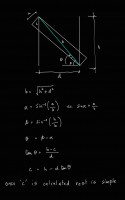
I did it myself by hand using similar triangles to directly obtain c for the solution I posted without any trig and without introducing so many extra parameters. I think this approach is unnecessarily complicated. On Wed, Apr 15, 2026 at 13:30 Sanjeev Prabhakar via Discuss < discuss@lists.openscad.org> wrote: > I would prefer to do this by hand > > > > > > On Wed, 15 Apr 2026, 00:40 Glenn Butcher via Discuss, < > discuss@lists.openscad.org> wrote: > >> Disclaimer: I'm not a math person. >> >> I'm building a CAD model of a vintage railroad baggage car, to help with >> the visualization of design for a restoration project. In modeling the >> framing internal to the walls, I need diagonal members between the >> verticals; my first module to do that was 'carpenter style', where I >> laid the diagonal between two vertical members and used difference() to >> cut it. This required an angle parameter that I had to 'scooch' around >> to get the right angle. >> >> What I wanted was a module that just took the height and spacing numbers >> and made a parallelogram to fit and extruded it to the right thickness. >> So, I spent a few forays into the internets, searching for the math to >> do that. And, I just couldn't find it, even the AI search summaries >> didn't complete the solution. I finally gave in to the vibe coding >> thing, and took the problem to Microsoft CoPilot, with which I had some >> success building an OpenGL renderer. To describe the problem I used >> compass cardinal points to lay out the space, NE, NW, SE, SW to define >> the four corners of the parallelogram. Took 5 iterations to get it >> close, and it still was plotting the NE corner on the wrong side of the >> Y axis. I finally just told it to negate that corner's vertical >> component, ta-da, works. >> >> Thing is, I do not understand the methodology. I've inspected the >> intermediate variables and I just don't have the math chops to >> understand how the vectors yield the parallelogram sides. Here's the >> code: >> >> //algorithm courtesy Microsoft CoPilot: >> module v2x4_diagonal(S, T) { >> //ggb: diagonal member dimensions >> w=4; //ggb: height of the parallelogram >> t=2; >> >> // Upper edge endpoints >> NW = [0, T]; >> SE = [S, 0]; >> >> // Diagonal direction >> dx = S; >> dy = -T; >> L = sqrt(dx*dx + dy*dy); >> >> // Perpendicular unit vector (points downward) >> px = -T / L; >> py = -S / L; >> >> // Offset vector for lower edge >> ox = w * px; >> oy = w * py; >> >> // Lower edge parametric line: P(t) = NW + (ox, oy) + t*(dx, dy) >> >> // Intersection with x = 0 → SW >> t0 = -ox / dx; >> SW = [0, >> T + oy + t0 * dy]; >> >> // Intersection with x = S → NE >> t1 = (S - ox) / dx; >> NE = [S, >> -(T + oy + t1 * dy)]; //ggb: I had to negate the Y coordinate >> >> // Correct winding order: NW → NE → SE → SW >> // ggb: extrude works in xy plane, rotate and translate to make it >> 'vertical', >> // along the wall frame axis, Y. >> rotate([90,0,-90]) >> translate([-S,0,-2]) >> linear_extrude(height = t) >> polygon(points=[NW, NE, SE, SW]); >> } >> >> T=96; //ggb: how tall is the framing >> S=28; //ggb: spacing between the framing members >> >> translate([0,-2,0])cube([4,2,T]); >> translate([0,S,0]) cube([4,2,T]); >> >> color("green") v2x4_diagonal(S, T); >> >> I offer this in the public domain, use as you see fit. All I'd like to >> get is some sort of explanation as to how it works... >> >> Thanks, >> Glenn Butcher >> >> >> >> _______________________________________________ >> OpenSCAD mailing list >> To unsubscribe send an email to discuss-leave@lists.openscad.org > > _______________________________________________ > OpenSCAD mailing list > To unsubscribe send an email to discuss-leave@lists.openscad.org