

discuss@lists.openscad.org

OpenSCAD general discussion Mailing-list

View all threads

Math Behind the Code

GB
Glenn Butcher
Wed, Apr 15, 2026 7:08 PM

Ah, an approach I can understand, thanks, Sanjeev.  This is not a diss
on the non-trig approaches, it just reflects my limited knowledge of
math.  Ironically, it's the trig that I understand, given I flunked that
in high school, which set me off on a long, ill-advised path of math
avoidance.  Yes, you can get a doctorate in computer science with only
four math courses, total...  :D

No, I spent hours trying to divine relevant angles, and I kept
constraining myself to the parallelogram.  Didn't think to just extend
the bottom edge out to make a right triangle with the board width.

I want to thank everyone who pitched in an algorithm.  I was just going
to use what CoPilot gave me, but that felt unsatisfying. And, turned out
to be not that right.  This bit of discourse poignantly demonstrates a
fundamental concept in engineering, multiple sets of eyes on a a
problem.  Human eyes, IMHO...

Regards,
Glenn Butcher

On 4/15/2026 11:29 AM, Sanjeev Prabhakar wrote:

I would prefer to do this by hand

On Wed, 15 Apr 2026, 00:40 Glenn Butcher via Discuss,
discuss@lists.openscad.org wrote:

 Disclaimer: I'm not a math person.

 I'm building a CAD model of a vintage railroad baggage car, to
 help with
 the visualization of design for a restoration project. In modeling
 the
 framing internal to the walls, I need diagonal members between the
 verticals; my first module to do that was 'carpenter style', where I
 laid the diagonal between two vertical members and used
 difference() to
 cut it.  This required an angle parameter that I had to 'scooch'
 around
 to get the right angle.

 What I wanted was a module that just took the height and spacing
 numbers
 and made a parallelogram to fit and extruded it to the right
 thickness.
 So, I spent a few forays into the internets, searching for the
 math to
 do that.  And, I just couldn't find it, even the AI search summaries
 didn't complete the solution.  I finally gave in to the vibe coding
 thing, and took the problem to Microsoft CoPilot, with which I had
 some
 success building an OpenGL renderer.  To describe the problem I used
 compass cardinal points to lay out the space, NE, NW, SE, SW to
 define
 the four corners of the parallelogram.  Took 5 iterations to get it
 close, and it still was plotting the NE corner on the wrong side
 of the
 Y axis.  I finally just told it to negate that corner's vertical
 component, ta-da, works.

 Thing is, I do not understand the methodology.  I've inspected the
 intermediate variables and I just don't have the math chops to
 understand how the vectors yield the parallelogram sides. Here's
 the code:

 //algorithm courtesy Microsoft CoPilot:
 module v2x4_diagonal(S, T) {
      //ggb: diagonal member dimensions
      w=4;  //ggb: height of the parallelogram
      t=2;

      // Upper edge endpoints
      NW = [0, T];
      SE = [S, 0];

      // Diagonal direction
      dx = S;
      dy = -T;
      L  = sqrt(dx*dx + dy*dy);

      // Perpendicular unit vector (points downward)
      px = -T / L;
      py = -S / L;

      // Offset vector for lower edge
      ox = w * px;
      oy = w * py;

      // Lower edge parametric line: P(t) = NW + (ox, oy) + t*(dx, dy)

      // Intersection with x = 0 → SW
      t0 = -ox / dx;
      SW = [0,
            T + oy + t0 * dy];

      // Intersection with x = S → NE
      t1 = (S - ox) / dx;
      NE = [S,
            -(T + oy + t1 * dy)];  //ggb: I had to negate the Y
 coordinate

      // Correct winding order: NW → NE → SE → SW
      // ggb: extrude works in xy plane, rotate and translate to
 make it
 'vertical',
      //        along the wall frame axis, Y.
      rotate([90,0,-90])
          translate([-S,0,-2])
              linear_extrude(height = t)
                  polygon(points=[NW, NE, SE, SW]);
 }

 T=96;  //ggb: how tall is the framing
 S=28;  //ggb: spacing between the framing members

 translate([0,-2,0])cube([4,2,T]);
 translate([0,S,0]) cube([4,2,T]);

 color("green") v2x4_diagonal(S, T);

 I offer this in the public domain, use as you see fit.  All I'd
 like to
 get is some sort of explanation as to how it works...

 Thanks,
 Glenn Butcher


 _______________________________________________
 OpenSCAD mailing list
 To unsubscribe send an email to discuss-leave@lists.openscad.org
Ah, an approach I can understand, thanks, Sanjeev.  This is not a diss on the non-trig approaches, it just reflects my limited knowledge of math.  Ironically, it's the trig that I understand, given I flunked that in high school, which set me off on a long, ill-advised path of math avoidance.  Yes, you can get a doctorate in computer science with only four math courses, total...  :D No, I spent hours trying to divine relevant angles, and I kept constraining myself to the parallelogram.  Didn't think to just extend the bottom edge out to make a right triangle with the board width. I want to thank everyone who pitched in an algorithm.  I was just going to use what CoPilot gave me, but that felt unsatisfying. And, turned out to be not that right.  This bit of discourse poignantly demonstrates a fundamental concept in engineering, multiple sets of eyes on a a problem.  Human eyes, IMHO... Regards, Glenn Butcher On 4/15/2026 11:29 AM, Sanjeev Prabhakar wrote: > I would prefer to do this by hand > > > > > > On Wed, 15 Apr 2026, 00:40 Glenn Butcher via Discuss, > <discuss@lists.openscad.org> wrote: > > Disclaimer: I'm not a math person. > > I'm building a CAD model of a vintage railroad baggage car, to > help with > the visualization of design for a restoration project. In modeling > the > framing internal to the walls, I need diagonal members between the > verticals; my first module to do that was 'carpenter style', where I > laid the diagonal between two vertical members and used > difference() to > cut it.  This required an angle parameter that I had to 'scooch' > around > to get the right angle. > > What I wanted was a module that just took the height and spacing > numbers > and made a parallelogram to fit and extruded it to the right > thickness. > So, I spent a few forays into the internets, searching for the > math to > do that.  And, I just couldn't find it, even the AI search summaries > didn't complete the solution.  I finally gave in to the vibe coding > thing, and took the problem to Microsoft CoPilot, with which I had > some > success building an OpenGL renderer.  To describe the problem I used > compass cardinal points to lay out the space, NE, NW, SE, SW to > define > the four corners of the parallelogram.  Took 5 iterations to get it > close, and it still was plotting the NE corner on the wrong side > of the > Y axis.  I finally just told it to negate that corner's vertical > component, ta-da, works. > > Thing is, I do not understand the methodology.  I've inspected the > intermediate variables and I just don't have the math chops to > understand how the vectors yield the parallelogram sides. Here's > the code: > > //algorithm courtesy Microsoft CoPilot: > module v2x4_diagonal(S, T) { >      //ggb: diagonal member dimensions >      w=4;  //ggb: height of the parallelogram >      t=2; > >      // Upper edge endpoints >      NW = [0, T]; >      SE = [S, 0]; > >      // Diagonal direction >      dx = S; >      dy = -T; >      L  = sqrt(dx*dx + dy*dy); > >      // Perpendicular unit vector (points downward) >      px = -T / L; >      py = -S / L; > >      // Offset vector for lower edge >      ox = w * px; >      oy = w * py; > >      // Lower edge parametric line: P(t) = NW + (ox, oy) + t*(dx, dy) > >      // Intersection with x = 0 → SW >      t0 = -ox / dx; >      SW = [0, >            T + oy + t0 * dy]; > >      // Intersection with x = S → NE >      t1 = (S - ox) / dx; >      NE = [S, >            -(T + oy + t1 * dy)];  //ggb: I had to negate the Y > coordinate > >      // Correct winding order: NW → NE → SE → SW >      // ggb: extrude works in xy plane, rotate and translate to > make it > 'vertical', >      //        along the wall frame axis, Y. >      rotate([90,0,-90]) >          translate([-S,0,-2]) >              linear_extrude(height = t) >                  polygon(points=[NW, NE, SE, SW]); > } > > T=96;  //ggb: how tall is the framing > S=28;  //ggb: spacing between the framing members > > translate([0,-2,0])cube([4,2,T]); > translate([0,S,0]) cube([4,2,T]); > > color("green") v2x4_diagonal(S, T); > > I offer this in the public domain, use as you see fit.  All I'd > like to > get is some sort of explanation as to how it works... > > Thanks, > Glenn Butcher > > > > _______________________________________________ > OpenSCAD mailing list > To unsubscribe send an email to discuss-leave@lists.openscad.org >
AM
Adrian Mariano
Wed, Apr 15, 2026 8:48 PM

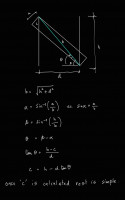
Here's the similar triangle approach.

On Wed, Apr 15, 2026 at 3:08 PM Glenn Butcher via Discuss <
discuss@lists.openscad.org> wrote:

Ah, an approach I can understand, thanks, Sanjeev.  This is not a diss on
the non-trig approaches, it just reflects my limited knowledge of math.
Ironically, it's the trig that I understand, given I flunked that in high
school, which set me off on a long, ill-advised path of math avoidance.
Yes, you can get a doctorate in computer science with only four math
courses, total...  :D

No, I spent hours trying to divine relevant angles, and I kept
constraining myself to the parallelogram.  Didn't think to just extend the
bottom edge out to make a right triangle with the board width.

I want to thank everyone who pitched in an algorithm.  I was just going to
use what CoPilot gave me, but that felt unsatisfying.  And, turned out to
be not that right.  This bit of discourse poignantly demonstrates a
fundamental concept in engineering, multiple sets of eyes on a a problem.
Human eyes, IMHO...

Regards,
Glenn Butcher
On 4/15/2026 11:29 AM, Sanjeev Prabhakar wrote:

I would prefer to do this by hand

On Wed, 15 Apr 2026, 00:40 Glenn Butcher via Discuss, <
discuss@lists.openscad.org> wrote:

Disclaimer: I'm not a math person.

I'm building a CAD model of a vintage railroad baggage car, to help with
the visualization of design for a restoration project. In modeling the
framing internal to the walls, I need diagonal members between the
verticals; my first module to do that was 'carpenter style', where I
laid the diagonal between two vertical members and used difference() to
cut it.  This required an angle parameter that I had to 'scooch' around
to get the right angle.

What I wanted was a module that just took the height and spacing numbers
and made a parallelogram to fit and extruded it to the right thickness.
So, I spent a few forays into the internets, searching for the math to
do that.  And, I just couldn't find it, even the AI search summaries
didn't complete the solution.  I finally gave in to the vibe coding
thing, and took the problem to Microsoft CoPilot, with which I had some
success building an OpenGL renderer.  To describe the problem I used
compass cardinal points to lay out the space, NE, NW, SE, SW to define
the four corners of the parallelogram.  Took 5 iterations to get it
close, and it still was plotting the NE corner on the wrong side of the
Y axis.  I finally just told it to negate that corner's vertical
component, ta-da, works.

Thing is, I do not understand the methodology.  I've inspected the
intermediate variables and I just don't have the math chops to
understand how the vectors yield the parallelogram sides.  Here's the
code:

//algorithm courtesy Microsoft CoPilot:
module v2x4_diagonal(S, T) {
//ggb: diagonal member dimensions
w=4;  //ggb: height of the parallelogram
t=2;

  // Upper edge endpoints
  NW = [0, T];
  SE = [S, 0];

  // Diagonal direction
  dx = S;
  dy = -T;
  L  = sqrt(dx*dx + dy*dy);

  // Perpendicular unit vector (points downward)
  px = -T / L;
  py = -S / L;

  // Offset vector for lower edge
  ox = w * px;
  oy = w * py;

  // Lower edge parametric line: P(t) = NW + (ox, oy) + t*(dx, dy)

  // Intersection with x = 0 → SW
  t0 = -ox / dx;
  SW = [0,
        T + oy + t0 * dy];

  // Intersection with x = S → NE
  t1 = (S - ox) / dx;
  NE = [S,
        -(T + oy + t1 * dy)];  //ggb: I had to negate the Y coordinate

  // Correct winding order: NW → NE → SE → SW
  // ggb: extrude works in xy plane, rotate and translate to make it

'vertical',
//        along the wall frame axis, Y.
rotate([90,0,-90])
translate([-S,0,-2])
linear_extrude(height = t)
polygon(points=[NW, NE, SE, SW]);
}

T=96;  //ggb: how tall is the framing
S=28;  //ggb: spacing between the framing members

translate([0,-2,0])cube([4,2,T]);
translate([0,S,0]) cube([4,2,T]);

color("green") v2x4_diagonal(S, T);

I offer this in the public domain, use as you see fit.  All I'd like to
get is some sort of explanation as to how it works...

Thanks,
Glenn Butcher


OpenSCAD mailing list
To unsubscribe send an email to discuss-leave@lists.openscad.org


OpenSCAD mailing list
To unsubscribe send an email to discuss-leave@lists.openscad.org
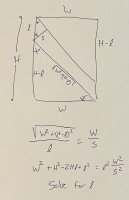
Here's the similar triangle approach. On Wed, Apr 15, 2026 at 3:08 PM Glenn Butcher via Discuss < discuss@lists.openscad.org> wrote: > Ah, an approach I can understand, thanks, Sanjeev. This is not a diss on > the non-trig approaches, it just reflects my limited knowledge of math. > Ironically, it's the trig that I understand, given I flunked that in high > school, which set me off on a long, ill-advised path of math avoidance. > Yes, you can get a doctorate in computer science with only four math > courses, total... :D > > No, I spent hours trying to divine relevant angles, and I kept > constraining myself to the parallelogram. Didn't think to just extend the > bottom edge out to make a right triangle with the board width. > > I want to thank everyone who pitched in an algorithm. I was just going to > use what CoPilot gave me, but that felt unsatisfying. And, turned out to > be not that right. This bit of discourse poignantly demonstrates a > fundamental concept in engineering, multiple sets of eyes on a a problem. > Human eyes, IMHO... > > Regards, > Glenn Butcher > On 4/15/2026 11:29 AM, Sanjeev Prabhakar wrote: > > I would prefer to do this by hand > > > > > > On Wed, 15 Apr 2026, 00:40 Glenn Butcher via Discuss, < > discuss@lists.openscad.org> wrote: > >> Disclaimer: I'm not a math person. >> >> I'm building a CAD model of a vintage railroad baggage car, to help with >> the visualization of design for a restoration project. In modeling the >> framing internal to the walls, I need diagonal members between the >> verticals; my first module to do that was 'carpenter style', where I >> laid the diagonal between two vertical members and used difference() to >> cut it. This required an angle parameter that I had to 'scooch' around >> to get the right angle. >> >> What I wanted was a module that just took the height and spacing numbers >> and made a parallelogram to fit and extruded it to the right thickness. >> So, I spent a few forays into the internets, searching for the math to >> do that. And, I just couldn't find it, even the AI search summaries >> didn't complete the solution. I finally gave in to the vibe coding >> thing, and took the problem to Microsoft CoPilot, with which I had some >> success building an OpenGL renderer. To describe the problem I used >> compass cardinal points to lay out the space, NE, NW, SE, SW to define >> the four corners of the parallelogram. Took 5 iterations to get it >> close, and it still was plotting the NE corner on the wrong side of the >> Y axis. I finally just told it to negate that corner's vertical >> component, ta-da, works. >> >> Thing is, I do not understand the methodology. I've inspected the >> intermediate variables and I just don't have the math chops to >> understand how the vectors yield the parallelogram sides. Here's the >> code: >> >> //algorithm courtesy Microsoft CoPilot: >> module v2x4_diagonal(S, T) { >> //ggb: diagonal member dimensions >> w=4; //ggb: height of the parallelogram >> t=2; >> >> // Upper edge endpoints >> NW = [0, T]; >> SE = [S, 0]; >> >> // Diagonal direction >> dx = S; >> dy = -T; >> L = sqrt(dx*dx + dy*dy); >> >> // Perpendicular unit vector (points downward) >> px = -T / L; >> py = -S / L; >> >> // Offset vector for lower edge >> ox = w * px; >> oy = w * py; >> >> // Lower edge parametric line: P(t) = NW + (ox, oy) + t*(dx, dy) >> >> // Intersection with x = 0 → SW >> t0 = -ox / dx; >> SW = [0, >> T + oy + t0 * dy]; >> >> // Intersection with x = S → NE >> t1 = (S - ox) / dx; >> NE = [S, >> -(T + oy + t1 * dy)]; //ggb: I had to negate the Y coordinate >> >> // Correct winding order: NW → NE → SE → SW >> // ggb: extrude works in xy plane, rotate and translate to make it >> 'vertical', >> // along the wall frame axis, Y. >> rotate([90,0,-90]) >> translate([-S,0,-2]) >> linear_extrude(height = t) >> polygon(points=[NW, NE, SE, SW]); >> } >> >> T=96; //ggb: how tall is the framing >> S=28; //ggb: spacing between the framing members >> >> translate([0,-2,0])cube([4,2,T]); >> translate([0,S,0]) cube([4,2,T]); >> >> color("green") v2x4_diagonal(S, T); >> >> I offer this in the public domain, use as you see fit. All I'd like to >> get is some sort of explanation as to how it works... >> >> Thanks, >> Glenn Butcher >> >> >> >> _______________________________________________ >> OpenSCAD mailing list >> To unsubscribe send an email to discuss-leave@lists.openscad.org > > _______________________________________________ > OpenSCAD mailing list > To unsubscribe send an email to discuss-leave@lists.openscad.org
SP
Sanjeev Prabhakar
Thu, Apr 16, 2026 12:56 AM

Thanks
Initially i did the same, but to explain majority of people would be
difficult as i am not sure how many here would know how to solve quadratic
equations.

On Wed, 15 Apr 2026, 23:33 Adrian Mariano via Discuss, <
discuss@lists.openscad.org> wrote:

I did it myself by hand using similar triangles to directly obtain c for
the solution I posted without any trig and without introducing so many
extra parameters. I think this approach is unnecessarily complicated.

On Wed, Apr 15, 2026 at 13:30 Sanjeev Prabhakar via Discuss <
discuss@lists.openscad.org> wrote:

I would prefer to do this by hand

On Wed, 15 Apr 2026, 00:40 Glenn Butcher via Discuss, <
discuss@lists.openscad.org> wrote:

Disclaimer: I'm not a math person.

I'm building a CAD model of a vintage railroad baggage car, to help with
the visualization of design for a restoration project. In modeling the
framing internal to the walls, I need diagonal members between the
verticals; my first module to do that was 'carpenter style', where I
laid the diagonal between two vertical members and used difference() to
cut it.  This required an angle parameter that I had to 'scooch' around
to get the right angle.

What I wanted was a module that just took the height and spacing numbers
and made a parallelogram to fit and extruded it to the right thickness.
So, I spent a few forays into the internets, searching for the math to
do that.  And, I just couldn't find it, even the AI search summaries
didn't complete the solution.  I finally gave in to the vibe coding
thing, and took the problem to Microsoft CoPilot, with which I had some
success building an OpenGL renderer.  To describe the problem I used
compass cardinal points to lay out the space, NE, NW, SE, SW to define
the four corners of the parallelogram.  Took 5 iterations to get it
close, and it still was plotting the NE corner on the wrong side of the
Y axis.  I finally just told it to negate that corner's vertical
component, ta-da, works.

Thing is, I do not understand the methodology.  I've inspected the
intermediate variables and I just don't have the math chops to
understand how the vectors yield the parallelogram sides.  Here's the
code:

//algorithm courtesy Microsoft CoPilot:
module v2x4_diagonal(S, T) {
//ggb: diagonal member dimensions
w=4;  //ggb: height of the parallelogram
t=2;

  // Upper edge endpoints
  NW = [0, T];
  SE = [S, 0];

  // Diagonal direction
  dx = S;
  dy = -T;
  L  = sqrt(dx*dx + dy*dy);

  // Perpendicular unit vector (points downward)
  px = -T / L;
  py = -S / L;

  // Offset vector for lower edge
  ox = w * px;
  oy = w * py;

  // Lower edge parametric line: P(t) = NW + (ox, oy) + t*(dx, dy)

  // Intersection with x = 0 → SW
  t0 = -ox / dx;
  SW = [0,
        T + oy + t0 * dy];

  // Intersection with x = S → NE
  t1 = (S - ox) / dx;
  NE = [S,
        -(T + oy + t1 * dy)];  //ggb: I had to negate the Y coordinate

  // Correct winding order: NW → NE → SE → SW
  // ggb: extrude works in xy plane, rotate and translate to make it

'vertical',
//        along the wall frame axis, Y.
rotate([90,0,-90])
translate([-S,0,-2])
linear_extrude(height = t)
polygon(points=[NW, NE, SE, SW]);
}

T=96;  //ggb: how tall is the framing
S=28;  //ggb: spacing between the framing members

translate([0,-2,0])cube([4,2,T]);
translate([0,S,0]) cube([4,2,T]);

color("green") v2x4_diagonal(S, T);

I offer this in the public domain, use as you see fit.  All I'd like to
get is some sort of explanation as to how it works...

Thanks,
Glenn Butcher


OpenSCAD mailing list
To unsubscribe send an email to discuss-leave@lists.openscad.org


OpenSCAD mailing list
To unsubscribe send an email to discuss-leave@lists.openscad.org


OpenSCAD mailing list
To unsubscribe send an email to discuss-leave@lists.openscad.org
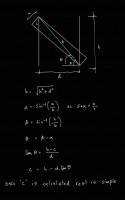
Thanks Initially i did the same, but to explain majority of people would be difficult as i am not sure how many here would know how to solve quadratic equations. On Wed, 15 Apr 2026, 23:33 Adrian Mariano via Discuss, < discuss@lists.openscad.org> wrote: > I did it myself by hand using similar triangles to directly obtain c for > the solution I posted without any trig and without introducing so many > extra parameters. I think this approach is unnecessarily complicated. > > On Wed, Apr 15, 2026 at 13:30 Sanjeev Prabhakar via Discuss < > discuss@lists.openscad.org> wrote: > >> I would prefer to do this by hand >> >> >> >> >> >> On Wed, 15 Apr 2026, 00:40 Glenn Butcher via Discuss, < >> discuss@lists.openscad.org> wrote: >> >>> Disclaimer: I'm not a math person. >>> >>> I'm building a CAD model of a vintage railroad baggage car, to help with >>> the visualization of design for a restoration project. In modeling the >>> framing internal to the walls, I need diagonal members between the >>> verticals; my first module to do that was 'carpenter style', where I >>> laid the diagonal between two vertical members and used difference() to >>> cut it. This required an angle parameter that I had to 'scooch' around >>> to get the right angle. >>> >>> What I wanted was a module that just took the height and spacing numbers >>> and made a parallelogram to fit and extruded it to the right thickness. >>> So, I spent a few forays into the internets, searching for the math to >>> do that. And, I just couldn't find it, even the AI search summaries >>> didn't complete the solution. I finally gave in to the vibe coding >>> thing, and took the problem to Microsoft CoPilot, with which I had some >>> success building an OpenGL renderer. To describe the problem I used >>> compass cardinal points to lay out the space, NE, NW, SE, SW to define >>> the four corners of the parallelogram. Took 5 iterations to get it >>> close, and it still was plotting the NE corner on the wrong side of the >>> Y axis. I finally just told it to negate that corner's vertical >>> component, ta-da, works. >>> >>> Thing is, I do not understand the methodology. I've inspected the >>> intermediate variables and I just don't have the math chops to >>> understand how the vectors yield the parallelogram sides. Here's the >>> code: >>> >>> //algorithm courtesy Microsoft CoPilot: >>> module v2x4_diagonal(S, T) { >>> //ggb: diagonal member dimensions >>> w=4; //ggb: height of the parallelogram >>> t=2; >>> >>> // Upper edge endpoints >>> NW = [0, T]; >>> SE = [S, 0]; >>> >>> // Diagonal direction >>> dx = S; >>> dy = -T; >>> L = sqrt(dx*dx + dy*dy); >>> >>> // Perpendicular unit vector (points downward) >>> px = -T / L; >>> py = -S / L; >>> >>> // Offset vector for lower edge >>> ox = w * px; >>> oy = w * py; >>> >>> // Lower edge parametric line: P(t) = NW + (ox, oy) + t*(dx, dy) >>> >>> // Intersection with x = 0 → SW >>> t0 = -ox / dx; >>> SW = [0, >>> T + oy + t0 * dy]; >>> >>> // Intersection with x = S → NE >>> t1 = (S - ox) / dx; >>> NE = [S, >>> -(T + oy + t1 * dy)]; //ggb: I had to negate the Y coordinate >>> >>> // Correct winding order: NW → NE → SE → SW >>> // ggb: extrude works in xy plane, rotate and translate to make it >>> 'vertical', >>> // along the wall frame axis, Y. >>> rotate([90,0,-90]) >>> translate([-S,0,-2]) >>> linear_extrude(height = t) >>> polygon(points=[NW, NE, SE, SW]); >>> } >>> >>> T=96; //ggb: how tall is the framing >>> S=28; //ggb: spacing between the framing members >>> >>> translate([0,-2,0])cube([4,2,T]); >>> translate([0,S,0]) cube([4,2,T]); >>> >>> color("green") v2x4_diagonal(S, T); >>> >>> I offer this in the public domain, use as you see fit. All I'd like to >>> get is some sort of explanation as to how it works... >>> >>> Thanks, >>> Glenn Butcher >>> >>> >>> >>> _______________________________________________ >>> OpenSCAD mailing list >>> To unsubscribe send an email to discuss-leave@lists.openscad.org >> >> _______________________________________________ >> OpenSCAD mailing list >> To unsubscribe send an email to discuss-leave@lists.openscad.org > > _______________________________________________ > OpenSCAD mailing list > To unsubscribe send an email to discuss-leave@lists.openscad.org
AM
Adrian Mariano
Thu, Apr 16, 2026 1:17 AM

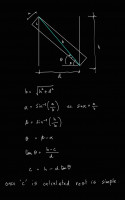
I would consider solution of quadratic equations to be more elementary than
trigonometry.  Certainly that's how math is taught in the USA, and it's
common for people to express confusion about trig. Though I suppose there's
no telling what people remember or don't years later.  In my posted code I
dodged that matter by using a library to solve the equation, which is
always an option.

On Wed, Apr 15, 2026 at 8:56 PM Sanjeev Prabhakar sprabhakar2006@gmail.com
wrote:

Thanks
Initially i did the same, but to explain majority of people would be
difficult as i am not sure how many here would know how to solve quadratic
equations.

On Wed, 15 Apr 2026, 23:33 Adrian Mariano via Discuss, <
discuss@lists.openscad.org> wrote:

I did it myself by hand using similar triangles to directly obtain c for
the solution I posted without any trig and without introducing so many
extra parameters. I think this approach is unnecessarily complicated.

On Wed, Apr 15, 2026 at 13:30 Sanjeev Prabhakar via Discuss <
discuss@lists.openscad.org> wrote:

I would prefer to do this by hand

On Wed, 15 Apr 2026, 00:40 Glenn Butcher via Discuss, <
discuss@lists.openscad.org> wrote:

Disclaimer: I'm not a math person.

I'm building a CAD model of a vintage railroad baggage car, to help
with
the visualization of design for a restoration project. In modeling the
framing internal to the walls, I need diagonal members between the
verticals; my first module to do that was 'carpenter style', where I
laid the diagonal between two vertical members and used difference() to
cut it.  This required an angle parameter that I had to 'scooch' around
to get the right angle.

What I wanted was a module that just took the height and spacing
numbers
and made a parallelogram to fit and extruded it to the right
thickness.
So, I spent a few forays into the internets, searching for the math to
do that.  And, I just couldn't find it, even the AI search summaries
didn't complete the solution.  I finally gave in to the vibe coding
thing, and took the problem to Microsoft CoPilot, with which I had some
success building an OpenGL renderer.  To describe the problem I used
compass cardinal points to lay out the space, NE, NW, SE, SW to define
the four corners of the parallelogram.  Took 5 iterations to get it
close, and it still was plotting the NE corner on the wrong side of the
Y axis.  I finally just told it to negate that corner's vertical
component, ta-da, works.

Thing is, I do not understand the methodology.  I've inspected the
intermediate variables and I just don't have the math chops to
understand how the vectors yield the parallelogram sides.  Here's the
code:

//algorithm courtesy Microsoft CoPilot:
module v2x4_diagonal(S, T) {
//ggb: diagonal member dimensions
w=4;  //ggb: height of the parallelogram
t=2;

  // Upper edge endpoints
  NW = [0, T];
  SE = [S, 0];

  // Diagonal direction
  dx = S;
  dy = -T;
  L  = sqrt(dx*dx + dy*dy);

  // Perpendicular unit vector (points downward)
  px = -T / L;
  py = -S / L;

  // Offset vector for lower edge
  ox = w * px;
  oy = w * py;

  // Lower edge parametric line: P(t) = NW + (ox, oy) + t*(dx, dy)

  // Intersection with x = 0 → SW
  t0 = -ox / dx;
  SW = [0,
        T + oy + t0 * dy];

  // Intersection with x = S → NE
  t1 = (S - ox) / dx;
  NE = [S,
        -(T + oy + t1 * dy)];  //ggb: I had to negate the Y

coordinate

  // Correct winding order: NW → NE → SE → SW
  // ggb: extrude works in xy plane, rotate and translate to make it

'vertical',
//        along the wall frame axis, Y.
rotate([90,0,-90])
translate([-S,0,-2])
linear_extrude(height = t)
polygon(points=[NW, NE, SE, SW]);
}

T=96;  //ggb: how tall is the framing
S=28;  //ggb: spacing between the framing members

translate([0,-2,0])cube([4,2,T]);
translate([0,S,0]) cube([4,2,T]);

color("green") v2x4_diagonal(S, T);

I offer this in the public domain, use as you see fit.  All I'd like to
get is some sort of explanation as to how it works...

Thanks,
Glenn Butcher


OpenSCAD mailing list
To unsubscribe send an email to discuss-leave@lists.openscad.org


OpenSCAD mailing list
To unsubscribe send an email to discuss-leave@lists.openscad.org

OpenSCAD mailing list
To unsubscribe send an email to discuss-leave@lists.openscad.org

I would consider solution of quadratic equations to be more elementary than trigonometry. Certainly that's how math is taught in the USA, and it's common for people to express confusion about trig. Though I suppose there's no telling what people remember or don't years later. In my posted code I dodged that matter by using a library to solve the equation, which is always an option. On Wed, Apr 15, 2026 at 8:56 PM Sanjeev Prabhakar <sprabhakar2006@gmail.com> wrote: > Thanks > Initially i did the same, but to explain majority of people would be > difficult as i am not sure how many here would know how to solve quadratic > equations. > > > On Wed, 15 Apr 2026, 23:33 Adrian Mariano via Discuss, < > discuss@lists.openscad.org> wrote: > >> I did it myself by hand using similar triangles to directly obtain c for >> the solution I posted without any trig and without introducing so many >> extra parameters. I think this approach is unnecessarily complicated. >> >> On Wed, Apr 15, 2026 at 13:30 Sanjeev Prabhakar via Discuss < >> discuss@lists.openscad.org> wrote: >> >>> I would prefer to do this by hand >>> >>> >>> >>> >>> >>> On Wed, 15 Apr 2026, 00:40 Glenn Butcher via Discuss, < >>> discuss@lists.openscad.org> wrote: >>> >>>> Disclaimer: I'm not a math person. >>>> >>>> I'm building a CAD model of a vintage railroad baggage car, to help >>>> with >>>> the visualization of design for a restoration project. In modeling the >>>> framing internal to the walls, I need diagonal members between the >>>> verticals; my first module to do that was 'carpenter style', where I >>>> laid the diagonal between two vertical members and used difference() to >>>> cut it. This required an angle parameter that I had to 'scooch' around >>>> to get the right angle. >>>> >>>> What I wanted was a module that just took the height and spacing >>>> numbers >>>> and made a parallelogram to fit and extruded it to the right >>>> thickness. >>>> So, I spent a few forays into the internets, searching for the math to >>>> do that. And, I just couldn't find it, even the AI search summaries >>>> didn't complete the solution. I finally gave in to the vibe coding >>>> thing, and took the problem to Microsoft CoPilot, with which I had some >>>> success building an OpenGL renderer. To describe the problem I used >>>> compass cardinal points to lay out the space, NE, NW, SE, SW to define >>>> the four corners of the parallelogram. Took 5 iterations to get it >>>> close, and it still was plotting the NE corner on the wrong side of the >>>> Y axis. I finally just told it to negate that corner's vertical >>>> component, ta-da, works. >>>> >>>> Thing is, I do not understand the methodology. I've inspected the >>>> intermediate variables and I just don't have the math chops to >>>> understand how the vectors yield the parallelogram sides. Here's the >>>> code: >>>> >>>> //algorithm courtesy Microsoft CoPilot: >>>> module v2x4_diagonal(S, T) { >>>> //ggb: diagonal member dimensions >>>> w=4; //ggb: height of the parallelogram >>>> t=2; >>>> >>>> // Upper edge endpoints >>>> NW = [0, T]; >>>> SE = [S, 0]; >>>> >>>> // Diagonal direction >>>> dx = S; >>>> dy = -T; >>>> L = sqrt(dx*dx + dy*dy); >>>> >>>> // Perpendicular unit vector (points downward) >>>> px = -T / L; >>>> py = -S / L; >>>> >>>> // Offset vector for lower edge >>>> ox = w * px; >>>> oy = w * py; >>>> >>>> // Lower edge parametric line: P(t) = NW + (ox, oy) + t*(dx, dy) >>>> >>>> // Intersection with x = 0 → SW >>>> t0 = -ox / dx; >>>> SW = [0, >>>> T + oy + t0 * dy]; >>>> >>>> // Intersection with x = S → NE >>>> t1 = (S - ox) / dx; >>>> NE = [S, >>>> -(T + oy + t1 * dy)]; //ggb: I had to negate the Y >>>> coordinate >>>> >>>> // Correct winding order: NW → NE → SE → SW >>>> // ggb: extrude works in xy plane, rotate and translate to make it >>>> 'vertical', >>>> // along the wall frame axis, Y. >>>> rotate([90,0,-90]) >>>> translate([-S,0,-2]) >>>> linear_extrude(height = t) >>>> polygon(points=[NW, NE, SE, SW]); >>>> } >>>> >>>> T=96; //ggb: how tall is the framing >>>> S=28; //ggb: spacing between the framing members >>>> >>>> translate([0,-2,0])cube([4,2,T]); >>>> translate([0,S,0]) cube([4,2,T]); >>>> >>>> color("green") v2x4_diagonal(S, T); >>>> >>>> I offer this in the public domain, use as you see fit. All I'd like to >>>> get is some sort of explanation as to how it works... >>>> >>>> Thanks, >>>> Glenn Butcher >>>> >>>> >>>> >>>> _______________________________________________ >>>> OpenSCAD mailing list >>>> To unsubscribe send an email to discuss-leave@lists.openscad.org >>> >>> _______________________________________________ >>> OpenSCAD mailing list >>> To unsubscribe send an email to discuss-leave@lists.openscad.org >> >> _______________________________________________ >> OpenSCAD mailing list >> To unsubscribe send an email to discuss-leave@lists.openscad.org > >
FH
Father Horton
Thu, Apr 16, 2026 1:21 AM

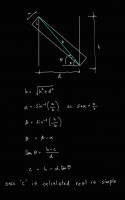
Here's a refresher: https://youtu.be/AD58TWGIcsQ?si=pB4qk9dGcclm-d9y

On Wed, Apr 15, 2026 at 8:18 PM Adrian Mariano via Discuss <
discuss@lists.openscad.org> wrote:

I would consider solution of quadratic equations to be more elementary
than trigonometry.  Certainly that's how math is taught in the USA, and
it's common for people to express confusion about trig. Though I suppose
there's no telling what people remember or don't years later.  In my posted
code I dodged that matter by using a library to solve the equation, which
is always an option.

On Wed, Apr 15, 2026 at 8:56 PM Sanjeev Prabhakar <
sprabhakar2006@gmail.com> wrote:

Thanks
Initially i did the same, but to explain majority of people would be
difficult as i am not sure how many here would know how to solve quadratic
equations.

On Wed, 15 Apr 2026, 23:33 Adrian Mariano via Discuss, <
discuss@lists.openscad.org> wrote:

I did it myself by hand using similar triangles to directly obtain c for
the solution I posted without any trig and without introducing so many
extra parameters. I think this approach is unnecessarily complicated.

On Wed, Apr 15, 2026 at 13:30 Sanjeev Prabhakar via Discuss <
discuss@lists.openscad.org> wrote:

I would prefer to do this by hand

On Wed, 15 Apr 2026, 00:40 Glenn Butcher via Discuss, <
discuss@lists.openscad.org> wrote:

Disclaimer: I'm not a math person.

I'm building a CAD model of a vintage railroad baggage car, to help
with
the visualization of design for a restoration project. In modeling the
framing internal to the walls, I need diagonal members between the
verticals; my first module to do that was 'carpenter style', where I
laid the diagonal between two vertical members and used difference()
to
cut it.  This required an angle parameter that I had to 'scooch'
around
to get the right angle.

What I wanted was a module that just took the height and spacing
numbers
and made a parallelogram to fit and extruded it to the right
thickness.
So, I spent a few forays into the internets, searching for the math to
do that.  And, I just couldn't find it, even the AI search summaries
didn't complete the solution.  I finally gave in to the vibe coding
thing, and took the problem to Microsoft CoPilot, with which I had
some
success building an OpenGL renderer.  To describe the problem I used
compass cardinal points to lay out the space, NE, NW, SE, SW to define
the four corners of the parallelogram.  Took 5 iterations to get it
close, and it still was plotting the NE corner on the wrong side of
the
Y axis.  I finally just told it to negate that corner's vertical
component, ta-da, works.

Thing is, I do not understand the methodology.  I've inspected the
intermediate variables and I just don't have the math chops to
understand how the vectors yield the parallelogram sides.  Here's the
code:

//algorithm courtesy Microsoft CoPilot:
module v2x4_diagonal(S, T) {
//ggb: diagonal member dimensions
w=4;  //ggb: height of the parallelogram
t=2;

  // Upper edge endpoints
  NW = [0, T];
  SE = [S, 0];

  // Diagonal direction
  dx = S;
  dy = -T;
  L  = sqrt(dx*dx + dy*dy);

  // Perpendicular unit vector (points downward)
  px = -T / L;
  py = -S / L;

  // Offset vector for lower edge
  ox = w * px;
  oy = w * py;

  // Lower edge parametric line: P(t) = NW + (ox, oy) + t*(dx, dy)

  // Intersection with x = 0 → SW
  t0 = -ox / dx;
  SW = [0,
        T + oy + t0 * dy];

  // Intersection with x = S → NE
  t1 = (S - ox) / dx;
  NE = [S,
        -(T + oy + t1 * dy)];  //ggb: I had to negate the Y

coordinate

  // Correct winding order: NW → NE → SE → SW
  // ggb: extrude works in xy plane, rotate and translate to make

it
'vertical',
//        along the wall frame axis, Y.
rotate([90,0,-90])
translate([-S,0,-2])
linear_extrude(height = t)
polygon(points=[NW, NE, SE, SW]);
}

T=96;  //ggb: how tall is the framing
S=28;  //ggb: spacing between the framing members

translate([0,-2,0])cube([4,2,T]);
translate([0,S,0]) cube([4,2,T]);

color("green") v2x4_diagonal(S, T);

I offer this in the public domain, use as you see fit.  All I'd like
to
get is some sort of explanation as to how it works...

Thanks,
Glenn Butcher


OpenSCAD mailing list
To unsubscribe send an email to discuss-leave@lists.openscad.org


OpenSCAD mailing list
To unsubscribe send an email to discuss-leave@lists.openscad.org

OpenSCAD mailing list
To unsubscribe send an email to discuss-leave@lists.openscad.org


OpenSCAD mailing list
To unsubscribe send an email to discuss-leave@lists.openscad.org
Here's a refresher: https://youtu.be/AD58TWGIcsQ?si=pB4qk9dGcclm-d9y On Wed, Apr 15, 2026 at 8:18 PM Adrian Mariano via Discuss < discuss@lists.openscad.org> wrote: > I would consider solution of quadratic equations to be more elementary > than trigonometry. Certainly that's how math is taught in the USA, and > it's common for people to express confusion about trig. Though I suppose > there's no telling what people remember or don't years later. In my posted > code I dodged that matter by using a library to solve the equation, which > is always an option. > > On Wed, Apr 15, 2026 at 8:56 PM Sanjeev Prabhakar < > sprabhakar2006@gmail.com> wrote: > >> Thanks >> Initially i did the same, but to explain majority of people would be >> difficult as i am not sure how many here would know how to solve quadratic >> equations. >> >> >> On Wed, 15 Apr 2026, 23:33 Adrian Mariano via Discuss, < >> discuss@lists.openscad.org> wrote: >> >>> I did it myself by hand using similar triangles to directly obtain c for >>> the solution I posted without any trig and without introducing so many >>> extra parameters. I think this approach is unnecessarily complicated. >>> >>> On Wed, Apr 15, 2026 at 13:30 Sanjeev Prabhakar via Discuss < >>> discuss@lists.openscad.org> wrote: >>> >>>> I would prefer to do this by hand >>>> >>>> >>>> >>>> >>>> >>>> On Wed, 15 Apr 2026, 00:40 Glenn Butcher via Discuss, < >>>> discuss@lists.openscad.org> wrote: >>>> >>>>> Disclaimer: I'm not a math person. >>>>> >>>>> I'm building a CAD model of a vintage railroad baggage car, to help >>>>> with >>>>> the visualization of design for a restoration project. In modeling the >>>>> framing internal to the walls, I need diagonal members between the >>>>> verticals; my first module to do that was 'carpenter style', where I >>>>> laid the diagonal between two vertical members and used difference() >>>>> to >>>>> cut it. This required an angle parameter that I had to 'scooch' >>>>> around >>>>> to get the right angle. >>>>> >>>>> What I wanted was a module that just took the height and spacing >>>>> numbers >>>>> and made a parallelogram to fit and extruded it to the right >>>>> thickness. >>>>> So, I spent a few forays into the internets, searching for the math to >>>>> do that. And, I just couldn't find it, even the AI search summaries >>>>> didn't complete the solution. I finally gave in to the vibe coding >>>>> thing, and took the problem to Microsoft CoPilot, with which I had >>>>> some >>>>> success building an OpenGL renderer. To describe the problem I used >>>>> compass cardinal points to lay out the space, NE, NW, SE, SW to define >>>>> the four corners of the parallelogram. Took 5 iterations to get it >>>>> close, and it still was plotting the NE corner on the wrong side of >>>>> the >>>>> Y axis. I finally just told it to negate that corner's vertical >>>>> component, ta-da, works. >>>>> >>>>> Thing is, I do not understand the methodology. I've inspected the >>>>> intermediate variables and I just don't have the math chops to >>>>> understand how the vectors yield the parallelogram sides. Here's the >>>>> code: >>>>> >>>>> //algorithm courtesy Microsoft CoPilot: >>>>> module v2x4_diagonal(S, T) { >>>>> //ggb: diagonal member dimensions >>>>> w=4; //ggb: height of the parallelogram >>>>> t=2; >>>>> >>>>> // Upper edge endpoints >>>>> NW = [0, T]; >>>>> SE = [S, 0]; >>>>> >>>>> // Diagonal direction >>>>> dx = S; >>>>> dy = -T; >>>>> L = sqrt(dx*dx + dy*dy); >>>>> >>>>> // Perpendicular unit vector (points downward) >>>>> px = -T / L; >>>>> py = -S / L; >>>>> >>>>> // Offset vector for lower edge >>>>> ox = w * px; >>>>> oy = w * py; >>>>> >>>>> // Lower edge parametric line: P(t) = NW + (ox, oy) + t*(dx, dy) >>>>> >>>>> // Intersection with x = 0 → SW >>>>> t0 = -ox / dx; >>>>> SW = [0, >>>>> T + oy + t0 * dy]; >>>>> >>>>> // Intersection with x = S → NE >>>>> t1 = (S - ox) / dx; >>>>> NE = [S, >>>>> -(T + oy + t1 * dy)]; //ggb: I had to negate the Y >>>>> coordinate >>>>> >>>>> // Correct winding order: NW → NE → SE → SW >>>>> // ggb: extrude works in xy plane, rotate and translate to make >>>>> it >>>>> 'vertical', >>>>> // along the wall frame axis, Y. >>>>> rotate([90,0,-90]) >>>>> translate([-S,0,-2]) >>>>> linear_extrude(height = t) >>>>> polygon(points=[NW, NE, SE, SW]); >>>>> } >>>>> >>>>> T=96; //ggb: how tall is the framing >>>>> S=28; //ggb: spacing between the framing members >>>>> >>>>> translate([0,-2,0])cube([4,2,T]); >>>>> translate([0,S,0]) cube([4,2,T]); >>>>> >>>>> color("green") v2x4_diagonal(S, T); >>>>> >>>>> I offer this in the public domain, use as you see fit. All I'd like >>>>> to >>>>> get is some sort of explanation as to how it works... >>>>> >>>>> Thanks, >>>>> Glenn Butcher >>>>> >>>>> >>>>> >>>>> _______________________________________________ >>>>> OpenSCAD mailing list >>>>> To unsubscribe send an email to discuss-leave@lists.openscad.org >>>> >>>> _______________________________________________ >>>> OpenSCAD mailing list >>>> To unsubscribe send an email to discuss-leave@lists.openscad.org >>> >>> _______________________________________________ >>> OpenSCAD mailing list >>> To unsubscribe send an email to discuss-leave@lists.openscad.org >> >> _______________________________________________ > OpenSCAD mailing list > To unsubscribe send an email to discuss-leave@lists.openscad.org
HW
Harvey white
Thu, Apr 16, 2026 1:43 AM

In the old days <grin> the wood was cut to dimensional, i.e. a 2 * 4
started off with a larger piece of wood and was cut down to 2 * 4.  To
maximize yield (and heavens above, not profit) the lumber was defined as
a 2*4 was initially cut to exactly 2 * 4, and then "finish cut" to the
size, IIRC, they took about 1/16 inch off each side.

Length remained as specified.

Harvey

On 4/14/2026 8:36 PM, Glenn Butcher via Discuss wrote:

The baggage car we're restoring was built in 1880, when a 2x4 was
actually 2x4. We work with a sawmill in Antonito, CO that'll cut what
we need.

Yeah, I was a shade-tree framing/finish carpenter when I started
working with this, found out there's a third category...

Glenn Butcher
Sr. Paint Removal Engineer
Friends of the Cumbres & Toltec Scenic Railroad

On 4/14/2026 6:21 PM, Lee DeRaud via Discuss wrote:

Speaking as someone whose woodworking chops are probably better than
his OpenSCAD chops…

Am I the only one chuckling at the idea of a precise 4”-wide 2x4? 😊

(And now for some reason I can’t get the phrase “measure twice, code
once” out of my head.)

*From:*Glenn Butcher via Discuss discuss@lists.openscad.org
Sent: Tuesday, April 14, 2026 5:01 PM
To: discuss@lists.openscad.org
Cc: Glenn Butcher glenn.butcher@gmail.com
Subject: [OpenSCAD] Re: Math Behind the Code

The claude code gives a precise 4" board, yay.


OpenSCAD mailing list
To unsubscribe send an email todiscuss-leave@lists.openscad.org


OpenSCAD mailing list
To unsubscribe send an email to discuss-leave@lists.openscad.org

In the old days <grin> the wood was cut to dimensional, i.e. a 2 * 4 started off with a larger piece of wood and was cut down to 2 * 4.  To maximize yield (and heavens above, not profit) the lumber was defined as a 2*4 was initially cut to exactly 2 * 4, and then "finish cut" to the size, IIRC, they took about 1/16 inch off each side. Length remained as specified. Harvey On 4/14/2026 8:36 PM, Glenn Butcher via Discuss wrote: > > The baggage car we're restoring was built in 1880, when a 2x4 was > actually 2x4. We work with a sawmill in Antonito, CO that'll cut what > we need. > > Yeah, I was a shade-tree framing/finish carpenter when I started > working with this, found out there's a third category... > > Glenn Butcher > Sr. Paint Removal Engineer > Friends of the Cumbres & Toltec Scenic Railroad > > On 4/14/2026 6:21 PM, Lee DeRaud via Discuss wrote: >> >> Speaking as someone whose woodworking chops are probably better than >> his OpenSCAD chops… >> >> Am I the only one chuckling at the idea of a precise 4”-wide 2x4? 😊 >> >> (And now for some reason I can’t get the phrase “measure twice, code >> once” out of my head.) >> >> *From:*Glenn Butcher via Discuss <discuss@lists.openscad.org> >> *Sent:* Tuesday, April 14, 2026 5:01 PM >> *To:* discuss@lists.openscad.org >> *Cc:* Glenn Butcher <glenn.butcher@gmail.com> >> *Subject:* [OpenSCAD] Re: Math Behind the Code >> >> The claude code gives a precise 4" board, yay. >> >> >> _______________________________________________ >> OpenSCAD mailing list >> To unsubscribe send an email todiscuss-leave@lists.openscad.org > > _______________________________________________ > OpenSCAD mailing list > To unsubscribe send an email to discuss-leave@lists.openscad.org
AM
Adrian Mariano
Thu, Apr 16, 2026 1:45 AM

Strictly speaking, the quadratic formula is an unstable algorithm, which is
a reason you might actually want to use a library implementation.
https://people.csail.mit.edu/bkph/articles/Quadratics.pdf  For the problem
at hand it won't matter.

Really for almost every numerical computation it's trickier than you think
and best left to library routines written by experts, at least if you want
the most accurate result.  I recently ran across a situation where in a
particular subject, the early literature suggests using the cubic formula
to determine eigenvalues of a 3x3 matrix.
https://en.wikipedia.org/wiki/Cubic_equation#General_cubic_formula
The cubic formula numerically unstable and should not be used, and better
methods exist for solving this problem, but researchers writing papers
don't realize this and I saw a 2025 paper whose whole purpose was to give
an elaborate and complex algorithm to work around cases where the
calculation fails...except it only fails because a bad numerical method was
used.

On Wed, Apr 15, 2026 at 9:22 PM Father Horton via Discuss <
discuss@lists.openscad.org> wrote:

Here's a refresher: https://youtu.be/AD58TWGIcsQ?si=pB4qk9dGcclm-d9y

On Wed, Apr 15, 2026 at 8:18 PM Adrian Mariano via Discuss <
discuss@lists.openscad.org> wrote:

I would consider solution of quadratic equations to be more elementary
than trigonometry.  Certainly that's how math is taught in the USA, and
it's common for people to express confusion about trig. Though I suppose
there's no telling what people remember or don't years later.  In my posted
code I dodged that matter by using a library to solve the equation, which
is always an option.

On Wed, Apr 15, 2026 at 8:56 PM Sanjeev Prabhakar <
sprabhakar2006@gmail.com> wrote:

Thanks
Initially i did the same, but to explain majority of people would be
difficult as i am not sure how many here would know how to solve quadratic
equations.

On Wed, 15 Apr 2026, 23:33 Adrian Mariano via Discuss, <
discuss@lists.openscad.org> wrote:

I did it myself by hand using similar triangles to directly obtain c
for the solution I posted without any trig and without introducing so many
extra parameters. I think this approach is unnecessarily complicated.

On Wed, Apr 15, 2026 at 13:30 Sanjeev Prabhakar via Discuss <
discuss@lists.openscad.org> wrote:

I would prefer to do this by hand

On Wed, 15 Apr 2026, 00:40 Glenn Butcher via Discuss, <
discuss@lists.openscad.org> wrote:

Disclaimer: I'm not a math person.

I'm building a CAD model of a vintage railroad baggage car, to help
with
the visualization of design for a restoration project. In modeling
the
framing internal to the walls, I need diagonal members between the
verticals; my first module to do that was 'carpenter style', where I
laid the diagonal between two vertical members and used difference()
to
cut it.  This required an angle parameter that I had to 'scooch'
around
to get the right angle.

What I wanted was a module that just took the height and spacing
numbers
and made a parallelogram to fit and extruded it to the right
thickness.
So, I spent a few forays into the internets, searching for the math
to
do that.  And, I just couldn't find it, even the AI search summaries
didn't complete the solution.  I finally gave in to the vibe coding
thing, and took the problem to Microsoft CoPilot, with which I had
some
success building an OpenGL renderer.  To describe the problem I used
compass cardinal points to lay out the space, NE, NW, SE, SW to
define
the four corners of the parallelogram.  Took 5 iterations to get it
close, and it still was plotting the NE corner on the wrong side of
the
Y axis.  I finally just told it to negate that corner's vertical
component, ta-da, works.

Thing is, I do not understand the methodology.  I've inspected the
intermediate variables and I just don't have the math chops to
understand how the vectors yield the parallelogram sides.  Here's the
code:

//algorithm courtesy Microsoft CoPilot:
module v2x4_diagonal(S, T) {
//ggb: diagonal member dimensions
w=4;  //ggb: height of the parallelogram
t=2;

  // Upper edge endpoints
  NW = [0, T];
  SE = [S, 0];

  // Diagonal direction
  dx = S;
  dy = -T;
  L  = sqrt(dx*dx + dy*dy);

  // Perpendicular unit vector (points downward)
  px = -T / L;
  py = -S / L;

  // Offset vector for lower edge
  ox = w * px;
  oy = w * py;

  // Lower edge parametric line: P(t) = NW + (ox, oy) + t*(dx, dy)

  // Intersection with x = 0 → SW
  t0 = -ox / dx;
  SW = [0,
        T + oy + t0 * dy];

  // Intersection with x = S → NE
  t1 = (S - ox) / dx;
  NE = [S,
        -(T + oy + t1 * dy)];  //ggb: I had to negate the Y

coordinate

  // Correct winding order: NW → NE → SE → SW
  // ggb: extrude works in xy plane, rotate and translate to make

it
'vertical',
//        along the wall frame axis, Y.
rotate([90,0,-90])
translate([-S,0,-2])
linear_extrude(height = t)
polygon(points=[NW, NE, SE, SW]);
}

T=96;  //ggb: how tall is the framing
S=28;  //ggb: spacing between the framing members

translate([0,-2,0])cube([4,2,T]);
translate([0,S,0]) cube([4,2,T]);

color("green") v2x4_diagonal(S, T);

I offer this in the public domain, use as you see fit.  All I'd like
to
get is some sort of explanation as to how it works...

Thanks,
Glenn Butcher


OpenSCAD mailing list
To unsubscribe send an email to discuss-leave@lists.openscad.org


OpenSCAD mailing list
To unsubscribe send an email to discuss-leave@lists.openscad.org


OpenSCAD mailing list
To unsubscribe send an email to discuss-leave@lists.openscad.org


OpenSCAD mailing list
To unsubscribe send an email to discuss-leave@lists.openscad.org


OpenSCAD mailing list
To unsubscribe send an email to discuss-leave@lists.openscad.org

Strictly speaking, the quadratic formula is an unstable algorithm, which is a reason you might actually want to use a library implementation. https://people.csail.mit.edu/bkph/articles/Quadratics.pdf For the problem at hand it won't matter. Really for almost every numerical computation it's trickier than you think and best left to library routines written by experts, at least if you want the most accurate result. I recently ran across a situation where in a particular subject, the early literature suggests using the cubic formula to determine eigenvalues of a 3x3 matrix. https://en.wikipedia.org/wiki/Cubic_equation#General_cubic_formula The cubic formula numerically unstable and should not be used, and better methods exist for solving this problem, but researchers writing papers don't realize this and I saw a 2025 paper whose whole purpose was to give an elaborate and complex algorithm to work around cases where the calculation fails...except it only fails because a bad numerical method was used. On Wed, Apr 15, 2026 at 9:22 PM Father Horton via Discuss < discuss@lists.openscad.org> wrote: > Here's a refresher: https://youtu.be/AD58TWGIcsQ?si=pB4qk9dGcclm-d9y > > On Wed, Apr 15, 2026 at 8:18 PM Adrian Mariano via Discuss < > discuss@lists.openscad.org> wrote: > >> I would consider solution of quadratic equations to be more elementary >> than trigonometry. Certainly that's how math is taught in the USA, and >> it's common for people to express confusion about trig. Though I suppose >> there's no telling what people remember or don't years later. In my posted >> code I dodged that matter by using a library to solve the equation, which >> is always an option. >> >> On Wed, Apr 15, 2026 at 8:56 PM Sanjeev Prabhakar < >> sprabhakar2006@gmail.com> wrote: >> >>> Thanks >>> Initially i did the same, but to explain majority of people would be >>> difficult as i am not sure how many here would know how to solve quadratic >>> equations. >>> >>> >>> On Wed, 15 Apr 2026, 23:33 Adrian Mariano via Discuss, < >>> discuss@lists.openscad.org> wrote: >>> >>>> I did it myself by hand using similar triangles to directly obtain c >>>> for the solution I posted without any trig and without introducing so many >>>> extra parameters. I think this approach is unnecessarily complicated. >>>> >>>> On Wed, Apr 15, 2026 at 13:30 Sanjeev Prabhakar via Discuss < >>>> discuss@lists.openscad.org> wrote: >>>> >>>>> I would prefer to do this by hand >>>>> >>>>> >>>>> >>>>> >>>>> >>>>> On Wed, 15 Apr 2026, 00:40 Glenn Butcher via Discuss, < >>>>> discuss@lists.openscad.org> wrote: >>>>> >>>>>> Disclaimer: I'm not a math person. >>>>>> >>>>>> I'm building a CAD model of a vintage railroad baggage car, to help >>>>>> with >>>>>> the visualization of design for a restoration project. In modeling >>>>>> the >>>>>> framing internal to the walls, I need diagonal members between the >>>>>> verticals; my first module to do that was 'carpenter style', where I >>>>>> laid the diagonal between two vertical members and used difference() >>>>>> to >>>>>> cut it. This required an angle parameter that I had to 'scooch' >>>>>> around >>>>>> to get the right angle. >>>>>> >>>>>> What I wanted was a module that just took the height and spacing >>>>>> numbers >>>>>> and made a parallelogram to fit and extruded it to the right >>>>>> thickness. >>>>>> So, I spent a few forays into the internets, searching for the math >>>>>> to >>>>>> do that. And, I just couldn't find it, even the AI search summaries >>>>>> didn't complete the solution. I finally gave in to the vibe coding >>>>>> thing, and took the problem to Microsoft CoPilot, with which I had >>>>>> some >>>>>> success building an OpenGL renderer. To describe the problem I used >>>>>> compass cardinal points to lay out the space, NE, NW, SE, SW to >>>>>> define >>>>>> the four corners of the parallelogram. Took 5 iterations to get it >>>>>> close, and it still was plotting the NE corner on the wrong side of >>>>>> the >>>>>> Y axis. I finally just told it to negate that corner's vertical >>>>>> component, ta-da, works. >>>>>> >>>>>> Thing is, I do not understand the methodology. I've inspected the >>>>>> intermediate variables and I just don't have the math chops to >>>>>> understand how the vectors yield the parallelogram sides. Here's the >>>>>> code: >>>>>> >>>>>> //algorithm courtesy Microsoft CoPilot: >>>>>> module v2x4_diagonal(S, T) { >>>>>> //ggb: diagonal member dimensions >>>>>> w=4; //ggb: height of the parallelogram >>>>>> t=2; >>>>>> >>>>>> // Upper edge endpoints >>>>>> NW = [0, T]; >>>>>> SE = [S, 0]; >>>>>> >>>>>> // Diagonal direction >>>>>> dx = S; >>>>>> dy = -T; >>>>>> L = sqrt(dx*dx + dy*dy); >>>>>> >>>>>> // Perpendicular unit vector (points downward) >>>>>> px = -T / L; >>>>>> py = -S / L; >>>>>> >>>>>> // Offset vector for lower edge >>>>>> ox = w * px; >>>>>> oy = w * py; >>>>>> >>>>>> // Lower edge parametric line: P(t) = NW + (ox, oy) + t*(dx, dy) >>>>>> >>>>>> // Intersection with x = 0 → SW >>>>>> t0 = -ox / dx; >>>>>> SW = [0, >>>>>> T + oy + t0 * dy]; >>>>>> >>>>>> // Intersection with x = S → NE >>>>>> t1 = (S - ox) / dx; >>>>>> NE = [S, >>>>>> -(T + oy + t1 * dy)]; //ggb: I had to negate the Y >>>>>> coordinate >>>>>> >>>>>> // Correct winding order: NW → NE → SE → SW >>>>>> // ggb: extrude works in xy plane, rotate and translate to make >>>>>> it >>>>>> 'vertical', >>>>>> // along the wall frame axis, Y. >>>>>> rotate([90,0,-90]) >>>>>> translate([-S,0,-2]) >>>>>> linear_extrude(height = t) >>>>>> polygon(points=[NW, NE, SE, SW]); >>>>>> } >>>>>> >>>>>> T=96; //ggb: how tall is the framing >>>>>> S=28; //ggb: spacing between the framing members >>>>>> >>>>>> translate([0,-2,0])cube([4,2,T]); >>>>>> translate([0,S,0]) cube([4,2,T]); >>>>>> >>>>>> color("green") v2x4_diagonal(S, T); >>>>>> >>>>>> I offer this in the public domain, use as you see fit. All I'd like >>>>>> to >>>>>> get is some sort of explanation as to how it works... >>>>>> >>>>>> Thanks, >>>>>> Glenn Butcher >>>>>> >>>>>> >>>>>> >>>>>> _______________________________________________ >>>>>> OpenSCAD mailing list >>>>>> To unsubscribe send an email to discuss-leave@lists.openscad.org >>>>> >>>>> _______________________________________________ >>>>> OpenSCAD mailing list >>>>> To unsubscribe send an email to discuss-leave@lists.openscad.org >>>> >>>> _______________________________________________ >>>> OpenSCAD mailing list >>>> To unsubscribe send an email to discuss-leave@lists.openscad.org >>> >>> _______________________________________________ >> OpenSCAD mailing list >> To unsubscribe send an email to discuss-leave@lists.openscad.org > > _______________________________________________ > OpenSCAD mailing list > To unsubscribe send an email to discuss-leave@lists.openscad.org