

discuss@lists.openscad.org

OpenSCAD general discussion Mailing-list

View all threads

Polyhedron tube with irregular sides -- is it possible ?

R
runsun
Mon, Sep 14, 2015 6:26 AM

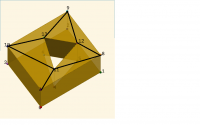
I wanna make some tube-like shape with irregular sides, similar like one
below:

http://forum.openscad.org/file/n13813/20150914_irregular_tube_by_extrude.png

This is made with a polygon + linear_extrude out of

pts_out =  [ [0,0],[6,0],[6,5],[0,5] ];
pts_in =  [ [2,1],[5,2], [3,4]];

To make a polyhedron, I convert pts to 3D:

pts =  [[0, 0, 0], [6, 0, 0], [6, 5, 0], [0, 5, 0], [2, 1, 0], [5, 2, 0],
[3, 4, 0], [0, 0, 3], [6, 0, 3], [6, 5, 3], [0, 5, 3], [2, 1, 3], [5, 2,
3], [3, 4, 3]];

Their indices are placed on the extruded shape as follow:

http://forum.openscad.org/file/n13813/150914_irregular_tube_marked.png

I tried several combinations of faces but couldn't get a polyhedron. Here
are two tries:

faces1= [[0, 7, 8, 1], [1, 8, 9, 2], [2, 9, 10, 3], [3, 10, 7, 0], [4, 5,
12, 11], [5, 6, 13, 12], [6, 4, 11, 13], [0, 1, 2, 3], [4, 5, 6], [7, 8,
9, 10], [11, 12, 13]];
polyhedron( points = pts, faces = faces1  );

faces2 = [[0, 7, 8, 1], [1, 8, 9, 2], [2, 9, 10, 3], [3, 10, 7, 0], [4, 5,
12, 11], [5, 6, 13, 12], [6, 4, 11, 13], [0, 1, 2, 3, 4, 5, 6], [7, 8, 9,
10, 11, 12, 13]];
color(undef,0.8)
polyhedron( points = pts , faces = faces2 );


$  Runsun Pan, PhD

$ -- libs: doctest , faces ( git ), offliner ( git );

tips: hash( 1 , 2 ), sweep , var

$ -- Linux Mint 17.1 Rebecca x64  + OpenSCAD 2015.03.15/2015.04.01.nightly

--
View this message in context: http://forum.openscad.org/Polyhedron-tube-with-irregular-sides-is-it-possible-tp13813.html
Sent from the OpenSCAD mailing list archive at Nabble.com.

I wanna make some tube-like shape with irregular sides, similar like one below: <http://forum.openscad.org/file/n13813/20150914_irregular_tube_by_extrude.png> This is made with a polygon + linear_extrude out of > pts_out = [ [0,0],[6,0],[6,5],[0,5] ]; > pts_in = [ [2,1],[5,2], [3,4]]; To make a polyhedron, I convert pts to 3D: > pts = [[0, 0, 0], [6, 0, 0], [6, 5, 0], [0, 5, 0], [2, 1, 0], [5, 2, 0], > [3, 4, 0], [0, 0, 3], [6, 0, 3], [6, 5, 3], [0, 5, 3], [2, 1, 3], [5, 2, > 3], [3, 4, 3]]; Their indices are placed on the extruded shape as follow: <http://forum.openscad.org/file/n13813/150914_irregular_tube_marked.png> I tried several combinations of faces but couldn't get a polyhedron. Here are two tries: > > faces1= [[0, 7, 8, 1], [1, 8, 9, 2], [2, 9, 10, 3], [3, 10, 7, 0], [4, 5, > 12, 11], [5, 6, 13, 12], [6, 4, 11, 13], [0, 1, 2, 3], [4, 5, 6], [7, 8, > 9, 10], [11, 12, 13]]; > polyhedron( points = pts, faces = faces1 ); <http://forum.openscad.org/file/n13813/20150914_irregular_tube_faces1.png> > > faces2 = [[0, 7, 8, 1], [1, 8, 9, 2], [2, 9, 10, 3], [3, 10, 7, 0], [4, 5, > 12, 11], [5, 6, 13, 12], [6, 4, 11, 13], [0, 1, 2, 3, 4, 5, 6], [7, 8, 9, > 10, 11, 12, 13]]; > color(undef,0.8) > polyhedron( points = pts , faces = faces2 ); ----- $ Runsun Pan, PhD $ -- libs: doctest , faces ( git ), offliner ( git ); tips: hash( 1 , 2 ), sweep , var $ -- Linux Mint 17.1 Rebecca x64 + OpenSCAD 2015.03.15/2015.04.01.nightly -- View this message in context: http://forum.openscad.org/Polyhedron-tube-with-irregular-sides-is-it-possible-tp13813.html Sent from the OpenSCAD mailing list archive at Nabble.com.
PF
Peter Falke
Mon, Sep 14, 2015 6:33 AM

​I guess you need to tesselate the face properly.

2015-09-14 8:26 GMT+02:00 runsun runsun@gmail.com:

I wanna make some tube-like shape with irregular sides, similar like one
below:

<
http://forum.openscad.org/file/n13813/20150914_irregular_tube_by_extrude.png

This is made with a polygon + linear_extrude out of

pts_out =  [ [0,0],[6,0],[6,5],[0,5] ];
pts_in =  [ [2,1],[5,2], [3,4]];

To make a polyhedron, I convert pts to 3D:

pts =  [[0, 0, 0], [6, 0, 0], [6, 5, 0], [0, 5, 0], [2, 1, 0], [5, 2, 0],
[3, 4, 0], [0, 0, 3], [6, 0, 3], [6, 5, 3], [0, 5, 3], [2, 1, 3], [5, 2,
3], [3, 4, 3]];

Their indices are placed on the extruded shape as follow:

http://forum.openscad.org/file/n13813/150914_irregular_tube_marked.png

I tried several combinations of faces but couldn't get a polyhedron. Here
are two tries:

faces1= [[0, 7, 8, 1], [1, 8, 9, 2], [2, 9, 10, 3], [3, 10, 7, 0], [4, 5,
12, 11], [5, 6, 13, 12], [6, 4, 11, 13], [0, 1, 2, 3], [4, 5, 6], [7, 8,
9, 10], [11, 12, 13]];
polyhedron( points = pts, faces = faces1  );

faces2 = [[0, 7, 8, 1], [1, 8, 9, 2], [2, 9, 10, 3], [3, 10, 7, 0], [4,

5,

12, 11], [5, 6, 13, 12], [6, 4, 11, 13], [0, 1, 2, 3, 4, 5, 6], [7, 8, 9,
10, 11, 12, 13]];
color(undef,0.8)
polyhedron( points = pts , faces = faces2 );


$  Runsun Pan, PhD

$ -- libs: doctest , faces ( git ), offliner ( git );

tips: hash( 1 , 2 ), sweep , var

$ -- Linux Mint 17.1 Rebecca x64  + OpenSCAD 2015.03.15/2015.04.01.nightly

--
View this message in context:
http://forum.openscad.org/Polyhedron-tube-with-irregular-sides-is-it-possible-tp13813.html
Sent from the OpenSCAD mailing list archive at Nabble.com.


OpenSCAD mailing list
Discuss@lists.openscad.org
http://lists.openscad.org/mailman/listinfo/discuss_lists.openscad.org

--
stempeldergeschichte@googlemail.com karsten@rohrbach.de

P.S. Falls meine E-Mail kürzer ausfällt als Dir angenehm ist:
Ich probiere gerade aus kurze Antworten statt gar keine Antworten zu
schreiben.
Wenn Du gerne mehr lesen möchtest, dann lass es mich bitte wissen.

P.S. In case my e-mail is shorter than you enjoy:
I am currently trying short replies instead of no replies at all.
Please let me know, if you like to read more.

Enjoy!
​I guess you need to tesselate the face properly. 2015-09-14 8:26 GMT+02:00 runsun <runsun@gmail.com>: > I wanna make some tube-like shape with irregular sides, similar like one > below: > > < > http://forum.openscad.org/file/n13813/20150914_irregular_tube_by_extrude.png > > > > This is made with a polygon + linear_extrude out of > > > pts_out = [ [0,0],[6,0],[6,5],[0,5] ]; > > pts_in = [ [2,1],[5,2], [3,4]]; > > To make a polyhedron, I convert pts to 3D: > > > > pts = [[0, 0, 0], [6, 0, 0], [6, 5, 0], [0, 5, 0], [2, 1, 0], [5, 2, 0], > > [3, 4, 0], [0, 0, 3], [6, 0, 3], [6, 5, 3], [0, 5, 3], [2, 1, 3], [5, 2, > > 3], [3, 4, 3]]; > > Their indices are placed on the extruded shape as follow: > > <http://forum.openscad.org/file/n13813/150914_irregular_tube_marked.png> > > I tried several combinations of faces but couldn't get a polyhedron. Here > are two tries: > > > > > > faces1= [[0, 7, 8, 1], [1, 8, 9, 2], [2, 9, 10, 3], [3, 10, 7, 0], [4, 5, > > 12, 11], [5, 6, 13, 12], [6, 4, 11, 13], [0, 1, 2, 3], [4, 5, 6], [7, 8, > > 9, 10], [11, 12, 13]]; > > polyhedron( points = pts, faces = faces1 ); > > <http://forum.openscad.org/file/n13813/20150914_irregular_tube_faces1.png> > > > > > > faces2 = [[0, 7, 8, 1], [1, 8, 9, 2], [2, 9, 10, 3], [3, 10, 7, 0], [4, > 5, > > 12, 11], [5, 6, 13, 12], [6, 4, 11, 13], [0, 1, 2, 3, 4, 5, 6], [7, 8, 9, > > 10, 11, 12, 13]]; > > color(undef,0.8) > > polyhedron( points = pts , faces = faces2 ); > > > > > > ----- > > $ Runsun Pan, PhD > > $ -- libs: doctest , faces ( git ), offliner ( git ); > > tips: hash( 1 , 2 ), sweep , var > > $ -- Linux Mint 17.1 Rebecca x64 + OpenSCAD 2015.03.15/2015.04.01.nightly > > > > > -- > View this message in context: > http://forum.openscad.org/Polyhedron-tube-with-irregular-sides-is-it-possible-tp13813.html > Sent from the OpenSCAD mailing list archive at Nabble.com. > > _______________________________________________ > OpenSCAD mailing list > Discuss@lists.openscad.org > http://lists.openscad.org/mailman/listinfo/discuss_lists.openscad.org > -- stempeldergeschichte@googlemail.com <karsten@rohrbach.de> P.S. Falls meine E-Mail kürzer ausfällt als Dir angenehm ist: Ich probiere gerade aus kurze Antworten statt gar keine Antworten zu schreiben. Wenn Du gerne mehr lesen möchtest, dann lass es mich bitte wissen. P.S. In case my e-mail is shorter than you enjoy: I am currently trying short replies instead of no replies at all. Please let me know, if you like to read more. Enjoy!
R
runsun
Mon, Sep 14, 2015 3:09 PM

Peter Falke wrote

​I guess you need to tesselate the face properly.

That was my very first try. But consider that I want a generalized approach,
in which users can punch any shape of hole on a surface of any shape, this
one doesn't seem to be ideal.

My 2nd try was a function to generate points like this:

http://forum.openscad.org/file/n13824/20150914_irregular_tube_paring.png

It works, but I imagine that it is still far from the objective of "any
shape".

So I thought, we can do polygon of any shape with a hole of any shape like
this:

polygon (points= concate( pts_out,pts_in), faces= [ [0,1,2,3],[4,5,6] ] );

http://forum.openscad.org/file/n13824/20150914_irregular_tube_polygon.png

Shouldn't we be able to use the same way to generate a surface with a hole
in 3D?

So I tried, but it doesn't seem to work.

Maybe we can implement this feature by allowing faces to have this way:

[
...,

[ [0, 1, 2, 3], [4, 5, 6] ]
, [ [7, 8, 9], [10, 11, 12, 13] ]

]

and with this allows for a "punched hole surface" in 3D, thus consistent
with that in 2D ?


$  Runsun Pan, PhD

$ -- libs: doctest , faces ( git ), offliner ( git );

tips: hash( 1 , 2 ), sweep , var

$ -- Linux Mint 17.1 Rebecca x64  + OpenSCAD 2015.03.15/2015.04.01.nightly

--
View this message in context: http://forum.openscad.org/Polyhedron-tube-with-irregular-sides-is-it-possible-tp13813p13824.html
Sent from the OpenSCAD mailing list archive at Nabble.com.

Peter Falke wrote > ​I guess you need to tesselate the face properly. That was my very first try. But consider that I want a generalized approach, in which users can punch any shape of hole on a surface of any shape, this one doesn't seem to be ideal. My 2nd try was a function to generate points like this: <http://forum.openscad.org/file/n13824/20150914_irregular_tube_paring.png> It works, but I imagine that it is still far from the objective of "any shape". So I thought, we can do polygon of any shape with a hole of any shape like this: > polygon (points= concate( pts_out,pts_in), faces= [ [0,1,2,3],[4,5,6] ] ); <http://forum.openscad.org/file/n13824/20150914_irregular_tube_polygon.png> Shouldn't we be able to use the same way to generate a surface with a hole in 3D? So I tried, but it doesn't seem to work. Maybe we can implement this feature by allowing faces to have this way: > [ > ..., * > [ [0, 1, 2, 3], [4, 5, 6] ] > , [ [7, 8, 9], [10, 11, 12, 13] ] * > ] and with this allows for a "punched hole surface" in 3D, thus consistent with that in 2D ? ----- $ Runsun Pan, PhD $ -- libs: doctest , faces ( git ), offliner ( git ); tips: hash( 1 , 2 ), sweep , var $ -- Linux Mint 17.1 Rebecca x64 + OpenSCAD 2015.03.15/2015.04.01.nightly -- View this message in context: http://forum.openscad.org/Polyhedron-tube-with-irregular-sides-is-it-possible-tp13813p13824.html Sent from the OpenSCAD mailing list archive at Nabble.com.
PF
Peter Falke
Mon, Sep 14, 2015 5:24 PM

Why do you want to exclude using the difference() operation?

2015-09-14 17:09 GMT+02:00 runsun runsun@gmail.com:

Peter Falke wrote

​I guess you need to tesselate the face properly.

That was my very first try. But consider that I want a generalized
approach,
in which users can punch any shape of hole on a surface of any shape, this
one doesn't seem to be ideal.

My 2nd try was a function to generate points like this:

http://forum.openscad.org/file/n13824/20150914_irregular_tube_paring.png

It works, but I imagine that it is still far from the objective of "any
shape".

So I thought, we can do polygon of any shape with a hole of any shape like
this:

polygon (points= concate( pts_out,pts_in), faces= [ [0,1,2,3],[4,5,6] ]

);
<http://forum.openscad.org/file/n13824/20150914_irregular_tube_polygon.png

Shouldn't we be able to use the same way to generate a surface with a hole
in 3D?

So I tried, but it doesn't seem to work.

Maybe we can implement this feature by allowing faces to have this way:

[
...,

[ [0, 1, 2, 3], [4, 5, 6] ]
, [ [7, 8, 9], [10, 11, 12, 13] ]

]

and with this allows for a "punched hole surface" in 3D, thus consistent
with that in 2D ?


$  Runsun Pan, PhD

$ -- libs: doctest , faces ( git ), offliner ( git );

tips: hash( 1 , 2 ), sweep , var

$ -- Linux Mint 17.1 Rebecca x64  + OpenSCAD 2015.03.15/2015.04.01.nightly

--
View this message in context:
http://forum.openscad.org/Polyhedron-tube-with-irregular-sides-is-it-possible-tp13813p13824.html
Sent from the OpenSCAD mailing list archive at Nabble.com.


OpenSCAD mailing list
Discuss@lists.openscad.org
http://lists.openscad.org/mailman/listinfo/discuss_lists.openscad.org

Why do you want to exclude using the difference() operation? 2015-09-14 17:09 GMT+02:00 runsun <runsun@gmail.com>: > Peter Falke wrote > > ​I guess you need to tesselate the face properly. > > That was my very first try. But consider that I want a generalized > approach, > in which users can punch any shape of hole on a surface of any shape, this > one doesn't seem to be ideal. > > My 2nd try was a function to generate points like this: > > <http://forum.openscad.org/file/n13824/20150914_irregular_tube_paring.png> > > It works, but I imagine that it is still far from the objective of "any > shape". > > So I thought, we can do polygon of any shape with a hole of any shape like > this: > > > polygon (points= concate( pts_out,pts_in), faces= [ [0,1,2,3],[4,5,6] ] > ); > <http://forum.openscad.org/file/n13824/20150914_irregular_tube_polygon.png > > > > > Shouldn't we be able to use the same way to generate a surface with a hole > in 3D? > > So I tried, but it doesn't seem to work. > > Maybe we can implement this feature by allowing faces to have this way: > > > [ > > ..., > * > > [ [0, 1, 2, 3], [4, 5, 6] ] > > , [ [7, 8, 9], [10, 11, 12, 13] ] > * > > ] > > and with this allows for a "punched hole surface" in 3D, thus consistent > with that in 2D ? > > > > > ----- > > $ Runsun Pan, PhD > > $ -- libs: doctest , faces ( git ), offliner ( git ); > > tips: hash( 1 , 2 ), sweep , var > > $ -- Linux Mint 17.1 Rebecca x64 + OpenSCAD 2015.03.15/2015.04.01.nightly > > > > > -- > View this message in context: > http://forum.openscad.org/Polyhedron-tube-with-irregular-sides-is-it-possible-tp13813p13824.html > Sent from the OpenSCAD mailing list archive at Nabble.com. > > _______________________________________________ > OpenSCAD mailing list > Discuss@lists.openscad.org > http://lists.openscad.org/mailman/listinfo/discuss_lists.openscad.org >
R
runsun
Mon, Sep 14, 2015 7:48 PM

Peter Falke wrote

Why do you want to exclude using the difference() operation?

It's part of my polyhedron-based lib, in which I'll use the "holed surface"
in different situations, including the irregular-side tube mentioned here.


$  Runsun Pan, PhD

$ -- libs: doctest , faces ( git ), offliner ( git );

tips: hash( 1 , 2 ), sweep , var

$ -- Linux Mint 17.1 Rebecca x64  + OpenSCAD 2015.03.15/2015.04.01.nightly

--
View this message in context: http://forum.openscad.org/Polyhedron-tube-with-irregular-sides-is-it-possible-tp13813p13830.html
Sent from the OpenSCAD mailing list archive at Nabble.com.

Peter Falke wrote > Why do you want to exclude using the difference() operation? It's part of my polyhedron-based lib, in which I'll use the "holed surface" in different situations, including the irregular-side tube mentioned here. ----- $ Runsun Pan, PhD $ -- libs: doctest , faces ( git ), offliner ( git ); tips: hash( 1 , 2 ), sweep , var $ -- Linux Mint 17.1 Rebecca x64 + OpenSCAD 2015.03.15/2015.04.01.nightly -- View this message in context: http://forum.openscad.org/Polyhedron-tube-with-irregular-sides-is-it-possible-tp13813p13830.html Sent from the OpenSCAD mailing list archive at Nabble.com.
DB
don bright
Mon, Sep 14, 2015 10:49 PM

polyhedron() cannot do "faces with holes" currently as far as i know.

However there is a work-around. It is called the Keyhole Polygon...

Basically you take any polygon with a single hole... and pretend you
slice a knife down from the outside of the polygon, straight down, until
you cut into the hole. What you end up with is a single polygon without
any holes. Here is a picture

https://sozvyezdami.files.wordpress.com/2013/04/11.png?w=640

The caveat that the new edges you create by cutting will be coincident
with each other.... and the 'points' or 'nodes' of those new edges will
also be coincident, which can be a problem for some polygon processing
algorithms. However it appears to work on your basic example in
OpenSCAD. Here is your code rewritten to have two 'keyhole' polygons on
top and bottom.

pts =  [[0, 0, 0], [6, 0, 0], [6, 5, 0], [0, 5, 0], [2, 1, 0], [5, 2,
0],
[3, 4, 0], [0, 0, 3], [6, 0, 3], [6, 5, 3], [0, 5, 3], [2, 1, 3], [5, 2,
3], [3, 4, 3]];

faces1= [[0, 7, 8, 1], [1, 8, 9, 2], [2, 9, 10, 3], [3, 10, 7, 0],
[4, 5,12, 11], [5, 6, 13, 12], [6, 4, 11, 13],
[0, 1, 2, 3, 4, 6, 5, 4, 3],
[10, 9, 8, 7, 11, 12, 13, 11, 7]];
polyhedron( points = pts, faces = faces1  );

Also i had to re-order some of the vertices, as viewable in
'View/ThrownTogether' mode within OpenSCAD to make sure there were no
naughty purples. Hope this helps!

-don bright
hmbright@fastmail.fm

polyhedron() cannot do "faces with holes" currently as far as i know. However there is a work-around. It is called the Keyhole Polygon... Basically you take any polygon with a single hole... and pretend you slice a knife down from the outside of the polygon, straight down, until you cut into the hole. What you end up with is a single polygon without any holes. Here is a picture https://sozvyezdami.files.wordpress.com/2013/04/11.png?w=640 The caveat that the new edges you create by cutting will be coincident with each other.... and the 'points' or 'nodes' of those new edges will also be coincident, which can be a problem for some polygon processing algorithms. However it appears to work on your basic example in OpenSCAD. Here is your code rewritten to have two 'keyhole' polygons on top and bottom. pts = [[0, 0, 0], [6, 0, 0], [6, 5, 0], [0, 5, 0], [2, 1, 0], [5, 2, 0], [3, 4, 0], [0, 0, 3], [6, 0, 3], [6, 5, 3], [0, 5, 3], [2, 1, 3], [5, 2, 3], [3, 4, 3]]; faces1= [[0, 7, 8, 1], [1, 8, 9, 2], [2, 9, 10, 3], [3, 10, 7, 0], [4, 5,12, 11], [5, 6, 13, 12], [6, 4, 11, 13], [0, 1, 2, 3, 4, 6, 5, 4, 3], [10, 9, 8, 7, 11, 12, 13, 11, 7]]; polyhedron( points = pts, faces = faces1 ); Also i had to re-order some of the vertices, as viewable in 'View/ThrownTogether' mode within OpenSCAD to make sure there were no naughty purples. Hope this helps! -don bright hmbright@fastmail.fm
R
runsun
Tue, Sep 15, 2015 4:56 AM

Hi Don, interesting approach. I seem to read similar one when reading
Computer Geometry or something a while back, but can't recall what it's for.

This approach seems to simplify the problem significantly. The
re-arrangement of points is not a big issue.

On the other hand, for my application, it might bring up other problems.
What I show in this thread is an extremely simplified example. The actual
tube in my lib could be a complicated one with random curving, etc. To make
a holed surface on the end of a long tube with this approach, the entire
tube will have to be sliced apart.

I also intend to use a holed surface as the merging face when cylinder of
different sides (in polyhedron) linked together. That is, to merge two
polyhedria. It will then be a budding, but not hole-punching/cutting,
process.

Anyway, thx for the idea. I believe it'd turn out useful in the future
development of my lib.


$  Runsun Pan, PhD

$ -- libs: doctest , faces ( git ), offliner ( git );

tips: hash( 1 , 2 ), sweep , var

$ -- Linux Mint 17.1 Rebecca x64  + OpenSCAD 2015.03.15/2015.04.01.nightly

--
View this message in context: http://forum.openscad.org/Polyhedron-tube-with-irregular-sides-is-it-possible-tp13813p13839.html
Sent from the OpenSCAD mailing list archive at Nabble.com.

Hi Don, interesting approach. I seem to read similar one when reading Computer Geometry or something a while back, but can't recall what it's for. This approach seems to simplify the problem significantly. The re-arrangement of points is not a big issue. On the other hand, for my application, it might bring up other problems. What I show in this thread is an extremely simplified example. The actual tube in my lib could be a complicated one with random curving, etc. To make a holed surface on the end of a long tube with this approach, the entire tube will have to be sliced apart. I also intend to use a holed surface as the merging face when cylinder of different sides (in polyhedron) linked together. That is, to merge two polyhedria. It will then be a budding, but not hole-punching/cutting, process. Anyway, thx for the idea. I believe it'd turn out useful in the future development of my lib. ----- $ Runsun Pan, PhD $ -- libs: doctest , faces ( git ), offliner ( git ); tips: hash( 1 , 2 ), sweep , var $ -- Linux Mint 17.1 Rebecca x64 + OpenSCAD 2015.03.15/2015.04.01.nightly -- View this message in context: http://forum.openscad.org/Polyhedron-tube-with-irregular-sides-is-it-possible-tp13813p13839.html Sent from the OpenSCAD mailing list archive at Nabble.com.
R
runsun
Sun, Dec 9, 2018 11:37 PM

Regarding "faces with hole", following up the "keyhole polygon" solution
described by dob bright 3 yrs ago (which is also presented as an "
alternative face description
https://en.wikibooks.org/wiki/OpenSCAD_User_Manual/The_OpenSCAD_Language#Alternate_Face_Descriptions
" in the official document ).I found that it could even be used to make a
polyhedron cube with multiple holes, like this:
pts = [[0, 0, 0], [0, 4, 0], [3, 5, 0], [2, 0, 0], [0, 0, 2], [0, 4, 2], [3,
5, 2], [2, 0, 2], [1, 0.5, 0], [0.4, 1.2, 0], [0.5, 2.1, 0], [2, 1.5, 0],
[1, 0.5, 2], [0.4, 1.2, 2], [0.5, 2.1, 2], [2, 1.5, 2], [1.5, 2.5, 0], [0.5,
3.5, 0], [2, 3.5, 0], [1.5, 2.5, 2], [0.5, 3.5, 2], [2, 3.5, 2]];faces =
[[4, 5, 6, 7, 4, 15, 14, 13, 12, 15, 4, 21, 20, 19, 21], [3, 2, 1, 0, 3, 8,
9, 10, 11, 8, 3, 16, 17, 18, 16], [0, 1, 5, 4], [1, 2, 6, 5], [2, 3, 7, 6],
[3, 0, 4, 7], [9, 8, 12, 13], [10, 9, 13, 14], [11, 10, 14, 15], [8, 11, 15,
12], [17, 16, 19, 20], [18, 17, 20, 21], [16, 18, 21,
19]];polyhedron(pts,faces);
http://forum.openscad.org/file/t602/20181209_runsun_multi_hole_surface_1.png
In this case, the top face uses pts[4] as the starting point to cut into the
two holes:
[ 4, 5, 6, 7, 4, 15, 14, 13, 12, 15, 4, 21, 20, 19, 21]
as shown in this figure:
http://forum.openscad.org/file/t602/20181209_runsun_multi_hole_surface_2.png
What surprises me is that the 2 cut lines, 4~15 and 4~21,  go across the
entire holes.Is this normal?

It seems that this approach works in more holes, too:
pts = [[0, 0, 0], [0, 4, 0], [3, 5, 0], [2, 0, 0], [0, 0, 1], [0, 4, 1], [3,
5, 1], [2, 0, 1], [1, 0.5, 0], [0.4, 1.2, 0], [2, 1.5, 0], [1, 0.5, 1],
[0.4, 1.2, 1], [2, 1.5, 1], [0.5, 1.8, 0], [0.5, 2.1, 0], [1.8, 2.2, 0],
[1.5, 2, 0], [0.5, 1.8, 1], [0.5, 2.1, 1], [1.8, 2.2, 1], [1.5, 2, 1], [1,
2.75, 0], [0.5, 3.5, 0], [2, 3.5, 0], [1, 2.75, 1], [0.5, 3.5, 1], [2, 3.5,
1]];faces = [[4, 5, 6, 7, 4, 13, 12, 11, 13, 4, 21, 20, 19, 18, 21, 4, 27,
26, 25, 27], [3, 2, 1, 0, 3, 8, 9, 10, 8, 3, 14, 15, 16, 17, 14, 3, 22, 23,
24, 22], [0, 1, 5, 4], [1, 2, 6, 5], [2, 3, 7, 6], [3, 0, 4, 7], [9, 8, 11,
12], [10, 9, 12, 13], [8, 10, 13, 11], [15, 14, 18, 19], [16, 15, 19, 20],
[17, 16, 20, 21], [14, 17, 21, 18], [23, 22, 25, 26], [24, 23, 26, 27], [22,
24, 27, 25]];polyhedron(pts,faces);
http://forum.openscad.org/file/t602/20181209_runsun_multi_hole_surface_3.png
The top face:
[ 4, 5, 6, 7, 4, 13, 12, 11, 13, 4, 21, 20, 19, 18, 21, 4, 27, 26, 25, 27]
I'd like to know what you experts think about this.


$  Runsun Pan, PhD $ libs: scadx , doctest , faces ( git ), offline doc ( git ), runscad.py ( 2 , git ), editor of choice: CudaText  ( OpenSCAD lexer ); $ Tips ; $ Snippets

--
Sent from: http://forum.openscad.org/

Regarding "faces with hole", following up the "keyhole polygon" solution described by dob bright 3 yrs ago (which is also presented as an " alternative face description <https://en.wikibooks.org/wiki/OpenSCAD_User_Manual/The_OpenSCAD_Language#Alternate_Face_Descriptions> " in the official document ).I found that it could even be used to make a polyhedron cube with multiple holes, like this: pts = [[0, 0, 0], [0, 4, 0], [3, 5, 0], [2, 0, 0], [0, 0, 2], [0, 4, 2], [3, 5, 2], [2, 0, 2], [1, 0.5, 0], [0.4, 1.2, 0], [0.5, 2.1, 0], [2, 1.5, 0], [1, 0.5, 2], [0.4, 1.2, 2], [0.5, 2.1, 2], [2, 1.5, 2], [1.5, 2.5, 0], [0.5, 3.5, 0], [2, 3.5, 0], [1.5, 2.5, 2], [0.5, 3.5, 2], [2, 3.5, 2]];faces = [[4, 5, 6, 7, 4, 15, 14, 13, 12, 15, 4, 21, 20, 19, 21], [3, 2, 1, 0, 3, 8, 9, 10, 11, 8, 3, 16, 17, 18, 16], [0, 1, 5, 4], [1, 2, 6, 5], [2, 3, 7, 6], [3, 0, 4, 7], [9, 8, 12, 13], [10, 9, 13, 14], [11, 10, 14, 15], [8, 11, 15, 12], [17, 16, 19, 20], [18, 17, 20, 21], [16, 18, 21, 19]];polyhedron(pts,faces); <http://forum.openscad.org/file/t602/20181209_runsun_multi_hole_surface_1.png> In this case, the top face uses pts[4] as the starting point to cut into the two holes: [ 4, 5, 6, 7, 4, 15, 14, 13, 12, 15, 4, 21, 20, 19, 21] as shown in this figure: <http://forum.openscad.org/file/t602/20181209_runsun_multi_hole_surface_2.png> What surprises me is that the 2 cut lines, *4~15* and *4~21*, go across the entire holes.Is this normal? It seems that this approach works in more holes, too: pts = [[0, 0, 0], [0, 4, 0], [3, 5, 0], [2, 0, 0], [0, 0, 1], [0, 4, 1], [3, 5, 1], [2, 0, 1], [1, 0.5, 0], [0.4, 1.2, 0], [2, 1.5, 0], [1, 0.5, 1], [0.4, 1.2, 1], [2, 1.5, 1], [0.5, 1.8, 0], [0.5, 2.1, 0], [1.8, 2.2, 0], [1.5, 2, 0], [0.5, 1.8, 1], [0.5, 2.1, 1], [1.8, 2.2, 1], [1.5, 2, 1], [1, 2.75, 0], [0.5, 3.5, 0], [2, 3.5, 0], [1, 2.75, 1], [0.5, 3.5, 1], [2, 3.5, 1]];faces = [[4, 5, 6, 7, 4, 13, 12, 11, 13, 4, 21, 20, 19, 18, 21, 4, 27, 26, 25, 27], [3, 2, 1, 0, 3, 8, 9, 10, 8, 3, 14, 15, 16, 17, 14, 3, 22, 23, 24, 22], [0, 1, 5, 4], [1, 2, 6, 5], [2, 3, 7, 6], [3, 0, 4, 7], [9, 8, 11, 12], [10, 9, 12, 13], [8, 10, 13, 11], [15, 14, 18, 19], [16, 15, 19, 20], [17, 16, 20, 21], [14, 17, 21, 18], [23, 22, 25, 26], [24, 23, 26, 27], [22, 24, 27, 25]];polyhedron(pts,faces); <http://forum.openscad.org/file/t602/20181209_runsun_multi_hole_surface_3.png> The top face: [ 4, 5, 6, 7, 4, 13, 12, 11, 13, 4, 21, 20, 19, 18, 21, 4, 27, 26, 25, 27] I'd like to know what you experts think about this. ----- $ Runsun Pan, PhD $ libs: scadx , doctest , faces ( git ), offline doc ( git ), runscad.py ( 2 , git ), editor of choice: CudaText ( OpenSCAD lexer );&nbsp;$ Tips ;&nbsp;$ Snippets -- Sent from: http://forum.openscad.org/
P
Parkinbot
Mon, Dec 10, 2018 4:08 AM

Very interesting stuff. Thanks for digging out this hack!
I immediately wanted this for sweep();

A sweep with a "close" attribute doing a single hole without difference() is
already nothing new - you sweep up and down.

sweep([circle(10, 0), circle(10, 20), circle(7, 20), circle(7, 0)], close =
true);
function circle(r=10, z = 0, N=10) = [for(i=[0:N-1]) [rcos(360/Ni),
rsin(360/Ni), z]];

I guess this approach will allow to implement a sweep() allowing for as many
holes as one likes.
I'll have to add a new interface parameter to my sweep() that lets one
supply a list of polygons describing the holes. The first and last face need
the hack, the rest is more or less straight forward.

Being able to sweep objects with multiple holes can speed up rendering of a
lot of stuff. I'm looking forward to have it.

--
Sent from: http://forum.openscad.org/

Very interesting stuff. Thanks for digging out this hack! I immediately wanted this for sweep(); A sweep with a "close" attribute doing a single hole without difference() is already nothing new - you sweep up and down. sweep([circle(10, 0), circle(10, 20), circle(7, 20), circle(7, 0)], close = true); function circle(r=10, z = 0, N=10) = [for(i=[0:N-1]) [r*cos(360/N*i), r*sin(360/N*i), z]]; I guess this approach will allow to implement a sweep() allowing for as many holes as one likes. I'll have to add a new interface parameter to my sweep() that lets one supply a list of polygons describing the holes. The first and last face need the hack, the rest is more or less straight forward. Being able to sweep objects with multiple holes can speed up rendering of a lot of stuff. I'm looking forward to have it. -- Sent from: http://forum.openscad.org/
NH
nop head
Mon, Dec 10, 2018 9:36 AM

It's happy to preview but doesn't work with a union with a unit cube and F6.

On Mon, 10 Dec 2018 at 04:09, Parkinbot rudolf@digitaldocument.de wrote:

Very interesting stuff. Thanks for digging out this hack!
I immediately wanted this for sweep();

A sweep with a "close" attribute doing a single hole without difference()
is
already nothing new - you sweep up and down.

sweep([circle(10, 0), circle(10, 20), circle(7, 20), circle(7, 0)], close =
true);
function circle(r=10, z = 0, N=10) = [for(i=[0:N-1]) [rcos(360/Ni),
rsin(360/Ni), z]];

I guess this approach will allow to implement a sweep() allowing for as
many
holes as one likes.
I'll have to add a new interface parameter to my sweep() that lets one
supply a list of polygons describing the holes. The first and last face
need
the hack, the rest is more or less straight forward.

Being able to sweep objects with multiple holes can speed up rendering of a
lot of stuff. I'm looking forward to have it.

--
Sent from: http://forum.openscad.org/


OpenSCAD mailing list
Discuss@lists.openscad.org
http://lists.openscad.org/mailman/listinfo/discuss_lists.openscad.org

It's happy to preview but doesn't work with a union with a unit cube and F6. On Mon, 10 Dec 2018 at 04:09, Parkinbot <rudolf@digitaldocument.de> wrote: > Very interesting stuff. Thanks for digging out this hack! > I immediately wanted this for sweep(); > > A sweep with a "close" attribute doing a single hole without difference() > is > already nothing new - you sweep up and down. > > sweep([circle(10, 0), circle(10, 20), circle(7, 20), circle(7, 0)], close = > true); > function circle(r=10, z = 0, N=10) = [for(i=[0:N-1]) [r*cos(360/N*i), > r*sin(360/N*i), z]]; > > I guess this approach will allow to implement a sweep() allowing for as > many > holes as one likes. > I'll have to add a new interface parameter to my sweep() that lets one > supply a list of polygons describing the holes. The first and last face > need > the hack, the rest is more or less straight forward. > > Being able to sweep objects with multiple holes can speed up rendering of a > lot of stuff. I'm looking forward to have it. > > > > > -- > Sent from: http://forum.openscad.org/ > > _______________________________________________ > OpenSCAD mailing list > Discuss@lists.openscad.org > http://lists.openscad.org/mailman/listinfo/discuss_lists.openscad.org >