

Monitor Mount

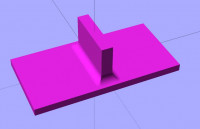
How an we do The Soft connection to the plate in OpenSCad
http://forum.openscad.org/file/t2425/Monitor_Mount.jpg
--
Sent from: http://forum.openscad.org/

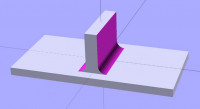
I think you mean that you want to re-create a part like this one, and you
want to be able to do the curved 'fillet' between the main plate and the
raised mount.
The way you can do this is to make the plate and the mount so that they
overlap, and put both inside a union() {.....}
Make the mount wider than you want it to be, by 2x the radius of the fillet
you want.
Translate the parts so that the TOP surface of the plate on Z=0.
Then, you want to take a cylinder with the radius of the fillet you want,
make it easily long enough to be wider than the whole part. Rotate it over
so that it is in line with the fillet you want to make.
Translate it up to Z=fillet radius, so it is lying on the surface of the
plate. Translate it horizontally so its centre overlaps the EXTRA width of
the mount, and its edges are at the correct width.
Now, copy that cylinder, paste it and translate the copy in Z so it is way
above the parts. Then put both inside a hull() {.....}
Use difference() to cut the new cylinder hull out of the union above. Then
copy-paste the cylinder hull over to the other side to do the same on the
other side.
This should get you what you are after!
Alex Gibson
admg consulting
edumaker limited
. Project management
. Operations & Process improvement
. 3D Printing
-----Original Message-----
From: Discuss [mailto:discuss-bounces@lists.openscad.org] On Behalf Of
ats3788
Sent: 22 November 2019 12:37
To: discuss@lists.openscad.org
Subject: [OpenSCAD] Monitor Mount
How an we do The Soft connection to the plate in OpenSCad
http://forum.openscad.org/file/t2425/Monitor_Mount.jpg
--
Sent from: http://forum.openscad.org/
OpenSCAD mailing list
Discuss@lists.openscad.org
http://lists.openscad.org/mailman/listinfo/discuss_lists.openscad.org
Example:
fillet_radius = 10;
mount_width = 15;
difference()
            {

            union()

                            {

                            //plate

                            translate([0,0,-5])
cube([200,100,10],center=true);
                            //mount

                            translate([0,0,25])
cube([mount_width+fillet_radius*2,75,50],center=true);
                            }

            hull()

                            {
translate([mount_width/2+fillet_radius,0,fillet_radius])
rotate([90,0,0])
cylinder(200,fillet_radius,fillet_radius,center=true);
translate([mount_width/2+fillet_radius,0,fillet_radius+200])
rotate([90,0,0])
cylinder(200,fillet_radius,fillet_radius,center=true);
                            }

            hull()

                            {
translate([-mount_width/2-fillet_radius,0,fillet_radius])
rotate([90,0,0])
cylinder(200,fillet_radius,fillet_radius,center=true);
translate([-mount_width/2-fillet_radius,0,fillet_radius+200])
rotate([90,0,0])
cylinder(200,fillet_radius,fillet_radius,center=true);
                            }

            }
Alex Gibson
admg consulting
edumaker limited
. Project management
. Operations & Process improvement
. 3D Printing
-----Original Message-----
From: Discuss [mailto:discuss-bounces@lists.openscad.org] On Behalf Of Alex
Gibson
Sent: 22 November 2019 13:44
To: 'OpenSCAD general discussion'
Subject: Re: [OpenSCAD] Monitor Mount
I think you mean that you want to re-create a part like this one, and you
want to be able to do the curved 'fillet' between the main plate and the
raised mount.
The way you can do this is to make the plate and the mount so that they
overlap, and put both inside a union() {.....}
Make the mount wider than you want it to be, by 2x the radius of the fillet
you want.
Translate the parts so that the TOP surface of the plate on Z=0.
Then, you want to take a cylinder with the radius of the fillet you want,
make it easily long enough to be wider than the whole part. Rotate it over
so that it is in line with the fillet you want to make.
Translate it up to Z=fillet radius, so it is lying on the surface of the
plate. Translate it horizontally so its centre overlaps the EXTRA width of
the mount, and its edges are at the correct width.
Now, copy that cylinder, paste it and translate the copy in Z so it is way
above the parts. Then put both inside a hull() {.....}
Use difference() to cut the new cylinder hull out of the union above. Then
copy-paste the cylinder hull over to the other side to do the same on the
other side.
This should get you what you are after!
Alex Gibson
admg consulting
edumaker limited
. Project management
. Operations & Process improvement
. 3D Printing
-----Original Message-----
From: Discuss [mailto:discuss-bounces@lists.openscad.org] On Behalf Of
ats3788
Sent: 22 November 2019 12:37
To: discuss@lists.openscad.org
Subject: [OpenSCAD] Monitor Mount
How an we do The Soft connection to the plate in OpenSCad
http://forum.openscad.org/file/t2425/Monitor_Mount.jpg
--
Sent from: http://forum.openscad.org/
OpenSCAD mailing list
http://lists.openscad.org/mailman/listinfo/discuss_lists.openscad.org
OpenSCAD mailing list
http://lists.openscad.org/mailman/listinfo/discuss_lists.openscad.org

On 2019-11-22 13:36, ats3788 wrote:
How an we do The Soft connection to the plate in OpenSCad
http://forum.openscad.org/file/t2425/Monitor_Mount.jpg
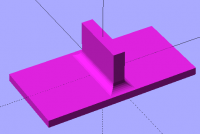
Determine the fillet radius r and add 2*r thickness in all directions to
the parts mentioned below.
Union two "plates" defined as cubes. One for the "horizontal plate" and
one for the "vertical". No holes or cutouts at this stage, but add 2*r
to all directions so we can "machine" away a thickness of r on all sides
later and obtain the correct dimensions.
Create a cube enclosing the unioned parts 100% and subtract the unioned
parts from it. You now have a cube with an internal void shaped by your
object. Run minkowski() on that using a sphere with the required fillet
radius. Subtract the result of minkowski() from your original union. Now
you have two parts with a fillet with given radius between them.
Punch the holes as required.
Carsten Arnholm
Here's an example of that. It's better, as it gives both fillets, if you
want them the same radius:
fillet_radius = 10;
mount_width = 15;
module shape_inflated()
            {

            union()

                            {

                            //plate

                            translate([0,0,-5])
cube([200+fillet_radius2,100+fillet_radius2,10+fillet_radius*2],center=tru
e);
                            //mount

                            translate([0,0,25])
cube([mount_width+fillet_radius2,75+fillet_radius2,50+fillet_radius*2],cen
ter=true);
                            }

            }
difference()
            {

            shape_inflated();

            minkowski()

                            {

                            difference()

                                            {
cube([500,500,500],center=true);
                                            shape_inflated();

                                            }

                            sphere(fillet_radius);

                            }

            }
Alex Gibson
admg consulting
edumaker limited
. Project management
. Operations & Process improvement
. 3D Printing
-----Original Message-----
From: Discuss [mailto:discuss-bounces@lists.openscad.org] On Behalf Of
arnholm@arnholm.org
Sent: 22 November 2019 14:04
To: OpenSCAD general discussion
Subject: Re: [OpenSCAD] Monitor Mount
On 2019-11-22 13:36, ats3788 wrote:
How an we do The Soft connection to the plate in OpenSCad
Determine the fillet radius r and add 2*r thickness in all directions to
the parts mentioned below.
Union two "plates" defined as cubes. One for the "horizontal plate" and
one for the "vertical". No holes or cutouts at this stage, but add 2*r
to all directions so we can "machine" away a thickness of r on all sides
later and obtain the correct dimensions.
Create a cube enclosing the unioned parts 100% and subtract the unioned
parts from it. You now have a cube with an internal void shaped by your
object. Run minkowski() on that using a sphere with the required fillet
radius. Subtract the result of minkowski() from your original union. Now
you have two parts with a fillet with given radius between them.
Punch the holes as required.
Carsten Arnholm
OpenSCAD mailing list
http://lists.openscad.org/mailman/listinfo/discuss_lists.openscad.org
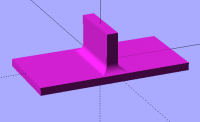
An even cleaner way to code that is below - has the same result but you can
stick any shape you like into 'original_shape' module, and it will get the
same treatment.
fillet_radius = 10;
mount_width = 15;
module original_shape()
            {

            union()

                            {

                            //plate

                            translate([0,0,-5])
cube([200,100,10],center=true);
                            //mount

                            translate([0,0,25])
cube([mount_width,75,50],center=true);
                            }

            }
module shape_inflated()
            {

            minkowski()

                            {

                            original_shape();
cube([fillet_radius2,fillet_radius2,fillet_radius*2]);
                            }

            }
difference()
            {

            shape_inflated();

            minkowski()

                            {

                            difference()

                                            {
cube([500,500,500],center=true);
                                            shape_inflated();

                                            }

                            sphere(fillet_radius);

                            }

            }
Alex Gibson
admg consulting
edumaker limited
. Project management
. Operations & Process improvement
. 3D Printing
From: Discuss [mailto:discuss-bounces@lists.openscad.org] On Behalf Of Alex
Gibson
Sent: 22 November 2019 14:49
To: 'OpenSCAD general discussion'
Subject: Re: [OpenSCAD] Monitor Mount
Here's an example of that. It's better, as it gives both fillets, if you
want them the same radius:
fillet_radius = 10;
mount_width = 15;
module shape_inflated()
            {

            union()

                            {

                            //plate

                            translate([0,0,-5])
cube([200+fillet_radius2,100+fillet_radius2,10+fillet_radius*2],center=tru
e);
                            //mount

                            translate([0,0,25])
cube([mount_width+fillet_radius2,75+fillet_radius2,50+fillet_radius*2],cen
ter=true);
                            }

            }
difference()
            {

            shape_inflated();

            minkowski()

                            {

                            difference()

                                            {
cube([500,500,500],center=true);
                                            shape_inflated();

                                            }

                            sphere(fillet_radius);

                            }

            }
Alex Gibson
admg consulting
edumaker limited
. Project management
. Operations & Process improvement
. 3D Printing
-----Original Message-----
From: Discuss [mailto:discuss-bounces@lists.openscad.org] On Behalf Of
arnholm@arnholm.org
Sent: 22 November 2019 14:04
To: OpenSCAD general discussion
Subject: Re: [OpenSCAD] Monitor Mount
On 2019-11-22 13:36, ats3788 wrote:
How an we do The Soft connection to the plate in OpenSCad
Determine the fillet radius r and add 2*r thickness in all directions to
the parts mentioned below.
Union two "plates" defined as cubes. One for the "horizontal plate" and
one for the "vertical". No holes or cutouts at this stage, but add 2*r
to all directions so we can "machine" away a thickness of r on all sides
later and obtain the correct dimensions.
Create a cube enclosing the unioned parts 100% and subtract the unioned
parts from it. You now have a cube with an internal void shaped by your
object. Run minkowski() on that using a sphere with the required fillet
radius. Subtract the result of minkowski() from your original union. Now
you have two parts with a fillet with given radius between them.
Punch the holes as required.
Carsten Arnholm
OpenSCAD mailing list
http://lists.openscad.org/mailman/listinfo/discuss_lists.openscad.org
On 2019-11-22 15:48, Alex Gibson wrote:
Here's an example of that. It's better, as it gives both fillets, if
you want them the same radius:
Yes, that's what I meant, as I did this
https://gist.github.com/arnholm/a8254293238b2143c4565fc179104576
Carsten Arnholm
Nice! I must check out AngelCAD.
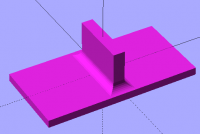
So this works well for square-edged items. I wanted to check how well my
example would work for rounded shapes. Not so well.
In this case the 'mount' is supposed to have rounded ends being the union of
two cylinders. But the cubes I used to inflate the original piece
overpowered the original shape's radii:
fillet_radius = 10;
mount_width = 15;
module original_shape()
 {

 union()

       {

       //plate

       translate([0,0,-5])

            cube([200,100,10],center=true);


       //mount

       hull()

            {

            translate([0,75/2-mount_width/2,25])

                 cylinder(50,mount_width/2,mount_width/2,center=true);

            translate([0,-75/2+mount_width/2,25])

                 cylinder(50,mount_width/2,mount_width/2,center=true);

            }

       }

 }
module shape_inflated()
 {

 minkowski()

       {

       original_shape();
cube([fillet_radius2,fillet_radius2,fillet_radius*2],center=true);
       }

 }
difference()
 {

 shape_inflated();

 minkowski()

       {

       difference()

            {

            cube([500,500,500],center=true);

            shape_inflated();

            }

       sphere(fillet_radius);

       }

 }
So, If the same is run again, but making sure the radii on the original part
are bigger than the fillet radius, you get something closer to the expected
output - but still distorted:
Alex Gibson
admg consulting
edumaker limited
. Project management
. Operations & Process improvement
. 3D Printing
-----Original Message-----
From: Discuss [mailto:discuss-bounces@lists.openscad.org] On Behalf Of
arnholm@arnholm.org
Sent: 22 November 2019 15:11
To: OpenSCAD general discussion
Subject: Re: [OpenSCAD] Monitor Mount
On 2019-11-22 15:48, Alex Gibson wrote:
Here's an example of that. It's better, as it gives both fillets, if
you want them the same radius:
Yes, that's what I meant, as I did this
https://gist.github.com/arnholm/a8254293238b2143c4565fc179104576
Carsten Arnholm
OpenSCAD mailing list
http://lists.openscad.org/mailman/listinfo/discuss_lists.openscad.org
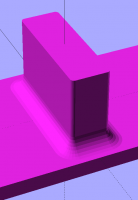
Thank you people
That looks great
--
Sent from: http://forum.openscad.org/
Thank you people
--
Sent from: http://forum.openscad.org/