

discuss@lists.openscad.org

OpenSCAD general discussion Mailing-list

View all threads

beginners question

KE
Karl Exler
Thu, May 28, 2026 2:22 PM

Dear all!

I found a beautiful cone on Thingiverse and build some changes to use it
for my purposes. F5 works great, but when I print F6 I receive an error
message:

ERROR: The given mesh is not closed! Unable to convert to
CGAL_Nef_Polyhedron. What can I do, that OpenScad renders this object
correctly? many thanks in advance Karl
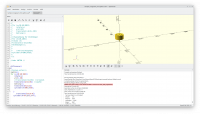
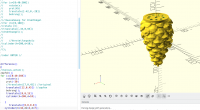
Dear all! I found a beautiful cone on Thingiverse and build some changes to use it for my purposes. F5 works great, but when I print F6 I receive an error message: ERROR: The given mesh is not closed! Unable to convert to CGAL_Nef_Polyhedron. What can I do, that OpenScad renders this object correctly? many thanks in advance Karl
NK
Nikolaus Klepp
Thu, May 28, 2026 2:48 PM

Anno domini 2026 Thu, 28 May 16:22:14 +0200
Karl Exler via Discuss scripsit:

Dear all!

I found a beautiful cone on Thingiverse and build some changes to use it
for my purposes. F5 works great, but when I print F6 I receive an error
message:

ERROR: The given mesh is not closed! Unable to convert to
CGAL_Nef_Polyhedron. What can I do, that OpenScad renders this object
correctly? many thanks in advance Karl

Hi!

You could load the mesh in MeshLab and reapair/close it there. https://www.meshlab.net

Nik

--
Please do not email me anything that you are not comfortable also sharing with the NSA, CIA ...

Anno domini 2026 Thu, 28 May 16:22:14 +0200 Karl Exler via Discuss scripsit: > Dear all! > > I found a beautiful cone on Thingiverse and build some changes to use it > for my purposes. F5 works great, but when I print F6 I receive an error > message: > > ERROR: The given mesh is not closed! Unable to convert to > CGAL_Nef_Polyhedron. What can I do, that OpenScad renders this object > correctly? many thanks in advance Karl > Hi! You could load the mesh in MeshLab and reapair/close it there. https://www.meshlab.net Nik -- Please do not email me anything that you are not comfortable also sharing with the NSA, CIA ...
F
fred
Thu, May 28, 2026 3:18 PM

If the model will not convert within OpenSCAD, it won't be something to be repaired externally.
Consider to post the link of the original file and also present the changes you've made. If the original file renders properly, the changes listing will be critical to determine the solution.
On Thursday, May 28, 2026 at 10:48:45 AM EDT, Nikolaus Klepp via Discuss discuss@lists.openscad.org wrote:

Anno domini 2026 Thu, 28 May 16:22:14 +0200
Karl Exler via Discuss scripsit:

Dear all!

I found a beautiful cone on Thingiverse and build some changes to use it
for my purposes. F5 works great, but when I print F6 I receive an error
message:

ERROR: The given mesh is not closed! Unable to convert to
CGAL_Nef_Polyhedron. What can I do, that OpenScad renders this object
correctly? many thanks in advance Karl

Hi!

You could load the mesh in MeshLab and reapair/close it there. https://www.meshlab.net

Nik

--
Please do not email me anything that you are not comfortable also sharing with the NSA, CIA ...


OpenSCAD mailing list
To unsubscribe send an email to discuss-leave@lists.openscad.org

If the model will not convert within OpenSCAD, it won't be something to be repaired externally. Consider to post the link of the original file and also present the changes you've made. If the original file renders properly, the changes listing will be critical to determine the solution. On Thursday, May 28, 2026 at 10:48:45 AM EDT, Nikolaus Klepp via Discuss <discuss@lists.openscad.org> wrote: Anno domini 2026 Thu, 28 May 16:22:14 +0200 Karl Exler via Discuss scripsit: > Dear all! > > I found a beautiful cone on Thingiverse and build some changes to use it > for my purposes. F5 works great, but when I print F6 I receive an error > message: > > ERROR: The given mesh is not closed! Unable to convert to > CGAL_Nef_Polyhedron. What can I do, that OpenScad renders this object > correctly? many thanks in advance Karl > Hi! You could load the mesh in MeshLab and reapair/close it there. https://www.meshlab.net Nik -- Please do not email me anything that you are not comfortable also sharing with the NSA, CIA ... _______________________________________________ OpenSCAD mailing list To unsubscribe send an email to discuss-leave@lists.openscad.org
RW
Rogier Wolff
Thu, May 28, 2026 3:25 PM

On Thu, May 28, 2026 at 04:22:14PM +0200, Karl Exler via Discuss wrote:

Dear all!

I found a beautiful cone on Thingiverse and build some changes to use it for
my purposes. F5 works great, but when I print F6 I receive an error message:

ERROR: The given mesh is not closed! Unable to convert to
CGAL_Nef_Polyhedron. What can I do, that OpenScad renders this object
correctly? many thanks in advance Karl

OpenScad has, for ages, used the CGAL library for rendering the
geometry that you've defined.

About two years ago someone started a project to replace CGAL. It is
called "manifold". The openscad programmers, have for a while kept the
feature "included, but disabled by default" to allow for more
testing. I'm not sure if it would be "enabled by default" on the most
recent version or not. That said, if you have the latest stable release
it certainly has it available!

If you switch to "manifold" as opposed to CGAL you get a few benefits.

  1. It is orders of magnitude faster in some cases.(*)
  2. it accepts many of the STLs that CGAL doesn't.

You need to move to a reasonably recent openscad, and possibly
go into the preferences to enable manifold.
On my version it is
edit -> preferences -> features -> Manifold.

Even is the maintainers haven't enabled it by default, I've never seen
a problem caused by manifold, on the contrary I've had big struggles
with exactly the problem you've been having.

I previously was under the impression that everybody on the internet
was producing and sharing "bad", "broken" STL files. As "manifold"
does accept them, it seems that the problem with those STLs somehow
originate in CGAL.

Somehow I am under a strong impression that you're still using
CGAL:

ERROR: ... CGAL_Nef_Polyhedron....

Roger. 

(*) It doesn't really matter if your render takes 0.001 or 0.1
seconds. But once it renders in half a second as opposed to 10
minutes, you start to appreciate the speed. :-)

--
** R.E.Wolff@BitWizard.nl ** https://www.BitWizard.nl/ ** +31-15-2049110 **
** Verl. Spiegelmakerstraat 37 2645 LZ  Delfgauw, The Netherlands.
** KVK: 27239233    **
f equals m times a. When your f is steady, and your m is going down
your a** is going up.  -- Chris Hadfield about flying up the space shuttle.
**  'a' for accelleration.

On Thu, May 28, 2026 at 04:22:14PM +0200, Karl Exler via Discuss wrote: > Dear all! > > I found a beautiful cone on Thingiverse and build some changes to use it for > my purposes. F5 works great, but when I print F6 I receive an error message: > > ERROR: The given mesh is not closed! Unable to convert to > CGAL_Nef_Polyhedron. What can I do, that OpenScad renders this object > correctly? many thanks in advance Karl OpenScad has, for ages, used the CGAL library for rendering the geometry that you've defined. About two years ago someone started a project to replace CGAL. It is called "manifold". The openscad programmers, have for a while kept the feature "included, but disabled by default" to allow for more testing. I'm not sure if it would be "enabled by default" on the most recent version or not. That said, if you have the latest stable release it certainly has it available! If you switch to "manifold" as opposed to CGAL you get a few benefits. 1) It is orders of magnitude faster in some cases.(*) 2) it accepts many of the STLs that CGAL doesn't. You need to move to a reasonably recent openscad, and possibly go into the preferences to enable manifold. On my version it is edit -> preferences -> features -> Manifold. Even is the maintainers haven't enabled it by default, I've never seen a problem caused by manifold, on the contrary I've had big struggles with exactly the problem you've been having. I previously was under the impression that everybody on the internet was producing and sharing "bad", "broken" STL files. As "manifold" does accept them, it seems that the problem with those STLs somehow originate in CGAL. Somehow I am under a strong impression that you're still using CGAL: > ERROR: ... CGAL_Nef_Polyhedron.... Roger. (*) It doesn't really matter if your render takes 0.001 or 0.1 seconds. But once it renders in half a second as opposed to 10 minutes, you start to appreciate the speed. :-) -- ** R.E.Wolff@BitWizard.nl ** https://www.BitWizard.nl/ ** +31-15-2049110 ** ** Verl. Spiegelmakerstraat 37 2645 LZ Delfgauw, The Netherlands. ** KVK: 27239233 ** f equals m times a. When your f is steady, and your m is going down your a** is going up. -- Chris Hadfield about flying up the space shuttle. ** 'a' for accelleration.
L
larry
Thu, May 28, 2026 3:46 PM

On Thu, 2026-05-28 at 16:22 +0200, Karl Exler via Discuss wrote:

Dear all!
I found a beautiful cone on Thingiverse and build some changes to use
it for my purposes. F5 works great, but when I print F6 I receive an
error message:

ERROR: The given mesh is not closed! Unable to convert to
CGAL_Nef_Polyhedron.  What can I do, that OpenScad renders this
object correctly? many thanks in advance Karl

If you are running Windows 10 or 11, and if you have (or can download)
Bambu Studio, you can load up the STL, and when it tells you it's not
manifold, click on 'Repair'. It will try to fix it with a Microsoft
program.

I have found it to be pretty good.

Larry.

On Thu, 2026-05-28 at 16:22 +0200, Karl Exler via Discuss wrote: > Dear all! > I found a beautiful cone on Thingiverse and build some changes to use > it for my purposes. F5 works great, but when I print F6 I receive an > error message: > > ERROR: The given mesh is not closed! Unable to convert to > CGAL_Nef_Polyhedron.  What can I do, that OpenScad renders this > object correctly? many thanks in advance Karl If you are running Windows 10 or 11, and if you have (or can download) Bambu Studio, you can load up the STL, and when it tells you it's not manifold, click on 'Repair'. It will try to fix it with a Microsoft program. I have found it to be pretty good. Larry.
F
fred
Thu, May 28, 2026 3:51 PM

Larry, OpenSCAD will not create an STL, based on the error message. One cannot repair something that can't be created. The problem lies within the code modified by the OP.
On Thursday, May 28, 2026 at 11:47:24 AM EDT, larry via Discuss discuss@lists.openscad.org wrote:

On Thu, 2026-05-28 at 16:22 +0200, Karl Exler via Discuss wrote:

Dear all!
I found a beautiful cone on Thingiverse and build some changes to use
it for my purposes. F5 works great, but when I print F6 I receive an
error message:

ERROR: The given mesh is not closed! Unable to convert to
CGAL_Nef_Polyhedron.  What can I do, that OpenScad renders this
object correctly? many thanks in advance Karl

If you are running Windows 10 or 11, and if you have (or can download)
Bambu Studio, you can load up the STL, and when it tells you it's not
manifold, click on 'Repair'. It will try to fix it with a Microsoft
program.

I have found it to be pretty good.

Larry.


OpenSCAD mailing list
To unsubscribe send an email to discuss-leave@lists.openscad.org

Larry, OpenSCAD will not create an STL, based on the error message. One cannot repair something that can't be created. The problem lies within the code modified by the OP. On Thursday, May 28, 2026 at 11:47:24 AM EDT, larry via Discuss <discuss@lists.openscad.org> wrote: On Thu, 2026-05-28 at 16:22 +0200, Karl Exler via Discuss wrote: > Dear all! > I found a beautiful cone on Thingiverse and build some changes to use > it for my purposes. F5 works great, but when I print F6 I receive an > error message: > > ERROR: The given mesh is not closed! Unable to convert to > CGAL_Nef_Polyhedron.  What can I do, that OpenScad renders this > object correctly? many thanks in advance Karl If you are running Windows 10 or 11, and if you have (or can download) Bambu Studio, you can load up the STL, and when it tells you it's not manifold, click on 'Repair'. It will try to fix it with a Microsoft program. I have found it to be pretty good. Larry. _______________________________________________ OpenSCAD mailing list To unsubscribe send an email to discuss-leave@lists.openscad.org
RW
Rogier Wolff
Thu, May 28, 2026 4:22 PM

On Thu, May 28, 2026 at 09:46:27AM -0600, larry via Discuss wrote:

If you are running Windows 10 or 11, and if you have (or can download)
Bambu Studio, you can load up the STL, and when it tells you it's not
manifold, click on 'Repair'. It will try to fix it with a Microsoft
program.

Guys, Stop telling this guy that it's the STL that's broken. It is
OpenScad / CGAL.

I found numerous STLs that you import, hit render: All is OK. Then you
intersect it with something or subtract anything... As soon as there
is overlap, you get exactly these errors. Then, switch to manifold,
and everything is fine.

It is CGAL or CGAL in combination with OpenScad. Yeah, the error message
is misleading because it points you in the wrong direction.

In my case I had a "wind turbine blade" STL and I needed to cut it into
smaller sections to print it (I printed three blades (eventually 4) at
2.54 m length per blade).

To demonstrate my point I tried reproducing what I did a long time
ago, but today I can't even import the STL. Not my project, so I'm not
going to spend more time on it.

Roger. 

--
** R.E.Wolff@BitWizard.nl ** https://www.BitWizard.nl/ ** +31-15-2049110 **
** Verl. Spiegelmakerstraat 37 2645 LZ  Delfgauw, The Netherlands.
** KVK: 27239233    **
f equals m times a. When your f is steady, and your m is going down
your a** is going up.  -- Chris Hadfield about flying up the space shuttle.
**  'a' for accelleration.

On Thu, May 28, 2026 at 09:46:27AM -0600, larry via Discuss wrote: > If you are running Windows 10 or 11, and if you have (or can download) > Bambu Studio, you can load up the STL, and when it tells you it's not > manifold, click on 'Repair'. It will try to fix it with a Microsoft > program. Guys, Stop telling this guy that it's the STL that's broken. It is OpenScad / CGAL. I found numerous STLs that you import, hit render: All is OK. Then you intersect it with something or subtract anything... As soon as there is overlap, you get exactly these errors. Then, switch to manifold, and everything is fine. It is CGAL or CGAL in combination with OpenScad. Yeah, the error message is misleading because it points you in the wrong direction. In my case I had a "wind turbine blade" STL and I needed to cut it into smaller sections to print it (I printed three blades (eventually 4) at 2.54 m length per blade). To demonstrate my point I tried reproducing what I did a long time ago, but today I can't even import the STL. Not my project, so I'm not going to spend more time on it. Roger. -- ** R.E.Wolff@BitWizard.nl ** https://www.BitWizard.nl/ ** +31-15-2049110 ** ** Verl. Spiegelmakerstraat 37 2645 LZ Delfgauw, The Netherlands. ** KVK: 27239233 ** f equals m times a. When your f is steady, and your m is going down your a** is going up. -- Chris Hadfield about flying up the space shuttle. ** 'a' for accelleration.
LD
lee.deraud@roadrunner.com
Thu, May 28, 2026 5:23 PM

If OP is using the "official" OpenSCAD download, I'd also suggest trying a
more recent version.
The newer ones seem to be more tolerant of irregularities in imported
meshes.

If OP is using the "official" OpenSCAD download, I'd also suggest trying a more recent version. The newer ones seem to be more tolerant of irregularities in imported meshes.
F
fred
Thu, May 28, 2026 5:39 PM

It appears that there is a lot of interpretation error of the OP’s post. He collected an OpenSCAD file from Thingiverse and modified it. The modified file will not render without error. There’s no indication of imported meshes.

On Thursday, May 28, 2026, 1:24 PM, Lee DeRaud via Discuss discuss@lists.openscad.org wrote:

If OP is using the "official" OpenSCAD download, I'd also suggest trying a
more recent version.
The newer ones seem to be more tolerant of irregularities in imported
meshes.


OpenSCAD mailing list
To unsubscribe send an email to discuss-leave@lists.openscad.org

It appears that there is a lot of interpretation error of the OP’s post. He collected an OpenSCAD file from Thingiverse and modified it. The modified file will not render without error. There’s no indication of imported meshes. On Thursday, May 28, 2026, 1:24 PM, Lee DeRaud via Discuss <discuss@lists.openscad.org> wrote: If OP is using the "official" OpenSCAD download, I'd also suggest trying a more recent version. The newer ones seem to be more tolerant of irregularities in imported meshes. _______________________________________________ OpenSCAD mailing list To unsubscribe send an email to discuss-leave@lists.openscad.org
RW
Raymond West
Thu, May 28, 2026 8:29 PM

Hi,

There is often confusion between manifold, (the 3d calculation method),
and manifold, the object description

The following code shows some things to try.

//////////
polyhedron(points=[[0,0,0],[0,0,30],[0,30,0],[0,30,30],[30,0,0],[30,0,30],[30,30,0],[30,30,30]],
faces=[[1,0,4],[2,4,0],[1,3,0],[3,1,5],[3,2,0],[3,7,2],[5,4,6],[5,1,4],[6,4,2],[7,6,2],[7,3,5],[7,5,7]]);
//last should be 6, not 7 i.e [7,5,6] cube(10);

///////////

the polyhedron is a cube with an error, (the last tri has been altered.)

In order for booleans to take place, the shapes must be
manifold/watertight (each edge shared by two faces)

if you load the above code in openscad, and fn5, you will see that the
large cube has one triangle missing, that shape is not watertight. Run
f6, and the large cube disappears. If manifold, not cgal, is selected,
then the small cube disappears, too, but if cgal is selected, then the
small cube remains. Correct the last face in the code, and fn6 works for
both cases. You can select cgal or manifold from
'edit-preferences-advanced-backend', if your version of openscad is
fairly recent. If you have a downloaded stl/whatever, then add a small
cube, and fn6. If the shape disappears, you know it is not watertight.
If you difference the small cube from the faulty large cube, that is a
boolean, and that will only produce a result if both shapes are watertight.

cgal is more thorough than manifold in may ways. Did you note the the
fact that when the shapes were not differenced, it showed the smaller
watertight cube, whereas manifold render showed nothing.

fn 5 , fast render, give a very rough idea of any shapes, you cannot
export that as an stl/whatever. There is a multitude of non watertight
shapes, generated by blender and elsewhere on the various sites. They
can often be 3d printed, but unless they are repaired, that is generally
all you can do. If you want to give the link, and your code, we can
probably tell if it is your code, or the cone, or both that are faulty.

Best wishes,

Ray

On 28/05/2026 15:22, Karl Exler via Discuss wrote:

Dear all!

I found a beautiful cone on Thingiverse and build some changes to use
it for my purposes. F5 works great, but when I print F6 I receive an
error message:

ERROR: The given mesh is not closed! Unable to convert to
CGAL_Nef_Polyhedron. What can I do, that OpenScad renders this object
correctly? many thanks in advance Karl


OpenSCAD mailing list
To unsubscribe send an email todiscuss-leave@lists.openscad.org

Hi, There is often confusion between manifold, (the 3d calculation method), and manifold, the object description The following code shows some things to try. ////////// polyhedron(points=[[0,0,0],[0,0,30],[0,30,0],[0,30,30],[30,0,0],[30,0,30],[30,30,0],[30,30,30]], faces=[[1,0,4],[2,4,0],[1,3,0],[3,1,5],[3,2,0],[3,7,2],[5,4,6],[5,1,4],[6,4,2],[7,6,2],[7,3,5],[7,5,7]]); //last should be 6, not 7 i.e [7,5,6] cube(10); /////////// the polyhedron is a cube with an error, (the last tri has been altered.) In order for booleans to take place, the shapes must be manifold/watertight (each edge shared by two faces) if you load the above code in openscad, and fn5, you will see that the large cube has one triangle missing, that shape is not watertight. Run f6, and the large cube disappears. If manifold, not cgal, is selected, then the small cube disappears, too, but if cgal is selected, then the small cube remains. Correct the last face in the code, and fn6 works for both cases. You can select cgal or manifold from 'edit-preferences-advanced-backend', if your version of openscad is fairly recent. If you have a downloaded stl/whatever, then add a small cube, and fn6. If the shape disappears, you know it is not watertight. If you difference the small cube from the faulty large cube, that is a boolean, and that will only produce a result if both shapes are watertight. cgal is more thorough than manifold in may ways. Did you note the the fact that when the shapes were not differenced, it showed the smaller watertight cube, whereas manifold render showed nothing. fn 5 , fast render, give a very rough idea of any shapes, you cannot export that as an stl/whatever. There is a multitude of non watertight shapes, generated by blender and elsewhere on the various sites. They can often be 3d printed, but unless they are repaired, that is generally all you can do. If you want to give the link, and your code, we can probably tell if it is your code, or the cone, or both that are faulty. Best wishes, Ray On 28/05/2026 15:22, Karl Exler via Discuss wrote: > > Dear all! > > I found a beautiful cone on Thingiverse and build some changes to use > it for my purposes. F5 works great, but when I print F6 I receive an > error message: > > ERROR: The given mesh is not closed! Unable to convert to > CGAL_Nef_Polyhedron. What can I do, that OpenScad renders this object > correctly? many thanks in advance Karl > > > _______________________________________________ > OpenSCAD mailing list > To unsubscribe send an email todiscuss-leave@lists.openscad.org

