

discuss@lists.openscad.org

OpenSCAD general discussion Mailing-list

View all threads

Place holes on a circle

A
AndyY
Fri, Aug 28, 2020 12:23 PM

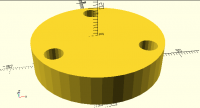
Actually I need to place some holes at a circle:

http://forum.openscad.org/file/t2943/place_holes_on_circle.png

I did with:

diameter = 34.0;

difference () {
    cylinder(h=10, d=diameter + 10);
    cylinder(h=10, d=6);
    translate([0, diameter/2, 0]) {
        cylinder(h=10, d=6);
    }
    rotate (a=120) {
        translate([0, diameter/2, 0]) {
            cylinder(h=10, d=6);
        }   
    }
    rotate (a=-120) {
        translate([0, diameter/2, 0]) {
            cylinder(h=10, d=6);
        }   
    }
}

Which results in:

http://forum.openscad.org/file/t2943/place_holes_on_circle_firsttry.png

Is there a better way?

--
Sent from: http://forum.openscad.org/

Actually I need to place some holes at a circle: <http://forum.openscad.org/file/t2943/place_holes_on_circle.png> I did with: ``` diameter = 34.0; difference () { cylinder(h=10, d=diameter + 10); cylinder(h=10, d=6); translate([0, diameter/2, 0]) { cylinder(h=10, d=6); } rotate (a=120) { translate([0, diameter/2, 0]) { cylinder(h=10, d=6); } } rotate (a=-120) { translate([0, diameter/2, 0]) { cylinder(h=10, d=6); } } } ``` Which results in: <http://forum.openscad.org/file/t2943/place_holes_on_circle_firsttry.png> Is there a better way? -- Sent from: http://forum.openscad.org/
T
trygve@totallytrygve.com
Fri, Aug 28, 2020 1:01 PM

I assume it's slow?

First, you need to translate the differenced cylinders so that they start below the cylinder you're punching holes in, and make them longer so that they poke out part the top.
That should make it render faster

With a FOR loop you only have one set of commands, repated as many times you want around the rim.
(Sorry, don't have time to check the correect syntax right now. I have a CAKE that needs to be eaten... )

And finally, to clean it up a bit, use indentation.

ROTATE ()
TRANSLATE ()
OBJECT();

Notice that there's no need to use the curly brackets because both ROTATE and TRANSLATE expect an object of some sort to follow.

Trygve

Den 28. august 2020 kl. 14.23.47 +02.00 skrev AndyY via Discuss discuss@lists.openscad.org:

Actually I need to place some holes at a circle:

<http://forum.openscad.org/file/t2943/place_holes_on_circle.png>

I did with:

diameter = 34.0;

difference () {
cylinder(h=10, d=diameter + 10);
cylinder(h=10, d=6);
translate([0, diameter/2, 0]) {
cylinder(h=10, d=6);
}
rotate (a=120) {
translate([0, diameter/2, 0]) {
cylinder(h=10, d=6);
}
}
rotate (a=-120) {
translate([0, diameter/2, 0]) {
cylinder(h=10, d=6);
}
}
}

Which results in:

<http://forum.openscad.org/file/t2943/place_holes_on_circle_firsttry.png>

Is there a better way?

--
Sent from: http://forum.openscad.org/


OpenSCAD mailing list
Discuss@lists.openscad.org
http://lists.openscad.org/mailman/listinfo/discuss_lists.openscad.org

I assume it's slow? First, you need to translate the differenced cylinders so that they start below the cylinder you're punching holes in, and make them longer so that they poke out part the top. That should make it render faster With a FOR loop you only have one set of commands, repated as many times you want around the rim. (Sorry, don't have time to check the correect syntax right now. I have a CAKE that needs to be eaten... ) And finally, to clean it up a bit, use indentation. ROTATE () TRANSLATE () OBJECT(); Notice that there's no need to use the curly brackets because both ROTATE and TRANSLATE expect an object of some sort to follow. Trygve Den 28. august 2020 kl. 14.23.47 +02.00 skrev AndyY via Discuss <discuss@lists.openscad.org>: > Actually I need to place some holes at a circle: > > <<http://forum.openscad.org/file/t2943/place_holes_on_circle.png>> > > I did with: > > ``` > diameter = 34.0; > > difference () { > cylinder(h=10, d=diameter + 10); > cylinder(h=10, d=6); > translate([0, diameter/2, 0]) { > cylinder(h=10, d=6); > } > rotate (a=120) { > translate([0, diameter/2, 0]) { > cylinder(h=10, d=6); > } > } > rotate (a=-120) { > translate([0, diameter/2, 0]) { > cylinder(h=10, d=6); > } > } > } > ``` > > Which results in: > > <<http://forum.openscad.org/file/t2943/place_holes_on_circle_firsttry.png>> > > Is there a better way? > > > > -- > Sent from: <http://forum.openscad.org/> > > _______________________________________________ > OpenSCAD mailing list > Discuss@lists.openscad.org > <http://lists.openscad.org/mailman/listinfo/discuss_lists.openscad.org> >
NH
nop head
Fri, Aug 28, 2020 1:17 PM

It is faster to do in 2D and then extrude to 3D

diameter = 34.0;
linear_extrude(10)
difference() {
circle(d = diameter + 10);

    for(i = [-1 : 1])
       rotate(i * 120)
            translate([0, diameter / 2])
                circle(d = 6);
}

On Fri, 28 Aug 2020 at 14:02, trygve@totallytrygve.com wrote:

I assume it's slow?

First, you need to translate the differenced cylinders so that they start
below the cylinder you're punching holes in, and make them longer so that
they poke out part the top.
That should make it render faster

With a FOR loop you only have one set of commands, repated as many times
you want around the rim.
(Sorry, don't have time to check the correect syntax right now. I have a
CAKE that needs to be eaten... )

And finally, to clean it up a bit, use indentation.

ROTATE ()
TRANSLATE ()
OBJECT();

Notice that there's no need to use the curly brackets because both ROTATE
and TRANSLATE expect an object of some sort to follow.

Trygve

Den 28. august 2020 kl. 14.23.47 +02.00 skrev AndyY via Discuss <
discuss@lists.openscad.org>:

Actually I need to place some holes at a circle:

http://forum.openscad.org/file/t2943/place_holes_on_circle.png

I did with:

diameter = 34.0;

difference () {
cylinder(h=10, d=diameter + 10);
cylinder(h=10, d=6);
translate([0, diameter/2, 0]) {
cylinder(h=10, d=6);
}
rotate (a=120) {
translate([0, diameter/2, 0]) {
cylinder(h=10, d=6);
}
}
rotate (a=-120) {
translate([0, diameter/2, 0]) {
cylinder(h=10, d=6);
}
}
}

Which results in:

http://forum.openscad.org/file/t2943/place_holes_on_circle_firsttry.png

Is there a better way?

--
Sent from: http://forum.openscad.org/


OpenSCAD mailing list
Discuss@lists.openscad.org
http://lists.openscad.org/mailman/listinfo/discuss_lists.openscad.org


OpenSCAD mailing list
Discuss@lists.openscad.org
http://lists.openscad.org/mailman/listinfo/discuss_lists.openscad.org

It is faster to do in 2D and then extrude to 3D diameter = 34.0; linear_extrude(10) difference() { circle(d = diameter + 10); for(i = [-1 : 1]) rotate(i * 120) translate([0, diameter / 2]) circle(d = 6); } On Fri, 28 Aug 2020 at 14:02, <trygve@totallytrygve.com> wrote: > I assume it's slow? > > First, you need to translate the differenced cylinders so that they start > below the cylinder you're punching holes in, and make them longer so that > they poke out part the top. > That should make it render faster > > > With a FOR loop you only have one set of commands, repated as many times > you want around the rim. > (Sorry, don't have time to check the correect syntax right now. I have a > CAKE that needs to be eaten... ) > > > And finally, to clean it up a bit, use indentation. > > ROTATE () > TRANSLATE () > OBJECT(); > > Notice that there's no need to use the curly brackets because both ROTATE > and TRANSLATE expect an object of some sort to follow. > > > Trygve > > > Den 28. august 2020 kl. 14.23.47 +02.00 skrev AndyY via Discuss < > discuss@lists.openscad.org>: > > Actually I need to place some holes at a circle: > > <http://forum.openscad.org/file/t2943/place_holes_on_circle.png> > > I did with: > > ``` > diameter = 34.0; > > difference () { > cylinder(h=10, d=diameter + 10); > cylinder(h=10, d=6); > translate([0, diameter/2, 0]) { > cylinder(h=10, d=6); > } > rotate (a=120) { > translate([0, diameter/2, 0]) { > cylinder(h=10, d=6); > } > } > rotate (a=-120) { > translate([0, diameter/2, 0]) { > cylinder(h=10, d=6); > } > } > } > ``` > > Which results in: > > <http://forum.openscad.org/file/t2943/place_holes_on_circle_firsttry.png> > > Is there a better way? > > > > -- > Sent from: http://forum.openscad.org/ > > _______________________________________________ > OpenSCAD mailing list > Discuss@lists.openscad.org > http://lists.openscad.org/mailman/listinfo/discuss_lists.openscad.org > > > _______________________________________________ > OpenSCAD mailing list > Discuss@lists.openscad.org > http://lists.openscad.org/mailman/listinfo/discuss_lists.openscad.org >
RW
Ron Wheeler
Fri, Aug 28, 2020 3:21 PM

Very slick.

On 2020-08-28 9:17 a.m., nop head wrote:

It is faster to do in 2D and then extrude to 3D

diameter = 34.0;
linear_extrude(10)
    difference() {
        circle(d = diameter + 10);

        for(i = [-1 : 1])
           rotate(i * 120)
                translate([0, diameter / 2])
                    circle(d = 6);
    }

On Fri, 28 Aug 2020 at 14:02, <trygve@totallytrygve.com
mailto:trygve@totallytrygve.com> wrote:

 I assume it's slow?

 First, you need to translate the differenced cylinders so that
 they start below the cylinder you're punching holes in, and make
 them longer so that they poke out part the top.
 That should make it render faster


 With a FOR loop you only have one set of commands, repated as many
 times you want around the rim.
 (Sorry, don't have time to check the correect syntax right now. I
 have a CAKE that needs to be eaten... )


 And finally, to clean it up a bit, use indentation.

 ROTATE ()
        TRANSLATE ()
                 OBJECT();

 Notice that there's no need to use the curly brackets because both
 ROTATE and TRANSLATE expect an object of some sort to follow.


 Trygve

 Den 28. august 2020 kl. 14.23.47 +02.00 skrev AndyY via Discuss
 <discuss@lists.openscad.org <mailto:discuss@lists.openscad.org>>:
 Actually I need to place some holes at a circle:

 <http://forum.openscad.org/file/t2943/place_holes_on_circle.png>

 I did with:

 ```
 diameter = 34.0;

 difference () {
 cylinder(h=10, d=diameter + 10);
 cylinder(h=10, d=6);
 translate([0, diameter/2, 0]) {
 cylinder(h=10, d=6);
 }
 rotate (a=120) {
 translate([0, diameter/2, 0]) {
 cylinder(h=10, d=6);
 }
 }
 rotate (a=-120) {
 translate([0, diameter/2, 0]) {
 cylinder(h=10, d=6);
 }
 }
 }
 ```

 Which results in:

 <http://forum.openscad.org/file/t2943/place_holes_on_circle_firsttry.png>


 Is there a better way?


 --
 Sent from: http://forum.openscad.org/

 _______________________________________________
 OpenSCAD mailing list
 Discuss@lists.openscad.org <mailto:Discuss@lists.openscad.org>
 http://lists.openscad.org/mailman/listinfo/discuss_lists.openscad.org
 _______________________________________________
 OpenSCAD mailing list
 Discuss@lists.openscad.org <mailto:Discuss@lists.openscad.org>
 http://lists.openscad.org/mailman/listinfo/discuss_lists.openscad.org

OpenSCAD mailing list
Discuss@lists.openscad.org
http://lists.openscad.org/mailman/listinfo/discuss_lists.openscad.org

--
Ron Wheeler
Artifact Software
438-345-3369
rwheeler@artifact-software.com

Very slick. On 2020-08-28 9:17 a.m., nop head wrote: > It is faster to do in 2D and then extrude to 3D > > diameter = 34.0; > linear_extrude(10) >     difference() { >         circle(d = diameter + 10); > >         for(i = [-1 : 1]) >            rotate(i * 120) >                 translate([0, diameter / 2]) >                     circle(d = 6); >     } > > On Fri, 28 Aug 2020 at 14:02, <trygve@totallytrygve.com > <mailto:trygve@totallytrygve.com>> wrote: > > I assume it's slow? > > First, you need to translate the differenced cylinders so that > they start below the cylinder you're punching holes in, and make > them longer so that they poke out part the top. > That should make it render faster > > > With a FOR loop you only have one set of commands, repated as many > times you want around the rim. > (Sorry, don't have time to check the correect syntax right now. I > have a CAKE that needs to be eaten... ) > > > And finally, to clean it up a bit, use indentation. > > ROTATE () >        TRANSLATE () >                 OBJECT(); > > Notice that there's no need to use the curly brackets because both > ROTATE and TRANSLATE expect an object of some sort to follow. > > > Trygve > > Den 28. august 2020 kl. 14.23.47 +02.00 skrev AndyY via Discuss > <discuss@lists.openscad.org <mailto:discuss@lists.openscad.org>>: >> Actually I need to place some holes at a circle: >> >> <http://forum.openscad.org/file/t2943/place_holes_on_circle.png> >> >> I did with: >> >> ``` >> diameter = 34.0; >> >> difference () { >> cylinder(h=10, d=diameter + 10); >> cylinder(h=10, d=6); >> translate([0, diameter/2, 0]) { >> cylinder(h=10, d=6); >> } >> rotate (a=120) { >> translate([0, diameter/2, 0]) { >> cylinder(h=10, d=6); >> } >> } >> rotate (a=-120) { >> translate([0, diameter/2, 0]) { >> cylinder(h=10, d=6); >> } >> } >> } >> ``` >> >> Which results in: >> >> <http://forum.openscad.org/file/t2943/place_holes_on_circle_firsttry.png> >> >> >> Is there a better way? >> >> >> >> -- >> Sent from: http://forum.openscad.org/ >> >> _______________________________________________ >> OpenSCAD mailing list >> Discuss@lists.openscad.org <mailto:Discuss@lists.openscad.org> >> http://lists.openscad.org/mailman/listinfo/discuss_lists.openscad.org > > _______________________________________________ > OpenSCAD mailing list > Discuss@lists.openscad.org <mailto:Discuss@lists.openscad.org> > http://lists.openscad.org/mailman/listinfo/discuss_lists.openscad.org > > > _______________________________________________ > OpenSCAD mailing list > Discuss@lists.openscad.org > http://lists.openscad.org/mailman/listinfo/discuss_lists.openscad.org -- Ron Wheeler Artifact Software 438-345-3369 rwheeler@artifact-software.com
JB
Jordan Brown
Fri, Aug 28, 2020 3:55 PM

AndyY:

Nophead and Trygve gave some good hints for improvement, but your
original really wasn't all that bad.

What was it that was concerning you about your result?

The only thing I see to complain about in the render that you got is
that the punched-out circles are decagons, and the big circle is still
pretty obviously a polygon.  (It's a 30-gon.)

$fa, $fs, and $fn control the number of sides used for a circle.
https://en.wikibooks.org/wiki/OpenSCAD_User_Manual/Other_Language_Features#$fa,$fs_and$fn

I'd try

$fs = 1;
$fa = 8;

to get a better approximation without going wild.  Mostly, $fs will
control the small circles and $fa will control the large one.

The render tends to make circles look more polygonal than they really
end up.  Let's do some math.

From the web page:

a_based=360/$fa;
s_based=r*2*PI/$fs;
n=($fn>0?($fn>=3?$fn:3):ceil(max(min(a_based,s_based),5)));

OpenSCAD "circle" radii are measured from the center to the vertices. 
The distance from the center to the middle of an edge is r*cos(360/n/2).

For the default values ($fs=2, $fa=12):

Sides
Vertices

Diameter
Edges
Diameter
Error
Error
Percent
Outer
30
34
33.81
-0.19
-0.5%
Inner
10
6
5.71
-0.29
-4.9%

With $fs=1 and $fa=8:

Sides
Vertices

Diameter
Edges
Diameter
Error
Error
Percent
Outer
45
34
33.92
-0.08
-0.2%
Inner
19
6
5.92
-0.08
-1.4%

If you want to reproduce those numbers:

$fs = 1;
$fa = 8;
function v2e(r, n) = r * cos(360/n/2);
for (d=[34,6]) {
    r = d/2;
    a_based = 360/$fa;
    s_based = r*2*PI/$fs;
    n = ($fn>0?($fn>=3?$fn:3):ceil(max(min(a_based,s_based),5)));
    edges = v2e(r, n);
    error = edges-r;
    percent = error / r;
    echo(n=n, vertices=r*2, edges=edges*2, error=error*2, percent=percent*100);
}

Note that the *2 in the final echo is because the calculations are in
terms of radius and you specified diameter.
AndyY: Nophead and Trygve gave some good hints for improvement, but your original really wasn't all that bad. What was it that was concerning you about your result? The only thing I see to complain about in the render that you got is that the punched-out circles are decagons, and the big circle is still pretty obviously a polygon.  (It's a 30-gon.) $fa, $fs, and $fn control the number of sides used for a circle. https://en.wikibooks.org/wiki/OpenSCAD_User_Manual/Other_Language_Features#$fa,_$fs_and_$fn I'd try $fs = 1; $fa = 8; to get a better approximation without going wild.  Mostly, $fs will control the small circles and $fa will control the large one. The render tends to make circles look more polygonal than they really end up.  Let's do some math. >From the web page: a_based=360/$fa; s_based=r*2*PI/$fs; n=($fn>0?($fn>=3?$fn:3):ceil(max(min(a_based,s_based),5))); OpenSCAD "circle" radii are measured from the center to the vertices.  The distance from the center to the middle of an edge is r*cos(360/n/2). For the default values ($fs=2, $fa=12): Sides Vertices Diameter Edges Diameter Error Error Percent Outer 30 34 33.81 -0.19 -0.5% Inner 10 6 5.71 -0.29 -4.9% With $fs=1 and $fa=8: Sides Vertices Diameter Edges Diameter Error Error Percent Outer 45 34 33.92 -0.08 -0.2% Inner 19 6 5.92 -0.08 -1.4% If you want to reproduce those numbers: $fs = 1; $fa = 8; function v2e(r, n) = r * cos(360/n/2); for (d=[34,6]) { r = d/2; a_based = 360/$fa; s_based = r*2*PI/$fs; n = ($fn>0?($fn>=3?$fn:3):ceil(max(min(a_based,s_based),5))); edges = v2e(r, n); error = edges-r; percent = error / r; echo(n=n, vertices=r*2, edges=edges*2, error=error*2, percent=percent*100); } Note that the *2 in the final echo is because the calculations are in terms of radius and you specified diameter.
P
Parkinbot
Fri, Aug 28, 2020 4:11 PM

I have a bunch of for_ modules in my main library that provide a simplified
interface to repeated objects

module forN(r=10, N=4, offs=0, M=undef) for($i=[0:(M?M-1:N-1)])
rotate([0,0,offs+$i*360/N])  translate([r,0,0]) children();
module forN(r=10, N=4, offs=0, M=undef) rotN(r, N, offs, M) children();
module forX(dx = 10, N=4) for($x=[0:N-1]) T(-((N-1)/2-$x)*dx) children();
module forY(dy = 10, M=4) for($y=[0:M-1]) Ty(-((M-1)/2-$y)*dy) children();
module forZ(dz = 10, M=4) for($z=[0:M-1]) Tz(-((M-1)/2-$z)*dz) children();
module forXY(dx = 10, N=4, dy = 10, M=4) forX(dx, N) forY(dy, M) children();

with this your code gets:

diameter = 34.0;
linear_extrude(10)
difference() {
circle(d = diameter + 10);
circle(d = 6);
forN(diameter/2, 3) circle(d = 6);
}

a centered 3 by 4 pattern of objects gets as simple as:
forXY(10, 3, 15, 4) circle(3);

the $ provides access to the iteration variable:
forX(20, 5) text(str($x));

--
Sent from: http://forum.openscad.org/

I have a bunch of for_ modules in my main library that provide a simplified interface to repeated objects module forN(r=10, N=4, offs=0, M=undef) for($i=[0:(M?M-1:N-1)]) rotate([0,0,offs+$i*360/N]) translate([r,0,0]) children(); module forN(r=10, N=4, offs=0, M=undef) rotN(r, N, offs, M) children(); module forX(dx = 10, N=4) for($x=[0:N-1]) T(-((N-1)/2-$x)*dx) children(); module forY(dy = 10, M=4) for($y=[0:M-1]) Ty(-((M-1)/2-$y)*dy) children(); module forZ(dz = 10, M=4) for($z=[0:M-1]) Tz(-((M-1)/2-$z)*dz) children(); module forXY(dx = 10, N=4, dy = 10, M=4) forX(dx, N) forY(dy, M) children(); with this your code gets: diameter = 34.0; linear_extrude(10) difference() { circle(d = diameter + 10); circle(d = 6); forN(diameter/2, 3) circle(d = 6); } a centered 3 by 4 pattern of objects gets as simple as: forXY(10, 3, 15, 4) circle(3); the $ provides access to the iteration variable: forX(20, 5) text(str($x)); -- Sent from: http://forum.openscad.org/
RW
Ray West
Fri, Aug 28, 2020 6:54 PM

Hi,

Referring to Andy'Y's original solution, I thought I'd have a look at
it. Bear in mind that I only discovered Openscad a month or so ago, I
found the sort of backwards progression a bit of a nuisance. From here,
I found AngelCad, and thought I'd attempt the 'flange' using that
scripting language, which for me, I can probably still read and
understand in a month or two's time.

double diameter = 34;

solid@ disc()
{
   return cylinder(10,(diameter+10)/2);
}

solid@ hole()
{
  return  cylinder(10,3);
}

solid@ threeholes()
{
   solid@ holer = translate(diameter/2,0,0)*hole();
   return  holer  + rotate_z(120)*holer + rotate_z(-120)*holer;
}

solid@ all()
{
   return disc()-hole()-threeholes();
}

void main()
{
   shape@ obj = all();
   obj.write_xcsg(GetInputFullPath(),secant_tolerance:-.01);
}

To me, that is quite a logical approach - make the disc, make a hole,
make the three holes positioned where you want, then drill 'em in the
disc. A straight forward sequence, that would be as you machined the
solid. By adjusting the secant tolerance, it regulates the number of
steps in forming a circle, for example.

Where's the naughty step?

Hi, Referring to Andy'Y's original solution, I thought I'd have a look at it. Bear in mind that I only discovered Openscad a month or so ago, I found the sort of backwards progression a bit of a nuisance. From here, I found AngelCad, and thought I'd attempt the 'flange' using that scripting language, which for me, I can probably still read and understand in a month or two's time. double diameter = 34; solid@ disc() {    return cylinder(10,(diameter+10)/2); } solid@ hole() {   return  cylinder(10,3); } solid@ threeholes() {    solid@ holer = translate(diameter/2,0,0)*hole();    return  holer  + rotate_z(120)*holer + rotate_z(-120)*holer; } solid@ all() {    return disc()-hole()-threeholes(); } void main() {    shape@ obj = all();    obj.write_xcsg(GetInputFullPath(),secant_tolerance:-.01); } To me, that is quite a logical approach - make the disc, make a hole, make the three holes positioned where you want, then drill 'em in the disc. A straight forward sequence, that would be as you machined the solid. By adjusting the secant tolerance, it regulates the number of steps in forming a circle, for example. Where's the naughty step? > _______________________________________________ > OpenSCAD mailing list > Discuss@lists.openscad.org > http://lists.openscad.org/mailman/listinfo/discuss_lists.openscad.org
A
AndyY
Fri, Aug 28, 2020 7:02 PM

Thank you very much for the help! I'm completly new in 3D CAD. Mostly I used
it for realized models or some printings. This one should be a holder for a
electro magnet.

Can someone give me a hint how I can format source code in this forum??? It
looks ugly in the normal format.

For me this is really a nice solution:

$fs = 1;
$fa = 8;
$fn = 64;

diameter = 34.0;
linear_extrude(10) {
    difference() {
        circle(d = diameter + 10);

        for(i = [-1 : 1])
           rotate(i * 120)
                translate([0, diameter / 2])
                    circle(d = 6);
    }
}

Thank you very much! I like it.

In addition to that I know the $fn var. But not the other ones. So I have to
read the wiki for further information concerning this two vars.

--
Sent from: http://forum.openscad.org/

Thank you very much for the help! I'm completly new in 3D CAD. Mostly I used it for realized models or some printings. This one should be a holder for a electro magnet. Can someone give me a hint how I can format source code in this forum??? It looks ugly in the normal format. For me this is really a nice solution: ``` $fs = 1; $fa = 8; $fn = 64; diameter = 34.0; linear_extrude(10) { difference() { circle(d = diameter + 10); for(i = [-1 : 1]) rotate(i * 120) translate([0, diameter / 2]) circle(d = 6); } } ``` Thank you very much! I like it. In addition to that I know the $fn var. But not the other ones. So I have to read the wiki for further information concerning this two vars. -- Sent from: http://forum.openscad.org/
A
AndyY
Fri, Aug 28, 2020 7:11 PM

The holes arround the circle are getting screws for holding the magnet. So if
I have the holes in a little bigger size it does not matter if there are
some errors of the position.

Concerning you post @JordanBrown: This is a very important post for me!
Thank you. I guess the error comes from the calcuation in the OpenSCAD
engine? Which means that this is the error of the exactly position of the
holes. As I wrote in the previous post I immediatelly need to check the vars
($fs/$fa) for further designs. If you have some more internal informations,
I'd like to know it...

--
Sent from: http://forum.openscad.org/

The holes arround the circle are getting screws for holding the magnet. So if I have the holes in a little bigger size it does not matter if there are some errors of the position. Concerning you post @JordanBrown: This is a very important post for me! Thank you. I guess the error comes from the calcuation in the OpenSCAD engine? Which means that this is the error of the exactly position of the holes. As I wrote in the previous post I immediatelly need to check the vars ($fs/$fa) for further designs. If you have some more internal informations, I'd like to know it... -- Sent from: http://forum.openscad.org/
NH
nop head
Fri, Aug 28, 2020 7:21 PM

The code I posted was via gmail and I simply set the font to Fixed Width to
preserve the formatting.

On Fri, 28 Aug 2020 at 20:12, AndyY via Discuss discuss@lists.openscad.org
wrote:

The holes arround the circle are getting screws for holding the magnet. So
if
I have the holes in a little bigger size it does not matter if there are
some errors of the position.

Concerning you post @JordanBrown: This is a very important post for me!
Thank you. I guess the error comes from the calcuation in the OpenSCAD
engine? Which means that this is the error of the exactly position of the
holes. As I wrote in the previous post I immediatelly need to check the
vars
($fs/$fa) for further designs. If you have some more internal informations,
I'd like to know it...

--
Sent from: http://forum.openscad.org/


OpenSCAD mailing list
Discuss@lists.openscad.org
http://lists.openscad.org/mailman/listinfo/discuss_lists.openscad.org

The code I posted was via gmail and I simply set the font to Fixed Width to preserve the formatting. On Fri, 28 Aug 2020 at 20:12, AndyY via Discuss <discuss@lists.openscad.org> wrote: > The holes arround the circle are getting screws for holding the magnet. So > if > I have the holes in a little bigger size it does not matter if there are > some errors of the position. > > Concerning you post @JordanBrown: This is a very important post for me! > Thank you. I guess the error comes from the calcuation in the OpenSCAD > engine? Which means that this is the error of the exactly position of the > holes. As I wrote in the previous post I immediatelly need to check the > vars > ($fs/$fa) for further designs. If you have some more internal informations, > I'd like to know it... > > > > -- > Sent from: http://forum.openscad.org/ > > _______________________________________________ > OpenSCAD mailing list > Discuss@lists.openscad.org > http://lists.openscad.org/mailman/listinfo/discuss_lists.openscad.org >