discuss@lists.openscad.org

OpenSCAD general discussion Mailing-list

View all threads

volumetric color

JB
Jordan Brown
Thu, Dec 25, 2025 7:31 AM

On 12/24/2025 9:37 PM, Cory Cross via Discuss wrote:

That's "just" vnf
https://github.com/BelfrySCAD/BOSL2/wiki/vnf.scad using lists instead
of functions.

Not even a little bit.  VNF is vertices-n-faces, basically the
parameters for polyhedron().  What this person has done is to represent
the CSG tree as data, and then interpret it.

Note, for instance, this snippet:
https://github.com/TOGoS/OpenSCADDesigns/blob/master/2023/experimental/Threads2.scad

	["union",
		["translate", [0,0,head_height/2], ["rotate", [90,0,0], headside_hole]],
		["translate", [0,0,head_height/2], ["rotate", [0,90,0], headside_hole]],
	];

It's an interesting technique, though I'm not immediate seeing any big
win for this particular model.

Where it would be a win:

  • If for some reason you want to manipulate lists of shapes.  With
    PR#4478 geometry values, I used that to define a train by creating a
    list of cars.
  • If some subassembly is expensive to calculate, and you want a bunch
    of them.
  • If for some reason you want to examine the CSG tree that you generated.

If I get bored in a couple of days I might take this model and translate
it back to "normal" OpenSCAD, and compare.

On 12/24/2025 9:37 PM, Cory Cross via Discuss wrote: > That's "just" vnf > https://github.com/BelfrySCAD/BOSL2/wiki/vnf.scad using lists instead > of functions. Not even a little bit.  VNF is vertices-n-faces, basically the parameters for polyhedron().  What this person has done is to represent the CSG tree as data, and then interpret it. Note, for instance, this snippet: https://github.com/TOGoS/OpenSCADDesigns/blob/master/2023/experimental/Threads2.scad ["union", ["translate", [0,0,head_height/2], ["rotate", [90,0,0], headside_hole]], ["translate", [0,0,head_height/2], ["rotate", [0,90,0], headside_hole]], ]; It's an interesting technique, though I'm not immediate seeing any big win for this particular model. Where it would be a win: * If for some reason you want to manipulate lists of shapes.  With PR#4478 geometry values, I used that to define a train by creating a list of cars. * If some subassembly is expensive to calculate, and you want a bunch of them. * If for some reason you want to examine the CSG tree that you generated. If I get bored in a couple of days I might take this model and translate it back to "normal" OpenSCAD, and compare.
CC
Cory Cross
Thu, Dec 25, 2025 8:09 AM

On December 24, 2025 11:31:57 PM PST, Jordan Brown via Discuss discuss@lists.openscad.org wrote:

On 12/24/2025 9:37 PM, Cory Cross via Discuss wrote:

That's "just" vnf
https://github.com/BelfrySCAD/BOSL2/wiki/vnf.scad using lists instead
of functions.

Not even a little bit.  VNF is vertices-n-faces, basically the
parameters for polyhedron(). 

What do you think togthreads2_make_threads( is returning if not polyhedron data?

What this person has done is to represent
the CSG tree as data, and then interpret it.

OpenSCAD does that for you, if you write union() { translate( 0,0,head_height/2)... vnf_polyhedron(the_post); } instead.

Or you write a union function which operates on vnf: https://github.com/BelfrySCAD/BOSL2/wiki/regions.scad#functionmodule-union (though this only works on 2d AFAICT, but the concept isn't so limited) and https://github.com/BelfrySCAD/BOSL2/wiki/transforms.scad#functionmodule-move (which does operate fully on 3d vnf).

That's why I say it's "just" vnf: most all of BOSL2 works on vnf and geometry.

Where it would be a win:

...

  • If for some reason you want to examine the CSG tree that you generated.

You could write defmacros which operate on this CSG, but that doesn't appear, on rough review, to be exploited; and that it would save a lot of duplication to use BOSL2 instead.

Cory

On December 24, 2025 11:31:57 PM PST, Jordan Brown via Discuss <discuss@lists.openscad.org> wrote: >On 12/24/2025 9:37 PM, Cory Cross via Discuss wrote: >> That's "just" vnf >> https://github.com/BelfrySCAD/BOSL2/wiki/vnf.scad using lists instead >> of functions. > >Not even a little bit.  VNF is vertices-n-faces, basically the >parameters for polyhedron().  What do you think `togthreads2_make_threads(` is returning if not polyhedron data? > What this person has done is to represent >the CSG tree as data, and then interpret it. OpenSCAD does that for you, if you write union() { translate( 0,0,head_height/2)... vnf_polyhedron(the_post); } instead. Or you write a union function which operates on vnf: https://github.com/BelfrySCAD/BOSL2/wiki/regions.scad#functionmodule-union (though this only works on 2d AFAICT, but the concept isn't so limited) and https://github.com/BelfrySCAD/BOSL2/wiki/transforms.scad#functionmodule-move (which does operate fully on 3d vnf). That's why I say it's "just" vnf: most all of BOSL2 works on vnf and geometry. >Where it would be a win: > > ... > * If for some reason you want to examine the CSG tree that you generated. You could write defmacros which operate on this CSG, but that doesn't appear, on rough review, to be exploited; and that it would save a lot of duplication to use BOSL2 instead. Cory
RW
Raymond West
Thu, Dec 25, 2025 11:23 AM

Hi Jordan,

If you do a boolean on a couple of objects, you need a 'rule' (or user
decides) to specify the final object colour, since the original objects
no longer exist. If it is the faces that are coloured, then the exposed
faces may or may not retain their original colour (user decides). There
is a bit of complexity within openscad, as to whether parts are being
considered as 3d or 2d.

Best wishes,

Ray

O, so the color parametr for themdissapearsn 24/12/2025 01:02, Jordan
Brown via Discuss wrote:

Today's OpenSCAD color processing does face coloring.  It is perfectly
possible to have the six faces of a cube have six different colors,
and if you union two shapes of different colors there's nothing known
about the color of the overlap area.

That scheme is fine, more or less, for visualization, but it doesn't
work well for actual 3D printing where you need to know what color (or
material) the interior of a shape is to be.

What you need is volumetric color, so that there are no overlapping
shapes and you always know what color the interior of a shape is.

I mentioned this need as part of a discussion of color semantics, and
one of the responses was that we didn't know how to do volumetric
color.  I'd done an OpenSCAD demonstration of volumetric color and was
pretty sure that it was straightforward to come up with appropriate
processing, so I said I'd recreate that proof-of-concept for discussion.

And here it is.

Note:  this is not the most efficient possible implementation.  It
re-evaluates the model many times, when it really only needs to be
evaluated once.  There should probably be a few more render()s
scattered around to try to get subtrees to be cached.  But it looks
like it works.

Implementations of hull(), minkowski(), et cetera, and of the 2D
operations, left as an exercise for the reader.

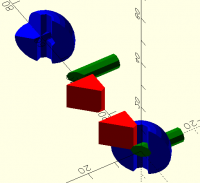
Here's the result of this particular model, both in assembled form and
exploded by color:

// Volumetric color proof of concept
// Jordan Brown,openscad@jordan.maileater.net

// There are four relevant modules in this POC:
// col - replacement for color()
// uni - replacement for union()
// dif - replacement for difference()
// int - replacement for intersection()

// In this POC, the list of possible colors needs to be known in advance;
// in a built-in implementation it would either be collected during the
// evaluation phase or managed entirely dynamically.  It would be
// straightforward to build a version of this POC that would be
// driven by an external script that would first run it in a
// "list colors" mode and would then run it once for each color.

// Similarly, in this POC the model is encapsulated in a module main(),
// while in a built-in implementation the final "step through the colors"
// loop would be implied and the model could be at the top level.

// This POC steps through the colors, generating the parts for one color,
// then the next, then the next.  A built-in implementation could do
// that, or could do roughly the same operations across all colors at once.

// The model.  A couple of unions, a difference, and an intersection
// to do a cutaway so that you can see the internal colors.
module main() {
int() {
uni() {
col("green") rotate([90,0,0]) cylinder(h=30, d=5, center=true);
dif() {
uni() {
col("red") cube(10);
col("blue") sphere(10);
}
cylinder(h=30, d=5, center=true);
}
}
rotate(-45) translate([0,-20,-20]) cube([40,40,40]);
}
}

// And now the infrastructure...

// Set the color of the children, like color().
// In this POC, this really operates by skipping anything that
// isn't the desired color, and then coloring during the per-color
// pass at the end, but there are other variations.
module col(c) {
union() {  // work around #6456.
// $color=undef means that we want all colors - in particular,
// for the second-and-later children of dif() and int().
if (is_undef($color) || c == $color) {
children();
}
}
}

// Union the children.
// What this does is to draw the first child, then draw the second child
// less the first child, then the third less the first and second, and
// so on.  Note that the negative components have $color=undef so that
// the entire subassembly, of all colors, gets subtracted out.
module uni() {
for (i=[0:1:$children-1]) {
// Add this child, less the children before it.  Note that
// because of col() processing this might be only part
// of the logical subtree, but that's OK; what's important
// is that we mask it all colors of the previous children.
difference() {
children(i);
children([0:1:i-1], $color=undef);
}
}
}

// Difference the children.
// The only novel thing that this does is to set $color=undef
// for the second-and-later children, so that all colors are
// subtracted away from the first child.  Again, because of
// col() processing the first child might only be a fraction of
// the logical subtree; it'll all get reassembled in the final
// multiple passes.
module dif() {
difference() {
children(0);
children([1:$children-1], $color=undef);
}
}

// Intersect the children.
// Think of this as taking the first child, and subtracting
// parts of it that are not in common with the later children.
// That neatly answers the question of what color the result
// should be, and makes everything consistent:  the first child's
// color wins.
module int() {
intersection_for(i=[0:1:$children-1]) {
if (i == 0) {
children(i);
} else {
$color = undef;
children(i);
}
}
}

// As noted above, this list of colors needs to be
// known in advance; in a built-in implementation (or even
// in a script-driven userspace implementation) this list
// would be dynamically derived.
colors = [ "red", "green", "blue" ];

// Build the model.
for (c = colors) {
$color=c;
color(c) render() main();
}

// Build an exploded set so that you can see
// what the individual colored parts look like.
for (i = [ 0:len(colors)-1 ]) {
c = colors[i];
$color=c;
translate([20+i*20,0,0]) color(c) render() main();
}


OpenSCAD mailing list
To unsubscribe send an email todiscuss-leave@lists.openscad.org
Hi Jordan, If you do a boolean on a couple of objects, you need a 'rule' (or user decides) to specify the final object colour, since the original objects no longer exist. If it is the faces that are coloured, then the exposed faces may or may not retain their original colour (user decides). There is a bit of complexity within openscad, as to whether parts are being considered as 3d or 2d. Best wishes, Ray O, so the color parametr for themdissapearsn 24/12/2025 01:02, Jordan Brown via Discuss wrote: > Today's OpenSCAD color processing does face coloring.  It is perfectly > possible to have the six faces of a cube have six different colors, > and if you union two shapes of different colors there's nothing known > about the color of the overlap area. > > That scheme is fine, more or less, for visualization, but it doesn't > work well for actual 3D printing where you need to know what color (or > material) the interior of a shape is to be. > > What you need is volumetric color, so that there are no overlapping > shapes and you always know what color the interior of a shape is. > > I mentioned this need as part of a discussion of color semantics, and > one of the responses was that we didn't know how to do volumetric > color.  I'd done an OpenSCAD demonstration of volumetric color and was > pretty sure that it was straightforward to come up with appropriate > processing, so I said I'd recreate that proof-of-concept for discussion. > > And here it is. > > Note:  this is not the most efficient possible implementation.  It > re-evaluates the model many times, when it really only needs to be > evaluated once.  There should probably be a few more render()s > scattered around to try to get subtrees to be cached.  But it looks > like it works. > > Implementations of hull(), minkowski(), et cetera, and of the 2D > operations, left as an exercise for the reader. > > Here's the result of this particular model, both in assembled form and > exploded by color: > > > > // Volumetric color proof of concept > // Jordan Brown,openscad@jordan.maileater.net > > // There are four relevant modules in this POC: > // col - replacement for color() > // uni - replacement for union() > // dif - replacement for difference() > // int - replacement for intersection() > > // In this POC, the list of possible colors needs to be known in advance; > // in a built-in implementation it would either be collected during the > // evaluation phase or managed entirely dynamically. It would be > // straightforward to build a version of this POC that would be > // driven by an external script that would first run it in a > // "list colors" mode and would then run it once for each color. > > // Similarly, in this POC the model is encapsulated in a module main(), > // while in a built-in implementation the final "step through the colors" > // loop would be implied and the model could be at the top level. > > // This POC steps through the colors, generating the parts for one color, > // then the next, then the next. A built-in implementation could do > // that, or could do roughly the same operations across all colors at once. > > // The model. A couple of unions, a difference, and an intersection > // to do a cutaway so that you can see the internal colors. > module main() { > int() { > uni() { > col("green") rotate([90,0,0]) cylinder(h=30, d=5, center=true); > dif() { > uni() { > col("red") cube(10); > col("blue") sphere(10); > } > cylinder(h=30, d=5, center=true); > } > } > rotate(-45) translate([0,-20,-20]) cube([40,40,40]); > } > } > > // And now the infrastructure... > > // Set the color of the children, like color(). > // In this POC, this really operates by skipping anything that > // isn't the desired color, and then coloring during the per-color > // pass at the end, but there are other variations. > module col(c) { > union() { // work around #6456. > // $color=undef means that we want all colors - in particular, > // for the second-and-later children of dif() and int(). > if (is_undef($color) || c == $color) { > children(); > } > } > } > > // Union the children. > // What this does is to draw the first child, then draw the second child > // less the first child, then the third less the first and second, and > // so on. Note that the negative components have $color=undef so that > // the entire subassembly, of all colors, gets subtracted out. > module uni() { > for (i=[0:1:$children-1]) { > // Add this child, less the children before it. Note that > // because of col() processing this might be only part > // of the logical subtree, but that's OK; what's important > // is that we mask it all colors of the previous children. > difference() { > children(i); > children([0:1:i-1], $color=undef); > } > } > } > > // Difference the children. > // The only novel thing that this does is to set $color=undef > // for the second-and-later children, so that all colors are > // subtracted away from the first child. Again, because of > // col() processing the first child might only be a fraction of > // the logical subtree; it'll all get reassembled in the final > // multiple passes. > module dif() { > difference() { > children(0); > children([1:$children-1], $color=undef); > } > } > > // Intersect the children. > // Think of this as taking the first child, and subtracting > // parts of it that are not in common with the later children. > // That neatly answers the question of what color the result > // should be, and makes everything consistent: the first child's > // color wins. > module int() { > intersection_for(i=[0:1:$children-1]) { > if (i == 0) { > children(i); > } else { > $color = undef; > children(i); > } > } > } > > // As noted above, this list of colors needs to be > // known in advance; in a built-in implementation (or even > // in a script-driven userspace implementation) this list > // would be dynamically derived. > colors = [ "red", "green", "blue" ]; > > // Build the model. > for (c = colors) { > $color=c; > color(c) render() main(); > } > > // Build an exploded set so that you can see > // what the individual colored parts look like. > for (i = [ 0:len(colors)-1 ]) { > c = colors[i]; > $color=c; > translate([20+i*20,0,0]) color(c) render() main(); > } > > > > _______________________________________________ > OpenSCAD mailing list > To unsubscribe send an email todiscuss-leave@lists.openscad.org
BC
Bob Carlson
Thu, Dec 25, 2025 9:10 PM

It’s certainly nice to not deal with point lists most of the time, but BOSL2 also has an extensive array of functions that do just that. I had a difficult task when I tackled Hirth Joints. It turned out that BOSL2s VNFs were the secret to solving it. The solution was surprisingly elegant when completed.

-Bob
Tucson AZ

On Dec 24, 2025, at 21:11, Jon Bondy via Discuss discuss@lists.openscad.org wrote:

Sanjeev:

"You need to learn first to work with points list instead of openscad primitives."

You and I think very differently.  From my perspective, the whole point of using OpenSCAD (plus BOSL2) is to NOT have to deal with point lists.

Jon

On 12/24/2025 10:58 AM, Sanjeev Prabhakar via Discuss wrote:

I have been working on openscad with python for a few years now.

I use Jupyter Lab to write my python code and it is working well for me.

But simply writing openscad code in python is not very useful. You need to learn first to work with points list instead of openscad primitives.

I have written various examples for this approach and here is a small video for a starting point in case you are interested:
https://youtu.be/kBshJ0CQCS0 https://urldefense.proofpoint.com/v2/url?u=https-3A__youtu.be_kBshJ0CQCS0&d=DwMFaQ&c=euGZstcaTDllvimEN8b7jXrwqOf-v5A_CdpgnVfiiMM&r=AsrE-c7ZR7B2Kyr3qgfvvppkCEBVsNmwEMndcrRSuOI&m=C-2LNFc4Vy8H1YpL56LCiAEPDkG3QYO27Ipyvyc0DrQ2c1gbJkY4C2Ac9G-rFCJu&s=GOkemD40ePPDy_8Nl3SyQh9B-HzV8PuteL-E8-MnCrU&e=
On Wed, 24 Dec 2025 at 09:06, Lee DeRaud via Discuss <discuss@lists.openscad.org mailto:discuss@lists.openscad.org> wrote:

The whole "just do it in python" thing seems to be turning into a meme. 😊

There appear to be multiple approaches to extending OS with python...

Any suggestions for where best to start, assuming  someone (1) decently familiar with OS,

(2) relative beginner with python, and (3) working in a Windows environment (if that matters)?


OpenSCAD mailing list
To unsubscribe send an email to discuss-leave@lists.openscad.org mailto:discuss-leave@lists.openscad.org


OpenSCAD mailing list
To unsubscribe send an email to discuss-leave@lists.openscad.org mailto:discuss-leave@lists.openscad.org

It’s certainly nice to not deal with point lists most of the time, but BOSL2 also has an extensive array of functions that do just that. I had a difficult task when I tackled Hirth Joints. It turned out that BOSL2s VNFs were the secret to solving it. The solution was surprisingly elegant when completed. -Bob Tucson AZ > On Dec 24, 2025, at 21:11, Jon Bondy via Discuss <discuss@lists.openscad.org> wrote: > > Sanjeev: > > "You need to learn first to work with points list instead of openscad primitives." > > You and I think very differently. From my perspective, the whole point of using OpenSCAD (plus BOSL2) is to NOT have to deal with point lists. > > Jon > > > > On 12/24/2025 10:58 AM, Sanjeev Prabhakar via Discuss wrote: >> I have been working on openscad with python for a few years now. >> >> I use Jupyter Lab to write my python code and it is working well for me. >> >> But simply writing openscad code in python is not very useful. You need to learn first to work with points list instead of openscad primitives. >> >> I have written various examples for this approach and here is a small video for a starting point in case you are interested: >> https://youtu.be/kBshJ0CQCS0 <https://urldefense.proofpoint.com/v2/url?u=https-3A__youtu.be_kBshJ0CQCS0&d=DwMFaQ&c=euGZstcaTDllvimEN8b7jXrwqOf-v5A_CdpgnVfiiMM&r=AsrE-c7ZR7B2Kyr3qgfvvppkCEBVsNmwEMndcrRSuOI&m=C-2LNFc4Vy8H1YpL56LCiAEPDkG3QYO27Ipyvyc0DrQ2c1gbJkY4C2Ac9G-rFCJu&s=GOkemD40ePPDy_8Nl3SyQh9B-HzV8PuteL-E8-MnCrU&e=> >> On Wed, 24 Dec 2025 at 09:06, Lee DeRaud via Discuss <discuss@lists.openscad.org <mailto:discuss@lists.openscad.org>> wrote: >>> The whole "just do it in python" thing seems to be turning into a meme. 😊 >>> >>> >>> There appear to be multiple approaches to extending OS with python... >>> >>> Any suggestions for where best to start, assuming someone (1) decently familiar with OS, >>> >>> (2) relative beginner with python, and (3) working in a Windows environment (if that matters)? >>> >>> >>> _______________________________________________ >>> OpenSCAD mailing list >>> To unsubscribe send an email to discuss-leave@lists.openscad.org <mailto:discuss-leave@lists.openscad.org> >> >> _______________________________________________ >> OpenSCAD mailing list >> To unsubscribe send an email to discuss-leave@lists.openscad.org <mailto:discuss-leave@lists.openscad.org> > <http://www.avg.com/email-signature?utm_medium=email&utm_source=link&utm_campaign=sig-email&utm_content=emailclient> Virus-free.www.avg.com <http://www.avg.com/email-signature?utm_medium=email&utm_source=link&utm_campaign=sig-email&utm_content=emailclient> <x-msg://31/#DAB4FAD8-2DD7-40BB-A1B8-4E2AA1F9FDF2>_______________________________________________ > OpenSCAD mailing list > To unsubscribe send an email to discuss-leave@lists.openscad.org
JB
Jordan Brown
Sun, Dec 28, 2025 3:45 AM

On 12/25/2025 12:09 AM, Cory Cross via Discuss wrote:

What do you think togthreads2_make_threads( is returning if not polyhedron data?

Probably.  But that's not the essence of the pattern.

What this person has done is to represent
the CSG tree as data, and then interpret it.

OpenSCAD does that for you, if you write union() { translate( 0,0,head_height/2)... vnf_polyhedron(the_post); } instead.

Indeed, I'm not at all sure that this scheme helps you any, in the vast
majority of cases.  But it isn't just VNF; it's representing a CSG
tree as data and then interpreting that data.

On 12/25/2025 12:09 AM, Cory Cross via Discuss wrote: > What do you think `togthreads2_make_threads(` is returning if not polyhedron data? Probably.  But that's not the essence of the pattern. >> What this person has done is to represent >> the CSG tree as data, and then interpret it. > OpenSCAD does that for you, if you write union() { translate( 0,0,head_height/2)... vnf_polyhedron(the_post); } instead. Indeed, I'm not at all sure that this scheme helps you any, in the vast majority of cases.  But it *isn't* just VNF; it's representing a CSG tree as data and then interpreting that data.
SP
Sanjeev Prabhakar
Sun, Dec 28, 2025 6:52 AM

an example of creating surface with 4 lines enclosure and creating a solid

https://youtu.be/Hj3rDfStsJY

On Wed, 24 Dec 2025 at 21:28, Sanjeev Prabhakar sprabhakar2006@gmail.com
wrote:

I have been working on openscad with python for a few years now.

I use Jupyter Lab to write my python code and it is working well for me.

But simply writing openscad code in python is not very useful. You need to
learn first to work with points list instead of openscad primitives.

I have written various examples for this approach and here is a small
video for a starting point in case you are interested:
https://youtu.be/kBshJ0CQCS0

On Wed, 24 Dec 2025 at 09:06, Lee DeRaud via Discuss <
discuss@lists.openscad.org> wrote:

The whole "just do it in python" thing seems to be turning into a meme.
😊

There appear to be multiple approaches to extending OS with python...

Any suggestions for where best to start, assuming  someone (1) decently
familiar with OS,

(2) relative beginner with python, and (3) working in a Windows
environment (if that matters)?


OpenSCAD mailing list
To unsubscribe send an email to discuss-leave@lists.openscad.org

an example of creating surface with 4 lines enclosure and creating a solid https://youtu.be/Hj3rDfStsJY On Wed, 24 Dec 2025 at 21:28, Sanjeev Prabhakar <sprabhakar2006@gmail.com> wrote: > I have been working on openscad with python for a few years now. > > I use Jupyter Lab to write my python code and it is working well for me. > > But simply writing openscad code in python is not very useful. You need to > learn first to work with points list instead of openscad primitives. > > I have written various examples for this approach and here is a small > video for a starting point in case you are interested: > https://youtu.be/kBshJ0CQCS0 > > On Wed, 24 Dec 2025 at 09:06, Lee DeRaud via Discuss < > discuss@lists.openscad.org> wrote: > >> The whole "just do it in python" thing seems to be turning into a meme. >> 😊 >> >> >> >> There appear to be multiple approaches to extending OS with python... >> >> Any suggestions for where best to start, assuming someone (1) decently >> familiar with OS, >> >> (2) relative beginner with python, and (3) working in a Windows >> environment (if that matters)? >> >> >> _______________________________________________ >> OpenSCAD mailing list >> To unsubscribe send an email to discuss-leave@lists.openscad.org >> >
CC
Cory Cross
Mon, Dec 29, 2025 3:36 PM

On December 24, 2025 7:48:59 AM PST, Jordan Brown via Discuss
discuss@lists.openscad.org wrote:

I haven’t thought too much about the language binding, about how you would say you want volumetric color. When I first played with this years ago, it was after somebody told me not to document the existing color behavior because it was kind of an accident and maybe not the right behavior. One of my initial thoughts would be to just cut over, accepting the short term pain to get the long term simplicity. However, (a) there are a lot of people relying, for visualization and other non-3DP purposes, on the current behavior, and (b) non-3DP applications like video games probably want face coloring, so reluctantly I wouldn’t recommend that choice today.

Also with fdm printing, sometimes face coloring is the right thing.
Every time someone chooses "purge to infill" they've abandoned
"volumetric color" to some degree, though not one that requires the
modeling software to be involved.

Slicers already allow you to color faces of models separate from the
interior, so coloring faces and having volumetric color already has
semantic meaning:
https://wiki.snapmaker.com/en/third_party_software/orcaslicer_color_painting

Lets take the example of creating a single-piece, non-functional traffic
light (i.e. only its outward appearance matters). With volumetric color
as proposed, I must prematurely decide what every internal volume is?
even if I only care about the face. Naively lets say I model most of it
out of yellow, then volumetrically union in the lights (lights being
complicated multi-material so they sparkle). But then I go to print and
I'm low on yellow. So I want yellow faces but a different volumetric
color. I think this can be solved with a conditional volumetric color,
i.e. color("purple", prior_color="yellow", volumetric_only=true), at the
appropriate place.

color("purple", prior_color="yellow", volumetric_only=true)
difference() { // volumetric diff because body is volumetric color
body(); // Already volumetric colored in this example
lights();
}

There, now I have a model with all yellow faces and a different
volumetric color, and I can print it.

Or, prepare the whole thing as a single multi-material model:

union() { // volumetric because at least one child is volumetric
color("purple", volumetric_only=true)
color("yellow", face_only=true)
body(); // Already colored, but doesn't matter in this example
lights();
}

which mostly minimizes the amount of yellow filament needed. (Truly
minimize by recoloring all yellow volume to purple like previous
example, in case the lights contain any yellow volumetric colors).

There aren't any operations for working on mesh faces, because OpenSCAD
doesn't let you directly target faces except by polyhedron? If you
wanted to model a superman chest S logo thing, with color, I assume
you'd have to make each delineation a slightly different height of
colored, linear extruded polygons? Or use polyhedron to explicitly
create the desired faces, which could allow you to set each face color
and have the final surface be perfectly flat. I'm not sure if being able
to color a subset of geometry faces is a good idea outside polyhedron
though, just because you have so little control of them being created.

I wonder if it ever makes sense to specify the non-volumetric
difference/union/intersection algorithm for a volumetrically-colored
geometry? I thought I had use cases above, but I'm not sure yet.

difference(volumetric=true)
difference(face=true)
Default is volumetric iff the first child is volumetric? (any for
intersection or union)

-Cory

On December 24, 2025 7:48:59 AM PST, Jordan Brown via Discuss <discuss@lists.openscad.org> wrote: > >I haven’t thought too much about the language binding, about how you would say you want volumetric color. When I first played with this years ago, it was after somebody told me not to document the existing color behavior because it was kind of an accident and maybe not the right behavior. One of my initial thoughts would be to just cut over, accepting the short term pain to get the long term simplicity. However, (a) there are a lot of people relying, for visualization and other non-3DP purposes, on the current behavior, and (b) non-3DP applications like video games probably want face coloring, so reluctantly I wouldn’t recommend that choice today. Also with fdm printing, sometimes face coloring is the right thing. Every time someone chooses "purge to infill" they've abandoned "volumetric color" to some degree, though not one that requires the modeling software to be involved. Slicers already allow you to color faces of models separate from the interior, so coloring faces and having volumetric color already has semantic meaning: https://wiki.snapmaker.com/en/third_party_software/orcaslicer_color_painting Lets take the example of creating a single-piece, non-functional traffic light (i.e. only its outward appearance matters). With volumetric color as proposed, I must prematurely decide what every internal volume is? even if I only care about the face. Naively lets say I model most of it out of yellow, then volumetrically union in the lights (lights being complicated multi-material so they sparkle). But then I go to print and I'm low on yellow. So I want yellow faces but a different volumetric color. I think this can be solved with a conditional volumetric color, i.e. color("purple", prior_color="yellow", volumetric_only=true), at the appropriate place. color("purple", prior_color="yellow", volumetric_only=true) difference() { // volumetric diff because body is volumetric color body(); // Already volumetric colored in this example lights(); } There, now I have a model with all yellow faces and a different volumetric color, and I can print it. Or, prepare the whole thing as a single multi-material model: union() { // volumetric because at least one child is volumetric color("purple", volumetric_only=true) color("yellow", face_only=true) body(); // Already colored, but doesn't matter in this example lights(); } which mostly minimizes the amount of yellow filament needed. (Truly minimize by recoloring all yellow volume to purple like previous example, in case the lights contain any yellow volumetric colors). There aren't any operations for working on mesh faces, because OpenSCAD doesn't let you directly target faces except by polyhedron? If you wanted to model a superman chest S logo thing, with color, I assume you'd have to make each delineation a slightly different height of colored, linear extruded polygons? Or use polyhedron to explicitly create the desired faces, which could allow you to set each face color and have the final surface be perfectly flat. I'm not sure if being able to color a subset of geometry faces is a good idea outside polyhedron though, just because you have so little control of them being created. I wonder if it ever makes sense to specify the non-volumetric difference/union/intersection algorithm for a volumetrically-colored geometry? I thought I had use cases above, but I'm not sure yet. difference(volumetric=true) difference(face=true) Default is volumetric iff the first child is volumetric? (any for intersection or union) -Cory
JB
Jordan Brown
Mon, Dec 29, 2025 5:32 PM

On 12/29/2025 7:36 AM, Cory Cross via Discuss wrote:

Slicers already allow you to color faces of models separate from the
interior, so coloring faces and having volumetric color already has
semantic meaning:
https://wiki.snapmaker.com/en/third_party_software/orcaslicer_color_painting 

Sure.  Slicers can let you do anything to the model - especially in the
absence of good support elsewhere in the toolchain.  But should you
have to?  My mental model is that, to the greatest extent possible,
the modeling tool (OpenSCAD) is responsible for designing the final
model, and the slicer is responsible for making that vision real. 
Anything that you must control in the slicer is a functionality gap. The
ideal is a Star Trek replicator; you give it a model and it gives you a
physical object, and you don't have to worry about materials, or print
orientation, or support, or layer lines, or performance tradeoffs.

Lets take the example of creating a single-piece, non-functional
traffic light (i.e. only its outward appearance matters). With
volumetric color as proposed, I must prematurely decide what every
internal volume is? 

I'd say that the word "must" is ... misleading ... there.  In any
variation, if you say color("red") cube(10) you get a 100% red cube.  Is
it correct to say that you "must" specify the color of the interior? 
No, I'd say that you (implicitly) have specified the color of the
interior, absent explicit editing downstream.

When you bring in multiple colors, and you say color("red") cube(10);
color("blue") sphere(10), there will be infill that's either red or
blue.  Probably the cube-only parts will be red and the sphere-only
parts will be blue.  But what color will the overlap be?  With face
coloring, it's entirely up to the slicer, and there's no way to control
it from the modeling tool.  With volumetric color, it's well-defined,
and there's presumably a way to control it.

even if I only care about the face. Naively lets say I model most of
it out of yellow, then volumetrically union in the lights (lights
being complicated multi-material so they sparkle). But then I go to
print and I'm low on yellow. So I want yellow faces but a different
volumetric color. I think this can be solved with a conditional
volumetric color, i.e. color("purple", prior_color="yellow",
volumetric_only=true), at the appropriate place. 

First, note that with face coloring you'd have an unspecified color in
the interior.  It's not like the slicer is going to automatically
separate it into a separate part to be assigned to a different
extruder.  With volumetric color indeed the interior is yellow, but that
leaves you in approximately the same position:  an object with an
interior that isn't the color you need it to be.

With volumetric color you could go back to the design tool and
re-color the interior as desired.

With either face-coloring or volumetric color, you could probably go in
with the slicer and manually specify which volumes are to be what
color.  (Maybe it could do that semi-automatically, by having a "set
infill to <this> color" mechanism, or maybe you'd have to "paint" on
different colors.)

color("purple", prior_color="yellow", volumetric_only=true) 
difference() { // volumetric diff because body is volumetric color
  body(); // Already volumetric colored in this example
  lights();

You're editing the color, saying "change this color to that color". 
While I can't give a clear reason why that bothers me, it does.

If we were to try to do this, I would think of modeling this object like so:

union() {
    lights();
    color(faces="yellow", interior="purple") body();
}

But... what would that really mean?  In digital-land, we can have
zero-thickness yellow paint on the outside of a purple object, but in
physical reality the yellow has to have a thickness.  How thick should
it be, and where should you set that thickness?  It seems like you're
hinting to the slicer that the outside should be yellow, to some depth,
but without saying anything about how deep; that would have to be up to
the slicer.  And if it's up to the slicer, why not make the slicer
responsible for changing the interior color, rather than hinting from
the design tool?

If you really want to control it from the design tool, you have to
specify the thickness of the yellow... that is, you have to specify it
volumetrically.

You would want something like (handwaving furiously in the vicinity of
the offset()):

union() {
    lights();
    color("purple") offset(-1) body();
    color(yellow") body();
}

There aren't any operations for working on mesh faces, because
OpenSCAD doesn't let you directly target faces except by polyhedron?

Indeed, if we wanted to truly support face coloring then I'd say that
polyhedron() should accept a "color" parameter that is an array parallel
to the "faces" array, that specifies the color of each face.  (Or, more
generally, the texture.)

We could also do that for cubes, allowing a color parameter that
specifies the colors of the +Z, -Z, +X, -X, +Y, -Y sides, in that order.

Cylinders... tough.  You could separately specify top, bottom, and
sides, and with $fn specified you could specify the sides.  But if the
sides are curved, there's not much you could do.

Spheres... doesn't seem practical.

If you wanted to model a superman chest S logo thing, with color, I
assume you'd have to make each delineation a slightly different height
of colored, linear extruded polygons?

Why different heights?  If they're separate extrusions then they are
just differently-colored shapes subject to the rules established for
combining differently-colored shapes.  But really the color should be
preserved from 2D to 3D; you should draw N different-colored polygons
(which would have rules for how they combine), and then extrude them.

I wonder if it ever makes sense to specify the non-volumetric
difference/union/intersection algorithm for a volumetrically-colored
geometry? I thought I had use cases above, but I'm not sure yet.

difference(volumetric=true)
difference(face=true)
Default is volumetric iff the first child is volumetric? (any for
intersection or union)

Note that there's not much point to face-colored union.  The results
visible from the outside are the same for volumetric and face-colored
union (unless you really like Z-fighting).  The differences are in the
interior, where in volumetric union the results are well-defined and in
face-colored union the results are undefined.

I haven't thought about how volumetric and non-volumetric difference and
intersection would interact.  Mostly, I think the answer is that you
want to design in either volumetric color or face color, and not mix the
two - and that in the long run, you mostly want to design in volumetric
color.  But how do you specify which style you want?  And what happens
when you do mix them?

On 12/29/2025 7:36 AM, Cory Cross via Discuss wrote: > Slicers already allow you to color faces of models separate from the > interior, so coloring faces and having volumetric color already has > semantic meaning: > https://wiki.snapmaker.com/en/third_party_software/orcaslicer_color_painting  Sure.  Slicers can let you do anything to the model - especially in the absence of good support elsewhere in the toolchain.  But should you *have* to?  My mental model is that, to the greatest extent possible, the modeling tool (OpenSCAD) is responsible for designing the final model, and the slicer is responsible for making that vision real.  Anything that you must control in the slicer is a functionality gap. The ideal is a Star Trek replicator; you give it a model and it gives you a physical object, and you don't have to worry about materials, or print orientation, or support, or layer lines, or performance tradeoffs. > Lets take the example of creating a single-piece, non-functional > traffic light (i.e. only its outward appearance matters). With > volumetric color as proposed, I must prematurely decide what every > internal volume is?  I'd say that the word "must" is ... misleading ... there.  In any variation, if you say color("red") cube(10) you get a 100% red cube.  Is it correct to say that you "must" specify the color of the interior?  No, I'd say that you (implicitly) *have* specified the color of the interior, absent explicit editing downstream. When you bring in multiple colors, and you say color("red") cube(10); color("blue") sphere(10), there *will* be infill that's either red or blue.  Probably the cube-only parts will be red and the sphere-only parts will be blue.  But what color will the overlap be?  With face coloring, it's entirely up to the slicer, and there's no way to control it from the modeling tool.  With volumetric color, it's well-defined, and there's presumably a way to control it. > even if I only care about the face. Naively lets say I model most of > it out of yellow, then volumetrically union in the lights (lights > being complicated multi-material so they sparkle). But then I go to > print and I'm low on yellow. So I want yellow faces but a different > volumetric color. I think this can be solved with a conditional > volumetric color, i.e. color("purple", prior_color="yellow", > volumetric_only=true), at the appropriate place.  First, note that with face coloring you'd have an unspecified color in the interior.  It's not like the slicer is going to automatically separate it into a separate part to be assigned to a different extruder.  With volumetric color indeed the interior is yellow, but that leaves you in approximately the same position:  an object with an interior that isn't the color you need it to be. With volumetric color you *could* go back to the design tool and re-color the interior as desired. With either face-coloring or volumetric color, you could probably go in with the slicer and manually specify which volumes are to be what color.  (Maybe it could do that semi-automatically, by having a "set infill to <this> color" mechanism, or maybe you'd have to "paint" on different colors.) > color("purple", prior_color="yellow", volumetric_only=true)  > difference() { // volumetric diff because body is volumetric color >   body(); // Already volumetric colored in this example >   lights(); > }  You're editing the color, saying "change this color to that color".  While I can't give a clear reason why that bothers me, it does. If we were to try to do this, I would think of modeling this object like so: union() {     lights();     color(faces="yellow", interior="purple") body(); } But... what would that really mean?  In digital-land, we can have zero-thickness yellow paint on the outside of a purple object, but in physical reality the yellow has to have a thickness.  How thick should it be, and where should you set that thickness?  It seems like you're hinting to the slicer that the outside should be yellow, to some depth, but without saying anything about how deep; that would have to be up to the slicer.  And if it's up to the slicer, why not make the slicer responsible for changing the interior color, rather than hinting from the design tool? If you really want to control it from the design tool, you have to specify the thickness of the yellow... that is, you have to specify it volumetrically. You would want something like (handwaving furiously in the vicinity of the offset()): union() {     lights();     color("purple") offset(-1) body();     color(yellow") body(); } > There aren't any operations for working on mesh faces, because > OpenSCAD doesn't let you directly target faces except by polyhedron? Indeed, if we wanted to truly support face coloring then I'd say that polyhedron() should accept a "color" parameter that is an array parallel to the "faces" array, that specifies the color of each face.  (Or, more generally, the texture.) We could also do that for cubes, allowing a color parameter that specifies the colors of the +Z, -Z, +X, -X, +Y, -Y sides, in that order. Cylinders... tough.  You could separately specify top, bottom, and sides, and with $fn specified you could specify the sides.  But if the sides are curved, there's not much you could do. Spheres... doesn't seem practical. > If you wanted to model a superman chest S logo thing, with color, I > assume you'd have to make each delineation a slightly different height > of colored, linear extruded polygons? Why different heights?  If they're separate extrusions then they are just differently-colored shapes subject to the rules established for combining differently-colored shapes.  But really the color should be preserved from 2D to 3D; you should draw N different-colored polygons (which would have rules for how they combine), and then extrude them. > I wonder if it ever makes sense to specify the non-volumetric > difference/union/intersection algorithm for a volumetrically-colored > geometry? I thought I had use cases above, but I'm not sure yet. > > difference(volumetric=true) > difference(face=true) > Default is volumetric iff the first child is volumetric? (any for > intersection or union) Note that there's not much point to face-colored union.  The results visible from the outside are the same for volumetric and face-colored union (unless you really like Z-fighting).  The differences are in the interior, where in volumetric union the results are well-defined and in face-colored union the results are undefined. I haven't thought about how volumetric and non-volumetric difference and intersection would interact.  Mostly, I think the answer is that you want to design in either volumetric color or face color, and not mix the two - and that in the long run, you mostly want to design in volumetric color.  But how do you specify which style you want?  And what happens when you *do* mix them?
GH
gene heskett
Mon, Dec 29, 2025 6:22 PM

On 12/29/25 10:36, Cory Cross via Discuss wrote:

On December 24, 2025 7:48:59 AM PST, Jordan Brown via Discuss
discuss@lists.openscad.org wrote:

I haven’t thought too much about the language binding, about how you
would say you want volumetric color. When I first played with this
years ago, it was after somebody told me not to document the existing
color behavior because it was kind of an accident and maybe not the
right behavior. One of my initial thoughts would be to just cut over,
accepting the short term pain to get the long term simplicity.
However, (a) there are a lot of people relying, for visualization and
other non-3DP purposes, on the current behavior, and (b) non-3DP
applications like video games probably want face coloring, so
reluctantly I wouldn’t recommend that choice today.

Also with fdm printing, sometimes face coloring is the right thing.
Every time someone chooses "purge to infill" they've abandoned
"volumetric color" to some degree, though not one that requires the
modeling software to be involved.

Seems to me the modeling software. like us, must be involved. OTOH the
traffic light situation seems to be best handled after the print with paint.
The amount of time needed to withdraw the current color, and refeed a
different one, purge until,  just to color a traffic light lens seems to
be a huge time killer, one that would be a wasted time multiplier to me.
Just paint it.  Or fit the correct color of LED. again after the fact.

What I might buy a box turtle or similar tool, for me would be that of
using up the spool, and autochanging to a fresh spool of the same color
so it runs out mid job and continues on the job with another spool of
the same color. I would be far more likely to build for that than for
multicolor.

Slicers already allow you to color faces of models separate from the
interior, so coloring faces and having volumetric color already has
semantic meaning:
https://wiki.snapmaker.com/en/third_party_software/orcaslicer_color_painting

Lets take the example of creating a single-piece, non-functional
traffic light (i.e. only its outward appearance matters). With
volumetric color as proposed, I must prematurely decide what every
internal volume is? even if I only care about the face. Naively lets
say I model most of it out of yellow, then volumetrically union in the
lights (lights being complicated multi-material so they sparkle). But
then I go to print and I'm low on yellow. So I want yellow faces but a
different volumetric color. I think this can be solved with a
conditional volumetric color, i.e. color("purple",
prior_color="yellow", volumetric_only=true), at the appropriate place.

color("purple", prior_color="yellow", volumetric_only=true)
difference() { // volumetric diff because body is volumetric color
  body(); // Already volumetric colored in this example
  lights();
}

There, now I have a model with all yellow faces and a different
volumetric color, and I can print it.

Or, prepare the whole thing as a single multi-material model:

union() { // volumetric because at least one child is volumetric
  color("purple", volumetric_only=true)
    color("yellow", face_only=true)
    body(); // Already colored, but doesn't matter in this example
  lights();
}

which mostly minimizes the amount of yellow filament needed. (Truly
minimize by recoloring all yellow volume to purple like previous
example, in case the lights contain any yellow volumetric colors).

There aren't any operations for working on mesh faces, because
OpenSCAD doesn't let you directly target faces except by polyhedron?
If you wanted to model a superman chest S logo thing, with color, I
assume you'd have to make each delineation a slightly different height
of colored, linear extruded polygons? Or use polyhedron to explicitly
create the desired faces, which could allow you to set each face color
and have the final surface be perfectly flat. I'm not sure if being
able to color a subset of geometry faces is a good idea outside
polyhedron though, just because you have so little control of them
being created.

I wonder if it ever makes sense to specify the non-volumetric
difference/union/intersection algorithm for a volumetrically-colored
geometry? I thought I had use cases above, but I'm not sure yet.

difference(volumetric=true)
difference(face=true)
Default is volumetric iff the first child is volumetric? (any for
intersection or union)

-Cory


OpenSCAD mailing list
To unsubscribe send an email to discuss-leave@lists.openscad.org

Cheers, Gene Heskett, CET.

"There are four boxes to be used in defense of liberty:
soap, ballot, jury, and ammo. Please use in that order."
-Ed Howdershelt (Author, 1940)
If we desire respect for the law, we must first make the law respectable.

  • Louis D. Brandeis
    Don't poison our oceans, interdict drugs at the src.
On 12/29/25 10:36, Cory Cross via Discuss wrote: > On December 24, 2025 7:48:59 AM PST, Jordan Brown via Discuss > <discuss@lists.openscad.org> wrote: >> >> I haven’t thought too much about the language binding, about how you >> would say you want volumetric color. When I first played with this >> years ago, it was after somebody told me not to document the existing >> color behavior because it was kind of an accident and maybe not the >> right behavior. One of my initial thoughts would be to just cut over, >> accepting the short term pain to get the long term simplicity. >> However, (a) there are a lot of people relying, for visualization and >> other non-3DP purposes, on the current behavior, and (b) non-3DP >> applications like video games probably want face coloring, so >> reluctantly I wouldn’t recommend that choice today. > > Also with fdm printing, sometimes face coloring is the right thing. > Every time someone chooses "purge to infill" they've abandoned > "volumetric color" to some degree, though not one that requires the > modeling software to be involved. Seems to me the modeling software. like us, must be involved. OTOH the traffic light situation seems to be best handled after the print with paint. The amount of time needed to withdraw the current color, and refeed a different one, purge until,  just to color a traffic light lens seems to be a huge time killer, one that would be a wasted time multiplier to me. Just paint it.  Or fit the correct color of LED. again after the fact. What I might buy a box turtle or similar tool, for me would be that of using up the spool, and autochanging to a fresh spool of the same color so it runs out mid job and continues on the job with another spool of the same color. I would be far more likely to build for that than for multicolor. > > Slicers already allow you to color faces of models separate from the > interior, so coloring faces and having volumetric color already has > semantic meaning: > https://wiki.snapmaker.com/en/third_party_software/orcaslicer_color_painting > > Lets take the example of creating a single-piece, non-functional > traffic light (i.e. only its outward appearance matters). With > volumetric color as proposed, I must prematurely decide what every > internal volume is? even if I only care about the face. Naively lets > say I model most of it out of yellow, then volumetrically union in the > lights (lights being complicated multi-material so they sparkle). But > then I go to print and I'm low on yellow. So I want yellow faces but a > different volumetric color. I think this can be solved with a > conditional volumetric color, i.e. color("purple", > prior_color="yellow", volumetric_only=true), at the appropriate place. > > color("purple", prior_color="yellow", volumetric_only=true) > difference() { // volumetric diff because body is volumetric color >   body(); // Already volumetric colored in this example >   lights(); > } > > There, now I have a model with all yellow faces and a different > volumetric color, and I can print it. > > Or, prepare the whole thing as a single multi-material model: > > union() { // volumetric because at least one child is volumetric >   color("purple", volumetric_only=true) >     color("yellow", face_only=true) >     body(); // Already colored, but doesn't matter in this example >   lights(); > } > > which mostly minimizes the amount of yellow filament needed. (Truly > minimize by recoloring all yellow volume to purple like previous > example, in case the lights contain any yellow volumetric colors). > > There aren't any operations for working on mesh faces, because > OpenSCAD doesn't let you directly target faces except by polyhedron? > If you wanted to model a superman chest S logo thing, with color, I > assume you'd have to make each delineation a slightly different height > of colored, linear extruded polygons? Or use polyhedron to explicitly > create the desired faces, which could allow you to set each face color > and have the final surface be perfectly flat. I'm not sure if being > able to color a subset of geometry faces is a good idea outside > polyhedron though, just because you have so little control of them > being created. > > I wonder if it ever makes sense to specify the non-volumetric > difference/union/intersection algorithm for a volumetrically-colored > geometry? I thought I had use cases above, but I'm not sure yet. > > difference(volumetric=true) > difference(face=true) > Default is volumetric iff the first child is volumetric? (any for > intersection or union) > > > -Cory > _______________________________________________ > OpenSCAD mailing list > To unsubscribe send an email to discuss-leave@lists.openscad.org Cheers, Gene Heskett, CET. -- "There are four boxes to be used in defense of liberty: soap, ballot, jury, and ammo. Please use in that order." -Ed Howdershelt (Author, 1940) If we desire respect for the law, we must first make the law respectable. - Louis D. Brandeis Don't poison our oceans, interdict drugs at the src.

RD
Revar Desmera
Mon, Dec 29, 2025 8:11 PM

On Dec 29, 2025, at 10:23 AM, gene heskett via Discuss <discuss@lists.openscad.org> wrote:

The amount of time needed to withdraw the current color, and refeed a different one, purge until, just to color a traffic light lens seems to be a huge time killer, one that would be a wasted time multiplier to me.

Recently, tool changing printers like the Snapmaker U1 are emerging that mitigate a lot of that.

oardefault.jpg🤯 The Snapmaker U1 Changes Tools 👌

youtube.com

-Revar