discuss@lists.openscad.org

OpenSCAD general discussion Mailing-list

View all threads

volumetric color

GH
gene heskett
Tue, Dec 30, 2025 1:19 AM

On 12/29/25 15:12, Revar Desmera via Discuss wrote:

On Dec 29, 2025, at 10:23 AM, gene heskett via Discuss
discuss@lists.openscad.org wrote:

The amount of time needed to withdraw the current color, and refeed a
different one, purge until,  just to color a traffic light lens seems to be a
huge time killer, one that would be a wasted time multiplier to me.

Recently, tool changing printers like the Snapmaker U1 are emerging that
mitigate a lot of that.

oardefault.jpg
🤯 The Snapmaker U1 Changes Tools 👌 <https://youtube.com/shorts/29x94q-s8m8?
si=yYiS1vbp-y8NrNqa>
youtube.com https://youtube.com/shorts/29x94q-s8m8?si=yYiS1vbp-y8NrNqa

https://youtube.com/shorts/29x94q-s8m8?si=yYiS1vbp-y8NrNqa

Interesting, until you realize its a bed slinger=slow.  And they don't
show a corexy which could be 10x faster w/o breaking a sweat. Combine
that with a Sovol sv08 max which I have still in parts looking for space
for it and I'll drop the card instantly. That I expect will approach the
Prusa corexy, but I've BTDT,  Over $1000 for a $20 hot end with half
stripped threads in the dead soft alu hot block & zero support.  Call me
Pi$$ed.  I will probably put a box turtle on the sv08 Max.  Unless
someone comes up with a tool changer kit for the Max. That would be my
ideal 3d printer

-Revar


OpenSCAD mailing list
To unsubscribe send an email to discuss-leave@lists.openscad.org

Cheers, Gene Heskett, CET.

"There are four boxes to be used in defense of liberty:
soap, ballot, jury, and ammo. Please use in that order."
-Ed Howdershelt (Author, 1940)
If we desire respect for the law, we must first make the law respectable.

  • Louis D. Brandeis
    Don't poison our oceans, interdict drugs at the src.
On 12/29/25 15:12, Revar Desmera via Discuss wrote: > > On Dec 29, 2025, at 10:23 AM, gene heskett via Discuss > > <discuss@lists.openscad.org> wrote: > > > > The amount of time needed to withdraw the current color, and refeed a > > different one, purge until, just to color a traffic light lens seems to be a > > huge time killer, one that would be a wasted time multiplier to me. > > Recently, tool changing printers like the Snapmaker U1 are emerging that > mitigate a lot of that. > > oardefault.jpg > 🤯 The Snapmaker U1 Changes Tools 👌 <https://youtube.com/shorts/29x94q-s8m8? > si=yYiS1vbp-y8NrNqa> > youtube.com <https://youtube.com/shorts/29x94q-s8m8?si=yYiS1vbp-y8NrNqa> > > <https://youtube.com/shorts/29x94q-s8m8?si=yYiS1vbp-y8NrNqa> Interesting, until you realize its a bed slinger=slow.  And they don't show a corexy which could be 10x faster w/o breaking a sweat. Combine that with a Sovol sv08 max which I have still in parts looking for space for it and I'll drop the card instantly. That I expect will approach the Prusa corexy, but I've BTDT,  Over $1000 for a $20 hot end with half stripped threads in the dead soft alu hot block & zero support.  Call me Pi$$ed.  I will probably put a box turtle on the sv08 Max.  Unless someone comes up with a tool changer kit for the Max. That would be my ideal 3d printer > > -Revar > > _______________________________________________ > OpenSCAD mailing list > To unsubscribe send an email to discuss-leave@lists.openscad.org Cheers, Gene Heskett, CET. -- "There are four boxes to be used in defense of liberty: soap, ballot, jury, and ammo. Please use in that order." -Ed Howdershelt (Author, 1940) If we desire respect for the law, we must first make the law respectable. - Louis D. Brandeis Don't poison our oceans, interdict drugs at the src.
JB
Jon Bondy
Tue, Dec 30, 2025 2:02 AM

Gene:

"Unless someone comes up with a tool changer kit for the Max."

Are you aware of this effort?

https://www.youtube.com/watch?v=h7yb_HNKJVw

Jon

On 12/29/2025 8:19 PM, gene heskett via Discuss wrote:

On 12/29/25 15:12, Revar Desmera via Discuss wrote:

On Dec 29, 2025, at 10:23 AM, gene heskett via Discuss >

The amount of time needed to withdraw the current color, and refeed

a > different one, purge until,  just to color a traffic light lens
seems to be a > huge time killer, one that would be a wasted time
multiplier to me.

Recently, tool changing printers like the Snapmaker U1 are emerging that
mitigate a lot of that.

oardefault.jpg
🤯 The Snapmaker U1 Changes Tools 👌
https://urldefense.proofpoint.com/v2/url?u=https-3A__youtube.com_shorts_29x94q-2Ds8m8-3F&d=DwIGaQ&c=euGZstcaTDllvimEN8b7jXrwqOf-v5A_CdpgnVfiiMM&r=AsrE-c7ZR7B2Kyr3qgfvvppkCEBVsNmwEMndcrRSuOI&m=bgduDWXOLEmt7ecPXNPd2uOVjQKneAgGfgVOCuQ_UAbKI8myL6jppCClGEfbwEBM&s=lADY2XbiVtRwnLiw2Y_OUfFTqjpZUXLfE5kXnUvtl7M&e=
si=yYiS1vbp-y8NrNqa>
https://urldefense.proofpoint.com/v2/url?u=http-3A__youtube.com&d=DwIGaQ&c=euGZstcaTDllvimEN8b7jXrwqOf-v5A_CdpgnVfiiMM&r=AsrE-c7ZR7B2Kyr3qgfvvppkCEBVsNmwEMndcrRSuOI&m=bgduDWXOLEmt7ecPXNPd2uOVjQKneAgGfgVOCuQ_UAbKI8myL6jppCClGEfbwEBM&s=d2HNwRBVd2YE-mRFVewme6xGTIvFoJRR05rN-JJQv5I&e=
https://urldefense.proofpoint.com/v2/url?u=https-3A__youtube.com_shorts_29x94q-2Ds8m8-3Fsi-3DyYiS1vbp-2Dy8NrNqa&d=DwIGaQ&c=euGZstcaTDllvimEN8b7jXrwqOf-v5A_CdpgnVfiiMM&r=AsrE-c7ZR7B2Kyr3qgfvvppkCEBVsNmwEMndcrRSuOI&m=bgduDWXOLEmt7ecPXNPd2uOVjQKneAgGfgVOCuQ_UAbKI8myL6jppCClGEfbwEBM&s=U6mVB1h-m_XoFC-Xicmfg5qv1wpdgArClkAYd3qBVoc&e=

https://urldefense.proofpoint.com/v2/url?u=https-3A__youtube.com_shorts_29x94q-2Ds8m8-3Fsi-3DyYiS1vbp-2Dy8NrNqa&d=DwIGaQ&c=euGZstcaTDllvimEN8b7jXrwqOf-v5A_CdpgnVfiiMM&r=AsrE-c7ZR7B2Kyr3qgfvvppkCEBVsNmwEMndcrRSuOI&m=bgduDWXOLEmt7ecPXNPd2uOVjQKneAgGfgVOCuQ_UAbKI8myL6jppCClGEfbwEBM&s=U6mVB1h-m_XoFC-Xicmfg5qv1wpdgArClkAYd3qBVoc&e=

Interesting, until you realize its a bed slinger=slow.  And they don't
show a corexy which could be 10x faster w/o breaking a sweat. Combine
that with a Sovol sv08 max which I have still in parts looking for
space for it and I'll drop the card instantly. That I expect will
approach the Prusa corexy, but I've BTDT,  Over $1000 for a $20 hot
end with half stripped threads in the dead soft alu hot block & zero
support.  Call me Pi$$ed.  I will probably put a box turtle on the
sv08 Max.  Unless someone comes up with a tool changer kit for the
Max. That would be my ideal 3d printer

-Revar


OpenSCAD mailing list
To unsubscribe send an email to discuss-leave@lists.openscad.org

Cheers, Gene Heskett, CET.

--
This email has been checked for viruses by AVG antivirus software.
www.avg.com

Gene: "Unless someone comes up with a tool changer kit for the Max." Are you aware of this effort? https://www.youtube.com/watch?v=h7yb_HNKJVw Jon On 12/29/2025 8:19 PM, gene heskett via Discuss wrote: > On 12/29/25 15:12, Revar Desmera via Discuss wrote: >> > On Dec 29, 2025, at 10:23 AM, gene heskett via Discuss > >> <discuss@lists.openscad.org> wrote: >> > >> > The amount of time needed to withdraw the current color, and refeed >> a > different one, purge until,  just to color a traffic light lens >> seems to be a > huge time killer, one that would be a wasted time >> multiplier to me. >> >> Recently, tool changing printers like the Snapmaker U1 are emerging that >> mitigate a lot of that. >> >> oardefault.jpg >> 🤯 The Snapmaker U1 Changes Tools 👌 >> <https://urldefense.proofpoint.com/v2/url?u=https-3A__youtube.com_shorts_29x94q-2Ds8m8-3F&d=DwIGaQ&c=euGZstcaTDllvimEN8b7jXrwqOf-v5A_CdpgnVfiiMM&r=AsrE-c7ZR7B2Kyr3qgfvvppkCEBVsNmwEMndcrRSuOI&m=bgduDWXOLEmt7ecPXNPd2uOVjQKneAgGfgVOCuQ_UAbKI8myL6jppCClGEfbwEBM&s=lADY2XbiVtRwnLiw2Y_OUfFTqjpZUXLfE5kXnUvtl7M&e=> >> si=yYiS1vbp-y8NrNqa> >> https://urldefense.proofpoint.com/v2/url?u=http-3A__youtube.com&d=DwIGaQ&c=euGZstcaTDllvimEN8b7jXrwqOf-v5A_CdpgnVfiiMM&r=AsrE-c7ZR7B2Kyr3qgfvvppkCEBVsNmwEMndcrRSuOI&m=bgduDWXOLEmt7ecPXNPd2uOVjQKneAgGfgVOCuQ_UAbKI8myL6jppCClGEfbwEBM&s=d2HNwRBVd2YE-mRFVewme6xGTIvFoJRR05rN-JJQv5I&e= >> <https://urldefense.proofpoint.com/v2/url?u=https-3A__youtube.com_shorts_29x94q-2Ds8m8-3Fsi-3DyYiS1vbp-2Dy8NrNqa&d=DwIGaQ&c=euGZstcaTDllvimEN8b7jXrwqOf-v5A_CdpgnVfiiMM&r=AsrE-c7ZR7B2Kyr3qgfvvppkCEBVsNmwEMndcrRSuOI&m=bgduDWXOLEmt7ecPXNPd2uOVjQKneAgGfgVOCuQ_UAbKI8myL6jppCClGEfbwEBM&s=U6mVB1h-m_XoFC-Xicmfg5qv1wpdgArClkAYd3qBVoc&e=> >> >> >> <https://urldefense.proofpoint.com/v2/url?u=https-3A__youtube.com_shorts_29x94q-2Ds8m8-3Fsi-3DyYiS1vbp-2Dy8NrNqa&d=DwIGaQ&c=euGZstcaTDllvimEN8b7jXrwqOf-v5A_CdpgnVfiiMM&r=AsrE-c7ZR7B2Kyr3qgfvvppkCEBVsNmwEMndcrRSuOI&m=bgduDWXOLEmt7ecPXNPd2uOVjQKneAgGfgVOCuQ_UAbKI8myL6jppCClGEfbwEBM&s=U6mVB1h-m_XoFC-Xicmfg5qv1wpdgArClkAYd3qBVoc&e=> >> > Interesting, until you realize its a bed slinger=slow.  And they don't > show a corexy which could be 10x faster w/o breaking a sweat. Combine > that with a Sovol sv08 max which I have still in parts looking for > space for it and I'll drop the card instantly. That I expect will > approach the Prusa corexy, but I've BTDT,  Over $1000 for a $20 hot > end with half stripped threads in the dead soft alu hot block & zero > support.  Call me Pi$$ed.  I will probably put a box turtle on the > sv08 Max.  Unless someone comes up with a tool changer kit for the > Max. That would be my ideal 3d printer >> >> -Revar >> >> _______________________________________________ >> OpenSCAD mailing list >> To unsubscribe send an email to discuss-leave@lists.openscad.org > > Cheers, Gene Heskett, CET. -- This email has been checked for viruses by AVG antivirus software. www.avg.com
GH
gene heskett
Tue, Dec 30, 2025 5:52 AM

On 12/29/25 21:03, Jon Bondy via Discuss wrote:

Gene:

"Unless someone comes up with a tool changer kit for the Max."

Are you aware of this effort?

https://www.youtube.com/watch?v=h7yb_HNKJVw

No, I was not.  Thank you Jon.  I traced a goodly number of the URL's
there but did not find a "one place" that sells the whole kit, plus its
made for the smaller SV08, so at least the spring would have to grow,
and maybe the head cable  too.  IOW not the Max which has an operating
envelope of half a meter in all directions.  Truly a monster size
wise...  However, just a single dual head would get me an auto switch
for filament runout mid job situations.  So I am wondering if the dual
nozzle head could be adapted to the SV08 Max. None of the links I
checked offered any info about that.  Any SWAG's from anyone here?

Jon

On 12/29/2025 8:19 PM, gene heskett via Discuss wrote:

On 12/29/25 15:12, Revar Desmera via Discuss wrote:

On Dec 29, 2025, at 10:23 AM, gene heskett via Discuss >

The amount of time needed to withdraw the current color, and

refeed a > different one, purge until,  just to color a traffic
light lens seems to be a > huge time killer, one that would be a
wasted time multiplier to me.

Recently, tool changing printers like the Snapmaker U1 are emerging
that
mitigate a lot of that.

oardefault.jpg
🤯 The Snapmaker U1 Changes Tools 👌
https://urldefense.proofpoint.com/v2/url?u=https-3A__youtube.com_shorts_29x94q-2Ds8m8-3F&d=DwIGaQ&c=euGZstcaTDllvimEN8b7jXrwqOf-v5A_CdpgnVfiiMM&r=AsrE-c7ZR7B2Kyr3qgfvvppkCEBVsNmwEMndcrRSuOI&m=bgduDWXOLEmt7ecPXNPd2uOVjQKneAgGfgVOCuQ_UAbKI8myL6jppCClGEfbwEBM&s=lADY2XbiVtRwnLiw2Y_OUfFTqjpZUXLfE5kXnUvtl7M&e=
si=yYiS1vbp-y8NrNqa>
https://urldefense.proofpoint.com/v2/url?u=http-3A__youtube.com&d=DwIGaQ&c=euGZstcaTDllvimEN8b7jXrwqOf-v5A_CdpgnVfiiMM&r=AsrE-c7ZR7B2Kyr3qgfvvppkCEBVsNmwEMndcrRSuOI&m=bgduDWXOLEmt7ecPXNPd2uOVjQKneAgGfgVOCuQ_UAbKI8myL6jppCClGEfbwEBM&s=d2HNwRBVd2YE-mRFVewme6xGTIvFoJRR05rN-JJQv5I&e=
https://urldefense.proofpoint.com/v2/url?u=https-3A__youtube.com_shorts_29x94q-2Ds8m8-3Fsi-3DyYiS1vbp-2Dy8NrNqa&d=DwIGaQ&c=euGZstcaTDllvimEN8b7jXrwqOf-v5A_CdpgnVfiiMM&r=AsrE-c7ZR7B2Kyr3qgfvvppkCEBVsNmwEMndcrRSuOI&m=bgduDWXOLEmt7ecPXNPd2uOVjQKneAgGfgVOCuQ_UAbKI8myL6jppCClGEfbwEBM&s=U6mVB1h-m_XoFC-Xicmfg5qv1wpdgArClkAYd3qBVoc&e=

https://urldefense.proofpoint.com/v2/url?u=https-3A__youtube.com_shorts_29x94q-2Ds8m8-3Fsi-3DyYiS1vbp-2Dy8NrNqa&d=DwIGaQ&c=euGZstcaTDllvimEN8b7jXrwqOf-v5A_CdpgnVfiiMM&r=AsrE-c7ZR7B2Kyr3qgfvvppkCEBVsNmwEMndcrRSuOI&m=bgduDWXOLEmt7ecPXNPd2uOVjQKneAgGfgVOCuQ_UAbKI8myL6jppCClGEfbwEBM&s=U6mVB1h-m_XoFC-Xicmfg5qv1wpdgArClkAYd3qBVoc&e=

Interesting, until you realize its a bed slinger=slow.  And they
don't show a corexy which could be 10x faster w/o breaking a sweat.
Combine that with a Sovol sv08 max which I have still in parts
looking for space for it and I'll drop the card instantly. That I
expect will approach the Prusa corexy, but I've BTDT, Over $1000 for
a $20 hot end with half stripped threads in the dead soft alu hot
block & zero support.  Call me Pi$$ed.  I will probably put a box
turtle on the sv08 Max.  Unless someone comes up with a tool changer
kit for the Max. That would be my ideal 3d printer

-Revar


OpenSCAD mailing list
To unsubscribe send an email to discuss-leave@lists.openscad.org

Cheers, Gene Heskett, CET.

Cheers, Gene Heskett, CET.

"There are four boxes to be used in defense of liberty:
soap, ballot, jury, and ammo. Please use in that order."
-Ed Howdershelt (Author, 1940)
If we desire respect for the law, we must first make the law respectable.

  • Louis D. Brandeis
    Don't poison our oceans, interdict drugs at the src.
On 12/29/25 21:03, Jon Bondy via Discuss wrote: > Gene: > > "Unless someone comes up with a tool changer kit for the Max." > > Are you aware of this effort? > > https://www.youtube.com/watch?v=h7yb_HNKJVw No, I was not.  Thank you Jon.  I traced a goodly number of the URL's there but did not find a "one place" that sells the whole kit, plus its made for the smaller SV08, so at least the spring would have to grow, and maybe the head cable  too.  IOW not the Max which has an operating envelope of half a meter in all directions.  Truly a monster size wise...  However, just a single dual head would get me an auto switch for filament runout mid job situations.  So I am wondering if the dual nozzle head could be adapted to the SV08 Max. None of the links I checked offered any info about that.  Any SWAG's from anyone here? > > Jon > > > On 12/29/2025 8:19 PM, gene heskett via Discuss wrote: >> On 12/29/25 15:12, Revar Desmera via Discuss wrote: >>> > On Dec 29, 2025, at 10:23 AM, gene heskett via Discuss > >>> <discuss@lists.openscad.org> wrote: >>> > >>> > The amount of time needed to withdraw the current color, and >>> refeed a > different one, purge until,  just to color a traffic >>> light lens seems to be a > huge time killer, one that would be a >>> wasted time multiplier to me. >>> >>> Recently, tool changing printers like the Snapmaker U1 are emerging >>> that >>> mitigate a lot of that. >>> >>> oardefault.jpg >>> 🤯 The Snapmaker U1 Changes Tools 👌 >>> <https://urldefense.proofpoint.com/v2/url?u=https-3A__youtube.com_shorts_29x94q-2Ds8m8-3F&d=DwIGaQ&c=euGZstcaTDllvimEN8b7jXrwqOf-v5A_CdpgnVfiiMM&r=AsrE-c7ZR7B2Kyr3qgfvvppkCEBVsNmwEMndcrRSuOI&m=bgduDWXOLEmt7ecPXNPd2uOVjQKneAgGfgVOCuQ_UAbKI8myL6jppCClGEfbwEBM&s=lADY2XbiVtRwnLiw2Y_OUfFTqjpZUXLfE5kXnUvtl7M&e=> >>> si=yYiS1vbp-y8NrNqa> >>> https://urldefense.proofpoint.com/v2/url?u=http-3A__youtube.com&d=DwIGaQ&c=euGZstcaTDllvimEN8b7jXrwqOf-v5A_CdpgnVfiiMM&r=AsrE-c7ZR7B2Kyr3qgfvvppkCEBVsNmwEMndcrRSuOI&m=bgduDWXOLEmt7ecPXNPd2uOVjQKneAgGfgVOCuQ_UAbKI8myL6jppCClGEfbwEBM&s=d2HNwRBVd2YE-mRFVewme6xGTIvFoJRR05rN-JJQv5I&e= >>> <https://urldefense.proofpoint.com/v2/url?u=https-3A__youtube.com_shorts_29x94q-2Ds8m8-3Fsi-3DyYiS1vbp-2Dy8NrNqa&d=DwIGaQ&c=euGZstcaTDllvimEN8b7jXrwqOf-v5A_CdpgnVfiiMM&r=AsrE-c7ZR7B2Kyr3qgfvvppkCEBVsNmwEMndcrRSuOI&m=bgduDWXOLEmt7ecPXNPd2uOVjQKneAgGfgVOCuQ_UAbKI8myL6jppCClGEfbwEBM&s=U6mVB1h-m_XoFC-Xicmfg5qv1wpdgArClkAYd3qBVoc&e=> >>> >>> >>> <https://urldefense.proofpoint.com/v2/url?u=https-3A__youtube.com_shorts_29x94q-2Ds8m8-3Fsi-3DyYiS1vbp-2Dy8NrNqa&d=DwIGaQ&c=euGZstcaTDllvimEN8b7jXrwqOf-v5A_CdpgnVfiiMM&r=AsrE-c7ZR7B2Kyr3qgfvvppkCEBVsNmwEMndcrRSuOI&m=bgduDWXOLEmt7ecPXNPd2uOVjQKneAgGfgVOCuQ_UAbKI8myL6jppCClGEfbwEBM&s=U6mVB1h-m_XoFC-Xicmfg5qv1wpdgArClkAYd3qBVoc&e=> >>> >> Interesting, until you realize its a bed slinger=slow.  And they >> don't show a corexy which could be 10x faster w/o breaking a sweat. >> Combine that with a Sovol sv08 max which I have still in parts >> looking for space for it and I'll drop the card instantly. That I >> expect will approach the Prusa corexy, but I've BTDT, Over $1000 for >> a $20 hot end with half stripped threads in the dead soft alu hot >> block & zero support.  Call me Pi$$ed.  I will probably put a box >> turtle on the sv08 Max.  Unless someone comes up with a tool changer >> kit for the Max. That would be my ideal 3d printer >>> >>> -Revar >>> >>> _______________________________________________ >>> OpenSCAD mailing list >>> To unsubscribe send an email to discuss-leave@lists.openscad.org >> >> Cheers, Gene Heskett, CET. > Cheers, Gene Heskett, CET. -- "There are four boxes to be used in defense of liberty: soap, ballot, jury, and ammo. Please use in that order." -Ed Howdershelt (Author, 1940) If we desire respect for the law, we must first make the law respectable. - Louis D. Brandeis Don't poison our oceans, interdict drugs at the src.

CC
Cory Cross
Tue, Dec 30, 2025 6:02 AM

This got long again so I tried to drop more stuff, but if it's getting
too confusing please ping me for clarification.

On 12/29/25 9:32 AM, Jordan Brown via Discuss wrote:

On 12/29/2025 7:36 AM, Cory Cross via Discuss wrote:

Slicers already allow you to color faces of models separate from the
interior, so coloring faces and having volumetric color already has
semantic meaning:
https://wiki.snapmaker.com/en/third_party_software/orcaslicer_color_painting

Sure.  Slicers can let you do anything to the model - especially in
the absence of good support elsewhere in the toolchain.  But should
you have to?

Not sure if we have the same understanding or not, but that's just my
point. I think OpenSCAD should be able to create a model with face and
volumetric color simultaneously, because that's a model you can prepare
in the slicer. It's annoying to have to go back after reloading a model
and repeat some manual operations.

Lets take the example of creating a single-piece, non-functional
traffic light (i.e. only its outward appearance matters). With
volumetric color as proposed, I must prematurely decide what every
internal volume is?

I'd say that the word "must" is ... misleading ... there.  In any
variation, if you say color("red") cube(10) you get a 100% red cube. 
Is it correct to say that you "must" specify the color of the
interior?  No, I'd say that you (implicitly) have specified the
color of the interior, absent explicit editing downstream.

My point is that with your volumetric color POC, I can't (?) color
faces, so to make my traffic light body yellow, I must give it the
volumetric color yellow? (the question marks are intentional, because
it's not clear to me)

even if I only care about the face. Naively lets say I model most of
it out of yellow, then volumetrically union in the lights (lights
being complicated multi-material so they sparkle). But then I go to
print and I'm low on yellow. So I want yellow faces but a different
volumetric color. I think this can be solved with a conditional
volumetric color, i.e. color("purple", prior_color="yellow",
volumetric_only=true), at the appropriate place.

First, note that with face coloring you'd have an unspecified color in
the interior.

Exactly: the inside is unspecified until the point where it makes sense
for me to do so.

It's not like the slicer is going to automatically separate it into a
separate part to be assigned to a different extruder.  With volumetric
color indeed the interior is yellow, but that leaves you in
approximately the same position:  an object with an interior that
isn't the color you need it to be.

Volumetric uncolor can get a default color when render is complete, like
face positive/negative uncolors. Or you should be able to say "color the
uncolored stuff only".

Lets say my traffic light has a black stripe across the back of it. With
the volumetric coloring POC, I now need to know how translucent my
filament will be and must encode the thickness in the model, instead of
the slicer adapting to different filaments (e.g. black can be thinner
than white).

union() { color("black") translate([0,0,15]) linear_extrude(h=10)
polygon([[0,10],[0.5,9.5],[9.5,9.5],[10,10]]); color("yellow")
cube([10,10,40]); }

Instead, with face coloring (but we should specify what to do with
coincident faces with different colors... I don't think that came up in
our color spec conversation), I should be able to:

union() { color("yellow") cube([10,10,40]); translate([0,10,15])
color("black") cube([10,0.01,10]);

Nothing in this second example specifies the internal volume color,
because I don't (yet) care. And yet it looks exactly how I want it to
(modulo the epsilon depth). And the slicer can handle the correct
thickness of material to create that black stripe and update it if I
change to green or white.

If we were to try to do this, I would think of modeling this object
like so:

union() {
    lights();
    color(faces="yellow", interior="purple") body();
}

Oh, I did get union backward; this is the way it'd have to be done with
your POC. And that would be a solution, except with the black stripe
problem.

But... what would that really mean?  In digital-land, we can have
zero-thickness yellow paint on the outside of a purple object, but in
physical reality the yellow has to have a thickness.  How thick should
it be, and where should you set that thickness?  It seems like you're
hinting to the slicer that the outside should be yellow, to some
depth, but without saying anything about how deep; that would have to
be up to the slicer.

Yes, just like it's responsible for infill variations. Rarely does
anybody model infill, and similarly you don't need to actually extrude
every face inward to full define the 3d volume.

And if it's up to the slicer, why not make the slicer responsible for
changing the interior color, rather than hinting from the design tool?

Because you sometimes do care about the interior color; the lights can
be a tendrils of translucent filament going into the depth where they're
surrounded by other interior volume colors to create an appearance of
light from reflections. And you communicate that you don't care about
the volume color by specifically choosing a unique color, and then, in
the slicer, you map that color once and it persists across model
updates. Manual operations mostly can't persist

If you really want to control it from the design tool, you have to
specify the thickness of the yellow... that is, you have to specify it
volumetrically.

You don't, simply record exactly what the slicers already do: color some
subset of faces different than the volumetric colors and let the slicer
handle it, just like it handles infill.

I specified non-functional intentionally for the example. If you had a
rubber shell that had functional purpose for e.g. absorbing shock, then
you should specify its thickness in the model properly to do its job, a
particular shell of rubber around a stiffer core, where the interior
volume of the model matters.

But why shouldn't I be able to do all these steps in OpenSCAD?:

  1. Model something in OpenSCAD with no overlaps between different colors
  2. Use colorscad to take each color and material into a 3mf
  3. Open the slicer and color some faces a new material

Your proposal is to add #2, but I think #3 should be brought along.

If you wanted to model a superman chest S logo thing, with color, I
assume you'd have to make each delineation a slightly different
height of colored, linear extruded polygons?

Why different heights?  If they're separate extrusions then they are
just differently-colored shapes subject to the rules established for
combining differently-colored shapes.

You're right, it would be fine (still worry about Preview and coincident
faces, but not actually an issue here for the reasons you state).

  • Cory
This got long again so I tried to drop more stuff, but if it's getting too confusing please ping me for clarification. On 12/29/25 9:32 AM, Jordan Brown via Discuss wrote: > On 12/29/2025 7:36 AM, Cory Cross via Discuss wrote: >> Slicers already allow you to color faces of models separate from the >> interior, so coloring faces and having volumetric color already has >> semantic meaning: >> https://wiki.snapmaker.com/en/third_party_software/orcaslicer_color_painting >> > > Sure.  Slicers can let you do anything to the model - especially in > the absence of good support elsewhere in the toolchain.  But should > you *have* to? Not sure if we have the same understanding or not, but that's just my point. I think OpenSCAD should be able to create a model with face and volumetric color simultaneously, because that's a model you can prepare in the slicer. It's annoying to have to go back after reloading a model and repeat some manual operations. >> Lets take the example of creating a single-piece, non-functional >> traffic light (i.e. only its outward appearance matters). With >> volumetric color as proposed, I must prematurely decide what every >> internal volume is? > > I'd say that the word "must" is ... misleading ... there.  In any > variation, if you say color("red") cube(10) you get a 100% red cube.  > Is it correct to say that you "must" specify the color of the > interior?  No, I'd say that you (implicitly) *have* specified the > color of the interior, absent explicit editing downstream. My point is that with your volumetric color POC, I can't (?) color faces, so to make my traffic light body yellow, I must give it the volumetric color yellow? (the question marks are intentional, because it's not clear to me) >> even if I only care about the face. Naively lets say I model most of >> it out of yellow, then volumetrically union in the lights (lights >> being complicated multi-material so they sparkle). But then I go to >> print and I'm low on yellow. So I want yellow faces but a different >> volumetric color. I think this can be solved with a conditional >> volumetric color, i.e. color("purple", prior_color="yellow", >> volumetric_only=true), at the appropriate place. > > First, note that with face coloring you'd have an unspecified color in > the interior. Exactly: the inside is unspecified until the point where it makes sense for me to do so. > It's not like the slicer is going to automatically separate it into a > separate part to be assigned to a different extruder.  With volumetric > color indeed the interior is yellow, but that leaves you in > approximately the same position:  an object with an interior that > isn't the color you need it to be. Volumetric uncolor can get a default color when render is complete, like face positive/negative uncolors. Or you should be able to say "color the uncolored stuff only". Lets say my traffic light has a black stripe across the back of it. With the volumetric coloring POC, I now need to know how translucent my filament will be and must encode the thickness in the model, instead of the slicer adapting to different filaments (e.g. black can be thinner than white). union() { color("black") translate([0,0,15]) linear_extrude(h=10) polygon([[0,10],[0.5,9.5],[9.5,9.5],[10,10]]); color("yellow") cube([10,10,40]); } Instead, with face coloring (but we should specify what to do with coincident faces with different colors... I don't think that came up in our color spec conversation), I should be able to: union() { color("yellow") cube([10,10,40]); translate([0,10,15]) color("black") cube([10,0.01,10]); Nothing in this second example specifies the internal volume color, because I don't (yet) care. And yet it looks exactly how I want it to (modulo the epsilon depth). And the slicer can handle the correct thickness of material to create that black stripe and update it if I change to green or white. > If we were to try to do this, I would think of modeling this object > like so: > > union() { >     lights(); >     color(faces="yellow", interior="purple") body(); > } Oh, I did get union backward; this is the way it'd have to be done with your POC. And that would be a solution, except with the black stripe problem. > But... what would that really mean?  In digital-land, we can have > zero-thickness yellow paint on the outside of a purple object, but in > physical reality the yellow has to have a thickness.  How thick should > it be, and where should you set that thickness?  It seems like you're > hinting to the slicer that the outside should be yellow, to some > depth, but without saying anything about how deep; that would have to > be up to the slicer. Yes, just like it's responsible for infill variations. Rarely does anybody model infill, and similarly you don't need to actually extrude every face inward to full define the 3d volume. > And if it's up to the slicer, why not make the slicer responsible for > changing the interior color, rather than hinting from the design tool? Because you sometimes *do* care about the interior color; the lights can be a tendrils of translucent filament going into the depth where they're surrounded by other interior volume colors to create an appearance of light from reflections. And you communicate that you don't care about the volume color by specifically choosing a unique color, and then, in the slicer, you map that color once and it persists across model updates. Manual operations mostly can't persist > > If you really want to control it from the design tool, you have to > specify the thickness of the yellow... that is, you have to specify it > volumetrically. You don't, simply record exactly what the slicers already do: color some subset of faces different than the volumetric colors and let the slicer handle it, just like it handles infill. I specified non-functional intentionally for the example. If you had a rubber shell that had functional purpose for e.g. absorbing shock, then you should specify its thickness in the model properly to do its job, a particular shell of rubber around a stiffer core, where the interior volume of the model matters. But why shouldn't I be able to do all these steps in OpenSCAD?: 1. Model something in OpenSCAD with no overlaps between different colors 2. Use colorscad to take each color and material into a 3mf 3. Open the slicer and color some faces a new material Your proposal is to add #2, but I think #3 should be brought along. >> If you wanted to model a superman chest S logo thing, with color, I >> assume you'd have to make each delineation a slightly different >> height of colored, linear extruded polygons? > > Why different heights?  If they're separate extrusions then they are > just differently-colored shapes subject to the rules established for > combining differently-colored shapes. You're right, it would be fine (still worry about Preview and coincident faces, but not actually an issue here for the reasons you state). - Cory
GH
gene heskett
Tue, Dec 30, 2025 11:01 AM

On 12/30/25 01:02, Cory Cross via Discuss wrote:

This got long again so I tried to drop more stuff, but if it's getting
too confusing please ping me for clarification.

On 12/29/25 9:32 AM, Jordan Brown via Discuss wrote:

On 12/29/2025 7:36 AM, Cory Cross via Discuss wrote:

Slicers already allow you to color faces of models separate from the
interior, so coloring faces and having volumetric color already has
semantic meaning:
https://wiki.snapmaker.com/en/third_party_software/orcaslicer_color_painting

Sure.  Slicers can let you do anything to the model - especially in
the absence of good support elsewhere in the toolchain.  But should
you have to?

Not sure if we have the same understanding or not, but that's just my
point. I think OpenSCAD should be able to create a model with face and
volumetric color simultaneously, because that's a model you can
prepare in the slicer. It's annoying to have to go back after
reloading a model and repeat some manual operations.

Lets take the example of creating a single-piece, non-functional
traffic light (i.e. only its outward appearance matters). With
volumetric color as proposed, I must prematurely decide what every
internal volume is?

I'd say that the word "must" is ... misleading ... there.  In any
variation, if you say color("red") cube(10) you get a 100% red cube. 
Is it correct to say that you "must" specify the color of the
interior?  No, I'd say that you (implicitly) have specified the
color of the interior, absent explicit editing downstream.

My point is that with your volumetric color POC, I can't (?) color
faces, so to make my traffic light body yellow, I must give it the
volumetric color yellow? (the question marks are intentional, because
it's not clear to me)

even if I only care about the face. Naively lets say I model most of
it out of yellow, then volumetrically union in the lights (lights
being complicated multi-material so they sparkle). But then I go to
print and I'm low on yellow. So I want yellow faces but a different
volumetric color. I think this can be solved with a conditional
volumetric color, i.e. color("purple", prior_color="yellow",
volumetric_only=true), at the appropriate place.

First, note that with face coloring you'd have an unspecified color
in the interior.

Exactly: the inside is unspecified until the point where it makes
sense for me to do so.

It's not like the slicer is going to automatically separate it into a
separate part to be assigned to a different extruder.  With
volumetric color indeed the interior is yellow, but that leaves you
in approximately the same position:  an object with an interior that
isn't the color you need it to be.

Volumetric uncolor can get a default color when render is complete,
like face positive/negative uncolors. Or you should be able to say
"color the uncolored stuff only".

Lets say my traffic light has a black stripe across the back of it.
With the volumetric coloring POC, I now need to know how translucent
my filament will be and must encode the thickness in the model,
instead of the slicer adapting to different filaments (e.g. black can
be thinner than white).

union() { color("black") translate([0,0,15]) linear_extrude(h=10)
polygon([[0,10],[0.5,9.5],[9.5,9.5],[10,10]]); color("yellow")
cube([10,10,40]); }

Instead, with face coloring (but we should specify what to do with
coincident faces with different colors... I don't think that came up
in our color spec conversation), I should be able to:

union() { color("yellow") cube([10,10,40]); translate([0,10,15])
color("black") cube([10,0.01,10]);

Nothing in this second example specifies the internal volume color,
because I don't (yet) care. And yet it looks exactly how I want it to
(modulo the epsilon depth). And the slicer can handle the correct
thickness of material to create that black stripe and update it if I
change to green or white.

If we were to try to do this, I would think of modeling this object
like so:

union() {
    lights();
    color(faces="yellow", interior="purple") body();
}

Oh, I did get union backward; this is the way it'd have to be done
with your POC. And that would be a solution, except with the black
stripe problem.

But... what would that really mean?  In digital-land, we can have
zero-thickness yellow paint on the outside of a purple object, but in
physical reality the yellow has to have a thickness.  How thick
should it be, and where should you set that thickness?  It seems like
you're hinting to the slicer that the outside should be yellow, to
some depth, but without saying anything about how deep; that would
have to be up to the slicer.

Yes, just like it's responsible for infill variations. Rarely does
anybody model infill, and similarly you don't need to actually extrude
every face inward to full define the 3d volume.

And if it's up to the slicer, why not make the slicer responsible for
changing the interior color, rather than hinting from the design tool?

Because you sometimes do care about the interior color; the lights
can be a tendrils of translucent filament going into the depth where
they're surrounded by other interior volume colors to create an
appearance of light from reflections. And you communicate that you
don't care about the volume color by specifically choosing a unique
color, and then, in the slicer, you map that color once and it
persists across model updates. Manual operations mostly can't persist

If you really want to control it from the design tool, you have to
specify the thickness of the yellow... that is, you have to specify
it volumetrically.

You don't, simply record exactly what the slicers already do: color
some subset of faces different than the volumetric colors and let the
slicer handle it, just like it handles infill.

I specified non-functional intentionally for the example. If you had a
rubber shell that had functional purpose for e.g. absorbing shock,
then you should specify its thickness in the model properly to do its
job, a particular shell of rubber around a stiffer core, where the
interior volume of the model matters.

But why shouldn't I be able to do all these steps in OpenSCAD?:

  1. Model something in OpenSCAD with no overlaps between different colors
  2. Use colorscad to take each color and material into a 3mf
  3. Open the slicer and color some faces a new material

Your proposal is to add #2, but I think #3 should be brought along.

If you wanted to model a superman chest S logo thing, with color, I
assume you'd have to make each delineation a slightly different
height of colored, linear extruded polygons?

Why different heights?  If they're separate extrusions then they are
just differently-colored shapes subject to the rules established for
combining differently-colored shapes.

You're right, it would be fine (still worry about Preview and
coincident faces, but not actually an issue here for the reasons you
state).

  • Cory

You, Cory,  have described the problem in detail I hadn't considered,
but that is the clearest description of the problem yet. IMO this is the
direction OpenSCAD should take.  Unfortunately my oar in this is a
broken toothpick and likely does not see the problems that creating the
solution will involve.

Lets hope 2026 is better than 2025 has been.


OpenSCAD mailing list
To unsubscribe send an email to discuss-leave@lists.openscad.org

Cheers, Gene Heskett, CET.

"There are four boxes to be used in defense of liberty:
soap, ballot, jury, and ammo. Please use in that order."
-Ed Howdershelt (Author, 1940)
If we desire respect for the law, we must first make the law respectable.

  • Louis D. Brandeis
    Don't poison our oceans, interdict drugs at the src.
On 12/30/25 01:02, Cory Cross via Discuss wrote: > This got long again so I tried to drop more stuff, but if it's getting > too confusing please ping me for clarification. > > On 12/29/25 9:32 AM, Jordan Brown via Discuss wrote: >> On 12/29/2025 7:36 AM, Cory Cross via Discuss wrote: >>> Slicers already allow you to color faces of models separate from the >>> interior, so coloring faces and having volumetric color already has >>> semantic meaning: >>> https://wiki.snapmaker.com/en/third_party_software/orcaslicer_color_painting >>> >> >> Sure.  Slicers can let you do anything to the model - especially in >> the absence of good support elsewhere in the toolchain.  But should >> you *have* to? > > Not sure if we have the same understanding or not, but that's just my > point. I think OpenSCAD should be able to create a model with face and > volumetric color simultaneously, because that's a model you can > prepare in the slicer. It's annoying to have to go back after > reloading a model and repeat some manual operations. > >>> Lets take the example of creating a single-piece, non-functional >>> traffic light (i.e. only its outward appearance matters). With >>> volumetric color as proposed, I must prematurely decide what every >>> internal volume is? >> >> I'd say that the word "must" is ... misleading ... there.  In any >> variation, if you say color("red") cube(10) you get a 100% red cube.  >> Is it correct to say that you "must" specify the color of the >> interior?  No, I'd say that you (implicitly) *have* specified the >> color of the interior, absent explicit editing downstream. > > My point is that with your volumetric color POC, I can't (?) color > faces, so to make my traffic light body yellow, I must give it the > volumetric color yellow? (the question marks are intentional, because > it's not clear to me) > >>> even if I only care about the face. Naively lets say I model most of >>> it out of yellow, then volumetrically union in the lights (lights >>> being complicated multi-material so they sparkle). But then I go to >>> print and I'm low on yellow. So I want yellow faces but a different >>> volumetric color. I think this can be solved with a conditional >>> volumetric color, i.e. color("purple", prior_color="yellow", >>> volumetric_only=true), at the appropriate place. >> >> First, note that with face coloring you'd have an unspecified color >> in the interior. > > Exactly: the inside is unspecified until the point where it makes > sense for me to do so. > >> It's not like the slicer is going to automatically separate it into a >> separate part to be assigned to a different extruder.  With >> volumetric color indeed the interior is yellow, but that leaves you >> in approximately the same position:  an object with an interior that >> isn't the color you need it to be. > > Volumetric uncolor can get a default color when render is complete, > like face positive/negative uncolors. Or you should be able to say > "color the uncolored stuff only". > > Lets say my traffic light has a black stripe across the back of it. > With the volumetric coloring POC, I now need to know how translucent > my filament will be and must encode the thickness in the model, > instead of the slicer adapting to different filaments (e.g. black can > be thinner than white). > > union() { color("black") translate([0,0,15]) linear_extrude(h=10) > polygon([[0,10],[0.5,9.5],[9.5,9.5],[10,10]]); color("yellow") > cube([10,10,40]); } > > Instead, with face coloring (but we should specify what to do with > coincident faces with different colors... I don't think that came up > in our color spec conversation), I should be able to: > > union() { color("yellow") cube([10,10,40]); translate([0,10,15]) > color("black") cube([10,0.01,10]); > > Nothing in this second example specifies the internal volume color, > because I don't (yet) care. And yet it looks exactly how I want it to > (modulo the epsilon depth). And the slicer can handle the correct > thickness of material to create that black stripe and update it if I > change to green or white. > >> If we were to try to do this, I would think of modeling this object >> like so: >> >> union() { >>     lights(); >>     color(faces="yellow", interior="purple") body(); >> } > > Oh, I did get union backward; this is the way it'd have to be done > with your POC. And that would be a solution, except with the black > stripe problem. > >> But... what would that really mean?  In digital-land, we can have >> zero-thickness yellow paint on the outside of a purple object, but in >> physical reality the yellow has to have a thickness.  How thick >> should it be, and where should you set that thickness?  It seems like >> you're hinting to the slicer that the outside should be yellow, to >> some depth, but without saying anything about how deep; that would >> have to be up to the slicer. > > Yes, just like it's responsible for infill variations. Rarely does > anybody model infill, and similarly you don't need to actually extrude > every face inward to full define the 3d volume. > >> And if it's up to the slicer, why not make the slicer responsible for >> changing the interior color, rather than hinting from the design tool? > > Because you sometimes *do* care about the interior color; the lights > can be a tendrils of translucent filament going into the depth where > they're surrounded by other interior volume colors to create an > appearance of light from reflections. And you communicate that you > don't care about the volume color by specifically choosing a unique > color, and then, in the slicer, you map that color once and it > persists across model updates. Manual operations mostly can't persist > >> >> If you really want to control it from the design tool, you have to >> specify the thickness of the yellow... that is, you have to specify >> it volumetrically. > > You don't, simply record exactly what the slicers already do: color > some subset of faces different than the volumetric colors and let the > slicer handle it, just like it handles infill. > > I specified non-functional intentionally for the example. If you had a > rubber shell that had functional purpose for e.g. absorbing shock, > then you should specify its thickness in the model properly to do its > job, a particular shell of rubber around a stiffer core, where the > interior volume of the model matters. > > But why shouldn't I be able to do all these steps in OpenSCAD?: > > 1. Model something in OpenSCAD with no overlaps between different colors > 2. Use colorscad to take each color and material into a 3mf > 3. Open the slicer and color some faces a new material > > Your proposal is to add #2, but I think #3 should be brought along. > >>> If you wanted to model a superman chest S logo thing, with color, I >>> assume you'd have to make each delineation a slightly different >>> height of colored, linear extruded polygons? >> >> Why different heights?  If they're separate extrusions then they are >> just differently-colored shapes subject to the rules established for >> combining differently-colored shapes. > > You're right, it would be fine (still worry about Preview and > coincident faces, but not actually an issue here for the reasons you > state). > > - Cory You, Cory,  have described the problem in detail I hadn't considered, but that is the clearest description of the problem yet. IMO this is the direction OpenSCAD should take.  Unfortunately my oar in this is a broken toothpick and likely does not see the problems that creating the solution will involve. Lets hope 2026 is better than 2025 has been. > _______________________________________________ > OpenSCAD mailing list > To unsubscribe send an email to discuss-leave@lists.openscad.org Cheers, Gene Heskett, CET. -- "There are four boxes to be used in defense of liberty: soap, ballot, jury, and ammo. Please use in that order." -Ed Howdershelt (Author, 1940) If we desire respect for the law, we must first make the law respectable. - Louis D. Brandeis Don't poison our oceans, interdict drugs at the src.
JB
Jordan Brown
Tue, Dec 30, 2025 5:37 PM

On 12/29/2025 10:02 PM, Cory Cross via Discuss wrote:

Sure.  Slicers can let you do anything to the model - especially in
the absence of good support elsewhere in the toolchain.  But should
you have to?

Not sure if we have the same understanding or not, but that's just my
point. I think OpenSCAD should be able to create a model with face and
volumetric color simultaneously, because that's a model you can
prepare in the slicer. It's annoying to have to go back after
reloading a model and repeat some manual operations. 

Hmm.  Do slicers really support "painting" the model?  I know it looks
like that from the UI, but what does it really mean depth-wise?  If you
have a cube, and paint it all blue, what does that mean for the
interior?  My assumption had always been that the paint-like UI  was
only an approximation, and that really it was going to take that paint
and apply it throughout the model, until it ran into some other paint. 
Do they really support the concept of "just change the outermost little
bit of this shape, but leave the interior alone"?

A quick experiment later... PrusaSlicer's "multimaterial painting"
feature does indeed paint the interior.  I created a cube(10);
sphere(10); and painted the cube.  The resulting slice carries the
cube's color throughout the cube, though the exact boundary is ...
strange. Here's pictures taken at a couple of different layers.

Still, that does seem like a plausible feature so that's an argument for
supporting it.

My point is that with your volumetric color POC, I can't (?) color faces,

Correct.  (Noting again that I don't yet have a theory on how to make
legacy face painting and new volumetric coloring peacefully coexist, and
I accept the need for some sort of coexistence.)

 so to make my traffic light body yellow, I must give it the
volumetric color yellow? (the question marks are intentional, because
it's not clear to me) 

I would say "to make my traffic light body yellow, I must make it
yellow", but yes.  With the POC there's no way to say "make the faces
yellow but the interior purple", or equivalently "make the faces yellow
but the interior unspecified".

Can the various formats even represent that?  STL is monochromatic, of
course, but even the first-level workaround of having a different STL
for each color can't represent that face-vs-interior distinction.  You'd
need to have two sets of STLs - one set that represents the face colors,
and another set that represents the interior colors.  I have no idea
whether 3MF can distinguish between the color of a face and the color of
the interior.

My guess (a total guess) is that they can only represent the color of a
shape, and that the slicers then interpret that as the color of the
faces, and then flood the interior with that color, using some scheme
that decides on a boundary when two faces of the same shape have
different colors.

First, note that with face coloring you'd have an unspecified color
in the interior.

Exactly: the inside is unspecified until the point where it makes
sense for me to do so.

So one of the key questions is whether the color of the interior is an
aspect of the design (and so properly controlled by the design tool), or
an implementation detail (like layer height and infill pattern) and so
properly controlled by the slicer.

Lets say my traffic light has a black stripe across the back of it.
With the volumetric coloring POC, I now need to know how translucent
my filament will be and must encode the thickness in the model,
instead of the slicer adapting to different filaments (e.g. black can
be thinner than white). 

Indeed, there's an argument that a slicer could have such a "paint"
feature, and could do a better job of it than the design tool can do.

I suspect that existing slicers do not have that feature.  I started
over with the cube+sphere model, and put a single dot of second-extruder
on the side of the cube; here's what I got:

Instead, with face coloring (but we should specify what to do with
coincident faces with different colors... I don't think that came up
in our color spec conversation), I should be able to: 

Theoretically, I think the answer should be the same as for volumes,
which means either first-wins or last-wins, and for me that coin came
down on first-wins.

Practically, however, there are cases where faces are mathematically
coincident but in actual calculation (because of floating point error,
grid snap, et cetera) are slightly off.  I think best practice, as with
difference and for exactly the same reasons, is to avoid coincident faces.

Well, sort of.  Having two objects that share the same side of the
same face, bad.  Having two objects that share opposite sides of the
same face, not bad.  That is:

color("red") cube(10);
color("blue") cube(5);

would be bad, because it would share 5x5 squares on three sides and it's
hard to tell what color those squares should be, and you care because
they're visible.  However,

color("red") cube(10);
translate([10,0,0]) color("blue") cube(5);

would be OK because although at the micro level it's not clear exactly
where the boundary is or if there's a micro gap or overlap, at the macro
level it's clear that there is a boundary and that it's red on one
side and blue on the other side, and nobody cares about micro variations
on the inside.

Yes, just like it's responsible for infill variations. Rarely does
anybody model infill, and similarly you don't need to actually extrude
every face inward to full define the 3d volume. 

Ref my "key question" above, but there's an additional tidbit here.

You say "extrude every face inward" like face coloring is the natural
behavior, like cube() defines faces and only happens to define the
enclosed volume.  I would say, on the other hand, that volume coloring
is the natural behavior and that cube() defines a solid cube, and that
faces are only interesting because they are the boundary between cube
and not-cube.  That is, conceptually, does cube() define six squares in
a particular layout, or does it define a six-sided solid?  Yes, I know
that the mesh defines the faces, but conceptually is that because the
goal is to define faces, or is it because the goal is to define the
enclosed solid?
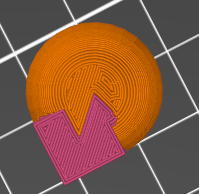
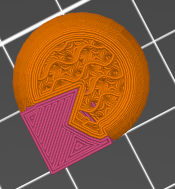
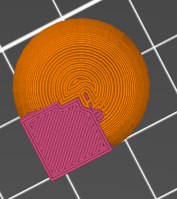
On 12/29/2025 10:02 PM, Cory Cross via Discuss wrote: >> Sure.  Slicers can let you do anything to the model - especially in >> the absence of good support elsewhere in the toolchain.  But should >> you *have* to? > Not sure if we have the same understanding or not, but that's just my > point. I think OpenSCAD should be able to create a model with face and > volumetric color simultaneously, because that's a model you can > prepare in the slicer. It's annoying to have to go back after > reloading a model and repeat some manual operations.  Hmm.  Do slicers *really* support "painting" the model?  I know it looks like that from the UI, but what does it really mean depth-wise?  If you have a cube, and paint it all blue, what does that mean for the interior?  My assumption had always been that the paint-like UI  was only an approximation, and that really it was going to take that paint and apply it throughout the model, until it ran into some other paint.  Do they really support the concept of "just change the outermost little bit of this shape, but leave the interior alone"? A quick experiment later... PrusaSlicer's "multimaterial painting" feature does indeed paint the interior.  I created a cube(10); sphere(10); and painted the cube.  The resulting slice carries the cube's color throughout the cube, though the exact boundary is ... strange. Here's pictures taken at a couple of different layers. Still, that does seem like a plausible feature so that's an argument for supporting it. > My point is that with your volumetric color POC, I can't (?) color faces, Correct.  (Noting again that I don't yet have a theory on how to make legacy face painting and new volumetric coloring peacefully coexist, and I accept the need for some sort of coexistence.) >  so to make my traffic light body yellow, I must give it the > volumetric color yellow? (the question marks are intentional, because > it's not clear to me)  I would say "to make my traffic light body yellow, I must make it yellow", but yes.  With the POC there's no way to say "make the faces yellow but the interior purple", or equivalently "make the faces yellow but the interior unspecified". Can the various formats even represent that?  STL is monochromatic, of course, but even the first-level workaround of having a different STL for each color can't represent that face-vs-interior distinction.  You'd need to have two sets of STLs - one set that represents the face colors, and another set that represents the interior colors.  I have no idea whether 3MF can distinguish between the color of a face and the color of the interior. My guess (a total guess) is that they can only represent the color of a shape, and that the slicers then interpret that as the color of the faces, and then flood the interior with that color, using some scheme that decides on a boundary when two faces of the same shape have different colors. >> First, note that with face coloring you'd have an unspecified color >> in the interior. > Exactly: the inside is unspecified until the point where it makes > sense for me to do so. So one of the key questions is whether the color of the interior is an aspect of the design (and so properly controlled by the design tool), or an implementation detail (like layer height and infill pattern) and so properly controlled by the slicer. > Lets say my traffic light has a black stripe across the back of it. > With the volumetric coloring POC, I now need to know how translucent > my filament will be and must encode the thickness in the model, > instead of the slicer adapting to different filaments (e.g. black can > be thinner than white).  Indeed, there's an argument that a slicer could have such a "paint" feature, and could do a better job of it than the design tool can do. I suspect that existing slicers do *not* have that feature.  I started over with the cube+sphere model, and put a single dot of second-extruder on the side of the cube; here's what I got: > Instead, with face coloring (but we should specify what to do with > coincident faces with different colors... I don't think that came up > in our color spec conversation), I should be able to:  Theoretically, I think the answer should be the same as for volumes, which means either first-wins or last-wins, and for me that coin came down on first-wins. Practically, however, there are cases where faces are mathematically coincident but in actual calculation (because of floating point error, grid snap, et cetera) are slightly off.  I think best practice, as with difference and for exactly the same reasons, is to avoid coincident faces. Well, sort of.  Having two objects that share the same *side* of the same face, bad.  Having two objects that share *opposite* sides of the same face, not bad.  That is: color("red") cube(10); color("blue") cube(5); would be bad, because it would share 5x5 squares on three sides and it's hard to tell what color those squares should be, and you care because they're visible.  However, color("red") cube(10); translate([10,0,0]) color("blue") cube(5); would be OK because although at the micro level it's not clear exactly where the boundary is or if there's a micro gap or overlap, at the macro level it's clear that there *is* a boundary and that it's red on one side and blue on the other side, and nobody cares about micro variations on the inside. > Yes, just like it's responsible for infill variations. Rarely does > anybody model infill, and similarly you don't need to actually extrude > every face inward to full define the 3d volume.  Ref my "key question" above, but there's an additional tidbit here. You say "extrude every face inward" like face coloring is the natural behavior, like cube() defines faces and only happens to define the enclosed volume.  I would say, on the other hand, that volume coloring is the natural behavior and that cube() defines a *solid* cube, and that faces are only interesting because they are the boundary between cube and not-cube.  That is, conceptually, does cube() define six squares in a particular layout, or does it define a six-sided solid?  Yes, I know that the mesh defines the faces, but conceptually is that because the goal is to define faces, or is it because the goal is to define the enclosed solid?
GB
Glenn Butcher
Tue, Dec 30, 2025 6:48 PM

On 12/30/2025 10:37 AM, Jordan Brown via Discuss wrote:

Can the various formats even represent that?  STL is monochromatic, of
course, but even the first-level workaround of having a different STL
for each color can't represent that face-vs-interior distinction. 
You'd need to have two sets of STLs - one set that represents the face
colors, and another set that represents the interior colors.  I have
no idea whether 3MF can distinguish between the color of a face and
the color of the interior.

My guess (a total guess) is that they can only represent the color of
a shape, and that the slicers then interpret that as the color of the
faces, and then flood the interior with that color, using some scheme
that decides on a boundary when two faces of the same shape have
different colors.

The 3MF specification allows the identification of up to three
properties per triangle, one for each vertex.  Properties refer to
materials defined under the <basematerials> section.  This information
was nominally destined to inform rendering in OpenGL/Direct3D/whatever,
but effectively defines a surface (boundary) coloring.

STL doesn't even preserve topology, much less inform color, boundary or
volumetric.

https://github.com/3MFConsortium/spec_core/blob/master/3MF%20Core%20Specification.md#41-meshes

ref: I've recently been writing OBJ, STL, and 3MF I/O routines, got
tired of messing with assimp...

On 12/30/2025 10:37 AM, Jordan Brown via Discuss wrote: > Can the various formats even represent that?  STL is monochromatic, of > course, but even the first-level workaround of having a different STL > for each color can't represent that face-vs-interior distinction.  > You'd need to have two sets of STLs - one set that represents the face > colors, and another set that represents the interior colors.  I have > no idea whether 3MF can distinguish between the color of a face and > the color of the interior. > > My guess (a total guess) is that they can only represent the color of > a shape, and that the slicers then interpret that as the color of the > faces, and then flood the interior with that color, using some scheme > that decides on a boundary when two faces of the same shape have > different colors. The 3MF specification allows the identification of up to three properties per triangle, one for each vertex.  Properties refer to materials defined under the <basematerials> section.  This information was nominally destined to inform rendering in OpenGL/Direct3D/whatever, but effectively defines a surface (boundary) coloring. STL doesn't even preserve topology, much less inform color, boundary or volumetric. https://github.com/3MFConsortium/spec_core/blob/master/3MF%20Core%20Specification.md#41-meshes ref: I've recently been writing OBJ, STL, and 3MF I/O routines, got tired of messing with assimp...
RW
Raymond West
Tue, Dec 30, 2025 7:41 PM

I mentioned earlier, the complexity of mixing 2d with 3d, which openscad
tries to do. If the surface is treated as a thin solid, then everything
is solved by dealing with colour of a solid. That applies to 3d
printing, and even a painted surface.

If you want a pattern on the surface, then that is merely individual
extruded solid tris, but too many to think about.

For objects with solid colours, they can exist and retain their
individual colours, unless unioned. You need rules for booleans and
colour. but, you can leave the result of boolean colours as neutral, and
assign a colour to the final object, if required. You cannot add
colours, not usually in practice, since more than two or three unions
will usually end up as a brown mess.

If you generate the rules, and adhere to them, anything else can adapt
to them. When rules are inconsistent, that is where the problems occur.

Consider normal? fdm printing in plastic. Most slicers allow painting of
colours onto the object, since the earlier slicers had to do something
with stl files. obj files can have an axillary colour file, but I've
never seen that used, and ply files have colour built in, but orca and
many slicers do not import that. 3mf has a colour extension, but bbl
does not always conform. It seems that slicers do their own thing wrt
colour for the current crop of multicolour fdm printers. Resin and other
printers, probably no colour involved. My opinion, is that trying to put
colour into an object, and hoping that all slicers will interpret it, is
a bit pointless, unless the user can't change it in the slicer, which
they all can. You may as well not let the user scale or rotate the
object. (If you are running a print farm, then you may want one file
that isn't modified, but that will be the gcode/sliced file unless you
have different printer types, and if it is a business, you need to pay
for your cad!).

The other aspect that crops up is the use of colour to signify the type
of line, in laser cutting, say. In most cases, a colour fill will do the
same job in 2d, as a solid colour in 3d. since openscad does not have an
effective gui interface, it is probably not the best 2d drawing package
to use.

This sort of reminds me of the 1960's when diy and black and decker
drills became popular. Folk, not knowing much about power/bearings etc.,
began  attaching grinding discs, circular saws and the like to the
drills, which then began to disassemble. The solution was to develop a
range of tools to do specific jobs.

The image, the red and green cubes placed overlapping, not unioned, and
tapered hole differenced. Since the part in the middle is both red and
green, you get some 'fighting', which to my mind is exactly as it should
be. If it is unioned, then it is one object, so the colour is grey,
unless assigned to whatever.

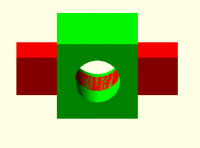
I mentioned earlier, the complexity of mixing 2d with 3d, which openscad tries to do. If the surface is treated as a thin solid, then everything is solved by dealing with colour of a solid. That applies to 3d printing, and even a painted surface. If you want a pattern on the surface, then that is merely individual extruded solid tris, but too many to think about. For objects with solid colours, they can exist and retain their individual colours, unless unioned. You need rules for booleans and colour. but, you can leave the result of boolean colours as neutral, and assign a colour to the final object, if required. You cannot add colours, not usually in practice, since more than two or three unions will usually end up as a brown mess. If you generate the rules, and adhere to them, anything else can adapt to them. When rules are inconsistent, that is where the problems occur. Consider normal? fdm printing in plastic. Most slicers allow painting of colours onto the object, since the earlier slicers had to do something with stl files. obj files can have an axillary colour file, but I've never seen that used, and ply files have colour built in, but orca and many slicers do not import that. 3mf has a colour extension, but bbl does not always conform. It seems that slicers do their own thing wrt colour for the current crop of multicolour fdm printers. Resin and other printers, probably no colour involved. My opinion, is that trying to put colour into an object, and hoping that all slicers will interpret it, is a bit pointless, unless the user can't change it in the slicer, which they all can. You may as well not let the user scale or rotate the object. (If you are running a print farm, then you may want one file that isn't modified, but that will be the gcode/sliced file unless you have different printer types, and if it is a business, you need to pay for your cad!). The other aspect that crops up is the use of colour to signify the type of line, in laser cutting, say. In most cases, a colour fill will do the same job in 2d, as a solid colour in 3d. since openscad does not have an effective gui interface, it is probably not the best 2d drawing package to use. This sort of reminds me of the 1960's when diy and black and decker drills became popular. Folk, not knowing much about power/bearings etc., began  attaching grinding discs, circular saws and the like to the drills, which then began to disassemble. The solution was to develop a range of tools to do specific jobs. The image, the red and green cubes placed overlapping, not unioned, and tapered hole differenced. Since the part in the middle is both red and green, you get some 'fighting', which to my mind is exactly as it should be. If it is unioned, then it is one object, so the colour is grey, unless assigned to whatever.
CC
Cory Cross
Tue, Dec 30, 2025 8:53 PM

On 12/30/25 9:37 AM, Jordan Brown via Discuss wrote:

On 12/29/2025 10:02 PM, Cory Cross via Discuss wrote:

Not sure if we have the same understanding or not, but that's just my
point. I think OpenSCAD should be able to create a model with face
and volumetric color simultaneously, because that's a model you can
prepare in the slicer. It's annoying to have to go back after
reloading a model and repeat some manual operations.

Hmm.  Do slicers really support "painting" the model?  ...
A quick experiment later... PrusaSlicer's "multimaterial painting"
feature does indeed paint the interior.  I created a cube(10);
sphere(10); and painted the cube.  The resulting slice carries the
cube's color throughout the cube, though the exact boundary is ...
strange. Here's pictures taken at a couple of different layers.

It is, but they're also continually improving and evolving. Face
painting will likely only get better as time goes on.

 so to make my traffic light body yellow, I must give it the
volumetric color yellow? (the question marks are intentional, because
it's not clear to me)

I would say "to make my traffic light body yellow, I must make it
yellow", but yes.  With the POC there's no way to say "make the faces
yellow but the interior purple", or equivalently "make the faces
yellow but the interior unspecified".

Can the various formats even represent that?  STL is monochromatic

We shouldn't concern ourselves with STL, it's inherently broken.

I have no idea whether 3MF can distinguish between the color of a face
and the color of the interior.

It can, 3MF is hierarchical so mesh can have a material and faces
(triangles) can override:

https://learn.microsoft.com/en-us/windows/uwp/devices-sensors/3d-generate-3mf#create-materials

Furthermore, individual triangles on each mesh can specify different

materials and different materials can even be represented within a
single triangle

Examples:
https://github.com/3MFConsortium/spec_materials/blob/master/3MF%20Materials%20Extension.md#chapter-5-multiproperties
and a "different faces with different colors":
https://github.com/3MFConsortium/3mf-samples/blob/master/examples/material/sphere_logo.png

Lets say my traffic light has a black stripe across the back of it.
With the volumetric coloring POC, I now need to know how translucent
my filament will be and must encode the thickness in the model,
instead of the slicer adapting to different filaments (e.g. black can
be thinner than white).

Indeed, there's an argument that a slicer could have such a "paint"
feature, and could do a better job of it than the design tool can do.

Right, but that's why I want to export just the colored face and not
change the interior of model. Let slicer handle the realization and
don't make me recolor it every time I reload my model.

Instead, with face coloring (but we should specify what to do with
coincident faces with different colors... I don't think that came up
in our color spec conversation), I should be able to:

Theoretically, I think the answer should be the same as for volumes,
which means either first-wins or last-wins, and for me that coin came
down on first-wins.

Sadly, it does not do that. I'm, uh, not sure exactly this is. F6 w/
Manifold (duh, because color).

union() { color("white") cube(10);
translate([0,0,5]) color("black") cube(10);
}

translate([15,0,0]) union() {
translate([0,0,5]) color("black") cube(10);
color("white") cube(10);
translate([5,0,5]) rotate([-90,0,0]) color("red") cylinder(d=5,h=10);
}

Practically, however, there are cases where faces are mathematically
coincident but in actual calculation (because of floating point error,
grid snap, et cetera) are slightly off.

I don't think that's true with Manifold (and we should skate to where
the puck's going to be).

  I think best practice, as with difference and for exactly the same
reasons, is to avoid coincident faces.

Well, sort of.  Having two objects that share the same side of the
same face, bad.  Having two objects that share opposite sides of the
same face, not bad.

That's why I'm a bit lost on how to create and color a face in
OpenSCAD, which, except for polygon/polyhedron, exposes nothing about
faces. After all, it's going for CSG.

Yes, just like it's responsible for infill variations. Rarely does
anybody model infill, and similarly you don't need to actually
extrude every face inward to full define the 3d volume.

Ref my "key question" above, but there's an additional tidbit here.

You say "extrude every face inward" like face coloring is the natural
behavior, like cube() defines faces and only happens to define the
enclosed volume.  I would say, on the other hand, that volume coloring
is the natural behavior and that cube() defines a solid cube, and
that faces are only interesting because they are the boundary between
cube and not-cube.  That is, conceptually, does cube() define six
squares in a particular layout, or does it define a six-sided solid? 
Yes, I know that the mesh defines the faces, but conceptually is that
because the goal is to define faces, or is it because the goal is to
define the enclosed solid?
The very fact that unioning two different "colored" solids has an
indeterminate interior essentially proves that it's six squares in a
particular layout.

If we ignore all coloring, we can exported the enclosed solid for 3D
printing, but you've already applied a transform (flattening color).
Arguing the original was an enclosed solid is like arguing a cube is 2d
because you ran projection on it and got a 2d shape.

Adding volumetric color makes geometry be an enclosed solid AND six
squares in a particular layout. You can then use only part of the output
(computer graphics only needs the faces) if you want. If slicers didn't
allow coloring faces, then exporting only enclosed solids would be all
you want to do. But since they do...

  • Cory
On 12/30/25 9:37 AM, Jordan Brown via Discuss wrote: > On 12/29/2025 10:02 PM, Cory Cross via Discuss wrote: >> Not sure if we have the same understanding or not, but that's just my >> point. I think OpenSCAD should be able to create a model with face >> and volumetric color simultaneously, because that's a model you can >> prepare in the slicer. It's annoying to have to go back after >> reloading a model and repeat some manual operations. > > Hmm.  Do slicers *really* support "painting" the model?  ... > A quick experiment later... PrusaSlicer's "multimaterial painting" > feature does indeed paint the interior.  I created a cube(10); > sphere(10); and painted the cube.  The resulting slice carries the > cube's color throughout the cube, though the exact boundary is ... > strange. Here's pictures taken at a couple of different layers. It is, but they're also continually improving and evolving. Face painting will likely only get better as time goes on. >>  so to make my traffic light body yellow, I must give it the >> volumetric color yellow? (the question marks are intentional, because >> it's not clear to me) > > I would say "to make my traffic light body yellow, I must make it > yellow", but yes.  With the POC there's no way to say "make the faces > yellow but the interior purple", or equivalently "make the faces > yellow but the interior unspecified". > > Can the various formats even represent that?  STL is monochromatic We shouldn't concern ourselves with STL, it's inherently broken. > I have no idea whether 3MF can distinguish between the color of a face > and the color of the interior. It can, 3MF is hierarchical so mesh can have a material and faces (triangles) can override: https://learn.microsoft.com/en-us/windows/uwp/devices-sensors/3d-generate-3mf#create-materials > Furthermore, individual triangles on each mesh can specify different materials and different materials can even be represented within a single triangle Examples: https://github.com/3MFConsortium/spec_materials/blob/master/3MF%20Materials%20Extension.md#chapter-5-multiproperties and a "different faces with different colors": https://github.com/3MFConsortium/3mf-samples/blob/master/examples/material/sphere_logo.png >> Lets say my traffic light has a black stripe across the back of it. >> With the volumetric coloring POC, I now need to know how translucent >> my filament will be and must encode the thickness in the model, >> instead of the slicer adapting to different filaments (e.g. black can >> be thinner than white). > > Indeed, there's an argument that a slicer could have such a "paint" > feature, and could do a better job of it than the design tool can do. Right, but that's why I want to export just the colored face and not change the interior of model. Let slicer handle the realization and don't make me recolor it every time I reload my model. >> Instead, with face coloring (but we should specify what to do with >> coincident faces with different colors... I don't think that came up >> in our color spec conversation), I should be able to: > > Theoretically, I think the answer should be the same as for volumes, > which means either first-wins or last-wins, and for me that coin came > down on first-wins. Sadly, it does not do that. I'm, uh, not sure exactly this is. F6 w/ Manifold (duh, because color). union() { color("white") cube(10); translate([0,0,5]) color("black") cube(10); } translate([15,0,0]) union() { translate([0,0,5]) color("black") cube(10); color("white") cube(10); translate([5,0,5]) rotate([-90,0,0]) color("red") cylinder(d=5,h=10); } > > Practically, however, there are cases where faces are mathematically > coincident but in actual calculation (because of floating point error, > grid snap, et cetera) are slightly off. I don't think that's true with Manifold (and we should skate to where the puck's going to be). >   I think best practice, as with difference and for exactly the same > reasons, is to avoid coincident faces. > > Well, sort of.  Having two objects that share the same *side* of the > same face, bad.  Having two objects that share *opposite* sides of the > same face, not bad. That's why I'm a bit lost on *how* to create and color a face in OpenSCAD, which, except for polygon/polyhedron, exposes nothing about faces. After all, it's going for CSG. >> Yes, just like it's responsible for infill variations. Rarely does >> anybody model infill, and similarly you don't need to actually >> extrude every face inward to full define the 3d volume. > > Ref my "key question" above, but there's an additional tidbit here. > > You say "extrude every face inward" like face coloring is the natural > behavior, like cube() defines faces and only happens to define the > enclosed volume.  I would say, on the other hand, that volume coloring > is the natural behavior and that cube() defines a *solid* cube, and > that faces are only interesting because they are the boundary between > cube and not-cube.  That is, conceptually, does cube() define six > squares in a particular layout, or does it define a six-sided solid?  > Yes, I know that the mesh defines the faces, but conceptually is that > because the goal is to define faces, or is it because the goal is to > define the enclosed solid? The very fact that unioning two different "colored" solids has an indeterminate interior essentially proves that it's six squares in a particular layout. If we ignore all coloring, we can exported the enclosed solid for 3D printing, but you've already applied a transform (flattening color). Arguing the original was an enclosed solid is like arguing a cube is 2d because you ran projection on it and got a 2d shape. Adding volumetric color makes geometry be an enclosed solid AND six squares in a particular layout. You can then use only part of the output (computer graphics only needs the faces) if you want. If slicers didn't allow coloring faces, then exporting only enclosed solids would be all you want to do. But since they do... - Cory
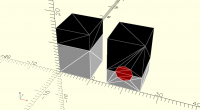
CC
Cory Cross
Tue, Dec 30, 2025 10:03 PM

On 12/30/25 11:41 AM, Raymond West via Discuss wrote:

Consider normal? fdm printing in plastic. Most slicers allow painting
of colours onto the object, since the earlier slicers had to do
something with stl files. obj files can have an axillary colour file,
but I've never seen that used, and ply files have colour built in, but
orca and many slicers do not import that. 3mf has a colour extension,
but bbl does not always conform. It seems that slicers do their own
thing wrt colour for the current crop of multicolour fdm printers.

It's also chicken-and-egg; if inputs using these features are rare, then
there's no motivation to be able to import them. If we're taking the
effort to set up volumetric color, I think it's worth going all the way
and make a chicken.

  • Cory
On 12/30/25 11:41 AM, Raymond West via Discuss wrote: > Consider normal? fdm printing in plastic. Most slicers allow painting > of colours onto the object, since the earlier slicers had to do > something with stl files. obj files can have an axillary colour file, > but I've never seen that used, and ply files have colour built in, but > orca and many slicers do not import that. 3mf has a colour extension, > but bbl does not always conform. It seems that slicers do their own > thing wrt colour for the current crop of multicolour fdm printers. It's also chicken-and-egg; if inputs using these features are rare, then there's no motivation to be able to import them. *If* we're taking the effort to set up volumetric color, I think it's worth going all the way and make a chicken. - Cory