Behaviour of 2D in 3D space?

As a test after a query by someone, I did:
rotate([80,0,0]) square([30,10]);circle(10);
I wasn't sure what I expected it to do.
In preview it looks 3D.
http://forum.openscad.org/file/t359/Capture_2D_in_3D_F5.jpg
In render it seems to take the projection of that 3D view.
http://forum.openscad.org/file/t359/Capture_2D_in_3D_F6.jpg
Is this expected behaviour?
Should intrusion into 3D by a 2D object result in a Warning or error?
Admin - email* me if you need anything, or if I've done something stupid...
- click on my MichaelAtOz label, there is a link to email me.
Unless specifically shown otherwise above, my contribution is in the Public Domain; to the extent possible under law, I have waived all copyright and related or neighbouring rights to this work. Obviously inclusion of works of previous authors is not included in the above.
The TPP is no simple “trade agreement.” Fight it! http://www.ourfairdeal.org/ time is running out!
Sent from: http://forum.openscad.org/

I had some surprises in this space recently too. I then updated my
developer version and it surprised me in a different way. I’d have to
reconstruct the specifics but I’m happy to do so if folks think there might
be a regression.
- Rob
.
On Sun, Apr 7, 2019 at 9:44 PM MichaelAtOz oz.at.michael@gmail.com wrote:
As a test after a query by someone, I did:
rotate([80,0,0])
square([30,10]);
circle(10);
I wasn't sure what I expected it to do.
In preview it looks 3D.
In render it seems to take the projection of that 3D view.
Is this expected behaviour?
Should intrusion into 3D by a 2D object result in a Warning or error?
Admin - email me if you need anything, *
or if I've done something stupid...
- click on my MichaelAtOz label, there is a link to email me.
Unless specifically shown otherwise above, my contribution is in the
Public Domain; to the extent possible under law, I have waived all
copyright and related or neighbouring rights to this work.
Obviously inclusion of works of previous authors is not included in the
above.
The TPP is no simple “trade agreement.” Fight it!
http://www.ourfairdeal.org/ time is running out!
Sent from the OpenSCAD mailing list archive http://forum.openscad.org/
at Nabble.com.
OpenSCAD mailing list
Discuss@lists.openscad.org
http://lists.openscad.org/mailman/listinfo/discuss_lists.openscad.org

I don't know how it's supposed to look, but 2D objects are displayed in preview as if they
were thin 3D objects, and are rendered as 2D objects. So the circle looks as I fully expected.
While I was not expecting the rotated square to look like a projection, it isn't surprising, since
a square, circle, or polygon displays as thin 3D objects, but renders as if it were a projection.
I don't think a rotated 2D figure should be any different.
Try this one, just for fun.
rotate([80,0,0])
square([30,10]);
rotate([-80,0,0])
circle(10);
On 7 Apr 2019 at 21:43, MichaelAtOz wrote:
As a test after a query by someone, I did:
rotate([80,0,0])
square([30,10]);
circle(10);
I wasn't sure what I expected it to do.
In preview it looks 3D.
In render it seems to take the projection of that 3D view.
Is this expected behaviour?
Should intrusion into 3D by a 2D object result in a Warning or error?
--
Magic trumps science for most people,
and wishful thinking drives a lot of decision-making.
- Joe Haldeman

I keep 2D objects in the XY plane. I don't think they were ever intended to
exist in a 3D space, and that's why you get that result.
--
Sent from: http://forum.openscad.org/

Also if you rotate 2D objects so they are on their edge you get warning.
rotate([90, 0, 0])
circle();
WARNING: Scaling a 2D object with 0 - removing object
Rendering cancelled on first warning.
UI-WARNING: No top level geometry to render
This is even true if you rotate it back to the XY plane.
rotate([90, 0, 0]) rotate([-90, 0, 0]) circle();
WARNING: Scaling a 2D object with 0 - removing object
Rendering cancelled on first warning.
UI-WARNING: No top level geometry to render
I don't think this warning is useful because if the 2D object ends up back
on the XY plane it should be valid. I would rather it was silent and
correctly rotated in 3D and until it gets projected to 2D. Preview should
match F6 of course.
On Mon, 8 Apr 2019 at 07:35, Troberg troberg.anders@gmail.com wrote:
I keep 2D objects in the XY plane. I don't think they were ever intended to
exist in a 3D space, and that's why you get that result.
--
Sent from: http://forum.openscad.org/
OpenSCAD mailing list
Discuss@lists.openscad.org
http://lists.openscad.org/mailman/listinfo/discuss_lists.openscad.org
On 7 Apr 2019 at 23:34, Troberg wrote:
I keep 2D objects in the XY plane. I don't think they were ever intended to
exist in a 3D space, and that's why you get that result.
That brings up something that has always made me wonder. In the docs, the example of
making a torus using a rotate_extrude of a circle, just doesn't make sense to me. The circle
is in the X/Y plane, but the extruded object looks like the circle has been rotated before being
extruded.
One thing this discussion has done for me is to point out just how many ways one can use
2D objects to create some rather interesting shapes.
--
Magic trumps science for most people,
and wishful thinking drives a lot of decision-making.
- Joe Haldeman
I have been going through all my objects rewriting them to be unions of
extruded 2D objects to avoid as many 3D differences and intersections as I
can. By doing that I have reduced the time to draw all my objects from 972
seconds to 194.
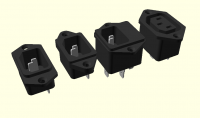
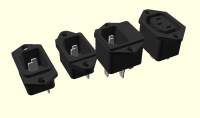
I have learned a few tricks on the way to make things that look inescapably
3D out unions of extruded 2D. For example these draw in 0 seconds. I think
they used to take about 17.
[image: image.png]
I previously made the cavities by subtracting two linear extrudes. That
takes ages because I render all differences with CGAL to avoid clashes
between negative objects and the curved cavities have lots of vertices. I
now linear extrude the difference to make the walls of the cavity and then
fill in the back with another linear extrude.
The countersinks are creative because on the face of it you need to
subtract 3D shapes. What I actually do is put some slightly bigger straight
holes in the linear_extrude() of the flange by subtracting circles. I then
rotate_extrude a cylinder with the counter sunk hole in it and union those
into the holes in the flange. Union is free in preview because it just
draws both parts and there is never any z-fighting if they are the same
colour.
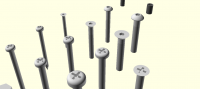
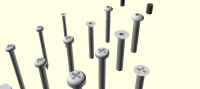
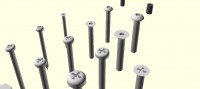
I did the opposite thing with countersunk, pan and dome screw heads.
[image: image.png]
I rotate extrude the basic shape of the head with a cylinder missing where
the slots go and the linear extrude a circle with the slot cut in it and
inlay it into the head.
It has taken me weeks because I have had to re-code everything, moving all
the differences and intersections into 2D.
On Mon, 8 Apr 2019 at 16:44, lar3ry@sasktel.net wrote:
On 7 Apr 2019 at 23:34, Troberg wrote:
I keep 2D objects in the XY plane. I don't think they were ever intended
to
exist in a 3D space, and that's why you get that result.
That brings up something that has always made me wonder. In the docs, the
example of
making a torus using a rotate_extrude of a circle, just doesn't make sense
to me. The circle
is in the X/Y plane, but the extruded object looks like the circle has
been rotated before being
extruded.
One thing this discussion has done for me is to point out just how many
ways one can use
2D objects to create some rather interesting shapes.
--
Magic trumps science for most people,
and wishful thinking drives a lot of decision-making.
- Joe Haldeman
OpenSCAD mailing list
Discuss@lists.openscad.org
http://lists.openscad.org/mailman/listinfo/discuss_lists.openscad.org

Awesome results! The difference between the obvious solution and an
efficient one can be massive - both in terms of performance and the
effort required to get there. That delta is a big reason, IMO, why we
need to settle on a good library and packaging story, to help increase
adoption.
On 4/8/19 12:55 PM, nop head wrote:
I have been going through all my objects rewriting them to be unions
of extruded 2D objects to avoid as many 3D differences and
intersections as I can. By doing that I have reduced the time to draw
all my objects from 972 seconds to 194.
I have learned a few tricks on the way to make things that look
inescapably 3D out unions of extruded 2D. For example these draw in 0
seconds. I think they used to take about 17.
image.png
I previously made the cavities by subtracting two linear extrudes.
That takes ages because I render all differences with CGAL to avoid
clashes between negative objects and the curved cavities have lots of
vertices. I now linear extrude the difference to make the walls of the
cavity and then fill in the back with another linear extrude.
The countersinks are creative because on the face of it you need to
subtract 3D shapes. What I actually do is put some slightly bigger
straight holes in the linear_extrude() of the flange by subtracting
circles. I then rotate_extrude a cylinder with the counter sunk hole
in it and union those into the holes in the flange. Union is free in
preview because it just draws both parts and there is never any
z-fighting if they are the same colour.
I did the opposite thing with countersunk, pan and dome screw heads.
image.png
I rotate extrude the basic shape of the head with a cylinder missing
where the slots go and the linear extrude a circle with the slot cut
in it and inlay it into the head.
It has taken me weeks because I have had to re-code everything, moving
all the differences and intersections into 2D.
On Mon, 8 Apr 2019 at 16:44, <lar3ry@sasktel.net
mailto:lar3ry@sasktel.net> wrote:
On 7 Apr 2019 at 23:34, Troberg wrote:
I keep 2D objects in the XY plane. I don't think they were ever
intended to
exist in a 3D space, and that's why you get that result.
 That brings up something that has always made me wonder. In the
 docs, the example of
 making a torus using a rotate_extrude of a circle, just doesn't
 make sense to me. The circle
 is in the X/Y plane, but the extruded object looks like the circle
 has been rotated before being
 extruded.

 One thing this discussion has done for me is to point out just how
 many ways one can use
 2D objects to create some rather interesting shapes.


 --
 Magic trumps science for most people,
 and wishful thinking drives a lot of decision-making.
     - Joe Haldeman


 _______________________________________________
 OpenSCAD mailing list
 Discuss@lists.openscad.org <mailto:Discuss@lists.openscad.org>
 http://lists.openscad.org/mailman/listinfo/discuss_lists.openscad.org
OpenSCAD mailing list
Discuss@lists.openscad.org
http://lists.openscad.org/mailman/listinfo/discuss_lists.openscad.org
Fascinating work - thank you! I’ve has complicated designs (e.g., complex
compound planetary gears) that take up to 30 minutes (!!) to render. I’ll
have to rethink parts of it using your insights.
Any thoughts about posting some example code?
Cheers,
- Rob
.
On Mon, Apr 8, 2019 at 10:56 AM nop head nop.head@gmail.com wrote:
I have been going through all my objects rewriting them to be unions of
extruded 2D objects to avoid as many 3D differences and intersections as I
can. By doing that I have reduced the time to draw all my objects from 972
seconds to 194.
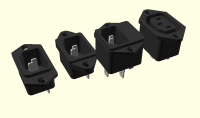
I have learned a few tricks on the way to make things that look
inescapably 3D out unions of extruded 2D. For example these draw in 0
seconds. I think they used to take about 17.
[image: image.png]
I previously made the cavities by subtracting two linear extrudes. That
takes ages because I render all differences with CGAL to avoid clashes
between negative objects and the curved cavities have lots of vertices. I
now linear extrude the difference to make the walls of the cavity and then
fill in the back with another linear extrude.
The countersinks are creative because on the face of it you need to
subtract 3D shapes. What I actually do is put some slightly bigger straight
holes in the linear_extrude() of the flange by subtracting circles. I then
rotate_extrude a cylinder with the counter sunk hole in it and union those
into the holes in the flange. Union is free in preview because it just
draws both parts and there is never any z-fighting if they are the same
colour.
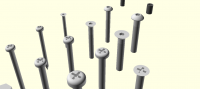
I did the opposite thing with countersunk, pan and dome screw heads.
[image: image.png]
I rotate extrude the basic shape of the head with a cylinder missing where
the slots go and the linear extrude a circle with the slot cut in it and
inlay it into the head.
It has taken me weeks because I have had to re-code everything, moving all
the differences and intersections into 2D.
On Mon, 8 Apr 2019 at 16:44, lar3ry@sasktel.net wrote:
On 7 Apr 2019 at 23:34, Troberg wrote:
I keep 2D objects in the XY plane. I don't think they were ever
intended to
exist in a 3D space, and that's why you get that result.
That brings up something that has always made me wonder. In the docs, the
example of
making a torus using a rotate_extrude of a circle, just doesn't make
sense to me. The circle
is in the X/Y plane, but the extruded object looks like the circle has
been rotated before being
extruded.
One thing this discussion has done for me is to point out just how many
ways one can use
2D objects to create some rather interesting shapes.
--
Magic trumps science for most people,
and wishful thinking drives a lot of decision-making.
- Joe Haldeman
OpenSCAD mailing list
Discuss@lists.openscad.org
http://lists.openscad.org/mailman/listinfo/discuss_lists.openscad.org
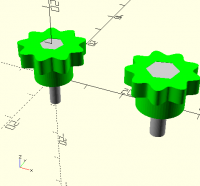
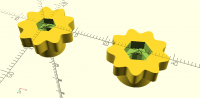
Here is simple example. I have these printed knobs that take a hex screw.
They are printed upside down with a complicated hanging hole that can be
printed without support material. See
http://hydraraptor.blogspot.com/2014/03/buried-nuts-and-hanging-holes.html
[image: image.png]
They were taking six seconds to preview when wrapped with render() because
the hole is being subtracted from a complex shape in 3D. This was the
original code
knob_wall = 2;
function knob_nut_trap_depth(screw) =
round_to_layer(screw_head_height(screw));
knob_stem_h = 6;
knob_thickness = 4;
knob_r = 8;
knob_wave = 1;
knob_waves = 9;
knob_height = knob_stem_h + knob_thickness;
function knob_height() = knob_height;
module screw_knob(screw) {
stl(str("screw_knob_M", screw_radius(screw) * 20));
knob_stem_r = nut_trap_radius(screw_nut(screw)) + knob_wall;

function wave(a) = knob_r + sin(a * knob_waves) * knob_wave;

render() difference() {
    union() {
        cylinder(r = knob_stem_r, h = knob_thickness + knob_stem_h);

        linear_extrude(height = knob_thickness, convexity = 3)
            polygon(points = [for(a = [0 : 359]) [wave(a) * sin(a),
wave(a) * cos(a)]]);
}
hanging_hole(knob_nut_trap_depth(screw),
screw_clearance_radius(screw))
rotate(45)
circle(r = nut_trap_radius(screw_nut(screw)), $fn = 6);
}
}
To make it faster I now have this:
module screw_knob(screw) {
stl(str("screw_knob_M", screw_radius(screw) * 20));
knob_stem_r = nut_trap_radius(screw_nut(screw)) + knob_wall;

function wave(a) = knob_r + sin(a * knob_waves) * knob_wave;

union() {
    render() difference() {
        cylinder(r = knob_stem_r, h = knob_thickness + knob_stem_h);

        hanging_hole(knob_nut_trap_depth(screw),
screw_clearance_radius(screw))
rotate(45)
circle(r = nut_trap_radius(screw_nut(screw)), $fn = 6);
}
linear_extrude(height = knob_thickness, convexity = 3)
difference() {
polygon(points = [for(a = [0 : 359]) [wave(a) * sin(a),
wave(a) * cos(a)]]);
            circle(knob_stem_r - eps);
        }
}
}
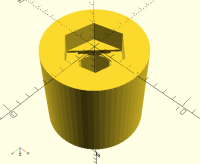
The differences is now a on a plain cylinder, so is a lot faster because
there are less vertices and CGAL slows with the square of the vertices I
think.
[image: image.png]
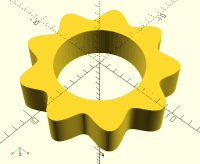
I then union with the outer bit, which I make with a slightly smaller hole
in the middle. That is very fast because it is an extruded 2D shape and I
don't need to use CGAL when previewing unions.
[image: image.png]
So my test which draws two difference sizes goes from 6 seconds, to 0
seconds.
[image: image.png]
Another thing I found is avoiding any unions inside a 3D hull by using
repetition instead of for loops and not using translations or rotations to
operate on more than one child as that does a union as well. Same with if.
I.e. I repeat the if or the translation instead of using one with braces.
This even speeds up difference but the code gets uglier and uglier.
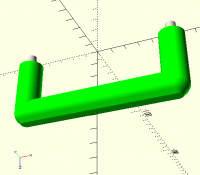
E.g. This handle which also prints without support material was very slow
[image: image.png]
module handle_stl() {
stl("handle");
render() difference() {
    translate_z(dia / 2)
        union() {
            hull()
                handle_screw_positions()
                    rotate_extrude()
                        intersection() {
                            rotate(180)
                                teardrop_2D(r = dia / 2);

                            translate([0, - (dia + 1) / 2])
                                square([dia / 2 + 1, dia + 1]);
                        }
            handle_screw_positions()
                cylinder(d = dia, h = height + dia / 2);
        }

    handle_screw_positions()
        translate_z(dia + height) {
            insert_hole(insert);

            poly_cylinder(r = screw_clearance_radius(screw), h =
(insert_length(insert) + 6) * 2, center = true);
}
}
}
I got it down to a couple of seconds like this:
module handle_stl() {
stl("handle");
module end(end)
    translate([end * pitch / 2, 0])
        rotate_extrude()
            intersection() {
                rotate(180)
                    teardrop(r = dia / 2, h = 0);

                translate([0, - (dia + 1) / 2])
                    square([dia / 2 + 1, dia + 1]);
            }

translate_z(dia / 2)
    union() {
        hull() {
            end(-1);

            end(1);
        }

        handle_screw_positions()
            render() difference() {
                h =  height + dia / 2;
                cylinder(d = dia, h = h);

                translate_z(h)
                    insert_hole(insert, 6);
            }
    }
}
Again moving the subtraction to a simple cylinder and placing the ends in
the hull with repetition instead of a loop to avoid unioning two objects
with a lot of vertices before the hull is taken.
On Wed, 10 Apr 2019 at 17:38, Rob Sherwood rob.sherwood@gmail.com wrote:
Fascinating work - thank you! I’ve has complicated designs (e.g., complex
compound planetary gears) that take up to 30 minutes (!!) to render. I’ll
have to rethink parts of it using your insights.
Any thoughts about posting some example code?
Cheers,
- Rob
.
On Mon, Apr 8, 2019 at 10:56 AM nop head nop.head@gmail.com wrote:
I have been going through all my objects rewriting them to be unions of
extruded 2D objects to avoid as many 3D differences and intersections as I
can. By doing that I have reduced the time to draw all my objects from 972
seconds to 194.
I have learned a few tricks on the way to make things that look
inescapably 3D out unions of extruded 2D. For example these draw in 0
seconds. I think they used to take about 17.
[image: image.png]
I previously made the cavities by subtracting two linear extrudes. That
takes ages because I render all differences with CGAL to avoid clashes
between negative objects and the curved cavities have lots of vertices. I
now linear extrude the difference to make the walls of the cavity and then
fill in the back with another linear extrude.
The countersinks are creative because on the face of it you need to
subtract 3D shapes. What I actually do is put some slightly bigger straight
holes in the linear_extrude() of the flange by subtracting circles. I then
rotate_extrude a cylinder with the counter sunk hole in it and union those
into the holes in the flange. Union is free in preview because it just
draws both parts and there is never any z-fighting if they are the same
colour.
I did the opposite thing with countersunk, pan and dome screw heads.
[image: image.png]
I rotate extrude the basic shape of the head with a cylinder missing
where the slots go and the linear extrude a circle with the slot cut in it
and inlay it into the head.
It has taken me weeks because I have had to re-code everything, moving
all the differences and intersections into 2D.
On Mon, 8 Apr 2019 at 16:44, lar3ry@sasktel.net wrote:
On 7 Apr 2019 at 23:34, Troberg wrote:
I keep 2D objects in the XY plane. I don't think they were ever
intended to
exist in a 3D space, and that's why you get that result.
That brings up something that has always made me wonder. In the docs,
the example of
making a torus using a rotate_extrude of a circle, just doesn't make
sense to me. The circle
is in the X/Y plane, but the extruded object looks like the circle has
been rotated before being
extruded.
One thing this discussion has done for me is to point out just how many
ways one can use
2D objects to create some rather interesting shapes.
--
Magic trumps science for most people,
and wishful thinking drives a lot of decision-making.
- Joe Haldeman
OpenSCAD mailing list
Discuss@lists.openscad.org
http://lists.openscad.org/mailman/listinfo/discuss_lists.openscad.org