

$vpx?

It’s horribly fiddly to open the viewport to a specific width with the mouse/cursor, especially with complicated code. Is there some parameter like $vpr, $vpt, $vpd etc. with which the width can be set in the code window?

On 8/23/26 6:52 PM, mike Smith via Discuss wrote:
It’s horribly fiddly to open the viewport to a specific width with the
mouse/cursor, especially with complicated code. Is there some
parameter like $vpr, $vpt, $vpd etc. with which the width can be set
in the code window?
Your question is underspecified. What is the thing you want to be a
specific width?
The viewport is a single point camera with adjustable field of view. So
the camera itself has no width. It can look at things which have width.
The viewport is the picture I see.
Sometimes i want it to be 820 pixels wide, sometimes 620.
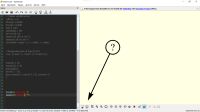
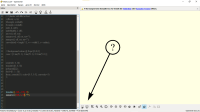
It’s about the cream-coloured rectangle on the right and the numbers at the bottom below the two cubes.


Sounds to me like Mike wants to be able to dynamically (and
automatically) adjust the size of the viewport based on the size of the
modeled object.
On 8/23/2026 11:45 PM, Cory Cross wrote:
On 8/23/26 6:52 PM, mike Smith via Discuss wrote:
It’s horribly fiddly to open the viewport to a specific width with
the mouse/cursor, especially with complicated code. Is there some
parameter like $vpr, $vpt, $vpd etc. with which the width can be set
in the code window?
Your question is underspecified. What is the thing you want to be a
specific width?
The viewport is a single point camera with adjustable field of view.
So the camera itself has no width. It can look at things which have
width.
Ah. I'd be surprised if it got added in a way which you could control
from a program, though I could see someone adding a menu entry for it.
You can make feature requests at
https://github.com/openscad/openscad/issues/new/choose but I doubt
anyone else would want to do it.
On 8/23/26 10:06 PM, mike Smith via Discuss wrote:
It’s about the cream-coloured rectangle on the right and the numbers
at the bottom below the two cubes.
OpenSCAD mailing list
To unsubscribe send an email todiscuss-leave@lists.openscad.org
Done. Let’s see what happens.

Hi, this is Gene Heskett, your resident old fart of 91 years. I've been
in the shop for a couple months, kidney failure, so I am being dialyzed
3x a week now. And this is a different computer, an arm64. Runs a
variant of ubuntu 2404 I think. The user interface for multiple
workspaces has apparently been stripped out. Whats chances the next
weekly build will install on this arm64 so I can run openscad and drive
the stepsons printer? We;ve played with the passwds and I just ran
synaptic w/o a pw & upgraded around 750 files. But have not rebooted,
so that is next, and I'll pull the latest build & see if it will install
whaen the reboot has been deen done.

On 31.08.26 18:22, maurice e heskett via Discuss wrote:
Whats chances the next weekly build will install on this arm64 so
I can run openscad and drive the stepsons printer?
If that is a regular Ubuntu, that should be no problem. We have
official builds at
https://download.opensuse.org/repositories/home:/t-paul/xUbuntu_24.04/
I believe on Ubuntu the following should work assuming "sudo" is
setup for the user, or run as root user and drop the sudo from
the commands. Both are single line commands.
- Add the repository signing key
curl -fsSL
https://download.opensuse.org/repositories/home:/t-paul/xUbuntu_24.04/Release.key
| sudo gpg --dearmor -o /etc/apt/keyrings/obs-openscad.gpg
- Add the repository itself
echo "deb [signed-by=/etc/apt/keyrings/obs-openscad.gpg]
https://download.opensuse.org/repositories/home:/t-paul/xUbuntu_24.04/
/" | sudo tee /etc/apt/sources.list.d/obs-openscad.list
After that "openscad-nightly" should show up in apt and also synaptic
and hopefully install without complaints.
If it does not work, post the content of /etc/os-release - this has
the details of which OS version is installed.
ciao,
Torsten.
On 8/31/26 12:22, maurice e heskett via Discuss wrote:
Hi, this is Gene Heskett, your resident old fart of 91 years. I've
been in the shop for a couple months, kidney failure, so I am being
dialyzed 3x a week now. And this is a different computer, an arm64.
Runs a variant of ubuntu 2404 I think. The user interface for
multiple workspaces has apparently been stripped out. Whats chances
the next weekly build will install on this arm64 so I can run openscad
and drive the stepsons printer? We;ve played with the passwds and I
just ran synaptic w/o a pw & upgraded around 750 files. But have not
rebooted, so that is next, and I'll pull the latest build & see if it
will install whaen the reboot has been deen done.
well this is interesting, After a reboot McAfee got me into a no boot
loop, and I finally got out of that by gettng into the bios and
selecting optimized, then save & reboot. But imagine my surprise by this :
uname -a
Linux xxxxxxxxxxxxx 7.0.0-30-generic #30~24.04.1-Ubuntu SMP
PREEMPT_DYNAMIC Fri Aug 7 13:27:52 UTC 2 x86_64 x86_64 x86_64 GNU/Linux
Which is NOT an arm64 cpu. Somebody bring me up to speed on the N95 cpu
this thing has, please.
I did finally find a multi- workspace setup under the settings menu, and
set it up for 6 workspaces, all of which seem to work normally,
but this makes me want to ask if I'm trying to install the wrong
architecture for this cpu. I want the latest weekly build.
This is a Dreamquest product, amazon sells for around $350. I want to
run the weekly build of openscad on it.
OpenSCAD mailing list
To unsubscribe send an email to discuss-leave@lists.openscad.org
OpenSCAD mailing list
To unsubscribe send an email to discuss-leave@lists.openscad.org