

discuss@lists.openscad.org

OpenSCAD general discussion Mailing-list

View all threads

dxf

A
arnholm@arnholm.org
Mon, Jul 27, 2020 3:49 AM

On 2020-07-26 22:53, Ray West wrote:

Does
anyone know of a piece of software that can, say, import a dxf file
and produce a list of xy coordinates, that could be readily embedded
in the scad file as a polygon, say. Also, would it be possible to
import that list, instead of embedding it in the scad code.

I have written a piece of software called 'dxfread' that is going to be
included with the next release of AngelCAD (soon). Right now, dxfread is
a stand alone console application that takes a dxf file and produces
either an OpenSCAD .scad file or an AngelCAD .as file. There is also an
option to produce a text '.p2d' file with a list of xy coordinates.

Once converted to .scad or .as the files are self-contained, there is no
longer a need for the original dxf. Instead of creating one or more
really complex polygons with inner holes, the geometry of the dxf file
is expressed as a set of 2d boolean operations using only basic polygons
without holes as input.

I have tested this on a fair amount of dxf files, and it seems to work
in many cases, including with POLYLINE, LWPOLYLINE and many other dxf
data types. As you say elsewhere, dxf files come in many variants so for
sure there are cases that don't work that well (DXF is really a poor
format but it has been widely used and millions of dxf files exist
already). I guess R12 is generally the safest bet.

Can you provide one of your typical dxf files? I can try it and see if
it works, then show the various output formats produced, including
OpenSCAD .scad file.

Regards
Carsten Arnholm

On 2020-07-26 22:53, Ray West wrote: > Does > anyone know of a piece of software that can, say, import a dxf file > and produce a list of xy coordinates, that could be readily embedded > in the scad file as a polygon, say. Also, would it be possible to > import that list, instead of embedding it in the scad code. I have written a piece of software called 'dxfread' that is going to be included with the next release of AngelCAD (soon). Right now, dxfread is a stand alone console application that takes a dxf file and produces either an OpenSCAD .scad file or an AngelCAD .as file. There is also an option to produce a text '.p2d' file with a list of xy coordinates. Once converted to .scad or .as the files are self-contained, there is no longer a need for the original dxf. Instead of creating one or more really complex polygons with inner holes, the geometry of the dxf file is expressed as a set of 2d boolean operations using only basic polygons without holes as input. I have tested this on a fair amount of dxf files, and it seems to work in many cases, including with POLYLINE, LWPOLYLINE and many other dxf data types. As you say elsewhere, dxf files come in many variants so for sure there are cases that don't work that well (DXF is really a poor format but it has been widely used and millions of dxf files exist already). I guess R12 is generally the safest bet. Can you provide one of your typical dxf files? I can try it and see if it works, then show the various output formats produced, including OpenSCAD .scad file. Regards Carsten Arnholm
RW
Rogier Wolff
Mon, Jul 27, 2020 5:50 AM

On Sun, Jul 26, 2020 at 11:23:49PM +0100, Ray West wrote:

Hi Ron,

Thanks for your reply.

There are many different versions of dxf files. I've tried a few,
without getting very far. What version does opnscad expect? No point
in me playing with R12, if openscad expects 2013, say.

DXF is the Drawing eXchange Format. This means that it should be largely
program/version independent. Sure, newer versions might support or add
new features, but in principle things should always be compatible.

With say "Microsoft Word", every new version from microsoft would
introduce a completely new file format with little to no compatiblity.

That's the exact opposite of what DXF is meant to do: be compatible
across as many programs and versions as possible.

Roger. 

--
** R.E.Wolff@BitWizard.nl ** https://www.BitWizard.nl/ ** +31-15-2049110 **
**    Delftechpark 11 2628 XJ  Delft, The Netherlands.  KVK: 27239233    **
The plan was simple, like my brother-in-law Phil. But unlike
Phil, this plan just might work.

On Sun, Jul 26, 2020 at 11:23:49PM +0100, Ray West wrote: > Hi Ron, > > Thanks for your reply. > > There are many different versions of dxf files. I've tried a few, > without getting very far. What version does opnscad expect? No point > in me playing with R12, if openscad expects 2013, say. DXF is the Drawing eXchange Format. This means that it should be largely program/version independent. Sure, newer versions might support or add new features, but in principle things should always be compatible. With say "Microsoft Word", every new version from microsoft would introduce a completely new file format with little to no compatiblity. That's the exact opposite of what DXF is meant to do: be compatible across as many programs and versions as possible. Roger. -- ** R.E.Wolff@BitWizard.nl ** https://www.BitWizard.nl/ ** +31-15-2049110 ** ** Delftechpark 11 2628 XJ Delft, The Netherlands. KVK: 27239233 ** The plan was simple, like my brother-in-law Phil. But unlike Phil, this plan just might work.
TP
Torsten Paul
Mon, Jul 27, 2020 8:53 AM

There's a branch with new DXF import code based on the BRL-CAD
importer. This was created by last years GSoC project but
not completely finished. If you share some example, we could
try if the new importer would work better in this case.

ciao,
Torsten.

There's a branch with new DXF import code based on the BRL-CAD importer. This was created by last years GSoC project but not completely finished. If you share some example, we could try if the new importer would work better in this case. ciao, Torsten.
C
cbernhardt
Tue, Jul 28, 2020 3:57 PM

I use an older version of AutoCAD (R14) and I have found that OpenSCAD will
accept DXF files with AutoCAD entities Line, Arc, Polyline, Circle, Ellipse,
and Polygon (actually a Polyline).  If the Polyline has arc segments they
must be eploded (broken into line and arc segments) to import into OpenSCAD
correctly.  AutoCAD 3DFACEs ( like a 3D triangle in an STL file ) will not
import and AutoCAD SPLINE entities will not import.

http://forum.openscad.org/file/t1309/acad_entities.jpg

--
Sent from: http://forum.openscad.org/

I use an older version of AutoCAD (R14) and I have found that OpenSCAD will accept DXF files with AutoCAD entities Line, Arc, Polyline, Circle, Ellipse, and Polygon (actually a Polyline). If the Polyline has arc segments they must be eploded (broken into line and arc segments) to import into OpenSCAD correctly. AutoCAD 3DFACEs ( like a 3D triangle in an STL file ) will not import and AutoCAD SPLINE entities will not import. <http://forum.openscad.org/file/t1309/acad_entities.jpg> -- Sent from: http://forum.openscad.org/
CA
Carsten Arnholm
Tue, Jul 28, 2020 4:38 PM

On 28.07.2020 17:57, cbernhardt wrote:

I use an older version of AutoCAD (R14) and I have found that OpenSCAD will
accept DXF files with AutoCAD entities Line, Arc, Polyline, Circle, Ellipse,
and Polygon (actually a Polyline).  If the Polyline has arc segments they
must be eploded (broken into line and arc segments) to import into OpenSCAD
correctly.  AutoCAD 3DFACEs ( like a 3D triangle in an STL file ) will not
import and AutoCAD SPLINE entities will not import.

I guess that depends on which version of OpenSCAD you use. Also note
that there are 2 very different polyline types in DXF

POLYLINE
https://www.autodesk.com/techpubs/autocad/acad2000/dxf/polyline_dxf_06.htm

LWPOLYLINE
https://www.autodesk.com/techpubs/autocad/acad2000/dxf/lwpolyline_dxf_06.htm

For the interested, I just released an updated version of AngelCAD with
dxfread included, it can generate OpenSCAD source files from DXF
https://github.com/arnholm/angelcad/releases/tag/v1.4-00

Regards
Carsten Arnholm

On 28.07.2020 17:57, cbernhardt wrote: > I use an older version of AutoCAD (R14) and I have found that OpenSCAD will > accept DXF files with AutoCAD entities Line, Arc, Polyline, Circle, Ellipse, > and Polygon (actually a Polyline). If the Polyline has arc segments they > must be eploded (broken into line and arc segments) to import into OpenSCAD > correctly. AutoCAD 3DFACEs ( like a 3D triangle in an STL file ) will not > import and AutoCAD SPLINE entities will not import. I guess that depends on which version of OpenSCAD you use. Also note that there are 2 very different polyline types in DXF POLYLINE https://www.autodesk.com/techpubs/autocad/acad2000/dxf/polyline_dxf_06.htm LWPOLYLINE https://www.autodesk.com/techpubs/autocad/acad2000/dxf/lwpolyline_dxf_06.htm For the interested, I just released an updated version of AngelCAD with dxfread included, it can generate OpenSCAD source files from DXF https://github.com/arnholm/angelcad/releases/tag/v1.4-00 Regards Carsten Arnholm
C
cbernhardt
Tue, Jul 28, 2020 6:49 PM

cacb wrote

For the interested, I just released an updated version of AngelCAD with
dxfread included, it can generate OpenSCAD source files from DXF
https://github.com/arnholm/angelcad/releases/tag/v1.4-00

Regards
Carsten Arnholm

OpenSCAD mailing list

Discuss@.openscad

Does your dxfread read AutoCAD splines?

--
Sent from: http://forum.openscad.org/

cacb wrote > For the interested, I just released an updated version of AngelCAD with > dxfread included, it can generate OpenSCAD source files from DXF > https://github.com/arnholm/angelcad/releases/tag/v1.4-00 > > Regards > Carsten Arnholm > > OpenSCAD mailing list > Discuss@.openscad > http://lists.openscad.org/mailman/listinfo/discuss_lists.openscad.org Does your dxfread read AutoCAD splines? -- Sent from: http://forum.openscad.org/
A
arnholm@arnholm.org
Tue, Jul 28, 2020 8:04 PM

On 2020-07-28 20:49, cbernhardt wrote:

Does your dxfread read AutoCAD splines?

I am sorry, it does not. It supports ARC, CIRCLE, ELLIPSE, INSERT, LINE,
LWPOLYLINE, POLYLINE with bulges (If my memory serves me right).

Regards
Carsten Arnholm

On 2020-07-28 20:49, cbernhardt wrote: > > Does your dxfread read AutoCAD splines? > I am sorry, it does not. It supports ARC, CIRCLE, ELLIPSE, INSERT, LINE, LWPOLYLINE, POLYLINE with bulges (If my memory serves me right). Regards Carsten Arnholm
TP
Torsten Paul
Tue, Jul 28, 2020 8:13 PM

On 28.07.20 20:49, cbernhardt wrote:

Does your dxfread read AutoCAD splines?

If you have sample files, I would be interested to try them
with the new DXF reading code for OpenSCAD. Ideally with a
screenshot how it's supposed to look like.

The code supports basic splines, but that entity has some
extra options which are not very clear in the documentation.

ciao,
Torsten.

On 28.07.20 20:49, cbernhardt wrote: > Does your dxfread read AutoCAD splines? If you have sample files, I would be interested to try them with the new DXF reading code for OpenSCAD. Ideally with a screenshot how it's supposed to look like. The code supports basic splines, but that entity has some extra options which are not very clear in the documentation. ciao, Torsten.
C
cbernhardt
Tue, Jul 28, 2020 10:43 PM

tp3 wrote

On 28.07.20 20:49, cbernhardt wrote:

Does your dxfread read AutoCAD splines?

If you have sample files, I would be interested to try them
with the new DXF reading code for OpenSCAD. Ideally with a
screenshot how it's supposed to look like.

The code supports basic splines, but that entity has some
extra options which are not very clear in the documentation.
ciao,
Torsten.

Here is a ZIP file with spline.dxf, spline.jpg, and spline.txt with
coordinates and explanation.
http://www.carols62.com/spline.zip http://www.carols62.com/spline.zip

--
Sent from: http://forum.openscad.org/

tp3 wrote > On 28.07.20 20:49, cbernhardt wrote: >> Does your dxfread read AutoCAD splines? > > If you have sample files, I would be interested to try them > with the new DXF reading code for OpenSCAD. Ideally with a > screenshot how it's supposed to look like. > > The code supports basic splines, but that entity has some > extra options which are not very clear in the documentation. > ciao, > Torsten. Here is a ZIP file with spline.dxf, spline.jpg, and spline.txt with coordinates and explanation. http://www.carols62.com/spline.zip <http://www.carols62.com/spline.zip> -- Sent from: http://forum.openscad.org/
TP
Torsten Paul
Tue, Jul 28, 2020 10:58 PM

On 29.07.20 00:43, cbernhardt wrote:

Here is a ZIP file with spline.dxf, spline.jpg, and spline.txt with
coordinates and explanation.

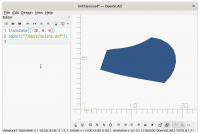
Thanks, that might help clarifying some details. It's currently
trying but not quite getting the correct result for this file.

So far the only test was a simple spline created in LibreCAD
and that looked ok.

ciao,
Torsten.
On 29.07.20 00:43, cbernhardt wrote: > Here is a ZIP file with spline.dxf, spline.jpg, and spline.txt with > coordinates and explanation. Thanks, that might help clarifying some details. It's currently trying but not quite getting the correct result for this file. So far the only test was a simple spline created in LibreCAD and that looked ok. ciao, Torsten.