discuss@lists.openscad.org

OpenSCAD general discussion Mailing-list

View all threads

dxf

L
lar3ry@sasktel.net
Wed, Jul 29, 2020 3:55 AM

On 28 Jul 2020 at 8:57, cbernhardt wrote:

I use an older version of AutoCAD (R14) and I have found that OpenSCAD will
accept DXF files with AutoCAD entities Line, Arc, Polyline, Circle, Ellipse,
and Polygon (actually a Polyline).  If the Polyline has arc segments they
must be eploded (broken into line and arc segments) to import into OpenSCAD
correctly.  AutoCAD 3DFACEs ( like a 3D triangle in an STL file ) will not
import and AutoCAD SPLINE entities will not import.

I often have trouble with various types of files. I have had fairly good luck
converting DXF files to SVG, either by exporting them from Inkscape or
converting them to SVG on one of the on-line file converters.

I like this one: https://convertio.co/dxf-svg/

On 28 Jul 2020 at 8:57, cbernhardt wrote: > I use an older version of AutoCAD (R14) and I have found that OpenSCAD will > accept DXF files with AutoCAD entities Line, Arc, Polyline, Circle, Ellipse, > and Polygon (actually a Polyline). If the Polyline has arc segments they > must be eploded (broken into line and arc segments) to import into OpenSCAD > correctly. AutoCAD 3DFACEs ( like a 3D triangle in an STL file ) will not > import and AutoCAD SPLINE entities will not import. I often have trouble with various types of files. I have had fairly good luck converting DXF files to SVG, either by exporting them from Inkscape or converting them to SVG on one of the on-line file converters. I like this one: https://convertio.co/dxf-svg/
CA
Carsten Arnholm
Wed, Jul 29, 2020 11:47 AM

On 29.07.2020 00:58, Torsten Paul wrote:

On 29.07.20 00:43, cbernhardt wrote:

Here is a ZIP file with spline.dxf, spline.jpg, and spline.txt with
coordinates and explanation.

Thanks, that might help clarifying some details. It's currently
trying but not quite getting the correct result for this file.

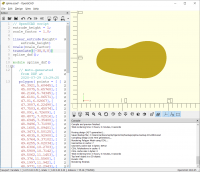
Here is my effort today trying to implement SPLINE in dxfread and
converting it to OpenSCAD.

It sort of works, but splines are far from well defined in DXF, it is
not at all clear how the "control points" are supposed to help, and the
same goes for the "knot values". I used the "fit points" to get the best
result matching the green spline in the original drawing provided by
cbernhardt.

Also, getting the boundary conditions right is not easy (and again the
DXF definition is not clear) so I applied a little work-around based on
the "periodic" setting for the spline to get something that looks right.

See attached PNG and generated .scad file.

P.S: This feature is not available in yesterday's released version of
dxfread, I implemented the feature based on today's example.

Carsten Arnholm

On 29.07.2020 00:58, Torsten Paul wrote: > On 29.07.20 00:43, cbernhardt wrote: >> Here is a ZIP file with spline.dxf, spline.jpg, and spline.txt with >> coordinates and explanation. > > Thanks, that might help clarifying some details. It's currently > trying but not quite getting the correct result for this file. > Here is my effort today trying to implement SPLINE in dxfread and converting it to OpenSCAD. It sort of works, but splines are *far* from well defined in DXF, it is not at all clear how the "control points" are supposed to help, and the same goes for the "knot values". I used the "fit points" to get the best result matching the green spline in the original drawing provided by cbernhardt. Also, getting the boundary conditions right is not easy (and again the DXF definition is not clear) so I applied a little work-around based on the "periodic" setting for the spline to get something that looks right. See attached PNG and generated .scad file. P.S: This feature is not available in yesterday's released version of dxfread, I implemented the feature based on today's example. Carsten Arnholm
AC
A. Craig West
Wed, Jul 29, 2020 12:06 PM

I would expect that if it has control points and knot points, the expected
implementation is a cubic bezier, which is very well defined, and quite
easy to implement in OpenScad

On Wed, 29 Jul 2020, 07:48 Carsten Arnholm, arnholm@arnholm.org wrote:

On 29.07.2020 00:58, Torsten Paul wrote:

On 29.07.20 00:43, cbernhardt wrote:

Here is a ZIP file with spline.dxf, spline.jpg, and spline.txt with
coordinates and explanation.

Thanks, that might help clarifying some details. It's currently
trying but not quite getting the correct result for this file.

Here is my effort today trying to implement SPLINE in dxfread and
converting it to OpenSCAD.

It sort of works, but splines are far from well defined in DXF, it is
not at all clear how the "control points" are supposed to help, and the
same goes for the "knot values". I used the "fit points" to get the best
result matching the green spline in the original drawing provided by
cbernhardt.

Also, getting the boundary conditions right is not easy (and again the
DXF definition is not clear) so I applied a little work-around based on
the "periodic" setting for the spline to get something that looks right.

See attached PNG and generated .scad file.

P.S: This feature is not available in yesterday's released version of
dxfread, I implemented the feature based on today's example.

Carsten Arnholm


OpenSCAD mailing list
Discuss@lists.openscad.org
http://lists.openscad.org/mailman/listinfo/discuss_lists.openscad.org

I would expect that if it has control points and knot points, the expected implementation is a cubic bezier, which is very well defined, and quite easy to implement in OpenScad On Wed, 29 Jul 2020, 07:48 Carsten Arnholm, <arnholm@arnholm.org> wrote: > On 29.07.2020 00:58, Torsten Paul wrote: > > On 29.07.20 00:43, cbernhardt wrote: > >> Here is a ZIP file with spline.dxf, spline.jpg, and spline.txt with > >> coordinates and explanation. > > > > Thanks, that might help clarifying some details. It's currently > > trying but not quite getting the correct result for this file. > > > > Here is my effort today trying to implement SPLINE in dxfread and > converting it to OpenSCAD. > > It sort of works, but splines are *far* from well defined in DXF, it is > not at all clear how the "control points" are supposed to help, and the > same goes for the "knot values". I used the "fit points" to get the best > result matching the green spline in the original drawing provided by > cbernhardt. > > Also, getting the boundary conditions right is not easy (and again the > DXF definition is not clear) so I applied a little work-around based on > the "periodic" setting for the spline to get something that looks right. > > See attached PNG and generated .scad file. > > P.S: This feature is not available in yesterday's released version of > dxfread, I implemented the feature based on today's example. > > Carsten Arnholm > _______________________________________________ > OpenSCAD mailing list > Discuss@lists.openscad.org > http://lists.openscad.org/mailman/listinfo/discuss_lists.openscad.org >
CA
Carsten Arnholm
Wed, Jul 29, 2020 12:16 PM

On 29.07.2020 14:06, A. Craig West wrote:

I would expect that if it has control points and knot points, the
expected implementation is a cubic bezier, which is very well defined,
and quite easy to implement in OpenScad

Then there is no problem, just go ahead and do it.

Carsten Arnholm

On 29.07.2020 14:06, A. Craig West wrote: > I would expect that if it has control points and knot points, the > expected implementation is a cubic bezier, which is very well defined, > and quite easy to implement in OpenScad Then there is no problem, just go ahead and do it. Carsten Arnholm
TV
Tim V. Shaporev
Wed, Jul 29, 2020 12:41 PM

If my memory serves me right, AutoCAD splines are arbitrary order NURBS
i.e. the curve order is specified and (in theory) may be bigger than 3.

On 7/29/2020 3:06 PM, A. Craig West wrote:

I would expect that if it has control points and knot points, the
expected implementation is a cubic bezier, which is very well defined,
and quite easy to implement in OpenScad

On Wed, 29 Jul 2020, 07:48 Carsten Arnholm, <arnholm@arnholm.org
mailto:arnholm@arnholm.org> wrote:

 On 29.07.2020 00:58, Torsten Paul wrote:

On 29.07.20 00:43, cbernhardt wrote:

Here is a ZIP file with spline.dxf, spline.jpg, and spline.txt with
coordinates and explanation.

Thanks, that might help clarifying some details. It's currently
trying but not quite getting the correct result for this file.

 Here is my effort today trying to implement SPLINE in dxfread and
 converting it to OpenSCAD.

 It sort of works, but splines are *far* from well defined in DXF, it is
 not at all clear how the "control points" are supposed to help, and the
 same goes for the "knot values". I used the "fit points" to get the
 best
 result matching the green spline in the original drawing provided by
 cbernhardt.

 Also, getting the boundary conditions right is not easy (and again the
 DXF definition is not clear) so I applied a little work-around based on
 the "periodic" setting for the spline to get something that looks right.

 See attached PNG and generated .scad file.

 P.S: This feature is not available in yesterday's released version of
 dxfread, I implemented the feature based on today's example.

 Carsten Arnholm
 _______________________________________________
 OpenSCAD mailing list
 Discuss@lists.openscad.org <mailto:Discuss@lists.openscad.org>
 http://lists.openscad.org/mailman/listinfo/discuss_lists.openscad.org

OpenSCAD mailing list
Discuss@lists.openscad.org
http://lists.openscad.org/mailman/listinfo/discuss_lists.openscad.org

If my memory serves me right, AutoCAD splines are arbitrary order NURBS i.e. the curve order is specified and (in theory) may be bigger than 3. On 7/29/2020 3:06 PM, A. Craig West wrote: > I would expect that if it has control points and knot points, the > expected implementation is a cubic bezier, which is very well defined, > and quite easy to implement in OpenScad > > On Wed, 29 Jul 2020, 07:48 Carsten Arnholm, <arnholm@arnholm.org > <mailto:arnholm@arnholm.org>> wrote: > > On 29.07.2020 00:58, Torsten Paul wrote: > > On 29.07.20 00:43, cbernhardt wrote: > >> Here is a ZIP file with spline.dxf, spline.jpg, and spline.txt with > >> coordinates and explanation. > > > > Thanks, that might help clarifying some details. It's currently > > trying but not quite getting the correct result for this file. > > > > Here is my effort today trying to implement SPLINE in dxfread and > converting it to OpenSCAD. > > It sort of works, but splines are *far* from well defined in DXF, it is > not at all clear how the "control points" are supposed to help, and the > same goes for the "knot values". I used the "fit points" to get the > best > result matching the green spline in the original drawing provided by > cbernhardt. > > Also, getting the boundary conditions right is not easy (and again the > DXF definition is not clear) so I applied a little work-around based on > the "periodic" setting for the spline to get something that looks right. > > See attached PNG and generated .scad file. > > P.S: This feature is not available in yesterday's released version of > dxfread, I implemented the feature based on today's example. > > Carsten Arnholm > _______________________________________________ > OpenSCAD mailing list > Discuss@lists.openscad.org <mailto:Discuss@lists.openscad.org> > http://lists.openscad.org/mailman/listinfo/discuss_lists.openscad.org > > > _______________________________________________ > OpenSCAD mailing list > Discuss@lists.openscad.org > http://lists.openscad.org/mailman/listinfo/discuss_lists.openscad.org >
C
cbernhardt
Wed, Jul 29, 2020 1:02 PM

cacb wrote

Here is my effort today trying to implement SPLINE in dxfread and
converting it to OpenSCAD.

It sort of works, but splines are far from well defined in DXF, it is
not at all clear how the "control points" are supposed to help, and the
same goes for the "knot values". I used the "fit points" to get the best
result matching the green spline in the original drawing provided by
cbernhardt.

Also, getting the boundary conditions right is not easy (and again the
DXF definition is not clear) so I applied a little work-around based on
the "periodic" setting for the spline to get something that looks right.

See attached PNG and generated .scad file.

P.S: This feature is not available in yesterday's released version of
dxfread, I implemented the feature based on today's example.

Carsten Arnholm

Here is a comparison of your spline to the original in the spline.dxf file.

http://forum.openscad.org/file/t1309/spline2.jpg

--
Sent from: http://forum.openscad.org/

cacb wrote > Here is my effort today trying to implement SPLINE in dxfread and > converting it to OpenSCAD. > > It sort of works, but splines are *far* from well defined in DXF, it is > not at all clear how the "control points" are supposed to help, and the > same goes for the "knot values". I used the "fit points" to get the best > result matching the green spline in the original drawing provided by > cbernhardt. > > Also, getting the boundary conditions right is not easy (and again the > DXF definition is not clear) so I applied a little work-around based on > the "periodic" setting for the spline to get something that looks right. > > See attached PNG and generated .scad file. > > P.S: This feature is not available in yesterday's released version of > dxfread, I implemented the feature based on today's example. > > Carsten Arnholm Here is a comparison of your spline to the original in the spline.dxf file. <http://forum.openscad.org/file/t1309/spline2.jpg> -- Sent from: http://forum.openscad.org/
CA
Carsten Arnholm
Wed, Jul 29, 2020 1:22 PM

On 29.07.2020 15:02, cbernhardt wrote:

Here is a comparison of your spline to the original in the spline.dxf file.

http://forum.openscad.org/file/t1309/spline2.jpg

The difference is probably due to my difficulty applying the boundary
conditions correctly, whatever the correct procedure is. Oh well, such
things happen when the definition is unclear.

Regards
Carsten Arholm

On 29.07.2020 15:02, cbernhardt wrote: > Here is a comparison of your spline to the original in the spline.dxf file. > > <http://forum.openscad.org/file/t1309/spline2.jpg> The difference is probably due to my difficulty applying the boundary conditions correctly, whatever the correct procedure is. Oh well, such things happen when the definition is unclear. Regards Carsten Arholm
TP
Torsten Paul
Wed, Jul 29, 2020 2:30 PM

FWIW, below is the raw data from the DXF. And here's one of the
references to the specification:

http://docs.autodesk.com/ACD/2011/ENU/filesDXF/WS1a9193826455f5ff18cb41610ec0a2e719-79e1.htm

Note the extensive description of the fields below the table...

I'm not sure if the suspicious info "Adobe Flash Player is
required to view related information." would reveal anything
in addition, but I doubt that as the 270 page PDF has exactly
the same table and nothing more.

ciao,
Torsten.

spline: layer = 0, degree = 3
flags:
CLOSED
PERIODIC
PLANAR
start tangent: (0.94160, 0.33673)
end tangent: (0.94160, 0.33673)
knots (16): 0.00 0.00 0.00 0.00 5.11 8.83 14.25 18.25 22.00 26.57 31.73 34.60 37.91 37.91 37.91 37.91
ctrlp (12):
(35.07592, 11.58298 |  1.00000)
(36.67850, 12.15608 |  1.00000)
(39.89868, 11.51130 |  1.00000)
(43.86774, 14.14291 |  1.00000)
(49.59186, 13.56638 |  1.00000)
(49.93316,  8.12415 |  1.00000)
(46.40645,  5.11687 |  1.00000)
(41.67137,  5.96252 |  1.00000)
(37.72738,  6.49387 |  1.00000)
(33.76019,  7.79691 |  1.00000)
(34.03418, 11.21044 |  1.00000)
(35.07592, 11.58298 |  1.00000)

fitp (10):
(35.07592, 11.58298 |  0.00000)
(40.14785, 12.17122 |  0.00000)
(43.63480, 13.48344 |  0.00000)
(48.93316, 12.35222 |  0.00000)
(49.29544,  8.37029 |  0.00000)
(46.53305,  5.83634 |  0.00000)
(41.95925,  5.88159 |  0.00000)
(36.88732,  6.83182 |  0.00000)
(34.44193,  8.32504 |  0.00000)
(35.07592, 11.58298 |  0.00000)

FWIW, below is the raw data from the DXF. And here's one of the references to the specification: http://docs.autodesk.com/ACD/2011/ENU/filesDXF/WS1a9193826455f5ff18cb41610ec0a2e719-79e1.htm Note the extensive description of the fields below the table... I'm not sure if the suspicious info "Adobe Flash Player is required to view related information." would reveal anything in addition, but I doubt that as the 270 page PDF has exactly the same table and nothing more. ciao, Torsten. spline: layer = 0, degree = 3 flags: CLOSED PERIODIC PLANAR start tangent: (0.94160, 0.33673) end tangent: (0.94160, 0.33673) knots (16): 0.00 0.00 0.00 0.00 5.11 8.83 14.25 18.25 22.00 26.57 31.73 34.60 37.91 37.91 37.91 37.91 ctrlp (12): (35.07592, 11.58298 | 1.00000) (36.67850, 12.15608 | 1.00000) (39.89868, 11.51130 | 1.00000) (43.86774, 14.14291 | 1.00000) (49.59186, 13.56638 | 1.00000) (49.93316, 8.12415 | 1.00000) (46.40645, 5.11687 | 1.00000) (41.67137, 5.96252 | 1.00000) (37.72738, 6.49387 | 1.00000) (33.76019, 7.79691 | 1.00000) (34.03418, 11.21044 | 1.00000) (35.07592, 11.58298 | 1.00000) fitp (10): (35.07592, 11.58298 | 0.00000) (40.14785, 12.17122 | 0.00000) (43.63480, 13.48344 | 0.00000) (48.93316, 12.35222 | 0.00000) (49.29544, 8.37029 | 0.00000) (46.53305, 5.83634 | 0.00000) (41.95925, 5.88159 | 0.00000) (36.88732, 6.83182 | 0.00000) (34.44193, 8.32504 | 0.00000) (35.07592, 11.58298 | 0.00000)
RD
Revar Desmera
Wed, Jul 29, 2020 11:08 PM

If splines in DXF have knots, then it’s definitely using the more complex NURBS type splines, as Bezier’s of any degree don’t need knots.
https://en.wikipedia.org/wiki/Non-uniform_rational_B-spline https://en.wikipedia.org/wiki/Non-uniform_rational_B-spline

One nice thing about NURBS is that you can exactly model circular arcs, with the right knot vector.

  • Revar

On Jul 29, 2020, at 5:41 AM, Tim V. Shaporev tim.shaporev@auriga.ru wrote:

If my memory serves me right, AutoCAD splines are arbitrary order NURBS i.e. the curve order is specified and (in theory) may be bigger than 3.

On 7/29/2020 3:06 PM, A. Craig West wrote:

I would expect that if it has control points and knot points, the expected implementation is a cubic bezier, which is very well defined, and quite easy to implement in OpenScad
On Wed, 29 Jul 2020, 07:48 Carsten Arnholm, <arnholm@arnholm.org mailto:arnholm@arnholm.org <mailto:arnholm@arnholm.org mailto:arnholm@arnholm.org>> wrote:
On 29.07.2020 00:58, Torsten Paul wrote:

On 29.07.20 00:43, cbernhardt wrote:

Here is a ZIP file with spline.dxf, spline.jpg, and spline.txt with
coordinates and explanation.

Thanks, that might help clarifying some details. It's currently
trying but not quite getting the correct result for this file.

Here is my effort today trying to implement SPLINE in dxfread and
converting it to OpenSCAD.
It sort of works, but splines are *far* from well defined in DXF, it is
not at all clear how the "control points" are supposed to help, and the
same goes for the "knot values". I used the "fit points" to get the
best
result matching the green spline in the original drawing provided by
cbernhardt.
Also, getting the boundary conditions right is not easy (and again the
DXF definition is not clear) so I applied a little work-around based on
the "periodic" setting for the spline to get something that looks right.
See attached PNG and generated .scad file.
P.S: This feature is not available in yesterday's released version of
dxfread, I implemented the feature based on today's example.
Carsten Arnholm
_______________________________________________
OpenSCAD mailing list
Discuss@lists.openscad.org <mailto:Discuss@lists.openscad.org> <mailto:Discuss@lists.openscad.org <mailto:Discuss@lists.openscad.org>>
http://lists.openscad.org/mailman/listinfo/discuss_lists.openscad.org <http://lists.openscad.org/mailman/listinfo/discuss_lists.openscad.org>

OpenSCAD mailing list
Discuss@lists.openscad.org mailto:Discuss@lists.openscad.org
http://lists.openscad.org/mailman/listinfo/discuss_lists.openscad.org http://lists.openscad.org/mailman/listinfo/discuss_lists.openscad.org

If splines in DXF have knots, then it’s definitely using the more complex NURBS type splines, as Bezier’s of any degree don’t need knots. https://en.wikipedia.org/wiki/Non-uniform_rational_B-spline <https://en.wikipedia.org/wiki/Non-uniform_rational_B-spline> One nice thing about NURBS is that you can exactly model circular arcs, with the right knot vector. - Revar > On Jul 29, 2020, at 5:41 AM, Tim V. Shaporev <tim.shaporev@auriga.ru> wrote: > > If my memory serves me right, AutoCAD splines are arbitrary order NURBS i.e. the curve order is specified and (in theory) may be bigger than 3. > > On 7/29/2020 3:06 PM, A. Craig West wrote: >> I would expect that if it has control points and knot points, the expected implementation is a cubic bezier, which is very well defined, and quite easy to implement in OpenScad >> On Wed, 29 Jul 2020, 07:48 Carsten Arnholm, <arnholm@arnholm.org <mailto:arnholm@arnholm.org> <mailto:arnholm@arnholm.org <mailto:arnholm@arnholm.org>>> wrote: >> On 29.07.2020 00:58, Torsten Paul wrote: >> > On 29.07.20 00:43, cbernhardt wrote: >> >> Here is a ZIP file with spline.dxf, spline.jpg, and spline.txt with >> >> coordinates and explanation. >> > >> > Thanks, that might help clarifying some details. It's currently >> > trying but not quite getting the correct result for this file. >> > >> Here is my effort today trying to implement SPLINE in dxfread and >> converting it to OpenSCAD. >> It sort of works, but splines are *far* from well defined in DXF, it is >> not at all clear how the "control points" are supposed to help, and the >> same goes for the "knot values". I used the "fit points" to get the >> best >> result matching the green spline in the original drawing provided by >> cbernhardt. >> Also, getting the boundary conditions right is not easy (and again the >> DXF definition is not clear) so I applied a little work-around based on >> the "periodic" setting for the spline to get something that looks right. >> See attached PNG and generated .scad file. >> P.S: This feature is not available in yesterday's released version of >> dxfread, I implemented the feature based on today's example. >> Carsten Arnholm >> _______________________________________________ >> OpenSCAD mailing list >> Discuss@lists.openscad.org <mailto:Discuss@lists.openscad.org> <mailto:Discuss@lists.openscad.org <mailto:Discuss@lists.openscad.org>> >> http://lists.openscad.org/mailman/listinfo/discuss_lists.openscad.org <http://lists.openscad.org/mailman/listinfo/discuss_lists.openscad.org> >> _______________________________________________ >> OpenSCAD mailing list >> Discuss@lists.openscad.org <mailto:Discuss@lists.openscad.org> >> http://lists.openscad.org/mailman/listinfo/discuss_lists.openscad.org <http://lists.openscad.org/mailman/listinfo/discuss_lists.openscad.org> > > > _______________________________________________ > OpenSCAD mailing list > Discuss@lists.openscad.org <mailto:Discuss@lists.openscad.org> > http://lists.openscad.org/mailman/listinfo/discuss_lists.openscad.org <http://lists.openscad.org/mailman/listinfo/discuss_lists.openscad.org>