NH
nop head
Tue, Jul 21, 2020 2:06 PM
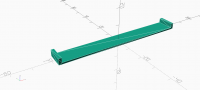
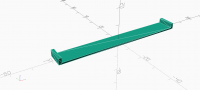
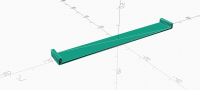
Has the code to show CGAL edges been changed recently. Two things don't
work on OpenSCAD 2020.04.26.ci4968.
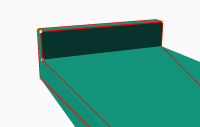
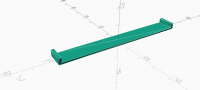
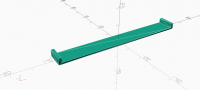
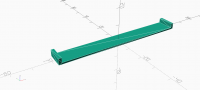
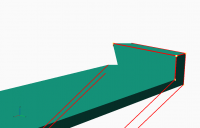
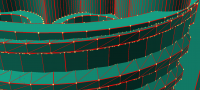
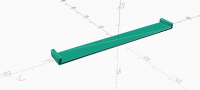
Some edges are missing and if the camera is too close the edges detach from
the object. This is just three overlapping cubes. The concave edge is
missing and the horizontal ones detach when too close.
[image: image.png]
width = 9.8;
length = 73.2;
thickness = 1.75;
overlap = 1;
overlap_h = 3.75;
module packer_stl() {
translate([0, 0, thickness / 2])
cube([length + 2 * overlap, width, thickness], center = true);
for(end = [-1, 1])
    translate([end * (length / 2 + overlap / 2), 0, overlap_h / 2])
        cube([overlap, width, overlap_h], center = true);
}
packer_stl();
Has the code to show CGAL edges been changed recently. Two things don't
work on OpenSCAD 2020.04.26.ci4968.
Some edges are missing and if the camera is too close the edges detach from
the object. This is just three overlapping cubes. The concave edge is
missing and the horizontal ones detach when too close.
[image: image.png]
width = 9.8;
length = 73.2;
thickness = 1.75;
overlap = 1;
overlap_h = 3.75;
module packer_stl() {
translate([0, 0, thickness / 2])
cube([length + 2 * overlap, width, thickness], center = true);
for(end = [-1, 1])
translate([end * (length / 2 + overlap / 2), 0, overlap_h / 2])
cube([overlap, width, overlap_h], center = true);
}
packer_stl();

M
MichaelAtOz
Tue, Jul 21, 2020 11:17 PM
I went back to 2015.03, none did concave edges.
nophead wrote
and if the camera is too close the edges detach from
the object.
I could not reproduce, 2015.03, 2019.05, 2020.04.01, 2020.07.05.
Tried both ortho & perspective.
As a general comment, now that preview & render & export (at least STL) no
longer triangulate/quadralaturate(?) consistently, show edges is not as
useful.
Admin - email* me if you need anything, or if I've done something stupid...
- click on my MichaelAtOz label, there is a link to email me.
Unless specifically shown otherwise above, my contribution is in the Public Domain; to the extent possible under law, I have waived all copyright and related or neighbouring rights to this work. Obviously inclusion of works of previous authors is not included in the above.
--
Sent from: http://forum.openscad.org/
nophead wrote
> Some edges are missing
I went back to 2015.03, none did concave edges.
nophead wrote
> and if the camera is too close the edges detach from
> the object.
I could not reproduce, 2015.03, 2019.05, 2020.04.01, 2020.07.05.
Tried both ortho & perspective.
As a general comment, now that preview & render & export (at least STL) no
longer triangulate/quadralaturate(?) consistently, show edges is not as
useful.
-----
Admin - email* me if you need anything, or if I've done something stupid...
* click on my MichaelAtOz label, there is a link to email me.
Unless specifically shown otherwise above, my contribution is in the Public Domain; to the extent possible under law, I have waived all copyright and related or neighbouring rights to this work. Obviously inclusion of works of previous authors is not included in the above.
--
Sent from: http://forum.openscad.org/

MM
Michael Marx
Wed, Jul 22, 2020 6:36 AM
Let me rephrase that.
None did the inside corner edge of your example.
Presumably as a curve must have edges.
-----Original Message-----
Sent: Wed, 22 Jul 2020 09:18
Subject: Re: [OpenSCAD] Show edges broken
I went back to 2015.03, none did concave edges.
and if the camera is too close the edges detach from
I could not reproduce, 2015.03, 2019.05, 2020.04.01, 2020.07.05.
Tried both ortho & perspective.
As a general comment, now that preview & render & export (at least STL) no
longer triangulate/quadralaturate(?) consistently, show edges is not as
Admin - email* me if you need anything, or if I've done something stupid...
- click on my MichaelAtOz label, there is a link to email me.
Unless specifically shown otherwise above, my contribution is in the Public Domain; to the
extent possible under law, I have waived all copyright and related or neighbouring rights
to this work. Obviously inclusion of works of previous authors is not included in the
> none did concave edges
Let me rephrase that.
None did the inside corner edge of your example.
Presumably as a curve must have edges.
> -----Original Message-----
> From: Discuss [mailto:discuss-bounces@lists.openscad.org] On Behalf Of MichaelAtOz
> Sent: Wed, 22 Jul 2020 09:18
> To: discuss@lists.openscad.org
> Subject: Re: [OpenSCAD] Show edges broken
>
> nophead wrote
> > Some edges are missing
>
> I went back to 2015.03, none did concave edges.
>
> nophead wrote
> > and if the camera is too close the edges detach from
> > the object.
>
> I could not reproduce, 2015.03, 2019.05, 2020.04.01, 2020.07.05.
> Tried both ortho & perspective.
>
> As a general comment, now that preview & render & export (at least STL) no
> longer triangulate/quadralaturate(?) consistently, show edges is not as
> useful.
>
>
>
> -----
> Admin - email* me if you need anything, or if I've done something stupid...
>
> * click on my MichaelAtOz label, there is a link to email me.
>
> Unless specifically shown otherwise above, my contribution is in the Public Domain; to the
> extent possible under law, I have waived all copyright and related or neighbouring rights
> to this work. Obviously inclusion of works of previous authors is not included in the
> above.
>
> --
> Sent from: http://forum.openscad.org/
>
> _______________________________________________
> OpenSCAD mailing list
> Discuss@lists.openscad.org
> http://lists.openscad.org/mailman/listinfo/discuss_lists.openscad.org
--
This email has been checked for viruses by AVG.
https://www.avg.com
NH
nop head
Wed, Jul 22, 2020 10:41 AM
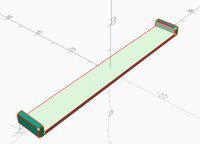
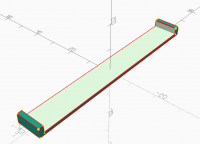
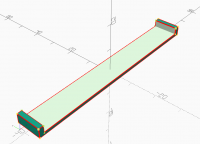
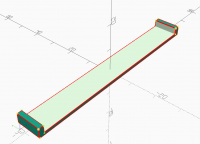
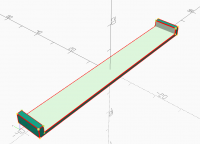
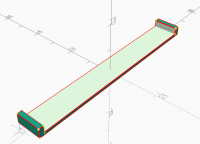
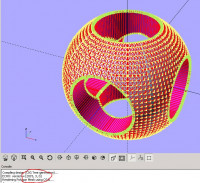
These are viewport parameters that give me the detached edges in
perspective mode:
$vpt = [ -16.23, -7.25, 7.21 ];
$vpr = [ 64.10, 0.00, 69.10 ];
$vpd = 4.13;
I assume the near ends of the lines are in front of the clipping plane but
somehow the lines get clipped incorrectly.
I don't know what the rule for missing edges is. Even if I create the shape
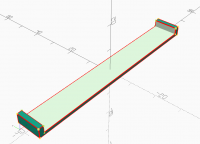
with a difference, instead of a union they are still missing.
[image: image.png]
And if the result is a PolySet the edges are never drawn in F6 but they are
in F5 but in a completely different style, why is that?
[image: image.png]
I agree it is not useful for seeing the final STL triangulation but I find
it useful for checking faces that should actually be flat, are, and don't
have extra edges or vertices.
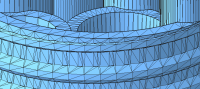
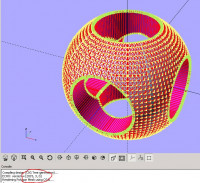
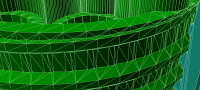
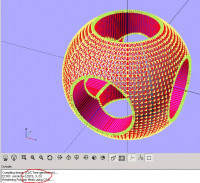
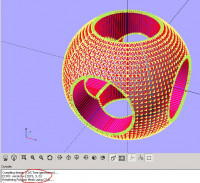
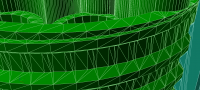
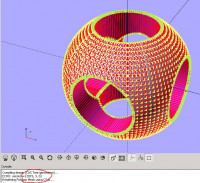
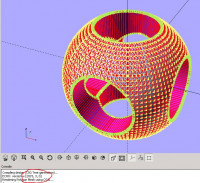
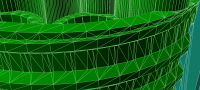
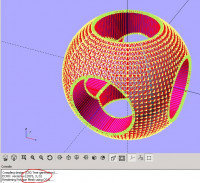
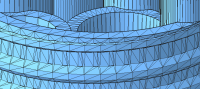
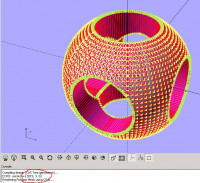
And this complex threaded part looks totally bizarre.
[image: image.png]
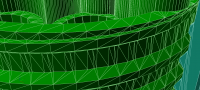
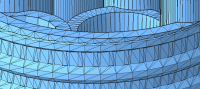
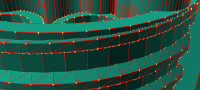
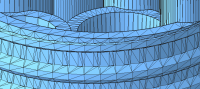
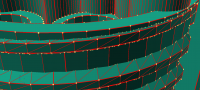
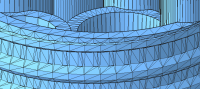
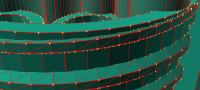
The squarish facets of the cylinder look planar across three edges but the
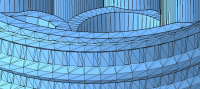
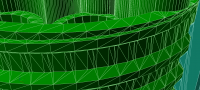
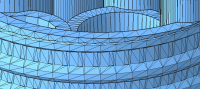
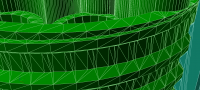
missing bottom edge where they meet the thread looks to be wonky. To get
any accurate representation I have to render() it to a polyset and then use
F5.
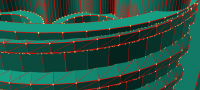
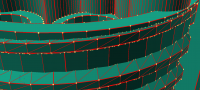
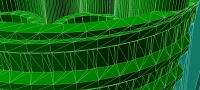
[image: image.png]
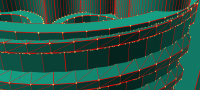
Seems to actually match the STL
[image: image.png]
On Wed, 22 Jul 2020 at 07:37, Michael Marx michael@marx.id.au wrote:
Let me rephrase that.
None did the inside corner edge of your example.
Presumably as a curve must have edges.
-----Original Message-----
Sent: Wed, 22 Jul 2020 09:18
Subject: Re: [OpenSCAD] Show edges broken
I went back to 2015.03, none did concave edges.
and if the camera is too close the edges detach from
I could not reproduce, 2015.03, 2019.05, 2020.04.01, 2020.07.05.
Tried both ortho & perspective.
As a general comment, now that preview & render & export (at least STL)
longer triangulate/quadralaturate(?) consistently, show edges is not as
Admin - email* me if you need anything, or if I've done something
- click on my MichaelAtOz label, there is a link to email me.
Unless specifically shown otherwise above, my contribution is in the
extent possible under law, I have waived all copyright and related or
to this work. Obviously inclusion of works of previous authors is not
These are viewport parameters that give me the detached edges in
perspective mode:
$vpt = [ -16.23, -7.25, 7.21 ];
$vpr = [ 64.10, 0.00, 69.10 ];
$vpd = 4.13;
I assume the near ends of the lines are in front of the clipping plane but
somehow the lines get clipped incorrectly.
I don't know what the rule for missing edges is. Even if I create the shape
with a difference, instead of a union they are still missing.
[image: image.png]
And if the result is a PolySet the edges are never drawn in F6 but they are
in F5 but in a completely different style, why is that?
[image: image.png]
I agree it is not useful for seeing the final STL triangulation but I find
it useful for checking faces that should actually be flat, are, and don't
have extra edges or vertices.
And this complex threaded part looks totally bizarre.
[image: image.png]
The squarish facets of the cylinder look planar across three edges but the
missing bottom edge where they meet the thread looks to be wonky. To get
any accurate representation I have to render() it to a polyset and then use
F5.
[image: image.png]
Seems to actually match the STL
[image: image.png]
On Wed, 22 Jul 2020 at 07:37, Michael Marx <michael@marx.id.au> wrote:
> > none did concave edges
>
>
>
> Let me rephrase that.
>
> None did the inside corner edge of your example.
>
>
>
>
>
> Presumably as a curve must have edges.
>
>
>
> > -----Original Message-----
>
> > From: Discuss [mailto:discuss-bounces@lists.openscad.org] On Behalf Of
> MichaelAtOz
>
> > Sent: Wed, 22 Jul 2020 09:18
>
> > To: discuss@lists.openscad.org
>
> > Subject: Re: [OpenSCAD] Show edges broken
>
> >
>
> > nophead wrote
>
> > > Some edges are missing
>
> >
>
> > I went back to 2015.03, none did concave edges.
>
> >
>
> > nophead wrote
>
> > > and if the camera is too close the edges detach from
>
> > > the object.
>
> >
>
> > I could not reproduce, 2015.03, 2019.05, 2020.04.01, 2020.07.05.
>
> > Tried both ortho & perspective.
>
> >
>
> > As a general comment, now that preview & render & export (at least STL)
> no
>
> > longer triangulate/quadralaturate(?) consistently, show edges is not as
>
> > useful.
>
> >
>
> >
>
> >
>
> > -----
>
> > Admin - email* me if you need anything, or if I've done something
> stupid...
>
> >
>
> > * click on my MichaelAtOz label, there is a link to email me.
>
> >
>
> > Unless specifically shown otherwise above, my contribution is in the
> Public Domain; to the
>
> > extent possible under law, I have waived all copyright and related or
> neighbouring rights
>
> > to this work. Obviously inclusion of works of previous authors is not
> included in the
>
> > above.
>
> >
>
> > --
>
> > Sent from: http://forum.openscad.org/
>
> >
>
> > _______________________________________________
>
> > OpenSCAD mailing list
>
> > Discuss@lists.openscad.org
>
> > http://lists.openscad.org/mailman/listinfo/discuss_lists.openscad.org
>
>
> <http://www.avg.com/email-signature?utm_medium=email&utm_source=link&utm_campaign=sig-email&utm_content=emailclient> Virus-free.
> www.avg.com
> <http://www.avg.com/email-signature?utm_medium=email&utm_source=link&utm_campaign=sig-email&utm_content=emailclient>
> <#m_988652690766883196_DAB4FAD8-2DD7-40BB-A1B8-4E2AA1F9FDF2>
> _______________________________________________
> OpenSCAD mailing list
> Discuss@lists.openscad.org
> http://lists.openscad.org/mailman/listinfo/discuss_lists.openscad.org
>

HL
Hans L
Wed, Jul 22, 2020 6:26 PM
This is just the difference in internal representation for OpenCSG vs
CGAL. OpenCSG requires tessellated faces, and CGAL does not.
CGAL_Nef_Polyhedrons have their own display functions.
I haven't dug into the render display code in a while, but I think it's
even calling some CGAL library function to show these, in which case
changing behavior is mostly out of our hands.
So any faces that are perfectly planar end up displayed as polygonal
shapes having no internal edges, which Nef have no problem representing.
In order to show them fully tessellated we'd have to convert the Nef back
to polyset and perform the tesselation ourselves. This happens
automatically during STL export for example, but would be an extra render
step for us to do so during display.
And it's not a recent change, but has always been this way as far as I am
aware.
Hans
On Wed, Jul 22, 2020 at 5:43 AM nop head nop.head@gmail.com wrote:
These are viewport parameters that give me the detached edges in
perspective mode:
$vpt = [ -16.23, -7.25, 7.21 ];
$vpr = [ 64.10, 0.00, 69.10 ];
$vpd = 4.13;
I assume the near ends of the lines are in front of the clipping plane but
somehow the lines get clipped incorrectly.
I don't know what the rule for missing edges is. Even if I create the
shape with a difference, instead of a union they are still missing.
[image: image.png]
And if the result is a PolySet the edges are never drawn in F6 but they
are in F5 but in a completely different style, why is that?
[image: image.png]
I agree it is not useful for seeing the final STL triangulation but I find
it useful for checking faces that should actually be flat, are, and don't
have extra edges or vertices.
And this complex threaded part looks totally bizarre.
[image: image.png]
The squarish facets of the cylinder look planar across three edges but the
missing bottom edge where they meet the thread looks to be wonky. To get
any accurate representation I have to render() it to a polyset and then use
F5.
[image: image.png]
Seems to actually match the STL
[image: image.png]
On Wed, 22 Jul 2020 at 07:37, Michael Marx michael@marx.id.au wrote:
Let me rephrase that.
None did the inside corner edge of your example.
Presumably as a curve must have edges.
-----Original Message-----
Sent: Wed, 22 Jul 2020 09:18
Subject: Re: [OpenSCAD] Show edges broken
I went back to 2015.03, none did concave edges.
and if the camera is too close the edges detach from
I could not reproduce, 2015.03, 2019.05, 2020.04.01, 2020.07.05.
Tried both ortho & perspective.
As a general comment, now that preview & render & export (at least STL)
longer triangulate/quadralaturate(?) consistently, show edges is not as
Admin - email* me if you need anything, or if I've done something
- click on my MichaelAtOz label, there is a link to email me.
Unless specifically shown otherwise above, my contribution is in the
extent possible under law, I have waived all copyright and related or
to this work. Obviously inclusion of works of previous authors is not
This is just the difference in internal representation for OpenCSG vs
CGAL. OpenCSG requires tessellated faces, and CGAL does not.
CGAL_Nef_Polyhedrons have their own display functions.
I haven't dug into the render display code in a while, but I think it's
even calling some CGAL library function to show these, in which case
changing behavior is mostly out of our hands.
So any faces *that are perfectly planar* end up displayed as polygonal
shapes having no internal edges, which Nef have no problem representing.
In order to show them fully tessellated we'd have to convert the Nef back
to polyset and perform the tesselation ourselves. This happens
automatically during STL export for example, but would be an extra render
step for us to do so during display.
And it's not a recent change, but has always been this way as far as I am
aware.
Hans
On Wed, Jul 22, 2020 at 5:43 AM nop head <nop.head@gmail.com> wrote:
> These are viewport parameters that give me the detached edges in
> perspective mode:
>
> $vpt = [ -16.23, -7.25, 7.21 ];
> $vpr = [ 64.10, 0.00, 69.10 ];
> $vpd = 4.13;
>
> I assume the near ends of the lines are in front of the clipping plane but
> somehow the lines get clipped incorrectly.
>
> I don't know what the rule for missing edges is. Even if I create the
> shape with a difference, instead of a union they are still missing.
>
> [image: image.png]
>
> And if the result is a PolySet the edges are never drawn in F6 but they
> are in F5 but in a completely different style, why is that?
>
> [image: image.png]
>
> I agree it is not useful for seeing the final STL triangulation but I find
> it useful for checking faces that should actually be flat, are, and don't
> have extra edges or vertices.
>
> And this complex threaded part looks totally bizarre.
>
> [image: image.png]
>
> The squarish facets of the cylinder look planar across three edges but the
> missing bottom edge where they meet the thread looks to be wonky. To get
> any accurate representation I have to render() it to a polyset and then use
> F5.
>
> [image: image.png]
>
> Seems to actually match the STL
>
> [image: image.png]
>
>
>
> On Wed, 22 Jul 2020 at 07:37, Michael Marx <michael@marx.id.au> wrote:
>
>> > none did concave edges
>>
>>
>>
>> Let me rephrase that.
>>
>> None did the inside corner edge of your example.
>>
>>
>>
>>
>>
>> Presumably as a curve must have edges.
>>
>>
>>
>> > -----Original Message-----
>>
>> > From: Discuss [mailto:discuss-bounces@lists.openscad.org] On Behalf Of
>> MichaelAtOz
>>
>> > Sent: Wed, 22 Jul 2020 09:18
>>
>> > To: discuss@lists.openscad.org
>>
>> > Subject: Re: [OpenSCAD] Show edges broken
>>
>> >
>>
>> > nophead wrote
>>
>> > > Some edges are missing
>>
>> >
>>
>> > I went back to 2015.03, none did concave edges.
>>
>> >
>>
>> > nophead wrote
>>
>> > > and if the camera is too close the edges detach from
>>
>> > > the object.
>>
>> >
>>
>> > I could not reproduce, 2015.03, 2019.05, 2020.04.01, 2020.07.05.
>>
>> > Tried both ortho & perspective.
>>
>> >
>>
>> > As a general comment, now that preview & render & export (at least STL)
>> no
>>
>> > longer triangulate/quadralaturate(?) consistently, show edges is not as
>>
>> > useful.
>>
>> >
>>
>> >
>>
>> >
>>
>> > -----
>>
>> > Admin - email* me if you need anything, or if I've done something
>> stupid...
>>
>> >
>>
>> > * click on my MichaelAtOz label, there is a link to email me.
>>
>> >
>>
>> > Unless specifically shown otherwise above, my contribution is in the
>> Public Domain; to the
>>
>> > extent possible under law, I have waived all copyright and related or
>> neighbouring rights
>>
>> > to this work. Obviously inclusion of works of previous authors is not
>> included in the
>>
>> > above.
>>
>> >
>>
>> > --
>>
>> > Sent from: http://forum.openscad.org/
>>
>> >
>>
>> > _______________________________________________
>>
>> > OpenSCAD mailing list
>>
>> > Discuss@lists.openscad.org
>>
>> > http://lists.openscad.org/mailman/listinfo/discuss_lists.openscad.org
>>
>>
>> <http://www.avg.com/email-signature?utm_medium=email&utm_source=link&utm_campaign=sig-email&utm_content=emailclient> Virus-free.
>> www.avg.com
>> <http://www.avg.com/email-signature?utm_medium=email&utm_source=link&utm_campaign=sig-email&utm_content=emailclient>
>> <#m_9066787652053745442_m_988652690766883196_DAB4FAD8-2DD7-40BB-A1B8-4E2AA1F9FDF2>
>> _______________________________________________
>> OpenSCAD mailing list
>> Discuss@lists.openscad.org
>> http://lists.openscad.org/mailman/listinfo/discuss_lists.openscad.org
>>
> _______________________________________________
> OpenSCAD mailing list
> Discuss@lists.openscad.org
> http://lists.openscad.org/mailman/listinfo/discuss_lists.openscad.org
>
NH
nop head
Wed, Jul 22, 2020 6:35 PM
Yes I appreciate that CGAL works in polygons and does not tessellate to
triangles but where two polygons meet at an angle there must be an edge.
Why does it only show a subset of edges?
On Wed, 22 Jul 2020 at 19:27, Hans L thehans@gmail.com wrote:
This is just the difference in internal representation for OpenCSG vs
CGAL. OpenCSG requires tessellated faces, and CGAL does not.
CGAL_Nef_Polyhedrons have their own display functions.
I haven't dug into the render display code in a while, but I think it's
even calling some CGAL library function to show these, in which case
changing behavior is mostly out of our hands.
So any faces that are perfectly planar end up displayed as polygonal
shapes having no internal edges, which Nef have no problem representing.
In order to show them fully tessellated we'd have to convert the Nef back
to polyset and perform the tesselation ourselves. This happens
automatically during STL export for example, but would be an extra render
step for us to do so during display.
And it's not a recent change, but has always been this way as far as I am
aware.
Hans
On Wed, Jul 22, 2020 at 5:43 AM nop head nop.head@gmail.com wrote:
These are viewport parameters that give me the detached edges in
perspective mode:
$vpt = [ -16.23, -7.25, 7.21 ];
$vpr = [ 64.10, 0.00, 69.10 ];
$vpd = 4.13;
I assume the near ends of the lines are in front of the clipping plane
but somehow the lines get clipped incorrectly.
I don't know what the rule for missing edges is. Even if I create the
shape with a difference, instead of a union they are still missing.
[image: image.png]
And if the result is a PolySet the edges are never drawn in F6 but they
are in F5 but in a completely different style, why is that?
[image: image.png]
I agree it is not useful for seeing the final STL triangulation but I
find it useful for checking faces that should actually be flat, are, and
don't have extra edges or vertices.
And this complex threaded part looks totally bizarre.
[image: image.png]
The squarish facets of the cylinder look planar across three edges but
the missing bottom edge where they meet the thread looks to be wonky. To
get any accurate representation I have to render() it to a polyset and then
use F5.
[image: image.png]
Seems to actually match the STL
[image: image.png]
On Wed, 22 Jul 2020 at 07:37, Michael Marx michael@marx.id.au wrote:
Let me rephrase that.
None did the inside corner edge of your example.
Presumably as a curve must have edges.
-----Original Message-----
Sent: Wed, 22 Jul 2020 09:18
Subject: Re: [OpenSCAD] Show edges broken
I went back to 2015.03, none did concave edges.
and if the camera is too close the edges detach from
I could not reproduce, 2015.03, 2019.05, 2020.04.01, 2020.07.05.
Tried both ortho & perspective.
As a general comment, now that preview & render & export (at least
longer triangulate/quadralaturate(?) consistently, show edges is not as
Admin - email* me if you need anything, or if I've done something
- click on my MichaelAtOz label, there is a link to email me.
Unless specifically shown otherwise above, my contribution is in the
extent possible under law, I have waived all copyright and related or
to this work. Obviously inclusion of works of previous authors is not
Yes I appreciate that CGAL works in polygons and does not tessellate to
triangles but where two polygons meet at an angle there must be an edge.
Why does it only show a subset of edges?
On Wed, 22 Jul 2020 at 19:27, Hans L <thehans@gmail.com> wrote:
> This is just the difference in internal representation for OpenCSG vs
> CGAL. OpenCSG requires tessellated faces, and CGAL does not.
> CGAL_Nef_Polyhedrons have their own display functions.
> I haven't dug into the render display code in a while, but I think it's
> even calling some CGAL library function to show these, in which case
> changing behavior is mostly out of our hands.
> So any faces *that are perfectly planar* end up displayed as polygonal
> shapes having no internal edges, which Nef have no problem representing.
> In order to show them fully tessellated we'd have to convert the Nef back
> to polyset and perform the tesselation ourselves. This happens
> automatically during STL export for example, but would be an extra render
> step for us to do so during display.
>
> And it's not a recent change, but has always been this way as far as I am
> aware.
>
> Hans
>
> On Wed, Jul 22, 2020 at 5:43 AM nop head <nop.head@gmail.com> wrote:
>
>> These are viewport parameters that give me the detached edges in
>> perspective mode:
>>
>> $vpt = [ -16.23, -7.25, 7.21 ];
>> $vpr = [ 64.10, 0.00, 69.10 ];
>> $vpd = 4.13;
>>
>> I assume the near ends of the lines are in front of the clipping plane
>> but somehow the lines get clipped incorrectly.
>>
>> I don't know what the rule for missing edges is. Even if I create the
>> shape with a difference, instead of a union they are still missing.
>>
>> [image: image.png]
>>
>> And if the result is a PolySet the edges are never drawn in F6 but they
>> are in F5 but in a completely different style, why is that?
>>
>> [image: image.png]
>>
>> I agree it is not useful for seeing the final STL triangulation but I
>> find it useful for checking faces that should actually be flat, are, and
>> don't have extra edges or vertices.
>>
>> And this complex threaded part looks totally bizarre.
>>
>> [image: image.png]
>>
>> The squarish facets of the cylinder look planar across three edges but
>> the missing bottom edge where they meet the thread looks to be wonky. To
>> get any accurate representation I have to render() it to a polyset and then
>> use F5.
>>
>> [image: image.png]
>>
>> Seems to actually match the STL
>>
>> [image: image.png]
>>
>>
>>
>> On Wed, 22 Jul 2020 at 07:37, Michael Marx <michael@marx.id.au> wrote:
>>
>>> > none did concave edges
>>>
>>>
>>>
>>> Let me rephrase that.
>>>
>>> None did the inside corner edge of your example.
>>>
>>>
>>>
>>>
>>>
>>> Presumably as a curve must have edges.
>>>
>>>
>>>
>>> > -----Original Message-----
>>>
>>> > From: Discuss [mailto:discuss-bounces@lists.openscad.org] On Behalf
>>> Of MichaelAtOz
>>>
>>> > Sent: Wed, 22 Jul 2020 09:18
>>>
>>> > To: discuss@lists.openscad.org
>>>
>>> > Subject: Re: [OpenSCAD] Show edges broken
>>>
>>> >
>>>
>>> > nophead wrote
>>>
>>> > > Some edges are missing
>>>
>>> >
>>>
>>> > I went back to 2015.03, none did concave edges.
>>>
>>> >
>>>
>>> > nophead wrote
>>>
>>> > > and if the camera is too close the edges detach from
>>>
>>> > > the object.
>>>
>>> >
>>>
>>> > I could not reproduce, 2015.03, 2019.05, 2020.04.01, 2020.07.05.
>>>
>>> > Tried both ortho & perspective.
>>>
>>> >
>>>
>>> > As a general comment, now that preview & render & export (at least
>>> STL) no
>>>
>>> > longer triangulate/quadralaturate(?) consistently, show edges is not as
>>>
>>> > useful.
>>>
>>> >
>>>
>>> >
>>>
>>> >
>>>
>>> > -----
>>>
>>> > Admin - email* me if you need anything, or if I've done something
>>> stupid...
>>>
>>> >
>>>
>>> > * click on my MichaelAtOz label, there is a link to email me.
>>>
>>> >
>>>
>>> > Unless specifically shown otherwise above, my contribution is in the
>>> Public Domain; to the
>>>
>>> > extent possible under law, I have waived all copyright and related or
>>> neighbouring rights
>>>
>>> > to this work. Obviously inclusion of works of previous authors is not
>>> included in the
>>>
>>> > above.
>>>
>>> >
>>>
>>> > --
>>>
>>> > Sent from: http://forum.openscad.org/
>>>
>>> >
>>>
>>> > _______________________________________________
>>>
>>> > OpenSCAD mailing list
>>>
>>> > Discuss@lists.openscad.org
>>>
>>> > http://lists.openscad.org/mailman/listinfo/discuss_lists.openscad.org
>>>
>>>
>>> <http://www.avg.com/email-signature?utm_medium=email&utm_source=link&utm_campaign=sig-email&utm_content=emailclient> Virus-free.
>>> www.avg.com
>>> <http://www.avg.com/email-signature?utm_medium=email&utm_source=link&utm_campaign=sig-email&utm_content=emailclient>
>>> <#m_945136239423965639_m_9066787652053745442_m_988652690766883196_DAB4FAD8-2DD7-40BB-A1B8-4E2AA1F9FDF2>
>>> _______________________________________________
>>> OpenSCAD mailing list
>>> Discuss@lists.openscad.org
>>> http://lists.openscad.org/mailman/listinfo/discuss_lists.openscad.org
>>>
>> _______________________________________________
>> OpenSCAD mailing list
>> Discuss@lists.openscad.org
>> http://lists.openscad.org/mailman/listinfo/discuss_lists.openscad.org
>>
> _______________________________________________
> OpenSCAD mailing list
> Discuss@lists.openscad.org
> http://lists.openscad.org/mailman/listinfo/discuss_lists.openscad.org
>
HL
Hans L
Wed, Jul 22, 2020 6:50 PM
Oh, you mean such as the concave part of your "packer" object having no
apparent edge?
Maybe not particularly helpful, but the edge is still there, just hidden a
bit on the wrong side of things... it can be seen if you position your
camera inside the object using perspective mode.
This might be considered CGAL bug, but again I'm not 100% sure if its
ultimately the CGAL code that is responsible for the polyhedron/edge
rendering here.
On Wed, Jul 22, 2020 at 1:36 PM nop head nop.head@gmail.com wrote:
Yes I appreciate that CGAL works in polygons and does not tessellate to
triangles but where two polygons meet at an angle there must be an edge.
Why does it only show a subset of edges?
On Wed, 22 Jul 2020 at 19:27, Hans L thehans@gmail.com wrote:
This is just the difference in internal representation for OpenCSG vs
CGAL. OpenCSG requires tessellated faces, and CGAL does not.
CGAL_Nef_Polyhedrons have their own display functions.
I haven't dug into the render display code in a while, but I think it's
even calling some CGAL library function to show these, in which case
changing behavior is mostly out of our hands.
So any faces that are perfectly planar end up displayed as polygonal
shapes having no internal edges, which Nef have no problem representing.
In order to show them fully tessellated we'd have to convert the Nef back
to polyset and perform the tesselation ourselves. This happens
automatically during STL export for example, but would be an extra render
step for us to do so during display.
And it's not a recent change, but has always been this way as far as I am
aware.
Hans
On Wed, Jul 22, 2020 at 5:43 AM nop head nop.head@gmail.com wrote:
These are viewport parameters that give me the detached edges in
perspective mode:
$vpt = [ -16.23, -7.25, 7.21 ];
$vpr = [ 64.10, 0.00, 69.10 ];
$vpd = 4.13;
I assume the near ends of the lines are in front of the clipping plane
but somehow the lines get clipped incorrectly.
I don't know what the rule for missing edges is. Even if I create the
shape with a difference, instead of a union they are still missing.
[image: image.png]
And if the result is a PolySet the edges are never drawn in F6 but they
are in F5 but in a completely different style, why is that?
[image: image.png]
I agree it is not useful for seeing the final STL triangulation but I
find it useful for checking faces that should actually be flat, are, and
don't have extra edges or vertices.
And this complex threaded part looks totally bizarre.
[image: image.png]
The squarish facets of the cylinder look planar across three edges but
the missing bottom edge where they meet the thread looks to be wonky. To
get any accurate representation I have to render() it to a polyset and then
use F5.
[image: image.png]
Seems to actually match the STL
[image: image.png]
On Wed, 22 Jul 2020 at 07:37, Michael Marx michael@marx.id.au wrote:
Let me rephrase that.
None did the inside corner edge of your example.
Presumably as a curve must have edges.
-----Original Message-----
Sent: Wed, 22 Jul 2020 09:18
Subject: Re: [OpenSCAD] Show edges broken
I went back to 2015.03, none did concave edges.
and if the camera is too close the edges detach from
I could not reproduce, 2015.03, 2019.05, 2020.04.01, 2020.07.05.
Tried both ortho & perspective.
As a general comment, now that preview & render & export (at least
longer triangulate/quadralaturate(?) consistently, show edges is not
Admin - email* me if you need anything, or if I've done something
- click on my MichaelAtOz label, there is a link to email me.
Unless specifically shown otherwise above, my contribution is in the
extent possible under law, I have waived all copyright and related or
to this work. Obviously inclusion of works of previous authors is not
Oh, you mean such as the concave part of your "packer" object having no
apparent edge?
Maybe not particularly helpful, but the edge is still there, just hidden a
bit on the wrong side of things... it can be seen if you position your
camera inside the object using perspective mode.
This *might* be considered CGAL bug, but again I'm not 100% sure if its
ultimately the CGAL code that is responsible for the polyhedron/edge
rendering here.
On Wed, Jul 22, 2020 at 1:36 PM nop head <nop.head@gmail.com> wrote:
> Yes I appreciate that CGAL works in polygons and does not tessellate to
> triangles but where two polygons meet at an angle there must be an edge.
> Why does it only show a subset of edges?
>
> On Wed, 22 Jul 2020 at 19:27, Hans L <thehans@gmail.com> wrote:
>
>> This is just the difference in internal representation for OpenCSG vs
>> CGAL. OpenCSG requires tessellated faces, and CGAL does not.
>> CGAL_Nef_Polyhedrons have their own display functions.
>> I haven't dug into the render display code in a while, but I think it's
>> even calling some CGAL library function to show these, in which case
>> changing behavior is mostly out of our hands.
>> So any faces *that are perfectly planar* end up displayed as polygonal
>> shapes having no internal edges, which Nef have no problem representing.
>> In order to show them fully tessellated we'd have to convert the Nef back
>> to polyset and perform the tesselation ourselves. This happens
>> automatically during STL export for example, but would be an extra render
>> step for us to do so during display.
>>
>> And it's not a recent change, but has always been this way as far as I am
>> aware.
>>
>> Hans
>>
>> On Wed, Jul 22, 2020 at 5:43 AM nop head <nop.head@gmail.com> wrote:
>>
>>> These are viewport parameters that give me the detached edges in
>>> perspective mode:
>>>
>>> $vpt = [ -16.23, -7.25, 7.21 ];
>>> $vpr = [ 64.10, 0.00, 69.10 ];
>>> $vpd = 4.13;
>>>
>>> I assume the near ends of the lines are in front of the clipping plane
>>> but somehow the lines get clipped incorrectly.
>>>
>>> I don't know what the rule for missing edges is. Even if I create the
>>> shape with a difference, instead of a union they are still missing.
>>>
>>> [image: image.png]
>>>
>>> And if the result is a PolySet the edges are never drawn in F6 but they
>>> are in F5 but in a completely different style, why is that?
>>>
>>> [image: image.png]
>>>
>>> I agree it is not useful for seeing the final STL triangulation but I
>>> find it useful for checking faces that should actually be flat, are, and
>>> don't have extra edges or vertices.
>>>
>>> And this complex threaded part looks totally bizarre.
>>>
>>> [image: image.png]
>>>
>>> The squarish facets of the cylinder look planar across three edges but
>>> the missing bottom edge where they meet the thread looks to be wonky. To
>>> get any accurate representation I have to render() it to a polyset and then
>>> use F5.
>>>
>>> [image: image.png]
>>>
>>> Seems to actually match the STL
>>>
>>> [image: image.png]
>>>
>>>
>>>
>>> On Wed, 22 Jul 2020 at 07:37, Michael Marx <michael@marx.id.au> wrote:
>>>
>>>> > none did concave edges
>>>>
>>>>
>>>>
>>>> Let me rephrase that.
>>>>
>>>> None did the inside corner edge of your example.
>>>>
>>>>
>>>>
>>>>
>>>>
>>>> Presumably as a curve must have edges.
>>>>
>>>>
>>>>
>>>> > -----Original Message-----
>>>>
>>>> > From: Discuss [mailto:discuss-bounces@lists.openscad.org] On Behalf
>>>> Of MichaelAtOz
>>>>
>>>> > Sent: Wed, 22 Jul 2020 09:18
>>>>
>>>> > To: discuss@lists.openscad.org
>>>>
>>>> > Subject: Re: [OpenSCAD] Show edges broken
>>>>
>>>> >
>>>>
>>>> > nophead wrote
>>>>
>>>> > > Some edges are missing
>>>>
>>>> >
>>>>
>>>> > I went back to 2015.03, none did concave edges.
>>>>
>>>> >
>>>>
>>>> > nophead wrote
>>>>
>>>> > > and if the camera is too close the edges detach from
>>>>
>>>> > > the object.
>>>>
>>>> >
>>>>
>>>> > I could not reproduce, 2015.03, 2019.05, 2020.04.01, 2020.07.05.
>>>>
>>>> > Tried both ortho & perspective.
>>>>
>>>> >
>>>>
>>>> > As a general comment, now that preview & render & export (at least
>>>> STL) no
>>>>
>>>> > longer triangulate/quadralaturate(?) consistently, show edges is not
>>>> as
>>>>
>>>> > useful.
>>>>
>>>> >
>>>>
>>>> >
>>>>
>>>> >
>>>>
>>>> > -----
>>>>
>>>> > Admin - email* me if you need anything, or if I've done something
>>>> stupid...
>>>>
>>>> >
>>>>
>>>> > * click on my MichaelAtOz label, there is a link to email me.
>>>>
>>>> >
>>>>
>>>> > Unless specifically shown otherwise above, my contribution is in the
>>>> Public Domain; to the
>>>>
>>>> > extent possible under law, I have waived all copyright and related or
>>>> neighbouring rights
>>>>
>>>> > to this work. Obviously inclusion of works of previous authors is not
>>>> included in the
>>>>
>>>> > above.
>>>>
>>>> >
>>>>
>>>> > --
>>>>
>>>> > Sent from: http://forum.openscad.org/
>>>>
>>>> >
>>>>
>>>> > _______________________________________________
>>>>
>>>> > OpenSCAD mailing list
>>>>
>>>> > Discuss@lists.openscad.org
>>>>
>>>> > http://lists.openscad.org/mailman/listinfo/discuss_lists.openscad.org
>>>>
>>>>
>>>> <http://www.avg.com/email-signature?utm_medium=email&utm_source=link&utm_campaign=sig-email&utm_content=emailclient> Virus-free.
>>>> www.avg.com
>>>> <http://www.avg.com/email-signature?utm_medium=email&utm_source=link&utm_campaign=sig-email&utm_content=emailclient>
>>>> <#m_8572132749704301283_m_945136239423965639_m_9066787652053745442_m_988652690766883196_DAB4FAD8-2DD7-40BB-A1B8-4E2AA1F9FDF2>
>>>> _______________________________________________
>>>> OpenSCAD mailing list
>>>> Discuss@lists.openscad.org
>>>> http://lists.openscad.org/mailman/listinfo/discuss_lists.openscad.org
>>>>
>>> _______________________________________________
>>> OpenSCAD mailing list
>>> Discuss@lists.openscad.org
>>> http://lists.openscad.org/mailman/listinfo/discuss_lists.openscad.org
>>>
>> _______________________________________________
>> OpenSCAD mailing list
>> Discuss@lists.openscad.org
>> http://lists.openscad.org/mailman/listinfo/discuss_lists.openscad.org
>>
> _______________________________________________
> OpenSCAD mailing list
> Discuss@lists.openscad.org
> http://lists.openscad.org/mailman/listinfo/discuss_lists.openscad.org
>
NH
nop head
Wed, Jul 22, 2020 7:12 PM
Ah, I see. Odd though because the lines are so thick one would think they
would be visible from both sides.
So two bugs in the CGAL edge rendering: some edges are inside and when the
line hits the front clipping plane its clipped endpoint ends up in the
wrong place.
On Wed, 22 Jul 2020 at 19:52, Hans L thehans@gmail.com wrote:
Oh, you mean such as the concave part of your "packer" object having no
apparent edge?
Maybe not particularly helpful, but the edge is still there, just hidden a
bit on the wrong side of things... it can be seen if you position your
camera inside the object using perspective mode.
This might be considered CGAL bug, but again I'm not 100% sure if its
ultimately the CGAL code that is responsible for the polyhedron/edge
rendering here.
On Wed, Jul 22, 2020 at 1:36 PM nop head nop.head@gmail.com wrote:
Yes I appreciate that CGAL works in polygons and does not tessellate to
triangles but where two polygons meet at an angle there must be an edge.
Why does it only show a subset of edges?
On Wed, 22 Jul 2020 at 19:27, Hans L thehans@gmail.com wrote:
This is just the difference in internal representation for OpenCSG vs
CGAL. OpenCSG requires tessellated faces, and CGAL does not.
CGAL_Nef_Polyhedrons have their own display functions.
I haven't dug into the render display code in a while, but I think it's
even calling some CGAL library function to show these, in which case
changing behavior is mostly out of our hands.
So any faces that are perfectly planar end up displayed as polygonal
shapes having no internal edges, which Nef have no problem representing.
In order to show them fully tessellated we'd have to convert the Nef
back to polyset and perform the tesselation ourselves. This happens
automatically during STL export for example, but would be an extra render
step for us to do so during display.
And it's not a recent change, but has always been this way as far as I
am aware.
Hans
On Wed, Jul 22, 2020 at 5:43 AM nop head nop.head@gmail.com wrote:
These are viewport parameters that give me the detached edges in
perspective mode:
$vpt = [ -16.23, -7.25, 7.21 ];
$vpr = [ 64.10, 0.00, 69.10 ];
$vpd = 4.13;
I assume the near ends of the lines are in front of the clipping plane
but somehow the lines get clipped incorrectly.
I don't know what the rule for missing edges is. Even if I create the
shape with a difference, instead of a union they are still missing.
[image: image.png]
And if the result is a PolySet the edges are never drawn in F6 but they
are in F5 but in a completely different style, why is that?
[image: image.png]
I agree it is not useful for seeing the final STL triangulation but I
find it useful for checking faces that should actually be flat, are, and
don't have extra edges or vertices.
And this complex threaded part looks totally bizarre.
[image: image.png]
The squarish facets of the cylinder look planar across three edges but
the missing bottom edge where they meet the thread looks to be wonky. To
get any accurate representation I have to render() it to a polyset and then
use F5.
[image: image.png]
Seems to actually match the STL
[image: image.png]
On Wed, 22 Jul 2020 at 07:37, Michael Marx michael@marx.id.au wrote:
Let me rephrase that.
None did the inside corner edge of your example.
Presumably as a curve must have edges.
-----Original Message-----
Sent: Wed, 22 Jul 2020 09:18
Subject: Re: [OpenSCAD] Show edges broken
I went back to 2015.03, none did concave edges.
and if the camera is too close the edges detach from
I could not reproduce, 2015.03, 2019.05, 2020.04.01, 2020.07.05.
Tried both ortho & perspective.
As a general comment, now that preview & render & export (at least
longer triangulate/quadralaturate(?) consistently, show edges is not
Admin - email* me if you need anything, or if I've done something
- click on my MichaelAtOz label, there is a link to email me.
Unless specifically shown otherwise above, my contribution is in the
extent possible under law, I have waived all copyright and related
to this work. Obviously inclusion of works of previous authors is
Ah, I see. Odd though because the lines are so thick one would think they
would be visible from both sides.
So two bugs in the CGAL edge rendering: some edges are inside and when the
line hits the front clipping plane its clipped endpoint ends up in the
wrong place.
On Wed, 22 Jul 2020 at 19:52, Hans L <thehans@gmail.com> wrote:
> Oh, you mean such as the concave part of your "packer" object having no
> apparent edge?
> Maybe not particularly helpful, but the edge is still there, just hidden a
> bit on the wrong side of things... it can be seen if you position your
> camera inside the object using perspective mode.
> This *might* be considered CGAL bug, but again I'm not 100% sure if its
> ultimately the CGAL code that is responsible for the polyhedron/edge
> rendering here.
>
> On Wed, Jul 22, 2020 at 1:36 PM nop head <nop.head@gmail.com> wrote:
>
>> Yes I appreciate that CGAL works in polygons and does not tessellate to
>> triangles but where two polygons meet at an angle there must be an edge.
>> Why does it only show a subset of edges?
>>
>> On Wed, 22 Jul 2020 at 19:27, Hans L <thehans@gmail.com> wrote:
>>
>>> This is just the difference in internal representation for OpenCSG vs
>>> CGAL. OpenCSG requires tessellated faces, and CGAL does not.
>>> CGAL_Nef_Polyhedrons have their own display functions.
>>> I haven't dug into the render display code in a while, but I think it's
>>> even calling some CGAL library function to show these, in which case
>>> changing behavior is mostly out of our hands.
>>> So any faces *that are perfectly planar* end up displayed as polygonal
>>> shapes having no internal edges, which Nef have no problem representing.
>>> In order to show them fully tessellated we'd have to convert the Nef
>>> back to polyset and perform the tesselation ourselves. This happens
>>> automatically during STL export for example, but would be an extra render
>>> step for us to do so during display.
>>>
>>> And it's not a recent change, but has always been this way as far as I
>>> am aware.
>>>
>>> Hans
>>>
>>> On Wed, Jul 22, 2020 at 5:43 AM nop head <nop.head@gmail.com> wrote:
>>>
>>>> These are viewport parameters that give me the detached edges in
>>>> perspective mode:
>>>>
>>>> $vpt = [ -16.23, -7.25, 7.21 ];
>>>> $vpr = [ 64.10, 0.00, 69.10 ];
>>>> $vpd = 4.13;
>>>>
>>>> I assume the near ends of the lines are in front of the clipping plane
>>>> but somehow the lines get clipped incorrectly.
>>>>
>>>> I don't know what the rule for missing edges is. Even if I create the
>>>> shape with a difference, instead of a union they are still missing.
>>>>
>>>> [image: image.png]
>>>>
>>>> And if the result is a PolySet the edges are never drawn in F6 but they
>>>> are in F5 but in a completely different style, why is that?
>>>>
>>>> [image: image.png]
>>>>
>>>> I agree it is not useful for seeing the final STL triangulation but I
>>>> find it useful for checking faces that should actually be flat, are, and
>>>> don't have extra edges or vertices.
>>>>
>>>> And this complex threaded part looks totally bizarre.
>>>>
>>>> [image: image.png]
>>>>
>>>> The squarish facets of the cylinder look planar across three edges but
>>>> the missing bottom edge where they meet the thread looks to be wonky. To
>>>> get any accurate representation I have to render() it to a polyset and then
>>>> use F5.
>>>>
>>>> [image: image.png]
>>>>
>>>> Seems to actually match the STL
>>>>
>>>> [image: image.png]
>>>>
>>>>
>>>>
>>>> On Wed, 22 Jul 2020 at 07:37, Michael Marx <michael@marx.id.au> wrote:
>>>>
>>>>> > none did concave edges
>>>>>
>>>>>
>>>>>
>>>>> Let me rephrase that.
>>>>>
>>>>> None did the inside corner edge of your example.
>>>>>
>>>>>
>>>>>
>>>>>
>>>>>
>>>>> Presumably as a curve must have edges.
>>>>>
>>>>>
>>>>>
>>>>> > -----Original Message-----
>>>>>
>>>>> > From: Discuss [mailto:discuss-bounces@lists.openscad.org] On Behalf
>>>>> Of MichaelAtOz
>>>>>
>>>>> > Sent: Wed, 22 Jul 2020 09:18
>>>>>
>>>>> > To: discuss@lists.openscad.org
>>>>>
>>>>> > Subject: Re: [OpenSCAD] Show edges broken
>>>>>
>>>>> >
>>>>>
>>>>> > nophead wrote
>>>>>
>>>>> > > Some edges are missing
>>>>>
>>>>> >
>>>>>
>>>>> > I went back to 2015.03, none did concave edges.
>>>>>
>>>>> >
>>>>>
>>>>> > nophead wrote
>>>>>
>>>>> > > and if the camera is too close the edges detach from
>>>>>
>>>>> > > the object.
>>>>>
>>>>> >
>>>>>
>>>>> > I could not reproduce, 2015.03, 2019.05, 2020.04.01, 2020.07.05.
>>>>>
>>>>> > Tried both ortho & perspective.
>>>>>
>>>>> >
>>>>>
>>>>> > As a general comment, now that preview & render & export (at least
>>>>> STL) no
>>>>>
>>>>> > longer triangulate/quadralaturate(?) consistently, show edges is not
>>>>> as
>>>>>
>>>>> > useful.
>>>>>
>>>>> >
>>>>>
>>>>> >
>>>>>
>>>>> >
>>>>>
>>>>> > -----
>>>>>
>>>>> > Admin - email* me if you need anything, or if I've done something
>>>>> stupid...
>>>>>
>>>>> >
>>>>>
>>>>> > * click on my MichaelAtOz label, there is a link to email me.
>>>>>
>>>>> >
>>>>>
>>>>> > Unless specifically shown otherwise above, my contribution is in the
>>>>> Public Domain; to the
>>>>>
>>>>> > extent possible under law, I have waived all copyright and related
>>>>> or neighbouring rights
>>>>>
>>>>> > to this work. Obviously inclusion of works of previous authors is
>>>>> not included in the
>>>>>
>>>>> > above.
>>>>>
>>>>> >
>>>>>
>>>>> > --
>>>>>
>>>>> > Sent from: http://forum.openscad.org/
>>>>>
>>>>> >
>>>>>
>>>>> > _______________________________________________
>>>>>
>>>>> > OpenSCAD mailing list
>>>>>
>>>>> > Discuss@lists.openscad.org
>>>>>
>>>>> >
>>>>> http://lists.openscad.org/mailman/listinfo/discuss_lists.openscad.org
>>>>>
>>>>>
>>>>> <http://www.avg.com/email-signature?utm_medium=email&utm_source=link&utm_campaign=sig-email&utm_content=emailclient> Virus-free.
>>>>> www.avg.com
>>>>> <http://www.avg.com/email-signature?utm_medium=email&utm_source=link&utm_campaign=sig-email&utm_content=emailclient>
>>>>> <#m_-127227421020485090_m_8572132749704301283_m_945136239423965639_m_9066787652053745442_m_988652690766883196_DAB4FAD8-2DD7-40BB-A1B8-4E2AA1F9FDF2>
>>>>> _______________________________________________
>>>>> OpenSCAD mailing list
>>>>> Discuss@lists.openscad.org
>>>>> http://lists.openscad.org/mailman/listinfo/discuss_lists.openscad.org
>>>>>
>>>> _______________________________________________
>>>> OpenSCAD mailing list
>>>> Discuss@lists.openscad.org
>>>> http://lists.openscad.org/mailman/listinfo/discuss_lists.openscad.org
>>>>
>>> _______________________________________________
>>> OpenSCAD mailing list
>>> Discuss@lists.openscad.org
>>> http://lists.openscad.org/mailman/listinfo/discuss_lists.openscad.org
>>>
>> _______________________________________________
>> OpenSCAD mailing list
>> Discuss@lists.openscad.org
>> http://lists.openscad.org/mailman/listinfo/discuss_lists.openscad.org
>>
> _______________________________________________
> OpenSCAD mailing list
> Discuss@lists.openscad.org
> http://lists.openscad.org/mailman/listinfo/discuss_lists.openscad.org
>
HL
Hans L
Wed, Jul 22, 2020 7:13 PM
In fact, it's possible to get the edge to show up from some very specific
viewpoints, which points to this being a sort of Z-fighting issue.
I zoomed in close and rotated camera around and eventually the edge did pop
into existence here: https://i.imgur.com/09QADD5.png
The OpenCSG edges have less of an issue with this sort of Z-fighting
because they use a custom fragment shader, where it just substitutes the
pixel color as it fills in near the edges of those triangles.
On Wed, Jul 22, 2020 at 1:50 PM Hans L thehans@gmail.com wrote:
Oh, you mean such as the concave part of your "packer" object having no
apparent edge?
Maybe not particularly helpful, but the edge is still there, just hidden a
bit on the wrong side of things... it can be seen if you position your
camera inside the object using perspective mode.
This might be considered CGAL bug, but again I'm not 100% sure if its
ultimately the CGAL code that is responsible for the polyhedron/edge
rendering here.
On Wed, Jul 22, 2020 at 1:36 PM nop head nop.head@gmail.com wrote:
Yes I appreciate that CGAL works in polygons and does not tessellate to
triangles but where two polygons meet at an angle there must be an edge.
Why does it only show a subset of edges?
On Wed, 22 Jul 2020 at 19:27, Hans L thehans@gmail.com wrote:
This is just the difference in internal representation for OpenCSG vs
CGAL. OpenCSG requires tessellated faces, and CGAL does not.
CGAL_Nef_Polyhedrons have their own display functions.
I haven't dug into the render display code in a while, but I think it's
even calling some CGAL library function to show these, in which case
changing behavior is mostly out of our hands.
So any faces that are perfectly planar end up displayed as polygonal
shapes having no internal edges, which Nef have no problem representing.
In order to show them fully tessellated we'd have to convert the Nef
back to polyset and perform the tesselation ourselves. This happens
automatically during STL export for example, but would be an extra render
step for us to do so during display.
And it's not a recent change, but has always been this way as far as I
am aware.
Hans
On Wed, Jul 22, 2020 at 5:43 AM nop head nop.head@gmail.com wrote:
These are viewport parameters that give me the detached edges in
perspective mode:
$vpt = [ -16.23, -7.25, 7.21 ];
$vpr = [ 64.10, 0.00, 69.10 ];
$vpd = 4.13;
I assume the near ends of the lines are in front of the clipping plane
but somehow the lines get clipped incorrectly.
I don't know what the rule for missing edges is. Even if I create the
shape with a difference, instead of a union they are still missing.
[image: image.png]
And if the result is a PolySet the edges are never drawn in F6 but they
are in F5 but in a completely different style, why is that?
[image: image.png]
I agree it is not useful for seeing the final STL triangulation but I
find it useful for checking faces that should actually be flat, are, and
don't have extra edges or vertices.
And this complex threaded part looks totally bizarre.
[image: image.png]
The squarish facets of the cylinder look planar across three edges but
the missing bottom edge where they meet the thread looks to be wonky. To
get any accurate representation I have to render() it to a polyset and then
use F5.
[image: image.png]
Seems to actually match the STL
[image: image.png]
On Wed, 22 Jul 2020 at 07:37, Michael Marx michael@marx.id.au wrote:
Let me rephrase that.
None did the inside corner edge of your example.
Presumably as a curve must have edges.
-----Original Message-----
Sent: Wed, 22 Jul 2020 09:18
Subject: Re: [OpenSCAD] Show edges broken
I went back to 2015.03, none did concave edges.
and if the camera is too close the edges detach from
I could not reproduce, 2015.03, 2019.05, 2020.04.01, 2020.07.05.
Tried both ortho & perspective.
As a general comment, now that preview & render & export (at least
longer triangulate/quadralaturate(?) consistently, show edges is not
Admin - email* me if you need anything, or if I've done something
- click on my MichaelAtOz label, there is a link to email me.
Unless specifically shown otherwise above, my contribution is in the
extent possible under law, I have waived all copyright and related
to this work. Obviously inclusion of works of previous authors is
In fact, it's possible to get the edge to show up from some very specific
viewpoints, which points to this being a sort of Z-fighting issue.
I zoomed in close and rotated camera around and eventually the edge did pop
into existence here: https://i.imgur.com/09QADD5.png
The OpenCSG edges have less of an issue with this sort of Z-fighting
because they use a custom fragment shader, where it just substitutes the
pixel color as it fills in near the edges of those triangles.
On Wed, Jul 22, 2020 at 1:50 PM Hans L <thehans@gmail.com> wrote:
> Oh, you mean such as the concave part of your "packer" object having no
> apparent edge?
> Maybe not particularly helpful, but the edge is still there, just hidden a
> bit on the wrong side of things... it can be seen if you position your
> camera inside the object using perspective mode.
> This *might* be considered CGAL bug, but again I'm not 100% sure if its
> ultimately the CGAL code that is responsible for the polyhedron/edge
> rendering here.
>
> On Wed, Jul 22, 2020 at 1:36 PM nop head <nop.head@gmail.com> wrote:
>
>> Yes I appreciate that CGAL works in polygons and does not tessellate to
>> triangles but where two polygons meet at an angle there must be an edge.
>> Why does it only show a subset of edges?
>>
>> On Wed, 22 Jul 2020 at 19:27, Hans L <thehans@gmail.com> wrote:
>>
>>> This is just the difference in internal representation for OpenCSG vs
>>> CGAL. OpenCSG requires tessellated faces, and CGAL does not.
>>> CGAL_Nef_Polyhedrons have their own display functions.
>>> I haven't dug into the render display code in a while, but I think it's
>>> even calling some CGAL library function to show these, in which case
>>> changing behavior is mostly out of our hands.
>>> So any faces *that are perfectly planar* end up displayed as polygonal
>>> shapes having no internal edges, which Nef have no problem representing.
>>> In order to show them fully tessellated we'd have to convert the Nef
>>> back to polyset and perform the tesselation ourselves. This happens
>>> automatically during STL export for example, but would be an extra render
>>> step for us to do so during display.
>>>
>>> And it's not a recent change, but has always been this way as far as I
>>> am aware.
>>>
>>> Hans
>>>
>>> On Wed, Jul 22, 2020 at 5:43 AM nop head <nop.head@gmail.com> wrote:
>>>
>>>> These are viewport parameters that give me the detached edges in
>>>> perspective mode:
>>>>
>>>> $vpt = [ -16.23, -7.25, 7.21 ];
>>>> $vpr = [ 64.10, 0.00, 69.10 ];
>>>> $vpd = 4.13;
>>>>
>>>> I assume the near ends of the lines are in front of the clipping plane
>>>> but somehow the lines get clipped incorrectly.
>>>>
>>>> I don't know what the rule for missing edges is. Even if I create the
>>>> shape with a difference, instead of a union they are still missing.
>>>>
>>>> [image: image.png]
>>>>
>>>> And if the result is a PolySet the edges are never drawn in F6 but they
>>>> are in F5 but in a completely different style, why is that?
>>>>
>>>> [image: image.png]
>>>>
>>>> I agree it is not useful for seeing the final STL triangulation but I
>>>> find it useful for checking faces that should actually be flat, are, and
>>>> don't have extra edges or vertices.
>>>>
>>>> And this complex threaded part looks totally bizarre.
>>>>
>>>> [image: image.png]
>>>>
>>>> The squarish facets of the cylinder look planar across three edges but
>>>> the missing bottom edge where they meet the thread looks to be wonky. To
>>>> get any accurate representation I have to render() it to a polyset and then
>>>> use F5.
>>>>
>>>> [image: image.png]
>>>>
>>>> Seems to actually match the STL
>>>>
>>>> [image: image.png]
>>>>
>>>>
>>>>
>>>> On Wed, 22 Jul 2020 at 07:37, Michael Marx <michael@marx.id.au> wrote:
>>>>
>>>>> > none did concave edges
>>>>>
>>>>>
>>>>>
>>>>> Let me rephrase that.
>>>>>
>>>>> None did the inside corner edge of your example.
>>>>>
>>>>>
>>>>>
>>>>>
>>>>>
>>>>> Presumably as a curve must have edges.
>>>>>
>>>>>
>>>>>
>>>>> > -----Original Message-----
>>>>>
>>>>> > From: Discuss [mailto:discuss-bounces@lists.openscad.org] On Behalf
>>>>> Of MichaelAtOz
>>>>>
>>>>> > Sent: Wed, 22 Jul 2020 09:18
>>>>>
>>>>> > To: discuss@lists.openscad.org
>>>>>
>>>>> > Subject: Re: [OpenSCAD] Show edges broken
>>>>>
>>>>> >
>>>>>
>>>>> > nophead wrote
>>>>>
>>>>> > > Some edges are missing
>>>>>
>>>>> >
>>>>>
>>>>> > I went back to 2015.03, none did concave edges.
>>>>>
>>>>> >
>>>>>
>>>>> > nophead wrote
>>>>>
>>>>> > > and if the camera is too close the edges detach from
>>>>>
>>>>> > > the object.
>>>>>
>>>>> >
>>>>>
>>>>> > I could not reproduce, 2015.03, 2019.05, 2020.04.01, 2020.07.05.
>>>>>
>>>>> > Tried both ortho & perspective.
>>>>>
>>>>> >
>>>>>
>>>>> > As a general comment, now that preview & render & export (at least
>>>>> STL) no
>>>>>
>>>>> > longer triangulate/quadralaturate(?) consistently, show edges is not
>>>>> as
>>>>>
>>>>> > useful.
>>>>>
>>>>> >
>>>>>
>>>>> >
>>>>>
>>>>> >
>>>>>
>>>>> > -----
>>>>>
>>>>> > Admin - email* me if you need anything, or if I've done something
>>>>> stupid...
>>>>>
>>>>> >
>>>>>
>>>>> > * click on my MichaelAtOz label, there is a link to email me.
>>>>>
>>>>> >
>>>>>
>>>>> > Unless specifically shown otherwise above, my contribution is in the
>>>>> Public Domain; to the
>>>>>
>>>>> > extent possible under law, I have waived all copyright and related
>>>>> or neighbouring rights
>>>>>
>>>>> > to this work. Obviously inclusion of works of previous authors is
>>>>> not included in the
>>>>>
>>>>> > above.
>>>>>
>>>>> >
>>>>>
>>>>> > --
>>>>>
>>>>> > Sent from: http://forum.openscad.org/
>>>>>
>>>>> >
>>>>>
>>>>> > _______________________________________________
>>>>>
>>>>> > OpenSCAD mailing list
>>>>>
>>>>> > Discuss@lists.openscad.org
>>>>>
>>>>> >
>>>>> http://lists.openscad.org/mailman/listinfo/discuss_lists.openscad.org
>>>>>
>>>>>
>>>>> <http://www.avg.com/email-signature?utm_medium=email&utm_source=link&utm_campaign=sig-email&utm_content=emailclient> Virus-free.
>>>>> www.avg.com
>>>>> <http://www.avg.com/email-signature?utm_medium=email&utm_source=link&utm_campaign=sig-email&utm_content=emailclient>
>>>>> <#m_-7235249719303615080_m_8572132749704301283_m_945136239423965639_m_9066787652053745442_m_988652690766883196_DAB4FAD8-2DD7-40BB-A1B8-4E2AA1F9FDF2>
>>>>> _______________________________________________
>>>>> OpenSCAD mailing list
>>>>> Discuss@lists.openscad.org
>>>>> http://lists.openscad.org/mailman/listinfo/discuss_lists.openscad.org
>>>>>
>>>> _______________________________________________
>>>> OpenSCAD mailing list
>>>> Discuss@lists.openscad.org
>>>> http://lists.openscad.org/mailman/listinfo/discuss_lists.openscad.org
>>>>
>>> _______________________________________________
>>> OpenSCAD mailing list
>>> Discuss@lists.openscad.org
>>> http://lists.openscad.org/mailman/listinfo/discuss_lists.openscad.org
>>>
>> _______________________________________________
>> OpenSCAD mailing list
>> Discuss@lists.openscad.org
>> http://lists.openscad.org/mailman/listinfo/discuss_lists.openscad.org
>>
>
NH
nop head
Wed, Jul 22, 2020 7:23 PM
I can't reproduce that. When I go close with the camera I get lots off
clipping errors:
[image: image.png]
On Wed, 22 Jul 2020 at 20:14, Hans L thehans@gmail.com wrote:
In fact, it's possible to get the edge to show up from some very specific
viewpoints, which points to this being a sort of Z-fighting issue.
I zoomed in close and rotated camera around and eventually the edge did
pop into existence here: https://i.imgur.com/09QADD5.png
The OpenCSG edges have less of an issue with this sort of Z-fighting
because they use a custom fragment shader, where it just substitutes the
pixel color as it fills in near the edges of those triangles.
On Wed, Jul 22, 2020 at 1:50 PM Hans L thehans@gmail.com wrote:
Oh, you mean such as the concave part of your "packer" object having no
apparent edge?
Maybe not particularly helpful, but the edge is still there, just hidden
a bit on the wrong side of things... it can be seen if you position your
camera inside the object using perspective mode.
This might be considered CGAL bug, but again I'm not 100% sure if its
ultimately the CGAL code that is responsible for the polyhedron/edge
rendering here.
On Wed, Jul 22, 2020 at 1:36 PM nop head nop.head@gmail.com wrote:
Yes I appreciate that CGAL works in polygons and does not tessellate to
triangles but where two polygons meet at an angle there must be an edge.
Why does it only show a subset of edges?
On Wed, 22 Jul 2020 at 19:27, Hans L thehans@gmail.com wrote:
This is just the difference in internal representation for OpenCSG vs
CGAL. OpenCSG requires tessellated faces, and CGAL does not.
CGAL_Nef_Polyhedrons have their own display functions.
I haven't dug into the render display code in a while, but I think it's
even calling some CGAL library function to show these, in which case
changing behavior is mostly out of our hands.
So any faces that are perfectly planar end up displayed as polygonal
shapes having no internal edges, which Nef have no problem representing.
In order to show them fully tessellated we'd have to convert the Nef
back to polyset and perform the tesselation ourselves. This happens
automatically during STL export for example, but would be an extra render
step for us to do so during display.
And it's not a recent change, but has always been this way as far as I
am aware.
Hans
On Wed, Jul 22, 2020 at 5:43 AM nop head nop.head@gmail.com wrote:
These are viewport parameters that give me the detached edges in
perspective mode:
$vpt = [ -16.23, -7.25, 7.21 ];
$vpr = [ 64.10, 0.00, 69.10 ];
$vpd = 4.13;
I assume the near ends of the lines are in front of the clipping plane
but somehow the lines get clipped incorrectly.
I don't know what the rule for missing edges is. Even if I create the
shape with a difference, instead of a union they are still missing.
[image: image.png]
And if the result is a PolySet the edges are never drawn in F6 but
they are in F5 but in a completely different style, why is that?
[image: image.png]
I agree it is not useful for seeing the final STL triangulation but I
find it useful for checking faces that should actually be flat, are, and
don't have extra edges or vertices.
And this complex threaded part looks totally bizarre.
[image: image.png]
The squarish facets of the cylinder look planar across three edges but
the missing bottom edge where they meet the thread looks to be wonky. To
get any accurate representation I have to render() it to a polyset and then
use F5.
[image: image.png]
Seems to actually match the STL
[image: image.png]
On Wed, 22 Jul 2020 at 07:37, Michael Marx michael@marx.id.au wrote:
Let me rephrase that.
None did the inside corner edge of your example.
Presumably as a curve must have edges.
-----Original Message-----
Sent: Wed, 22 Jul 2020 09:18
Subject: Re: [OpenSCAD] Show edges broken
I went back to 2015.03, none did concave edges.
and if the camera is too close the edges detach from
I could not reproduce, 2015.03, 2019.05, 2020.04.01, 2020.07.05.
Tried both ortho & perspective.
As a general comment, now that preview & render & export (at least
longer triangulate/quadralaturate(?) consistently, show edges is
Admin - email* me if you need anything, or if I've done something
- click on my MichaelAtOz label, there is a link to email me.
Unless specifically shown otherwise above, my contribution is in
the Public Domain; to the
extent possible under law, I have waived all copyright and related
to this work. Obviously inclusion of works of previous authors is
I can't reproduce that. When I go close with the camera I get lots off
clipping errors:
[image: image.png]
On Wed, 22 Jul 2020 at 20:14, Hans L <thehans@gmail.com> wrote:
> In fact, it's possible to get the edge to show up from some very specific
> viewpoints, which points to this being a sort of Z-fighting issue.
> I zoomed in close and rotated camera around and eventually the edge did
> pop into existence here: https://i.imgur.com/09QADD5.png
>
> The OpenCSG edges have less of an issue with this sort of Z-fighting
> because they use a custom fragment shader, where it just substitutes the
> pixel color as it fills in near the edges of those triangles.
>
>
> On Wed, Jul 22, 2020 at 1:50 PM Hans L <thehans@gmail.com> wrote:
>
>> Oh, you mean such as the concave part of your "packer" object having no
>> apparent edge?
>> Maybe not particularly helpful, but the edge is still there, just hidden
>> a bit on the wrong side of things... it can be seen if you position your
>> camera inside the object using perspective mode.
>> This *might* be considered CGAL bug, but again I'm not 100% sure if its
>> ultimately the CGAL code that is responsible for the polyhedron/edge
>> rendering here.
>>
>> On Wed, Jul 22, 2020 at 1:36 PM nop head <nop.head@gmail.com> wrote:
>>
>>> Yes I appreciate that CGAL works in polygons and does not tessellate to
>>> triangles but where two polygons meet at an angle there must be an edge.
>>> Why does it only show a subset of edges?
>>>
>>> On Wed, 22 Jul 2020 at 19:27, Hans L <thehans@gmail.com> wrote:
>>>
>>>> This is just the difference in internal representation for OpenCSG vs
>>>> CGAL. OpenCSG requires tessellated faces, and CGAL does not.
>>>> CGAL_Nef_Polyhedrons have their own display functions.
>>>> I haven't dug into the render display code in a while, but I think it's
>>>> even calling some CGAL library function to show these, in which case
>>>> changing behavior is mostly out of our hands.
>>>> So any faces *that are perfectly planar* end up displayed as polygonal
>>>> shapes having no internal edges, which Nef have no problem representing.
>>>> In order to show them fully tessellated we'd have to convert the Nef
>>>> back to polyset and perform the tesselation ourselves. This happens
>>>> automatically during STL export for example, but would be an extra render
>>>> step for us to do so during display.
>>>>
>>>> And it's not a recent change, but has always been this way as far as I
>>>> am aware.
>>>>
>>>> Hans
>>>>
>>>> On Wed, Jul 22, 2020 at 5:43 AM nop head <nop.head@gmail.com> wrote:
>>>>
>>>>> These are viewport parameters that give me the detached edges in
>>>>> perspective mode:
>>>>>
>>>>> $vpt = [ -16.23, -7.25, 7.21 ];
>>>>> $vpr = [ 64.10, 0.00, 69.10 ];
>>>>> $vpd = 4.13;
>>>>>
>>>>> I assume the near ends of the lines are in front of the clipping plane
>>>>> but somehow the lines get clipped incorrectly.
>>>>>
>>>>> I don't know what the rule for missing edges is. Even if I create the
>>>>> shape with a difference, instead of a union they are still missing.
>>>>>
>>>>> [image: image.png]
>>>>>
>>>>> And if the result is a PolySet the edges are never drawn in F6 but
>>>>> they are in F5 but in a completely different style, why is that?
>>>>>
>>>>> [image: image.png]
>>>>>
>>>>> I agree it is not useful for seeing the final STL triangulation but I
>>>>> find it useful for checking faces that should actually be flat, are, and
>>>>> don't have extra edges or vertices.
>>>>>
>>>>> And this complex threaded part looks totally bizarre.
>>>>>
>>>>> [image: image.png]
>>>>>
>>>>> The squarish facets of the cylinder look planar across three edges but
>>>>> the missing bottom edge where they meet the thread looks to be wonky. To
>>>>> get any accurate representation I have to render() it to a polyset and then
>>>>> use F5.
>>>>>
>>>>> [image: image.png]
>>>>>
>>>>> Seems to actually match the STL
>>>>>
>>>>> [image: image.png]
>>>>>
>>>>>
>>>>>
>>>>> On Wed, 22 Jul 2020 at 07:37, Michael Marx <michael@marx.id.au> wrote:
>>>>>
>>>>>> > none did concave edges
>>>>>>
>>>>>>
>>>>>>
>>>>>> Let me rephrase that.
>>>>>>
>>>>>> None did the inside corner edge of your example.
>>>>>>
>>>>>>
>>>>>>
>>>>>>
>>>>>>
>>>>>> Presumably as a curve must have edges.
>>>>>>
>>>>>>
>>>>>>
>>>>>> > -----Original Message-----
>>>>>>
>>>>>> > From: Discuss [mailto:discuss-bounces@lists.openscad.org] On
>>>>>> Behalf Of MichaelAtOz
>>>>>>
>>>>>> > Sent: Wed, 22 Jul 2020 09:18
>>>>>>
>>>>>> > To: discuss@lists.openscad.org
>>>>>>
>>>>>> > Subject: Re: [OpenSCAD] Show edges broken
>>>>>>
>>>>>> >
>>>>>>
>>>>>> > nophead wrote
>>>>>>
>>>>>> > > Some edges are missing
>>>>>>
>>>>>> >
>>>>>>
>>>>>> > I went back to 2015.03, none did concave edges.
>>>>>>
>>>>>> >
>>>>>>
>>>>>> > nophead wrote
>>>>>>
>>>>>> > > and if the camera is too close the edges detach from
>>>>>>
>>>>>> > > the object.
>>>>>>
>>>>>> >
>>>>>>
>>>>>> > I could not reproduce, 2015.03, 2019.05, 2020.04.01, 2020.07.05.
>>>>>>
>>>>>> > Tried both ortho & perspective.
>>>>>>
>>>>>> >
>>>>>>
>>>>>> > As a general comment, now that preview & render & export (at least
>>>>>> STL) no
>>>>>>
>>>>>> > longer triangulate/quadralaturate(?) consistently, show edges is
>>>>>> not as
>>>>>>
>>>>>> > useful.
>>>>>>
>>>>>> >
>>>>>>
>>>>>> >
>>>>>>
>>>>>> >
>>>>>>
>>>>>> > -----
>>>>>>
>>>>>> > Admin - email* me if you need anything, or if I've done something
>>>>>> stupid...
>>>>>>
>>>>>> >
>>>>>>
>>>>>> > * click on my MichaelAtOz label, there is a link to email me.
>>>>>>
>>>>>> >
>>>>>>
>>>>>> > Unless specifically shown otherwise above, my contribution is in
>>>>>> the Public Domain; to the
>>>>>>
>>>>>> > extent possible under law, I have waived all copyright and related
>>>>>> or neighbouring rights
>>>>>>
>>>>>> > to this work. Obviously inclusion of works of previous authors is
>>>>>> not included in the
>>>>>>
>>>>>> > above.
>>>>>>
>>>>>> >
>>>>>>
>>>>>> > --
>>>>>>
>>>>>> > Sent from: http://forum.openscad.org/
>>>>>>
>>>>>> >
>>>>>>
>>>>>> > _______________________________________________
>>>>>>
>>>>>> > OpenSCAD mailing list
>>>>>>
>>>>>> > Discuss@lists.openscad.org
>>>>>>
>>>>>> >
>>>>>> http://lists.openscad.org/mailman/listinfo/discuss_lists.openscad.org
>>>>>>
>>>>>>
>>>>>> <http://www.avg.com/email-signature?utm_medium=email&utm_source=link&utm_campaign=sig-email&utm_content=emailclient> Virus-free.
>>>>>> www.avg.com
>>>>>> <http://www.avg.com/email-signature?utm_medium=email&utm_source=link&utm_campaign=sig-email&utm_content=emailclient>
>>>>>> <#m_-2851557669588523705_m_-7235249719303615080_m_8572132749704301283_m_945136239423965639_m_9066787652053745442_m_988652690766883196_DAB4FAD8-2DD7-40BB-A1B8-4E2AA1F9FDF2>
>>>>>> _______________________________________________
>>>>>> OpenSCAD mailing list
>>>>>> Discuss@lists.openscad.org
>>>>>> http://lists.openscad.org/mailman/listinfo/discuss_lists.openscad.org
>>>>>>
>>>>> _______________________________________________
>>>>> OpenSCAD mailing list
>>>>> Discuss@lists.openscad.org
>>>>> http://lists.openscad.org/mailman/listinfo/discuss_lists.openscad.org
>>>>>
>>>> _______________________________________________
>>>> OpenSCAD mailing list
>>>> Discuss@lists.openscad.org
>>>> http://lists.openscad.org/mailman/listinfo/discuss_lists.openscad.org
>>>>
>>> _______________________________________________
>>> OpenSCAD mailing list
>>> Discuss@lists.openscad.org
>>> http://lists.openscad.org/mailman/listinfo/discuss_lists.openscad.org
>>>
>> _______________________________________________
> OpenSCAD mailing list
> Discuss@lists.openscad.org
> http://lists.openscad.org/mailman/listinfo/discuss_lists.openscad.org
>