

discuss@lists.openscad.org

OpenSCAD general discussion Mailing-list

View all threads

converting svg files from Inkscape to scad files to stl files

A
adamtimm1
Wed, Feb 10, 2016 1:31 AM

I hope I do not offend anyone with this request or my stupidity.  This was
supposed to be a simple "thing."

From an "instructable" and a "Thing" in Thingiverse (

http://www.instructables.com/id/Convert-any-2D-image-to-a-3D-object-using-OpenSCAD/
) the instructions said that I could import a 2D jpeg into Inkscape, covert
it into an svg file, click Path>Object to Path  then click extensions

Paths2openscad.  When I opened openscad I was supposed to be able to easily

convert the file to an extruded stl that I could print on my 3D printer.
REally??  I have been working on it for 2 days.

I am a photographer and an artist.  I want to create 3D images from my
photos and from artwork so that the blind can touch an image and "see it."
That is* all *I want to do. I did it once through another venue.

I did drop a "dxf" file onto the command line but I haven't the foggiest how
to implement it.  The first time I did it I got a message saying I had
dropped an invalid dxf file onto the command line.

I am told that I have to "correctly escape the string." How do I do that?  I
am totally overwhelmed with things I have to do at the moment and I do not
want more.  I am at a point where everything I do takes me further afield
from my goals.  I know that there is a manual but for the little thing I am
attempting to do I only need a couple of instructions.  I have no intention
of doing any greater things with SCAD.  It is a task I will repeat many
times until something better/easier comes along.

Could someone please tell me how to import the dxf file I want, extrude it
then save it as an STL?  I was thinking I would get an  "import" button, but
noooo!

Can/would someone please walk me through this?

--
View this message in context: http://forum.openscad.org/converting-svg-files-from-Inkscape-to-scad-files-to-stl-files-tp16084.html
Sent from the OpenSCAD mailing list archive at Nabble.com.

I hope I do not offend anyone with this request or my stupidity. This was supposed to be a simple "thing." >From an "instructable" and a "Thing" in Thingiverse ( http://www.instructables.com/id/Convert-any-2D-image-to-a-3D-object-using-OpenSCAD/ ) the instructions said that I could import a 2D jpeg into Inkscape, covert it into an svg file, click Path>Object to Path then click extensions >Paths2openscad. When I opened openscad I was supposed to be able to easily convert the file to an extruded stl that I could print on my 3D printer. REally?? I have been working on it for 2 days. I am a photographer and an artist. I want to create 3D images from my photos and from artwork so that the blind can touch an image and "see it." That is* all *I want to do. I did it once through another venue. I did drop a "dxf" file onto the command line but I haven't the foggiest how to implement it. The first time I did it I got a message saying I had dropped an invalid dxf file onto the command line. I am told that I have to "correctly escape the string." How do I do that? I am totally overwhelmed with things I have to do at the moment and I do not want more. I am at a point where everything I do takes me further afield from my goals. I know that there is a manual but for the little thing I am attempting to do I only need a couple of instructions. I have no intention of doing any greater things with SCAD. It is a task I will repeat many times until something better/easier comes along. Could someone please tell me how to import the dxf file I want, extrude it then save it as an STL? I was thinking I would get an "import" button, but noooo! Can/would someone please walk me through this? -- View this message in context: http://forum.openscad.org/converting-svg-files-from-Inkscape-to-scad-files-to-stl-files-tp16084.html Sent from the OpenSCAD mailing list archive at Nabble.com.
F
fred
Wed, Feb 10, 2016 1:45 AM

I've done just as you've described. One could consider that it's a bit less obvious than one could hope. If you are able to import your DXF file into Inkscape, that's a tiny part of the battle. Please keep in mind that I rarely know what I'm doing, but often enough muddle through it and accomplish the desired result.
Rather than pursue this particular direction, have you considered to create a lithophane? I ask this because a DXF or other vector file could be considered a two-bit image, black and white, while a lithophane will have greyscale, in a manner of speaking. With some lithophane generators, you can specify the depth/thickness of the print. For sighted viewing, one wants a minimal thickness for the light portions, which would work for non-sighted people as well, I suppose. I usually print a lithophane at 3-4mm, but you could have something as thick as 6-10 for exaggerated contrast for non-sighted viewers.
I'm not going to be able to create a workflow for you tonight, but I expect I'll have enough time tomorrow morning to address your request. It's really quite fun, in my opinion. 

On Tuesday, February 9, 2016 8:32 PM, adamtimm1 <adamtimm1@msn.com> wrote:

I hope I do not offend anyone with this request or my stupidity.  This was
supposed to be a simple "thing."

From an "instructable" and a "Thing" in Thingiverse (

http://www.instructables.com/id/Convert-any-2D-image-to-a-3D-object-using-OpenSCAD/
) the instructions said that I could import a 2D jpeg into Inkscape, covert
it into an svg file, click Path>Object to Path  then click extensions

Paths2openscad.  When I opened openscad I was supposed to be able to easily

convert the file to an extruded stl that I could print on my 3D printer.
REally??  I have been working on it for 2 days.

I am a photographer and an artist.  I want to create 3D images from my
photos and from artwork so that the blind can touch an image and "see it."
That is* all *I want to do. I did it once through another venue.

I did drop a "dxf" file onto the command line but I haven't the foggiest how
to implement it.  The first time I did it I got a message saying I had
dropped an invalid dxf file onto the command line.

I am told that I have to "correctly escape the string." How do I do that?  I
am totally overwhelmed with things I have to do at the moment and I do not
want more.  I am at a point where everything I do takes me further afield
from my goals.  I know that there is a manual but for the little thing I am
attempting to do I only need a couple of instructions.  I have no intention
of doing any greater things with SCAD.  It is a task I will repeat many
times until something better/easier comes along.

Could someone please tell me how to import the dxf file I want, extrude it
then save it as an STL?  I was thinking I would get an  "import" button, but
noooo!

Can/would someone please walk me through this?

--
View this message in context: http://forum.openscad.org/converting-svg-files-from-Inkscape-to-scad-files-to-stl-files-tp16084.html
Sent from the OpenSCAD mailing list archive at Nabble.com.


OpenSCAD mailing list
Discuss@lists.openscad.org
http://lists.openscad.org/mailman/listinfo/discuss_lists.openscad.org

I've done just as you've described. One could consider that it's a bit less obvious than one could hope. If you are able to import your DXF file into Inkscape, that's a tiny part of the battle. Please keep in mind that I rarely know what I'm doing, but often enough muddle through it and accomplish the desired result. Rather than pursue this particular direction, have you considered to create a lithophane? I ask this because a DXF or other vector file could be considered a two-bit image, black and white, while a lithophane will have greyscale, in a manner of speaking. With some lithophane generators, you can specify the depth/thickness of the print. For sighted viewing, one wants a minimal thickness for the light portions, which would work for non-sighted people as well, I suppose. I usually print a lithophane at 3-4mm, but you could have something as thick as 6-10 for exaggerated contrast for non-sighted viewers. I'm not going to be able to create a workflow for you tonight, but I expect I'll have enough time tomorrow morning to address your request. It's really quite fun, in my opinion.  On Tuesday, February 9, 2016 8:32 PM, adamtimm1 <adamtimm1@msn.com> wrote: I hope I do not offend anyone with this request or my stupidity.  This was supposed to be a simple "thing." >From an "instructable" and a "Thing" in Thingiverse ( http://www.instructables.com/id/Convert-any-2D-image-to-a-3D-object-using-OpenSCAD/ ) the instructions said that I could import a 2D jpeg into Inkscape, covert it into an svg file, click Path>Object to Path  then click extensions >Paths2openscad.  When I opened openscad I was supposed to be able to easily convert the file to an extruded stl that I could print on my 3D printer. REally??  I have been working on it for 2 days. I am a photographer and an artist.  I want to create 3D images from my photos and from artwork so that the blind can touch an image and "see it." That is* all *I want to do. I did it once through another venue. I did drop a "dxf" file onto the command line but I haven't the foggiest how to implement it.  The first time I did it I got a message saying I had dropped an invalid dxf file onto the command line. I am told that I have to "correctly escape the string." How do I do that?  I am totally overwhelmed with things I have to do at the moment and I do not want more.  I am at a point where everything I do takes me further afield from my goals.  I know that there is a manual but for the little thing I am attempting to do I only need a couple of instructions.  I have no intention of doing any greater things with SCAD.  It is a task I will repeat many times until something better/easier comes along. Could someone please tell me how to import the dxf file I want, extrude it then save it as an STL?  I was thinking I would get an  "import" button, but noooo! Can/would someone please walk me through this? -- View this message in context: http://forum.openscad.org/converting-svg-files-from-Inkscape-to-scad-files-to-stl-files-tp16084.html Sent from the OpenSCAD mailing list archive at Nabble.com. _______________________________________________ OpenSCAD mailing list Discuss@lists.openscad.org http://lists.openscad.org/mailman/listinfo/discuss_lists.openscad.org
DM
doug moen
Wed, Feb 10, 2016 1:56 AM

The \ character is magic inside a "..." character string.

If you are using windows, change all occurrences of \ to / within the path
name, and your problem should go away.

Usually people who are getting error messages from OpenSCAD post the source
code and the error message, it makes it easier for us to see what is going
on.

On 9 February 2016 at 20:31, adamtimm1 adamtimm1@msn.com wrote:

I hope I do not offend anyone with this request or my stupidity.  This was
supposed to be a simple "thing."

From an "instructable" and a "Thing" in Thingiverse (

http://www.instructables.com/id/Convert-any-2D-image-to-a-3D-object-using-OpenSCAD/
) the instructions said that I could import a 2D jpeg into Inkscape, covert
it into an svg file, click Path>Object to Path  then click extensions

Paths2openscad.  When I opened openscad I was supposed to be able to

easily
convert the file to an extruded stl that I could print on my 3D printer.
REally??  I have been working on it for 2 days.

I am a photographer and an artist.  I want to create 3D images from my
photos and from artwork so that the blind can touch an image and "see it."
That is* all *I want to do. I did it once through another venue.

I did drop a "dxf" file onto the command line but I haven't the foggiest
how
to implement it.  The first time I did it I got a message saying I had
dropped an invalid dxf file onto the command line.

I am told that I have to "correctly escape the string." How do I do that?
I
am totally overwhelmed with things I have to do at the moment and I do not
want more.  I am at a point where everything I do takes me further afield
from my goals.  I know that there is a manual but for the little thing I am
attempting to do I only need a couple of instructions.  I have no intention
of doing any greater things with SCAD.  It is a task I will repeat many
times until something better/easier comes along.

Could someone please tell me how to import the dxf file I want, extrude it
then save it as an STL?  I was thinking I would get an  "import" button,
but
noooo!

Can/would someone please walk me through this?

--
View this message in context:
http://forum.openscad.org/converting-svg-files-from-Inkscape-to-scad-files-to-stl-files-tp16084.html
Sent from the OpenSCAD mailing list archive at Nabble.com.


OpenSCAD mailing list
Discuss@lists.openscad.org
http://lists.openscad.org/mailman/listinfo/discuss_lists.openscad.org

The \ character is magic inside a "..." character string. If you are using windows, change all occurrences of \ to / within the path name, and your problem should go away. Usually people who are getting error messages from OpenSCAD post the source code and the error message, it makes it easier for us to see what is going on. On 9 February 2016 at 20:31, adamtimm1 <adamtimm1@msn.com> wrote: > I hope I do not offend anyone with this request or my stupidity. This was > supposed to be a simple "thing." > > From an "instructable" and a "Thing" in Thingiverse ( > > http://www.instructables.com/id/Convert-any-2D-image-to-a-3D-object-using-OpenSCAD/ > ) the instructions said that I could import a 2D jpeg into Inkscape, covert > it into an svg file, click Path>Object to Path then click extensions > >Paths2openscad. When I opened openscad I was supposed to be able to > easily > convert the file to an extruded stl that I could print on my 3D printer. > REally?? I have been working on it for 2 days. > > I am a photographer and an artist. I want to create 3D images from my > photos and from artwork so that the blind can touch an image and "see it." > That is* all *I want to do. I did it once through another venue. > > I did drop a "dxf" file onto the command line but I haven't the foggiest > how > to implement it. The first time I did it I got a message saying I had > dropped an invalid dxf file onto the command line. > > I am told that I have to "correctly escape the string." How do I do that? > I > am totally overwhelmed with things I have to do at the moment and I do not > want more. I am at a point where everything I do takes me further afield > from my goals. I know that there is a manual but for the little thing I am > attempting to do I only need a couple of instructions. I have no intention > of doing any greater things with SCAD. It is a task I will repeat many > times until something better/easier comes along. > > Could someone please tell me how to import the dxf file I want, extrude it > then save it as an STL? I was thinking I would get an "import" button, > but > noooo! > > Can/would someone please walk me through this? > > > > -- > View this message in context: > http://forum.openscad.org/converting-svg-files-from-Inkscape-to-scad-files-to-stl-files-tp16084.html > Sent from the OpenSCAD mailing list archive at Nabble.com. > > _______________________________________________ > OpenSCAD mailing list > Discuss@lists.openscad.org > http://lists.openscad.org/mailman/listinfo/discuss_lists.openscad.org > > >
N
Neon22
Wed, Feb 10, 2016 2:17 AM

@adamtimm1 keep at it- you'll get there.
Not sure if you're trying to import a dxf (already a vector format) or
vectorise a 2D raster image like a jpg.

  1. to transform a 2D raster image like a jpg you need to convert it to
    vector form, then export it to .scad file
  • drop the jpg onto the inkscape canvas (or use File/Import)
  • select it and select Path/Trace_Bitmap
    • this will allow you to chose how to threshold it and create one or more
      vector layers.
    • I'm going to assume you want a simple, single level, outline.
      • Choose "Brightness Cutoff" = 0.5. Hit update to preview and OK to
        add to canvas.
    • You will now have an extra object which is a 2D threshholded vectored
      version of your jpg image.
    • You can scale it and position it manually.
      • Use the paper size as a guide and set Default units to mm in
        File/Document_Properties.
      • So you can see its actual size when you export to OPENscad
  • export it
    • select it and then choose Extensions/Generate_from_path/Paths to
      OPENscad
    • it will save into profile.scad in your home directory
      Double click it to open in openSCAD.
  • see more details on using it once its there in this thingiverse post
    where the latest version of the paths to openscad.py conversion tool is.

Note: To make a multilevel vectored version of your jpg artwork - check out
inkscape and trace bitmap online for help. basically the same but several
grouped layers.

Also the Lithopane idea mentioned by @fred_dot_u is very good one for many
layers but for touch you may need to scale the off-page axis quite a lot.

  1. Using a 2D dxf file as the source
  • just import it or drop it onto the canvas.
  • if it won't load and complains about the format in some way - then the dxf
    is crafted a bit special to the authoring program.
    • I suggest you load it into some kind of dxf converter and save as dxf
      again or svg if it can do it.
  • if it appers in inkscape then it should be ok.
  • select it and save to openscad as per 1.

Let us know how you get on...
good luck.

--
View this message in context: http://forum.openscad.org/converting-svg-files-from-Inkscape-to-scad-files-to-stl-files-tp16084p16087.html
Sent from the OpenSCAD mailing list archive at Nabble.com.

@adamtimm1 keep at it- you'll get there. Not sure if you're trying to import a dxf (already a vector format) or vectorise a 2D raster image like a jpg. 1. to transform a 2D raster image like a jpg you need to convert it to vector form, then export it to .scad file - drop the jpg onto the inkscape canvas (or use File/Import) - select it and select Path/Trace_Bitmap - this will allow you to chose how to threshold it and create one or more vector layers. - I'm going to assume you want a simple, single level, outline. - Choose "Brightness Cutoff" = 0.5. Hit update to preview and OK to add to canvas. - You will now have an extra object which is a 2D threshholded vectored version of your jpg image. - You can scale it and position it manually. - Use the paper size as a guide and set Default units to mm in File/Document_Properties. - So you can see its actual size when you export to OPENscad - export it - select it and then choose Extensions/Generate_from_path/Paths to OPENscad - it will save into profile.scad in your home directory Double click it to open in openSCAD. - see more details on using it once its there in this thingiverse post where the latest version of the paths to openscad.py conversion tool is. - http://www.thingiverse.com/thing:1065500 Note: To make a multilevel vectored version of your jpg artwork - check out inkscape and trace bitmap online for help. basically the same but several grouped layers. Also the Lithopane idea mentioned by @fred_dot_u is very good one for many layers but for touch you may need to scale the off-page axis quite a lot. 2. Using a 2D dxf file as the source - just import it or drop it onto the canvas. - if it won't load and complains about the format in some way - then the dxf is crafted a bit special to the authoring program. - I suggest you load it into some kind of dxf converter and save as dxf again or svg if it can do it. - if it appers in inkscape then it should be ok. - select it and save to openscad as per 1. Let us know how you get on... good luck. -- View this message in context: http://forum.openscad.org/converting-svg-files-from-Inkscape-to-scad-files-to-stl-files-tp16084p16087.html Sent from the OpenSCAD mailing list archive at Nabble.com.
A
Adam
Wed, Feb 10, 2016 3:13 AM

Thanks Doug,

 I think "usually" means that they weren't ambushed by a language they are not familiar with and know a little about what they are doing.

 I was able to paste the dxf file, but how do I implement?

Adam

----- Original Message -----

From: doug moenmailto:doug@moens.org

To: OpenSCAD general discussionmailto:discuss@lists.openscad.org

Sent: Tuesday, February 09, 2016 7:56 PM

Subject: Re: [OpenSCAD] converting svg files from Inkscape to scad files to stl files

The \ character is magic inside a "..." character string.

If you are using windows, change all occurrences of \ to / within the path name, and your problem should go away.

Usually people who are getting error messages from OpenSCAD post the source code and the error message, it makes it easier for us to see what is going on.

On 9 February 2016 at 20:31, adamtimm1 <adamtimm1@msn.commailto:adamtimm1@msn.com> wrote:

I hope I do not offend anyone with this request or my stupidity.  This was
supposed to be a simple "thing."

From an "instructable" and a "Thing" in Thingiverse (

http://www.instructables.com/id/Convert-any-2D-image-to-a-3D-object-using-OpenSCAD/http://www.instructables.com/id/Convert-any-2D-image-to-a-3D-object-using-OpenSCAD/
) the instructions said that I could import a 2D jpeg into Inkscape, covert
it into an svg file, click Path>Object to Path  then click extensions

Paths2openscad.  When I opened openscad I was supposed to be able to easily

convert the file to an extruded stl that I could print on my 3D printer.
REally??  I have been working on it for 2 days.

I am a photographer and an artist.  I want to create 3D images from my
photos and from artwork so that the blind can touch an image and "see it."
That is* all *I want to do. I did it once through another venue.

I did drop a "dxf" file onto the command line but I haven't the foggiest how
to implement it.  The first time I did it I got a message saying I had
dropped an invalid dxf file onto the command line.

I am told that I have to "correctly escape the string." How do I do that?  I
am totally overwhelmed with things I have to do at the moment and I do not
want more.  I am at a point where everything I do takes me further afield
from my goals.  I know that there is a manual but for the little thing I am
attempting to do I only need a couple of instructions.  I have no intention
of doing any greater things with SCAD.  It is a task I will repeat many
times until something better/easier comes along.

Could someone please tell me how to import the dxf file I want, extrude it
then save it as an STL?  I was thinking I would get an  "import" button, but
noooo!

Can/would someone please walk me through this?

--
View this message in context: http://forum.openscad.org/converting-svg-files-from-Inkscape-to-scad-files-to-stl-files-tp16084.htmlhttp://forum.openscad.org/converting-svg-files-from-Inkscape-to-scad-files-to-stl-files-tp16084.html
Sent from the OpenSCAD mailing list archive at Nabble.com.


OpenSCAD mailing list
Discuss@lists.openscad.orgmailto:Discuss@lists.openscad.org
http://lists.openscad.org/mailman/listinfo/discuss_lists.openscad.orghttp://lists.openscad.org/mailman/listinfo/discuss_lists.openscad.org


OpenSCAD mailing list
Discuss@lists.openscad.org
http://lists.openscad.org/mailman/listinfo/discuss_lists.openscad.org

Thanks Doug, I think "usually" means that they weren't ambushed by a language they are not familiar with and know a little about what they are doing. I was able to paste the dxf file, but how do I implement? Adam ----- Original Message ----- From: doug moen<mailto:doug@moens.org> To: OpenSCAD general discussion<mailto:discuss@lists.openscad.org> Sent: Tuesday, February 09, 2016 7:56 PM Subject: Re: [OpenSCAD] converting svg files from Inkscape to scad files to stl files The \ character is magic inside a "..." character string. If you are using windows, change all occurrences of \ to / within the path name, and your problem should go away. Usually people who are getting error messages from OpenSCAD post the source code and the error message, it makes it easier for us to see what is going on. On 9 February 2016 at 20:31, adamtimm1 <adamtimm1@msn.com<mailto:adamtimm1@msn.com>> wrote: I hope I do not offend anyone with this request or my stupidity. This was supposed to be a simple "thing." >From an "instructable" and a "Thing" in Thingiverse ( http://www.instructables.com/id/Convert-any-2D-image-to-a-3D-object-using-OpenSCAD/<http://www.instructables.com/id/Convert-any-2D-image-to-a-3D-object-using-OpenSCAD/> ) the instructions said that I could import a 2D jpeg into Inkscape, covert it into an svg file, click Path>Object to Path then click extensions >Paths2openscad. When I opened openscad I was supposed to be able to easily convert the file to an extruded stl that I could print on my 3D printer. REally?? I have been working on it for 2 days. I am a photographer and an artist. I want to create 3D images from my photos and from artwork so that the blind can touch an image and "see it." That is* all *I want to do. I did it once through another venue. I did drop a "dxf" file onto the command line but I haven't the foggiest how to implement it. The first time I did it I got a message saying I had dropped an invalid dxf file onto the command line. I am told that I have to "correctly escape the string." How do I do that? I am totally overwhelmed with things I have to do at the moment and I do not want more. I am at a point where everything I do takes me further afield from my goals. I know that there is a manual but for the little thing I am attempting to do I only need a couple of instructions. I have no intention of doing any greater things with SCAD. It is a task I will repeat many times until something better/easier comes along. Could someone please tell me how to import the dxf file I want, extrude it then save it as an STL? I was thinking I would get an "import" button, but noooo! Can/would someone please walk me through this? -- View this message in context: http://forum.openscad.org/converting-svg-files-from-Inkscape-to-scad-files-to-stl-files-tp16084.html<http://forum.openscad.org/converting-svg-files-from-Inkscape-to-scad-files-to-stl-files-tp16084.html> Sent from the OpenSCAD mailing list archive at Nabble.com. _______________________________________________ OpenSCAD mailing list Discuss@lists.openscad.org<mailto:Discuss@lists.openscad.org> http://lists.openscad.org/mailman/listinfo/discuss_lists.openscad.org<http://lists.openscad.org/mailman/listinfo/discuss_lists.openscad.org> _______________________________________________ OpenSCAD mailing list Discuss@lists.openscad.org http://lists.openscad.org/mailman/listinfo/discuss_lists.openscad.org
LT
Laura Taalman
Wed, Feb 10, 2016 3:23 AM

Maybe this is too simple a solution, but maybe not... If you really don't need openscad functionality beyond extruding a 2D image, then you could try using tinkercad instead. Here's instructions for how to do that: http://www.thingiverse.com/thing:1031735


Laura Taalman
educ.jmu.edu/~taalmala
www.mathgrrl.com

On Feb 9, 2016, at 8:31 PM, adamtimm1 adamtimm1@msn.com wrote:

I hope I do not offend anyone with this request or my stupidity.  This was
supposed to be a simple "thing."

From an "instructable" and a "Thing" in Thingiverse (
http://www.instructables.com/id/Convert-any-2D-image-to-a-3D-object-using-OpenSCAD/
) the instructions said that I could import a 2D jpeg into Inkscape, covert
it into an svg file, click Path>Object to Path  then click extensions

Paths2openscad.  When I opened openscad I was supposed to be able to easily

convert the file to an extruded stl that I could print on my 3D printer.
REally??  I have been working on it for 2 days.

I am a photographer and an artist.  I want to create 3D images from my
photos and from artwork so that the blind can touch an image and "see it."
That is* all *I want to do. I did it once through another venue.

I did drop a "dxf" file onto the command line but I haven't the foggiest how
to implement it.  The first time I did it I got a message saying I had
dropped an invalid dxf file onto the command line.

I am told that I have to "correctly escape the string." How do I do that?  I
am totally overwhelmed with things I have to do at the moment and I do not
want more.  I am at a point where everything I do takes me further afield
from my goals.  I know that there is a manual but for the little thing I am
attempting to do I only need a couple of instructions.  I have no intention
of doing any greater things with SCAD.  It is a task I will repeat many
times until something better/easier comes along.

Could someone please tell me how to import the dxf file I want, extrude it
then save it as an STL?  I was thinking I would get an  "import" button, but
noooo!

Can/would someone please walk me through this?

--
View this message in context: http://forum.openscad.org/converting-svg-files-from-Inkscape-to-scad-files-to-stl-files-tp16084.html
Sent from the OpenSCAD mailing list archive at Nabble.com.


OpenSCAD mailing list
Discuss@lists.openscad.org
http://lists.openscad.org/mailman/listinfo/discuss_lists.openscad.org

Maybe this is too simple a solution, but maybe not... If you really don't need openscad functionality beyond extruding a 2D image, then you could try using tinkercad instead. Here's instructions for how to do that: http://www.thingiverse.com/thing:1031735 ----- Laura Taalman educ.jmu.edu/~taalmala www.mathgrrl.com > On Feb 9, 2016, at 8:31 PM, adamtimm1 <adamtimm1@msn.com> wrote: > > I hope I do not offend anyone with this request or my stupidity. This was > supposed to be a simple "thing." > > From an "instructable" and a "Thing" in Thingiverse ( > http://www.instructables.com/id/Convert-any-2D-image-to-a-3D-object-using-OpenSCAD/ > ) the instructions said that I could import a 2D jpeg into Inkscape, covert > it into an svg file, click Path>Object to Path then click extensions >> Paths2openscad. When I opened openscad I was supposed to be able to easily > convert the file to an extruded stl that I could print on my 3D printer. > REally?? I have been working on it for 2 days. > > I am a photographer and an artist. I want to create 3D images from my > photos and from artwork so that the blind can touch an image and "see it." > That is* all *I want to do. I did it once through another venue. > > I did drop a "dxf" file onto the command line but I haven't the foggiest how > to implement it. The first time I did it I got a message saying I had > dropped an invalid dxf file onto the command line. > > I am told that I have to "correctly escape the string." How do I do that? I > am totally overwhelmed with things I have to do at the moment and I do not > want more. I am at a point where everything I do takes me further afield > from my goals. I know that there is a manual but for the little thing I am > attempting to do I only need a couple of instructions. I have no intention > of doing any greater things with SCAD. It is a task I will repeat many > times until something better/easier comes along. > > Could someone please tell me how to import the dxf file I want, extrude it > then save it as an STL? I was thinking I would get an "import" button, but > noooo! > > Can/would someone please walk me through this? > > > > -- > View this message in context: http://forum.openscad.org/converting-svg-files-from-Inkscape-to-scad-files-to-stl-files-tp16084.html > Sent from the OpenSCAD mailing list archive at Nabble.com. > > _______________________________________________ > OpenSCAD mailing list > Discuss@lists.openscad.org > http://lists.openscad.org/mailman/listinfo/discuss_lists.openscad.org
A
Adam
Wed, Feb 10, 2016 4:09 AM

Thank you!

If you get a chance look at the Instructable or the "Thing" on Thingiverse that I posted on the message.  What you described is exactly what I am attempting to do.  I have imported a jpeg into InkScape, and converted to an svg file with which one is supposedly able to use an extension "path2openscad" to convert to a "scad" which can then be manipulated and saved as a 3D STL.

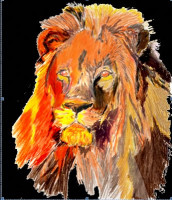
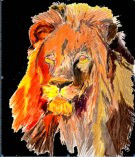
These are the kinds of images I am working with. You can see below that I am already doing what you suggest.

In the 80's all one had to do was to change the file extension in DOS and bang!

The alternate method was to use InkScape to save the image as a dxf and "use OpenScads import function."  Silly me, I expected an "import" button.  After all there is one for export and most of the programs I work with are not this primative--bare bones.

Marius the admin for OpenScad said that I could drag and drop the dxf file directly into OpenScad but then I am stuck with how the heck do I implement the import.  The line of code means nothing to me as much as I wish it meant more.  This is the only use I will ever have for this program, that plus adjusting the depth of the image to make it more tactile.

As for the Extensions > export, I have Guillotine, plot, and Win32 vector print.  Nothing else.  I do not have an "export to OpenScad." and believe me, I have looked.

But it's the "select it and then choose Extensions/Generate_from_path/Paths to OPENscad" that has been bugging me the most. It just is not there and I have been looking for two days.    I do not believe that the previous step was even mentioned in the "how to" on the Instructable.

I have attempted to install the extensions but they do not show up.  Path2openscad3 shows the inv and pyth extensions in file explorer but the extension does not work.

I have installed and uninstalled Inkscape and the extensions 4 times in different directories.  The program practically insisted on installing to my desk top and would not work at all unless I did.

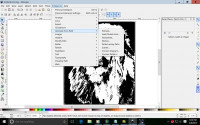
It probably shows where I am on the image I am sending.

So if you know what I am doing right or wrong I would greatly appreciate the help. I know I will feel really stupid when I finally get it.  I mean this is supposed to be easy right?

I used to move files between floppy disks because we did not have hard drives.  This cannot be that difficult, right???

----- Original Message -----

From: Neon22mailto:mschafer@wireframe.biz

To: discuss@lists.openscad.orgmailto:discuss@lists.openscad.org

Sent: Tuesday, February 09, 2016 8:17 PM

Subject: Re: [OpenSCAD] converting svg files from Inkscape to scad files tostl files

@adamtimm1 keep at it- you'll get there.
Not sure if you're trying to import a dxf (already a vector format) or
vectorise a 2D raster image like a jpg.

  1. to transform a 2D raster image like a jpg you need to convert it to
    vector form, then export it to .scad file
  • drop the jpg onto the inkscape canvas (or use File/Import)
  • select it and select Path/Trace_Bitmap
    • this will allow you to chose how to threshold it and create one or more
      vector layers.
    • I'm going to assume you want a simple, single level, outline.
      • Choose "Brightness Cutoff" = 0.5. Hit update to preview and OK to
        add to canvas.
    • You will now have an extra object which is a 2D threshholded vectored
      version of your jpg image.
    • You can scale it and position it manually.
      • Use the paper size as a guide and set Default units to mm in
        File/Document_Properties.
      • So you can see its actual size when you export to OPENscad
  • export it
    • select it and then choose Extensions/Generate_from_path/Paths to
      OPENscad
    • it will save into profile.scad in your home directory
      Double click it to open in openSCAD.
  • see more details on using it once its there in this thingiverse post
    where the latest version of the paths to openscad.py conversion tool is.

Note: To make a multilevel vectored version of your jpg artwork - check out
inkscape and trace bitmap online for help. basically the same but several
grouped layers.

Also the Lithopane idea mentioned by @fred_dot_u is very good one for many
layers but for touch you may need to scale the off-page axis quite a lot.

  1. Using a 2D dxf file as the source
  • just import it or drop it onto the canvas.
  • if it won't load and complains about the format in some way - then the dxf
    is crafted a bit special to the authoring program.
    • I suggest you load it into some kind of dxf converter and save as dxf
      again or svg if it can do it.
  • if it appers in inkscape then it should be ok.
  • select it and save to openscad as per 1.

Let us know how you get on...
good luck.

--
View this message in context: http://forum.openscad.org/converting-svg-files-from-Inkscape-to-scad-files-to-stl-files-tp16084p16087.html
Sent from the OpenSCAD mailing list archive at Nabble.com.


OpenSCAD mailing list
Discuss@lists.openscad.org
http://lists.openscad.org/mailman/listinfo/discuss_lists.openscad.org

Thank you! If you get a chance look at the Instructable or the "Thing" on Thingiverse that I posted on the message. What you described is exactly what I am attempting to do. I have imported a jpeg into InkScape, and converted to an svg file with which one is supposedly able to use an extension "path2openscad" to convert to a "scad" which can then be manipulated and saved as a 3D STL. These are the kinds of images I am working with. You can see below that I am already doing what you suggest. In the 80's all one had to do was to change the file extension in DOS and bang! The alternate method was to use InkScape to save the image as a dxf and "use OpenScads import function." Silly me, I expected an "import" button. After all there is one for export and most of the programs I work with are not this primative--bare bones. Marius the admin for OpenScad said that I could drag and drop the dxf file directly into OpenScad but then I am stuck with how the heck do I implement the import. The line of code means nothing to me as much as I wish it meant more. This is the only use I will ever have for this program, that plus adjusting the depth of the image to make it more tactile. As for the Extensions > export, I have Guillotine, plot, and Win32 vector print. Nothing else. I do not have an "export to OpenScad." and believe me, I have looked. But it's the "select it and then choose Extensions/Generate_from_path/Paths to OPENscad" that has been bugging me the most. It just is not there and I have been looking for two days. I do not believe that the previous step was even mentioned in the "how to" on the Instructable. I have attempted to install the extensions but they do not show up. Path2openscad3 shows the inv and pyth extensions in file explorer but the extension does not work. I have installed and uninstalled Inkscape and the extensions 4 times in different directories. The program practically insisted on installing to my desk top and would not work at all unless I did. It probably shows where I am on the image I am sending. So if you know what I am doing right or wrong I would greatly appreciate the help. I know I will feel really stupid when I finally get it. I mean this is supposed to be easy right? I used to move files between floppy disks because we did not have hard drives. This cannot be that difficult, right??? ----- Original Message ----- From: Neon22<mailto:mschafer@wireframe.biz> To: discuss@lists.openscad.org<mailto:discuss@lists.openscad.org> Sent: Tuesday, February 09, 2016 8:17 PM Subject: Re: [OpenSCAD] converting svg files from Inkscape to scad files tostl files @adamtimm1 keep at it- you'll get there. Not sure if you're trying to import a dxf (already a vector format) or vectorise a 2D raster image like a jpg. 1. to transform a 2D raster image like a jpg you need to convert it to vector form, then export it to .scad file - drop the jpg onto the inkscape canvas (or use File/Import) - select it and select Path/Trace_Bitmap - this will allow you to chose how to threshold it and create one or more vector layers. - I'm going to assume you want a simple, single level, outline. - Choose "Brightness Cutoff" = 0.5. Hit update to preview and OK to add to canvas. - You will now have an extra object which is a 2D threshholded vectored version of your jpg image. - You can scale it and position it manually. - Use the paper size as a guide and set Default units to mm in File/Document_Properties. - So you can see its actual size when you export to OPENscad - export it - select it and then choose Extensions/Generate_from_path/Paths to OPENscad - it will save into profile.scad in your home directory Double click it to open in openSCAD. - see more details on using it once its there in this thingiverse post where the latest version of the paths to openscad.py conversion tool is. - http://www.thingiverse.com/thing:1065500 Note: To make a multilevel vectored version of your jpg artwork - check out inkscape and trace bitmap online for help. basically the same but several grouped layers. Also the Lithopane idea mentioned by @fred_dot_u is very good one for many layers but for touch you may need to scale the off-page axis quite a lot. 2. Using a 2D dxf file as the source - just import it or drop it onto the canvas. - if it won't load and complains about the format in some way - then the dxf is crafted a bit special to the authoring program. - I suggest you load it into some kind of dxf converter and save as dxf again or svg if it can do it. - if it appers in inkscape then it should be ok. - select it and save to openscad as per 1. Let us know how you get on... good luck. -- View this message in context: http://forum.openscad.org/converting-svg-files-from-Inkscape-to-scad-files-to-stl-files-tp16084p16087.html Sent from the OpenSCAD mailing list archive at Nabble.com. _______________________________________________ OpenSCAD mailing list Discuss@lists.openscad.org http://lists.openscad.org/mailman/listinfo/discuss_lists.openscad.org
A
Adam
Wed, Feb 10, 2016 4:51 AM

Thank you Laura.  Are you related to Taulman filments?

I tried Tinkercad out and it only works with svg and stl files.  It also did not give me the topography that I wanted rather just a bunch of dots all over the place and in 2D no matter how much I elevated.  Messy!  In short not powerful enough.

I use FreeCad but don't know how to get it to give me what I want.  I printed this lion once and got some topography and want to do it again but better.  I want people to be able to touch the image and get a sense of what it looks like.

Adam

----- Original Message -----

From: Laura Taalmanmailto:laurataalman@gmail.com

To: OpenSCAD general discussionmailto:discuss@lists.openscad.org

Sent: Tuesday, February 09, 2016 9:23 PM

Subject: Re: [OpenSCAD] converting svg files from Inkscape to scad files tostl files

Maybe this is too simple a solution, but maybe not... If you really don't need openscad functionality beyond extruding a 2D image, then you could try using tinkercad instead. Here's instructions for how to do that: http://www.thingiverse.com/thing:1031735http://www.thingiverse.com/thing:1031735


Laura Taalman

educ.jmu.edu/~taalmalahttp://educ.jmu.edu/~taalmala

www.mathgrrl.comhttp://www.mathgrrl.com/

On Feb 9, 2016, at 8:31 PM, adamtimm1 <adamtimm1@msn.commailto:adamtimm1@msn.com> wrote:

I hope I do not offend anyone with this request or my stupidity.  This was
supposed to be a simple "thing."

From an "instructable" and a "Thing" in Thingiverse (

http://www.instructables.com/id/Convert-any-2D-image-to-a-3D-object-using-OpenSCAD/http://www.instructables.com/id/Convert-any-2D-image-to-a-3D-object-using-OpenSCAD/
) the instructions said that I could import a 2D jpeg into Inkscape, covert
it into an svg file, click Path>Object to Path  then click extensions

Paths2openscad.  When I opened openscad I was supposed to be able to easily

convert the file to an extruded stl that I could print on my 3D printer.
REally??  I have been working on it for 2 days.

I am a photographer and an artist.  I want to create 3D images from my
photos and from artwork so that the blind can touch an image and "see it."
That is* all *I want to do. I did it once through another venue.

I did drop a "dxf" file onto the command line but I haven't the foggiest how
to implement it.  The first time I did it I got a message saying I had
dropped an invalid dxf file onto the command line.

I am told that I have to "correctly escape the string." How do I do that?  I
am totally overwhelmed with things I have to do at the moment and I do not
want more.  I am at a point where everything I do takes me further afield
from my goals.  I know that there is a manual but for the little thing I am
attempting to do I only need a couple of instructions.  I have no intention
of doing any greater things with SCAD.  It is a task I will repeat many
times until something better/easier comes along.

Could someone please tell me how to import the dxf file I want, extrude it
then save it as an STL?  I was thinking I would get an  "import" button, but
noooo!

Can/would someone please walk me through this?

--
View this message in context: http://forum.openscad.org/converting-svg-files-from-Inkscape-to-scad-files-to-stl-files-tp16084.htmlhttp://forum.openscad.org/converting-svg-files-from-Inkscape-to-scad-files-to-stl-files-tp16084.html
Sent from the OpenSCAD mailing list archive at Nabble.comhttp://nabble.com/.


OpenSCAD mailing list
Discuss@lists.openscad.orgmailto:Discuss@lists.openscad.org
http://lists.openscad.org/mailman/listinfo/discuss_lists.openscad.orghttp://lists.openscad.org/mailman/listinfo/discuss_lists.openscad.org


OpenSCAD mailing list
Discuss@lists.openscad.org
http://lists.openscad.org/mailman/listinfo/discuss_lists.openscad.org

Thank you Laura. Are you related to Taulman filments? I tried Tinkercad out and it only works with svg and stl files. It also did not give me the topography that I wanted rather just a bunch of dots all over the place and in 2D no matter how much I elevated. Messy! In short not powerful enough. I use FreeCad but don't know how to get it to give me what I want. I printed this lion once and got some topography and want to do it again but better. I want people to be able to touch the image and get a sense of what it looks like. Adam ----- Original Message ----- From: Laura Taalman<mailto:laurataalman@gmail.com> To: OpenSCAD general discussion<mailto:discuss@lists.openscad.org> Sent: Tuesday, February 09, 2016 9:23 PM Subject: Re: [OpenSCAD] converting svg files from Inkscape to scad files tostl files Maybe this is too simple a solution, but maybe not... If you really don't need openscad functionality beyond extruding a 2D image, then you could try using tinkercad instead. Here's instructions for how to do that: http://www.thingiverse.com/thing:1031735<http://www.thingiverse.com/thing:1031735> ----- Laura Taalman educ.jmu.edu/~taalmala<http://educ.jmu.edu/~taalmala> www.mathgrrl.com<http://www.mathgrrl.com/> On Feb 9, 2016, at 8:31 PM, adamtimm1 <adamtimm1@msn.com<mailto:adamtimm1@msn.com>> wrote: I hope I do not offend anyone with this request or my stupidity. This was supposed to be a simple "thing." >From an "instructable" and a "Thing" in Thingiverse ( http://www.instructables.com/id/Convert-any-2D-image-to-a-3D-object-using-OpenSCAD/<http://www.instructables.com/id/Convert-any-2D-image-to-a-3D-object-using-OpenSCAD/> ) the instructions said that I could import a 2D jpeg into Inkscape, covert it into an svg file, click Path>Object to Path then click extensions Paths2openscad. When I opened openscad I was supposed to be able to easily convert the file to an extruded stl that I could print on my 3D printer. REally?? I have been working on it for 2 days. I am a photographer and an artist. I want to create 3D images from my photos and from artwork so that the blind can touch an image and "see it." That is* all *I want to do. I did it once through another venue. I did drop a "dxf" file onto the command line but I haven't the foggiest how to implement it. The first time I did it I got a message saying I had dropped an invalid dxf file onto the command line. I am told that I have to "correctly escape the string." How do I do that? I am totally overwhelmed with things I have to do at the moment and I do not want more. I am at a point where everything I do takes me further afield from my goals. I know that there is a manual but for the little thing I am attempting to do I only need a couple of instructions. I have no intention of doing any greater things with SCAD. It is a task I will repeat many times until something better/easier comes along. Could someone please tell me how to import the dxf file I want, extrude it then save it as an STL? I was thinking I would get an "import" button, but noooo! Can/would someone please walk me through this? -- View this message in context: http://forum.openscad.org/converting-svg-files-from-Inkscape-to-scad-files-to-stl-files-tp16084.html<http://forum.openscad.org/converting-svg-files-from-Inkscape-to-scad-files-to-stl-files-tp16084.html> Sent from the OpenSCAD mailing list archive at Nabble.com<http://nabble.com/>. _______________________________________________ OpenSCAD mailing list Discuss@lists.openscad.org<mailto:Discuss@lists.openscad.org> http://lists.openscad.org/mailman/listinfo/discuss_lists.openscad.org<http://lists.openscad.org/mailman/listinfo/discuss_lists.openscad.org> _______________________________________________ OpenSCAD mailing list Discuss@lists.openscad.org http://lists.openscad.org/mailman/listinfo/discuss_lists.openscad.org
LT
Laura Taalman
Wed, Feb 10, 2016 5:10 AM

Haha, no, not related to Taulman, but that is a neat coincidence.

Tinkercad is indeed only good for simple things, too bad that was not
enough!  My next-easiest quick-fix probably-too-simple suggestion is to try
to use the Thingiverse Customizer for lithopanes:
http://www.thingiverse.com/thing:74322 (press "Open in Customizer"). It
works well but it is limited in what it can do since it is for the specific
purpose of making lithopanes. Might work for what you want to do, though.
You can also select "View Source" when in the Customizer, and you'll see
the OpenSCAD code that is used; maybe you can extend or modify it to suit
your purposes.

On Tue, Feb 9, 2016 at 11:51 PM, Adam adamtimm1@msn.com wrote:

Thank you Laura.  Are you related to Taulman filments?
I tried Tinkercad out and it only works with svg and stl files.  It also
did not give me the topography that I wanted rather just a bunch of dots
all over the place and in 2D no matter how much I elevated.  Messy!  In
short not powerful enough.

I use FreeCad but don't know how to get it to give me what I want.  I
printed this lion once and got some topography and want to do it again
but better.  I want people to be able to touch the image and get a sense of
what it looks like.

Adam

----- Original Message -----
From: Laura Taalman laurataalman@gmail.com
To: OpenSCAD general discussion discuss@lists.openscad.org
Sent: Tuesday, February 09, 2016 9:23 PM
Subject: Re: [OpenSCAD] converting svg files from Inkscape to scad
files tostl files

Maybe this is too simple a solution, but maybe not... If you really don't
need openscad functionality beyond extruding a 2D image, then you could try
using tinkercad instead. Here's instructions for how to do that:
http://www.thingiverse.com/thing:1031735


Laura Taalman
educ.jmu.edu/~taalmala
www.mathgrrl.com

On Feb 9, 2016, at 8:31 PM, adamtimm1 adamtimm1@msn.com wrote:

I hope I do not offend anyone with this request or my stupidity.  This was
supposed to be a simple "thing."

From an "instructable" and a "Thing" in Thingiverse (

http://www.instructables.com/id/Convert-any-2D-image-to-a-3D-object-using-OpenSCAD/
) the instructions said that I could import a 2D jpeg into Inkscape, covert
it into an svg file, click Path>Object to Path  then click extensions

Paths2openscad.  When I opened openscad I was supposed to be able to easily

convert the file to an extruded stl that I could print on my 3D printer.
REally??  I have been working on it for 2 days.

I am a photographer and an artist.  I want to create 3D images from my
photos and from artwork so that the blind can touch an image and "see it."
That is* all *I want to do. I did it once through another venue.

I did drop a "dxf" file onto the command line but I haven't the foggiest
how
to implement it.  The first time I did it I got a message saying I had
dropped an invalid dxf file onto the command line.

I am told that I have to "correctly escape the string." How do I do that?
I
am totally overwhelmed with things I have to do at the moment and I do not
want more.  I am at a point where everything I do takes me further afield
from my goals.  I know that there is a manual but for the little thing I am
attempting to do I only need a couple of instructions.  I have no intention
of doing any greater things with SCAD.  It is a task I will repeat many
times until something better/easier comes along.

Could someone please tell me how to import the dxf file I want, extrude it
then save it as an STL?  I was thinking I would get an  "import" button,
but
noooo!

Can/would someone please walk me through this?

--
View this message in context:
http://forum.openscad.org/converting-svg-files-from-Inkscape-to-scad-files-to-stl-files-tp16084.html
Sent from the OpenSCAD mailing list archive at Nabble.com
http://nabble.com.


OpenSCAD mailing list
Discuss@lists.openscad.org
http://lists.openscad.org/mailman/listinfo/discuss_lists.openscad.org


OpenSCAD mailing list
Discuss@lists.openscad.org
http://lists.openscad.org/mailman/listinfo/discuss_lists.openscad.org

OpenSCAD mailing list
Discuss@lists.openscad.org
http://lists.openscad.org/mailman/listinfo/discuss_lists.openscad.org
--
Dr. Laura Taalman
www.mathgrrl.com/hacktastic + educ.jmu.edu/~taalmala + @mathgrrl
http://www.twitter.com/mathgrrl
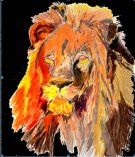
Haha, no, not related to Taulman, but that is a neat coincidence. Tinkercad is indeed only good for simple things, too bad that was not enough! My next-easiest quick-fix probably-too-simple suggestion is to try to use the Thingiverse Customizer for lithopanes: http://www.thingiverse.com/thing:74322 (press "Open in Customizer"). It works well but it is limited in what it can do since it is for the specific purpose of making lithopanes. Might work for what you want to do, though. You can also select "View Source" when in the Customizer, and you'll see the OpenSCAD code that is used; maybe you can extend or modify it to suit your purposes. On Tue, Feb 9, 2016 at 11:51 PM, Adam <adamtimm1@msn.com> wrote: > Thank you Laura. Are you related to Taulman filments? > I tried Tinkercad out and it only works with svg and stl files. It also > did not give me the topography that I wanted rather just a bunch of dots > all over the place and in 2D no matter how much I elevated. Messy! In > short not powerful enough. > > I use FreeCad but don't know how to get it to give me what I want. I > printed this lion once and got some topography and want to do it again > but better. I want people to be able to touch the image and get a sense of > what it looks like. > > Adam > > ----- Original Message ----- > *From:* Laura Taalman <laurataalman@gmail.com> > *To:* OpenSCAD general discussion <discuss@lists.openscad.org> > *Sent:* Tuesday, February 09, 2016 9:23 PM > *Subject:* Re: [OpenSCAD] converting svg files from Inkscape to scad > files tostl files > > Maybe this is too simple a solution, but maybe not... If you really don't > need openscad functionality beyond extruding a 2D image, then you could try > using tinkercad instead. Here's instructions for how to do that: > http://www.thingiverse.com/thing:1031735 > > ----- > Laura Taalman > educ.jmu.edu/~taalmala > www.mathgrrl.com > > On Feb 9, 2016, at 8:31 PM, adamtimm1 <adamtimm1@msn.com> wrote: > > I hope I do not offend anyone with this request or my stupidity. This was > supposed to be a simple "thing." > > From an "instructable" and a "Thing" in Thingiverse ( > > http://www.instructables.com/id/Convert-any-2D-image-to-a-3D-object-using-OpenSCAD/ > ) the instructions said that I could import a 2D jpeg into Inkscape, covert > it into an svg file, click Path>Object to Path then click extensions > > Paths2openscad. When I opened openscad I was supposed to be able to easily > > convert the file to an extruded stl that I could print on my 3D printer. > REally?? I have been working on it for 2 days. > > I am a photographer and an artist. I want to create 3D images from my > photos and from artwork so that the blind can touch an image and "see it." > That is* all *I want to do. I did it once through another venue. > > I did drop a "dxf" file onto the command line but I haven't the foggiest > how > to implement it. The first time I did it I got a message saying I had > dropped an invalid dxf file onto the command line. > > I am told that I have to "correctly escape the string." How do I do that? > I > am totally overwhelmed with things I have to do at the moment and I do not > want more. I am at a point where everything I do takes me further afield > from my goals. I know that there is a manual but for the little thing I am > attempting to do I only need a couple of instructions. I have no intention > of doing any greater things with SCAD. It is a task I will repeat many > times until something better/easier comes along. > > Could someone please tell me how to import the dxf file I want, extrude it > then save it as an STL? I was thinking I would get an "import" button, > but > noooo! > > Can/would someone please walk me through this? > > > > -- > View this message in context: > http://forum.openscad.org/converting-svg-files-from-Inkscape-to-scad-files-to-stl-files-tp16084.html > Sent from the OpenSCAD mailing list archive at Nabble.com > <http://nabble.com>. > > _______________________________________________ > OpenSCAD mailing list > Discuss@lists.openscad.org > http://lists.openscad.org/mailman/listinfo/discuss_lists.openscad.org > > _______________________________________________ > OpenSCAD mailing list > Discuss@lists.openscad.org > http://lists.openscad.org/mailman/listinfo/discuss_lists.openscad.org > > > _______________________________________________ > OpenSCAD mailing list > Discuss@lists.openscad.org > http://lists.openscad.org/mailman/listinfo/discuss_lists.openscad.org > > -- Dr. Laura Taalman www.mathgrrl.com/hacktastic + educ.jmu.edu/~taalmala + @mathgrrl <http://www.twitter.com/mathgrrl>
N
Neon22
Wed, Feb 10, 2016 5:39 AM

ok thanks for the detail. A couple of things first.

  1. Regrettably changing a raster file to a vector file cannot be done by
    just changing the file extension. That would be like changing a car to an
    airplane by swapping the gas caps over. While they are both forms of
    transport, they do different things. So there is no way it'll ever be that
    simple. Sorry.

  2. Your image is going to need to be in several layers. One for each of the
    contour colors you can see in your image. Maybe 8 or more. Oh yes - as you
    can see (way below), the image needs a bit of editing and tidying at the
    borders before you begin to get a good result and no cruft at the edges.

So things to try:

  1. You really should look at lithopanes. The author solved an interesting
    problem and its worth considering if you can use it for what you want.
    The live customiser online version cannot use really big files. But if you
    download the scad then you can use much bigger images.
    Try it:

  2. I'm sorry for your troubles with Inkscape.
    You need 0.91. You also need to download the extension (which what inkscape
    calls plugins) and put it in the right directory. If you're on windows
    that's %APPDATA% then go looking for the inkscape/extensions folder.

The instructable you reference is making a simple black and white one-layer
shape. Your image looks like its maybe > 8 layers.
When you split your image into 8 layers - using the Trace_Bitmap tool -
you'll need to have these settings:

  • choose colors,
  • 8 layers (or however many you need)
  • stack scans off
  • remove_background off (but you can play with this and the previous
    option)
  • smooth on (optional)
    http://forum.openscad.org/file/n16093/bitmap_001315.png
    Then export using the extension (must be v8). force line output must be off.
    Then open in openscad and be disappointed to see a low cube....

But wait....
at the end of the file will be 8 (or whatever you chose) poly_path
statements.
You can toggle visibiility of these on and off using the // comment operator
to check each shape is there.

Anyway - if you translate each one away from the next one (by whatever
height you choose) then you'll end up with a stacked scan like this:
http://forum.openscad.org/file/n16093/profile_001316.png

  • now they won't come in in the exact order you need. You'll have to swap
    them round until they are in correct height order.

The following numbers won't match yours at all but see what I'm doing with
the translates in Z... ?
// The shapes
poly_path4313(height, width);
translate([0,0,-height])
poly_path4319(height, width);
translate([0,0,-height2])
poly_path4311(height, width);
translate([0,0,-height
3])
poly_path4315(height, width);
translate([0,0,-height4])
poly_path4321(height, width);
translate([0,0,-height
5])
poly_path4317(height, width);
translate([0,0,-height6])
poly_path4309(height, width);
translate([0,0,-height
7])
poly_path4307(height, width);

Try again
Cheers...

--
View this message in context: http://forum.openscad.org/converting-svg-files-from-Inkscape-to-scad-files-to-stl-files-tp16084p16093.html
Sent from the OpenSCAD mailing list archive at Nabble.com.

ok thanks for the detail. A couple of things first. 1. Regrettably changing a raster file to a vector file cannot be done by just changing the file extension. That would be like changing a car to an airplane by swapping the gas caps over. While they are both forms of transport, they do different things. So there is no way it'll ever be that simple. Sorry. 2. Your image is going to need to be in several layers. One for each of the contour colors you can see in your image. Maybe 8 or more. Oh yes - as you can see (way below), the image needs a bit of editing and tidying at the borders before you begin to get a good result and no cruft at the edges. So things to try: 1. You really should look at lithopanes. The author solved an interesting problem and its worth considering if you can use it for what you want. The live customiser online version cannot use really big files. But if you download the scad then you can use much bigger images. Try it: - http://www.thingiverse.com/thing:74322 - http://www.thingiverse.com/search?q=lithopane&sa= 2. I'm sorry for your troubles with Inkscape. You need 0.91. You also need to download the extension (which what inkscape calls plugins) and put it in the right directory. If you're on windows that's %APPDATA% then go looking for the inkscape/extensions folder. - you really should use the zip file from here: http://www.thingiverse.com/thing:1065500/#files - unpack it into that extensions folder - http://www.thingiverse.com/thing:25036 - if you unpack it then it should appear on that specific menu - when you restart inkscape. The instructable you reference is making a simple black and white one-layer shape. Your image looks like its maybe > 8 layers. When you split your image into 8 layers - using the Trace_Bitmap tool - you'll need to have these settings: - choose colors, - 8 layers (or however many you need) - stack scans off - remove_background off (but you can play with this and the previous option) - smooth on (optional) <http://forum.openscad.org/file/n16093/bitmap_001315.png> Then export using the extension (must be v8). force line output must be off. Then open in openscad and be disappointed to see a low cube.... But wait.... at the end of the file will be 8 (or whatever you chose) poly_path statements. You can toggle visibiility of these on and off using the // comment operator to check each shape is there. Anyway - if you translate each one away from the next one (by whatever height you choose) then you'll end up with a stacked scan like this: <http://forum.openscad.org/file/n16093/profile_001316.png> - now they won't come in in the exact order you need. You'll have to swap them round until they are in correct height order. The following numbers won't match yours at all but see what I'm doing with the translates in Z... ? // The shapes poly_path4313(height, width); translate([0,0,-height]) poly_path4319(height, width); translate([0,0,-height*2]) poly_path4311(height, width); translate([0,0,-height*3]) poly_path4315(height, width); translate([0,0,-height*4]) poly_path4321(height, width); translate([0,0,-height*5]) poly_path4317(height, width); translate([0,0,-height*6]) poly_path4309(height, width); translate([0,0,-height*7]) poly_path4307(height, width); Try again Cheers... -- View this message in context: http://forum.openscad.org/converting-svg-files-from-Inkscape-to-scad-files-to-stl-files-tp16084p16093.html Sent from the OpenSCAD mailing list archive at Nabble.com.