discuss@lists.openscad.org

OpenSCAD general discussion Mailing-list

View all threads

"Ghost surfaces" in 2D?

T
Troberg
Tue, Feb 4, 2020 10:23 AM

When doing 2D operations, you get "ghost surfaces", similar to how you can
get zero thickness surfaces if you don't make the hole slightly bigger than
the object you pierce in 3D.

I get the reason you get them in 3D (although I think they should be
removed, it would allow me to clean out a big bunch of +1 and -1 from my
code), but in 2D, they make no sense at all. If I do, say, a square which I
diff out a circle from, I expect there to be a hole. As it works, the hole
is there, but depending on zoom level, it sometimes disappear or get
"ghosted" (could go either way). When exported, it's the expected result,
however.

Now, this isn't a biggie, but it's kind of annoying when you spend 30
minutes trying to figure out where a hole is going when it doesn't appear as
expected, and then when you accidentally zoom out, it suddenly appears.

I can do a projection to get rid of it, but that'll slow down an already
slow preview even more.

I suppose this is because 2D objects are actually treated as thin 3D
objects, but it's still annoying.

--
Sent from: http://forum.openscad.org/

When doing 2D operations, you get "ghost surfaces", similar to how you can get zero thickness surfaces if you don't make the hole slightly bigger than the object you pierce in 3D. I get the reason you get them in 3D (although I think they should be removed, it would allow me to clean out a big bunch of +1 and -1 from my code), but in 2D, they make no sense at all. If I do, say, a square which I diff out a circle from, I expect there to be a hole. As it works, the hole is there, but depending on zoom level, it sometimes disappear or get "ghosted" (could go either way). When exported, it's the expected result, however. Now, this isn't a biggie, but it's kind of annoying when you spend 30 minutes trying to figure out where a hole is going when it doesn't appear as expected, and then when you accidentally zoom out, it suddenly appears. I can do a projection to get rid of it, but that'll slow down an already slow preview even more. I suppose this is because 2D objects are actually treated as thin 3D objects, but it's still annoying. -- Sent from: http://forum.openscad.org/
NH
nop head
Tue, Feb 4, 2020 10:41 AM

I have never seen that happen in 2D, can you give an example?

On Tue, 4 Feb 2020 at 10:24, Troberg troberg.anders@gmail.com wrote:

When doing 2D operations, you get "ghost surfaces", similar to how you can
get zero thickness surfaces if you don't make the hole slightly bigger than
the object you pierce in 3D.

I get the reason you get them in 3D (although I think they should be
removed, it would allow me to clean out a big bunch of +1 and -1 from my
code), but in 2D, they make no sense at all. If I do, say, a square which I
diff out a circle from, I expect there to be a hole. As it works, the hole
is there, but depending on zoom level, it sometimes disappear or get
"ghosted" (could go either way). When exported, it's the expected result,
however.

Now, this isn't a biggie, but it's kind of annoying when you spend 30
minutes trying to figure out where a hole is going when it doesn't appear
as
expected, and then when you accidentally zoom out, it suddenly appears.

I can do a projection to get rid of it, but that'll slow down an already
slow preview even more.

I suppose this is because 2D objects are actually treated as thin 3D
objects, but it's still annoying.

--
Sent from: http://forum.openscad.org/


OpenSCAD mailing list
Discuss@lists.openscad.org
http://lists.openscad.org/mailman/listinfo/discuss_lists.openscad.org

I have never seen that happen in 2D, can you give an example? On Tue, 4 Feb 2020 at 10:24, Troberg <troberg.anders@gmail.com> wrote: > When doing 2D operations, you get "ghost surfaces", similar to how you can > get zero thickness surfaces if you don't make the hole slightly bigger than > the object you pierce in 3D. > > I get the reason you get them in 3D (although I think they should be > removed, it would allow me to clean out a big bunch of +1 and -1 from my > code), but in 2D, they make no sense at all. If I do, say, a square which I > diff out a circle from, I expect there to be a hole. As it works, the hole > is there, but depending on zoom level, it sometimes disappear or get > "ghosted" (could go either way). When exported, it's the expected result, > however. > > Now, this isn't a biggie, but it's kind of annoying when you spend 30 > minutes trying to figure out where a hole is going when it doesn't appear > as > expected, and then when you accidentally zoom out, it suddenly appears. > > I can do a projection to get rid of it, but that'll slow down an already > slow preview even more. > > I suppose this is because 2D objects are actually treated as thin 3D > objects, but it's still annoying. > > > > -- > Sent from: http://forum.openscad.org/ > > _______________________________________________ > OpenSCAD mailing list > Discuss@lists.openscad.org > http://lists.openscad.org/mailman/listinfo/discuss_lists.openscad.org >
T
Troberg
Tue, Feb 4, 2020 12:19 PM
difference(){
	circle(d=150);
	circle(d=100);
}

Select top view, and orthogonal projection, then zoom out. At some zoom
levels, the hole will appear green, on some it'll disappear, and on most,
it'll be there.

--
Sent from: http://forum.openscad.org/

difference(){ circle(d=150); circle(d=100); } Select top view, and orthogonal projection, then zoom out. At some zoom levels, the hole will appear green, on some it'll disappear, and on most, it'll be there. -- Sent from: http://forum.openscad.org/
AR
Algot Runeman
Tue, Feb 4, 2020 1:32 PM

For what it is worth, there was no ghosting (following your view
settings) on my Kubuntu GNU/Linux OpenSCAD 2019.05 and also works fine
with 2015.03-2.

On 2/4/20 7:19 AM, Troberg wrote:

  difference(){
  	circle(d=150);
  	circle(d=100);
  }
For what it is worth, there was no ghosting (following your view settings) on my Kubuntu GNU/Linux OpenSCAD 2019.05 and also works fine with 2015.03-2. On 2/4/20 7:19 AM, Troberg wrote: > difference(){ > circle(d=150); > circle(d=100); > }
T
Troberg
Tue, Feb 4, 2020 1:34 PM

I'm running Windows, same version.

--
Sent from: http://forum.openscad.org/

I'm running Windows, same version. -- Sent from: http://forum.openscad.org/
RP
Ronaldo Persiano
Tue, Feb 4, 2020 2:03 PM

Yes, it happen in version 2019.10.25.ci3851 with enough zoom out. The hole
reappears with additional zom out, or render. With edges on, it clearly
absent. It is not a question of ghosting. It seems to be some kind of small
edge eliminations.

Em ter., 4 de fev. de 2020 às 13:34, Troberg troberg.anders@gmail.com
escreveu:

Yes, it happen in version 2019.10.25.ci3851 with enough zoom out. The hole reappears with additional zom out, or render. With edges on, it clearly absent. It is not a question of ghosting. It seems to be some kind of small edge eliminations. Em ter., 4 de fev. de 2020 às 13:34, Troberg <troberg.anders@gmail.com> escreveu: > I'm running Windows, same version. > > > > -- > Sent from: http://forum.openscad.org/ > > _______________________________________________ > OpenSCAD mailing list > Discuss@lists.openscad.org > http://lists.openscad.org/mailman/listinfo/discuss_lists.openscad.org >
RP
Ronaldo Persiano
Tue, Feb 4, 2020 2:28 PM

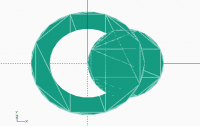
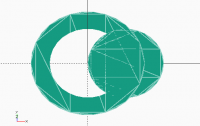
The difference operation is fake: the edges of the hole are not highlighted
with edges on. It seems that the hole circle is just a mask and the
difference polygon is not really computed. Unions seem to be fake too and
some ghost edges may appear.

// linear_extrude(100)
union() {
translate([50,0,0]) circle(d=100);
difference(){
circle(d=150);
circle(d=100);
}
}

[image: ghostLinesPNG.PNG]

The polygon is really computed when extruded.

Em ter., 4 de fev. de 2020 às 14:03, Ronaldo Persiano rcmpersiano@gmail.com
escreveu:

Yes, it happen in version 2019.10.25.ci3851 with enough zoom out. The
hole reappears with additional zom out, or render. With edges on, it
clearly absent. It is not a question of ghosting. It seems to be some kind
of small edge eliminations.

Em ter., 4 de fev. de 2020 às 13:34, Troberg troberg.anders@gmail.com
escreveu:

The difference operation is fake: the edges of the hole are not highlighted with edges on. It seems that the hole circle is just a mask and the difference polygon is not really computed. Unions seem to be fake too and some ghost edges may appear. // linear_extrude(100) union() { translate([50,0,0]) circle(d=100); difference(){ circle(d=150); circle(d=100); } } [image: ghostLinesPNG.PNG] The polygon is really computed when extruded. Em ter., 4 de fev. de 2020 às 14:03, Ronaldo Persiano <rcmpersiano@gmail.com> escreveu: > Yes, it happen in version 2019.10.25.ci3851 with enough zoom out. The > hole reappears with additional zom out, or render. With edges on, it > clearly absent. It is not a question of ghosting. It seems to be some kind > of small edge eliminations. > > Em ter., 4 de fev. de 2020 às 13:34, Troberg <troberg.anders@gmail.com> > escreveu: > >> I'm running Windows, same version. >> >> >> >> -- >> Sent from: http://forum.openscad.org/ >> >> _______________________________________________ >> OpenSCAD mailing list >> Discuss@lists.openscad.org >> http://lists.openscad.org/mailman/listinfo/discuss_lists.openscad.org >> >
NH
nop head
Tue, Feb 4, 2020 2:45 PM

It only seems to be a problem in the orthogonal view.

I must admit I am surprised that 2D is faked in OpenCSG. I thought it was
always calculated and then drawn as a thin polyhedron but it appears that
is not the case. Adding render() fixes it and then the correct edges are
drawn.

On Tue, 4 Feb 2020 at 14:29, Ronaldo Persiano rcmpersiano@gmail.com wrote:

The difference operation is fake: the edges of the hole are not
highlighted with edges on. It seems that the hole circle is just a mask and
the difference polygon is not really computed. Unions seem to be fake too
and some ghost edges may appear.

// linear_extrude(100)
union() {
 translate([50,0,0]) circle(d=100);
 difference(){
     circle(d=150);
     circle(d=100);
 }

}

[image: ghostLinesPNG.PNG]

The polygon is really computed when extruded.

Em ter., 4 de fev. de 2020 às 14:03, Ronaldo Persiano <
rcmpersiano@gmail.com> escreveu:

Yes, it happen in version 2019.10.25.ci3851 with enough zoom out. The
hole reappears with additional zom out, or render. With edges on, it
clearly absent. It is not a question of ghosting. It seems to be some kind
of small edge eliminations.

Em ter., 4 de fev. de 2020 às 13:34, Troberg troberg.anders@gmail.com
escreveu:


It only seems to be a problem in the orthogonal view. I must admit I am surprised that 2D is faked in OpenCSG. I thought it was always calculated and then drawn as a thin polyhedron but it appears that is not the case. Adding render() fixes it and then the correct edges are drawn. On Tue, 4 Feb 2020 at 14:29, Ronaldo Persiano <rcmpersiano@gmail.com> wrote: > The difference operation is fake: the edges of the hole are not > highlighted with edges on. It seems that the hole circle is just a mask and > the difference polygon is not really computed. Unions seem to be fake too > and some ghost edges may appear. > > // linear_extrude(100) > union() { > translate([50,0,0]) circle(d=100); > difference(){ > circle(d=150); > circle(d=100); > } > } > > [image: ghostLinesPNG.PNG] > > The polygon is really computed when extruded. > > Em ter., 4 de fev. de 2020 às 14:03, Ronaldo Persiano < > rcmpersiano@gmail.com> escreveu: > >> Yes, it happen in version 2019.10.25.ci3851 with enough zoom out. The >> hole reappears with additional zom out, or render. With edges on, it >> clearly absent. It is not a question of ghosting. It seems to be some kind >> of small edge eliminations. >> >> Em ter., 4 de fev. de 2020 às 13:34, Troberg <troberg.anders@gmail.com> >> escreveu: >> >>> I'm running Windows, same version. >>> >>> >>> >>> -- >>> Sent from: http://forum.openscad.org/ >>> >>> _______________________________________________ >>> OpenSCAD mailing list >>> Discuss@lists.openscad.org >>> http://lists.openscad.org/mailman/listinfo/discuss_lists.openscad.org >>> >> _______________________________________________ > OpenSCAD mailing list > Discuss@lists.openscad.org > http://lists.openscad.org/mailman/listinfo/discuss_lists.openscad.org >
T
Troberg
Tue, Feb 4, 2020 5:16 PM

nophead wrote

Adding render() fixes it and then the correct edges are
drawn.

I've had some other issues, where stuff has been drawn completely different
in different circumstances (drawing directly in a module works fine, but
when using that shape in a module call as to difference a hole in another
object resulted in some of the differences in the module being inverted),
and render() fixed it. I can't really replicate it simply, it's in a 16 000
line project, but I've seen it several times.

I'm starting to consider putting every 2D module with a union and a render
at the top...

--
Sent from: http://forum.openscad.org/

nophead wrote > Adding render() fixes it and then the correct edges are > drawn. I've had some other issues, where stuff has been drawn completely different in different circumstances (drawing directly in a module works fine, but when using that shape in a module call as to difference a hole in another object resulted in some of the differences in the module being inverted), and render() fixed it. I can't really replicate it simply, it's in a 16 000 line project, but I've seen it several times. I'm starting to consider putting every 2D module with a union and a render at the top... -- Sent from: http://forum.openscad.org/
NH
nop head
Tue, Feb 4, 2020 6:08 PM

I probably never encounter problems because all my 2D stuff eventually gets
made into 3D in the preview because there are no 2D objects in real life.
My sheets are modelled in 2D for speed but always drawn with the correct
thickness in preview.

On Tue, 4 Feb 2020 at 17:17, Troberg troberg.anders@gmail.com wrote:

nophead wrote

Adding render() fixes it and then the correct edges are
drawn.

I've had some other issues, where stuff has been drawn completely different
in different circumstances (drawing directly in a module works fine, but
when using that shape in a module call as to difference a hole in another
object resulted in some of the differences in the module being inverted),
and render() fixed it. I can't really replicate it simply, it's in a 16 000
line project, but I've seen it several times.

I'm starting to consider putting every 2D module with a union and a render
at the top...

--
Sent from: http://forum.openscad.org/


OpenSCAD mailing list
Discuss@lists.openscad.org
http://lists.openscad.org/mailman/listinfo/discuss_lists.openscad.org
I probably never encounter problems because all my 2D stuff eventually gets made into 3D in the preview because there are no 2D objects in real life. My sheets are modelled in 2D for speed but always drawn with the correct thickness in preview. On Tue, 4 Feb 2020 at 17:17, Troberg <troberg.anders@gmail.com> wrote: > nophead wrote > > Adding render() fixes it and then the correct edges are > > drawn. > > I've had some other issues, where stuff has been drawn completely different > in different circumstances (drawing directly in a module works fine, but > when using that shape in a module call as to difference a hole in another > object resulted in some of the differences in the module being inverted), > and render() fixed it. I can't really replicate it simply, it's in a 16 000 > line project, but I've seen it several times. > > I'm starting to consider putting every 2D module with a union and a render > at the top... > > > > -- > Sent from: http://forum.openscad.org/ > > _______________________________________________ > OpenSCAD mailing list > Discuss@lists.openscad.org > http://lists.openscad.org/mailman/listinfo/discuss_lists.openscad.org >