

M
MichaelAtOz
Wed, Feb 24, 2016 9:56 PM
I am a newbie with regard to OpenSCAD, and I was wondering is it possible
to use shapes as variables?

I think the usual way goes like this:
union() {
cylinder(15, 7);
difference() {cube(12, center=true); sphere(8);}
}
In this case the structure is build somehow from bottom up, first shapes
being generates deepest / last in the code.
Somehow, at least for me, it would be easier to read and write code using
shapes as variables and manipulating them incrementally, and the same code
could look something like this:
myShape = difference() {cube(12, center=true); sphere(8);};
myShape = union() {myShape; cylinder(15, 7);};
In this case first shapes are first in the code, and they are
incrementally developed.
So is it possible to write code like in second imaginary example?
Is there some general guidelines how bigger projects should be organized
so that they remain readable, understandable, and editable? Currently I
feel that whenever I am adding complexity to my models, they became very
difficult to understand afterwards.
Any input is welcome! Thank you!
Hi Aetiq,
Welcome to the forum. Your post is still flagged as "This post has NOT been
accepted by the mailing list yet", so nobody gets it unless they look.
You need to subscribe to the mailing list
http://forum.openscad.org/mailing_list/MailingListOptions.jtp?forum=1 ,
and respond to the registration email.
You can't use variables to hold shapes. This will likely become available in
a new generation of OpenSCAD, called OpenSCAD2 at this stag, but don't hold
your breath yet.
For bigger projects you should use module and functions
https://en.wikibooks.org/wiki/OpenSCAD_User_Manual/User-Defined_Functions_and_Modules
and lots of comments.
I'd also suggest using variables for geometry size with meaningful names.
stemDiameter=5;
stemLong=10;
cylinder(d=stemDiameter,h=stemLong);
Admin - PM me if you need anything, or if I've done something stupid...
Unless specifically shown otherwise above, my contribution is in the Public Domain; to the extent possible under law, I have waived all copyright and related or neighbouring rights to this work. Obviously inclusion of works of previous authors is not included in the above.
The TPP is no simple “trade agreement.” Fight it! http://www.ourfairdeal.org/ time is running out!
View this message in context: http://forum.openscad.org/Is-it-possible-to-use-shapes-as-variables-tp16223p16227.html
Sent from the OpenSCAD mailing list archive at Nabble.com.
Aetig wrote
> I am a newbie with regard to OpenSCAD, and I was wondering is it possible
> to use shapes as variables?
>
> I think the usual way goes like this:
>
> union() {
> cylinder(15, 7);
> difference() {cube(12, center=true); sphere(8);}
> }
>
> In this case the structure is build somehow from bottom up, first shapes
> being generates deepest / last in the code.
>
>
> Somehow, at least for me, it would be easier to read and write code using
> shapes as variables and manipulating them incrementally, and the same code
> could look something like this:
>
> myShape = difference() {cube(12, center=true); sphere(8);};
> myShape = union() {myShape; cylinder(15, 7);};
>
> In this case first shapes are first in the code, and they are
> incrementally developed.
>
> So is it possible to write code like in second imaginary example?
>
> Is there some general guidelines how bigger projects should be organized
> so that they remain readable, understandable, and editable? Currently I
> feel that whenever I am adding complexity to my models, they became very
> difficult to understand afterwards.
>
> Any input is welcome! Thank you!
Hi Aetiq,
Welcome to the forum. Your post is still flagged as "This post has NOT been
accepted by the mailing list yet", so nobody gets it unless they look.
You need to subscribe to the mailing list
<http://forum.openscad.org/mailing_list/MailingListOptions.jtp?forum=1> ,
and respond to the registration email.
You can't use variables to hold shapes. This will likely become available in
a new generation of OpenSCAD, called OpenSCAD2 at this stag, but don't hold
your breath yet.
For bigger projects you should use module and functions
<https://en.wikibooks.org/wiki/OpenSCAD_User_Manual/User-Defined_Functions_and_Modules>
and lots of comments.
I'd also suggest using variables for geometry size with meaningful names.
stemDiameter=5;
stemLong=10;
cylinder(d=stemDiameter,h=stemLong);
-----
Admin - PM me if you need anything, or if I've done something stupid...
Unless specifically shown otherwise above, my contribution is in the Public Domain; to the extent possible under law, I have waived all copyright and related or neighbouring rights to this work. Obviously inclusion of works of previous authors is not included in the above.
The TPP is no simple “trade agreement.” Fight it! http://www.ourfairdeal.org/ time is running out!
--
View this message in context: http://forum.openscad.org/Is-it-possible-to-use-shapes-as-variables-tp16223p16227.html
Sent from the OpenSCAD mailing list archive at Nabble.com.
CA
Carsten Arnholm
Wed, Feb 24, 2016 10:35 PM
Somehow, at least for me, it would be easier to read and write code using
shapes as variables and manipulating them incrementally, and the same code
could look something like this:
myShape = difference() {cube(12, center=true); sphere(8);};
myShape = union() {myShape; cylinder(15, 7);};
In this case first shapes are first in the code, and they are
incrementally developed.
So is it possible to write code like in second imaginary example?
You cannot do it in the OpenSCAD language, as you are not allowed to
modify variables, and you cannot store shapes in variables.
As I had similar thoughts after using OpenSCAD for some time, I made
AngelScript CSG which I currently use for generating OpenSCAD models.
Your example then becomes straight forward (AngelScript syntax):
solid@ myShape = difference3d(cube(12,true),sphere(8));
@myShape = union3d(myShape, cylinder(15,7));
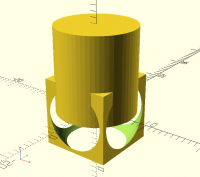
When running this, an OpenSCAD .csg file can be generated and the result
in OpenSCAD is as shown in the attached image.
Carsten Arnholm
http://arnholm.org/
> Aetig wrote
>> Somehow, at least for me, it would be easier to read and write code using
>> shapes as variables and manipulating them incrementally, and the same code
>> could look something like this:
>>
>> myShape = difference() {cube(12, center=true); sphere(8);};
>> myShape = union() {myShape; cylinder(15, 7);};
>>
>> In this case first shapes are first in the code, and they are
>> incrementally developed.
>>
>> So is it possible to write code like in second imaginary example?
You cannot do it in the OpenSCAD language, as you are not allowed to
modify variables, and you cannot store shapes in variables.
As I had similar thoughts after using OpenSCAD for some time, I made
AngelScript CSG which I currently use for generating OpenSCAD models.
Your example then becomes straight forward (AngelScript syntax):
solid@ myShape = difference3d(cube(12,true),sphere(8));
@myShape = union3d(myShape, cylinder(15,7));
When running this, an OpenSCAD .csg file can be generated and the result
in OpenSCAD is as shown in the attached image.
Carsten Arnholm
http://arnholm.org/

NH
nop head
Wed, Feb 24, 2016 10:48 PM
module partOfMyShape() difference() {cube(12, center=true); sphere(8);};
module myShape() union() {partOfMyShape(); cylinder(15, 7);};
myShape();
Makes a lot more sense though. Why use a single name to represent two
different things?
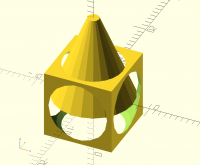
It produces this:
Seems like AngelScript CSG interprets the cylinder parameters differently
to OpenScad.
On 24 February 2016 at 22:35, Carsten Arnholm arnholm@arnholm.org wrote:
Somehow, at least for me, it would be easier to read and write code using
shapes as variables and manipulating them incrementally, and the same
code
could look something like this:
myShape = difference() {cube(12, center=true); sphere(8);};
myShape = union() {myShape; cylinder(15, 7);};
In this case first shapes are first in the code, and they are
incrementally developed.
So is it possible to write code like in second imaginary example?
You cannot do it in the OpenSCAD language, as you are not allowed to
modify variables, and you cannot store shapes in variables.
As I had similar thoughts after using OpenSCAD for some time, I made
AngelScript CSG which I currently use for generating OpenSCAD models. Your
example then becomes straight forward (AngelScript syntax):
solid@ myShape = difference3d(cube(12,true),sphere(8));
@myShape = union3d(myShape, cylinder(15,7));
When running this, an OpenSCAD .csg file can be generated and the result
in OpenSCAD is as shown in the attached image.
Carsten Arnholm
http://arnholm.org/
OpenSCAD mailing list
Discuss@lists.openscad.org
http://lists.openscad.org/mailman/listinfo/discuss_lists.openscad.org
module partOfMyShape() difference() {cube(12, center=true); sphere(8);};
module myShape() union() {partOfMyShape(); cylinder(15, 7);};
myShape();
Makes a lot more sense though. Why use a single name to represent two
different things?
It produces this:
Seems like AngelScript CSG interprets the cylinder parameters differently
to OpenScad.
On 24 February 2016 at 22:35, Carsten Arnholm <arnholm@arnholm.org> wrote:
> Aetig wrote
>>
>>> Somehow, at least for me, it would be easier to read and write code using
>>> shapes as variables and manipulating them incrementally, and the same
>>> code
>>> could look something like this:
>>>
>>> myShape = difference() {cube(12, center=true); sphere(8);};
>>> myShape = union() {myShape; cylinder(15, 7);};
>>>
>>> In this case first shapes are first in the code, and they are
>>> incrementally developed.
>>>
>>> So is it possible to write code like in second imaginary example?
>>>
>>
> You cannot do it in the OpenSCAD language, as you are not allowed to
> modify variables, and you cannot store shapes in variables.
>
> As I had similar thoughts after using OpenSCAD for some time, I made
> AngelScript CSG which I currently use for generating OpenSCAD models. Your
> example then becomes straight forward (AngelScript syntax):
>
> solid@ myShape = difference3d(cube(12,true),sphere(8));
> @myShape = union3d(myShape, cylinder(15,7));
>
> When running this, an OpenSCAD .csg file can be generated and the result
> in OpenSCAD is as shown in the attached image.
>
> Carsten Arnholm
> http://arnholm.org/
>
> _______________________________________________
> OpenSCAD mailing list
> Discuss@lists.openscad.org
> http://lists.openscad.org/mailman/listinfo/discuss_lists.openscad.org
>
>
TP
Torsten Paul
Wed, Feb 24, 2016 10:59 PM
On 02/24/2016 11:35 PM, Carsten Arnholm wrote:
Somehow, at least for me, it would be easier to read and write code using
shapes as variables and manipulating them incrementally, and the same code
could look something like this:
myShape = difference() {cube(12, center=true); sphere(8);};
myShape = union() {myShape; cylinder(15, 7);};
In this case first shapes are first in the code, and they are
incrementally developed.
So is it possible to write code like in second imaginary example?
You cannot do it in the OpenSCAD language, as you are not allowed to modify
variables, and you cannot store shapes in variables.
Sure you can incrementally build objects, even with OpenSCAD
currently not being able to assign shapes to a variable.
Using modules can be even more flexible as they can be
parameterized.
// define the first part by giving it a name (making it a module)
module myShape() difference() { cube(12, center=true); sphere(8); }
// use it to create more complex objects (with a parameter)
module moreComplexShape(h = 0) union() { myShape(); cylinder(15 + h, 7); }
// now use the moreComplexShape multiple times
moreComplexShape();
for (a = [ 0 : 45 : 359 ]) {
rotate([0, 0, a]) translate([30, 0, 0]) moreComplexShape(a / 20);
}
ciao,
Torsten.
On 02/24/2016 11:35 PM, Carsten Arnholm wrote:
>> Aetig wrote
>>> Somehow, at least for me, it would be easier to read and write code using
>>> shapes as variables and manipulating them incrementally, and the same code
>>> could look something like this:
>>>
>>> myShape = difference() {cube(12, center=true); sphere(8);};
>>> myShape = union() {myShape; cylinder(15, 7);};
>>>
>>> In this case first shapes are first in the code, and they are
>>> incrementally developed.
>>>
>>> So is it possible to write code like in second imaginary example?
>
> You cannot do it in the OpenSCAD language, as you are not allowed to modify
> variables, and you cannot store shapes in variables.
>
Sure you can incrementally build objects, even with OpenSCAD
currently not being able to assign shapes to a variable.
Using modules can be even more flexible as they can be
parameterized.
// define the first part by giving it a name (making it a module)
module myShape() difference() { cube(12, center=true); sphere(8); }
// use it to create more complex objects (with a parameter)
module moreComplexShape(h = 0) union() { myShape(); cylinder(15 + h, 7); }
// now use the moreComplexShape multiple times
moreComplexShape();
for (a = [ 0 : 45 : 359 ]) {
rotate([0, 0, a]) translate([30, 0, 0]) moreComplexShape(a / 20);
}
ciao,
Torsten.
A
arnholm@arnholm.org
Thu, Feb 25, 2016 8:38 AM
On 2016-02-24 23:59, Torsten Paul wrote:
On 02/24/2016 11:35 PM, Carsten Arnholm wrote:
Somehow, at least for me, it would be easier to read and write code
using
shapes as variables and manipulating them incrementally, and the
same code
could look something like this:
myShape = difference() {cube(12, center=true); sphere(8);};
myShape = union() {myShape; cylinder(15, 7);};
In this case first shapes are first in the code, and they are
incrementally developed.
So is it possible to write code like in second imaginary example?
You cannot do it in the OpenSCAD language, as you are not allowed to
modify
variables, and you cannot store shapes in variables.
Sure you can incrementally build objects, even with OpenSCAD
currently not being able to assign shapes to a variable.
Using modules can be even more flexible as they can be
parameterized.
Modules are functions by another name. Most languages have them,
including OpenSCAD and AngelScript. Functions are named algorithms,
variables are named object instances, functions and object instances are
not generally interchangeable. Modifiable variables are useful for
incrementally building objects like Aetig asked for, by iteration or
other methods, or as sources for further duplication. Plus much more.
Most languages have this ability as it is a generally useful thing.
Carsten Arnholm
On 2016-02-24 23:59, Torsten Paul wrote:
> On 02/24/2016 11:35 PM, Carsten Arnholm wrote:
>>> Aetig wrote
>>>> Somehow, at least for me, it would be easier to read and write code
>>>> using
>>>> shapes as variables and manipulating them incrementally, and the
>>>> same code
>>>> could look something like this:
>>>>
>>>> myShape = difference() {cube(12, center=true); sphere(8);};
>>>> myShape = union() {myShape; cylinder(15, 7);};
>>>>
>>>> In this case first shapes are first in the code, and they are
>>>> incrementally developed.
>>>>
>>>> So is it possible to write code like in second imaginary example?
>>
>> You cannot do it in the OpenSCAD language, as you are not allowed to
>> modify
>> variables, and you cannot store shapes in variables.
>>
>
> Sure you can incrementally build objects, even with OpenSCAD
> currently not being able to assign shapes to a variable.
>
> Using modules can be even more flexible as they can be
> parameterized.
Modules are functions by another name. Most languages have them,
including OpenSCAD and AngelScript. Functions are named algorithms,
variables are named object instances, functions and object instances are
not generally interchangeable. Modifiable variables are useful for
incrementally building objects like Aetig asked for, by iteration or
other methods, or as sources for further duplication. Plus much more.
Most languages have this ability as it is a generally useful thing.
Carsten Arnholm
TP
Torsten Paul
Thu, Feb 25, 2016 10:25 AM
Modules are functions by another name. Most languages have them,
including OpenSCAD and AngelScript. Functions are named algorithms,
variables are named object instances, functions and object instances are
not generally interchangeable. Modifiable variables are useful for
incrementally building objects like Aetig asked for, by iteration or
other methods, or as sources for further duplication. Plus much more.
Most languages have this ability as it is a generally useful thing.
Yes, all true.
However, my understanding of the original question was "How can I
get the modelling done in OpenSCAD using an incremental approach",
so that's what my answer was aming at.
I do find the language discussion part interesting and insightful,
but I'm not sure it's the most helpful thing for the original
question in this thread.
ciao,
Torsten.
> Modules are functions by another name. Most languages have them,
> including OpenSCAD and AngelScript. Functions are named algorithms,
> variables are named object instances, functions and object instances are
> not generally interchangeable. Modifiable variables are useful for
> incrementally building objects like Aetig asked for, by iteration or
> other methods, or as sources for further duplication. Plus much more.
> Most languages have this ability as it is a generally useful thing.
>
Yes, all true.
However, my understanding of the original question was "How can I
get the modelling done in OpenSCAD using an incremental approach",
so that's what my answer was aming at.
I do find the language discussion part interesting and insightful,
but I'm not sure it's the most helpful thing for the original
question in this thread.
ciao,
Torsten.
SG
Stefan Göttsche
Thu, Feb 25, 2016 12:53 PM
On 24. feb. 2016 23:48, nop head wrote:
Just inserting myself here as the openscad newbie.
Is this expected?
If I check the manual, it says
cylinder(h = height, r1 = BottomRadius, r2 = TopRadius, center = true/false);
*Parameters*
*h* : height of the cylinder or cone
*r* : radius of cylinder. r1 = r2 = r.
*r1* : radius, bottom of cone.
*r2* : radius, top of cone.
so I would have assumed that when writing cylinder(15,7); openSCAD
interprets the single r as r=r1=r2 and gives me a cylinder, 15 high, 7
in diameter?
But then again, that is not visible from the functions' parameter list.
The manual goes on to state
defaults: cylinder(); yields: cylinder($fn = 0, $fa = 12, $fs = 2, h = 1, r1 = 1, r2 = 1, center = false);
which probably explains the cone (H and R1 are given, R2 is assumed
default).
But this is a bit confusing to me, shouldn't the manual then NOT state
that r1=r2=r ?
On 24. feb. 2016 23:48, nop head wrote:
> cylinder(15, 7);
Just inserting myself here as the openscad newbie.
Is this expected?
If I check the manual, it says
cylinder(h = height, r1 = BottomRadius, r2 = TopRadius, center = true/false);
*Parameters*
*h* : height of the cylinder or cone
*r* : radius of cylinder. r1 = r2 = r.
*r1* : radius, bottom of cone.
*r2* : radius, top of cone.
so I would have assumed that when writing cylinder(15,7); openSCAD
interprets the single r as r=r1=r2 and gives me a cylinder, 15 high, 7
in diameter?
But then again, that is not visible from the functions' parameter list.
The manual goes on to state
defaults: cylinder(); yields: cylinder($fn = 0, $fa = 12, $fs = 2, h = 1, r1 = 1, r2 = 1, center = false);
which probably explains the cone (H and R1 are given, R2 is assumed
default).
But this is a bit confusing to me, shouldn't the manual then NOT state
that r1=r2=r ?
NH
nop head
Thu, Feb 25, 2016 1:31 PM
Yes it was a surprise to me as well but cylinder also takes d and d1 and
d2, so I have no idea how positional parameters are interpreted. I always
use the names for cylinder.
On 25 February 2016 at 12:53, Stefan Göttsche stefan.gottsche@gmail.com
wrote:
On 24. feb. 2016 23:48, nop head wrote:
cylinder(15, 7);
Just inserting myself here as the openscad newbie.
Is this expected?
If I check the manual, it says
cylinder(h = height, r1 = BottomRadius, r2 = TopRadius, center = true/false);
Parameters h : height of the cylinder or cone r : radius of
cylinder. r1 = r2 = r. r1 : radius, bottom of cone. r2 : radius, top
of cone.
so I would have assumed that when writing cylinder(15,7); openSCAD
interprets the single r as r=r1=r2 and gives me a cylinder, 15 high, 7 in
diameter?
But then again, that is not visible from the functions' parameter list.
The manual goes on to state
defaults: cylinder(); yields: cylinder($fn = 0, $fa = 12, $fs = 2, h = 1, r1 = 1, r2 = 1, center = false);
which probably explains the cone (H and R1 are given, R2 is assumed
default).
But this is a bit confusing to me, shouldn't the manual then NOT state
that r1=r2=r ?
OpenSCAD mailing list
Discuss@lists.openscad.org
http://lists.openscad.org/mailman/listinfo/discuss_lists.openscad.org
Yes it was a surprise to me as well but cylinder also takes d and d1 and
d2, so I have no idea how positional parameters are interpreted. I always
use the names for cylinder.
On 25 February 2016 at 12:53, Stefan Göttsche <stefan.gottsche@gmail.com>
wrote:
> On 24. feb. 2016 23:48, nop head wrote:
>
> cylinder(15, 7);
>
> Just inserting myself here as the openscad newbie.
> Is this expected?
> If I check the manual, it says
>
> cylinder(h = height, r1 = BottomRadius, r2 = TopRadius, center = true/false);
>
> *Parameters* *h* : height of the cylinder or cone *r* : radius of
> cylinder. r1 = r2 = r. *r1* : radius, bottom of cone. *r2* : radius, top
> of cone.
>
> so I would have assumed that when writing cylinder(15,7); openSCAD
> interprets the single r as r=r1=r2 and gives me a cylinder, 15 high, 7 in
> diameter?
> But then again, that is not visible from the functions' parameter list.
>
> The manual goes on to state
>
> defaults: cylinder(); yields: cylinder($fn = 0, $fa = 12, $fs = 2, h = 1, r1 = 1, r2 = 1, center = false);
>
>
>
> which probably explains the cone (H and R1 are given, R2 is assumed
> default).
>
> But this is a bit confusing to me, shouldn't the manual then NOT state
> that r1=r2=r ?
>
>
> _______________________________________________
> OpenSCAD mailing list
> Discuss@lists.openscad.org
> http://lists.openscad.org/mailman/listinfo/discuss_lists.openscad.org
>
>
A
arnholm@arnholm.org
Thu, Feb 25, 2016 2:02 PM
On 2016-02-25 13:53, Stefan Göttsche wrote:
so I would have assumed that when writing cylinder(15,7); openSCAD
interprets the single r as r=r1=r2 and gives me a cylinder, 15 high, 7
in diameter?
cylinder(15,7) in OpenSCAD is equivalent to cylinder(15,r1=7) which will
give you a cone with default r2=1. You can, however, write
cylinder(15,r=7) to get a proper cylinder (constant radius).
In AngelScript CSG, cone and cylinder are distinct types, a cylinder
will always have constant radius:
cylinder@ c1 = cylinder(15,7); // a cylinder: h, r
cone@ c2 = cone(15,7,1); // a cone: h, r1, r2
Carsten Arnholm
http://arnholm.org/
On 2016-02-25 13:53, Stefan Göttsche wrote:
>
> so I would have assumed that when writing cylinder(15,7); openSCAD
> interprets the single r as r=r1=r2 and gives me a cylinder, 15 high, 7
> in diameter?
cylinder(15,7) in OpenSCAD is equivalent to cylinder(15,r1=7) which will
give you a cone with default r2=1. You can, however, write
cylinder(15,r=7) to get a proper cylinder (constant radius).
In AngelScript CSG, cone and cylinder are distinct types, a cylinder
will always have constant radius:
cylinder@ c1 = cylinder(15,7); // a cylinder: h, r
cone@ c2 = cone(15,7,1); // a cone: h, r1, r2
Carsten Arnholm
http://arnholm.org/
LB
L Boyd
Thu, Feb 25, 2016 3:33 PM
https://en.wikibooks.org/wiki/OpenSCAD_User_Manual/Primitive_Solids#cylinder
"cylinder
Creates a cylinder or cone centered about the z axis. When center is true,
it is also centered vertically along the z axis.
Parameter names are optional if given in the order shown here. If a
parameter is named, all following parameters must also be named.
cylinder(h = height, r1 = BottomRadius, r2 = TopRadius, center =
true/false);
"
cylinder(15,7); is equivalent to cylinder(h=15,r1=7); This generates a cone
since the default r2=1 is used.
What manual does not state here, although perhaps it should, is that to use
alternates such as r, d, d1, d2 they must be named, as they are in the
examples.
Larry
View this message in context: http://forum.openscad.org/Is-it-possible-to-use-shapes-as-variables-tp16223p16241.html
Sent from the OpenSCAD mailing list archive at Nabble.com.
>From
https://en.wikibooks.org/wiki/OpenSCAD_User_Manual/Primitive_Solids#cylinder
<https://en.wikibooks.org/wiki/OpenSCAD_User_Manual/Primitive_Solids#cylinder>
"cylinder
Creates a cylinder or cone centered about the z axis. When center is true,
it is also centered vertically along the z axis.
Parameter names are optional if given in the order shown here. If a
parameter is named, all following parameters must also be named.
cylinder(h = height, r1 = BottomRadius, r2 = TopRadius, center =
true/false);
"
cylinder(15,7); is equivalent to cylinder(h=15,r1=7); This generates a cone
since the default r2=1 is used.
What manual does not state here, although perhaps it should, is that to use
alternates such as r, d, d1, d2 they must be named, as they are in the
examples.
-----
Larry
--
View this message in context: http://forum.openscad.org/Is-it-possible-to-use-shapes-as-variables-tp16223p16241.html
Sent from the OpenSCAD mailing list archive at Nabble.com.