How to scale to fit dimensions (or get dimensions of object)?

I have:
- a box
- generated text that is extruded and removed from the top of the box
I want to scale the text to fit on the box, with some margin on the edges.
If there was some built-in module to resize an object to fit inside of a
defined set of dimensions while preserving scale, I could work with that.
If I could get the x and y dimensions of the generated text, I could make my
own "ResizeToFit" module.
I've found info here, but haven't been able to extract anything solid from
it yet: https://github.com/openscad/openscad/issues/301
Am I missing something? Any help appreciated.
--
View this message in context: http://forum.openscad.org/How-to-scale-to-fit-dimensions-or-get-dimensions-of-object-tp18103.html
Sent from the OpenSCAD mailing list archive at Nabble.com.

Hi!
A while ago, I proposed a probe() command that does exactly what you
want. It will "probe" any geometry and provide the bounding box size
and position, as well as the center of mass and volume if you need it.
See this pull request: https://github.com/openscad/openscad/pull/1713
I've been given various reason why this proposal will not be included in
openscad. In my opinion, they are valid reasons, but not valid enough to
deprive everyone of the very basic functionality of measuring geometry
as you build it. Getting the size and position of objects is essential
for a language that is oriented toward parametrization.
If you want to offer parametrization, you must offer some form of
measuring feature. This is crippling openscad in my opinion and your
text example is one of many examples of this. The other awful example is
the problem of importing external STL models. Those can' t be scaled or
placed anywhere automatically. In a context of parametrization, where
someone would want to provide a STL model and get openscad to engrave it
with some provided text, well, good luck with that without measuring
capabilities! :-)
If you really need this feature, beside my pull request you can use my
temporary fork of openscad : https://github.com/blobule/openscad
Sincerely,
Sebastien
Le 2016-08-12 à 13:02, ipsod a écrit :
I have:
- a box
- generated text that is extruded and removed from the top of the box
I want to scale the text to fit on the box, with some margin on the edges.
If there was some built-in module to resize an object to fit inside of a
defined set of dimensions while preserving scale, I could work with that.
If I could get the x and y dimensions of the generated text, I could make my
own "ResizeToFit" module.
I've found info here, but haven't been able to extract anything solid from
it yet: https://github.com/openscad/openscad/issues/301
Am I missing something? Any help appreciated.
--
View this message in context: http://forum.openscad.org/How-to-scale-to-fit-dimensions-or-get-dimensions-of-object-tp18103.html
Sent from the OpenSCAD mailing list archive at Nabble.com.
OpenSCAD mailing list
Discuss@lists.openscad.org
http://lists.openscad.org/mailman/listinfo/discuss_lists.openscad.org

For text, there's an easy solution if fitting is only needed in
one axis. An extension to resize() could probably make that even
more flexible.
r = rands(10, 20, 2);
l = 3 * r[0];
w = r[1];
difference() {
cube([l, w, 1]);
color("white")
translate([0, w / 2, 0.6])
linear_extrude(1, convexity = 4)
resize([l, 0], auto = true)
text("This is a Test", valign = "center");
}
ciao,
Torsten.
Hi everyone,
I would like to propose the following new functions to align and resize
objects with greater flexibility. If there is clear interest to add
them, I'll be happy to code them right away.
align(anchor=[0.5,0.5,0.5],position=[0,0,0])
Align each of its children geometries according to the provided
anchor/position. Each children is aligned independently.
anchor defines the reference position on the children relative to its
bounding box (0 for minimum of bounding box, 1 for maximum of bounding
box, 0.5 for the center). The value false can bu used to disable
translation on an axis.
position specifies where the anchor position will be after alignment
Examples:
align(anchor=[0.5,0.5,0.5],position=[0,0,0]) : move the center of the
children to (0,0,0)
align(anchor=[0,0,0],position=[0,0,0]) : move the lower left corner
children to (0,0,0)
align(anchor=[0.5,0.5,false],position=[0,0,0]) : center the children
only in X,Y, leaving Z unmodifed
align(anchor=[false,false,0],position=[0,0,0]) : move the children in Z
so its lowest point is at Z=0
align(anchor=[0.5,0.5,0.5],position=[0,0,0]) cube() is equivalent to
cube(center=true).
module centerXY() { align(anchor=[0.5,0.5,false],position=[0,0,0])
children(); } : module for XY centering
alignto(anchor=[0.5,0.5,0.5],anchto=[0.5,0.5,0.5])
Align second and subsequent children to the first children. Each second
and above children anchor position will be moved to the anchorto
position of the first children. The first children is used only a a
reference and is not rendered.
anchor is specified as in align() for the anchor point of all second
and above children, with optional use of false to disable an axis
anchorto specifies the reference position on the first child geometry.
Examples:
alignto(anchor=[0.5,0.5,0.5],anchorto=[0.5,0.5,0.5]) referenceGeometry()
someGeometry() : move someGeometry() so it is centered on the center of
referenceGeometry()
alignto(anchor=[0,0.5,false],anchorto=[0,0.5,0]) aBox() someText() :
move someText() so it is left-aligned with the left side of a box in X,
centered in Y to the middle of the box, without changing Z
alignto(anchor=[0.1,0.5,false],anchorto=[0,0.5,0]) aBox() someText(); :
same as previous but leave a margin of 10% of the size of the box.
alignto(anchor=[0,0.5,0],anchorto=[1.2,0.5,0]) g1() g2(); place g2 next
to g1 in X with some space in between (20% of g2 size), center in Y, and
make bottom Z equal (practical for automatic placement for 3D printing)
module stack() { children(0);
alignto(anchor=[0.5,0.5,0],anchorto=[0.5,0.5,1]) children(0) children(1); }
stack() g1() g2(); will stack g2() above g1() in Z, and center in X,Y.
Resizing operattions are defined similarly (is use resizer since resize
is already used):
resizer(newsize=[10,10,10],aspect=false)
Resize each children geometry so that its bounding box size is changed
according to newsize. Use aspect=true to preserve the aspect ratio.
Using false for any axis will disable resizing for that axis.
newsize specifies the new children size. Use false to disable an axis.
aspect (true or false) specifies if the aspect ratio must be kept. When
preserving aspect, the new size will always "fit" inside the specified
newsize.
Examples:
resizer(newsize=[100,100,100],aspect=false) cylinder(r=2,h=7) is the
same as cylinder(r=50,h=100)
resizer(newsize=[100,100,false],aspect=false) someGeometry() makes some
geometry bounding box exactly 100x100 in X an Y, leaving Z unchanged.
resizer(newsize=[100,100,100],aspect=true) cube([2,1,1]) is the same as
cube([100,50,50]) since this preserves the aspect ratio while remaining
inside the 100x100x100 box.
resizerto(newsize=[1,1,1],aspect=true)*
*
Resize of second and subsequent children relative to to the size of the
first children. Aspect=true will preserve aspect ratio, and using false
for the size will disable resizing for that axis. The first children is
used only a a reference and is not rendered.
newsize specifies the size relative to the first children size (1 means
same size, 2 is twice the size, etc..) Use false to disable resizing for
an axis.
aspect (true or false) is used as in resizer()
examples:
resizerto(newsize=[1,1,1],aspect=false) referenceGeometry()
someGeometry() resize someGeometry() so its bounding box is exactly
the same as referenceGeometry().
resizerto(newsize=[1,1,false],aspect=false) refGeometry()
someGeometry() resize someGeometry() only in X and Y, but leave Z unchanged
Overall, it is possible to mix align and resizer to get full control of
unknown geometries, which occurs often when you import models (stl or
dxf), or as a consequence of parametrization (such as entering text).
Overall, the computation of bounding boxes would be hidden, so no magic
variables or other tricks would be necessary. Any interest?
Sorry for the long post.
Sincerely,
Sebastien

That would be nice before OpenSCAD2. In OpenSCAD2, it would be enough to
include a function like size_of(<solid>) returning the model bounding box
to implement your proposal in user space.
All your modules seem to assume that the children are solids. What will
happen if some child is a polygon?
2016-08-14 16:12 GMT-03:00 DIRO roys@iro.umontreal.ca:
Hi everyone,
I would like to propose the following new functions to align and resize
objects with greater flexibility. If there is clear interest to add them,
I'll be happy to code them right away.
align(anchor=[0.5,0.5,0.5],position=[0,0,0])
Align each of its children geometries according to the provided
anchor/position. Each children is aligned independently.
anchor defines the reference position on the children relative to its
bounding box (0 for minimum of bounding box, 1 for maximum of bounding box,
0.5 for the center). The value false can bu used to disable translation on
an axis.
position specifies where the anchor position will be after alignment
Examples:
align(anchor=[0.5,0.5,0.5],position=[0,0,0]) : move the center of the
children to (0,0,0)
align(anchor=[0,0,0],position=[0,0,0]) : move the lower left corner
children to (0,0,0)
align(anchor=[0.5,0.5,false],position=[0,0,0]) : center the children only
in X,Y, leaving Z unmodifed
align(anchor=[false,false,0],position=[0,0,0]) : move the children in Z
so its lowest point is at Z=0
align(anchor=[0.5,0.5,0.5],position=[0,0,0]) cube() is equivalent to
cube(center=true).
module centerXY() { align(anchor=[0.5,0.5,false],position=[0,0,0])
children(); } : module for XY centering
alignto(anchor=[0.5,0.5,0.5],anchto=[0.5,0.5,0.5])
Align second and subsequent children to the first children. Each second
and above children anchor position will be moved to the anchorto position
of the first children. The first children is used only a a reference and is
not rendered.
anchor is specified as in align() for the anchor point of all second
and above children, with optional use of false to disable an axis
anchorto specifies the reference position on the first child geometry.
Examples:
alignto(anchor=[0.5,0.5,0.5],anchorto=[0.5,0.5,0.5]) referenceGeometry()
someGeometry() : move someGeometry() so it is centered on the center of
referenceGeometry()
alignto(anchor=[0,0.5,false],anchorto=[0,0.5,0]) aBox() someText() :
move someText() so it is left-aligned with the left side of a box in X,
centered in Y to the middle of the box, without changing Z
alignto(anchor=[0.1,0.5,false],anchorto=[0,0.5,0]) aBox() someText(); :
same as previous but leave a margin of 10% of the size of the box.
alignto(anchor=[0,0.5,0],anchorto=[1.2,0.5,0]) g1() g2(); place g2 next
to g1 in X with some space in between (20% of g2 size), center in Y, and
make bottom Z equal (practical for automatic placement for 3D printing)
module stack() { children(0); alignto(anchor=[0.5,0.5,0],anchorto=[0.5,0.5,1])
children(0) children(1); }
stack() g1() g2(); will stack g2() above g1() in Z, and center in X,Y.
Resizing operattions are defined similarly (is use resizer since resize is
already used):
resizer(newsize=[10,10,10],aspect=false)
Resize each children geometry so that its bounding box size is changed
according to newsize. Use aspect=true to preserve the aspect ratio. Using
false for any axis will disable resizing for that axis.
newsize specifies the new children size. Use false to disable an axis.
aspect (true or false) specifies if the aspect ratio must be kept. When
preserving aspect, the new size will always "fit" inside the specified
newsize.
Examples:
resizer(newsize=[100,100,100],aspect=false) cylinder(r=2,h=7) is the
same as cylinder(r=50,h=100)
resizer(newsize=[100,100,false],aspect=false) someGeometry() makes some
geometry bounding box exactly 100x100 in X an Y, leaving Z unchanged.
resizer(newsize=[100,100,100],aspect=true) cube([2,1,1]) is the same as
cube([100,50,50]) since this preserves the aspect ratio while remaining
inside the 100x100x100 box.
resizerto(newsize=[1,1,1],aspect=true)
Resize of second and subsequent children relative to to the size of the
first children. Aspect=true will preserve aspect ratio, and using false for
the size will disable resizing for that axis. The first children is used
only a a reference and is not rendered.
newsize specifies the size relative to the first children size (1 means
same size, 2 is twice the size, etc..) Use false to disable resizing for an
axis.
aspect (true or false) is used as in resizer()
examples:
resizerto(newsize=[1,1,1],aspect=false) referenceGeometry()
someGeometry() resize someGeometry() so its bounding box is exactly the
same as referenceGeometry().
resizerto(newsize=[1,1,false],aspect=false) refGeometry() someGeometry()
resize someGeometry() only in X and Y, but leave Z unchanged
Overall, it is possible to mix align and resizer to get full control of
unknown geometries, which occurs often when you import models (stl or dxf),
or as a consequence of parametrization (such as entering text).
Overall, the computation of bounding boxes would be hidden, so no magic
variables or other tricks would be necessary. Any interest?
Sorry for the long post.
Sincerely,
Sebastien
OpenSCAD mailing list
Discuss@lists.openscad.org
http://lists.openscad.org/mailman/listinfo/discuss_lists.openscad.org

Here's another proposal for an 'align' operator:
https://github.com/openscad/openscad/issues/1610
You should check out the Relativity library, which is another approach, and
is useable today: http://www.thingiverse.com/thing:349943
On 14 August 2016 at 15:12, DIRO roys@iro.umontreal.ca wrote:
Hi everyone,
I would like to propose the following new functions to align and resize
objects with greater flexibility. If there is clear interest to add them,
I'll be happy to code them right away.
align(anchor=[0.5,0.5,0.5],position=[0,0,0])
Align each of its children geometries according to the provided
anchor/position. Each children is aligned independently.
anchor defines the reference position on the children relative to its
bounding box (0 for minimum of bounding box, 1 for maximum of bounding box,
0.5 for the center). The value false can bu used to disable translation on
an axis.
position specifies where the anchor position will be after alignment
Examples:
align(anchor=[0.5,0.5,0.5],position=[0,0,0]) : move the center of the
children to (0,0,0)
align(anchor=[0,0,0],position=[0,0,0]) : move the lower left corner
children to (0,0,0)
align(anchor=[0.5,0.5,false],position=[0,0,0]) : center the children only
in X,Y, leaving Z unmodifed
align(anchor=[false,false,0],position=[0,0,0]) : move the children in Z
so its lowest point is at Z=0
align(anchor=[0.5,0.5,0.5],position=[0,0,0]) cube() is equivalent to
cube(center=true).
module centerXY() { align(anchor=[0.5,0.5,false],position=[0,0,0])
children(); } : module for XY centering
alignto(anchor=[0.5,0.5,0.5],anchto=[0.5,0.5,0.5])
Align second and subsequent children to the first children. Each second
and above children anchor position will be moved to the anchorto position
of the first children. The first children is used only a a reference and is
not rendered.
anchor is specified as in align() for the anchor point of all second
and above children, with optional use of false to disable an axis
anchorto specifies the reference position on the first child geometry.
Examples:
alignto(anchor=[0.5,0.5,0.5],anchorto=[0.5,0.5,0.5]) referenceGeometry()
someGeometry() : move someGeometry() so it is centered on the center of
referenceGeometry()
alignto(anchor=[0,0.5,false],anchorto=[0,0.5,0]) aBox() someText() :
move someText() so it is left-aligned with the left side of a box in X,
centered in Y to the middle of the box, without changing Z
alignto(anchor=[0.1,0.5,false],anchorto=[0,0.5,0]) aBox() someText(); :
same as previous but leave a margin of 10% of the size of the box.
alignto(anchor=[0,0.5,0],anchorto=[1.2,0.5,0]) g1() g2(); place g2 next
to g1 in X with some space in between (20% of g2 size), center in Y, and
make bottom Z equal (practical for automatic placement for 3D printing)
module stack() { children(0); alignto(anchor=[0.5,0.5,0],anchorto=[0.5,0.5,1])
children(0) children(1); }
stack() g1() g2(); will stack g2() above g1() in Z, and center in X,Y.
Resizing operattions are defined similarly (is use resizer since resize is
already used):
resizer(newsize=[10,10,10],aspect=false)
Resize each children geometry so that its bounding box size is changed
according to newsize. Use aspect=true to preserve the aspect ratio. Using
false for any axis will disable resizing for that axis.
newsize specifies the new children size. Use false to disable an axis.
aspect (true or false) specifies if the aspect ratio must be kept. When
preserving aspect, the new size will always "fit" inside the specified
newsize.
Examples:
resizer(newsize=[100,100,100],aspect=false) cylinder(r=2,h=7) is the
same as cylinder(r=50,h=100)
resizer(newsize=[100,100,false],aspect=false) someGeometry() makes some
geometry bounding box exactly 100x100 in X an Y, leaving Z unchanged.
resizer(newsize=[100,100,100],aspect=true) cube([2,1,1]) is the same as
cube([100,50,50]) since this preserves the aspect ratio while remaining
inside the 100x100x100 box.
resizerto(newsize=[1,1,1],aspect=true)
Resize of second and subsequent children relative to to the size of the
first children. Aspect=true will preserve aspect ratio, and using false for
the size will disable resizing for that axis. The first children is used
only a a reference and is not rendered.
newsize specifies the size relative to the first children size (1 means
same size, 2 is twice the size, etc..) Use false to disable resizing for an
axis.
aspect (true or false) is used as in resizer()
examples:
resizerto(newsize=[1,1,1],aspect=false) referenceGeometry()
someGeometry() resize someGeometry() so its bounding box is exactly the
same as referenceGeometry().
resizerto(newsize=[1,1,false],aspect=false) refGeometry() someGeometry()
resize someGeometry() only in X and Y, but leave Z unchanged
Overall, it is possible to mix align and resizer to get full control of
unknown geometries, which occurs often when you import models (stl or dxf),
or as a consequence of parametrization (such as entering text).
Overall, the computation of bounding boxes would be hidden, so no magic
variables or other tricks would be necessary. Any interest?
Sorry for the long post.
Sincerely,
Sebastien
OpenSCAD mailing list
Discuss@lists.openscad.org
http://lists.openscad.org/mailman/listinfo/discuss_lists.openscad.org
 Hi everyone,

 When I run this code (with F6), I get an stl with an empty flat
 square,
 which is not a valid volume...

 Can anyone confirm this on some other version of Openscad? (I am 42
 commits behind current master version)

 intersection() {
       translate([0,0,1]) cube();
       cube();
   }
You can try also this:
intersection() {
translate([-25,-25,10]) cube(50);
cylinder(r=20,h=10);
}
wich generates a non manifold volume.
Seems to me like a regularization (closure of the interior) is missing
for the intersection operation.
Sincerely,
Sebastien

Both mathematically define an infinitely thin shape, so it is not
surprising it is non manifold. What do you expect the result to be?
On 16 August 2016 at 14:20, DIRO roys@iro.umontreal.ca wrote:
Hi everyone,
When I run this code (with F6), I get an stl with an empty flat square,
which is not a valid volume...
Can anyone confirm this on some other version of Openscad? (I am 42
commits behind current master version)
intersection() {
translate([0,0,1]) cube();
cube();
}
You can try also this:
intersection() {
translate([-25,-25,10]) cube(50);
cylinder(r=20,h=10);
}
wich generates a non manifold volume.
Seems to me like a regularization (closure of the interior) is missing
for the intersection operation.
Sincerely,
Sebastien
OpenSCAD mailing list
Discuss@lists.openscad.org
http://lists.openscad.org/mailman/listinfo/discuss_lists.openscad.org
CGAL, that is called by F6, doesn't seem to do regularization. Throw a warn
if the solid seems to be non-manifold. STL may be generated nevertheless.
2016-08-16 11:25 GMT-03:00 nop head nop.head@gmail.com:
Both mathematically define an infinitely thin shape, so it is not
surprising it is non manifold. What do you expect the result to be?
On 16 August 2016 at 14:20, DIRO roys@iro.umontreal.ca wrote:
Hi everyone,
When I run this code (with F6), I get an stl with an empty flat square,
which is not a valid volume...
Can anyone confirm this on some other version of Openscad? (I am 42
commits behind current master version)
intersection() {
translate([0,0,1]) cube();
cube();
}
You can try also this:
intersection() {
translate([-25,-25,10]) cube(50);
cylinder(r=20,h=10);
}
wich generates a non manifold volume.
Seems to me like a regularization (closure of the interior) is missing
for the intersection operation.
Sincerely,
Sebastien
OpenSCAD mailing list
Discuss@lists.openscad.org
http://lists.openscad.org/mailman/listinfo/discuss_lists.openscad.org
Hi!,
Le 2016-08-16 à 10:25, nop head a écrit :
Both mathematically define an infinitely thin shape, so it is not
surprising it is non manifold. What do you expect the result to be?
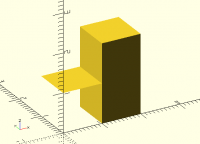
The result should be empty.
The whole point of openscad is generating valid 3D solids. Any shape
with 0 volume is essentially 2d, not 3d, and should be removed. Here is
one such invalid shape (use F6):
translate([1,0,0]) cube([1,1,2]);
intersection() {
translate([0,0,1]) cube();
cube();
}
By the way, if you import this stl into openscad, it will fail to render
(with F6), as openscad considers it invalid (as it should).
Sebastien
On 16 August 2016 at 14:20, DIRO <roys@iro.umontreal.ca
mailto:roys@iro.umontreal.ca> wrote:
Hi everyone,
When I run this code (with F6), I get an stl with an empty flat
square,
which is not a valid volume...
Can anyone confirm this on some other version of Openscad? (I am 42
commits behind current master version)
intersection() {
translate([0,0,1]) cube();
cube();
}