

discuss@lists.openscad.org

OpenSCAD general discussion Mailing-list

View all threads

openscad with python- Dimensioning

SP
Sanjeev Prabhakar
Fri, Jan 9, 2026 4:21 PM

Dimensioning is another area to work on in openSCAD
One of the examples which I created on how to communicate a design intent
using Python.
File attached for reference
Would you be able to create the same model with this?
[image: Screenshot 2026-01-09 at 9.34.37 PM.png]

[image: Screenshot 2026-01-09 at 9.46.54 PM.png]

Dimensioning is another area to work on in openSCAD One of the examples which I created on how to communicate a design intent using Python. File attached for reference Would you be able to create the same model with this? [image: Screenshot 2026-01-09 at 9.34.37 PM.png] [image: Screenshot 2026-01-09 at 9.46.54 PM.png]
JB
Jordan Brown
Fri, Jan 9, 2026 6:50 PM

On 1/9/2026 8:21 AM, Sanjeev Prabhakar via Discuss wrote:

Would you be able to create the same model with this?

Able to?  Sure.  Would it be easy?  No.  The big problem is that there's
no way in OpenSCAD to extract a location from a subassembly so as to
externally add dimensions.  The only options that I come up with are:

  • Calculate the locations in advance and use them in both the
    subassembly and the dimension lines
  • Do the calculations twice
  • Have the subassembly itself add the dimension lines

That is... here's a module that draws a dimension line, optionally with
a label.

function topolar3(p) = [
norm(p),
atan2(p.y, p.x),
atan2(norm([p.x,p.y]), p.z)
];

module dim3(a, b, rot=0, h=10, r=0.5, label) {
p = topolar3(b-a);
cone_r = r2;
cone_h = r
4;
translate(a) rotate([0,p[2],p[1]]) {
translate([0,0,cone_h]) cylinder(h=p[0]-cone_h2,r=r);
translate([0,0,p[0]-cone_h]) cylinder(h=cone_h, r1=cone_r, r2=0);
cylinder(h=cone_h, r1=0, r2=cone_r);
if (label) {
rotate([0,-90,0])
rotate([rot,0,0])
linear_extrude(height=r
2, center=true)
translate([p[0]/2,r*1.2,0])
text(label, size=h, halign="center", valign="bottom");
}
}
}

dim3([0,0,0], [100,100,100], label="here to there");

Now we want to draw dimension lines for, say, a cylinder()l

cylinder(h=50, d=10);

You need to know the coordinates of the two endpoints for the dimension
lines, but cylinder() has no way to tell you.

You could just know how a cylinder is built, and duplicate the
calculations:

h = 50;
d = 10;
cylinder(h=h, d=d);
offset = 2;
dim3([-d/2-offset,0,0], [-d/2-offset, 0,h]);
dim3([-d/2,0,-offset], [d/2,0,-offset]);

Or you could define cylinder() yourself and include dimension lines:

module cylinder2(h, d, dims=false) {    // simplified
offset = 2;
r = d/2;
linear_extrude(h=h) circle(d=d);
dim3([-r-offset, 0, 0], [-r-offset, 0, h]);
dim3([-r, 0, -offset], [r, 0, -offset]);
}

cylinder2(h=50,d=15,dims=true);

... but that assumes that you know when you build the subassembly what
dimension lines you might want, and presents the same problems when you
combine multiple subassemblies and want a dimension line from a point in
one subassembly to a point in another.

cylinder(h=50, d=5);
rotate([0,90,0]) cylinder(h=25,d=3);
dim3([0,0,50+5], [25+5,0,0]);

On 1/9/2026 8:21 AM, Sanjeev Prabhakar via Discuss wrote: > Would you be able to create the same model with this? Able to?  Sure.  Would it be easy?  No.  The big problem is that there's no way in OpenSCAD to extract a location from a subassembly so as to externally add dimensions.  The only options that I come up with are: * Calculate the locations in advance and use them in both the subassembly and the dimension lines * Do the calculations twice * Have the subassembly itself add the dimension lines That is... here's a module that draws a dimension line, optionally with a label. function topolar3(p) = [ norm(p), atan2(p.y, p.x), atan2(norm([p.x,p.y]), p.z) ]; module dim3(a, b, rot=0, h=10, r=0.5, label) { p = topolar3(b-a); cone_r = r*2; cone_h = r*4; translate(a) rotate([0,p[2],p[1]]) { translate([0,0,cone_h]) cylinder(h=p[0]-cone_h*2,r=r); translate([0,0,p[0]-cone_h]) cylinder(h=cone_h, r1=cone_r, r2=0); cylinder(h=cone_h, r1=0, r2=cone_r); if (label) { rotate([0,-90,0]) rotate([rot,0,0]) linear_extrude(height=r*2, center=true) translate([p[0]/2,r*1.2,0]) text(label, size=h, halign="center", valign="bottom"); } } } dim3([0,0,0], [100,100,100], label="here to there"); Now we want to draw dimension lines for, say, a cylinder()l cylinder(h=50, d=10); You need to know the coordinates of the two endpoints for the dimension lines, but cylinder() has no way to tell you. You could just know how a cylinder is built, and duplicate the calculations: h = 50; d = 10; cylinder(h=h, d=d); offset = 2; dim3([-d/2-offset,0,0], [-d/2-offset, 0,h]); dim3([-d/2,0,-offset], [d/2,0,-offset]); Or you could define cylinder() yourself and include dimension lines: module cylinder2(h, d, dims=false) { // simplified offset = 2; r = d/2; linear_extrude(h=h) circle(d=d); dim3([-r-offset, 0, 0], [-r-offset, 0, h]); dim3([-r, 0, -offset], [r, 0, -offset]); } cylinder2(h=50,d=15,dims=true); ... but that assumes that you know when you build the subassembly what dimension lines you might want, and presents the same problems when you combine multiple subassemblies and want a dimension line from a point in one subassembly to a point in another. cylinder(h=50, d=5); rotate([0,90,0]) cylinder(h=25,d=3); dim3([0,0,50+5], [25+5,0,0]);
JB
Jordan Brown
Fri, Jan 9, 2026 8:09 PM

Incidentally, my examples, and in particular the example with two
cylinders, demonstrates a problem with drawing dimension lines on a 3D
model.

On a two-dimensional drawing, you can just draw a line from point A to
point B, and as long as you color it so that it's distinct from the
drawing, it's visible.  But it's visible only because we are
three-dimensional creatures who can look at the drawing from the top. 
To a Flatlander, those dimension lines would likely be at least
partially inside the figures being measured, and so would not be visible.

We have the same problem with 3D dimension lines.  Consider my L-shaped
assembly of two cylinders, where I want to draw a dimension line from
the top of the L to the bottom-right of the L.  In my example, I offset
the dimension line a bit so that it wouldn't be inside the cylinders,
but that's not really right.  (It also means that an
automatically-calculated dimension label would have been wrong.)  If we
straightforwardly drew the dimension line from one endpoint to the
other, the ends of the dimension line would be inside the cylinders,
where we can't see them.  They don't even need to be inside the figure
to be a problem; they could be behind it and so not visible on the display.

If we were four-dimensional creatures, we could look at the model from
ana or kata
https://en.wikipedia.org/wiki/Four-dimensional_space#Orthogonality_and_vocabulary,
and could see the dimension lines clearly, but... we aren't.

Engineering drawings solve this problem by projecting the 3D object down
to 2D, and then using 2D techniques, but that doesn't play well in the
OpenSCAD world where we don't really have such a 2D view.  Or, we do, in
the display, but we don't have the (easy) ability to draw "on top of" it.

Incidentally, my examples, and in particular the example with two cylinders, demonstrates a problem with drawing dimension lines on a 3D model. On a two-dimensional drawing, you can just draw a line from point A to point B, and as long as you color it so that it's distinct from the drawing, it's visible.  But it's visible only because we are three-dimensional creatures who can look at the drawing from the top.  To a Flatlander, those dimension lines would likely be at least partially inside the figures being measured, and so would not be visible. We have the same problem with 3D dimension lines.  Consider my L-shaped assembly of two cylinders, where I want to draw a dimension line from the top of the L to the bottom-right of the L.  In my example, I offset the dimension line a bit so that it wouldn't be inside the cylinders, but that's not really right.  (It also means that an automatically-calculated dimension label would have been wrong.)  If we straightforwardly drew the dimension line from one endpoint to the other, the ends of the dimension line would be inside the cylinders, where we can't see them.  They don't even need to be inside the figure to be a problem; they could be behind it and so not visible on the display. If we were four-dimensional creatures, we could look at the model from ana or kata <https://en.wikipedia.org/wiki/Four-dimensional_space#Orthogonality_and_vocabulary>, and could see the dimension lines clearly, but... we aren't. Engineering drawings solve this problem by projecting the 3D object down to 2D, and then using 2D techniques, but that doesn't play well in the OpenSCAD world where we don't really have such a 2D view.  Or, we do, in the display, but we don't have the (easy) ability to draw "on top of" it.
NH
nop head
Fri, Jan 9, 2026 8:45 PM

This is how I dimension:

[image: rod_assembly.png]

On Fri, 9 Jan 2026 at 20:11, Jordan Brown via Discuss <
discuss@lists.openscad.org> wrote:

Incidentally, my examples, and in particular the example with two
cylinders, demonstrates a problem with drawing dimension lines on a 3D
model.

On a two-dimensional drawing, you can just draw a line from point A to
point B, and as long as you color it so that it's distinct from the
drawing, it's visible.  But it's visible only because we are
three-dimensional creatures who can look at the drawing from the top.  To a
Flatlander, those dimension lines would likely be at least partially inside
the figures being measured, and so would not be visible.

We have the same problem with 3D dimension lines.  Consider my L-shaped
assembly of two cylinders, where I want to draw a dimension line from the
top of the L to the bottom-right of the L.  In my example, I offset the
dimension line a bit so that it wouldn't be inside the cylinders, but
that's not really right.  (It also means that an automatically-calculated
dimension label would have been wrong.)  If we straightforwardly drew the
dimension line from one endpoint to the other, the ends of the dimension
line would be inside the cylinders, where we can't see them.  They don't
even need to be inside the figure to be a problem; they could be behind it
and so not visible on the display.

If we were four-dimensional creatures, we could look at the model from ana
or kata
https://en.wikipedia.org/wiki/Four-dimensional_space#Orthogonality_and_vocabulary,
and could see the dimension lines clearly, but... we aren't.

Engineering drawings solve this problem by projecting the 3D object down
to 2D, and then using 2D techniques, but that doesn't play well in the
OpenSCAD world where we don't really have such a 2D view.  Or, we do, in
the display, but we don't have the (easy) ability to draw "on top of" it.


OpenSCAD mailing list
To unsubscribe send an email to discuss-leave@lists.openscad.org
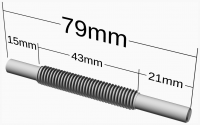
This is how I dimension: [image: rod_assembly.png] On Fri, 9 Jan 2026 at 20:11, Jordan Brown via Discuss < discuss@lists.openscad.org> wrote: > Incidentally, my examples, and in particular the example with two > cylinders, demonstrates a problem with drawing dimension lines on a 3D > model. > > On a two-dimensional drawing, you can just draw a line from point A to > point B, and as long as you color it so that it's distinct from the > drawing, it's visible. But it's visible only because we are > three-dimensional creatures who can look at the drawing from the top. To a > Flatlander, those dimension lines would likely be at least partially inside > the figures being measured, and so would not be visible. > > We have the same problem with 3D dimension lines. Consider my L-shaped > assembly of two cylinders, where I want to draw a dimension line from the > top of the L to the bottom-right of the L. In my example, I offset the > dimension line a bit so that it wouldn't be inside the cylinders, but > that's not really right. (It also means that an automatically-calculated > dimension label would have been wrong.) If we straightforwardly drew the > dimension line from one endpoint to the other, the ends of the dimension > line would be inside the cylinders, where we can't see them. They don't > even need to be inside the figure to be a problem; they could be behind it > and so not visible on the display. > > If we were four-dimensional creatures, we could look at the model from ana > or kata > <https://en.wikipedia.org/wiki/Four-dimensional_space#Orthogonality_and_vocabulary>, > and could see the dimension lines clearly, but... we aren't. > > Engineering drawings solve this problem by projecting the 3D object down > to 2D, and then using 2D techniques, but that doesn't play well in the > OpenSCAD world where we don't really have such a 2D view. Or, we do, in > the display, but we don't have the (easy) ability to draw "on top of" it. > > _______________________________________________ > OpenSCAD mailing list > To unsubscribe send an email to discuss-leave@lists.openscad.org
JB
Jon Bondy
Fri, Jan 9, 2026 8:52 PM

Very nice!  Can you show what the code would look like to generate the
piece and the annotation?

Jon

On 1/9/2026 3:45 PM, nop head via Discuss wrote:

This is how I dimension:

rod_assembly.png

--
This email has been checked for viruses by AVG antivirus software.
www.avg.com

Very nice!  Can you show what the code would look like to generate the piece and the annotation? Jon On 1/9/2026 3:45 PM, nop head via Discuss wrote: > This is how I dimension: > > rod_assembly.png > > > -- This email has been checked for viruses by AVG antivirus software. www.avg.com
JB
Jordan Brown
Fri, Jan 9, 2026 10:17 PM

On 1/9/2026 12:45 PM, nop head via Discuss wrote:

This is how I dimension:

rod_assembly.png

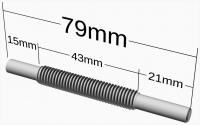
Right, and that looks gorgeous, but you had to do that more or less "by
hand", right? That is, which direction the offset is for the line,
offset for the vertical lines from the measurement endpoints, et cetera.

And that only works from this angle; if you rotated that rod 90° the
labels wouldn't work.

My dimension lines look like so:

but I positioned those "by hand".
On 1/9/2026 12:45 PM, nop head via Discuss wrote: > This is how I dimension: > > rod_assembly.png Right, and that looks gorgeous, but you had to do that more or less "by hand", right? That is, which direction the offset is for the line, offset for the vertical lines from the measurement endpoints, et cetera. And that only works from this angle; if you rotated that rod 90° the labels wouldn't work. My dimension lines look like so: but I positioned those "by hand".
NH
nop head
Fri, Jan 9, 2026 10:24 PM

module dimv(p1, p2, z, max = inf, offset = 1) { //! Draw a vertical
dimension showing the x,y distance between two points
for(p = [p1, p2])
translate(p + [0, 0, offset])
cylinder(r = 0.1, h = z - p.z - offset);

mid = (p1 + p2) / 2;
d = norm(vec2(p1 - p2));
text = str(d, "mm");
tw = d - 2;
if(max < tw)
    for(side = [-1, 1])
        translate([mid.x, mid.y, 0] + [side * d / 2, 0, z - max /

len(text) / 1.75])
rotate([0, -side * 90, 0])
cylinder(r = 0.1, h = (d - max) / 2 - 1);

translate([mid.x, mid.y, z])
    rotate([90, 0, 0])
        resize([min(tw, max), 0], auto = true)
            linear_extrude(0.1)
                text(text, halign = "center", valign = "top");

}

//! 1. Turn down the ends of the studding to 5.96mm
module rod_assembly()
assembly("rod", big = true) {
if(exploded())
color("black") {
h = 15;
p0 = axle_pos + [0, 0, axle_d / 2];
p1 = studding_pos + [0, 0, studding_d / 2];
p2 = studding_pos + [-studding_length, 0, studding_d / 2];
p3 = axle_pos + [-axle_length, 0, axle_d / 2];

            max = p2.x - p3.x - 2;
            dimv(p0, p1, axle_pos.z + h, max);
            dimv(p1, p2, axle_pos.z + h, max);
            dimv(p2, p3, axle_pos.z + h, max);
            dimv(p0, p3, axle_pos.z + 2 * h, 2 * max);
        }

    translate(axle_pos)
        rotate([0, -90, 0])
            not_on_bom()
                rod(axle_d, axle_length, center = false);

    translate(studding_pos)
        rotate([0, -90, 0])
            let($show_threads = true)
                not_on_bom()
                    studding(studding_d, studding_length, false);
    hidden()
        studding(studding_d, axle_length, false);
}

On Fri, 9 Jan 2026 at 20:52, Jon Bondy jon@jonbondy.com wrote:

Very nice!  Can you show what the code would look like to generate the
piece and the annotation?

Jon
On 1/9/2026 3:45 PM, nop head via Discuss wrote:

This is how I dimension:

[image: rod_assembly.png]

http://www.avg.com/email-signature?utm_medium=email&utm_source=link&utm_campaign=sig-email&utm_content=emailclient
Virus-free.www.avg.com
http://www.avg.com/email-signature?utm_medium=email&utm_source=link&utm_campaign=sig-email&utm_content=emailclient
<#m_-4894524017845060735_DAB4FAD8-2DD7-40BB-A1B8-4E2AA1F9FDF2>


module dimv(p1, p2, z, max = inf, offset = 1) { //! Draw a vertical dimension showing the x,y distance between two points for(p = [p1, p2]) translate(p + [0, 0, offset]) cylinder(r = 0.1, h = z - p.z - offset); mid = (p1 + p2) / 2; d = norm(vec2(p1 - p2)); text = str(d, "mm"); tw = d - 2; if(max < tw) for(side = [-1, 1]) translate([mid.x, mid.y, 0] + [side * d / 2, 0, z - max / len(text) / 1.75]) rotate([0, -side * 90, 0]) cylinder(r = 0.1, h = (d - max) / 2 - 1); translate([mid.x, mid.y, z]) rotate([90, 0, 0]) resize([min(tw, max), 0], auto = true) linear_extrude(0.1) text(text, halign = "center", valign = "top"); } //! 1. Turn down the ends of the studding to 5.96mm module rod_assembly() assembly("rod", big = true) { if(exploded()) color("black") { h = 15; p0 = axle_pos + [0, 0, axle_d / 2]; p1 = studding_pos + [0, 0, studding_d / 2]; p2 = studding_pos + [-studding_length, 0, studding_d / 2]; p3 = axle_pos + [-axle_length, 0, axle_d / 2]; max = p2.x - p3.x - 2; dimv(p0, p1, axle_pos.z + h, max); dimv(p1, p2, axle_pos.z + h, max); dimv(p2, p3, axle_pos.z + h, max); dimv(p0, p3, axle_pos.z + 2 * h, 2 * max); } translate(axle_pos) rotate([0, -90, 0]) not_on_bom() rod(axle_d, axle_length, center = false); translate(studding_pos) rotate([0, -90, 0]) let($show_threads = true) not_on_bom() studding(studding_d, studding_length, false); hidden() studding(studding_d, axle_length, false); } On Fri, 9 Jan 2026 at 20:52, Jon Bondy <jon@jonbondy.com> wrote: > Very nice! Can you show what the code would look like to generate the > piece and the annotation? > > Jon > On 1/9/2026 3:45 PM, nop head via Discuss wrote: > > This is how I dimension: > > [image: rod_assembly.png] > > > > > > <http://www.avg.com/email-signature?utm_medium=email&utm_source=link&utm_campaign=sig-email&utm_content=emailclient> > Virus-free.www.avg.com > <http://www.avg.com/email-signature?utm_medium=email&utm_source=link&utm_campaign=sig-email&utm_content=emailclient> > <#m_-4894524017845060735_DAB4FAD8-2DD7-40BB-A1B8-4E2AA1F9FDF2> >
GB
Glenn Butcher
Fri, Jan 9, 2026 11:22 PM

On 1/9/2026 3:17 PM, Jordan Brown via Discuss wrote:

Right, and that looks gorgeous, but you had to do that more or less
"by hand", right? That is, which direction the offset is for the line,
offset for the vertical lines from the measurement endpoints, et cetera.

I lay out my parts on an axis (usually X), and I use variables for major
measurements.  So, when I use my dimension() module it lays out on the X
axis, and I pass it the particular measurements into its start and end
parameters.  If I put the part module call and the dimension module call
in a module,e.g, dimensioned_siderod(), I can translate/rotate that to
my heart's content:

rotate([0,-10,45]) dimensioned_siderod();

does this:

The numbers in parentheses are turns and ticks of the mill wheel to take
the tool from the left-center to the center-center, useful when
hand-milling the part.

On 1/9/2026 3:17 PM, Jordan Brown via Discuss wrote: > > Right, and that looks gorgeous, but you had to do that more or less > "by hand", right? That is, which direction the offset is for the line, > offset for the vertical lines from the measurement endpoints, et cetera. > > I lay out my parts on an axis (usually X), and I use variables for major measurements.  So, when I use my dimension() module it lays out on the X axis, and I pass it the particular measurements into its start and end parameters.  If I put the part module call and the dimension module call in a module,e.g, dimensioned_siderod(), I can translate/rotate that to my heart's content: rotate([0,-10,45]) dimensioned_siderod(); does this: The numbers in parentheses are turns and ticks of the mill wheel to take the tool from the left-center to the center-center, useful when hand-milling the part.
SP
Sanjeev Prabhakar
Sat, Jan 10, 2026 4:28 AM

If you have to do this manually it is very tedious.
You need to definitely mention which arc needs to be dimensioned or which
line etc.
With primitives it is very hard to do that and also it misses the point
when you do that manually because it may not show the correct values.

This can be done more usefully if:

  • you draw models with the points list
  • there is a points tracing / numbering method available
  • all calculations should be autonomous like it should auto calculate arc
    radius , angle between 2 lines, distance between 2 given points and display
    the results.
    and so on...

The python code for the example I shared is below for reference:


from openscad4 import *

c1,c2,c3=[circle(i,s=100) for i in [50/2,110/2,136/2]]
l1=[[-150,7.5],[150,7.5]]
l2=path_offset(l1,15)
p0,p1,p2,p3=s_int1([l1,l2]+seg(c3))
p4,p5,p6,p7=rot2d(22.5,[p0,p1,p2,p3])
p8=s_int1([[p0,p1],[p7,p6]])[0]
l3=corner_n_radius_list([p0,p8,p7],[0,4,0])
l4=a_([ rot2d(i,l3) for i in arange(0,360,22.5)]).reshape(-1,2).tolist()
txt1=dim_radial(l3[1:-1],.5,"blue",2)
path=cr2dt([[0,0],[0,1],[-7,4]])
sol=prism(c3,path)
sol1=translate([0,0,-.5],linear_extrude(l4,7))
sol2=translate([0,0,-.5],linear_extrude(c1,7))
txt2=dim_linear([p0,p3],-5,1,text_size=2)
txt3=dim_radial(c2[3:7],1,text_size=2)
txt4=dim_radial(c3[7:12],1,text_size=2)
txt5=dim_radial(c1[30:35],1,text_size=2)
txt6=dim_linear([sol[0][12],sol[1][12]],-1,.5,text_size=2)
txt7=dim_linear(point_vector(sol[1][12],[0,0,4]),-1,.5,text_size=2)
txt8=dim_linear(point_vector(sol[2][12],a_(line_as_unit_vector([[0,0,sol[2][
12][2]],sol[2][12]]))*7),1,.5,text_size=2)
txt9=dim_radial(sol[2][15:20],0.5,text_size=2)

fo: file open

fo(f'''
color("black") for(p={[c1,l4]}) p_line3dc(p,0.1);
{txt1}{txt2}{txt3}{txt4}{txt5}{txt6}{txt7}{txt8}{txt9}
%difference(){{
intersection(){{
{swp(sol)}
{swp(sol1)}
}}
{swp(sol2)}
}}
''')


On Sat, 10 Jan 2026 at 00:20, Jordan Brown openscad@jordan.maileater.net
wrote:

On 1/9/2026 8:21 AM, Sanjeev Prabhakar via Discuss wrote:

Would you be able to create the same model with this?

Able to?  Sure.  Would it be easy?  No.  The big problem is that there's
no way in OpenSCAD to extract a location from a subassembly so as to
externally add dimensions.  The only options that I come up with are:

- Calculate the locations in advance and use them in both the
subassembly and the dimension lines
- Do the calculations twice
- Have the subassembly itself add the dimension lines

That is... here's a module that draws a dimension line, optionally with a
label.

function topolar3(p) = [
norm(p),
atan2(p.y, p.x),
atan2(norm([p.x,p.y]), p.z)
];

module dim3(a, b, rot=0, h=10, r=0.5, label) {
p = topolar3(b-a);
cone_r = r2;
cone_h = r
4;
translate(a) rotate([0,p[2],p[1]]) {
translate([0,0,cone_h]) cylinder(h=p[0]-cone_h2,r=r);
translate([0,0,p[0]-cone_h]) cylinder(h=cone_h, r1=cone_r, r2=0);
cylinder(h=cone_h, r1=0, r2=cone_r);
if (label) {
rotate([0,-90,0])
rotate([rot,0,0])
linear_extrude(height=r
2, center=true)
translate([p[0]/2,r*1.2,0])
text(label, size=h, halign="center", valign="bottom");
}
}
}

dim3([0,0,0], [100,100,100], label="here to there");

Now we want to draw dimension lines for, say, a cylinder()l

cylinder(h=50, d=10);

You need to know the coordinates of the two endpoints for the dimension
lines, but cylinder() has no way to tell you.

You could just know how a cylinder is built, and duplicate the
calculations:

h = 50;
d = 10;
cylinder(h=h, d=d);
offset = 2;
dim3([-d/2-offset,0,0], [-d/2-offset, 0,h]);
dim3([-d/2,0,-offset], [d/2,0,-offset]);

Or you could define cylinder() yourself and include dimension lines:

module cylinder2(h, d, dims=false) {    // simplified
offset = 2;
r = d/2;
linear_extrude(h=h) circle(d=d);
dim3([-r-offset, 0, 0], [-r-offset, 0, h]);
dim3([-r, 0, -offset], [r, 0, -offset]);
}

cylinder2(h=50,d=15,dims=true);

... but that assumes that you know when you build the subassembly what
dimension lines you might want, and presents the same problems when you
combine multiple subassemblies and want a dimension line from a point in
one subassembly to a point in another.

cylinder(h=50, d=5);
rotate([0,90,0]) cylinder(h=25,d=3);
dim3([0,0,50+5], [25+5,0,0]);

If you have to do this manually it is very tedious. You need to definitely mention which arc needs to be dimensioned or which line etc. With primitives it is very hard to do that and also it misses the point when you do that manually because it may not show the correct values. This can be done more usefully if: - you draw models with the points list - there is a points tracing / numbering method available - all calculations should be autonomous like it should auto calculate arc radius , angle between 2 lines, distance between 2 given points and display the results. and so on... The python code for the example I shared is below for reference: _______________________________________________________________________ from openscad4 import * c1,c2,c3=[circle(i,s=100) for i in [50/2,110/2,136/2]] l1=[[-150,7.5],[150,7.5]] l2=path_offset(l1,15) p0,p1,p2,p3=s_int1([l1,l2]+seg(c3)) p4,p5,p6,p7=rot2d(22.5,[p0,p1,p2,p3]) p8=s_int1([[p0,p1],[p7,p6]])[0] l3=corner_n_radius_list([p0,p8,p7],[0,4,0]) l4=a_([ rot2d(i,l3) for i in arange(0,360,22.5)]).reshape(-1,2).tolist() txt1=dim_radial(l3[1:-1],.5,"blue",2) path=cr2dt([[0,0],[0,1],[-7,4]]) sol=prism(c3,path) sol1=translate([0,0,-.5],linear_extrude(l4,7)) sol2=translate([0,0,-.5],linear_extrude(c1,7)) txt2=dim_linear([p0,p3],-5,1,text_size=2) txt3=dim_radial(c2[3:7],1,text_size=2) txt4=dim_radial(c3[7:12],1,text_size=2) txt5=dim_radial(c1[30:35],1,text_size=2) txt6=dim_linear([sol[0][12],sol[1][12]],-1,.5,text_size=2) txt7=dim_linear(point_vector(sol[1][12],[0,0,4]),-1,.5,text_size=2) txt8=dim_linear(point_vector(sol[2][12],a_(line_as_unit_vector([[0,0,sol[2][ 12][2]],sol[2][12]]))*7),1,.5,text_size=2) txt9=dim_radial(sol[2][15:20],0.5,text_size=2) # fo: file open fo(f''' color("black") for(p={[c1,l4]}) p_line3dc(p,0.1); {txt1}{txt2}{txt3}{txt4}{txt5}{txt6}{txt7}{txt8}{txt9} %difference(){{ intersection(){{ {swp(sol)} {swp(sol1)} }} {swp(sol2)} }} ''') ________________________________________________________________________ On Sat, 10 Jan 2026 at 00:20, Jordan Brown <openscad@jordan.maileater.net> wrote: > On 1/9/2026 8:21 AM, Sanjeev Prabhakar via Discuss wrote: > > Would you be able to create the same model with this? > > > Able to? Sure. Would it be easy? No. The big problem is that there's > no way in OpenSCAD to extract a location from a subassembly so as to > externally add dimensions. The only options that I come up with are: > > - Calculate the locations in advance and use them in both the > subassembly and the dimension lines > - Do the calculations twice > - Have the subassembly itself add the dimension lines > > That is... here's a module that draws a dimension line, optionally with a > label. > > function topolar3(p) = [ > norm(p), > atan2(p.y, p.x), > atan2(norm([p.x,p.y]), p.z) > ]; > > module dim3(a, b, rot=0, h=10, r=0.5, label) { > p = topolar3(b-a); > cone_r = r*2; > cone_h = r*4; > translate(a) rotate([0,p[2],p[1]]) { > translate([0,0,cone_h]) cylinder(h=p[0]-cone_h*2,r=r); > translate([0,0,p[0]-cone_h]) cylinder(h=cone_h, r1=cone_r, r2=0); > cylinder(h=cone_h, r1=0, r2=cone_r); > if (label) { > rotate([0,-90,0]) > rotate([rot,0,0]) > linear_extrude(height=r*2, center=true) > translate([p[0]/2,r*1.2,0]) > text(label, size=h, halign="center", valign="bottom"); > } > } > } > > dim3([0,0,0], [100,100,100], label="here to there"); > > Now we want to draw dimension lines for, say, a cylinder()l > > cylinder(h=50, d=10); > > You need to know the coordinates of the two endpoints for the dimension > lines, but cylinder() has no way to tell you. > > > You could just know how a cylinder is built, and duplicate the > calculations: > > h = 50; > d = 10; > cylinder(h=h, d=d); > offset = 2; > dim3([-d/2-offset,0,0], [-d/2-offset, 0,h]); > dim3([-d/2,0,-offset], [d/2,0,-offset]); > > > > Or you could define cylinder() yourself and include dimension lines: > > module cylinder2(h, d, dims=false) { // simplified > offset = 2; > r = d/2; > linear_extrude(h=h) circle(d=d); > dim3([-r-offset, 0, 0], [-r-offset, 0, h]); > dim3([-r, 0, -offset], [r, 0, -offset]); > } > > cylinder2(h=50,d=15,dims=true); > > ... but that assumes that you know when you build the subassembly what > dimension lines you might want, and presents the same problems when you > combine multiple subassemblies and want a dimension line from a point in > one subassembly to a point in another. > > cylinder(h=50, d=5); > rotate([0,90,0]) cylinder(h=25,d=3); > dim3([0,0,50+5], [25+5,0,0]); > >
MD
Michele Denber
Mon, Jan 12, 2026 4:54 PM

For some reason when I open OpenSCAD now it comes up with the Editor
window above the Display window.  It used to have the editor window on
the left and the display on the right.  I don't see any obvious way to
make this happen.  Copilot is full of useless suggestions. It's Windows
11, version 2021.01 if that matters.  ???

            - Michele

For some reason when I open OpenSCAD now it comes up with the Editor window above the Display window.  It used to have the editor window on the left and the display on the right.  I don't see any obvious way to make this happen.  Copilot is full of useless suggestions. It's Windows 11, version 2021.01 if that matters.  ???             - Michele