

discuss@lists.openscad.org

OpenSCAD general discussion Mailing-list

View all threads

Assistance with Some Code (Totally new at this)

DO
Douglas Ochsner
Mon, Sep 14, 2026 1:20 AM

I am in need of some help with this code. This was AI generated when I to generate code to build an U25C sideframe to fit an Athearn power truck. (Yes, I'm a model railroader.) I don't have the knowledge to hand draw what I need.  The generated code is this (Spacing and indents have been put in as was generated in the webpage)::
// HO Scale U25C Sideframe for Athearn U-Boat Trucks // Dimensions in millimeters (1:87 HO Scale approximation) 
$fn = 50; // Smoothness 
// --- Athearn Mounting Dimensions --- pin_spacing = 31.5; // Distance between Athearn mounting clips/pins pin_diameter = 2.1; // Diameter of Athearn mounting socketsframe_thickness = 1.8; 
 // --- U25C Prototype Dimensions (HO Scale) --- truck_length = 46.0; truck_height = 5.0; axle_spacing = 15.2; // Standard 5'4" + 5'4" spacing in HO 
module main_sideframe() {       difference() {             union() {                        // Main horizontal frame bar                       translate([-truck_length/2, -truck_height/2, 0])                                 cube([truck_length, truck_height, frame_thickness]); 
                       // Drop equalizers (distinct U25C low-slung shape)                        translate([-truck_length/2 + 2, -truck_height-1.5, 0])                                  cube([truck_length - 4, 2, frame_thickness + 0.5]); 
                      // Axle Journal Box 1 (Left)                       translate([-axle_spacing, 0, 0]) journal_box();                       // Axle Journal Box 2 (Center)                       translate([0, 0, 0]) journal_box();                       // Axle Journal Box 3 (Right)                       translate([axle_spacing, 0, 0]) journal_box(); 
                      // Brake cylinders & rigging details                       translate([-axle_spacing/2, truck_height/2 - 1, 0]) brake_cylinder();                       translate([axle_spacing/2, truck_height/2 - 1, 0]) brake_cylinder();             } 
           // Athearn Mounting Holes (recesses into the back)            translate([-pin_spacing/2, 0, -0.1]) cylinder(d=pin_diameter, h=frame_thickness + 0.5);            translate([pin_spacing/2, 0, -0.1]) cylinder(d=pin_diameter, h=frame_thickness + 0.5);            } } 
module journal_box() {            // Models the distinct GSC/Adirondack bearing caps            translate([0, -truck_height/4, 0]) {                        cube([3.5, 3.5, frame_thickness + 1.2], center=true);             translate([0, 0, frame_thickness + 0.5])                        cylinder(d=2.2, h=1.0, center=true);             } } 
 module brake_cylinder() {             rotate([0, 90, 0])                        cylinder(d=1.8, h=4, center=true); }  // Render the sideframe main_sideframe();
When I try to run the code, it errors out with the message: 'Ignoring unknown module 'main_sideframe'. I know AI can have errors but as I have no idea where to begin, any ideas on how to fix this would be most welcomed.
Douglas
Yahoo Mail: Search, Organize, Conquer

I am in need of some help with this code. This was AI generated when I to generate code to build an U25C sideframe to fit an Athearn power truck. (Yes, I'm a model railroader.) I don't have the knowledge to hand draw what I need.  The generated code is this (Spacing and indents have been put in as was generated in the webpage):: // HO Scale U25C Sideframe for Athearn U-Boat Trucks // Dimensions in millimeters (1:87 HO Scale approximation)  $fn = 50; // Smoothness  // --- Athearn Mounting Dimensions --- pin_spacing = 31.5; // Distance between Athearn mounting clips/pins pin_diameter = 2.1; // Diameter of Athearn mounting socketsframe_thickness = 1.8;   // --- U25C Prototype Dimensions (HO Scale) --- truck_length = 46.0; truck_height = 5.0; axle_spacing = 15.2; // Standard 5'4" + 5'4" spacing in HO  module main_sideframe() {       difference() {             union() {                        // Main horizontal frame bar                       translate([-truck_length/2, -truck_height/2, 0])                                 cube([truck_length, truck_height, frame_thickness]);                         // Drop equalizers (distinct U25C low-slung shape)                        translate([-truck_length/2 + 2, -truck_height-1.5, 0])                                  cube([truck_length - 4, 2, frame_thickness + 0.5]);                        // Axle Journal Box 1 (Left)                       translate([-axle_spacing, 0, 0]) journal_box();                       // Axle Journal Box 2 (Center)                       translate([0, 0, 0]) journal_box();                       // Axle Journal Box 3 (Right)                       translate([axle_spacing, 0, 0]) journal_box();                        // Brake cylinders & rigging details                       translate([-axle_spacing/2, truck_height/2 - 1, 0]) brake_cylinder();                       translate([axle_spacing/2, truck_height/2 - 1, 0]) brake_cylinder();             }             // Athearn Mounting Holes (recesses into the back)            translate([-pin_spacing/2, 0, -0.1]) cylinder(d=pin_diameter, h=frame_thickness + 0.5);            translate([pin_spacing/2, 0, -0.1]) cylinder(d=pin_diameter, h=frame_thickness + 0.5);            } }  module journal_box() {            // Models the distinct GSC/Adirondack bearing caps            translate([0, -truck_height/4, 0]) {                        cube([3.5, 3.5, frame_thickness + 1.2], center=true);             translate([0, 0, frame_thickness + 0.5])                        cylinder(d=2.2, h=1.0, center=true);             } }   module brake_cylinder() {             rotate([0, 90, 0])                        cylinder(d=1.8, h=4, center=true); }  // Render the sideframe main_sideframe(); When I try to run the code, it errors out with the message: 'Ignoring unknown module 'main_sideframe'. I know AI can have errors but as I have no idea where to begin, any ideas on how to fix this would be most welcomed. Douglas Yahoo Mail: Search, Organize, Conquer
LM
Leonard Martin Struttmann
Mon, Sep 14, 2026 2:38 AM

It's missing a variable that defines the thickness of the frame.

Try adding this right after axle_spacing:
frame_thickness = 1;

It should give you somrthing to start with.

On Sun, Sep 13, 2026 at 9:28 PM Douglas Ochsner via Discuss <
discuss@lists.openscad.org> wrote:

I am in need of some help with this code. This was AI generated when I to
generate code to build an U25C sideframe to fit an Athearn power truck.
(Yes, I'm a model railroader.) I don't have the knowledge to hand draw what
I need.  The generated code is this (Spacing and indents have been put in
as was generated in the webpage)::

// HO Scale U25C Sideframe for Athearn U-Boat Trucks
// Dimensions in millimeters (1:87 HO Scale approximation)

$fn = 50; // Smoothness

// --- Athearn Mounting Dimensions ---
pin_spacing = 31.5; // Distance between Athearn mounting clips/pins
pin_diameter = 2.1; // Diameter of Athearn mounting sockets
frame_thickness = 1.8;

// --- U25C Prototype Dimensions (HO Scale) ---
truck_length = 46.0;
truck_height = 5.0;
axle_spacing = 15.2; // Standard 5'4" + 5'4" spacing in HO

module main_sideframe() {
difference() {
union() {
// Main horizontal frame bar
translate([-truck_length/2, -truck_height/2, 0])
cube([truck_length, truck_height,
frame_thickness]);

                    // Drop equalizers (distinct U25C low-slung shape)
                    translate([-truck_length/2 + 2, -truck_height-1.5,

0])
cube([truck_length - 4, 2,
frame_thickness + 0.5]);

                   // Axle Journal Box 1 (Left)
                   translate([-axle_spacing, 0, 0]) journal_box();
                   // Axle Journal Box 2 (Center)
                   translate([0, 0, 0]) journal_box();
                   // Axle Journal Box 3 (Right)
                   translate([axle_spacing, 0, 0]) journal_box();

                   // Brake cylinders & rigging details
                   translate([-axle_spacing/2, truck_height/2 - 1, 0])

brake_cylinder();
translate([axle_spacing/2, truck_height/2 - 1, 0])
brake_cylinder();
}

        // Athearn Mounting Holes (recesses into the back)
        translate([-pin_spacing/2, 0, -0.1]) cylinder(d=pin_diameter,

h=frame_thickness + 0.5);
translate([pin_spacing/2, 0, -0.1]) cylinder(d=pin_diameter,
h=frame_thickness + 0.5);
}
}

module journal_box() {
// Models the distinct GSC/Adirondack bearing caps
translate([0, -truck_height/4, 0]) {
cube([3.5, 3.5, frame_thickness + 1.2],
center=true);
translate([0, 0, frame_thickness + 0.5])
cylinder(d=2.2, h=1.0, center=true);
}
}

module brake_cylinder() {
rotate([0, 90, 0])
cylinder(d=1.8, h=4, center=true);
}
// Render the sideframe
main_sideframe();

When I try to run the code, it errors out with the message: 'Ignoring
unknown module 'main_sideframe'. I know AI can have errors but as I have no
idea where to begin, any ideas on how to fix this would be most welcomed.

Douglas

Yahoo Mail: Search, Organize, Conquer
https://mail.onelink.me/107872968?pid=nativeplacement&c=US_Acquisition_YMktg_315_SearchOrgConquer_EmailSignature&af_sub1=Acquisition&af_sub2=US_YMktg&af_sub3=&af_sub4=100002039&af_sub5=C01_Email_Static_&af_ios_store_cpp=0c38e4b0-a27e-40f9-a211-f4e2de32ab91&af_android_url=https://play.google.com/store/apps/details?id=com.yahoo.mobile.client.android.mail&listing=search_organize_conquer


OpenSCAD mailing list
To unsubscribe send an email to discuss-leave@lists.openscad.org

It's missing a variable that defines the thickness of the frame. Try adding this right after axle_spacing: frame_thickness = 1; It should give you somrthing to start with. On Sun, Sep 13, 2026 at 9:28 PM Douglas Ochsner via Discuss < discuss@lists.openscad.org> wrote: > I am in need of some help with this code. This was AI generated when I to > generate code to build an U25C sideframe to fit an Athearn power truck. > (Yes, I'm a model railroader.) I don't have the knowledge to hand draw what > I need. The generated code is this (Spacing and indents have been put in > as was generated in the webpage):: > > // HO Scale U25C Sideframe for Athearn U-Boat Trucks > // Dimensions in millimeters (1:87 HO Scale approximation) > > $fn = 50; // Smoothness > > // --- Athearn Mounting Dimensions --- > pin_spacing = 31.5; // Distance between Athearn mounting clips/pins > pin_diameter = 2.1; // Diameter of Athearn mounting sockets > frame_thickness = 1.8; > > // --- U25C Prototype Dimensions (HO Scale) --- > truck_length = 46.0; > truck_height = 5.0; > axle_spacing = 15.2; // Standard 5'4" + 5'4" spacing in HO > > module main_sideframe() { > difference() { > union() { > // Main horizontal frame bar > translate([-truck_length/2, -truck_height/2, 0]) > cube([truck_length, truck_height, > frame_thickness]); > > // Drop equalizers (distinct U25C low-slung shape) > translate([-truck_length/2 + 2, -truck_height-1.5, > 0]) > cube([truck_length - 4, 2, > frame_thickness + 0.5]); > > // Axle Journal Box 1 (Left) > translate([-axle_spacing, 0, 0]) journal_box(); > // Axle Journal Box 2 (Center) > translate([0, 0, 0]) journal_box(); > // Axle Journal Box 3 (Right) > translate([axle_spacing, 0, 0]) journal_box(); > > // Brake cylinders & rigging details > translate([-axle_spacing/2, truck_height/2 - 1, 0]) > brake_cylinder(); > translate([axle_spacing/2, truck_height/2 - 1, 0]) > brake_cylinder(); > } > > // Athearn Mounting Holes (recesses into the back) > translate([-pin_spacing/2, 0, -0.1]) cylinder(d=pin_diameter, > h=frame_thickness + 0.5); > translate([pin_spacing/2, 0, -0.1]) cylinder(d=pin_diameter, > h=frame_thickness + 0.5); > } > } > > module journal_box() { > // Models the distinct GSC/Adirondack bearing caps > translate([0, -truck_height/4, 0]) { > cube([3.5, 3.5, frame_thickness + 1.2], > center=true); > translate([0, 0, frame_thickness + 0.5]) > cylinder(d=2.2, h=1.0, center=true); > } > } > > module brake_cylinder() { > rotate([0, 90, 0]) > cylinder(d=1.8, h=4, center=true); > } > // Render the sideframe > main_sideframe(); > > When I try to run the code, it errors out with the message: 'Ignoring > unknown module 'main_sideframe'. I know AI can have errors but as I have no > idea where to begin, any ideas on how to fix this would be most welcomed. > > Douglas > > Yahoo Mail: Search, Organize, Conquer > <https://mail.onelink.me/107872968?pid=nativeplacement&c=US_Acquisition_YMktg_315_SearchOrgConquer_EmailSignature&af_sub1=Acquisition&af_sub2=US_YMktg&af_sub3=&af_sub4=100002039&af_sub5=C01_Email_Static_&af_ios_store_cpp=0c38e4b0-a27e-40f9-a211-f4e2de32ab91&af_android_url=https://play.google.com/store/apps/details?id=com.yahoo.mobile.client.android.mail&listing=search_organize_conquer> > _______________________________________________ > OpenSCAD mailing list > To unsubscribe send an email to discuss-leave@lists.openscad.org
WF
William F. Adams
Mon, Sep 14, 2026 2:39 AM

Looking at this, I see:
frame_thickness is used on line 20, but not defined --- what should it be?
Adding:
frame_thickness = 1;
as line 15 allowed it to render in PythonSCAD (when set to use .scad code)

Why not try to draw it by hand? If you could provide a dimensioned sketch we could better advise.
William
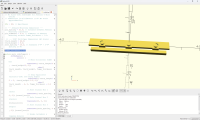
Looking at this, I see: frame_thickness is used on line 20, but not defined --- what should it be? Adding: frame_thickness = 1; as line 15 allowed it to render in PythonSCAD (when set to use .scad code) Why not try to draw it by hand? If you could provide a dimensioned sketch we could better advise. William
LM
Leonard Martin Struttmann
Mon, Sep 14, 2026 2:40 AM

Oh, there it is, in this line:

pin_diameter = 2.1; // Diameter of Athearn mounting sockets frame_thickness
= 1.8;

change to:

pin_diameter = 2.1; // Diameter of Athearn mounting sockets
frame_thickness = 1.8;

On Sun, Sep 13, 2026 at 9:38 PM Leonard Martin Struttmann <
lenstruttmann@gmail.com> wrote:

It's missing a variable that defines the thickness of the frame.

Try adding this right after axle_spacing:
frame_thickness = 1;

It should give you somrthing to start with.

On Sun, Sep 13, 2026 at 9:28 PM Douglas Ochsner via Discuss <
discuss@lists.openscad.org> wrote:

I am in need of some help with this code. This was AI generated when I to
generate code to build an U25C sideframe to fit an Athearn power truck.
(Yes, I'm a model railroader.) I don't have the knowledge to hand draw what
I need.  The generated code is this (Spacing and indents have been put in
as was generated in the webpage)::

// HO Scale U25C Sideframe for Athearn U-Boat Trucks
// Dimensions in millimeters (1:87 HO Scale approximation)

$fn = 50; // Smoothness

// --- Athearn Mounting Dimensions ---
pin_spacing = 31.5; // Distance between Athearn mounting clips/pins
pin_diameter = 2.1; // Diameter of Athearn mounting sockets
frame_thickness = 1.8;

// --- U25C Prototype Dimensions (HO Scale) ---
truck_length = 46.0;
truck_height = 5.0;
axle_spacing = 15.2; // Standard 5'4" + 5'4" spacing in HO

module main_sideframe() {
difference() {
union() {
// Main horizontal frame bar
translate([-truck_length/2, -truck_height/2, 0])
cube([truck_length, truck_height,
frame_thickness]);

                    // Drop equalizers (distinct U25C low-slung shape)
                    translate([-truck_length/2 + 2, -truck_height-1.5,

0])
cube([truck_length - 4, 2,
frame_thickness + 0.5]);

                   // Axle Journal Box 1 (Left)
                   translate([-axle_spacing, 0, 0]) journal_box();
                   // Axle Journal Box 2 (Center)
                   translate([0, 0, 0]) journal_box();
                   // Axle Journal Box 3 (Right)
                   translate([axle_spacing, 0, 0]) journal_box();

                   // Brake cylinders & rigging details
                   translate([-axle_spacing/2, truck_height/2 - 1, 0])

brake_cylinder();
translate([axle_spacing/2, truck_height/2 - 1, 0])
brake_cylinder();
}

        // Athearn Mounting Holes (recesses into the back)
        translate([-pin_spacing/2, 0, -0.1]) cylinder(d=pin_diameter,

h=frame_thickness + 0.5);
translate([pin_spacing/2, 0, -0.1]) cylinder(d=pin_diameter,
h=frame_thickness + 0.5);
}
}

module journal_box() {
// Models the distinct GSC/Adirondack bearing caps
translate([0, -truck_height/4, 0]) {
cube([3.5, 3.5, frame_thickness + 1.2],
center=true);
translate([0, 0, frame_thickness + 0.5])
cylinder(d=2.2, h=1.0, center=true);
}
}

module brake_cylinder() {
rotate([0, 90, 0])
cylinder(d=1.8, h=4, center=true);
}
// Render the sideframe
main_sideframe();

When I try to run the code, it errors out with the message: 'Ignoring
unknown module 'main_sideframe'. I know AI can have errors but as I have no
idea where to begin, any ideas on how to fix this would be most welcomed.

Douglas

Yahoo Mail: Search, Organize, Conquer
https://mail.onelink.me/107872968?pid=nativeplacement&c=US_Acquisition_YMktg_315_SearchOrgConquer_EmailSignature&af_sub1=Acquisition&af_sub2=US_YMktg&af_sub3=&af_sub4=100002039&af_sub5=C01_Email_Static_&af_ios_store_cpp=0c38e4b0-a27e-40f9-a211-f4e2de32ab91&af_android_url=https://play.google.com/store/apps/details?id=com.yahoo.mobile.client.android.mail&listing=search_organize_conquer


OpenSCAD mailing list
To unsubscribe send an email to discuss-leave@lists.openscad.org

Oh, there it is, in this line: pin_diameter = 2.1; // Diameter of Athearn mounting sockets frame_thickness = 1.8; change to: pin_diameter = 2.1; // Diameter of Athearn mounting sockets frame_thickness = 1.8; On Sun, Sep 13, 2026 at 9:38 PM Leonard Martin Struttmann < lenstruttmann@gmail.com> wrote: > It's missing a variable that defines the thickness of the frame. > > Try adding this right after axle_spacing: > frame_thickness = 1; > > It should give you somrthing to start with. > > > On Sun, Sep 13, 2026 at 9:28 PM Douglas Ochsner via Discuss < > discuss@lists.openscad.org> wrote: > >> I am in need of some help with this code. This was AI generated when I to >> generate code to build an U25C sideframe to fit an Athearn power truck. >> (Yes, I'm a model railroader.) I don't have the knowledge to hand draw what >> I need. The generated code is this (Spacing and indents have been put in >> as was generated in the webpage):: >> >> // HO Scale U25C Sideframe for Athearn U-Boat Trucks >> // Dimensions in millimeters (1:87 HO Scale approximation) >> >> $fn = 50; // Smoothness >> >> // --- Athearn Mounting Dimensions --- >> pin_spacing = 31.5; // Distance between Athearn mounting clips/pins >> pin_diameter = 2.1; // Diameter of Athearn mounting sockets >> frame_thickness = 1.8; >> >> // --- U25C Prototype Dimensions (HO Scale) --- >> truck_length = 46.0; >> truck_height = 5.0; >> axle_spacing = 15.2; // Standard 5'4" + 5'4" spacing in HO >> >> module main_sideframe() { >> difference() { >> union() { >> // Main horizontal frame bar >> translate([-truck_length/2, -truck_height/2, 0]) >> cube([truck_length, truck_height, >> frame_thickness]); >> >> // Drop equalizers (distinct U25C low-slung shape) >> translate([-truck_length/2 + 2, -truck_height-1.5, >> 0]) >> cube([truck_length - 4, 2, >> frame_thickness + 0.5]); >> >> // Axle Journal Box 1 (Left) >> translate([-axle_spacing, 0, 0]) journal_box(); >> // Axle Journal Box 2 (Center) >> translate([0, 0, 0]) journal_box(); >> // Axle Journal Box 3 (Right) >> translate([axle_spacing, 0, 0]) journal_box(); >> >> // Brake cylinders & rigging details >> translate([-axle_spacing/2, truck_height/2 - 1, 0]) >> brake_cylinder(); >> translate([axle_spacing/2, truck_height/2 - 1, 0]) >> brake_cylinder(); >> } >> >> // Athearn Mounting Holes (recesses into the back) >> translate([-pin_spacing/2, 0, -0.1]) cylinder(d=pin_diameter, >> h=frame_thickness + 0.5); >> translate([pin_spacing/2, 0, -0.1]) cylinder(d=pin_diameter, >> h=frame_thickness + 0.5); >> } >> } >> >> module journal_box() { >> // Models the distinct GSC/Adirondack bearing caps >> translate([0, -truck_height/4, 0]) { >> cube([3.5, 3.5, frame_thickness + 1.2], >> center=true); >> translate([0, 0, frame_thickness + 0.5]) >> cylinder(d=2.2, h=1.0, center=true); >> } >> } >> >> module brake_cylinder() { >> rotate([0, 90, 0]) >> cylinder(d=1.8, h=4, center=true); >> } >> // Render the sideframe >> main_sideframe(); >> >> When I try to run the code, it errors out with the message: 'Ignoring >> unknown module 'main_sideframe'. I know AI can have errors but as I have no >> idea where to begin, any ideas on how to fix this would be most welcomed. >> >> Douglas >> >> Yahoo Mail: Search, Organize, Conquer >> <https://mail.onelink.me/107872968?pid=nativeplacement&c=US_Acquisition_YMktg_315_SearchOrgConquer_EmailSignature&af_sub1=Acquisition&af_sub2=US_YMktg&af_sub3=&af_sub4=100002039&af_sub5=C01_Email_Static_&af_ios_store_cpp=0c38e4b0-a27e-40f9-a211-f4e2de32ab91&af_android_url=https://play.google.com/store/apps/details?id=com.yahoo.mobile.client.android.mail&listing=search_organize_conquer> >> _______________________________________________ >> OpenSCAD mailing list >> To unsubscribe send an email to discuss-leave@lists.openscad.org > >
JB
Jordan Brown
Mon, Sep 14, 2026 3:11 AM

On 9/13/2026 6:20 PM, Douglas Ochsner via Discuss wrote:

...

module main_sideframe() { 
...
} 

...
 // Render the sideframe 
main_sideframe();

When I try to run the code, it errors out with the message: 'Ignoring
unknown module 'main_sideframe'. I know AI can have errors but as I
have no idea where to begin, any ideas on how to fix this would be
most welcomed.

Nobody has specifically addressed this comment.

And I won't either, because I don't see any problem with
main_sideframe() and my OpenSCAD doesn't either.

As others have said, fixing the definition of frame_thickness makes it
run to completion, though I have no idea whether it produces the model
that you want.

Based on the other sideframes that I find, like 
https://ppw-aline.com/products/athsf-100-pa-sideframe-set-fits-athearn-pa-trucks
my guess is "not at all like what you want".

It's possible to design a part like that, but to get the level of detail
on that page would be a lot of work.  The problem is that pretty much
every feature on that part is a curvy organic-like shape, and OpenSCAD
is not good for designing shapes like that.


BTW, my recommendation for scale work is to do everything in the
"native" measurements.  Don't try to measure in HO scale (values in mm);
measure in full scale (values in inches, feet, centimeters, meters). 
Standard gauge is 1435mm, not 16.5mm.  Assuming that you're working off
of measurements of real-world parts,that lets you work directly with the
measurements, without having to constantly convert.  Computers are
really good at math; once you have something that's correct at full
scale, scale it down.  Then you can easily generate HO, N, G, or
whatever scale you need.

The simplest scheme is to just wrap scale(1/87) around it to get an HO
scale model.

Or, alternatively and better in some cases, define constants like INCH,
FOOT, CM, METER, and express your dimensions in terms of those units. 
For instance:

MM = 1;
INCH = 25.4MM;
FOOT = 12
INCH;
METER = 1000;
CM = METER/100;

And then a 3-foot by 52cm by 4-inch cube is

cube([3FOOT, 52CM, 4*INCH])

Then set the base unit (MM in this example) as desired to produce the
final size:

MM = 1/87;

The other units will remain in proportion.

This scheme is a bit more work, but (a) it lets you use multiple units
interchangeably if you need to, and (b) it lets you use "real" sizes
when you need to for modeling reasons - typically because you need to
force a minimum thickness for printability.

On 9/13/2026 6:20 PM, Douglas Ochsner via Discuss wrote: > ... > > module main_sideframe() {  > ... > }  > > ... >  // Render the sideframe  > main_sideframe(); > > When I try to run the code, it errors out with the message: 'Ignoring > unknown module 'main_sideframe'. I know AI can have errors but as I > have no idea where to begin, any ideas on how to fix this would be > most welcomed. Nobody has specifically addressed this comment. And I won't either, because I don't see any problem with main_sideframe() and my OpenSCAD doesn't either. As others have said, fixing the definition of frame_thickness makes it run to completion, though I have no idea whether it produces the model that you want. Based on the *other* sideframes that I find, like  https://ppw-aline.com/products/athsf-100-pa-sideframe-set-fits-athearn-pa-trucks my guess is "not at all like what you want". It's possible to design a part like that, but to get the level of detail on that page would be a lot of work.  The problem is that pretty much every feature on that part is a curvy organic-like shape, and OpenSCAD is not good for designing shapes like that. --- BTW, my recommendation for scale work is to do everything in the "native" measurements.  Don't try to measure in HO scale (values in mm); measure in full scale (values in inches, feet, centimeters, meters).  Standard gauge is 1435mm, not 16.5mm.  Assuming that you're working off of measurements of real-world parts,that lets you work directly with the measurements, without having to constantly convert.  Computers are really good at math; once you have something that's correct at full scale, scale it down.  Then you can easily generate HO, N, G, or whatever scale you need. The simplest scheme is to just wrap scale(1/87) around it to get an HO scale model. Or, alternatively and better in some cases, define constants like INCH, FOOT, CM, METER, and express your dimensions in terms of those units.  For instance: MM = 1; INCH = 25.4*MM; FOOT = 12*INCH; METER = 1000; CM = METER/100; And then a 3-foot by 52cm by 4-inch cube is cube([3*FOOT, 52*CM, 4*INCH]) Then set the base unit (MM in this example) as desired to produce the final size: MM = 1/87; The other units will remain in proportion. This scheme is a bit more work, but (a) it lets you use multiple units interchangeably if you need to, and (b) it lets you use "real" sizes when you need to for modeling reasons - typically because you need to force a minimum thickness for printability.
JB
Jordan Brown
Mon, Sep 14, 2026 3:18 AM

On 9/13/2026 8:11 PM, Jordan Brown via Discuss wrote:

BTW, my recommendation for scale work is to do everything in the
"native" measurements.  Don't try to measure in HO scale (values in
mm); measure in full scale (values in inches, feet, centimeters,
meters).  Standard gauge is 1435mm, not 16.5mm.

Admittedly, that advice falls down when the model standards are not
true-to-scale.  The Wikipedia page says that Japanese HO is 1:80 scale
(instead of 1:87), but still uses 16.5mm (1:87) track.  Net, in that
system you can't just use real-world measurements without knowing which
part of the model you're working on, and good luck at the interfaces.

On 9/13/2026 8:11 PM, Jordan Brown via Discuss wrote: > BTW, my recommendation for scale work is to do everything in the > "native" measurements.  Don't try to measure in HO scale (values in > mm); measure in full scale (values in inches, feet, centimeters, > meters).  Standard gauge is 1435mm, not 16.5mm. Admittedly, that advice falls down when the model standards are not true-to-scale.  The Wikipedia page says that Japanese HO is 1:80 scale (instead of 1:87), but still uses 16.5mm (1:87) track.  Net, in that system you can't just use real-world measurements without knowing which part of the model you're working on, and good luck at the interfaces.
DO
Douglas Ochsner
Mon, Sep 14, 2026 3:29 AM

William F. Adams wrote:

Looking at this, I see:
frame_thickness is used on line 20, but not defined --- what should it be?
Adding:
frame_thickness = 1;
as line 15 allowed it to render in PythonSCAD (when set to use .scad code)

Why not try to draw it by hand? If you could provide a dimensioned sketch we could better advise.
William

That looks correct for the back but I would need to see the other side to see if that rendered properly.

William F. Adams wrote: > Looking at this, I see: > frame_thickness is used on line 20, but not defined --- what should it be? > Adding: > frame_thickness = 1; > as line 15 allowed it to render in PythonSCAD (when set to use .scad code) > > Why not try to draw it by hand? If you could provide a dimensioned sketch we could better advise. > William That looks correct for the back but I would need to see the other side to see if that rendered properly.
GB
Glenn Butcher
Mon, Sep 14, 2026 3:45 AM

I wrote a steam locomotive with code like this:

scale(25.4) {
    scale(1/87) {
        (all sorts of OpenSCAD with 1:1 dimensions to make the model)
    }
}

The inner scales the prototype imperial (decimal inch) dimensions to the
modeling scale, and then the outer scales that to millimeters for
printing.  Yes, you need to know what modeling scale you're using, and
you need to make sure the track gauge you're targeting is dimensioned
correctly in the prototype measurements, but that's not hard to track. 
Oh, a pun.

One of my intermittent projects is modeling D&RGW narrow gauge passenger
trucks from a set of prototype drawings.  My pedestals (journal holders,
these trucks aren't constructed quite like diesel trucks) are
linear_extruded polygons, and I use the Round-Anything polyround.scad
library to put radii on selected corners.  I think that would be a
better approach.

On 9/13/2026 9:18 PM, Jordan Brown via Discuss wrote:

On 9/13/2026 8:11 PM, Jordan Brown via Discuss wrote:

BTW, my recommendation for scale work is to do everything in the
"native" measurements.  Don't try to measure in HO scale (values in
mm); measure in full scale (values in inches, feet, centimeters,
meters).  Standard gauge is 1435mm, not 16.5mm.

Admittedly, that advice falls down when the model standards are not
true-to-scale.  The Wikipedia page says that Japanese HO is 1:80 scale
(instead of 1:87), but still uses 16.5mm (1:87) track. Net, in that
system you can't just use real-world measurements without knowing
which part of the model you're working on, and good luck at the
interfaces.


OpenSCAD mailing list
To unsubscribe send an email to discuss-leave@lists.openscad.org

I wrote a steam locomotive with code like this: scale(25.4) {     scale(1/87) {         (all sorts of OpenSCAD with 1:1 dimensions to make the model)     } } The inner scales the prototype imperial (decimal inch) dimensions to the modeling scale, and then the outer scales that to millimeters for printing.  Yes, you need to know what modeling scale you're using, and you need to make sure the track gauge you're targeting is dimensioned correctly in the prototype measurements, but that's not hard to track.  Oh, a pun. One of my intermittent projects is modeling D&RGW narrow gauge passenger trucks from a set of prototype drawings.  My pedestals (journal holders, these trucks aren't constructed quite like diesel trucks) are linear_extruded polygons, and I use the Round-Anything polyround.scad library to put radii on selected corners.  I think that would be a better approach. On 9/13/2026 9:18 PM, Jordan Brown via Discuss wrote: > On 9/13/2026 8:11 PM, Jordan Brown via Discuss wrote: >> BTW, my recommendation for scale work is to do everything in the >> "native" measurements.  Don't try to measure in HO scale (values in >> mm); measure in full scale (values in inches, feet, centimeters, >> meters).  Standard gauge is 1435mm, not 16.5mm. > > Admittedly, that advice falls down when the model standards are not > true-to-scale.  The Wikipedia page says that Japanese HO is 1:80 scale > (instead of 1:87), but still uses 16.5mm (1:87) track. Net, in that > system you can't just use real-world measurements without knowing > which part of the model you're working on, and good luck at the > interfaces. > > > _______________________________________________ > OpenSCAD mailing list > To unsubscribe send an email to discuss-leave@lists.openscad.org
MM
Michael Marx (spin)
Mon, Sep 14, 2026 6:28 AM

For instance:

MM = 1;
INCH = 25.4MM;
FOOT = 12
INCH;
METER = 1000;
CM = METER/100;
...
Then set the base unit (MM in this example) as desired to produce the final size:

MM = 1/87;

The other units will remain in proportion.

That would of course be METER = 1000*MM;


From: Jordan Brown via Discuss [mailto:discuss@lists.openscad.org]
Sent: Monday, September 14, 2026 1:11 PM
To: Douglas Ochsner; OpenSCAD general discussion Mailing-list
Cc: Jordan Brown
Subject: [OpenSCAD] Re: Assistance with Some Code (Totally new at this)

For instance: MM = 1; INCH = 25.4*MM; FOOT = 12*INCH; METER = 1000; CM = METER/100; ... Then set the base unit (MM in this example) as desired to produce the final size: MM = 1/87; The other units will remain in proportion. That would of course be METER = 1000*MM; _____ From: Jordan Brown via Discuss [mailto:discuss@lists.openscad.org] Sent: Monday, September 14, 2026 1:11 PM To: Douglas Ochsner; OpenSCAD general discussion Mailing-list Cc: Jordan Brown Subject: [OpenSCAD] Re: Assistance with Some Code (Totally new at this)
MM
Michael Möller
Mon, Sep 14, 2026 11:21 AM

Other spelling mistakes in scaling:
https://xkcd.com/3297/

man. 14. sep. 2026, 08.28 skrev Michael Marx (spin) via Discuss <
discuss@lists.openscad.org>:

For instance:

MM = 1;
INCH = 25.4MM;
FOOT = 12
INCH;
METER = 1000;
CM = METER/100;
...
Then set the base unit (MM in this example) as desired to produce the
final size:

MM = 1/87;

The other units will remain in proportion.

That would of course be METER = 1000*MM;


From: Jordan Brown via Discuss [mailto:discuss@lists.openscad.org]
Sent: Monday, September 14, 2026 1:11 PM
To: Douglas Ochsner; OpenSCAD general discussion Mailing-list
Cc: Jordan Brown
Subject: [OpenSCAD] Re: Assistance with Some Code (Totally new at this)


OpenSCAD mailing list
To unsubscribe send an email to discuss-leave@lists.openscad.org

Other spelling mistakes in scaling: https://xkcd.com/3297/ man. 14. sep. 2026, 08.28 skrev Michael Marx (spin) via Discuss < discuss@lists.openscad.org>: > For instance: > > MM = 1; > INCH = 25.4*MM; > FOOT = 12*INCH; > METER = 1000; > CM = METER/100; > ... > Then set the base unit (MM in this example) as desired to produce the > final size: > > MM = 1/87; > > The other units will remain in proportion. > > That would of course be METER = 1000*MM; > > > > > ------------------------------ > > *From:* Jordan Brown via Discuss [mailto:discuss@lists.openscad.org] > *Sent:* Monday, September 14, 2026 1:11 PM > *To:* Douglas Ochsner; OpenSCAD general discussion Mailing-list > *Cc:* Jordan Brown > *Subject:* [OpenSCAD] Re: Assistance with Some Code (Totally new at this) > > > > > _______________________________________________ > OpenSCAD mailing list > To unsubscribe send an email to discuss-leave@lists.openscad.org