

SpaceNav

I'm playing with a SpaceNavigator. When I go to Preferences, Axes, I
see a SpaceNav check box, but it is greyed out. Any idea why that might be?

On 18.07.21 23:22, jon wrote:
I'm playing with a SpaceNavigator. When I go to Preferences,
Axes, I see a SpaceNav check box, but it is greyed out. Any
idea why that might be?
That means the SpaceNav driver (spacenavd, Linux only) was not
enabled at application build time.
Which platform are you on? If you don't need spacenavd for any
other program, I'd suggest trying the joystick driver first.
ciao,
Torsten.
Thanks! I am on Windows, Torsten.
On 7/18/2021 5:51 PM, Torsten Paul wrote:
On 18.07.21 23:22, jon wrote:
I'm playing with a SpaceNavigator. When I go to Preferences,
Axes, I see a SpaceNav check box, but it is greyed out. Any
idea why that might be?
That means the SpaceNav driver (spacenavd, Linux only) was not
enabled at application build time.
Which platform are you on? If you don't need spacenavd for any
other program, I'd suggest trying the joystick driver first.
ciao,
Torsten.
OpenSCAD mailing list
To unsubscribe send an email to discuss-leave@lists.openscad.org
On 18.07.21 23:59, jon wrote:
Thanks! I am on Windows, Torsten.
Right, then you need to enable the HIDAPI driver for support
of 3DConnexion Space Mouse devices (and restart OpenSCAD).
Note that the official 3DConnexion driver may or may not
interfere with OpenSCAD accessing the device. Unfortunately
it has a license I can't agree to, so I can't say much about
it, nor would it ever be possible for OpenSCAD to use it.
ciao,
Torsten.

I have to disable the 3DConnextion driver to use it with OpenSCAD.
I don't have their S/W installed ATM, I recall something in their start menu that starts/stops it.
-----Original Message-----
From: Torsten Paul [mailto:Torsten.Paul@gmx.de]
Sent: Mon, 19 Jul 2021 08:21
To: discuss@lists.openscad.org
Subject: [OpenSCAD] Re: SpaceNav
On 18.07.21 23:59, jon wrote:
Thanks! I am on Windows, Torsten.
Right, then you need to enable the HIDAPI driver for support
of 3DConnexion Space Mouse devices (and restart OpenSCAD).
Note that the official 3DConnexion driver may or may not
interfere with OpenSCAD accessing the device. Unfortunately
it has a license I can't agree to, so I can't say much about
it, nor would it ever be possible for OpenSCAD to use it.
ciao,
Torsten.
OpenSCAD mailing list
To unsubscribe send an email to discuss-leave@lists.openscad.org
--
This email has been checked for viruses by AVG.
https://www.avg.com
I am confused. Not sure how to "enable the HIDAPI driver" nor whether I
need to install special software. I downloaded a huge package from the
manufacturer but have not yet installed it.
On 7/18/2021 6:41 PM, MichaelAtOz wrote:
I have to disable the 3DConnextion driver to use it with OpenSCAD.
I don't have their S/W installed ATM, I recall something in their start menu that starts/stops it.
-----Original Message-----
From: Torsten Paul [mailto:Torsten.Paul@gmx.de]
Sent: Mon, 19 Jul 2021 08:21
To: discuss@lists.openscad.org
Subject: [OpenSCAD] Re: SpaceNavOn 18.07.21 23:59, jon wrote:
Thanks! I am on Windows, Torsten.
Right, then you need to enable the HIDAPI driver for support
of 3DConnexion Space Mouse devices (and restart OpenSCAD).Note that the official 3DConnexion driver may or may not
interfere with OpenSCAD accessing the device. Unfortunately
it has a license I can't agree to, so I can't say much about
it, nor would it ever be possible for OpenSCAD to use it.ciao,
Torsten.
OpenSCAD mailing list
To unsubscribe send an email to discuss-leave@lists.openscad.org
On 19.07.21 03:01, jon wrote:
I am confused. Not sure how to "enable the HIDAPI driver" nor
whether I need to install special software. I downloaded a
huge package from the manufacturer but have not yet installed
it.
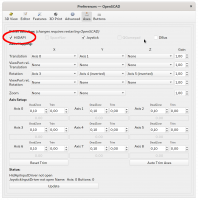
See attached screenshot. This checkbox needs to be enabled.
No other driver is needed, OpenSCAD will directly use the USB
device (and so far only 3DConnexion USB devices are supported).
As Michael confirmed, the driver from 3DConnexion will grab
the device and make it impossible to use with OpenSCAD. So if
you did not need that up to now, there's no reason to install.
ciao,
Torsten.
Thanks!
Even with the HIDAPI box checked, and even after re-starting OpenSCAD,
the SpaceNav check box remains greyed out.
On 7/18/2021 9:27 PM, Torsten Paul wrote:
On 19.07.21 03:01, jon wrote:
I am confused. Not sure how to "enable the HIDAPI driver" nor
whether I need to install special software. I downloaded a
huge package from the manufacturer but have not yet installed
it.
See attached screenshot. This checkbox needs to be enabled.
No other driver is needed, OpenSCAD will directly use the USB
device (and so far only 3DConnexion USB devices are supported).
As Michael confirmed, the driver from 3DConnexion will grab
the device and make it impossible to use with OpenSCAD. So if
you did not need that up to now, there's no reason to install.
ciao,
Torsten.
OpenSCAD mailing list
To unsubscribe send an email to discuss-leave@lists.openscad.org
HIDAPI is the raw USB driver interface to the SpaceNav device.
The SpaceNav check-box is for Linux only. (maybe Mac?)
From: jon [mailto:jon@jonbondy.com]
Sent: Mon, 19 Jul 2021 11:44
To: OpenSCAD general discussion; Torsten Paul
Subject: [OpenSCAD] Re: SpaceNav
Thanks!
Even with the HIDAPI box checked, and even after re-starting OpenSCAD, the SpaceNav check box remains greyed out.
On 7/18/2021 9:27 PM, Torsten Paul wrote:
On 19.07.21 03:01, jon wrote:
I am confused. Not sure how to "enable the HIDAPI driver" nor
whether I need to install special software. I downloaded a
huge package from the manufacturer but have not yet installed
it.
See attached screenshot. This checkbox needs to be enabled.
No other driver is needed, OpenSCAD will directly use the USB
device (and so far only 3DConnexion USB devices are supported).
As Michael confirmed, the driver from 3DConnexion will grab
the device and make it impossible to use with OpenSCAD. So if
you did not need that up to now, there's no reason to install.
ciao,
Torsten.
OpenSCAD mailing list
To unsubscribe send an email to discuss-leave@lists.openscad.org
--
This email has been checked for viruses by AVG.
https://www.avg.com
Well, if the check box is only for Linux, then perhaps I need to simply
give up.
I wonder if there is some way to change the UI so that this much effort
on the part of others is not required when a user stumbles across this
issue.
Thanks!
Jon
On 7/18/2021 9:53 PM, MichaelAtOz wrote:
HIDAPI is the raw USB driver interface to the SpaceNav device.
The SpaceNav check-box is for Linux only. (maybe Mac?)
*From:*jon [mailto:jon@jonbondy.com]
Sent: Mon, 19 Jul 2021 11:44
To: OpenSCAD general discussion; Torsten Paul
Subject: [OpenSCAD] Re: SpaceNav
Thanks!
Even with the HIDAPI box checked, and even after re-starting OpenSCAD,
the SpaceNav check box remains greyed out.
On 7/18/2021 9:27 PM, Torsten Paul wrote:
On 19.07.21 03:01, jon wrote:
I am confused. Not sure how to "enable the HIDAPI driver" nor
whether I need to install special software. I downloaded a
huge package from the manufacturer but have not yet installed
it.
See attached screenshot. This checkbox needs to be enabled.
No other driver is needed, OpenSCAD will directly use the USB
device (and so far only 3DConnexion USB devices are supported).
As Michael confirmed, the driver from 3DConnexion will grab
the device and make it impossible to use with OpenSCAD. So if
you did not need that up to now, there's no reason to install.
ciao,
Torsten.
OpenSCAD mailing list
To unsubscribe send an email to discuss-leave@lists.openscad.org
mailto:discuss-leave@lists.openscad.org
http://www.avg.com/email-signature?utm_medium=email&utm_source=link&utm_campaign=sig-email&utm_content=emailclient
Virus-free. www.avg.com
http://www.avg.com/email-signature?utm_medium=email&utm_source=link&utm_campaign=sig-email&utm_content=emailclient
<#DAB4FAD8-2DD7-40BB-A1B8-4E2AA1F9FDF2>
OpenSCAD mailing list
To unsubscribe send an email to discuss-leave@lists.openscad.org