

discuss@lists.openscad.org

OpenSCAD general discussion Mailing-list

View all threads

Angles of the faces of an icosahedron

AD
Ari Diacou
Wed, Dec 29, 2021 4:20 PM

I'm trying to make a customizable d20. I made the icosahedron no problem,
and have the vectors for both the vertices, and the faces. I have made the
numbers of the faces coincident with the faces, but can't figure out how to
rotate them so that they are coplanar with the faces.  Searching
mathematics stack exchange was fruitless, as well as my search of wikipedia
and mathworld. I also can't seem to straight apply spherical
coordinate transformation (but I was always bad at that, even in college)

size=25;
letter_ratio=.3;
golden_ratio=(1+sqrt(5))/2;
g=golden_ratio;
//See:
https://en.wikipedia.org/wiki/Regular_icosahedron#Cartesian_coordinates
rect1=[[0,+1,+g],[0,+1,-g],[0,-1,+g],[0,-1,-g]];
rect2=[[+1,+g,0],[+1,-g,0],[-1,+g,0],[-1,-g,0]];
rect3=[[+g,0,+1],[+g,0,-1],[-g,0,+1],[-g,0,-1]];
points=concat(rect1, rect2, rect3); //echo(points);
faces=[[0,10,2],[0,2,8],[0,8,4],[0,4,6],[0,6,10],

[10,2,7],[2,7,5],[2,5,8],[8,5,9],[8,9,4],[4,9,1],[6,4,1],[6,1,11],[6,11,10],[10,11,7],
[3,5,7],[3,7,11],[3,11,1],[3,1,9],[3,9,5]];
#polyhedron(.5sizepoints,faces);
for(i=[0:19])
translate(.5sizeavg(i)) color("yellow")
//rotate([1*acos(avg(i)[2]/size),0,0])
//rotate([0,0,90-atan2(avg(i)[2],avg(i)[0])])

text(str(i+1),size=size*letter_ratio,valign="center",halign="center");

function avg(x)
//calculates the vector of the center of the face x, based on the average
of the vertices
=points[faces[x][0]]/3
+points[faces[x][1]]/3
+points[faces[x][2]]/3;
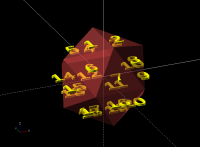
I'm trying to make a customizable d20. I made the icosahedron no problem, and have the vectors for both the vertices, and the faces. I have made the numbers of the faces coincident with the faces, but can't figure out how to rotate them so that they are coplanar with the faces. Searching mathematics stack exchange was fruitless, as well as my search of wikipedia and mathworld. I also can't seem to straight apply spherical coordinate transformation (but I was always bad at that, even in college) size=25; letter_ratio=.3; golden_ratio=(1+sqrt(5))/2; g=golden_ratio; //See: https://en.wikipedia.org/wiki/Regular_icosahedron#Cartesian_coordinates rect1=[[0,+1,+g],[0,+1,-g],[0,-1,+g],[0,-1,-g]]; rect2=[[+1,+g,0],[+1,-g,0],[-1,+g,0],[-1,-g,0]]; rect3=[[+g,0,+1],[+g,0,-1],[-g,0,+1],[-g,0,-1]]; points=concat(rect1, rect2, rect3); //echo(points); faces=[[0,10,2],[0,2,8],[0,8,4],[0,4,6],[0,6,10], [10,2,7],[2,7,5],[2,5,8],[8,5,9],[8,9,4],[4,9,1],[6,4,1],[6,1,11],[6,11,10],[10,11,7], [3,5,7],[3,7,11],[3,11,1],[3,1,9],[3,9,5]]; #polyhedron(.5*size*points,faces); for(i=[0:19]) translate(.5*size*avg(i)) color("yellow") //rotate([1*acos(avg(i)[2]/size),0,0]) //rotate([0,0,90-atan2(avg(i)[2],avg(i)[0])]) text(str(i+1),size=size*letter_ratio,valign="center",halign="center"); function avg(x) //calculates the vector of the center of the face x, based on the average of the vertices =points[faces[x][0]]/3 +points[faces[x][1]]/3 +points[faces[x][2]]/3;
NL
Nerius Landys
Wed, Dec 29, 2021 6:59 PM

The cross product of two vectors gives a vector which is normal to both vectors in the cross product. I think that's how it goes. I used this tactic to solve a similar issue when creating a computer animation many years ago. I think this is correct. It's been a long time.

Once you know the normal to the face, you're left with adjusting the angle of the text. That's step two and perhaps someone else can help, because I don't know off the top of my head how you'd go from having a normal to using the rotate() functions to adjust the angle of the text.

29.12.2021, 10:21, "Ari Diacou" <ari.diacou@gmail.com>:

I'm trying to make a customizable d20. I made the icosahedron no problem, and have the vectors for both the vertices, and the faces. I have made the numbers of the faces coincident with the faces, but can't figure out how to rotate them so that they are coplanar with the faces. Searching mathematics stack exchange was fruitless, as well as my search of wikipedia and mathworld. I also can't seem to straight apply spherical coordinate transformation (but I was always bad at that, even in college)

size=25;
letter_ratio=.3;
golden_ratio=(1+sqrt(5))/2;
g=golden_ratio;
//See: https://en.wikipedia.org/wiki/Regular_icosahedron#Cartesian_coordinates
rect1=[[0,+1,+g],[0,+1,-g],[0,-1,+g],[0,-1,-g]];
rect2=[[+1,+g,0],[+1,-g,0],[-1,+g,0],[-1,-g,0]];
rect3=[[+g,0,+1],[+g,0,-1],[-g,0,+1],[-g,0,-1]];
points=concat(rect1, rect2, rect3); //echo(points);
faces=[[0,10,2],[0,2,8],[0,8,4],[0,4,6],[0,6,10],
[10,2,7],[2,7,5],[2,5,8],[8,5,9],[8,9,4],[4,9,1],[6,4,1],[6,1,11],[6,11,10],[10,11,7],
[3,5,7],[3,7,11],[3,11,1],[3,1,9],[3,9,5]];
#polyhedron(.5*size*points,faces);
for(i=[0:19])
translate(.5*size*avg(i)) color("yellow")
//rotate([1*acos(avg(i)[2]/size),0,0])
//rotate([0,0,90-atan2(avg(i)[2],avg(i)[0])])
text(str(i+1),size=size*letter_ratio,valign="center",halign="center");

function avg(x)
//calculates the vector of the center of the face x, based on the average of the vertices
=points[faces[x][0]]/3
+points[faces[x][1]]/3
+points[faces[x][2]]/3;

,_______________________________________________
OpenSCAD mailing list
To unsubscribe send an email to discuss-leave@lists.openscad.org

DP
David Phillip Oster
Wed, Dec 29, 2021 10:57 PM

Although I don't have a complete solution,
https://openhome.cc/eGossip/OpenSCAD/TextSphere.html looks like it has most
of the missing pieces for you.

On Wed, Dec 29, 2021 at 8:21 AM Ari Diacou ari.diacou@gmail.com wrote:

I'm trying to make a customizable d20. I made the icosahedron no problem,
and have the vectors for both the vertices, and the faces. I have made the
numbers of the faces coincident with the faces, but can't figure out how
to rotate them so that they are coplanar with the faces.  Searching
mathematics stack exchange was fruitless, as well as my search of wikipedia
and mathworld. I also can't seem to straight apply spherical
coordinate transformation (but I was always bad at that, even in college)

size=25;
letter_ratio=.3;
golden_ratio=(1+sqrt(5))/2;
g=golden_ratio;
//See:
https://en.wikipedia.org/wiki/Regular_icosahedron#Cartesian_coordinates
rect1=[[0,+1,+g],[0,+1,-g],[0,-1,+g],[0,-1,-g]];
rect2=[[+1,+g,0],[+1,-g,0],[-1,+g,0],[-1,-g,0]];
rect3=[[+g,0,+1],[+g,0,-1],[-g,0,+1],[-g,0,-1]];
points=concat(rect1, rect2, rect3); //echo(points);
faces=[[0,10,2],[0,2,8],[0,8,4],[0,4,6],[0,6,10],

[10,2,7],[2,7,5],[2,5,8],[8,5,9],[8,9,4],[4,9,1],[6,4,1],[6,1,11],[6,11,10],[10,11,7],
[3,5,7],[3,7,11],[3,11,1],[3,1,9],[3,9,5]];
#polyhedron(.5sizepoints,faces);
for(i=[0:19])
translate(.5sizeavg(i)) color("yellow")
//rotate([1*acos(avg(i)[2]/size),0,0])
//rotate([0,0,90-atan2(avg(i)[2],avg(i)[0])])

text(str(i+1),size=size*letter_ratio,valign="center",halign="center");

function avg(x)
//calculates the vector of the center of the face x, based on the average
of the vertices
=points[faces[x][0]]/3
+points[faces[x][1]]/3
+points[faces[x][2]]/3;


OpenSCAD mailing list
To unsubscribe send an email to discuss-leave@lists.openscad.org

Although I don't have a complete solution, https://openhome.cc/eGossip/OpenSCAD/TextSphere.html looks like it has most of the missing pieces for you. On Wed, Dec 29, 2021 at 8:21 AM Ari Diacou <ari.diacou@gmail.com> wrote: > I'm trying to make a customizable d20. I made the icosahedron no problem, > and have the vectors for both the vertices, and the faces. I have made the > numbers of the faces coincident with the faces, but can't figure out how > to rotate them so that they are coplanar with the faces. Searching > mathematics stack exchange was fruitless, as well as my search of wikipedia > and mathworld. I also can't seem to straight apply spherical > coordinate transformation (but I was always bad at that, even in college) > > size=25; > letter_ratio=.3; > golden_ratio=(1+sqrt(5))/2; > g=golden_ratio; > //See: > https://en.wikipedia.org/wiki/Regular_icosahedron#Cartesian_coordinates > rect1=[[0,+1,+g],[0,+1,-g],[0,-1,+g],[0,-1,-g]]; > rect2=[[+1,+g,0],[+1,-g,0],[-1,+g,0],[-1,-g,0]]; > rect3=[[+g,0,+1],[+g,0,-1],[-g,0,+1],[-g,0,-1]]; > points=concat(rect1, rect2, rect3); //echo(points); > faces=[[0,10,2],[0,2,8],[0,8,4],[0,4,6],[0,6,10], > > [10,2,7],[2,7,5],[2,5,8],[8,5,9],[8,9,4],[4,9,1],[6,4,1],[6,1,11],[6,11,10],[10,11,7], > [3,5,7],[3,7,11],[3,11,1],[3,1,9],[3,9,5]]; > #polyhedron(.5*size*points,faces); > for(i=[0:19]) > translate(.5*size*avg(i)) color("yellow") > //rotate([1*acos(avg(i)[2]/size),0,0]) > //rotate([0,0,90-atan2(avg(i)[2],avg(i)[0])]) > > text(str(i+1),size=size*letter_ratio,valign="center",halign="center"); > > function avg(x) > //calculates the vector of the center of the face x, based on the average > of the vertices > =points[faces[x][0]]/3 > +points[faces[x][1]]/3 > +points[faces[x][2]]/3; > _______________________________________________ > OpenSCAD mailing list > To unsubscribe send an email to discuss-leave@lists.openscad.org >
LH
Lenore Horner
Thu, Dec 30, 2021 3:19 AM

On Dec 29, 2021, at 11:20, Ari Diacou ari.diacou@gmail.com wrote:

size=25;
letter_ratio=.3;
golden_ratio=(1+sqrt(5))/2;
g=golden_ratio;
//See: https://en.wikipedia.org/wiki/Regular_icosahedron#Cartesian_coordinates https://en.wikipedia.org/wiki/Regular_icosahedron#Cartesian_coordinates
rect1=[[0,+1,+g],[0,+1,-g],[0,-1,+g],[0,-1,-g]];
rect2=[[+1,+g,0],[+1,-g,0],[-1,+g,0],[-1,-g,0]];
rect3=[[+g,0,+1],[+g,0,-1],[-g,0,+1],[-g,0,-1]];
points=concat(rect1, rect2, rect3); //echo(points);
faces=[[0,10,2],[0,2,8],[0,8,4],[0,4,6],[0,6,10],
[10,2,7],[2,7,5],[2,5,8],[8,5,9],[8,9,4],[4,9,1],[6,4,1],[6,1,11],[6,11,10],[10,11,7],
[3,5,7],[3,7,11],[3,11,1],[3,1,9],[3,9,5]];
#polyhedron(.5sizepoints,faces);
for(i=[0:19])
translate(.5sizeavg(i)) color("yellow")
//rotate([1acos(avg(i)[2]/size),0,0])
//rotate([0,0,90-atan2(avg(i)[2],avg(i)[0])])
text(str(i+1),size=size
letter_ratio,valign="center",halign="center");

function avg(x)
//calculates the vector of the center of the face x, based on the average of the vertices
=points[faces[x][0]]/3
+points[faces[x][1]]/3
+points[faces[x][2]]/3;

The numbers start out with their normal vector pointing in the +z direction.  We need to rotate it so the normal is the avg(x) vector.  One way to do this is to tilt the letters away from the z-axis the right amount for the face by rotating around the y-axis by the z direction angle which is acos(z/norm) where norm is the length of the vector to the center of the face and z is the z-component of that vector.  Then rotate the result around the z-axis by the angle of the projection into the xy-plane from the x-axis.  Here, we have to compensate for the acos only returning results in the first 2 quadrants but looking at the y-component of the vector to the face.  Remembering that mathematical operations start at the inside and work outwards that gives the following for setting the texts.

for(i=[0:19])
translate(.5sizeavg(i)) color("yellow")
rotate([0,0,sign(avg(i)[1])acos(avg(i)[0]/sqrt((avg(i)[0])^2+(avg(i)[1])^2))])
rotate([0,acos(avg(i)[2]/norm(avg(i))),0])
text(str(i+1),size=size
letter_ratio,valign="center",halign="center”);

This looks good except for 1 and 18.  1 looks like it’s tilted to match 2 and 18 looks like it’s tilted like 19.  So what have I forgotten?  These are both “special” because the y-component is zero and the x-component is negative.  The acos gives 0 <= theta <180.  I’ll fix this inelegantly with an if statement rather than thinking harder about rotations.

for(i=[0:19])
translate(.5sizeavg(i)) color("yellow")
if(avg(i)[1]==0 && avg(i)[0]<0){
rotate([0,-acos(avg(i)[2]/norm(avg(i))),0])
text(str(i+1),size=size*letter_ratio,valign="center",halign="center");
}
else{
rotate([0,0,sign(avg(i)[1])acos(avg(i)[0]/sqrt((avg(i)[0])^2+(avg(i)[1])^2))])
rotate([0,acos(avg(i)[2]/norm(avg(i))),0])
text(str(i+1),size=size
letter_ratio,valign="center",halign="center");
}

Note that the text is 2D so won’t render.  Worse, if I extrude the text and union it with the polyhedron, the mesh isn’t closed and it still won’t render.  Maybe that has to be built of equilateral triangles moved into position the way the text is, but then we have to figure out how each triangle has to be rotated first.

Lenore

> On Dec 29, 2021, at 11:20, Ari Diacou <ari.diacou@gmail.com> wrote: > > size=25; > letter_ratio=.3; > golden_ratio=(1+sqrt(5))/2; > g=golden_ratio; > //See: https://en.wikipedia.org/wiki/Regular_icosahedron#Cartesian_coordinates <https://en.wikipedia.org/wiki/Regular_icosahedron#Cartesian_coordinates> > rect1=[[0,+1,+g],[0,+1,-g],[0,-1,+g],[0,-1,-g]]; > rect2=[[+1,+g,0],[+1,-g,0],[-1,+g,0],[-1,-g,0]]; > rect3=[[+g,0,+1],[+g,0,-1],[-g,0,+1],[-g,0,-1]]; > points=concat(rect1, rect2, rect3); //echo(points); > faces=[[0,10,2],[0,2,8],[0,8,4],[0,4,6],[0,6,10], > [10,2,7],[2,7,5],[2,5,8],[8,5,9],[8,9,4],[4,9,1],[6,4,1],[6,1,11],[6,11,10],[10,11,7], > [3,5,7],[3,7,11],[3,11,1],[3,1,9],[3,9,5]]; > #polyhedron(.5*size*points,faces); > for(i=[0:19]) > translate(.5*size*avg(i)) color("yellow") > //rotate([1*acos(avg(i)[2]/size),0,0]) > //rotate([0,0,90-atan2(avg(i)[2],avg(i)[0])]) > text(str(i+1),size=size*letter_ratio,valign="center",halign="center"); > > function avg(x) > //calculates the vector of the center of the face x, based on the average of the vertices > =points[faces[x][0]]/3 > +points[faces[x][1]]/3 > +points[faces[x][2]]/3; > The numbers start out with their normal vector pointing in the +z direction. We need to rotate it so the normal is the avg(x) vector. One way to do this is to tilt the letters away from the z-axis the right amount for the face by rotating around the y-axis by the z direction angle which is acos(z/norm) where norm is the length of the vector to the center of the face and z is the z-component of that vector. Then rotate the result around the z-axis by the angle of the projection into the xy-plane from the x-axis. Here, we have to compensate for the acos only returning results in the first 2 quadrants but looking at the y-component of the vector to the face. Remembering that mathematical operations start at the inside and work outwards that gives the following for setting the texts. for(i=[0:19]) translate(.5*size*avg(i)) color("yellow") rotate([0,0,sign(avg(i)[1])*acos(avg(i)[0]/sqrt((avg(i)[0])^2+(avg(i)[1])^2))]) rotate([0,acos(avg(i)[2]/norm(avg(i))),0]) text(str(i+1),size=size*letter_ratio,valign="center",halign="center”); This looks good except for 1 and 18. 1 looks like it’s tilted to match 2 and 18 looks like it’s tilted like 19. So what have I forgotten? These are both “special” because the y-component is zero and the x-component is negative. The acos gives 0 <= theta <180. I’ll fix this inelegantly with an if statement rather than thinking harder about rotations. for(i=[0:19]) translate(.5*size*avg(i)) color("yellow") if(avg(i)[1]==0 && avg(i)[0]<0){ rotate([0,-acos(avg(i)[2]/norm(avg(i))),0]) text(str(i+1),size=size*letter_ratio,valign="center",halign="center"); } else{ rotate([0,0,sign(avg(i)[1])*acos(avg(i)[0]/sqrt((avg(i)[0])^2+(avg(i)[1])^2))]) rotate([0,acos(avg(i)[2]/norm(avg(i))),0]) text(str(i+1),size=size*letter_ratio,valign="center",halign="center"); } Note that the text is 2D so won’t render. Worse, if I extrude the text and union it with the polyhedron, the mesh isn’t closed and it still won’t render. Maybe that has to be built of equilateral triangles moved into position the way the text is, but then we have to figure out how each triangle has to be rotated first. Lenore
JO
jjvb-openscad@bassklampfe.de
Thu, Dec 30, 2021 7:26 AM

One Issue is, your icosahedron is inside out.
If you remove the  # and switch to combined view [F12], you see a lot
pink faces. These should be yellow.

Change faces to

faces=[
    [10,0,2],[0,8,2],[0,4,8],[0,6,4],[0,10,6],
    [10,2,7],[2,5,7],[2,8,5],[8,9,5],[8,4,9],
    [4,1,9],[6,1,4],[6,11,1],[6,10,11],[10,7,11],
    [3,7,5],[3,11,7],[3,1,11],[3,9,1],[3,5,9]];

and then your icosahedron is valid.

Am 29.12.21 um 17:20 schrieb Ari Diacou:

I'm trying to make a customizable d20. I made the icosahedron no problem,
and have the vectors for both the vertices, and the faces. I have made the
numbers of the faces coincident with the faces, but can't figure out how to
rotate them so that they are coplanar with the faces.  Searching
mathematics stack exchange was fruitless, as well as my search of wikipedia
and mathworld. I also can't seem to straight apply spherical
coordinate transformation (but I was always bad at that, even in college)

size=25;
letter_ratio=.3;
golden_ratio=(1+sqrt(5))/2;
g=golden_ratio;
//See:
https://en.wikipedia.org/wiki/Regular_icosahedron#Cartesian_coordinates
rect1=[[0,+1,+g],[0,+1,-g],[0,-1,+g],[0,-1,-g]];
rect2=[[+1,+g,0],[+1,-g,0],[-1,+g,0],[-1,-g,0]];
rect3=[[+g,0,+1],[+g,0,-1],[-g,0,+1],[-g,0,-1]];
points=concat(rect1, rect2, rect3); //echo(points);
faces=[[0,10,2],[0,2,8],[0,8,4],[0,4,6],[0,6,10],

[10,2,7],[2,7,5],[2,5,8],[8,5,9],[8,9,4],[4,9,1],[6,4,1],[6,1,11],[6,11,10],[10,11,7],
[3,5,7],[3,7,11],[3,11,1],[3,1,9],[3,9,5]];
#polyhedron(.5sizepoints,faces);
for(i=[0:19])
translate(.5sizeavg(i)) color("yellow")
//rotate([1*acos(avg(i)[2]/size),0,0])
//rotate([0,0,90-atan2(avg(i)[2],avg(i)[0])])

text(str(i+1),size=size*letter_ratio,valign="center",halign="center");

function avg(x)
//calculates the vector of the center of the face x, based on the average
of the vertices
=points[faces[x][0]]/3
+points[faces[x][1]]/3
+points[faces[x][2]]/3;


OpenSCAD mailing list
To unsubscribe send an email to discuss-leave@lists.openscad.org

One Issue is, your icosahedron is inside out. If you remove the  # and switch to combined view [F12], you see a lot pink faces. These should be yellow. Change faces to faces=[     [10,0,2],[0,8,2],[0,4,8],[0,6,4],[0,10,6],     [10,2,7],[2,5,7],[2,8,5],[8,9,5],[8,4,9],     [4,1,9],[6,1,4],[6,11,1],[6,10,11],[10,7,11],     [3,7,5],[3,11,7],[3,1,11],[3,9,1],[3,5,9]]; and then your icosahedron is valid. Am 29.12.21 um 17:20 schrieb Ari Diacou: > I'm trying to make a customizable d20. I made the icosahedron no problem, > and have the vectors for both the vertices, and the faces. I have made the > numbers of the faces coincident with the faces, but can't figure out how to > rotate them so that they are coplanar with the faces. Searching > mathematics stack exchange was fruitless, as well as my search of wikipedia > and mathworld. I also can't seem to straight apply spherical > coordinate transformation (but I was always bad at that, even in college) > > size=25; > letter_ratio=.3; > golden_ratio=(1+sqrt(5))/2; > g=golden_ratio; > //See: > https://en.wikipedia.org/wiki/Regular_icosahedron#Cartesian_coordinates > rect1=[[0,+1,+g],[0,+1,-g],[0,-1,+g],[0,-1,-g]]; > rect2=[[+1,+g,0],[+1,-g,0],[-1,+g,0],[-1,-g,0]]; > rect3=[[+g,0,+1],[+g,0,-1],[-g,0,+1],[-g,0,-1]]; > points=concat(rect1, rect2, rect3); //echo(points); > faces=[[0,10,2],[0,2,8],[0,8,4],[0,4,6],[0,6,10], > > [10,2,7],[2,7,5],[2,5,8],[8,5,9],[8,9,4],[4,9,1],[6,4,1],[6,1,11],[6,11,10],[10,11,7], > [3,5,7],[3,7,11],[3,11,1],[3,1,9],[3,9,5]]; > #polyhedron(.5*size*points,faces); > for(i=[0:19]) > translate(.5*size*avg(i)) color("yellow") > //rotate([1*acos(avg(i)[2]/size),0,0]) > //rotate([0,0,90-atan2(avg(i)[2],avg(i)[0])]) > > text(str(i+1),size=size*letter_ratio,valign="center",halign="center"); > > function avg(x) > //calculates the vector of the center of the face x, based on the average > of the vertices > =points[faces[x][0]]/3 > +points[faces[x][1]]/3 > +points[faces[x][2]]/3; > > > _______________________________________________ > OpenSCAD mailing list > To unsubscribe send an email to discuss-leave@lists.openscad.org
JO
jjvb-openscad@bassklampfe.de
Thu, Dec 30, 2021 7:30 AM

There is a simple solution using BOSL2:

include <BOSL2/std.scad>
include <BOSL2/polyhedra.scad>
difference(){
  regular_polyhedron("icosahedron", side=35);
  regular_polyhedron("icosahedron", side=35,draw=false)
    down(.3) linear_extrude(height=1)
      text(str($faceindex+1),halign="center",valign="center");
}

Am 29.12.21 um 17:20 schrieb Ari Diacou:

I'm trying to make a customizable d20. I made the icosahedron no problem,
and have the vectors for both the vertices, and the faces. I have made the
numbers of the faces coincident with the faces, but can't figure out how to
rotate them so that they are coplanar with the faces.  Searching
mathematics stack exchange was fruitless, as well as my search of wikipedia
and mathworld. I also can't seem to straight apply spherical
coordinate transformation (but I was always bad at that, even in college)

size=25;
letter_ratio=.3;
golden_ratio=(1+sqrt(5))/2;
g=golden_ratio;
//See:
https://en.wikipedia.org/wiki/Regular_icosahedron#Cartesian_coordinates
rect1=[[0,+1,+g],[0,+1,-g],[0,-1,+g],[0,-1,-g]];
rect2=[[+1,+g,0],[+1,-g,0],[-1,+g,0],[-1,-g,0]];
rect3=[[+g,0,+1],[+g,0,-1],[-g,0,+1],[-g,0,-1]];
points=concat(rect1, rect2, rect3); //echo(points);
faces=[[0,10,2],[0,2,8],[0,8,4],[0,4,6],[0,6,10],

[10,2,7],[2,7,5],[2,5,8],[8,5,9],[8,9,4],[4,9,1],[6,4,1],[6,1,11],[6,11,10],[10,11,7],
[3,5,7],[3,7,11],[3,11,1],[3,1,9],[3,9,5]];
#polyhedron(.5sizepoints,faces);
for(i=[0:19])
translate(.5sizeavg(i)) color("yellow")
//rotate([1*acos(avg(i)[2]/size),0,0])
//rotate([0,0,90-atan2(avg(i)[2],avg(i)[0])])

text(str(i+1),size=size*letter_ratio,valign="center",halign="center");

function avg(x)
//calculates the vector of the center of the face x, based on the average
of the vertices
=points[faces[x][0]]/3
+points[faces[x][1]]/3
+points[faces[x][2]]/3;


OpenSCAD mailing list
To unsubscribe send an email to discuss-leave@lists.openscad.org

There is a simple solution using BOSL2: include <BOSL2/std.scad> include <BOSL2/polyhedra.scad> difference(){   regular_polyhedron("icosahedron", side=35);   regular_polyhedron("icosahedron", side=35,draw=false)     down(.3) linear_extrude(height=1)       text(str($faceindex+1),halign="center",valign="center"); } Am 29.12.21 um 17:20 schrieb Ari Diacou: > I'm trying to make a customizable d20. I made the icosahedron no problem, > and have the vectors for both the vertices, and the faces. I have made the > numbers of the faces coincident with the faces, but can't figure out how to > rotate them so that they are coplanar with the faces. Searching > mathematics stack exchange was fruitless, as well as my search of wikipedia > and mathworld. I also can't seem to straight apply spherical > coordinate transformation (but I was always bad at that, even in college) > > size=25; > letter_ratio=.3; > golden_ratio=(1+sqrt(5))/2; > g=golden_ratio; > //See: > https://en.wikipedia.org/wiki/Regular_icosahedron#Cartesian_coordinates > rect1=[[0,+1,+g],[0,+1,-g],[0,-1,+g],[0,-1,-g]]; > rect2=[[+1,+g,0],[+1,-g,0],[-1,+g,0],[-1,-g,0]]; > rect3=[[+g,0,+1],[+g,0,-1],[-g,0,+1],[-g,0,-1]]; > points=concat(rect1, rect2, rect3); //echo(points); > faces=[[0,10,2],[0,2,8],[0,8,4],[0,4,6],[0,6,10], > > [10,2,7],[2,7,5],[2,5,8],[8,5,9],[8,9,4],[4,9,1],[6,4,1],[6,1,11],[6,11,10],[10,11,7], > [3,5,7],[3,7,11],[3,11,1],[3,1,9],[3,9,5]]; > #polyhedron(.5*size*points,faces); > for(i=[0:19]) > translate(.5*size*avg(i)) color("yellow") > //rotate([1*acos(avg(i)[2]/size),0,0]) > //rotate([0,0,90-atan2(avg(i)[2],avg(i)[0])]) > > text(str(i+1),size=size*letter_ratio,valign="center",halign="center"); > > function avg(x) > //calculates the vector of the center of the face x, based on the average > of the vertices > =points[faces[x][0]]/3 > +points[faces[x][1]]/3 > +points[faces[x][2]]/3; > > > _______________________________________________ > OpenSCAD mailing list > To unsubscribe send an email to discuss-leave@lists.openscad.org
AD
Ari Diacou
Thu, Dec 30, 2021 1:33 PM

Thanks all.

There were 3 key parts. First like Lenore said, the arccosine has to be in
the y dimension, and has to be normalized by norm(avg(i)). The 2nd part was
that I had the wrong dimensions for the arctangent, which have to be
relative to y and x (not z and x). And the 3rd part is that both have to be
in the same rotation. So the rotation command is :
rotate([0,acos(avg(i)[2]/norm(avg(i))),atan2(avg(i)[1],avg(i)[0])])

JJVB's suggestion was correct, and I could remove the hull() that I had to
put in to make it manifold.

The final code is going up on thingiverse at:
https://www.thingiverse.com/thing:5179144

Thanks so much all.

size=25;
letter_ratio=.3;
depth_ratio=.03;
sides=[1,2,3,4,5,6,7,8,9,10,11,12,13,14,15,16,17,18,19,"\u263A"];
golden_ratio=(1+sqrt(5))/2+0;
g=golden_ratio;
//See:
https://en.wikipedia.org/wiki/Regular_icosahedron#Cartesian_coordinates
rect1=[[0,+1,+g],[0,+1,-g],[0,-1,+g],[0,-1,-g]];
rect2=[[+1,+g,0],[+1,-g,0],[-1,+g,0],[-1,-g,0]];
rect3=[[+g,0,+1],[+g,0,-1],[-g,0,+1],[-g,0,-1]];
points=concat(rect1, rect2, rect3); //echo(points);
faces=[
[10,0,2],[0,8,2],[0,4,8],[0,6,4],[0,10,6],
[10,2,7],[2,5,7],[2,8,5],[8,9,5],[8,4,9],
[4,1,9],[6,1,4],[6,11,1],[6,10,11],[10,7,11],
[3,7,5],[3,11,7],[3,1,11],[3,9,1],[3,5,9]]1;
difference(){
polyhedron(.5
sizepoints,faces);
for(i=[0:19])
translate(.5
size*avg(i)) color("yellow")

rotate([0,acos(avg(i)[2]/norm(avg(i))),atan2(avg(i)[1],avg(i)[0])])
translate([0,0,-depth_ratiosize+.05])
linear_extrude(depth_ratio
size)

text(str(sides[i]),size=size*letter_ratio,valign="center",halign="center");
}
function avg(x)
//calculates the vector of the center of the face x, based on the average
of the vertices
=points[faces[x][0]]/3
+points[faces[x][1]]/3
+points[faces[x][2]]/3;

On Thu, Dec 30, 2021 at 2:31 AM jjvb-openscad@bassklampfe.de wrote:

There is a simple solution using BOSL2:

include <BOSL2/std.scad>
include <BOSL2/polyhedra.scad>
difference(){
regular_polyhedron("icosahedron", side=35);
regular_polyhedron("icosahedron", side=35,draw=false)
down(.3) linear_extrude(height=1)
text(str($faceindex+1),halign="center",valign="center");
}

Am 29.12.21 um 17:20 schrieb Ari Diacou:

I'm trying to make a customizable d20. I made the icosahedron no problem,
and have the vectors for both the vertices, and the faces. I have made

the

numbers of the faces coincident with the faces, but can't figure out how

to

rotate them so that they are coplanar with the faces.  Searching
mathematics stack exchange was fruitless, as well as my search of

wikipedia

and mathworld. I also can't seem to straight apply spherical
coordinate transformation (but I was always bad at that, even in college)

size=25;
letter_ratio=.3;
golden_ratio=(1+sqrt(5))/2;
g=golden_ratio;
//See:
https://en.wikipedia.org/wiki/Regular_icosahedron#Cartesian_coordinates
rect1=[[0,+1,+g],[0,+1,-g],[0,-1,+g],[0,-1,-g]];
rect2=[[+1,+g,0],[+1,-g,0],[-1,+g,0],[-1,-g,0]];
rect3=[[+g,0,+1],[+g,0,-1],[-g,0,+1],[-g,0,-1]];
points=concat(rect1, rect2, rect3); //echo(points);
faces=[[0,10,2],[0,2,8],[0,8,4],[0,4,6],[0,6,10],

[10,2,7],[2,7,5],[2,5,8],[8,5,9],[8,9,4],[4,9,1],[6,4,1],[6,1,11],[6,11,10],[10,11,7],

     [3,5,7],[3,7,11],[3,11,1],[3,1,9],[3,9,5]];

#polyhedron(.5sizepoints,faces);
for(i=[0:19])
translate(.5sizeavg(i)) color("yellow")
//rotate([1*acos(avg(i)[2]/size),0,0])
//rotate([0,0,90-atan2(avg(i)[2],avg(i)[0])])

text(str(i+1),size=size*letter_ratio,valign="center",halign="center");

function avg(x)
//calculates the vector of the center of the face x, based on the average
of the vertices
=points[faces[x][0]]/3
+points[faces[x][1]]/3
+points[faces[x][2]]/3;


OpenSCAD mailing list
To unsubscribe send an email to discuss-leave@lists.openscad.org


OpenSCAD mailing list
To unsubscribe send an email to discuss-leave@lists.openscad.org
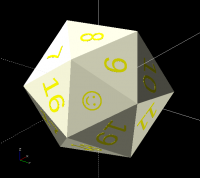
Thanks all. There were 3 key parts. First like Lenore said, the arccosine has to be in the y dimension, and has to be normalized by norm(avg(i)). The 2nd part was that I had the wrong dimensions for the arctangent, which have to be relative to y and x (not z and x). And the 3rd part is that both have to be in the same rotation. So the rotation command is : rotate([0,acos(avg(i)[2]/norm(avg(i))),atan2(avg(i)[1],avg(i)[0])]) JJVB's suggestion was correct, and I could remove the hull() that I had to put in to make it manifold. The final code is going up on thingiverse at: https://www.thingiverse.com/thing:5179144 Thanks so much all. size=25; letter_ratio=.3; depth_ratio=.03; sides=[1,2,3,4,5,6,7,8,9,10,11,12,13,14,15,16,17,18,19,"\u263A"]; golden_ratio=(1+sqrt(5))/2+0; g=golden_ratio; //See: https://en.wikipedia.org/wiki/Regular_icosahedron#Cartesian_coordinates rect1=[[0,+1,+g],[0,+1,-g],[0,-1,+g],[0,-1,-g]]; rect2=[[+1,+g,0],[+1,-g,0],[-1,+g,0],[-1,-g,0]]; rect3=[[+g,0,+1],[+g,0,-1],[-g,0,+1],[-g,0,-1]]; points=concat(rect1, rect2, rect3); //echo(points); faces=[ [10,0,2],[0,8,2],[0,4,8],[0,6,4],[0,10,6], [10,2,7],[2,5,7],[2,8,5],[8,9,5],[8,4,9], [4,1,9],[6,1,4],[6,11,1],[6,10,11],[10,7,11], [3,7,5],[3,11,7],[3,1,11],[3,9,1],[3,5,9]]*1; difference(){ polyhedron(.5*size*points,faces); for(i=[0:19]) translate(.5*size*avg(i)) color("yellow") rotate([0,acos(avg(i)[2]/norm(avg(i))),atan2(avg(i)[1],avg(i)[0])]) translate([0,0,-depth_ratio*size+.05]) linear_extrude(depth_ratio*size) text(str(sides[i]),size=size*letter_ratio,valign="center",halign="center"); } function avg(x) //calculates the vector of the center of the face x, based on the average of the vertices =points[faces[x][0]]/3 +points[faces[x][1]]/3 +points[faces[x][2]]/3; On Thu, Dec 30, 2021 at 2:31 AM <jjvb-openscad@bassklampfe.de> wrote: > There is a simple solution using BOSL2: > > > include <BOSL2/std.scad> > include <BOSL2/polyhedra.scad> > difference(){ > regular_polyhedron("icosahedron", side=35); > regular_polyhedron("icosahedron", side=35,draw=false) > down(.3) linear_extrude(height=1) > text(str($faceindex+1),halign="center",valign="center"); > } > > > Am 29.12.21 um 17:20 schrieb Ari Diacou: > > I'm trying to make a customizable d20. I made the icosahedron no problem, > > and have the vectors for both the vertices, and the faces. I have made > the > > numbers of the faces coincident with the faces, but can't figure out how > to > > rotate them so that they are coplanar with the faces. Searching > > mathematics stack exchange was fruitless, as well as my search of > wikipedia > > and mathworld. I also can't seem to straight apply spherical > > coordinate transformation (but I was always bad at that, even in college) > > > > size=25; > > letter_ratio=.3; > > golden_ratio=(1+sqrt(5))/2; > > g=golden_ratio; > > //See: > > https://en.wikipedia.org/wiki/Regular_icosahedron#Cartesian_coordinates > > rect1=[[0,+1,+g],[0,+1,-g],[0,-1,+g],[0,-1,-g]]; > > rect2=[[+1,+g,0],[+1,-g,0],[-1,+g,0],[-1,-g,0]]; > > rect3=[[+g,0,+1],[+g,0,-1],[-g,0,+1],[-g,0,-1]]; > > points=concat(rect1, rect2, rect3); //echo(points); > > faces=[[0,10,2],[0,2,8],[0,8,4],[0,4,6],[0,6,10], > > > > > [10,2,7],[2,7,5],[2,5,8],[8,5,9],[8,9,4],[4,9,1],[6,4,1],[6,1,11],[6,11,10],[10,11,7], > > [3,5,7],[3,7,11],[3,11,1],[3,1,9],[3,9,5]]; > > #polyhedron(.5*size*points,faces); > > for(i=[0:19]) > > translate(.5*size*avg(i)) color("yellow") > > //rotate([1*acos(avg(i)[2]/size),0,0]) > > //rotate([0,0,90-atan2(avg(i)[2],avg(i)[0])]) > > > > text(str(i+1),size=size*letter_ratio,valign="center",halign="center"); > > > > function avg(x) > > //calculates the vector of the center of the face x, based on the average > > of the vertices > > =points[faces[x][0]]/3 > > +points[faces[x][1]]/3 > > +points[faces[x][2]]/3; > > > > > > _______________________________________________ > > OpenSCAD mailing list > > To unsubscribe send an email to discuss-leave@lists.openscad.org > _______________________________________________ > OpenSCAD mailing list > To unsubscribe send an email to discuss-leave@lists.openscad.org >
CA
Carsten Arnholm
Thu, Dec 30, 2021 1:47 PM

On 30.12.2021 08:26, jjvb-openscad@bassklampfe.de wrote:

One Issue is, your icosahedron is inside out.
If you remove the  # and switch to combined view [F12], you see a lot
pink faces. These should be yellow.

Change faces to

faces=[
    [10,0,2],[0,8,2],[0,4,8],[0,6,4],[0,10,6],
    [10,2,7],[2,5,7],[2,8,5],[8,9,5],[8,4,9],
    [4,1,9],[6,1,4],[6,11,1],[6,10,11],[10,7,11],
    [3,7,5],[3,11,7],[3,1,11],[3,9,1],[3,5,9]];

and then your icosahedron is valid.

There is also another problem in the original code. The code sequence
below places text objects in the face centers:

for(i=[0:19])
translate(.5sizeavg(i)) color("yellow")
//rotate([1acos(avg(i)[2]/size),0,0])
//rotate([0,0,90-atan2(avg(i)[2],avg(i)[0])])
text(str(i+1),size=size
letter_ratio,valign="center",halign="center");

But: text is a 2D geometric object (ref
https://en.wikibooks.org/wiki/OpenSCAD_User_Manual/Text ), so it only
works in preview (a design mistake to draw 2d objects as 3d if you ask
me). If you try to render with F6, the text objects disappear because
they do not have a 3d representation. This can be fixed using extrusion,
i.e.

for(i=[0:19])
translate(.5sizeavg(i)) color("yellow")
//rotate([1acos(avg(i)[2]/size),0,0])
//rotate([0,0,90-atan2(avg(i)[2],avg(i)[0])])
linear_extrude(height=1.0)
text(str(i+1),size=size
letter_ratio,valign="center",halign="center");

As for the original problem, you have to compute the homogeneous
transformation matrix of the text letters. The calculation of the face
centers represents only the 4th column in the 4x4 homogeneous
transformation matrix, the orientations are specified in columns 1,2 and 3.

However, for each face there is an infinite number of coplanar
orientations of a letter in a face, the specification is incomplete. You
have to add some other requirement to define the transformation. I.e.
where is the "top" of each letter supposed to be pointing?

Carsten Arnholm

On 30.12.2021 08:26, jjvb-openscad@bassklampfe.de wrote: > One Issue is, your icosahedron is inside out. > If you remove the  # and switch to combined view [F12], you see a lot > pink faces. These should be yellow. > > Change faces to > > faces=[ >     [10,0,2],[0,8,2],[0,4,8],[0,6,4],[0,10,6], >     [10,2,7],[2,5,7],[2,8,5],[8,9,5],[8,4,9], >     [4,1,9],[6,1,4],[6,11,1],[6,10,11],[10,7,11], >     [3,7,5],[3,11,7],[3,1,11],[3,9,1],[3,5,9]]; > > and then your icosahedron is valid. There is also another problem in the original code. The code sequence below places text objects in the face centers: for(i=[0:19]) translate(.5*size*avg(i)) color("yellow") //rotate([1*acos(avg(i)[2]/size),0,0]) //rotate([0,0,90-atan2(avg(i)[2],avg(i)[0])]) text(str(i+1),size=size*letter_ratio,valign="center",halign="center"); But: text is a 2D geometric object (ref https://en.wikibooks.org/wiki/OpenSCAD_User_Manual/Text ), so it only works in preview (a design mistake to draw 2d objects as 3d if you ask me). If you try to render with F6, the text objects disappear because they do not have a 3d representation. This can be fixed using extrusion, i.e. for(i=[0:19]) translate(.5*size*avg(i)) color("yellow") //rotate([1*acos(avg(i)[2]/size),0,0]) //rotate([0,0,90-atan2(avg(i)[2],avg(i)[0])]) linear_extrude(height=1.0) text(str(i+1),size=size*letter_ratio,valign="center",halign="center"); As for the original problem, you have to compute the homogeneous transformation matrix of the text letters. The calculation of the face centers represents only the 4th column in the 4x4 homogeneous transformation matrix, the orientations are specified in columns 1,2 and 3. However, for each face there is an infinite number of coplanar orientations of a letter in a face, the specification is incomplete. You have to add some other requirement to define the transformation. I.e. where is the "top" of each letter supposed to be pointing? Carsten Arnholm
DP
David Phillip Oster
Thu, Dec 30, 2021 5:03 PM
  1. in your sides array, consider re-ordering the face labels. Vi Hart has
    a video https://www.youtube.com/watch?v=-p7C5FrgAzU&t=960s on how the
    faces of a d8 should be labeled to model the d6 where opposite faces have
    the same sum.

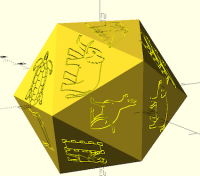
  2. On a Mac, I changed the sides array to:

sides=["𓄿","𓅔","𓅢","𓃌","𓃍","𓃎","𓆉", "𓃰", "𓃠", "𓃟", "𓁶", "𓂖",
"𓂀", "𓁿", "𓁰", "𓁀", "𓁥", "𓁔", "𓁁", "𓀨"];

and text line to:

   text(str(sides[i]), size=size*letter_ratio, font="Noto Sans Egyptian

Hieroglyphs", valign="center",halign="center");

to produce:

[image: Screen Shot 2021-12-30 at 9.02.06 AM.png]

On Thu, Dec 30, 2021 at 5:34 AM Ari Diacou ari.diacou@gmail.com wrote:

Thanks all.

There were 3 key parts. First like Lenore said, the arccosine has to be in
the y dimension, and has to be normalized by norm(avg(i)). The 2nd part was
that I had the wrong dimensions for the arctangent, which have to be
relative to y and x (not z and x). And the 3rd part is that both have to be
in the same rotation. So the rotation command is :
rotate([0,acos(avg(i)[2]/norm(avg(i))),atan2(avg(i)[1],avg(i)[0])])

JJVB's suggestion was correct, and I could remove the hull() that I had to
put in to make it manifold.

The final code is going up on thingiverse at:
https://www.thingiverse.com/thing:5179144

Thanks so much all.

size=25;
letter_ratio=.3;
depth_ratio=.03;
sides=[1,2,3,4,5,6,7,8,9,10,11,12,13,14,15,16,17,18,19,"\u263A"];
golden_ratio=(1+sqrt(5))/2+0;
g=golden_ratio;
//See:
https://en.wikipedia.org/wiki/Regular_icosahedron#Cartesian_coordinates
rect1=[[0,+1,+g],[0,+1,-g],[0,-1,+g],[0,-1,-g]];
rect2=[[+1,+g,0],[+1,-g,0],[-1,+g,0],[-1,-g,0]];
rect3=[[+g,0,+1],[+g,0,-1],[-g,0,+1],[-g,0,-1]];
points=concat(rect1, rect2, rect3); //echo(points);
faces=[
[10,0,2],[0,8,2],[0,4,8],[0,6,4],[0,10,6],
[10,2,7],[2,5,7],[2,8,5],[8,9,5],[8,4,9],
[4,1,9],[6,1,4],[6,11,1],[6,10,11],[10,7,11],
[3,7,5],[3,11,7],[3,1,11],[3,9,1],[3,5,9]]1;
difference(){
polyhedron(.5
sizepoints,faces);
for(i=[0:19])
translate(.5
size*avg(i)) color("yellow")

rotate([0,acos(avg(i)[2]/norm(avg(i))),atan2(avg(i)[1],avg(i)[0])])
translate([0,0,-depth_ratiosize+.05])
linear_extrude(depth_ratio
size)

text(str(sides[i]),size=size*letter_ratio,valign="center",halign="center");
}
function avg(x)
//calculates the vector of the center of the face x, based on the average
of the vertices
=points[faces[x][0]]/3
+points[faces[x][1]]/3
+points[faces[x][2]]/3;

On Thu, Dec 30, 2021 at 2:31 AM jjvb-openscad@bassklampfe.de wrote:

There is a simple solution using BOSL2:

include <BOSL2/std.scad>
include <BOSL2/polyhedra.scad>
difference(){
regular_polyhedron("icosahedron", side=35);
regular_polyhedron("icosahedron", side=35,draw=false)
down(.3) linear_extrude(height=1)
text(str($faceindex+1),halign="center",valign="center");
}

Am 29.12.21 um 17:20 schrieb Ari Diacou:

I'm trying to make a customizable d20. I made the icosahedron no

problem,

and have the vectors for both the vertices, and the faces. I have made

the

numbers of the faces coincident with the faces, but can't figure out

how to

rotate them so that they are coplanar with the faces.  Searching
mathematics stack exchange was fruitless, as well as my search of

wikipedia

and mathworld. I also can't seem to straight apply spherical
coordinate transformation (but I was always bad at that, even in

college)

size=25;
letter_ratio=.3;
golden_ratio=(1+sqrt(5))/2;
g=golden_ratio;
//See:
https://en.wikipedia.org/wiki/Regular_icosahedron#Cartesian_coordinates
rect1=[[0,+1,+g],[0,+1,-g],[0,-1,+g],[0,-1,-g]];
rect2=[[+1,+g,0],[+1,-g,0],[-1,+g,0],[-1,-g,0]];
rect3=[[+g,0,+1],[+g,0,-1],[-g,0,+1],[-g,0,-1]];
points=concat(rect1, rect2, rect3); //echo(points);
faces=[[0,10,2],[0,2,8],[0,8,4],[0,4,6],[0,6,10],

[10,2,7],[2,7,5],[2,5,8],[8,5,9],[8,9,4],[4,9,1],[6,4,1],[6,1,11],[6,11,10],[10,11,7],

     [3,5,7],[3,7,11],[3,11,1],[3,1,9],[3,9,5]];

#polyhedron(.5sizepoints,faces);
for(i=[0:19])
translate(.5sizeavg(i)) color("yellow")
//rotate([1*acos(avg(i)[2]/size),0,0])
//rotate([0,0,90-atan2(avg(i)[2],avg(i)[0])])

text(str(i+1),size=size*letter_ratio,valign="center",halign="center");

function avg(x)
//calculates the vector of the center of the face x, based on the

average

of the vertices
=points[faces[x][0]]/3
+points[faces[x][1]]/3
+points[faces[x][2]]/3;


OpenSCAD mailing list
To unsubscribe send an email to discuss-leave@lists.openscad.org


OpenSCAD mailing list
To unsubscribe send an email to discuss-leave@lists.openscad.org


OpenSCAD mailing list
To unsubscribe send an email to discuss-leave@lists.openscad.org
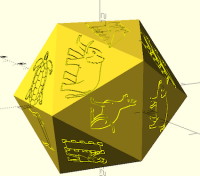
1) in your *sides* array, consider re-ordering the face labels. Vi Hart has a video <https://www.youtube.com/watch?v=-p7C5FrgAzU&t=960s> on how the faces of a d8 should be labeled to model the d6 where opposite faces have the same sum. 2) On a Mac, I changed the *sides* array to: sides=["𓄿","𓅔","𓅢","𓃌","𓃍","𓃎","𓆉", "𓃰", "𓃠", "𓃟", "𓁶", "𓂖", "𓂀", "𓁿", "𓁰", "𓁀", "𓁥", "𓁔", "𓁁", "𓀨"]; and text line to: text(str(sides[i]), size=size*letter_ratio, font="Noto Sans Egyptian Hieroglyphs", valign="center",halign="center"); to produce: [image: Screen Shot 2021-12-30 at 9.02.06 AM.png] On Thu, Dec 30, 2021 at 5:34 AM Ari Diacou <ari.diacou@gmail.com> wrote: > Thanks all. > > There were 3 key parts. First like Lenore said, the arccosine has to be in > the y dimension, and has to be normalized by norm(avg(i)). The 2nd part was > that I had the wrong dimensions for the arctangent, which have to be > relative to y and x (not z and x). And the 3rd part is that both have to be > in the same rotation. So the rotation command is : > rotate([0,acos(avg(i)[2]/norm(avg(i))),atan2(avg(i)[1],avg(i)[0])]) > > JJVB's suggestion was correct, and I could remove the hull() that I had to > put in to make it manifold. > > The final code is going up on thingiverse at: > https://www.thingiverse.com/thing:5179144 > > Thanks so much all. > > size=25; > letter_ratio=.3; > depth_ratio=.03; > sides=[1,2,3,4,5,6,7,8,9,10,11,12,13,14,15,16,17,18,19,"\u263A"]; > golden_ratio=(1+sqrt(5))/2+0; > g=golden_ratio; > //See: > https://en.wikipedia.org/wiki/Regular_icosahedron#Cartesian_coordinates > rect1=[[0,+1,+g],[0,+1,-g],[0,-1,+g],[0,-1,-g]]; > rect2=[[+1,+g,0],[+1,-g,0],[-1,+g,0],[-1,-g,0]]; > rect3=[[+g,0,+1],[+g,0,-1],[-g,0,+1],[-g,0,-1]]; > points=concat(rect1, rect2, rect3); //echo(points); > faces=[ > [10,0,2],[0,8,2],[0,4,8],[0,6,4],[0,10,6], > [10,2,7],[2,5,7],[2,8,5],[8,9,5],[8,4,9], > [4,1,9],[6,1,4],[6,11,1],[6,10,11],[10,7,11], > [3,7,5],[3,11,7],[3,1,11],[3,9,1],[3,5,9]]*1; > difference(){ > polyhedron(.5*size*points,faces); > for(i=[0:19]) > translate(.5*size*avg(i)) color("yellow") > > rotate([0,acos(avg(i)[2]/norm(avg(i))),atan2(avg(i)[1],avg(i)[0])]) > translate([0,0,-depth_ratio*size+.05]) > linear_extrude(depth_ratio*size) > > text(str(sides[i]),size=size*letter_ratio,valign="center",halign="center"); > } > function avg(x) > //calculates the vector of the center of the face x, based on the average > of the vertices > =points[faces[x][0]]/3 > +points[faces[x][1]]/3 > +points[faces[x][2]]/3; > > On Thu, Dec 30, 2021 at 2:31 AM <jjvb-openscad@bassklampfe.de> wrote: > >> There is a simple solution using BOSL2: >> >> >> include <BOSL2/std.scad> >> include <BOSL2/polyhedra.scad> >> difference(){ >> regular_polyhedron("icosahedron", side=35); >> regular_polyhedron("icosahedron", side=35,draw=false) >> down(.3) linear_extrude(height=1) >> text(str($faceindex+1),halign="center",valign="center"); >> } >> >> >> Am 29.12.21 um 17:20 schrieb Ari Diacou: >> > I'm trying to make a customizable d20. I made the icosahedron no >> problem, >> > and have the vectors for both the vertices, and the faces. I have made >> the >> > numbers of the faces coincident with the faces, but can't figure out >> how to >> > rotate them so that they are coplanar with the faces. Searching >> > mathematics stack exchange was fruitless, as well as my search of >> wikipedia >> > and mathworld. I also can't seem to straight apply spherical >> > coordinate transformation (but I was always bad at that, even in >> college) >> > >> > size=25; >> > letter_ratio=.3; >> > golden_ratio=(1+sqrt(5))/2; >> > g=golden_ratio; >> > //See: >> > https://en.wikipedia.org/wiki/Regular_icosahedron#Cartesian_coordinates >> > rect1=[[0,+1,+g],[0,+1,-g],[0,-1,+g],[0,-1,-g]]; >> > rect2=[[+1,+g,0],[+1,-g,0],[-1,+g,0],[-1,-g,0]]; >> > rect3=[[+g,0,+1],[+g,0,-1],[-g,0,+1],[-g,0,-1]]; >> > points=concat(rect1, rect2, rect3); //echo(points); >> > faces=[[0,10,2],[0,2,8],[0,8,4],[0,4,6],[0,6,10], >> > >> > >> [10,2,7],[2,7,5],[2,5,8],[8,5,9],[8,9,4],[4,9,1],[6,4,1],[6,1,11],[6,11,10],[10,11,7], >> > [3,5,7],[3,7,11],[3,11,1],[3,1,9],[3,9,5]]; >> > #polyhedron(.5*size*points,faces); >> > for(i=[0:19]) >> > translate(.5*size*avg(i)) color("yellow") >> > //rotate([1*acos(avg(i)[2]/size),0,0]) >> > //rotate([0,0,90-atan2(avg(i)[2],avg(i)[0])]) >> > >> > text(str(i+1),size=size*letter_ratio,valign="center",halign="center"); >> > >> > function avg(x) >> > //calculates the vector of the center of the face x, based on the >> average >> > of the vertices >> > =points[faces[x][0]]/3 >> > +points[faces[x][1]]/3 >> > +points[faces[x][2]]/3; >> > >> > >> > _______________________________________________ >> > OpenSCAD mailing list >> > To unsubscribe send an email to discuss-leave@lists.openscad.org >> _______________________________________________ >> OpenSCAD mailing list >> To unsubscribe send an email to discuss-leave@lists.openscad.org >> > _______________________________________________ > OpenSCAD mailing list > To unsubscribe send an email to discuss-leave@lists.openscad.org >
DP
David Phillip Oster
Thu, Dec 30, 2021 6:11 PM
  1. after rewatching that Vi Hart video, at least either 6 or 9 should be
    replaced by something, so they won't be confusable on the actual dice.

On Thu, Dec 30, 2021 at 9:03 AM David Phillip Oster <
davidphilliposter@gmail.com> wrote:

  1. in your sides array, consider re-ordering the face labels. Vi Hart
    has a video https://www.youtube.com/watch?v=-p7C5FrgAzU&t=960s on how
    the faces of a d8 should be labeled to model the d6 where opposite faces
    have the same sum.

  2. On a Mac, I changed the sides array to:

sides=["𓄿","𓅔","𓅢","𓃌","𓃍","𓃎","𓆉", "𓃰", "𓃠", "𓃟", "𓁶", "𓂖",
"𓂀", "𓁿", "𓁰", "𓁀", "𓁥", "𓁔", "𓁁", "𓀨"];

and text line to:

    text(str(sides[i]), size=size*letter_ratio, font="Noto Sans

Egyptian Hieroglyphs", valign="center",halign="center");

to produce:

[image: Screen Shot 2021-12-30 at 9.02.06 AM.png]

On Thu, Dec 30, 2021 at 5:34 AM Ari Diacou ari.diacou@gmail.com wrote:

Thanks all.

There were 3 key parts. First like Lenore said, the arccosine has to be
in the y dimension, and has to be normalized by norm(avg(i)). The 2nd part
was that I had the wrong dimensions for the arctangent, which have to be
relative to y and x (not z and x). And the 3rd part is that both have to be
in the same rotation. So the rotation command is :
rotate([0,acos(avg(i)[2]/norm(avg(i))),atan2(avg(i)[1],avg(i)[0])])

JJVB's suggestion was correct, and I could remove the hull() that I had
to put in to make it manifold.

The final code is going up on thingiverse at:
https://www.thingiverse.com/thing:5179144

Thanks so much all.

size=25;
letter_ratio=.3;
depth_ratio=.03;
sides=[1,2,3,4,5,6,7,8,9,10,11,12,13,14,15,16,17,18,19,"\u263A"];
golden_ratio=(1+sqrt(5))/2+0;
g=golden_ratio;
//See:
https://en.wikipedia.org/wiki/Regular_icosahedron#Cartesian_coordinates
rect1=[[0,+1,+g],[0,+1,-g],[0,-1,+g],[0,-1,-g]];
rect2=[[+1,+g,0],[+1,-g,0],[-1,+g,0],[-1,-g,0]];
rect3=[[+g,0,+1],[+g,0,-1],[-g,0,+1],[-g,0,-1]];
points=concat(rect1, rect2, rect3); //echo(points);
faces=[
[10,0,2],[0,8,2],[0,4,8],[0,6,4],[0,10,6],
[10,2,7],[2,5,7],[2,8,5],[8,9,5],[8,4,9],
[4,1,9],[6,1,4],[6,11,1],[6,10,11],[10,7,11],
[3,7,5],[3,11,7],[3,1,11],[3,9,1],[3,5,9]]1;
difference(){
polyhedron(.5
sizepoints,faces);
for(i=[0:19])
translate(.5
size*avg(i)) color("yellow")

rotate([0,acos(avg(i)[2]/norm(avg(i))),atan2(avg(i)[1],avg(i)[0])])
translate([0,0,-depth_ratiosize+.05])
linear_extrude(depth_ratio
size)

text(str(sides[i]),size=size*letter_ratio,valign="center",halign="center");
}
function avg(x)
//calculates the vector of the center of the face x, based on the average
of the vertices
=points[faces[x][0]]/3
+points[faces[x][1]]/3
+points[faces[x][2]]/3;

On Thu, Dec 30, 2021 at 2:31 AM jjvb-openscad@bassklampfe.de wrote:

There is a simple solution using BOSL2:

include <BOSL2/std.scad>
include <BOSL2/polyhedra.scad>
difference(){
regular_polyhedron("icosahedron", side=35);
regular_polyhedron("icosahedron", side=35,draw=false)
down(.3) linear_extrude(height=1)
text(str($faceindex+1),halign="center",valign="center");
}

Am 29.12.21 um 17:20 schrieb Ari Diacou:

I'm trying to make a customizable d20. I made the icosahedron no

problem,

and have the vectors for both the vertices, and the faces. I have made

the

numbers of the faces coincident with the faces, but can't figure out

how to

rotate them so that they are coplanar with the faces.  Searching
mathematics stack exchange was fruitless, as well as my search of

wikipedia

and mathworld. I also can't seem to straight apply spherical
coordinate transformation (but I was always bad at that, even in

college)

size=25;
letter_ratio=.3;
golden_ratio=(1+sqrt(5))/2;
g=golden_ratio;
//See:

rect1=[[0,+1,+g],[0,+1,-g],[0,-1,+g],[0,-1,-g]];
rect2=[[+1,+g,0],[+1,-g,0],[-1,+g,0],[-1,-g,0]];
rect3=[[+g,0,+1],[+g,0,-1],[-g,0,+1],[-g,0,-1]];
points=concat(rect1, rect2, rect3); //echo(points);
faces=[[0,10,2],[0,2,8],[0,8,4],[0,4,6],[0,6,10],

[10,2,7],[2,7,5],[2,5,8],[8,5,9],[8,9,4],[4,9,1],[6,4,1],[6,1,11],[6,11,10],[10,11,7],

     [3,5,7],[3,7,11],[3,11,1],[3,1,9],[3,9,5]];

#polyhedron(.5sizepoints,faces);
for(i=[0:19])
translate(.5sizeavg(i)) color("yellow")
//rotate([1*acos(avg(i)[2]/size),0,0])
//rotate([0,0,90-atan2(avg(i)[2],avg(i)[0])])

text(str(i+1),size=size*letter_ratio,valign="center",halign="center");

function avg(x)
//calculates the vector of the center of the face x, based on the

average

of the vertices
=points[faces[x][0]]/3
+points[faces[x][1]]/3
+points[faces[x][2]]/3;


OpenSCAD mailing list
To unsubscribe send an email to discuss-leave@lists.openscad.org


OpenSCAD mailing list
To unsubscribe send an email to discuss-leave@lists.openscad.org

OpenSCAD mailing list
To unsubscribe send an email to discuss-leave@lists.openscad.org

3) after rewatching that Vi Hart video, at least either 6 or 9 should be replaced by something, so they won't be confusable on the actual dice. On Thu, Dec 30, 2021 at 9:03 AM David Phillip Oster < davidphilliposter@gmail.com> wrote: > 1) in your *sides* array, consider re-ordering the face labels. Vi Hart > has a video <https://www.youtube.com/watch?v=-p7C5FrgAzU&t=960s> on how > the faces of a d8 should be labeled to model the d6 where opposite faces > have the same sum. > > 2) On a Mac, I changed the *sides* array to: > > sides=["𓄿","𓅔","𓅢","𓃌","𓃍","𓃎","𓆉", "𓃰", "𓃠", "𓃟", "𓁶", "𓂖", > "𓂀", "𓁿", "𓁰", "𓁀", "𓁥", "𓁔", "𓁁", "𓀨"]; > > and text line to: > > text(str(sides[i]), size=size*letter_ratio, font="Noto Sans > Egyptian Hieroglyphs", valign="center",halign="center"); > > to produce: > > [image: Screen Shot 2021-12-30 at 9.02.06 AM.png] > > On Thu, Dec 30, 2021 at 5:34 AM Ari Diacou <ari.diacou@gmail.com> wrote: > >> Thanks all. >> >> There were 3 key parts. First like Lenore said, the arccosine has to be >> in the y dimension, and has to be normalized by norm(avg(i)). The 2nd part >> was that I had the wrong dimensions for the arctangent, which have to be >> relative to y and x (not z and x). And the 3rd part is that both have to be >> in the same rotation. So the rotation command is : >> rotate([0,acos(avg(i)[2]/norm(avg(i))),atan2(avg(i)[1],avg(i)[0])]) >> >> JJVB's suggestion was correct, and I could remove the hull() that I had >> to put in to make it manifold. >> >> The final code is going up on thingiverse at: >> https://www.thingiverse.com/thing:5179144 >> >> Thanks so much all. >> >> size=25; >> letter_ratio=.3; >> depth_ratio=.03; >> sides=[1,2,3,4,5,6,7,8,9,10,11,12,13,14,15,16,17,18,19,"\u263A"]; >> golden_ratio=(1+sqrt(5))/2+0; >> g=golden_ratio; >> //See: >> https://en.wikipedia.org/wiki/Regular_icosahedron#Cartesian_coordinates >> rect1=[[0,+1,+g],[0,+1,-g],[0,-1,+g],[0,-1,-g]]; >> rect2=[[+1,+g,0],[+1,-g,0],[-1,+g,0],[-1,-g,0]]; >> rect3=[[+g,0,+1],[+g,0,-1],[-g,0,+1],[-g,0,-1]]; >> points=concat(rect1, rect2, rect3); //echo(points); >> faces=[ >> [10,0,2],[0,8,2],[0,4,8],[0,6,4],[0,10,6], >> [10,2,7],[2,5,7],[2,8,5],[8,9,5],[8,4,9], >> [4,1,9],[6,1,4],[6,11,1],[6,10,11],[10,7,11], >> [3,7,5],[3,11,7],[3,1,11],[3,9,1],[3,5,9]]*1; >> difference(){ >> polyhedron(.5*size*points,faces); >> for(i=[0:19]) >> translate(.5*size*avg(i)) color("yellow") >> >> rotate([0,acos(avg(i)[2]/norm(avg(i))),atan2(avg(i)[1],avg(i)[0])]) >> translate([0,0,-depth_ratio*size+.05]) >> linear_extrude(depth_ratio*size) >> >> text(str(sides[i]),size=size*letter_ratio,valign="center",halign="center"); >> } >> function avg(x) >> //calculates the vector of the center of the face x, based on the average >> of the vertices >> =points[faces[x][0]]/3 >> +points[faces[x][1]]/3 >> +points[faces[x][2]]/3; >> >> On Thu, Dec 30, 2021 at 2:31 AM <jjvb-openscad@bassklampfe.de> wrote: >> >>> There is a simple solution using BOSL2: >>> >>> >>> include <BOSL2/std.scad> >>> include <BOSL2/polyhedra.scad> >>> difference(){ >>> regular_polyhedron("icosahedron", side=35); >>> regular_polyhedron("icosahedron", side=35,draw=false) >>> down(.3) linear_extrude(height=1) >>> text(str($faceindex+1),halign="center",valign="center"); >>> } >>> >>> >>> Am 29.12.21 um 17:20 schrieb Ari Diacou: >>> > I'm trying to make a customizable d20. I made the icosahedron no >>> problem, >>> > and have the vectors for both the vertices, and the faces. I have made >>> the >>> > numbers of the faces coincident with the faces, but can't figure out >>> how to >>> > rotate them so that they are coplanar with the faces. Searching >>> > mathematics stack exchange was fruitless, as well as my search of >>> wikipedia >>> > and mathworld. I also can't seem to straight apply spherical >>> > coordinate transformation (but I was always bad at that, even in >>> college) >>> > >>> > size=25; >>> > letter_ratio=.3; >>> > golden_ratio=(1+sqrt(5))/2; >>> > g=golden_ratio; >>> > //See: >>> > >>> https://en.wikipedia.org/wiki/Regular_icosahedron#Cartesian_coordinates >>> > rect1=[[0,+1,+g],[0,+1,-g],[0,-1,+g],[0,-1,-g]]; >>> > rect2=[[+1,+g,0],[+1,-g,0],[-1,+g,0],[-1,-g,0]]; >>> > rect3=[[+g,0,+1],[+g,0,-1],[-g,0,+1],[-g,0,-1]]; >>> > points=concat(rect1, rect2, rect3); //echo(points); >>> > faces=[[0,10,2],[0,2,8],[0,8,4],[0,4,6],[0,6,10], >>> > >>> > >>> [10,2,7],[2,7,5],[2,5,8],[8,5,9],[8,9,4],[4,9,1],[6,4,1],[6,1,11],[6,11,10],[10,11,7], >>> > [3,5,7],[3,7,11],[3,11,1],[3,1,9],[3,9,5]]; >>> > #polyhedron(.5*size*points,faces); >>> > for(i=[0:19]) >>> > translate(.5*size*avg(i)) color("yellow") >>> > //rotate([1*acos(avg(i)[2]/size),0,0]) >>> > //rotate([0,0,90-atan2(avg(i)[2],avg(i)[0])]) >>> > >>> > text(str(i+1),size=size*letter_ratio,valign="center",halign="center"); >>> > >>> > function avg(x) >>> > //calculates the vector of the center of the face x, based on the >>> average >>> > of the vertices >>> > =points[faces[x][0]]/3 >>> > +points[faces[x][1]]/3 >>> > +points[faces[x][2]]/3; >>> > >>> > >>> > _______________________________________________ >>> > OpenSCAD mailing list >>> > To unsubscribe send an email to discuss-leave@lists.openscad.org >>> _______________________________________________ >>> OpenSCAD mailing list >>> To unsubscribe send an email to discuss-leave@lists.openscad.org >>> >> _______________________________________________ >> OpenSCAD mailing list >> To unsubscribe send an email to discuss-leave@lists.openscad.org >> >