


discuss@lists.openscad.org

OpenSCAD general discussion Mailing-list

View all threads

function-import

L
larry
Mon, Oct 6, 2025 7:19 PM

On Mon, 2025-10-06 at 17:12 +0000, William F. Adams wrote:

Is the basic importing of an SVG outline not what is wanted?

https://en.wikibooks.org/wiki/OpenSCAD_User_Manual/Importing_Geometry/SVG_Import

Apparently not, or perhaps there is something he can't figure out how
to do.

Here's his initial pot:


I'm trying (without much success) to use the BOSL2 'skin' module To
that end, I need to create a list of 2D objects. E.g., things like:
slice1 = [circle(50), circle(30), circle(20)];
or
slice2 = square(100);
work fine.
But what I really need is a list of imported SVGs. (And yes, I've
enabled the 'import-function' option under Preferences->Features.)
Everything I've seen indicates that OS treats an imported SVG as a set
of 2D points/polygons/whatever. So I should be able to do something
like:
slice3 = import("X_100x.svg");
But it fails with "WARNING: Failed to parse .../X_100x.svg..." etc.
Note that the non-function form of 'import' works fine with this rather
simple closed-curve file.
Am I just ahead of the curve (no pun intended) in the sense that that
the functionality isn't implemented yet? Or am I just doing it wrong
(again)?

Later, he says:

I think I have a workaround: the shapes in question are (more or
less) convex in the regions of interest, but I may be back later with
stupid questions about 'hull'.

Further discussions confirm he meant convex.

On Mon, 2025-10-06 at 17:12 +0000, William F. Adams wrote: > Is the basic importing of an SVG outline not what is wanted? > > https://en.wikibooks.org/wiki/OpenSCAD_User_Manual/Importing_Geometry/SVG_Import Apparently not, or perhaps there is something he can't figure out how to do. Here's his initial pot: ---- I'm trying (without much success) to use the BOSL2 'skin' module To that end, I need to create a list of 2D objects. E.g., things like: slice1 = [circle(50), circle(30), circle(20)]; or slice2 = square(100); work fine. But what I really need is a list of imported SVGs. (And yes, I've enabled the 'import-function' option under Preferences->Features.) Everything I've seen indicates that OS treats an imported SVG as a set of 2D points/polygons/whatever. So I *should* be able to do something like: slice3 = import("X_100x.svg"); But it fails with "WARNING: Failed to parse .../X_100x.svg..." etc. Note that the non-function form of 'import' works fine with this rather simple closed-curve file. Am I just ahead of the curve (no pun intended) in the sense that that the functionality isn't implemented yet? Or am I just doing it wrong (again)? ---- Later, he says: ---- I *think* I have a workaround: the shapes in question are (more or less) convex in the regions of interest, but I may be back later with stupid questions about 'hull'. ---- Further discussions confirm he meant convex.
JB
Jordan Brown
Mon, Oct 6, 2025 7:39 PM

On 10/6/2025 12:19 PM, larry via Discuss wrote:

I'm trying (without much success) to use the BOSL2 'skin' module To
that end, I need to create a list of 2D objects. E.g., things like:
slice1 = [circle(50), circle(30), circle(20)];
or
slice2 = square(100);
work fine.
But what I really need is a list of imported SVGs. (And yes, I've
enabled the 'import-function' option under Preferences->Features.)

There is no straightforward way to get from that Point A to that Point B.

In theory you could parse the SVG file, extract a list of coordinates
(and other directive), translate them into JSON, and then import that
JSON into OpenSCAD.  But that processing wouldn't be trivial.

Note that the non-function form of 'import' works fine with this rather
simple closed-curve file.

Functions are not modules; modules are not functions.  The import
function is completely independent of the import module, and has
entirely different capabilities.

Am I just ahead of the curve (no pun intended) in the sense that that
the functionality isn't implemented yet?

Yes.

On 10/6/2025 12:19 PM, larry via Discuss wrote: > I'm trying (without much success) to use the BOSL2 'skin' module To > that end, I need to create a list of 2D objects. E.g., things like: > slice1 = [circle(50), circle(30), circle(20)]; > or > slice2 = square(100); > work fine. > But what I really need is a list of imported SVGs. (And yes, I've > enabled the 'import-function' option under Preferences->Features.) There is no straightforward way to get from that Point A to that Point B. In theory you could parse the SVG file, extract a list of coordinates (and other directive), translate them into JSON, and then import that JSON into OpenSCAD.  But that processing wouldn't be trivial. > Note that the non-function form of 'import' works fine with this rather > simple closed-curve file. Functions are not modules; modules are not functions.  The import function is completely independent of the import module, and has entirely different capabilities. > Am I just ahead of the curve (no pun intended) in the sense that that > the functionality isn't implemented yet? Yes.
JB
Jon Bondy
Mon, Oct 6, 2025 8:08 PM

I probably am in a minority here, but I would prefer that we not
overload names in this manner.

Jon

On 10/6/2025 3:39 PM, Jordan Brown via Discuss wrote:

The import function is completely independent of the import module,
and has entirely different capabilities.

--
This email has been checked for viruses by AVG antivirus software.
www.avg.com

I probably am in a minority here, but I would prefer that we not overload names in this manner. Jon On 10/6/2025 3:39 PM, Jordan Brown via Discuss wrote: > The import function is completely independent of the import module, > and has entirely different capabilities. > -- This email has been checked for viruses by AVG antivirus software. www.avg.com
LM
Leonard Martin Struttmann
Mon, Oct 6, 2025 8:34 PM

I agree with Jon on this.  It's especially tough when trying to find the
functionality in the docs.

On Mon, Oct 6, 2025 at 3:09 PM Jon Bondy via Discuss <
discuss@lists.openscad.org> wrote:

I probably am in a minority here, but I would prefer that we not
overload names in this manner.

Jon

On 10/6/2025 3:39 PM, Jordan Brown via Discuss wrote:

The import function is completely independent of the import module,
and has entirely different capabilities.

--
This email has been checked for viruses by AVG antivirus software.
www.avg.com


OpenSCAD mailing list
To unsubscribe send an email to discuss-leave@lists.openscad.org

I agree with Jon on this. It's especially tough when trying to find the functionality in the docs. On Mon, Oct 6, 2025 at 3:09 PM Jon Bondy via Discuss < discuss@lists.openscad.org> wrote: > I probably am in a minority here, but I would prefer that we not > overload names in this manner. > > Jon > > > On 10/6/2025 3:39 PM, Jordan Brown via Discuss wrote: > > The import function is completely independent of the import module, > > and has entirely different capabilities. > > > > -- > This email has been checked for viruses by AVG antivirus software. > www.avg.com > _______________________________________________ > OpenSCAD mailing list > To unsubscribe send an email to discuss-leave@lists.openscad.org >
HW
Harvey white
Mon, Oct 6, 2025 11:45 PM

Perhaps there's a difficulty with two identically named items doing
different things.

How about an ImportData ?

Harvey

On 10/6/2025 12:40 PM, Jordan Brown via Discuss wrote:

On 10/5/2025 11:01 PM, larry via Discuss wrote:

A fellow on the 'OpenSCAD Academy' group on Facebook has asked a
question about function-import. I have never used it, so I can't help
him.
I have suggested he join this list, but I don't know if he will.

He enabled function-import and tried this...

slice2=("file.svg");

He gets an 'unable to parse' error.

I tried a few variations, but only got errors.

Could someone either answer his question on Facebook or give me an
example I could pass on to him

The import function imports JSON data and returns it as OpenSCAD data.

It handles most or maybe all JSON files.

It handles only JSON files; it does not (yet?) handle any other file type.


OpenSCAD mailing list
To unsubscribe send an email to discuss-leave@lists.openscad.org

Perhaps there's a difficulty with two identically named items doing different things. How about an ImportData ? Harvey On 10/6/2025 12:40 PM, Jordan Brown via Discuss wrote: > On 10/5/2025 11:01 PM, larry via Discuss wrote: >> A fellow on the 'OpenSCAD Academy' group on Facebook has asked a >> question about function-import. I have never used it, so I can't help >> him. >> I have suggested he join this list, but I don't know if he will. >> >> He enabled function-import and tried this... >> >> slice2=("file.svg"); >> >> He gets an 'unable to parse' error. >> >> I tried a few variations, but only got errors. >> >> Could someone either answer his question on Facebook or give me an >> example I could pass on to him > > The import function imports JSON data and returns it as OpenSCAD data. > > It handles most or maybe all JSON files. > > It handles only JSON files; it does not (yet?) handle any other file type. > > > _______________________________________________ > OpenSCAD mailing list > To unsubscribe send an email to discuss-leave@lists.openscad.org
JB
Jordan Brown
Mon, Oct 6, 2025 11:54 PM

If, next year, the import() function became able to read an SVG file and
return its contents as data (in some sense), what name would you want it
to have?

Is it wrong that the import() module can import both STL and 3MF files? 
Is it wrong that it can import both SVGs (yielding 2D geometry) and STLs
(yielding 3D geometry)?

If, next year, the import() function became able to read an SVG file and return its contents as data (in some sense), what name would you want it to have? Is it wrong that the import() module can import both STL and 3MF files?  Is it wrong that it can import both SVGs (yielding 2D geometry) and STLs (yielding 3D geometry)?
R
Rudolf
Tue, Oct 7, 2025 3:24 PM

There have been lots of feature requests asking for of such a
functionality in the last years ... Thanks for bringing it up again.

The work around I have been dealing with this problem since years is

  • load the .svg (ASCII) into an editor
    - do some search & replace, and convert the point list into a scad-file
    with the structure: svg = [[px, py], ... ];
  • include the scad file

I also wrote a converter in Matlab doing this steps automatically to
convert a couple of svg-files with a certain structure into sca-files.
However I tailored the code only for a small subset of the svg format to
get my jobs done.

Rudolf

Am 06.10.2025 um 19:13 schrieb larry via Discuss:

On Mon, 2025-10-06 at 09:40 -0700, Jordan Brown wrote:

On 10/5/2025 11:01 PM, larry via Discuss wrote:

A fellow on the 'OpenSCAD Academy' group on Facebook has asked a
question about function-import. I have never used it, so I can't
help
him.
I have suggested he join this list, but I don't know if he will.

He enabled function-import and tried this...

slice2=("file.svg");

He gets an 'unable to parse' error.

I tried a few variations, but only got errors.

Could someone either answer his question on Facebook or give me an
example I could pass on to him

 The import function imports JSON data and returns it as OpenSCAD
data.
It handles most or maybe all JSON files.
 It handles only JSON files; it does not (yet?) handle any other file
type.
That brings up another question (mine, this time).
Is there a way to get a json representation of an svg file?

L


OpenSCAD mailing list
To unsubscribe send an email to discuss-leave@lists.openscad.org

There have been lots of feature requests asking for of such a functionality in the last years ... Thanks for bringing it up again. The work around I have been dealing with this problem since years is - load the .svg (ASCII) into an editor - do some search & replace, and convert the point list into a scad-file with the structure: svg = [[px, py], ... ]; - include the scad file I also wrote a converter in Matlab doing this steps automatically to convert a couple of svg-files with a certain structure into sca-files. However I tailored the code only for a small subset of the svg format to get my jobs done. Rudolf Am 06.10.2025 um 19:13 schrieb larry via Discuss: > On Mon, 2025-10-06 at 09:40 -0700, Jordan Brown wrote: >> On 10/5/2025 11:01 PM, larry via Discuss wrote: >> >>> A fellow on the 'OpenSCAD Academy' group on Facebook has asked a >>> question about function-import. I have never used it, so I can't >>> help >>> him. >>> I have suggested he join this list, but I don't know if he will. >>> >>> He enabled function-import and tried this... >>> >>> slice2=("file.svg"); >>> >>> He gets an 'unable to parse' error. >>> >>> I tried a few variations, but only got errors. >>> >>> Could someone either answer his question on Facebook or give me an >>> example I could pass on to him >> >>  The import function imports JSON data and returns it as OpenSCAD >> data. >> It handles most or maybe all JSON files. >>  It handles only JSON files; it does not (yet?) handle any other file >> type. > That brings up another question (mine, this time). > Is there a way to get a json representation of an svg file? > > L > _______________________________________________ > OpenSCAD mailing list > To unsubscribe send an email to discuss-leave@lists.openscad.org
JH
Jeffrey Hayes
Tue, Oct 7, 2025 4:31 PM

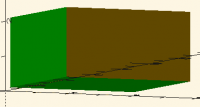
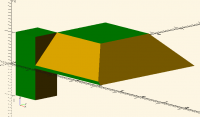
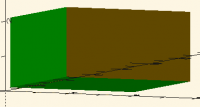
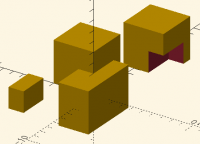
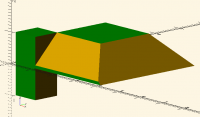
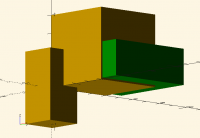
so here i am doing the boolean operations on a linear extrusion and a cube with this code cubesize=[6,1,1]; union() { linear_extrude(4) square(4); cube(cubesize, center=true); } translate([-6,3,0]) intersection() { linear_extrude(4) square(4); cube(cubesize, center=true); } translate([6,-3,0]) difference() { linear_extrude(4) square(4); cube(cubesize, center=true); } my question is .. is this mixing 2D and 3D shapes in boolean operations? or not. according to my place on the learning curve once i extrude from the 2D shape it is not involved in the boolean anymore i try this code cubesize=[6,1,1]; intersection(){ translate([.1,.1,.1]) color("green") %cube([5,5,2]); union() { linear_extrude(4) square(4); cube(cubesize, center=true); } } and i see this and when i remove the % on the cube the intersection does its thing .. i do think it odd that some of the sides of the resulting shape are still yellow and through all of this there are no warnings in the console i change the code a bit .. the intersecting cube is moved down in Z to be sure that it is overlapping with the square cubesize=[6,1,1]; intersection(){ translate([.1,.1,-1]) color("green") cube([5,5,2]); union() { roof() square(4); cube(cubesize, center=true); }} and we see this so .. EITHER we should be seeing warnings .. so there is a bug in there somewhere OR the use of an extrusion or a roof to create 3D geometry means this code is not mixing 2D with 3D shapes some of you will be tired of me pursuing this .. but for me .. maybe it really is my understanding that is flawed so how is it that the 2D shape underlying the linear extrusion, or the roof, is still being considered as part of the boolean operation .. and why are the warnings about mixing 2D with 3D not being emitted? thanks for your kind attention Jeff Hayes
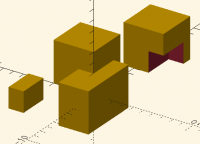
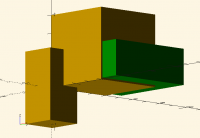
so here i am doing the boolean operations on a linear extrusion and a cube with this code cubesize=[6,1,1]; union() { linear_extrude(4) square(4); cube(cubesize, center=true); } translate([-6,3,0]) intersection() { linear_extrude(4) square(4); cube(cubesize, center=true); } translate([6,-3,0]) difference() { linear_extrude(4) square(4); cube(cubesize, center=true); } my question is .. is this mixing 2D and 3D shapes in boolean operations? or not. according to my place on the learning curve once i extrude from the 2D shape it is not involved in the boolean anymore i try this code cubesize=[6,1,1]; intersection(){ translate([.1,.1,.1]) color("green") %cube([5,5,2]); union() { linear_extrude(4) square(4); cube(cubesize, center=true); } } and i see this and when i remove the % on the cube the intersection does its thing .. i do think it odd that some of the sides of the resulting shape are still yellow and through all of this there are no warnings in the console i change the code a bit .. the intersecting cube is moved down in Z to be sure that it is overlapping with the square cubesize=[6,1,1]; intersection(){ translate([.1,.1,-1]) color("green") cube([5,5,2]); union() { roof() square(4); cube(cubesize, center=true); }} and we see this so .. EITHER we should be seeing warnings .. so there is a bug in there somewhere OR the use of an extrusion or a roof to create 3D geometry means this code is not mixing 2D with 3D shapes some of you will be tired of me pursuing this .. but for me .. maybe it really is my understanding that is flawed so how is it that the 2D shape underlying the linear extrusion, or the roof, is still being considered as part of the boolean operation .. and why are the warnings about mixing 2D with 3D not being emitted? thanks for your kind attention Jeff Hayes
AM
Adrian Mariano
Tue, Oct 7, 2025 5:48 PM

An extrusion of a 2d thing is no longer 2d. It is 3d.

On Tue, Oct 7, 2025 at 12:32 Jeffrey Hayes via Discuss <
discuss@lists.openscad.org> wrote:

so here i am doing the boolean operations on a linear extrusion and a cube

with this code
cubesize=[6,1,1];
union() {
linear_extrude(4)
square(4);
cube(cubesize, center=true);
}

translate([-6,3,0])
intersection() {
linear_extrude(4)
square(4);
cube(cubesize, center=true);
}

translate([6,-3,0])
difference() {
linear_extrude(4)
square(4);
cube(cubesize, center=true);
}
my question is .. is this mixing 2D and 3D shapes in boolean operations?
or not.
according to my place on the learning curve once i extrude from the 2D
shape it is not involved in the boolean anymore

i try this code
cubesize=[6,1,1];

intersection(){
translate([.1,.1,.1])
color("green")
%cube([5,5,2]);
union() {
linear_extrude(4)
square(4);
cube(cubesize, center=true);
}
}
and i see this

and when i remove the % on the cube
the intersection does its thing .. i do think it odd that some of the
sides of the resulting shape are still yellow

and through all of this there are no warnings in the console

i change the code a bit .. the intersecting cube is moved down in Z to be
sure that it is overlapping with the square
cubesize=[6,1,1];
intersection(){
translate([.1,.1,-1])
color("green")
cube([5,5,2]);
union() {
roof()
square(4);
cube(cubesize, center=true);
}}
and we see this

so ..
EITHER we should be seeing warnings .. so there is a bug in there somewhere
OR the use of an extrusion or a roof to create 3D geometry means this code
is not mixing 2D with 3D shapes

some of you will be tired of me pursuing this .. but for me .. maybe it
really is *my *understanding that is flawed

so how is it that the 2D shape underlying the linear extrusion, or the
roof, is still being considered as part of the boolean operation .. and why
are the warnings about mixing 2D with 3D not being emitted?

thanks for your kind attention

Jeff Hayes

OpenSCAD mailing list
To unsubscribe send an email to discuss-leave@lists.openscad.org
An extrusion of a 2d thing is no longer 2d. It is 3d. On Tue, Oct 7, 2025 at 12:32 Jeffrey Hayes via Discuss < discuss@lists.openscad.org> wrote: > so here i am doing the boolean operations on a linear extrusion and a cube > > > with this code > cubesize=[6,1,1]; > union() { > linear_extrude(4) > square(4); > cube(cubesize, center=true); > } > > translate([-6,3,0]) > intersection() { > linear_extrude(4) > square(4); > cube(cubesize, center=true); > } > > translate([6,-3,0]) > difference() { > linear_extrude(4) > square(4); > cube(cubesize, center=true); > } > my question is .. is this mixing 2D and 3D shapes in boolean operations? > or not. > according to my place on the learning curve once i extrude from the 2D > shape it is not involved in the boolean anymore > > i try this code > cubesize=[6,1,1]; > > intersection(){ > translate([.1,.1,.1]) > color("green") > %cube([5,5,2]); > union() { > linear_extrude(4) > square(4); > cube(cubesize, center=true); > } > } > and i see this > > and when i remove the % on the cube > the intersection does its thing .. i do think it odd that some of the > sides of the resulting shape are still yellow > > and through all of this there are no warnings in the console > > i change the code a bit .. the intersecting cube is moved down in Z to be > sure that it is overlapping with the square > cubesize=[6,1,1]; > intersection(){ > translate([.1,.1,-1]) > color("green") > cube([5,5,2]); > union() { > roof() > square(4); > cube(cubesize, center=true); > }} > and we see this > > so .. > EITHER we should be seeing warnings .. so there is a bug in there somewhere > OR the use of an extrusion or a roof to create 3D geometry means this code > is not mixing 2D with 3D shapes > > some of you will be tired of me pursuing this .. but for me .. maybe it > really is *my *understanding that is flawed > > so how is it that the 2D shape underlying the linear extrusion, or the > roof, is still being considered as part of the boolean operation .. and why > are the warnings about mixing 2D with 3D not being emitted? > > thanks for your kind attention > > Jeff Hayes > > > > _______________________________________________ > OpenSCAD mailing list > To unsubscribe send an email to discuss-leave@lists.openscad.org
LD
lee.deraud@roadrunner.com
Tue, Oct 7, 2025 6:32 PM

(Just FYI, I'm the "fellow from Facebook" larry alluded to...)

For one or two SVGs, brute-force text editing is certainly a viable option. When I asked the question, I was dealing with
dozens of SVGs from a LuBan 'stack' operation (cross-sections of a hideously complex SolidWorks STL export). Doing
that many by hand seemed like, well, way more work than I was up for, not to mention the sheer size of the results.
But at least the LuBan-generated files are all polygon/polyline objects, with no circles/ellipses/beziers.

Sounds like a job for Perl, or at least a plausible reason to learn it...
I probably should have done that a couple decades back when I was still getting paid.

-----Original Message-----
From: Rudolf via Discuss discuss@lists.openscad.org
Sent: Tuesday, October 7, 2025 8:25 AM
To: larry via Discuss discuss@lists.openscad.org
Cc: Rudolf parkinbot@digitaldocument.de
Subject: [OpenSCAD] Re: function-import

There have been lots of feature requests asking for of such a functionality in the last years ... Thanks for bringing it up again.

The work around I have been dealing with this problem since years is

  • load the .svg (ASCII) into an editor
  • do some search & replace, and convert the point list into a scad-file with the structure: svg = [[px, py], ... ];
  • include the scad file

I also wrote a converter in Matlab doing this steps automatically to convert a couple of svg-files with a certain structure into sca-files.
However I tailored the code only for a small subset of the svg format to get my jobs done.

Rudolf

Am 06.10.2025 um 19:13 schrieb larry via Discuss:

On Mon, 2025-10-06 at 09:40 -0700, Jordan Brown wrote:

On 10/5/2025 11:01 PM, larry via Discuss wrote:

A fellow on the 'OpenSCAD Academy' group on Facebook has asked a
question about function-import. I have never used it, so I can't
help him.
I have suggested he join this list, but I don't know if he will.

He enabled function-import and tried this...

slice2=("file.svg");

He gets an 'unable to parse' error.

I tried a few variations, but only got errors.

Could someone either answer his question on Facebook or give me an
example I could pass on to him

The import function imports JSON data and returns it as OpenSCAD
data.
It handles most or maybe all JSON files.
It handles only JSON files; it does not (yet?) handle any other
file type.

That brings up another question (mine, this time).
Is there a way to get a json representation of an svg file?

L


OpenSCAD mailing list
To unsubscribe send an email to discuss-leave@lists.openscad.org

OpenSCAD mailing list
To unsubscribe send an email to discuss-leave@lists.openscad.org
(Just FYI, I'm the "fellow from Facebook" larry alluded to...) For one or two SVGs, brute-force text editing is certainly a viable option. When I asked the question, I was dealing with dozens of SVGs from a LuBan 'stack' operation (cross-sections of a hideously complex SolidWorks STL export). Doing that many by hand seemed like, well, way more work than I was up for, not to mention the sheer size of the results. But at least the LuBan-generated files are all polygon/polyline objects, with no circles/ellipses/beziers. Sounds like a job for Perl, or at least a plausible reason to learn it... I probably should have done that a couple decades back when I was still getting paid. -----Original Message----- From: Rudolf via Discuss <discuss@lists.openscad.org> Sent: Tuesday, October 7, 2025 8:25 AM To: larry via Discuss <discuss@lists.openscad.org> Cc: Rudolf <parkinbot@digitaldocument.de> Subject: [OpenSCAD] Re: function-import There have been lots of feature requests asking for of such a functionality in the last years ... Thanks for bringing it up again. The work around I have been dealing with this problem since years is - load the .svg (ASCII) into an editor - do some search & replace, and convert the point list into a scad-file with the structure: svg = [[px, py], ... ]; - include the scad file I also wrote a converter in Matlab doing this steps automatically to convert a couple of svg-files with a certain structure into sca-files. However I tailored the code only for a small subset of the svg format to get my jobs done. Rudolf Am 06.10.2025 um 19:13 schrieb larry via Discuss: > On Mon, 2025-10-06 at 09:40 -0700, Jordan Brown wrote: >> On 10/5/2025 11:01 PM, larry via Discuss wrote: >> >>> A fellow on the 'OpenSCAD Academy' group on Facebook has asked a >>> question about function-import. I have never used it, so I can't >>> help him. >>> I have suggested he join this list, but I don't know if he will. >>> >>> He enabled function-import and tried this... >>> >>> slice2=("file.svg"); >>> >>> He gets an 'unable to parse' error. >>> >>> I tried a few variations, but only got errors. >>> >>> Could someone either answer his question on Facebook or give me an >>> example I could pass on to him >> >> The import function imports JSON data and returns it as OpenSCAD >> data. >> It handles most or maybe all JSON files. >> It handles only JSON files; it does not (yet?) handle any other >> file type. > That brings up another question (mine, this time). > Is there a way to get a json representation of an svg file? > > L > _______________________________________________ > OpenSCAD mailing list > To unsubscribe send an email to discuss-leave@lists.openscad.org _______________________________________________ OpenSCAD mailing list To unsubscribe send an email to discuss-leave@lists.openscad.org