

function-import

YES .. thank you Adrian .. -- jeff is vulcan_ in the cloud On 7 Oct 2025, at 19:48, Adrian Mariano via Discuss discuss@lists.openscad.org wrote: An extrusion of a 2d thing is no longer 2d. It is 3d.

On 10/7/2025 9:31 AM, Jeffrey Hayes via Discuss wrote:
with this code
cubesize=[6,1,1];
union() {
linear_extrude(4)
square(4);
cube(cubesize, center=true);
}
translate([-6,3,0])
intersection() {
linear_extrude(4)
square(4);
cube(cubesize, center=true);
}
translate([6,-3,0])
difference() {
linear_extrude(4)
square(4);
cube(cubesize, center=true);
}
my question is .. is this mixing 2D and 3D shapes in boolean
operations? or not.
It is not. The three top-level objects are all 3D, as are the children
of the union, the intersection, and the difference.
according to my place on the learning curve once i extrude from the 2D
shape it is not involved in the boolean anymore
It gets a bit metaphysical, but I would say that the 2D object there
does not exist any more. It is consumed by the extrusion, which yields
a 3D object. This is akin to the simpler rotate(45) cube(10); does the
original unrotated cube still exist?
i try this code
cubesize=[6,1,1];
intersection(){
translate([.1,.1,.1])
color("green")
%cube([5,5,2]);
union() {
linear_extrude(4)
square(4);
cube(cubesize, center=true);
}
}
You have done two things there that are ... odd.
First, you marked the first cube with a %. That's officially the
"background modifier
https://en.wikibooks.org/wiki/OpenSCAD_User_Manual/Modifier_Characters#Background_Modifier",
but I call it a ghost; it is displayed (by default as a translucent
gray) but does not participate in rendering. I wasn't absolutely sure
what that would mean for previewing because of the black magic that goes
into previewing, but it seems like it does not play a part in boolean
operations in previewing either.
... but the fact that that branch of the tree, the first child of the
intersection, is empty does appear to trigger an ... interesting ...
behavior, which is that if you have an intersection or difference, where
one of the children is nothing, it is as if that child was not present.
That's debatably wrong; there's a good argument that intersecting with
nothing yields nothing, but it is what it is. So that intersection ends
up doing basically nothing.
The second odd thing is that you recolored a %-marked object. I
couldn't have told you offhand what that would do, but it appears to
have more or less straightforwardly changed the color of that cube from
translucent gray to solid green.
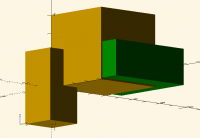
The linear_extrude yields an obvious 4x4x4 cube in the +XYZ octant,
unioned with a 6x1x1 cube(oid) centered on the origin; that's the yellow
parts.
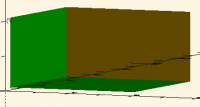
and i see this
Yes, I think that's fully explained above.
and when i remove the % on the cube the intersection does its thing
You made it real, so it participated in the boolean operation.
.. i do think it odd that some of the sides of the resulting shape
are still yellow
The colors that result from boolean operations on differing-color
objects are at least somewhat based on the black magic that goes into
previewing.
But here I think it's relatively simple: the sides that came from the
yellow union of the two cubes are yellow, and the sides that came from
the green cube are green.
In a face-color-centric model, that seems like the only right answer. I
personally prefer a volumentric-color answer, since that's what you need
for multi-color/multi-material printing, and there there is no clearly
correct answer for the color of an intersection. (But we don't have
volumetric color.)
and through all of this there are no warnings in the console
There's no errors. Interesting behavior, yes. Errors, no.
i change the code a bit .. the intersecting cube is moved down in Z to
be sure that it is overlapping with the square
cubesize=[6,1,1];
intersection(){
translate([.1,.1,-1])
color("green")
cube([5,5,2]);
union() {
roof()
square(4);
cube(cubesize, center=true);
}}
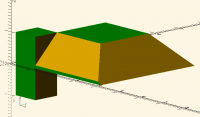
and we see this
so ..
EITHER we should be seeing warnings .. so there is a bug in there
somewhere
OR the use of an extrusion or a roof to create 3D geometry means this
code is not mixing 2D with 3D shapes
You just said it: the use of an extrusion or a roof to create 3D
geometry means that this code is not mixing 2D with 3D shapes.
There is no boolean operation in this model that is handed both a 2D
shape and a 3D shape.
so how is it that the 2D shape underlying the linear extrusion, or the
roof, is still being considered as part of the boolean operation
It isn't. Why do you think it is? Because of the green line along the
bottom of the pyramid? that's where you intersected away the edge of
the pyramid.
.. and why are the warnings about mixing 2D with 3D not being emitted?
Because there are no places where you mixed 2D with 3D.
Let's re-indent and mark up that model...
cubesize=[6,1,1];
intersection() {                                  <
                                                  <
    translate([.1,.1,-1])   <                     <
        color("green")      < 3D                  <
            cube([5,5,2]);  <                     <
                                                  <
    union() {                               <     < 3D
                                            <     <
        roof()                        < 3D  <     <
            square(4);      < 2D      <     < 3D  <
                                            <     <
        cube(cubesize, center=true);  < 3D  <     <
    }                                       <     <
}                                                 <
Or, in prose:
1. You created a 5x2x2 cube. (3D)
2. You colored it green. (3D)
3. You translated it a little +XY and -Z (3d)
4. You created a 4x4 square. (2D)
5. You roofed it, forming a pyramid. (3D)
6. You created a 6x1x1 cube. (3D)
7. You unioned the pyramid from 5 with the cube from 6. (3D + 3D --> 3D)
8. You intersected the pyramid-cube from 7 with the cube from 3. (3D
intersect 3D --> 3D)
You have two boolean operations there, 7 and 8. In neither of them did
you mix 2D and 3D objects.

I remember writing a one-time use Python program to do that years ago. It
wasn't all that difficult, if I remember correctly.
On Tue, Oct 7, 2025 at 6:35 PM Lee DeRaud via Discuss <
discuss@lists.openscad.org> wrote:
(Just FYI, I'm the "fellow from Facebook" larry alluded to...)
For one or two SVGs, brute-force text editing is certainly a viable
option. When I asked the question, I was dealing with
dozens of SVGs from a LuBan 'stack' operation (cross-sections of a
hideously complex SolidWorks STL export). Doing
that many by hand seemed like, well, way more work than I was up for, not
to mention the sheer size of the results.
But at least the LuBan-generated files are all polygon/polyline objects,
with no circles/ellipses/beziers.
Sounds like a job for Perl, or at least a plausible reason to learn it...
I probably should have done that a couple decades back when I was still
getting paid.
-----Original Message-----
From: Rudolf via Discuss discuss@lists.openscad.org
Sent: Tuesday, October 7, 2025 8:25 AM
To: larry via Discuss discuss@lists.openscad.org
Cc: Rudolf parkinbot@digitaldocument.de
Subject: [OpenSCAD] Re: function-import
There have been lots of feature requests asking for of such a
functionality in the last years ... Thanks for bringing it up again.
The work around I have been dealing with this problem since years is
- load the .svg (ASCII) into an editor
- do some search & replace, and convert the point list into a scad-file
with the structure: svg = [[px, py], ... ]; - include the scad file
I also wrote a converter in Matlab doing this steps automatically to
convert a couple of svg-files with a certain structure into sca-files.
However I tailored the code only for a small subset of the svg format to
get my jobs done.
Rudolf
Am 06.10.2025 um 19:13 schrieb larry via Discuss:
On Mon, 2025-10-06 at 09:40 -0700, Jordan Brown wrote:
On 10/5/2025 11:01 PM, larry via Discuss wrote:
A fellow on the 'OpenSCAD Academy' group on Facebook has asked a
question about function-import. I have never used it, so I can't
help him.
I have suggested he join this list, but I don't know if he will.
He enabled function-import and tried this...
slice2=("file.svg");
He gets an 'unable to parse' error.
I tried a few variations, but only got errors.
Could someone either answer his question on Facebook or give me an
example I could pass on to him
The import function imports JSON data and returns it as OpenSCAD
data.
It handles most or maybe all JSON files.
It handles only JSON files; it does not (yet?) handle any other
file type.
That brings up another question (mine, this time).
Is there a way to get a json representation of an svg file?
L
OpenSCAD mailing list
To unsubscribe send an email to discuss-leave@lists.openscad.org
OpenSCAD mailing list
To unsubscribe send an email to discuss-leave@lists.openscad.org
OpenSCAD mailing list
To unsubscribe send an email to discuss-leave@lists.openscad.org

Perhaps the pathbuilder library can help?
https://github.com/dinther/pathbuilder
On Tue, Oct 7, 2025 at 7:39 PM Leonard Martin Struttmann via Discuss <
discuss@lists.openscad.org> wrote:
I remember writing a one-time use Python program to do that years ago. It
wasn't all that difficult, if I remember correctly.
On Tue, Oct 7, 2025 at 6:35 PM Lee DeRaud via Discuss <
discuss@lists.openscad.org> wrote:
(Just FYI, I'm the "fellow from Facebook" larry alluded to...)
For one or two SVGs, brute-force text editing is certainly a viable
option. When I asked the question, I was dealing with
dozens of SVGs from a LuBan 'stack' operation (cross-sections of a
hideously complex SolidWorks STL export). Doing
that many by hand seemed like, well, way more work than I was up for, not
to mention the sheer size of the results.
But at least the LuBan-generated files are all polygon/polyline objects,
with no circles/ellipses/beziers.
Sounds like a job for Perl, or at least a plausible reason to learn it...
I probably should have done that a couple decades back when I was still
getting paid.
-----Original Message-----
From: Rudolf via Discuss discuss@lists.openscad.org
Sent: Tuesday, October 7, 2025 8:25 AM
To: larry via Discuss discuss@lists.openscad.org
Cc: Rudolf parkinbot@digitaldocument.de
Subject: [OpenSCAD] Re: function-import
There have been lots of feature requests asking for of such a
functionality in the last years ... Thanks for bringing it up again.
The work around I have been dealing with this problem since years is
- load the .svg (ASCII) into an editor
- do some search & replace, and convert the point list into a scad-file
with the structure: svg = [[px, py], ... ]; - include the scad file
I also wrote a converter in Matlab doing this steps automatically to
convert a couple of svg-files with a certain structure into sca-files.
However I tailored the code only for a small subset of the svg format to
get my jobs done.
Rudolf
Am 06.10.2025 um 19:13 schrieb larry via Discuss:
On Mon, 2025-10-06 at 09:40 -0700, Jordan Brown wrote:
On 10/5/2025 11:01 PM, larry via Discuss wrote:
A fellow on the 'OpenSCAD Academy' group on Facebook has asked a
question about function-import. I have never used it, so I can't
help him.
I have suggested he join this list, but I don't know if he will.
He enabled function-import and tried this...
slice2=("file.svg");
He gets an 'unable to parse' error.
I tried a few variations, but only got errors.
Could someone either answer his question on Facebook or give me an
example I could pass on to him
The import function imports JSON data and returns it as OpenSCAD
data.
It handles most or maybe all JSON files.
It handles only JSON files; it does not (yet?) handle any other
file type.
That brings up another question (mine, this time).
Is there a way to get a json representation of an svg file?
L
OpenSCAD mailing list
To unsubscribe send an email to discuss-leave@lists.openscad.org
OpenSCAD mailing list
To unsubscribe send an email to discuss-leave@lists.openscad.org
OpenSCAD mailing list
To unsubscribe send an email to discuss-leave@lists.openscad.org
OpenSCAD mailing list
To unsubscribe send an email to discuss-leave@lists.openscad.org
Jeff on the pad
On 8 Oct 2025, at 00:26, Jordan Brown via Discuss discuss@lists.openscad.org wrote:
EITHER we should be seeing warnings .. so there is a bug in there somewhere
OR the use of an extrusion or a roof to create 3D geometry means this code is not mixing 2D with 3D shapes
You just said it: the use of an extrusion or a roof to create 3D geometry means that this code is not mixing 2D with 3D shapes.
Exactly .. in the answers i got from the presious thread about roof on text Jordan, you and another said the example looked broken because it was mixing 2D and3D shapes in a boolean and i just did not see how that could be .. but maybe roof being experimental meant it was not building "real 3D" ?
so i made this new example using linear extrude instead
so know i know my understanding is correct
there are now mixing D's warnings cause that is not happening
thx Jordan!
There is no boolean operation in this model that is handed both a 2D shape and a 3D shape.

Many thanks!
That one goes right into the “EVERYTHING is out there, you just need to know the right search term…” file.
(My google-fu is getting ever weaker with age.)
From: Adrian Mariano via Discuss discuss@lists.openscad.org
Sent: Tuesday, October 7, 2025 5:10 PM
To: OpenSCAD general discussion Mailing-list discuss@lists.openscad.org
Cc: Adrian Mariano avm4@cornell.edu
Subject: [OpenSCAD] Re: function-import
Perhaps the pathbuilder library can help?
https://github.com/dinther/pathbuilder
On Tue, Oct 7, 2025 at 7:39 PM Leonard Martin Struttmann via Discuss <discuss@lists.openscad.org mailto:discuss@lists.openscad.org > wrote:
I remember writing a one-time use Python program to do that years ago. It wasn't all that difficult, if I remember correctly.
On Tue, Oct 7, 2025 at 6:35 PM Lee DeRaud via Discuss <discuss@lists.openscad.org mailto:discuss@lists.openscad.org > wrote:
(Just FYI, I'm the "fellow from Facebook" larry alluded to...)
For one or two SVGs, brute-force text editing is certainly a viable option. When I asked the question, I was dealing with
dozens of SVGs from a LuBan 'stack' operation (cross-sections of a hideously complex SolidWorks STL export). Doing
that many by hand seemed like, well, way more work than I was up for, not to mention the sheer size of the results.
But at least the LuBan-generated files are all polygon/polyline objects, with no circles/ellipses/beziers.
Sounds like a job for Perl, or at least a plausible reason to learn it...
I probably should have done that a couple decades back when I was still getting paid.
-----Original Message-----
From: Rudolf via Discuss <discuss@lists.openscad.org mailto:discuss@lists.openscad.org >
Sent: Tuesday, October 7, 2025 8:25 AM
To: larry via Discuss <discuss@lists.openscad.org mailto:discuss@lists.openscad.org >
Cc: Rudolf <parkinbot@digitaldocument.de mailto:parkinbot@digitaldocument.de >
Subject: [OpenSCAD] Re: function-import
There have been lots of feature requests asking for of such a functionality in the last years ... Thanks for bringing it up again.
The work around I have been dealing with this problem since years is
- load the .svg (ASCII) into an editor
- do some search & replace, and convert the point list into a scad-file with the structure: svg = [[px, py], ... ];
- include the scad file
I also wrote a converter in Matlab doing this steps automatically to convert a couple of svg-files with a certain structure into sca-files.
However I tailored the code only for a small subset of the svg format to get my jobs done.
Rudolf
Am 06.10.2025 um 19:13 schrieb larry via Discuss:
On Mon, 2025-10-06 at 09:40 -0700, Jordan Brown wrote:
On 10/5/2025 11:01 PM, larry via Discuss wrote:
A fellow on the 'OpenSCAD Academy' group on Facebook has asked a
question about function-import. I have never used it, so I can't
help him.
I have suggested he join this list, but I don't know if he will.
He enabled function-import and tried this...
slice2=("file.svg");
He gets an 'unable to parse' error.
I tried a few variations, but only got errors.
Could someone either answer his question on Facebook or give me an
example I could pass on to him
The import function imports JSON data and returns it as OpenSCAD
data.
It handles most or maybe all JSON files.
It handles only JSON files; it does not (yet?) handle any other
file type.
That brings up another question (mine, this time).
Is there a way to get a json representation of an svg file?
L
OpenSCAD mailing list
To unsubscribe send an email to discuss-leave@lists.openscad.org mailto:discuss-leave@lists.openscad.org
OpenSCAD mailing list
To unsubscribe send an email to discuss-leave@lists.openscad.org mailto:discuss-leave@lists.openscad.org
OpenSCAD mailing list
To unsubscribe send an email to discuss-leave@lists.openscad.org mailto:discuss-leave@lists.openscad.org
OpenSCAD mailing list
To unsubscribe send an email to discuss-leave@lists.openscad.org mailto:discuss-leave@lists.openscad.org
On 10/7/2025 5:39 PM, Jeffrey Hayes via Discuss wrote:
You just said it: the use of an extrusion or a roof to create 3D geometry means that this code is not mixing 2D with 3D shapes.
Exactly .. in the answers i got from the presious thread about roof on text Jordan, you and another said the example looked broken because it was mixing 2D and3D shapes in a boolean and i just did not see how that could be .. but maybe roof being experimental meant it was not building "real 3D" ?
Here's your program from that thread, re-indented and marked up:
greenpos=[2.5,3,0]; // [-50:.5:50]
textpos =[0,20,0]; // [-50:.5:50]
/* [Hidden] */
$fa=1; $fs=0.4;
translate(textpos) < 2D <
text("vrang", halign="center"); < <
<
intersection() { < <
< <
cube([100,100,2],true); < 3D < <
< <
scale([1,1,3]) < < 3D <
roof(convexity=6) < 3D < <
text("vrang", halign="center"); < 2D < < < Mixes
} < < 2D and 3D
<
translate(greenpos) < <
color("green") < <
intersection() { < <
< <
cube([100,100,2],true); < 3D < <
< 3D <
scale([1,1,3]) < < <
roof(method="straight", convexity=6) < 3D < <
text( "vrang", halign="center"); < 2D < < <
} < <
Or, in prose:
-
Create text saying "vrang". (2D)
-
Translate it +20 in Y. (2D)
-
Create a 100x100x2 cube centered on the origin. (3D)
-
Create text saying "vrang". (2D)
-
Roof it. (3D)
-
Scale it 3x in Z. (3D)
-
Intersect the cube from 3 with the roofed-and-scaled text from 6. (3D)
-
Create a 100x100x2 cube centered on the origin. (3D)
-
Create text saying "vrang". (2D)
-
Roof it (with method=straight). (3D)
-
Scale it 3x in Z. (3D)
-
Intersect the cube from 8 with the roofed-and-scaled text from 11. (3D)
-
Color that intersection green. (3D)
-
Translate that intersection to +2.5 in X and +3 in Y. (3D)
-
Union the text from 2, the intersection from 7, and the intersection
from 14. This is an error, because the text is 2D and the two
intersections are 3D. The overall type is determined by the first
child, the text, and so the two intersections are ignored in producing
the result - and so the result is just the text from 2.