

C
Caddiy
Wed, Oct 21, 2020 3:23 AM
/...an of course, that quote has different breaks...
I suspect it may be my email client, this is what I got./
There seems to be something wrong with your code and I don't think it's the
line breaks:
http://forum.openscad.org/file/t2925/frame00000.gif
--
Sent from: http://forum.openscad.org/

/...an of course, that quote has different breaks...
I suspect it may be my email client, this is what I got./
There seems to be something wrong with your code and I don't think it's the
line breaks:
<http://forum.openscad.org/file/t2925/frame00000.gif>
--
Sent from: http://forum.openscad.org/
M
MichaelAtOz
Wed, Oct 21, 2020 4:33 AM
I said "Here is one for inspiration to get you started."
You will need to use $vpt and/or $vpd to position it wherever you want it.
OpenSCAD Admin - email* me if you need anything, or if I've done something stupid...
- on the Forum, click on my MichaelAtOz label, there is a link to email me.
Unless specifically shown otherwise above, my contribution is in the Public Domain; to the extent possible under law, I have waived all copyright and related or neighbouring rights to this work. Obviously inclusion of works of previous authors is not included in the above.
--
Sent from: http://forum.openscad.org/

I said "Here is one for inspiration to get you started."
You will need to use $vpt and/or $vpd to position it wherever you want it.
-----
OpenSCAD Admin - email* me if you need anything, or if I've done something stupid...
* on the Forum, click on my MichaelAtOz label, there is a link to email me.
Unless specifically shown otherwise above, my contribution is in the Public Domain; to the extent possible under law, I have waived all copyright and related or neighbouring rights to this work. Obviously inclusion of works of previous authors is not included in the above.
--
Sent from: http://forum.openscad.org/
NH
nop head
Wed, Oct 21, 2020 5:39 AM
Yes $vpt, $vpr and $vpd tell you where the camera is and which direction it
is looking, so you need to position your fixed text relative to the camera
position, so that no matter where the camera is looking it always appears
the same.
On Wed, 21 Oct 2020 at 05:34, MichaelAtOz oz.at.michael@gmail.com wrote:
I said "Here is one for inspiration to get you started."
You will need to use $vpt and/or $vpd to position it wherever you want it.
OpenSCAD Admin - email* me if you need anything, or if I've done
something stupid...
- on the Forum, click on my MichaelAtOz label, there is a link to email me.
Unless specifically shown otherwise above, my contribution is in the
Public Domain; to the extent possible under law, I have waived all
copyright and related or neighbouring rights to this work. Obviously
inclusion of works of previous authors is not included in the above.
--
Sent from: http://forum.openscad.org/
OpenSCAD mailing list
Discuss@lists.openscad.org
http://lists.openscad.org/mailman/listinfo/discuss_lists.openscad.org
Yes $vpt, $vpr and $vpd tell you where the camera is and which direction it
is looking, so you need to position your fixed text relative to the camera
position, so that no matter where the camera is looking it always appears
the same.
On Wed, 21 Oct 2020 at 05:34, MichaelAtOz <oz.at.michael@gmail.com> wrote:
> I said "Here is one for inspiration to get you started."
> You will need to use $vpt and/or $vpd to position it wherever you want it.
>
>
>
> -----
> OpenSCAD Admin - email* me if you need anything, or if I've done
> something stupid...
>
> * on the Forum, click on my MichaelAtOz label, there is a link to email me.
>
> Unless specifically shown otherwise above, my contribution is in the
> Public Domain; to the extent possible under law, I have waived all
> copyright and related or neighbouring rights to this work. Obviously
> inclusion of works of previous authors is not included in the above.
>
> --
> Sent from: http://forum.openscad.org/
>
> _______________________________________________
> OpenSCAD mailing list
> Discuss@lists.openscad.org
> http://lists.openscad.org/mailman/listinfo/discuss_lists.openscad.org
>
C
Caddiy
Wed, Oct 21, 2020 9:04 PM
/I said "Here is one for inspiration to get you started."
You will need to use $vpt and/or $vpd to position it wherever you want it.
/
-
"INSpiration" would appear to be something of a euphemism. I think
"DESparation" comes closer as a description of my current state of mind with
regard to the subject of this discussion.
-
"check the forum to get the right one." If you can't get "the right one",
how do you expect me to find it?
-
What is this...
// turn on animation
$vpr = [$vpr[0], 0, $t * 360]; // animated rotate around Z
/I said "Here is one for inspiration to get you started."
You will need to use $vpt and/or $vpd to position it wherever you want it.
/
- "INSpiration" would appear to be something of a euphemism. I think
"DESparation" comes closer as a description of my current state of mind with
regard to the subject of this discussion.
- "check the forum to get the right one." If you can't get "the right one",
how do you expect me to find it?
- What is this...
> // turn on animation
> $vpr = [$vpr[0], 0, $t * 360]; // animated rotate around Z
...doing in your code? I don't want everything going round and round in
circles.
--
Sent from: http://forum.openscad.org/
M
MichaelAtOz
Wed, Oct 21, 2020 10:09 PM
- "check the forum to get the right one." If you can't get "the right
one",
how do you expect me to find it?
// turn on animation
$vpr = [$vpr[0], 0, $t * 360]; // animated rotate around Z
...doing in your code? I don't want everything going round and round in
circles.
It is an example animated object.
In the file above, line 9+ is the bit which makes the text face forward.
OpenSCAD is a program language.
You need to add $vpr/$vpd to position your message where you want it.
OpenSCAD Admin - email* me if you need anything, or if I've done something stupid...
- on the Forum, click on my MichaelAtOz label, there is a link to email me.
Unless specifically shown otherwise above, my contribution is in the Public Domain; to the extent possible under law, I have waived all copyright and related or neighbouring rights to this work. Obviously inclusion of works of previous authors is not included in the above.
--
Sent from: http://forum.openscad.org/
Caddiy wrote
> - "check the forum to get the right one." If you can't get "the right
> one",
> how do you expect me to find it?
This is the forum, my message above has the code, the code in the email was
corrupted.
Anyway, I have reformatted it here: animate-directed-message.scad
<http://forum.openscad.org/file/t359/animate-directed-message.scad>
It is an example.
> - What is this...
>
>> // turn on animation
>> $vpr = [$vpr[0], 0, $t * 360]; // animated rotate around Z
>
> ...doing in your code? I don't want everything going round and round in
> circles.
It is an example animated object.
In the file above, line 9+ is the bit which makes the text face forward.
OpenSCAD is a program language.
You need to add $vpr/$vpd to position your message where you want it.
-----
OpenSCAD Admin - email* me if you need anything, or if I've done something stupid...
* on the Forum, click on my MichaelAtOz label, there is a link to email me.
Unless specifically shown otherwise above, my contribution is in the Public Domain; to the extent possible under law, I have waived all copyright and related or neighbouring rights to this work. Obviously inclusion of works of previous authors is not included in the above.
--
Sent from: http://forum.openscad.org/
C
Caddiy
Wed, Oct 21, 2020 11:03 PM
/Yes $vpt, $vpr and $vpd tell you where the camera is and which direction it
is looking, so you need to position your fixed text relative to the camera
position, so that no matter where the camera is looking it always appears
the same./
Right, that's exactly what I want.
So it's just a matter of adding a bit to those x,y,z coordinates or what?
What is the syntax for this?
No mention of Edit/Copy viewport translation, rotation, distance. Are these
not relevant here?
I know the commands for $vpt and $vpr are translate and rotate. What is the
command for the variable, $vpd?
The User Manual says "$vpf shows the FOV of the view". What's that and where
is it "shown"? Do I need it?
I'm sorry to have to bother the forum with this elementary stuff, but it is
unfortunately not in the User Manual.
--
Sent from: http://forum.openscad.org/
/Yes $vpt, $vpr and $vpd tell you where the camera is and which direction it
is looking, so you need to position your fixed text relative to the camera
position, so that no matter where the camera is looking it always appears
the same./
Right, that's exactly what I want.
So it's just a matter of adding a bit to those x,y,z coordinates or what?
What is the syntax for this?
No mention of Edit/Copy viewport translation, rotation, distance. Are these
not relevant here?
I know the commands for $vpt and $vpr are translate and rotate. What is the
command for the variable, $vpd?
The User Manual says "$vpf shows the FOV of the view". What's that and where
is it "shown"? Do I need it?
I'm sorry to have to bother the forum with this elementary stuff, but it is
unfortunately not in the User Manual.
--
Sent from: http://forum.openscad.org/
NH
nop head
Thu, Oct 22, 2020 6:51 AM
You need to translate and rotate your message text to be in a position
relative to the camera using translate() and rotate() with values derived
from $vpr, $vpt, $vpd.
$fpd is the distance from the camera to the viewport as shown in the
distance figure at the bottom of the screen and changes with the zoom level.
$vpf is new and is available in the snapshots. It is the field of view of
the camera and again appears at the bottom of the screen if you have a
recent snapshot. On older versions it is fixed at 22.5 degrees and, unless
you assign a value to it, it will be 22.5 because the GUI has no way of
changing it. You would need to use it to find where the edge of the view
is, I think. I have just realised you would also need to know the window
size. Which isn't available in a variable. So I think you would maximize
the window and read the figure at the bottom and paste it into your code
which would then only work at the same window size.
You don't need the copy menu options as these are just the same values that
appear in $vpr, etc, You can paste them into code when you want to select a
particular camera setup by assigning to $vpr, $vpt, etc, or you can use
them on the command line to specify the camera position.
So you know the view is rotated by $vpr, translated by $vpt relative to the
viewport origin and the camera is then set back by $vpt and has a field of
view of $vpf. You have to work out how to position, rotate and scale your
text so it appears at the edge of the FOV of the camera.
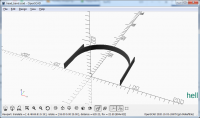
This nearly works for me but I don't know why I needed -350 or why X is a
little bit off the screen. I am not quite sure how OpenSCAD units relate to
pixels on the screen. Changing the window y dimension zooms the image to
fit but changing x just clips it. Perhaps somebody else can finish it off
as I have other things to do today.
window = [894, 422]; // Copied from the bottom of the GUI
translate($vpt)
rotate($vpr)
scale($vpd / window.y)
translate([window.x, -350] / 2 * tan($vpf))
linear_extrude(0.1)
text("hello", valign = "baseline", halign = "right");
[image: image.png]
On Thu, 22 Oct 2020 at 00:04, Caddiy mikeonenine@web.de wrote:
/Yes $vpt, $vpr and $vpd tell you where the camera is and which direction
it
is looking, so you need to position your fixed text relative to the camera
position, so that no matter where the camera is looking it always appears
the same./
Right, that's exactly what I want.
So it's just a matter of adding a bit to those x,y,z coordinates or what?
What is the syntax for this?
No mention of Edit/Copy viewport translation, rotation, distance. Are these
not relevant here?
I know the commands for $vpt and $vpr are translate and rotate. What is the
command for the variable, $vpd?
The User Manual says "$vpf shows the FOV of the view". What's that and
where
is it "shown"? Do I need it?
I'm sorry to have to bother the forum with this elementary stuff, but it is
unfortunately not in the User Manual.
--
Sent from: http://forum.openscad.org/
OpenSCAD mailing list
Discuss@lists.openscad.org
http://lists.openscad.org/mailman/listinfo/discuss_lists.openscad.org
You need to translate and rotate your message text to be in a position
relative to the camera using translate() and rotate() with values derived
from $vpr, $vpt, $vpd.
$fpd is the distance from the camera to the viewport as shown in the
distance figure at the bottom of the screen and changes with the zoom level.
$vpf is new and is available in the snapshots. It is the field of view of
the camera and again appears at the bottom of the screen if you have a
recent snapshot. On older versions it is fixed at 22.5 degrees and, unless
you assign a value to it, it will be 22.5 because the GUI has no way of
changing it. You would need to use it to find where the edge of the view
is, I think. I have just realised you would also need to know the window
size. Which isn't available in a variable. So I think you would maximize
the window and read the figure at the bottom and paste it into your code
which would then only work at the same window size.
You don't need the copy menu options as these are just the same values that
appear in $vpr, etc, You can paste them into code when you want to select a
particular camera setup by assigning to $vpr, $vpt, etc, or you can use
them on the command line to specify the camera position.
So you know the view is rotated by $vpr, translated by $vpt relative to the
viewport origin and the camera is then set back by $vpt and has a field of
view of $vpf. You have to work out how to position, rotate and scale your
text so it appears at the edge of the FOV of the camera.
This nearly works for me but I don't know why I needed -350 or why X is a
little bit off the screen. I am not quite sure how OpenSCAD units relate to
pixels on the screen. Changing the window y dimension zooms the image to
fit but changing x just clips it. Perhaps somebody else can finish it off
as I have other things to do today.
window = [894, 422]; // Copied from the bottom of the GUI
translate($vpt)
rotate($vpr)
scale($vpd / window.y)
translate([window.x, -350] / 2 * tan($vpf))
linear_extrude(0.1)
text("hello", valign = "baseline", halign = "right");
[image: image.png]
On Thu, 22 Oct 2020 at 00:04, Caddiy <mikeonenine@web.de> wrote:
>
>
> /Yes $vpt, $vpr and $vpd tell you where the camera is and which direction
> it
> is looking, so you need to position your fixed text relative to the camera
> position, so that no matter where the camera is looking it always appears
> the same./
>
>
>
> Right, that's exactly what I want.
>
> So it's just a matter of adding a bit to those x,y,z coordinates or what?
>
> What is the syntax for this?
>
> No mention of Edit/Copy viewport translation, rotation, distance. Are these
> not relevant here?
>
> I know the commands for $vpt and $vpr are translate and rotate. What is the
> command for the variable, $vpd?
>
> The User Manual says "$vpf shows the FOV of the view". What's that and
> where
> is it "shown"? Do I need it?
>
> I'm sorry to have to bother the forum with this elementary stuff, but it is
> unfortunately not in the User Manual.
>
>
>
>
> --
> Sent from: http://forum.openscad.org/
>
> _______________________________________________
> OpenSCAD mailing list
> Discuss@lists.openscad.org
> http://lists.openscad.org/mailman/listinfo/discuss_lists.openscad.org
>
C
Caddiy
Thu, Oct 22, 2020 11:03 PM
/So you know the view is rotated by $vpr, translated by $vpt relative to the
viewport origin and the camera is then set back by $vpt and has a field of
view of $vpf. You have to work out how to position, rotate and scale your
text so it appears at the edge of the FOV of the camera.
/
Thanks for your explanations.
$vpd differs from $vpt and $vpr in that it's a single value as opposed to a
coordinate, and with animation or preview, it overrides the mouse wheel, as
might be expected. It also does not take a command word and uses no
brackets, but the $vpd=value command does need to end with a semicolon. It
also needs to be placed outside the string of commands for any object. In
particular, though, unlike the others, $vpd seems to have a global effect
and cannot be restricted to a particular object.
Or is there a way to apply $vpd to one object only, e.g. text such that it
stays in the same position and size relative to the viewport instead of
relative to the object, while independently zooming in and out on the object
and moving it around?
The best solution would be an extra GUI layer for text with some elementary
word processing functions. However, there does not seem to be much demand
for text in a fixed position in the viewport. People seem to have been quite
happy without it so far.
After deleting the 2/3 of the original script that was redundant or
otherwise superfluous and only served to confuse a beginner without any
programming background, I managed to get to a useful core that I could build
upon. For my immediate needs I have also incorporated a fudge that magnifies
(or reduces) the object without affecting the text. It saves a lot of
chasing skewed text floating around in virtual space. If there is sufficient
interest, I could publish the fixed text code here.
--
Sent from: http://forum.openscad.org/
/So you know the view is rotated by $vpr, translated by $vpt relative to the
viewport origin and the camera is then set back by $vpt and has a field of
view of $vpf. You have to work out how to position, rotate and scale your
text so it appears at the edge of the FOV of the camera.
/
Thanks for your explanations.
$vpd differs from $vpt and $vpr in that it's a single value as opposed to a
coordinate, and with animation or preview, it overrides the mouse wheel, as
might be expected. It also does not take a command word and uses no
brackets, but the $vpd=value command does need to end with a semicolon. It
also needs to be placed outside the string of commands for any object. In
particular, though, unlike the others, $vpd seems to have a global effect
and cannot be restricted to a particular object.
Or is there a way to apply $vpd to one object only, e.g. text such that it
stays in the same position and size relative to the viewport instead of
relative to the object, while independently zooming in and out on the object
and moving it around?
The best solution would be an extra GUI layer for text with some elementary
word processing functions. However, there does not seem to be much demand
for text in a fixed position in the viewport. People seem to have been quite
happy without it so far.
After deleting the 2/3 of the original script that was redundant or
otherwise superfluous and only served to confuse a beginner without any
programming background, I managed to get to a useful core that I could build
upon. For my immediate needs I have also incorporated a fudge that magnifies
(or reduces) the object without affecting the text. It saves a lot of
chasing skewed text floating around in virtual space. If there is sufficient
interest, I could publish the fixed text code here.
--
Sent from: http://forum.openscad.org/
NH
nop head
Sat, Oct 24, 2020 9:15 AM
$vpr, $vpd, $vpt are not operators. They are simply variables that reflect
the current camera settings which are changed by the GUI pan, rotate and
zoom.
You use translate, rotate and scale on your text to place it in a fixed
position relative to the camera using information about the camera in $vpr,
$vpd and $vpt. The only difference with $vpd is it is a scalar distance but
the viewport rotation and translation variables are 3 element vectors.
The example I posted shows how to place text in the bottom right of a scene
but isn't quite right in determining the precise offset needed depending on
the screen width and height in pixels. It does get it the right size and
orientation and roughly in the bottom right. You can see in the picture I
posted it says Hell instead of Hello.
I will try and improve it later.
On Fri, 23 Oct 2020 at 00:04, Caddiy mikeonenine@web.de wrote:
/So you know the view is rotated by $vpr, translated by $vpt relative to
the
viewport origin and the camera is then set back by $vpt and has a field of
view of $vpf. You have to work out how to position, rotate and scale your
text so it appears at the edge of the FOV of the camera.
/
Thanks for your explanations.
$vpd differs from $vpt and $vpr in that it's a single value as opposed to
a
coordinate, and with animation or preview, it overrides the mouse wheel, as
might be expected. It also does not take a command word and uses no
brackets, but the $vpd=value command does need to end with a semicolon. It
also needs to be placed outside the string of commands for any object. In
particular, though, unlike the others, $vpd seems to have a global effect
and cannot be restricted to a particular object.
Or is there a way to apply $vpd to one object only, e.g. text such that it
stays in the same position and size relative to the viewport instead of
relative to the object, while independently zooming in and out on the
object
and moving it around?
The best solution would be an extra GUI layer for text with some elementary
word processing functions. However, there does not seem to be much demand
for text in a fixed position in the viewport. People seem to have been
quite
happy without it so far.
After deleting the 2/3 of the original script that was redundant or
otherwise superfluous and only served to confuse a beginner without any
programming background, I managed to get to a useful core that I could
build
upon. For my immediate needs I have also incorporated a fudge that
magnifies
(or reduces) the object without affecting the text. It saves a lot of
chasing skewed text floating around in virtual space. If there is
sufficient
interest, I could publish the fixed text code here.
--
Sent from: http://forum.openscad.org/
OpenSCAD mailing list
Discuss@lists.openscad.org
http://lists.openscad.org/mailman/listinfo/discuss_lists.openscad.org
$vpr, $vpd, $vpt are not operators. They are simply variables that reflect
the current camera settings which are changed by the GUI pan, rotate and
zoom.
You use translate, rotate and scale on your text to place it in a fixed
position relative to the camera using information about the camera in $vpr,
$vpd and $vpt. The only difference with $vpd is it is a scalar distance but
the viewport rotation and translation variables are 3 element vectors.
The example I posted shows how to place text in the bottom right of a scene
but isn't quite right in determining the precise offset needed depending on
the screen width and height in pixels. It does get it the right size and
orientation and roughly in the bottom right. You can see in the picture I
posted it says Hell instead of Hello.
I will try and improve it later.
On Fri, 23 Oct 2020 at 00:04, Caddiy <mikeonenine@web.de> wrote:
>
>
> /So you know the view is rotated by $vpr, translated by $vpt relative to
> the
> viewport origin and the camera is then set back by $vpt and has a field of
> view of $vpf. You have to work out how to position, rotate and scale your
> text so it appears at the edge of the FOV of the camera.
> /
>
> Thanks for your explanations.
>
> $vpd differs from $vpt and $vpr in that it's a single value as opposed to
> a
> coordinate, and with animation or preview, it overrides the mouse wheel, as
> might be expected. It also does not take a command word and uses no
> brackets, but the $vpd=value command does need to end with a semicolon. It
> also needs to be placed outside the string of commands for any object. In
> particular, though, unlike the others, $vpd seems to have a global effect
> and cannot be restricted to a particular object.
>
> Or is there a way to apply $vpd to one object only, e.g. text such that it
> stays in the same position and size relative to the viewport instead of
> relative to the object, while independently zooming in and out on the
> object
> and moving it around?
>
> The best solution would be an extra GUI layer for text with some elementary
> word processing functions. However, there does not seem to be much demand
> for text in a fixed position in the viewport. People seem to have been
> quite
> happy without it so far.
>
> After deleting the 2/3 of the original script that was redundant or
> otherwise superfluous and only served to confuse a beginner without any
> programming background, I managed to get to a useful core that I could
> build
> upon. For my immediate needs I have also incorporated a fudge that
> magnifies
> (or reduces) the object without affecting the text. It saves a lot of
> chasing skewed text floating around in virtual space. If there is
> sufficient
> interest, I could publish the fixed text code here.
>
>
>
>
> --
> Sent from: http://forum.openscad.org/
>
> _______________________________________________
> OpenSCAD mailing list
> Discuss@lists.openscad.org
> http://lists.openscad.org/mailman/listinfo/discuss_lists.openscad.org
>
C
Caddiy
Sun, Oct 25, 2020 2:34 AM
/but isn't quite right in determining the precise offset needed depending on
the screen width and height in pixels. It does get it the right size and
orientation and roughly in the bottom right. You can see in the picture I
posted it says Hell instead of Hello./
I cannot assess your script, I haven't got that far. But are you sure the
values of $vp* are in any way related to the number of pixels on your
computer monitor? It doesn't strike me as a particularly promising approach.
Is there a way to apply $vpd to a single object as can be done with $vpr&t,
as opposed to the whole scene?
--
Sent from: http://forum.openscad.org/
/but isn't quite right in determining the precise offset needed depending on
the screen width and height in pixels. It does get it the right size and
orientation and roughly in the bottom right. You can see in the picture I
posted it says Hell instead of Hello./
I cannot assess your script, I haven't got that far. But are you sure the
values of $vp* are in any way related to the number of pixels on your
computer monitor? It doesn't strike me as a particularly promising approach.
Is there a way to apply $vpd to a single object as can be done with $vpr&t,
as opposed to the whole scene?
--
Sent from: http://forum.openscad.org/