

More on text alignment

I've been noticing a few more "odd" cases. I'd like opinions on whether
or not they are bugs.
--- valign ---
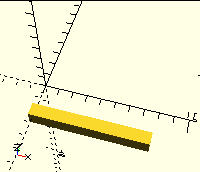
valign=top doesn't always slam the top of the string against the X
axis. If the glyph is below and not touching the baseline, it only
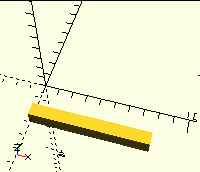
adjusts the baseline up to the X axis. Thus text("_",valign="top") has
the underscore a bit -Y below the X axis.
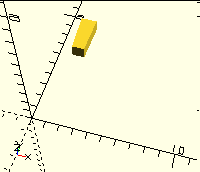
Similarly with valign="bottom", if the glyph is above and not touching
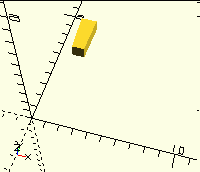
the baseline. text(" ' ", valign="bottom") has the apostrophe well +Y of
the X axis.
--- halign ---
Some fonts want to put ink left of the origin, or right of their nominal
width. This mostly happens in script and italic fonts.
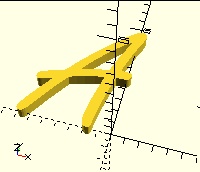
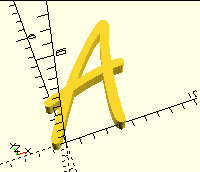
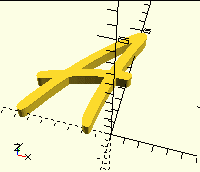
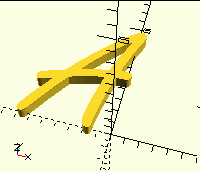
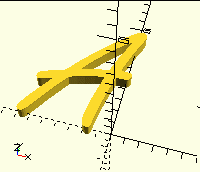
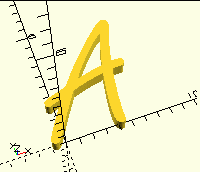
text("A", font="Freestyle Script", halign="left") has part of the left
tail of the A left of the Y axis.
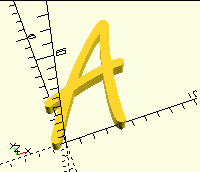
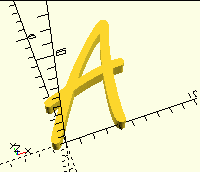
Similarly, text("A", font="Freestyle Script", halign="right") has part
to the right of the Y axis.
For all of these...
Feature?
Bug that should be fixed?
Regrettable legacy behavior that shouldn't change?

Those are cases of font properties.
The glyph can be written anywhere, including negative places. The valign etc is based on the cell
(cell height x advance) not the glyph.
'Nice' fonts fit in the cell.
I'm still looking at your ttb/bbt post.
From: Discuss [mailto:discuss-bounces@lists.openscad.org] On Behalf Of Jordan Brown
Sent: Mon, 28 Dec 2020 15:16
To: OpenSCAD general discussion
Subject: [OpenSCAD] More on text alignment
I've been noticing a few more "odd" cases. I'd like opinions on whether or not they are bugs.
--- valign ---
valign=top doesn't always slam the top of the string against the X axis. If the glyph is below and
not touching the baseline, it only adjusts the baseline up to the X axis. Thus
text("_",valign="top") has the underscore a bit -Y below the X axis.
Similarly with valign="bottom", if the glyph is above and not touching the baseline. text(" ' ",
valign="bottom") has the apostrophe well +Y of the X axis.
--- halign ---
Some fonts want to put ink left of the origin, or right of their nominal width. This mostly
happens in script and italic fonts.
text("A", font="Freestyle Script", halign="left") has part of the left tail of the A left of the Y
axis.
Similarly, text("A", font="Freestyle Script", halign="right") has part to the right of the Y axis.
For all of these...
Feature?
Bug that should be fixed?
Regrettable legacy behavior that shouldn't change?
--
This email has been checked for viruses by AVG.
https://www.avg.com
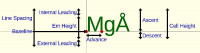

or probably cell = (Em Height x Advance)... been a while since I did all that...
From: Discuss [mailto:discuss-bounces@lists.openscad.org] On Behalf Of MichaelAtOz
Sent: Mon, 28 Dec 2020 15:29
To: 'OpenSCAD general discussion'
Subject: Re: [OpenSCAD] More on text alignment
Those are cases of font properties.
The glyph can be written anywhere, including negative places. The valign etc is based on the cell
(cell height x advance) not the glyph.
'Nice' fonts fit in the cell.
I'm still looking at your ttb/bbt post.
From: Discuss [mailto:discuss-bounces@lists.openscad.org] On Behalf Of Jordan Brown
Sent: Mon, 28 Dec 2020 15:16
To: OpenSCAD general discussion
Subject: [OpenSCAD] More on text alignment
I've been noticing a few more "odd" cases. I'd like opinions on whether or not they are bugs.
--- valign ---
valign=top doesn't always slam the top of the string against the X axis. If the glyph is below and
not touching the baseline, it only adjusts the baseline up to the X axis. Thus
text("_",valign="top") has the underscore a bit -Y below the X axis.
Similarly with valign="bottom", if the glyph is above and not touching the baseline. text(" ' ",
valign="bottom") has the apostrophe well +Y of the X axis.
--- halign ---
Some fonts want to put ink left of the origin, or right of their nominal width. This mostly
happens in script and italic fonts.
text("A", font="Freestyle Script", halign="left") has part of the left tail of the A left of the Y
axis.
Similarly, text("A", font="Freestyle Script", halign="right") has part to the right of the Y axis.
For all of these...
Feature?
Bug that should be fixed?
Regrettable legacy behavior that shouldn't change?
<http://www.avg.com/email-signature?utm_medium=email&utm_source=link&utm_campaign=sig-email&utm_con
tent=emailclient>
Virus-free.
<http://www.avg.com/email-signature?utm_medium=email&utm_source=link&utm_campaign=sig-email&utm_con
tent=emailclient> www.avg.com
--
This email has been checked for viruses by AVG.
https://www.avg.com
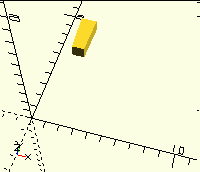
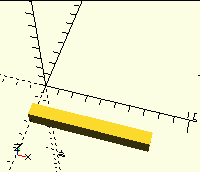
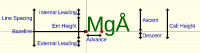
and on the max/min of the set of the glyphs in the text() call.
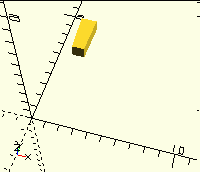
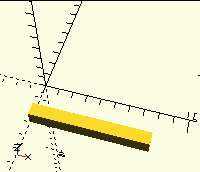
Compare the full block (occupying the Decent and Internal leading), with just the 'Z'
block="\u2588Z";
//block="Z";
text(block,size=30,valign="baseline");
translate([60,0,0]) text(block,size=30,valign="top");
translate([120,0,0]) text(block,size=30,valign="bottom");
From: Discuss [mailto:discuss-bounces@lists.openscad.org] On Behalf Of Michael Marx
Sent: Mon, 28 Dec 2020 15:33
To: 'OpenSCAD general discussion'
Subject: Re: [OpenSCAD] More on text alignment
or probably cell = (Em Height x Advance)... been a while since I did all that...
From: Discuss [mailto:discuss-bounces@lists.openscad.org] On Behalf Of MichaelAtOz
Sent: Mon, 28 Dec 2020 15:29
To: 'OpenSCAD general discussion'
Subject: Re: [OpenSCAD] More on text alignment
Those are cases of font properties.
The glyph can be written anywhere, including negative places. The valign etc is based on the cell
(cell height x advance) not the glyph.
'Nice' fonts fit in the cell.
I'm still looking at your ttb/bbt post.
From: Discuss [mailto:discuss-bounces@lists.openscad.org] On Behalf Of Jordan Brown
Sent: Mon, 28 Dec 2020 15:16
To: OpenSCAD general discussion
Subject: [OpenSCAD] More on text alignment
I've been noticing a few more "odd" cases. I'd like opinions on whether or not they are bugs.
--- valign ---
valign=top doesn't always slam the top of the string against the X axis. If the glyph is below and
not touching the baseline, it only adjusts the baseline up to the X axis. Thus
text("_",valign="top") has the underscore a bit -Y below the X axis.
Similarly with valign="bottom", if the glyph is above and not touching the baseline. text(" ' ",
valign="bottom") has the apostrophe well +Y of the X axis.
--- halign ---
Some fonts want to put ink left of the origin, or right of their nominal width. This mostly
happens in script and italic fonts.
text("A", font="Freestyle Script", halign="left") has part of the left tail of the A left of the Y
axis.
Similarly, text("A", font="Freestyle Script", halign="right") has part to the right of the Y axis.
For all of these...
Feature?
Bug that should be fixed?
Regrettable legacy behavior that shouldn't change?
<http://www.avg.com/email-signature?utm_medium=email&utm_source=link&utm_campaign=sig-email&utm_con
tent=emailclient>
Virus-free.
<http://www.avg.com/email-signature?utm_medium=email&utm_source=link&utm_campaign=sig-email&utm_con
tent=emailclient> www.avg.com
--
This email has been checked for viruses by AVG.
https://www.avg.com
On 12/27/2020 8:28 PM, MichaelAtOz wrote:
The glyph can be written anywhere, including negative places. The
valign etc is based on the cell (cell height x advance) not the glyph.
Yes, understood. And is that the right answer for OpenSCAD's halign?
Or is the right answer that halign=left always puts the left edge of the
object at the Y axis?
(And the valign/underscore/apostrophe question is more artificial -
OpenSCAD just doesn't believe that the bottom of a glyph can be above
the baseline, or that the top can be below the baseline, and so doesn't
allow ascent or descent to be on the "wrong" side of zero.)
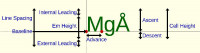
For the text metrics stuff, my goal is to report all of the interesting
metrics, notably including the bounding box that precisely surrounds the
actual ink. The question here is whether we want to tweak the OpenSCAD
halign/valign behavior. Whatever the answer is, I'll make the text
metrics stuff report the matching numbers.
Thanks for the pointer to \u2588. I'd been thinking that there should
be a Unicode code point (or a couple) devoted to marking the various
font metrics. Full block is certainly a good start on that. (And my
metrics line up with it, give or take epsilon. There's no visible
difference, but they aren't quite the same since I'm only getting
Z-fighting on one side.)

MichaelAtOz' wrote
and on the max/min of the set of the glyphs in the text() call.
Yep, and that's a huge problem. It makes any align except the baseline
pretty much useless if you want to line up several texts. For example, "g",
"a", "A" and "Å" will line up completely different. To be useful, it
shouldn't work on the actual text, but of the highest and lowest character
in that font.
--
Sent from: http://forum.openscad.org/

I think it should line up with the height of \u2588.
But is it a 'block' in all fonts?
--
Sent from: http://forum.openscad.org/
On 12/28/2020 8:07 AM, Troberg wrote:
MichaelAtOz' wrote
and on the max/min of the set of the glyphs in the text() call.
Yep, and that's a huge problem. It makes any align except the baseline
pretty much useless if you want to line up several texts. For example, "g",
"a", "A" and "Å" will line up completely different. To be useful, it
shouldn't work on the actual text, but of the highest and lowest character
in that font.
Yes, though one can equally say that it should be based on the text
being rendered. E.g., don't force me to have a margin for descenders
underneath my string that doesn't have any descenders.
My text metric work will let you answer this question however you want
for your particular application, by giving you both the metrics of the
particular string and the font-wide metrics.
lar3ry wrote
I think it should line up with the height of \u2588.
But is it a 'block' in all fonts?
Nope, for me, it's like a mirrored, tipped over L.
--
Sent from: http://forum.openscad.org/
On 12/28/2020 12:48 PM, Troberg wrote:
lar3ry wrote
I think it should line up with the height of \u2588.
But is it a 'block' in all fonts?
Nope, for me, it's like a mirrored, tipped over L.
Don't fixate on \u2588. \u2588 may help to visualize the font metrics,
but doesn't define them.
Fonts have defined ascent and descent values, and those values are
accessible from the C++ functions.
But note: even that isn't exactly the answer. There's the "typographic
ascent and descent", and they are distinct from the actual minimum and
maximum values.
Ref
https://www.freetype.org/freetype2/docs/reference/ft2-base_interface.html#ft_facerec
and the distinction between bbox and ascender/descender.
I think a normal example of the difference is that the ascent value is
the baseline-to-top height of a capital letter, but certain characters
(e.g. parentheses, superscripts) might go higher than that. And
similarly lower for the descender value.
This is all related to the comments from another thread about glyphs
that extend left or right (or both!) of their nominal character box.