

discuss@lists.openscad.org

OpenSCAD general discussion Mailing-list

View all threads

simple Celtic knot

MC
Mr C Camacho
Sun, Apr 9, 2017 9:03 AM

I ended up fudging this a bit but it basically makes a knot that mobius
(only 1 edge)

as is this will handily print with a layer height of 0.25mm an looks
really nice with higher $fn, leave it at 4 to see the mobius strip like
effect, prints fine with PETg, you will need very good fans to print
with PLA

it does look trivial but I posted it here as the physical end product
looks so nice and it did take a fair bit of tweaking...

Enjoy!

-------------snip!-------------

function knotAng(a,s) =
[(sin(a)+(2sin(2a)))s,
(cos(a)-(2
cos(2a)))s,
sin(3
a)
(s*1.5)];

// from wiki

// Find the unitary vector with direction v. Fails if v=[0,0,0].
function unit(v) = norm(v)>0 ? v/norm(v) : undef;
// Find the transpose of a rectangular matrix
function transpose(m) = // m is any rectangular matrix of objects
[ for(j=[0:len(m[0])-1]) [ for(i=[0:len(m)-1]) m[i][j] ] ];
// The identity matrix with dimension n
function identity(n) = [for(i=[0:n-1]) [for(j=[0:n-1]) i==j ? 1 : 0] ];

// computes the rotation with minimum angle that brings a to b
// the code fails if a and b are opposed to each other
function rotate_from_to(a,b) =
let( axis = unit(cross(a,b)) )
axis*axis >= 0.99 ?
transpose([unit(b), axis, cross(axis, unit(b))]) *
[unit(a), axis, cross(axis, unit(a))] :
identity(3);

STEP=4;
SCALE=14; // of overall knot
$fn=4; // use to select number of faces in the path profile

//union() // needed ?
for (a=[0:STEP:360]) {
v = knotAng(a,SCALE) - knotAng(a+STEP,SCALE);
v2 = knotAng(a+STEP,SCALE) - knotAng(a+STEP+STEP,SCALE);
hull() {
translate(knotAng(a,SCALE))
multmatrix(rotate_from_to([0,0,1],v))
rotate(a1.25)  // fudge
cylinder(r=SCALE/2,h=0.1,center=true);
translate(knotAng(a+STEP,SCALE))
multmatrix(rotate_from_to([0,0,1],v2))
rotate((a
1.25)+STEP) // fudge
cylinder(r=SCALE/2,h=0.1,center=true);

}

}

translate([0,0,-1.35*(SCALE1.5)]) cylinder(r=3SCALE,h=2,$fn=128);

I ended up fudging this a bit but it basically makes a knot that mobius (only 1 edge) as is this will handily print with a layer height of 0.25mm an looks really nice with higher $fn, leave it at 4 to see the mobius strip like effect, prints fine with PETg, you will need very good fans to print with PLA it does look trivial but I posted it here as the physical end product looks so nice and it did take a fair bit of tweaking... Enjoy! -------------snip!------------- function knotAng(a,s) = [(sin(a)+(2*sin(2*a)))*s, (cos(a)-(2*cos(2*a)))*s, sin(3*a)*(s*1.5)]; // from wiki // Find the unitary vector with direction v. Fails if v=[0,0,0]. function unit(v) = norm(v)>0 ? v/norm(v) : undef; // Find the transpose of a rectangular matrix function transpose(m) = // m is any rectangular matrix of objects [ for(j=[0:len(m[0])-1]) [ for(i=[0:len(m)-1]) m[i][j] ] ]; // The identity matrix with dimension n function identity(n) = [for(i=[0:n-1]) [for(j=[0:n-1]) i==j ? 1 : 0] ]; // computes the rotation with minimum angle that brings a to b // the code fails if a and b are opposed to each other function rotate_from_to(a,b) = let( axis = unit(cross(a,b)) ) axis*axis >= 0.99 ? transpose([unit(b), axis, cross(axis, unit(b))]) * [unit(a), axis, cross(axis, unit(a))] : identity(3); STEP=4; SCALE=14; // of overall knot $fn=4; // use to select number of faces in the path profile //union() // needed ? for (a=[0:STEP:360]) { v = knotAng(a,SCALE) - knotAng(a+STEP,SCALE); v2 = knotAng(a+STEP,SCALE) - knotAng(a+STEP+STEP,SCALE); hull() { translate(knotAng(a,SCALE)) multmatrix(rotate_from_to([0,0,1],v)) rotate(a*1.25) // fudge cylinder(r=SCALE/2,h=0.1,center=true); translate(knotAng(a+STEP,SCALE)) multmatrix(rotate_from_to([0,0,1],v2)) rotate((a*1.25)+STEP) // fudge cylinder(r=SCALE/2,h=0.1,center=true); } } translate([0,0,-1.35*(SCALE*1.5)]) cylinder(r=3*SCALE,h=2,$fn=128);
T
Tony
Sun, Apr 9, 2017 2:19 PM

thank you for sharing, I'm going to print up a few!

On Sun, Apr 9, 2017 at 5:03 AM, Mr C Camacho chris@bedroomcoders.co.uk
wrote:

I ended up fudging this a bit but it basically makes a knot that mobius
(only 1 edge)

as is this will handily print with a layer height of 0.25mm an looks
really nice with higher $fn, leave it at 4 to see the mobius strip like
effect, prints fine with PETg, you will need very good fans to print with
PLA

it does look trivial but I posted it here as the physical end product
looks so nice and it did take a fair bit of tweaking...

Enjoy!

-------------snip!-------------

function knotAng(a,s) =
[(sin(a)+(2sin(2a)))s,
(cos(a)-(2
cos(2a)))s,
sin(3
a)
(s*1.5)];

// from wiki

// Find the unitary vector with direction v. Fails if v=[0,0,0].
function unit(v) = norm(v)>0 ? v/norm(v) : undef;
// Find the transpose of a rectangular matrix
function transpose(m) = // m is any rectangular matrix of objects
[ for(j=[0:len(m[0])-1]) [ for(i=[0:len(m)-1]) m[i][j] ] ];
// The identity matrix with dimension n
function identity(n) = [for(i=[0:n-1]) [for(j=[0:n-1]) i==j ? 1 : 0] ];

// computes the rotation with minimum angle that brings a to b
// the code fails if a and b are opposed to each other
function rotate_from_to(a,b) =
let( axis = unit(cross(a,b)) )
axis*axis >= 0.99 ?
transpose([unit(b), axis, cross(axis, unit(b))]) *
[unit(a), axis, cross(axis, unit(a))] :
identity(3);

STEP=4;
SCALE=14; // of overall knot
$fn=4; // use to select number of faces in the path profile

//union() // needed ?
for (a=[0:STEP:360]) {
v = knotAng(a,SCALE) - knotAng(a+STEP,SCALE);
v2 = knotAng(a+STEP,SCALE) - knotAng(a+STEP+STEP,SCALE);
hull() {
translate(knotAng(a,SCALE))
multmatrix(rotate_from_to([0,0,1],v))
rotate(a1.25)  // fudge
cylinder(r=SCALE/2,h=0.1,center=true);
translate(knotAng(a+STEP,SCALE))
multmatrix(rotate_from_to([0,0,1],v2))
rotate((a
1.25)+STEP) // fudge
cylinder(r=SCALE/2,h=0.1,center=true);

}

}

translate([0,0,-1.35*(SCALE1.5)]) cylinder(r=3SCALE,h=2,$fn=128);


OpenSCAD mailing list
Discuss@lists.openscad.org
http://lists.openscad.org/mailman/listinfo/discuss_lists.openscad.org

thank you for sharing, I'm going to print up a few! On Sun, Apr 9, 2017 at 5:03 AM, Mr C Camacho <chris@bedroomcoders.co.uk> wrote: > I ended up fudging this a bit but it basically makes a knot that mobius > (only 1 edge) > > as is this will handily print with a layer height of 0.25mm an looks > really nice with higher $fn, leave it at 4 to see the mobius strip like > effect, prints fine with PETg, you will need very good fans to print with > PLA > > it does look trivial but I posted it here as the physical end product > looks so nice and it did take a fair bit of tweaking... > > Enjoy! > > -------------snip!------------- > > function knotAng(a,s) = > [(sin(a)+(2*sin(2*a)))*s, > (cos(a)-(2*cos(2*a)))*s, > sin(3*a)*(s*1.5)]; > > > // from wiki > > // Find the unitary vector with direction v. Fails if v=[0,0,0]. > function unit(v) = norm(v)>0 ? v/norm(v) : undef; > // Find the transpose of a rectangular matrix > function transpose(m) = // m is any rectangular matrix of objects > [ for(j=[0:len(m[0])-1]) [ for(i=[0:len(m)-1]) m[i][j] ] ]; > // The identity matrix with dimension n > function identity(n) = [for(i=[0:n-1]) [for(j=[0:n-1]) i==j ? 1 : 0] ]; > > // computes the rotation with minimum angle that brings a to b > // the code fails if a and b are opposed to each other > function rotate_from_to(a,b) = > let( axis = unit(cross(a,b)) ) > axis*axis >= 0.99 ? > transpose([unit(b), axis, cross(axis, unit(b))]) * > [unit(a), axis, cross(axis, unit(a))] : > identity(3); > > STEP=4; > SCALE=14; // of overall knot > $fn=4; // use to select number of faces in the path profile > > //union() // needed ? > for (a=[0:STEP:360]) { > v = knotAng(a,SCALE) - knotAng(a+STEP,SCALE); > v2 = knotAng(a+STEP,SCALE) - knotAng(a+STEP+STEP,SCALE); > hull() { > translate(knotAng(a,SCALE)) > multmatrix(rotate_from_to([0,0,1],v)) > rotate(a*1.25) // fudge > cylinder(r=SCALE/2,h=0.1,center=true); > translate(knotAng(a+STEP,SCALE)) > multmatrix(rotate_from_to([0,0,1],v2)) > rotate((a*1.25)+STEP) // fudge > cylinder(r=SCALE/2,h=0.1,center=true); > > } > > } > > translate([0,0,-1.35*(SCALE*1.5)]) cylinder(r=3*SCALE,h=2,$fn=128); > > > > > > > _______________________________________________ > OpenSCAD mailing list > Discuss@lists.openscad.org > http://lists.openscad.org/mailman/listinfo/discuss_lists.openscad.org >
M
MichaelAtOz
Mon, Apr 10, 2017 12:55 AM

Nice.
$fn needs to be multiple of 4.
Shame, as $fn=3 looks great apart from the misalignment...


Admin - PM me if you need anything, or if I've done something stupid...

Unless specifically shown otherwise above, my contribution is in the Public Domain; to the extent possible under law, I have waived all copyright and related or neighbouring rights to this work. Obviously inclusion of works of previous authors is not included in the above.

The TPP is no simple “trade agreement.”  Fight it! http://www.ourfairdeal.org/  time is running out!

View this message in context: http://forum.openscad.org/simple-Celtic-knot-tp21141p21152.html
Sent from the OpenSCAD mailing list archive at Nabble.com.

Nice. $fn needs to be multiple of 4. Shame, as $fn=3 looks great apart from the misalignment... ----- Admin - PM me if you need anything, or if I've done something stupid... Unless specifically shown otherwise above, my contribution is in the Public Domain; to the extent possible under law, I have waived all copyright and related or neighbouring rights to this work. Obviously inclusion of works of previous authors is not included in the above. The TPP is no simple “trade agreement.” Fight it! http://www.ourfairdeal.org/ time is running out! -- View this message in context: http://forum.openscad.org/simple-Celtic-knot-tp21141p21152.html Sent from the OpenSCAD mailing list archive at Nabble.com.
MC
Mr C Camacho
Mon, Apr 10, 2017 8:22 AM

Does work with fn=3 you have to change the fudge multiple tho

For three sides it would be 1.33333

It needs changing in two places

It could be calculated if $fn was assigned from a "settings" variable called SIDES

Where the multiple would be 1+(1/SIDES)  .... off the top of my head...

Three sides does look very effective but you will have to rotate the whole knot on the x and y axis slightly for it to sit on the base

Hope this helps
Chris

On 10 April 2017 01:55:31 BST, MichaelAtOz oz.at.michael@gmail.com wrote:

Nice.
$fn needs to be multiple of 4.
Shame, as $fn=3 looks great apart from the misalignment...


Admin - PM me if you need anything, or if I've done something stupid...

Unless specifically shown otherwise above, my contribution is in the
Public Domain; to the extent possible under law, I have waived all
copyright and related or neighbouring rights to this work. Obviously
inclusion of works of previous authors is not included in the above.

The TPP is no simple “trade agreement.”  Fight it!
http://www.ourfairdeal.org/  time is running out!

View this message in context:
http://forum.openscad.org/simple-Celtic-knot-tp21141p21152.html
Sent from the OpenSCAD mailing list archive at Nabble.com.


OpenSCAD mailing list
Discuss@lists.openscad.org
http://lists.openscad.org/mailman/listinfo/discuss_lists.openscad.org

--
Sent from my Android device with K-9 Mail. Please excuse my brevity.

Does work with fn=3 you have to change the fudge multiple tho For three sides it would be 1.33333 It needs changing in two places It could be calculated if $fn was assigned from a "settings" variable called SIDES Where the multiple would be 1+(1/SIDES) .... off the top of my head... Three sides does look very effective but you will have to rotate the whole knot on the x and y axis slightly for it to sit on the base Hope this helps Chris On 10 April 2017 01:55:31 BST, MichaelAtOz <oz.at.michael@gmail.com> wrote: >Nice. >$fn needs to be multiple of 4. >Shame, as $fn=3 looks great apart from the misalignment... > > > >----- >Admin - PM me if you need anything, or if I've done something stupid... > >Unless specifically shown otherwise above, my contribution is in the >Public Domain; to the extent possible under law, I have waived all >copyright and related or neighbouring rights to this work. Obviously >inclusion of works of previous authors is not included in the above. > >The TPP is no simple “trade agreement.” Fight it! >http://www.ourfairdeal.org/ time is running out! >-- >View this message in context: >http://forum.openscad.org/simple-Celtic-knot-tp21141p21152.html >Sent from the OpenSCAD mailing list archive at Nabble.com. > >_______________________________________________ >OpenSCAD mailing list >Discuss@lists.openscad.org >http://lists.openscad.org/mailman/listinfo/discuss_lists.openscad.org -- Sent from my Android device with K-9 Mail. Please excuse my brevity.
MC
Mr C Camacho
Mon, Apr 10, 2017 9:52 AM

okay he's for n sides while retaining its mobius quality - I will stop
playing with this now!

----snip-----

STEP=4; // fine in most cases
SCALE=14; // of overall knot
// three SIDES will need the whole model rotating to sit flat on base
SIDES=3; // number of sides in the profile 3 to 16 (unless printed very
large 16 should be plenty for printing)

$fn=SIDES; // use to select number of faces in the path profile

// calculates position in path a=angle s=scale
function knotAng(a,s) =
[(sin(a)+(2sin(2a)))s,
(cos(a)-(2
cos(2a)))s,
sin(3
a)
(s*1.5)];

// from wiki

// Find the unitary vector with direction v. Fails if v=[0,0,0].
function unit(v) = norm(v)>0 ? v/norm(v) : undef;
// Find the transpose of a rectangular matrix
function transpose(m) = // m is any rectangular matrix of objects
[ for(j=[0:len(m[0])-1]) [ for(i=[0:len(m)-1]) m[i][j] ] ];
// The identity matrix with dimension n
function identity(n) = [for(i=[0:n-1]) [for(j=[0:n-1]) i==j ? 1 : 0] ];

// computes the rotation with minimum angle that brings a to b
// the code fails if a and b are opposed to each other
function rotate_from_to(a,b) =
let( axis = unit(cross(a,b)) )
axis*axis >= 0.99 ?
transpose([unit(b), axis, cross(axis, unit(b))]) *
[unit(a), axis, cross(axis, unit(a))] :
identity(3);

for (a=[0:STEP:360]) {
v = knotAng(a,SCALE) - knotAng(a+STEP,SCALE);
v2 = knotAng(a+STEP,SCALE) - knotAng(a+STEP+STEP,SCALE);
hull() {
translate(knotAng(a,SCALE))
multmatrix(rotate_from_to([0,0,1],v))
rotate(a*(1+(1.0/SIDES)))  // fudge
cylinder(r=SCALE/2,h=0.1,center=true);
translate(knotAng(a+STEP,SCALE))
multmatrix(rotate_from_to([0,0,1],v2))
rotate((a*(1+(1.0/SIDES)))+STEP) // fudge
cylinder(r=SCALE/2,h=0.1,center=true);
}
}

//base
translate([0,0,-1.35*(SCALE1.5)]) cylinder(r=3SCALE,h=2,$fn=128);

On 10/04/17 01:55, MichaelAtOz wrote:

Nice.
$fn needs to be multiple of 4.
Shame, as $fn=3 looks great apart from the misalignment...


Admin - PM me if you need anything, or if I've done something stupid...

Unless specifically shown otherwise above, my contribution is in the Public Domain; to the extent possible under law, I have waived all copyright and related or neighbouring rights to this work. Obviously inclusion of works of previous authors is not included in the above.

The TPP is no simple “trade agreement.”  Fight it! http://www.ourfairdeal.org/  time is running out!

View this message in context: http://forum.openscad.org/simple-Celtic-knot-tp21141p21152.html
Sent from the OpenSCAD mailing list archive at Nabble.com.


OpenSCAD mailing list
Discuss@lists.openscad.org
http://lists.openscad.org/mailman/listinfo/discuss_lists.openscad.org

okay he's for n sides while retaining its mobius quality - I *will* stop playing with this now! ----snip----- STEP=4; // fine in most cases SCALE=14; // of overall knot // three SIDES will need the whole model rotating to sit flat on base SIDES=3; // number of sides in the profile 3 to 16 (unless printed very large 16 should be plenty for printing) $fn=SIDES; // use to select number of faces in the path profile // calculates position in path a=angle s=scale function knotAng(a,s) = [(sin(a)+(2*sin(2*a)))*s, (cos(a)-(2*cos(2*a)))*s, sin(3*a)*(s*1.5)]; // from wiki // Find the unitary vector with direction v. Fails if v=[0,0,0]. function unit(v) = norm(v)>0 ? v/norm(v) : undef; // Find the transpose of a rectangular matrix function transpose(m) = // m is any rectangular matrix of objects [ for(j=[0:len(m[0])-1]) [ for(i=[0:len(m)-1]) m[i][j] ] ]; // The identity matrix with dimension n function identity(n) = [for(i=[0:n-1]) [for(j=[0:n-1]) i==j ? 1 : 0] ]; // computes the rotation with minimum angle that brings a to b // the code fails if a and b are opposed to each other function rotate_from_to(a,b) = let( axis = unit(cross(a,b)) ) axis*axis >= 0.99 ? transpose([unit(b), axis, cross(axis, unit(b))]) * [unit(a), axis, cross(axis, unit(a))] : identity(3); for (a=[0:STEP:360]) { v = knotAng(a,SCALE) - knotAng(a+STEP,SCALE); v2 = knotAng(a+STEP,SCALE) - knotAng(a+STEP+STEP,SCALE); hull() { translate(knotAng(a,SCALE)) multmatrix(rotate_from_to([0,0,1],v)) rotate(a*(1+(1.0/SIDES))) // fudge cylinder(r=SCALE/2,h=0.1,center=true); translate(knotAng(a+STEP,SCALE)) multmatrix(rotate_from_to([0,0,1],v2)) rotate((a*(1+(1.0/SIDES)))+STEP) // fudge cylinder(r=SCALE/2,h=0.1,center=true); } } //base translate([0,0,-1.35*(SCALE*1.5)]) cylinder(r=3*SCALE,h=2,$fn=128); On 10/04/17 01:55, MichaelAtOz wrote: > Nice. > $fn needs to be multiple of 4. > Shame, as $fn=3 looks great apart from the misalignment... > > > > ----- > Admin - PM me if you need anything, or if I've done something stupid... > > Unless specifically shown otherwise above, my contribution is in the Public Domain; to the extent possible under law, I have waived all copyright and related or neighbouring rights to this work. Obviously inclusion of works of previous authors is not included in the above. > > The TPP is no simple “trade agreement.” Fight it! http://www.ourfairdeal.org/ time is running out! > -- > View this message in context: http://forum.openscad.org/simple-Celtic-knot-tp21141p21152.html > Sent from the OpenSCAD mailing list archive at Nabble.com. > > _______________________________________________ > OpenSCAD mailing list > Discuss@lists.openscad.org > http://lists.openscad.org/mailman/listinfo/discuss_lists.openscad.org
RP
Ronaldo Persiano
Mon, Apr 10, 2017 6:32 PM

Nice design! I have already spent a lot of enjoyable time sweeping knots
around a torus.

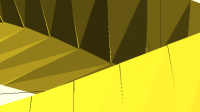
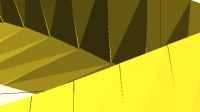
I found a small glitch in the matching between subsequent hulls:

which can be avoided with

    rotate((a+STEP)*1.25)

instead of

    rotate(a*(1.25)+STEP) // fudge

Nice design! I have already spent a lot of enjoyable time sweeping knots around a torus. I found a small glitch in the matching between subsequent hulls: ​ which can be avoided with rotate((a+STEP)*1.25) instead of rotate(a*(1.25)+STEP) // fudge ​
MC
Mr C Camacho
Mon, Apr 10, 2017 8:40 PM

nice catch, thats defo a coding error! fortunately its tiny enough to be
well outside the resolution of most 3d printers....

On 10/04/17 19:32, Ronaldo Persiano wrote:

Nice design! I have already spent a lot of enjoyable time sweeping
knots around a torus.

I found a small glitch in the matching between subsequent hulls:

which can be avoided with

     rotate((a+STEP)*1.25)

instead of

     rotate(a*(1.25)+STEP) // fudge

OpenSCAD mailing list
Discuss@lists.openscad.org
http://lists.openscad.org/mailman/listinfo/discuss_lists.openscad.org

nice catch, thats defo a coding error! fortunately its tiny enough to be well outside the resolution of most 3d printers.... On 10/04/17 19:32, Ronaldo Persiano wrote: > Nice design! I have already spent a lot of enjoyable time sweeping > knots around a torus. > > I found a small glitch in the matching between subsequent hulls: > > > ​ > > which can be avoided with > > rotate((a+STEP)*1.25) > > instead of > > rotate(a*(1.25)+STEP) // fudge > > > ​ > > > > _______________________________________________ > OpenSCAD mailing list > Discuss@lists.openscad.org > http://lists.openscad.org/mailman/listinfo/discuss_lists.openscad.org
MC
Mr C Camacho
Mon, Apr 10, 2017 8:42 PM

On 10/04/17 19:32, Ronaldo Persiano wrote:

sweeping knots around a torus.

how do you mean? sounds interesting...

On 10/04/17 19:32, Ronaldo Persiano wrote: > sweeping knots around a torus. how do you mean? sounds interesting...
R
Ronaldo
Mon, Apr 10, 2017 10:26 PM

codifies wrote

On 10/04/17 19:32, Ronaldo Persiano wrote:

sweeping knots around a torus.

how do you mean? sounds interesting...

Yes, it is indeed. You may want to take a look on it in  wikipedia
https://en.wikipedia.org/wiki/Torus_knot  . The particular knot you have
made is a knot(2,3):

http://forum.openscad.org/file/n21173/Knot2_3.png

In general in a knot(p,q), p is the number of turns the cord does around the
torus and q the number of times the cord goes through the torus hole. I
don't know how to change your definition of the knot path to include p and
q. I have used another definition:

function knot(phi,p,q) =
[ ((r+d)cos(qphi) + R)cos(pphi),
((r+d)cos(qphi) + R)sin(pphi),
(r+d)sin(qphi) ];

where:

d is the cord section radius
R is the torus major radius
r  is the torus minor radius

The control of the sweep twist is important to get a nice form. Your fudge
does exactly that. In the image above I have used another twist value such
that one face of the swept cord is facing the torus surface along all the
path. Certainly there no Moebius strip with that twist.

If you are interested on that I can provide you my changes to your code with
the twist control.

--
View this message in context: http://forum.openscad.org/simple-Celtic-knot-tp21141p21173.html
Sent from the OpenSCAD mailing list archive at Nabble.com.

codifies wrote > On 10/04/17 19:32, Ronaldo Persiano wrote: > > sweeping knots around a torus. > > how do you mean? sounds interesting... Yes, it is indeed. You may want to take a look on it in wikipedia <https://en.wikipedia.org/wiki/Torus_knot> . The particular knot you have made is a knot(2,3): <http://forum.openscad.org/file/n21173/Knot2_3.png> ​ In general in a knot(p,q), p is the number of turns the cord does around the torus and q the number of times the cord goes through the torus hole. I don't know how to change your definition of the knot path to include p and q. I have used another definition: > function knot(phi,p,q) = > [ ((r+d)*cos(q*phi) + R)*cos(p*phi), > ((r+d)*cos(q*phi) + R)*sin(p*phi), > (r+d)*sin(q*phi) ]; where: d is the cord section radius R is the torus major radius r is the torus minor radius The control of the sweep twist is important to get a nice form. Your fudge does exactly that. In the image above I have used another twist value such that one face of the swept cord is facing the torus surface along all the path. Certainly there no Moebius strip with that twist. If you are interested on that I can provide you my changes to your code with the twist control. -- View this message in context: http://forum.openscad.org/simple-Celtic-knot-tp21141p21173.html Sent from the OpenSCAD mailing list archive at Nabble.com.
N
Neon22
Tue, Apr 11, 2017 3:55 AM

Personally I'd love to see p,q integrated into this code. I had a go but
couldn't work it out.
The other problem I have with the existing code - is that the entire path
doesn't align when it loops round to the start. I.e. except for a quad, the
start and end faces are not twisted so as to align. Try $fn=5.

--
View this message in context: http://forum.openscad.org/simple-Celtic-knot-tp21141p21183.html
Sent from the OpenSCAD mailing list archive at Nabble.com.

Personally I'd love to see p,q integrated into this code. I had a go but couldn't work it out. The other problem I have with the existing code - is that the entire path doesn't align when it loops round to the start. I.e. except for a quad, the start and end faces are not twisted so as to align. Try $fn=5. -- View this message in context: http://forum.openscad.org/simple-Celtic-knot-tp21141p21183.html Sent from the OpenSCAD mailing list archive at Nabble.com.