discuss@lists.openscad.org

OpenSCAD general discussion Mailing-list

View all threads

simple Celtic knot

MC
Mr C Camacho
Tue, Apr 11, 2017 8:16 AM

I posted (here) a newer version where any value of SIDES creates the
correct twist

@Ronaldo I'd like to see it too, could you post it here for everyone ?

On 11/04/17 04:55, Neon22 wrote:

Personally I'd love to see p,q integrated into this code. I had a go but
couldn't work it out.
The other problem I have with the existing code - is that the entire path
doesn't align when it loops round to the start. I.e. except for a quad, the
start and end faces are not twisted so as to align. Try $fn=5.

--
View this message in context: http://forum.openscad.org/simple-Celtic-knot-tp21141p21183.html
Sent from the OpenSCAD mailing list archive at Nabble.com.


OpenSCAD mailing list
Discuss@lists.openscad.org
http://lists.openscad.org/mailman/listinfo/discuss_lists.openscad.org

I posted (here) a newer version where any value of SIDES creates the correct twist @Ronaldo I'd like to see it too, could you post it here for everyone ? On 11/04/17 04:55, Neon22 wrote: > Personally I'd love to see p,q integrated into this code. I had a go but > couldn't work it out. > The other problem I have with the existing code - is that the entire path > doesn't align when it loops round to the start. I.e. except for a quad, the > start and end faces are not twisted so as to align. Try $fn=5. > > > > > -- > View this message in context: http://forum.openscad.org/simple-Celtic-knot-tp21141p21183.html > Sent from the OpenSCAD mailing list archive at Nabble.com. > > _______________________________________________ > OpenSCAD mailing list > Discuss@lists.openscad.org > http://lists.openscad.org/mailman/listinfo/discuss_lists.openscad.org
MC
Mr C Camacho
Tue, Apr 11, 2017 11:28 AM

I've managed to implement the P/Q formula inside the knot script and
while it works, I can't replicate the original 2/3 knot that the
original script did.

That said I have made a very nice braided ring type object...

I've managed to implement the P/Q formula inside the knot script and while it works, I can't replicate the original 2/3 knot that the original script did. That said I have made a very nice braided ring type object...
RP
Ronaldo Persiano
Thu, Apr 13, 2017 12:13 AM

2017-04-11 5:16 GMT-03:00 Mr C Camacho chris@bedroomcoders.co.uk:

@Ronaldo I'd like to see it too, could you post it here for everyone ?

Sorry for the delay in answering you. I have been struggling with
trigonometric stuff trying to understand the specific parametrization of
the knot 2,3 you have used in your celtic knot. It produces a far better
shape the the parametrization I have been using. The effort was
rewarding... at least for me. :)

I will consider here the celtic knot parametrization (CKP) in the following
form without the scale parameters (they can be applied in the calling code):

function knot1(a) =  // CKP parametrization for knot 2,3
[(sin(a)+(2sin(2a))),
(cos(a)-(2cos(2a))),
sin(3*a)];

and I will compare it with the traditional parametrization for knots p,q:

function knot2(a,p,q,R,r) =
[ (rcos(qa) + R)cos(pa),
(rcos(qa) + R)sin(pa),
rsin(qa) ];

This parametrization may be rewritten to be clear that it is a knot on a
circular torus:

function knot3(a,p,q,R,r) =
let( t = [(rcos(qa) + R), 0, rsin(qa) ] ) // circle in XZ
[ [ cos(pa), sin(pa), 0],
[-sin(pa), cos(pa), 0],  // rotation in Z of p*a degrees
[0,0,1] ] * t;

This parametrization is a rotation in Z with an angle p*a of a point 't'
that also depends on 'a'. The expression of point t is itself a
parametrization of a circle of radius 'r' on the XZ plane centered at the
point [ R,0,0 ]. For 0<= a <= 360, the parametrization t does q turns on
the circle and the rotation does p turns around Z axis. The net result will
be a p,q knot on the surface of a circular torus with major radius 'R' and
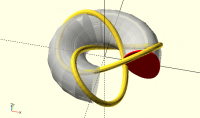
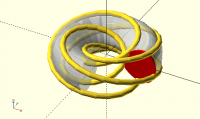
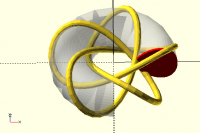
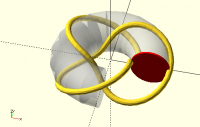
minor radius 'r'. The following image shows the knot 2,3 (also known as
trefoil) computed with knot3():

In the image, a partial torus appears transparent and its transversal
section highlighted in red. Note that the knot cord section center is on
the torus surface.

However, the shape of the knot generated by knot1() is far better specially
in the section it goes thought the torus hole.

Observe that the torus section of knot1() parametrization is not a circle
anymore. If we get a good parametrization of this section we may rewrite
knot1() in the form:

function knot1a(a) =
let( t = section_parametrization(3a) )
[ [ cos(2
a), sin(2a), 0],
[-sin(2
a), cos(2a), 0],  // rotation in Z of 2a degrees
[0,0,1] ] * t;

and then substitute p for 2 and q for 3 to get a general knot p,q with the
good shape of knot1().

Here is where the trigonometric stuffs are handy. After many failed trials
I have found the proper parametrization behind knot1().

function knot1b(a) =
let( t = [ sin(3a), cos(3a) - 2, sin(3a) ] ) // section
parametrization
[ [ cos(2
a), -sin(2a), 0],
[ sin(2
a),  cos(2a), 0],  // rotation in z of 2a degrees
[0,0,1] ] *
t;

This formulation is exactly equivalent to knot1() but it is now evident the
p,q numbers in it. If we compare knot1b() with knot3 it is also evident
that the section parametrization here is not a vertical section of the
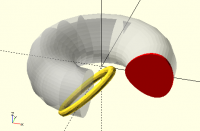
torus anymore. In fact, if we sweep just the section t, we get:


The torus transversal section is a slanted ellipsis!

Now, introducing p, q, R and r in the knot1b() we get our general form of
knot1():

function knot4(a,p,q,R,r) =
let( t = [ sin(qa+alpha), cos(qa+beta) - R, rsin(qa) ] ) //
elliptical slanted section
[ [ cos(pa), -sin(pa), 0],
[ sin(pa),  cos(pa), 0],  // rotation in z of p*a degrees
[0,0,1] ] * t;

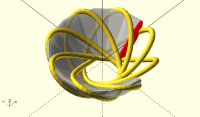
With this formulation we may explore other knots like the cinquefoil (3,5)
and its "dual" 5,3 :


Along of my multiple attempts to find knot4() expressions I have discovered
new possibilities to define interesting parametrizations of p,q knots, like
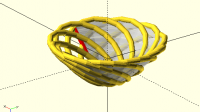
for instance the following interwoven basket:


This is a knot 5,8 we get with simple changes in knot4() introducing two
more shape parameters:

function knot5(a,p,q,R,r,alpha,beta) =
let( t = [ sin(qa+alpha), cos(qa+beta) - R, rsin(qa) ] ) //
elliptical slanted transversal section
[ [ cos(pa), -sin(pa), 0],
[ sin(pa),  cos(pa), 0],  // rotation in z of p*a degrees
[0,0,1] ] * t;

The phase parameters alpha and beta are angles that produce very different
torus shapes. In the last basket-like knot I have used alpha=beta=60. In
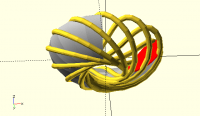
the following, we have p=7, q=11, alpha=80 and beta=50 with a different look


This same technique may be introduced in the definition of the circular
knot3():

function knot6(a,p,q,R,r) =
let( t = [(rcos(qa+alpha) + R), 0, rsin(qa) ] ) // circle in xz
[ [ cos(pa), sin(pa), 0],
[-sin(pa), cos(pa), 0],  // rotation in z of p*a degrees
[0,0,1] ] * t;

to achieve other basket shapes:

with the same parameters (7,11,80,50).

All this open up infinite possibilities to shape torus knots: just define a
suitable expression of t in knot5() !

That was a rather long message. I will leave the sweep aspects to another
time.
2017-04-11 5:16 GMT-03:00 Mr C Camacho <chris@bedroomcoders.co.uk>: > @Ronaldo I'd like to see it too, could you post it here for everyone ? > Sorry for the delay in answering you. I have been struggling with trigonometric stuff trying to understand the specific parametrization of the knot 2,3 you have used in your celtic knot. It produces a far better shape the the parametrization I have been using. The effort was rewarding... at least for me. :) I will consider here the celtic knot parametrization (CKP) in the following form without the scale parameters (they can be applied in the calling code): function knot1(a) = // CKP parametrization for knot 2,3 [(sin(a)+(2*sin(2*a))), (cos(a)-(2*cos(2*a))), sin(3*a)]; and I will compare it with the traditional parametrization for knots p,q: function knot2(a,p,q,R,r) = [ (r*cos(q*a) + R)*cos(p*a), (r*cos(q*a) + R)*sin(p*a), r*sin(q*a) ]; This parametrization may be rewritten to be clear that it is a knot on a circular torus: function knot3(a,p,q,R,r) = let( t = [(r*cos(q*a) + R), 0, r*sin(q*a) ] ) // circle in XZ [ [ cos(p*a), sin(p*a), 0], [-sin(p*a), cos(p*a), 0], // rotation in Z of p*a degrees [0,0,1] ] * t; This parametrization is a rotation in Z with an angle p*a of a point 't' that also depends on 'a'. The expression of point t is itself a parametrization of a circle of radius 'r' on the XZ plane centered at the point [ R,0,0 ]. For 0<= a <= 360, the parametrization t does q turns on the circle and the rotation does p turns around Z axis. The net result will be a p,q knot on the surface of a circular torus with major radius 'R' and minor radius 'r'. The following image shows the knot 2,3 (also known as trefoil) computed with knot3(): ​ In the image, a partial torus appears transparent and its transversal section highlighted in red. Note that the knot cord section center is on the torus surface. However, the shape of the knot generated by knot1() is far better specially in the section it goes thought the torus hole. ​ Observe that the torus section of knot1() parametrization is not a circle anymore. If we get a good parametrization of this section we may rewrite knot1() in the form: function knot1a(a) = let( t = section_parametrization(3*a) ) [ [ cos(2*a), sin(2*a), 0], [-sin(2*a), cos(2*a), 0], // rotation in Z of 2*a degrees [0,0,1] ] * t; and then substitute p for 2 and q for 3 to get a general knot p,q with the good shape of knot1(). Here is where the trigonometric stuffs are handy. After many failed trials I have found the proper parametrization behind knot1(). function knot1b(a) = let( t = [ sin(3*a), cos(3*a) - 2, sin(3*a) ] ) // section parametrization [ [ cos(2*a), -sin(2*a), 0], [ sin(2*a), cos(2*a), 0], // rotation in z of 2*a degrees [0,0,1] ] * t; This formulation is exactly equivalent to knot1() but it is now evident the p,q numbers in it. If we compare knot1b() with knot3 it is also evident that the section parametrization here is not a vertical section of the torus anymore. In fact, if we sweep just the section t, we get: ​ The torus transversal section is a slanted ellipsis! Now, introducing p, q, R and r in the knot1b() we get our general form of knot1(): function knot4(a,p,q,R,r) = let( t = [ sin(q*a+alpha), cos(q*a+beta) - R, r*sin(q*a) ] ) // elliptical slanted section [ [ cos(p*a), -sin(p*a), 0], [ sin(p*a), cos(p*a), 0], // rotation in z of p*a degrees [0,0,1] ] * t; With this formulation we may explore other knots like the cinquefoil (3,5) and its "dual" 5,3 : ​ ​ Along of my multiple attempts to find knot4() expressions I have discovered new possibilities to define interesting parametrizations of p,q knots, like for instance the following interwoven basket: ​ This is a knot 5,8 we get with simple changes in knot4() introducing two more shape parameters: function knot5(a,p,q,R,r,alpha,beta) = let( t = [ sin(q*a+alpha), cos(q*a+beta) - R, r*sin(q*a) ] ) // elliptical slanted transversal section [ [ cos(p*a), -sin(p*a), 0], [ sin(p*a), cos(p*a), 0], // rotation in z of p*a degrees [0,0,1] ] * t; The phase parameters alpha and beta are angles that produce very different torus shapes. In the last basket-like knot I have used alpha=beta=60. In the following, we have p=7, q=11, alpha=80 and beta=50 with a different look ​ ​ This same technique may be introduced in the definition of the circular knot3(): function knot6(a,p,q,R,r) = let( t = [(r*cos(q*a+alpha) + R), 0, r*sin(q*a) ] ) // circle in xz [ [ cos(p*a), sin(p*a), 0], [-sin(p*a), cos(p*a), 0], // rotation in z of p*a degrees [0,0,1] ] * t; to achieve other basket shapes: ​ with the same parameters (7,11,80,50). All this open up infinite possibilities to shape torus knots: just define a suitable expression of t in knot5() ! That was a rather long message. I will leave the sweep aspects to another time.
M
MichaelAtOz
Thu, Apr 13, 2017 3:10 AM

OK, I give up.
I can see how it gets a face pointing to the centre.

How are you calling knot() to get a shape to hull in the right direction,
such as a three sided cylinder.
And I'm getting results that appear as if r was negligable, looking from the
top its a circle.


Admin - PM me if you need anything, or if I've done something stupid...

Unless specifically shown otherwise above, my contribution is in the Public Domain; to the extent possible under law, I have waived all copyright and related or neighbouring rights to this work. Obviously inclusion of works of previous authors is not included in the above.

The TPP is no simple “trade agreement.”  Fight it! http://www.ourfairdeal.org/  time is running out!

View this message in context: http://forum.openscad.org/simple-Celtic-knot-tp21141p21221.html
Sent from the OpenSCAD mailing list archive at Nabble.com.

OK, I give up. I can see how it gets a face pointing to the centre. How are you calling knot() to get a shape to hull in the right direction, such as a three sided cylinder. And I'm getting results that appear as if r was negligable, looking from the top its a circle. ----- Admin - PM me if you need anything, or if I've done something stupid... Unless specifically shown otherwise above, my contribution is in the Public Domain; to the extent possible under law, I have waived all copyright and related or neighbouring rights to this work. Obviously inclusion of works of previous authors is not included in the above. The TPP is no simple “trade agreement.” Fight it! http://www.ourfairdeal.org/ time is running out! -- View this message in context: http://forum.openscad.org/simple-Celtic-knot-tp21141p21221.html Sent from the OpenSCAD mailing list archive at Nabble.com.
RP
Ronaldo Persiano
Thu, Apr 13, 2017 6:57 AM

Michael,

To make my discussion clearer I have dropped all scales from knotAng(). To
apply the my knot functions to @codifies code you should recode knotAng()
as:

p = 7;
q = 11;
alpha = 80;
beta =50;
function knotAng(a,s) =
[[s,0,0],[0,s,0],[0,0,s*1.5]]*knot4(a,p,q,2,1);

where you may use almost any of my knot functions instead of knot4(). Chose
the values of p, q, alpha and beta at your will.

The second @codifies code possibly work for any case even with SIDES=3, but
I haven't tested this. For higher values of p and/or q it is advisable to
reduce the cylinder radius and the STEP size. In my examples I have used
larger values for SIDES to get a rounded cord and less apparent twists.

I don't know what you mean by:
"I can see how it gets a face pointing to the centre."

2017-04-13 0:10 GMT-03:00 MichaelAtOz oz.at.michael@gmail.com:

OK, I give up.
I can see how it gets a face pointing to the centre.

How are you calling knot() to get a shape to hull in the right direction,
such as a three sided cylinder.
And I'm getting results that appear as if r was negligable, looking from
the
top its a circle.

Michael, To make my discussion clearer I have dropped all scales from knotAng(). To apply the my knot functions to @codifies code you should recode knotAng() as: p = 7; q = 11; alpha = 80; beta =50; function knotAng(a,s) = [[s,0,0],[0,s,0],[0,0,s*1.5]]*knot4(a,p,q,2,1); where you may use almost any of my knot functions instead of knot4(). Chose the values of p, q, alpha and beta at your will. The second @codifies code possibly work for any case even with SIDES=3, but I haven't tested this. For higher values of p and/or q it is advisable to reduce the cylinder radius and the STEP size. In my examples I have used larger values for SIDES to get a rounded cord and less apparent twists. I don't know what you mean by: "I can see how it gets a face pointing to the centre." 2017-04-13 0:10 GMT-03:00 MichaelAtOz <oz.at.michael@gmail.com>: > OK, I give up. > I can see how it gets a face pointing to the centre. > > How are you calling knot() to get a shape to hull in the right direction, > such as a three sided cylinder. > And I'm getting results that appear as if r was negligable, looking from > the > top its a circle. > >