

discuss@lists.openscad.org

OpenSCAD general discussion Mailing-list

View all threads

Paste viewport translation and rotation should be copy instead.

NH
nop head
Sun, Dec 9, 2018 7:15 PM

The paste viewport translation and rotation menu options don't do anything
if one is using an external editor and are not very natural operations even
when one is. I think they would be more useful and normal as copy viewport
translation / rotation instead that copied to the clipboard.

Would anybody object if I changed them?

The paste viewport translation and rotation menu options don't do anything if one is using an external editor and are not very natural operations even when one is. I think they would be more useful and normal as copy viewport translation / rotation instead that copied to the clipboard. Would anybody object if I changed them?
M
MichaelAtOz
Sun, Dec 9, 2018 9:27 PM

Perhaps make the copy variety happen by shift-click or similar.
Add Shift-Ctrt-T for translation shortcut.
Need to find a shortcut for the rotation flavour, spare keys are getting
tight, especially ones that are somewhat logical/reflective-of-function.


Admin - email* me if you need anything, or if I've done something stupid...

  • click on my MichaelAtOz label, there is a link to email me.

Unless specifically shown otherwise above, my contribution is in the Public Domain; to the extent possible under law, I have waived all copyright and related or neighbouring rights to this work. Obviously inclusion of works of previous authors is not included in the above.

The TPP is no simple “trade agreement.”  Fight it! http://www.ourfairdeal.org/  time is running out!

Sent from: http://forum.openscad.org/

Perhaps make the copy variety happen by shift-click or similar. Add Shift-Ctrt-T for translation shortcut. Need to find a shortcut for the rotation flavour, spare keys are getting tight, especially ones that are somewhat logical/reflective-of-function. ----- Admin - email* me if you need anything, or if I've done something stupid... * click on my MichaelAtOz label, there is a link to email me. Unless specifically shown otherwise above, my contribution is in the Public Domain; to the extent possible under law, I have waived all copyright and related or neighbouring rights to this work. Obviously inclusion of works of previous authors is not included in the above. The TPP is no simple “trade agreement.” Fight it! http://www.ourfairdeal.org/ time is running out! -- Sent from: http://forum.openscad.org/
NH
nop head
Sun, Dec 9, 2018 9:50 PM

I am not keen on adding even more menu options. I think the existing ones
were poorly concieved, perhaps before the external editor option was added.

It seems a bit odd to me placing your cursor in the editor and then going
to a menu that pastes to the cursor. I often ended up pasting it to the
wrong place and then moving it. More natural to copy to the clipboard and
then paste whereever you want. I can't think of another application that
pastes for somewhere other than the clipboard, but lots of applications can
copy different things to the clipboard.

On Sun, 9 Dec 2018 at 21:27, MichaelAtOz oz.at.michael@gmail.com wrote:

Perhaps make the copy variety happen by shift-click or similar.
Add Shift-Ctrt-T for translation shortcut.
Need to find a shortcut for the rotation flavour, spare keys are getting
tight, especially ones that are somewhat logical/reflective-of-function.


Admin - email* me if you need anything, or if I've done something stupid...

  • click on my MichaelAtOz label, there is a link to email me.

Unless specifically shown otherwise above, my contribution is in the
Public Domain; to the extent possible under law, I have waived all
copyright and related or neighbouring rights to this work. Obviously
inclusion of works of previous authors is not included in the above.

The TPP is no simple “trade agreement.”  Fight it!
http://www.ourfairdeal.org/  time is running out!

Sent from: http://forum.openscad.org/


OpenSCAD mailing list
Discuss@lists.openscad.org
http://lists.openscad.org/mailman/listinfo/discuss_lists.openscad.org
I am not keen on adding even more menu options. I think the existing ones were poorly concieved, perhaps before the external editor option was added. It seems a bit odd to me placing your cursor in the editor and then going to a menu that pastes to the cursor. I often ended up pasting it to the wrong place and then moving it. More natural to copy to the clipboard and then paste whereever you want. I can't think of another application that pastes for somewhere other than the clipboard, but lots of applications can copy different things to the clipboard. On Sun, 9 Dec 2018 at 21:27, MichaelAtOz <oz.at.michael@gmail.com> wrote: > Perhaps make the copy variety happen by shift-click or similar. > Add Shift-Ctrt-T for translation shortcut. > Need to find a shortcut for the rotation flavour, spare keys are getting > tight, especially ones that are somewhat logical/reflective-of-function. > > > > ----- > Admin - email* me if you need anything, or if I've done something stupid... > > * click on my MichaelAtOz label, there is a link to email me. > > Unless specifically shown otherwise above, my contribution is in the > Public Domain; to the extent possible under law, I have waived all > copyright and related or neighbouring rights to this work. Obviously > inclusion of works of previous authors is not included in the above. > > The TPP is no simple “trade agreement.” Fight it! > http://www.ourfairdeal.org/ time is running out! > -- > Sent from: http://forum.openscad.org/ > > _______________________________________________ > OpenSCAD mailing list > Discuss@lists.openscad.org > http://lists.openscad.org/mailman/listinfo/discuss_lists.openscad.org >
M
MichaelAtOz
Sun, Dec 9, 2018 10:02 PM

https://github.com/openscad/openscad/wiki/Keyboard-Shortcuts

ALT-keys don't seem to be used, anyone know if there is/was an issue, or we
just never ventured there?

Re shortcut for Paste_Viewport_Rotation, it appears keys B H J K L M are
free.
Nothing seems like a good mnemonic or logical match. Anyone?

If there is no issue with ALT, perhaps ALT-R and Shift-ALT-R for the Copy
flavour?


Admin - email* me if you need anything, or if I've done something stupid...

  • click on my MichaelAtOz label, there is a link to email me.

Unless specifically shown otherwise above, my contribution is in the Public Domain; to the extent possible under law, I have waived all copyright and related or neighbouring rights to this work. Obviously inclusion of works of previous authors is not included in the above.

The TPP is no simple “trade agreement.”  Fight it! http://www.ourfairdeal.org/  time is running out!

Sent from: http://forum.openscad.org/

https://github.com/openscad/openscad/wiki/Keyboard-Shortcuts ALT-keys don't seem to be used, anyone know if there is/was an issue, or we just never ventured there? Re shortcut for Paste_Viewport_Rotation, it appears keys B H J K L M are free. Nothing seems like a good mnemonic or logical match. Anyone? If there is no issue with ALT, perhaps ALT-R and Shift-ALT-R for the Copy flavour? ----- Admin - email* me if you need anything, or if I've done something stupid... * click on my MichaelAtOz label, there is a link to email me. Unless specifically shown otherwise above, my contribution is in the Public Domain; to the extent possible under law, I have waived all copyright and related or neighbouring rights to this work. Obviously inclusion of works of previous authors is not included in the above. The TPP is no simple “trade agreement.” Fight it! http://www.ourfairdeal.org/ time is running out! -- Sent from: http://forum.openscad.org/
M
MichaelAtOz
Sun, Dec 9, 2018 10:04 PM

Note I hadn't seen your previous post, so the above is not in Reply.


Admin - email* me if you need anything, or if I've done something stupid...

  • click on my MichaelAtOz label, there is a link to email me.

Unless specifically shown otherwise above, my contribution is in the Public Domain; to the extent possible under law, I have waived all copyright and related or neighbouring rights to this work. Obviously inclusion of works of previous authors is not included in the above.

The TPP is no simple “trade agreement.”  Fight it! http://www.ourfairdeal.org/  time is running out!

Sent from: http://forum.openscad.org/

Note I hadn't seen your previous post, so the above is not in Reply. ----- Admin - email* me if you need anything, or if I've done something stupid... * click on my MichaelAtOz label, there is a link to email me. Unless specifically shown otherwise above, my contribution is in the Public Domain; to the extent possible under law, I have waived all copyright and related or neighbouring rights to this work. Obviously inclusion of works of previous authors is not included in the above. The TPP is no simple “trade agreement.” Fight it! http://www.ourfairdeal.org/ time is running out! -- Sent from: http://forum.openscad.org/
TP
Torsten Paul
Sun, Dec 9, 2018 10:08 PM

I think renaming it to "Copy ..." and changing the behavior to put
the value into the clipboard makes sense. I'm not sure there's room
for 2 variants of that feature.

ciao,
Torsten.

I think renaming it to "Copy ..." and changing the behavior to put the value into the clipboard makes sense. I'm not sure there's room for 2 variants of that feature. ciao, Torsten.
M
MichaelAtOz
Sun, Dec 9, 2018 10:13 PM

nophead wrote

It seems a bit odd to me placing your cursor in the editor and then going
to a menu that pastes to the cursor. I often ended up pasting it to the
wrong place and then moving it. More natural to copy to the clipboard and
then paste whereever you want. I can't think of another application that
pastes for somewhere other than the clipboard, but lots of applications
can
copy different things to the clipboard.

I rarely use these functions, so not fussed apart from the don't change UX
unless you have to principle.

You also have the external editor focus. I haven't been doing a lot of that
lately.
With OpenSCAD GUI as your editor, it could make sense, particularly of you
already had something in the clipboard.

I doing the devils work here. We probably need comment from people who
actually use it often.

But as I said, not fussed.


Admin - email* me if you need anything, or if I've done something stupid...

  • click on my MichaelAtOz label, there is a link to email me.

Unless specifically shown otherwise above, my contribution is in the Public Domain; to the extent possible under law, I have waived all copyright and related or neighbouring rights to this work. Obviously inclusion of works of previous authors is not included in the above.

The TPP is no simple “trade agreement.”  Fight it! http://www.ourfairdeal.org/  time is running out!

Sent from: http://forum.openscad.org/

nophead wrote > It seems a bit odd to me placing your cursor in the editor and then going > to a menu that pastes to the cursor. I often ended up pasting it to the > wrong place and then moving it. More natural to copy to the clipboard and > then paste whereever you want. I can't think of another application that > pastes for somewhere other than the clipboard, but lots of applications > can > copy different things to the clipboard. I rarely use these functions, so not fussed apart from the don't change UX unless you have to principle. You also have the external editor focus. I haven't been doing a lot of that lately. With OpenSCAD GUI as your editor, it could make sense, particularly of you already had something in the clipboard. I doing the devils work here. We probably need comment from people who actually use it often. But as I said, not fussed. ----- Admin - email* me if you need anything, or if I've done something stupid... * click on my MichaelAtOz label, there is a link to email me. Unless specifically shown otherwise above, my contribution is in the Public Domain; to the extent possible under law, I have waived all copyright and related or neighbouring rights to this work. Obviously inclusion of works of previous authors is not included in the above. The TPP is no simple “trade agreement.” Fight it! http://www.ourfairdeal.org/ time is running out! -- Sent from: http://forum.openscad.org/
NH
nop head
Sun, Dec 9, 2018 10:43 PM

I use it to pose views for exporting as png files. Rather than specifing
unique camera parameters on the command line I realised I only need the
angle as the command line can now just do autocenter and viewall. I use
imagemagick to trim the excess blank around the edges as viewall is
conservative.

I use this pose module in the code and fill it in from the viewing angle I
find looks best on the GUI.
//
// Pose an assembly for rendering to png
//
module pose(a)
if(is_undef($pose))
children();
else
let($pose = undef, $posed = true) // only pose the top level
rotate([0, 0, 25 - a.z])
rotate([0, -a.y, 0])
rotate([a.x - 55, 0, 0])
children();

The pose module is a no op while I am viewing in the GUI. The command line
sets $pose and then pose rotates its children to the angle pasted from the
GUI. E.g.

module main_assembly() pose([210, 0, 180]) {
....
}

With this I now have scipts than can automatically generate images of all
the assemblies in my project from the BOM information emitted by echos. I
do them at four times the final resolution and downsample them in
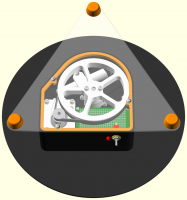
imagemagick to get antialised images like this:

[image: image.png]

On Sun, 9 Dec 2018 at 22:14, MichaelAtOz oz.at.michael@gmail.com wrote:

nophead wrote

It seems a bit odd to me placing your cursor in the editor and then going
to a menu that pastes to the cursor. I often ended up pasting it to the
wrong place and then moving it. More natural to copy to the clipboard and
then paste whereever you want. I can't think of another application that
pastes for somewhere other than the clipboard, but lots of applications
can
copy different things to the clipboard.

I rarely use these functions, so not fussed apart from the don't change UX
unless you have to principle.

You also have the external editor focus. I haven't been doing a lot of that
lately.
With OpenSCAD GUI as your editor, it could make sense, particularly of you
already had something in the clipboard.

I doing the devils work here. We probably need comment from people who
actually use it often.

But as I said, not fussed.


Admin - email* me if you need anything, or if I've done something stupid...

  • click on my MichaelAtOz label, there is a link to email me.

Unless specifically shown otherwise above, my contribution is in the
Public Domain; to the extent possible under law, I have waived all
copyright and related or neighbouring rights to this work. Obviously
inclusion of works of previous authors is not included in the above.

The TPP is no simple “trade agreement.”  Fight it!
http://www.ourfairdeal.org/  time is running out!

Sent from: http://forum.openscad.org/


OpenSCAD mailing list
Discuss@lists.openscad.org
http://lists.openscad.org/mailman/listinfo/discuss_lists.openscad.org

I use it to pose views for exporting as png files. Rather than specifing unique camera parameters on the command line I realised I only need the angle as the command line can now just do autocenter and viewall. I use imagemagick to trim the excess blank around the edges as viewall is conservative. I use this pose module in the code and fill it in from the viewing angle I find looks best on the GUI. // // Pose an assembly for rendering to png // module pose(a) if(is_undef($pose)) children(); else let($pose = undef, $posed = true) // only pose the top level rotate([0, 0, 25 - a.z]) rotate([0, -a.y, 0]) rotate([a.x - 55, 0, 0]) children(); The pose module is a no op while I am viewing in the GUI. The command line sets $pose and then pose rotates its children to the angle pasted from the GUI. E.g. module main_assembly() pose([210, 0, 180]) { .... } With this I now have scipts than can automatically generate images of all the assemblies in my project from the BOM information emitted by echos. I do them at four times the final resolution and downsample them in imagemagick to get antialised images like this: [image: image.png] On Sun, 9 Dec 2018 at 22:14, MichaelAtOz <oz.at.michael@gmail.com> wrote: > nophead wrote > > It seems a bit odd to me placing your cursor in the editor and then going > > to a menu that pastes to the cursor. I often ended up pasting it to the > > wrong place and then moving it. More natural to copy to the clipboard and > > then paste whereever you want. I can't think of another application that > > pastes for somewhere other than the clipboard, but lots of applications > > can > > copy different things to the clipboard. > > I rarely use these functions, so not fussed apart from the don't change UX > unless you have to principle. > > You also have the external editor focus. I haven't been doing a lot of that > lately. > With OpenSCAD GUI as your editor, it could make sense, particularly of you > already had something in the clipboard. > > I doing the devils work here. We probably need comment from people who > actually use it often. > > But as I said, not fussed. > > > > ----- > Admin - email* me if you need anything, or if I've done something stupid... > > * click on my MichaelAtOz label, there is a link to email me. > > Unless specifically shown otherwise above, my contribution is in the > Public Domain; to the extent possible under law, I have waived all > copyright and related or neighbouring rights to this work. Obviously > inclusion of works of previous authors is not included in the above. > > The TPP is no simple “trade agreement.” Fight it! > http://www.ourfairdeal.org/ time is running out! > -- > Sent from: http://forum.openscad.org/ > > _______________________________________________ > OpenSCAD mailing list > Discuss@lists.openscad.org > http://lists.openscad.org/mailman/listinfo/discuss_lists.openscad.org >
JB
Jordan Brown
Mon, Dec 10, 2018 1:52 AM

On 12/9/2018 2:02 PM, MichaelAtOz wrote:

ALT-keys don't seem to be used, anyone know if there is/was an issue, or we
just never ventured there?

In Windows, Alt+X opens the menu that has an underlined X in its name. 
Thus, typically, Alt+F opens the File menu, Alt+E opens the Edit menu,
et cetera.

Overloading this seems undesirable.

On 12/9/2018 2:02 PM, MichaelAtOz wrote: > ALT-keys don't seem to be used, anyone know if there is/was an issue, or we > just never ventured there? In Windows, Alt+X opens the menu that has an underlined X in its name.  Thus, typically, Alt+F opens the File menu, Alt+E opens the Edit menu, et cetera. Overloading this seems undesirable.
NH
nop head
Tue, Dec 25, 2018 11:19 AM

What do the ampersands in menu names mean? E.g. <string>P&aste viewport
translation</string>

On Mon, 10 Dec 2018 at 09:13, Jordan Brown openscad@jordan.maileater.net
wrote:

On 12/9/2018 2:02 PM, MichaelAtOz wrote:

ALT-keys don't seem to be used, anyone know if there is/was an issue, or we
just never ventured there?

In Windows, Alt+X opens the menu that has an underlined X in its name.
Thus, typically, Alt+F opens the File menu, Alt+E opens the Edit menu, et
cetera.

Overloading this seems undesirable.


OpenSCAD mailing list
Discuss@lists.openscad.org
http://lists.openscad.org/mailman/listinfo/discuss_lists.openscad.org

What do the ampersands in menu names mean? E.g. <string>P&amp;aste viewport translation</string> On Mon, 10 Dec 2018 at 09:13, Jordan Brown <openscad@jordan.maileater.net> wrote: > On 12/9/2018 2:02 PM, MichaelAtOz wrote: > > ALT-keys don't seem to be used, anyone know if there is/was an issue, or we > just never ventured there? > > > In Windows, Alt+X opens the menu that has an underlined X in its name. > Thus, typically, Alt+F opens the File menu, Alt+E opens the Edit menu, et > cetera. > > Overloading this seems undesirable. > > > _______________________________________________ > OpenSCAD mailing list > Discuss@lists.openscad.org > http://lists.openscad.org/mailman/listinfo/discuss_lists.openscad.org >