

workflow/approach request

I'm not a wizard at OpenSCAD, but enjoy using it for model creation. It
appeals to the logical side of my alleged mind. Unfortunately, the grey
matter is deteriorating too fast to encompass the massive power of coding
with OpenSCAD, so I'm asking for a bit of help.
I have been using SolveSpace http://solvespace.com/index.pl to create
quick-and-dirty drawings that also happen to have valuable parametric data.
As a result, my latest project allowed me to type out a list of 2D points on
a circle, ten in all, with semi-regular spacing. "Here's a hole, there's a
hole x mm away, then a hole y mm away, repeat five times."
I've attempted to understand the children() feature of OpenSCAD, with no
luck. Perhaps if children is/are the answer, I may understand it better in
the long run, but I'm not able to figure it out on my own.
If children isn't the best approach, what would be?
As it stands, the brute force method would be to create cylinders and
translate each one individually to the correct location. Is there a better
way?
19.5, 49.81
-19.5, 49.81
41.34, 33.94
-41.34, 33.94
53.4, -3.15
-53.4, -3.15
45.05, -28.83
-45.05, -28.83
13.5, -51.76
-13.5, -51.76
thanks
fred
--
Sent from: http://forum.openscad.org/

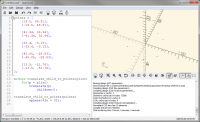
Does this help?
[image: image.png]
points = [
[19.5, 49.81],
[-19.5, 49.81],
[41.34, 33.94],
[-41.34, 33.94],

[53.4, -3.15],
[-53.4, -3.15],

[45.05, -28.83],
[-45.05, -28.83],

[13.5, -51.76],
[-13.5, -51.76],
];
module translate_child_to_points(plist)
for(p = plist)
translate(p)
children();
translate_child_to_points(points)
sphere($fn = 32);
On Mon, 19 Aug 2019 at 18:40, fred_dot_u via Discuss <
discuss@lists.openscad.org> wrote:
I'm not a wizard at OpenSCAD, but enjoy using it for model creation. It
appeals to the logical side of my alleged mind. Unfortunately, the grey
matter is deteriorating too fast to encompass the massive power of coding
with OpenSCAD, so I'm asking for a bit of help.
I have been using SolveSpace http://solvespace.com/index.pl to create
quick-and-dirty drawings that also happen to have valuable parametric data.
As a result, my latest project allowed me to type out a list of 2D points
on
a circle, ten in all, with semi-regular spacing. "Here's a hole, there's a
hole x mm away, then a hole y mm away, repeat five times."
I've attempted to understand the children() feature of OpenSCAD, with no
luck. Perhaps if children is/are the answer, I may understand it better in
the long run, but I'm not able to figure it out on my own.
If children isn't the best approach, what would be?
As it stands, the brute force method would be to create cylinders and
translate each one individually to the correct location. Is there a better
way?
19.5, 49.81
-19.5, 49.81
41.34, 33.94
-41.34, 33.94
53.4, -3.15
-53.4, -3.15
45.05, -28.83
-45.05, -28.83
13.5, -51.76
-13.5, -51.76
thanks
fred
--
Sent from: http://forum.openscad.org/
OpenSCAD mailing list
Discuss@lists.openscad.org
http://lists.openscad.org/mailman/listinfo/discuss_lists.openscad.org

for ?
points=10;
inc=360/points;
for (i=[0:inc:360]) {
rotate([0,0,i]) translate([0,10,0]) sphere(r=1);
}
On Mon, 19 Aug 2019 at 18:42, fred_dot_u via Discuss <
discuss@lists.openscad.org> wrote:
I'm not a wizard at OpenSCAD, but enjoy using it for model creation. It
appeals to the logical side of my alleged mind. Unfortunately, the grey
matter is deteriorating too fast to encompass the massive power of coding
with OpenSCAD, so I'm asking for a bit of help.
I have been using SolveSpace http://solvespace.com/index.pl to create
quick-and-dirty drawings that also happen to have valuable parametric data.
As a result, my latest project allowed me to type out a list of 2D points
on
a circle, ten in all, with semi-regular spacing. "Here's a hole, there's a
hole x mm away, then a hole y mm away, repeat five times."
I've attempted to understand the children() feature of OpenSCAD, with no
luck. Perhaps if children is/are the answer, I may understand it better in
the long run, but I'm not able to figure it out on my own.
If children isn't the best approach, what would be?
As it stands, the brute force method would be to create cylinders and
translate each one individually to the correct location. Is there a better
way?
19.5, 49.81
-19.5, 49.81
41.34, 33.94
-41.34, 33.94
53.4, -3.15
-53.4, -3.15
45.05, -28.83
-45.05, -28.83
13.5, -51.76
-13.5, -51.76
thanks
fred
--
Sent from: http://forum.openscad.org/
OpenSCAD mailing list
Discuss@lists.openscad.org
http://lists.openscad.org/mailman/listinfo/discuss_lists.openscad.org
That's exactly the layout/code I was hoping to find. I don't think I'd have
been able to generate it on my own. Other than cylinders at the points, it's
spot-on perfect for my requirements.
It does seem like cheating, since I can copy and paste your work into my
final code, rather than to type it in piecemeal.
thanks very much for the assist.
--
Sent from: http://forum.openscad.org/
The children can be cylinders to drill holes and later fasteners to fill
them, etc. This is how express nearly all of my positions. I.e. with a
module that translates its children.
On Mon, 19 Aug 2019 at 20:53, fred_dot_u via Discuss <
discuss@lists.openscad.org> wrote:
That's exactly the layout/code I was hoping to find. I don't think I'd have
been able to generate it on my own. Other than cylinders at the points,
it's
spot-on perfect for my requirements.
It does seem like cheating, since I can copy and paste your work into my
final code, rather than to type it in piecemeal.
thanks very much for the assist.
--
Sent from: http://forum.openscad.org/
OpenSCAD mailing list
Discuss@lists.openscad.org
http://lists.openscad.org/mailman/listinfo/discuss_lists.openscad.org

I find it easiest to think of children() as a function pointer. Whenever it
is used, it calls everything you pass to your module.
So, if I have this (all very simplified, and not necessarily exactly how I'd
do it):
module screw(){
...
}
module nut(){
...
}
module washer(){
...
}
module screwassembly(){
screw();
washer();
translate([0,0,-20])
washer();
nut();
}
module placesstuff(){
for(some logic to get some coordinates){
translate(coord)
children();
}
}
placestuff()
screwassembly();
In this case, each time children() is called, all the code in the other
modules will be run, creating a new screwassembly.
--
Sent from: http://forum.openscad.org/
Unfortunately (or fortunately), I took nophead's code verbatim and changed
only sphere to cylinder. It may be due to my personal density of a neutron
star, but I am yet lacking a comfortable understanding of the use of
children().
The code you've provided escapes me as well. Even though that is the current
situation, my resulting program is going well and merely needs to be printed
and test fit to determine final adjustments.
--
Sent from: http://forum.openscad.org/

@discuss
Maybe this would help you...
First, recognize that your openscad scripts, in order to draw something,
construct a tree of operations.
rotate([90,
0, 0])
|
|
translate([20, 20, 0])
|
|
union()
/
/
cube(size = [5, 5, 5])
cube(size = [10, 3, 5], center = false)
Next recognize in Openscad there are two types of operations; modules and
functions.
Functions only return values. These can be used to calculate some value,
iterate over a list of values and do something with them, or whatever else
you can dream up so long as the result is one or more values. The return
values are expressed as either a number, a list of numbers, or a matrix of
numbers.
Modules on the other hand do not return anything, but rather either act on,
or draw shapes. The "cube" operation obviously draws a shape. The "union",
"translate", and "rotate" operations act on a shape. Which shape? Their
children in the operation tree. So these modules are coded to do stuff to
"children()".
The next time you go to craft a module, ask yourself is the module going to
draw something, or manipulate something that is already drawn. If the
latter, you'll need to use "children()".
--
Sent from: http://forum.openscad.org/
cgriffith, your information may indeed be helpful. When I write to build a
model, I attempt to create modules for construction of components, as your
note references. I've yet to write a function.
I'm not sure if I've used a module to perform manipulation on a construction
module as yet, other than the code provided by nophead. That bit confused me
slightly as well, as there were no curly braces after the module call, but
copy/paste worked anyway.
With your information in mind, I've opened a few reference web pages to
study when I return from my errands, in hopes that I'll understand more with
the new viewpoint.
--
Sent from: http://forum.openscad.org/

Em qua, 21 de ago de 2019 às 13:35, fred_dot_u via Discuss <
discuss@lists.openscad.org> escreveu:
That bit confused me
slightly as well, as there were no curly braces after the module call, but
copy/paste worked anyway.
You don't need curly braces to translate a single object:
translate([10,0,0]) sphere(10);
The same happens with modules and it children().
Note that translate() is itself an operator module that could be
pseudocoded by:
module translate(v=[0,0,0])
rebuild children() adding v to each of its vertices;
I interpret children as the argument name of a module that operates on an
object. OpenSCAD language does not allow that objects (models) be passed as
parameter to functions and modules. So, children replaces the role a
parameter for modules that operates on objects. So, instead of :
module rotranlate(ang, vec, object) {
rotate(ang)
translate(vec)
object;
}
rotranslate( 30, [10,0,0], cube(10) );
which is forbidden, we may write:
module rotranslate(ang, vec) {
rotate(ang)
translate(vec)
children();
}
rotranslate( 30, [10,0,0] ) cube(10);
or, equivalently:
rotranslate( 30, [10,0,0] ) { cube(10); }
When your operator needs more than one object to operate, you need to index
children to identify each object:
module hullDifference() {
difference() {
hull() children(0);
hull() children(1);
}
}
hullDifference() { translate([10,0,0]) cylinder(h=20,r=10);
rotate(30) translate([0,0,-0.5]) cube(21);
}
Note that here the curly braces are necessary to embrace the two children
in the hullDifference() call. Try to eliminate the braces and see what
happens.