workflow/approach request

[ Sorry, sent the first copy from the wrong e-mail address. ]
On 8/21/2019 5:38 AM, fred_dot_u via Discuss wrote:
That bit confused me slightly as well, as there were no curly braces after the module call, [...]
Like most languages with sort-of-C-derived structure, you only need
braces if you want to enclose more than one statement. Also, line
breaks are not important.
Thus these are equivalent:
translate(...) rotate(...) scale(...) cube(...);

translate(...)
    rotate(...)
        scale(...)
            cube(...);

translate(...) {
    rotate(...) {
        scale(...) {
            cube(...);
        }
    }
}
As for children( ), the way that I think of it is that modules can have
arguments that are values - the ones in the parentheses, like the 10 in
sphere(10) - and they can have arguments that are objects. When you say
"rotate(...) cube(...);" the cube is an argument to the rotate.
children( ) is how the module accesses those object-arguments.
For instance, here's a really simple module that replicates an object:
module twin(dist)
{
    children();            // First copy of the object

    translate([dist,0,0])
        children();        // Second copy of the object
}
Thus you could say
twin(10) cube(5);
Or, equivalently
twin(10) {
	cube(5);
}
Here's a more elaborate example. Suppose I want to design a door, in a
generic way, and I want to be able to put any number of different
doorknobs on it.
I'm going to invoke it like this:
door(30) round_knob();	// make a 30" door with a round knob
door(36) handle();	// make a 36" door with a handle
The door module knows how to make a door. In particular, it knows where
the doorknob gets attached.
// Make a door of the specified width, with a knob supplied
// by the caller.
//
// Rules for the knob:
// * Its [0,0,0] is at the center of the mounting hole,
//   on the face of the door.
// * -X is towards the hinges; +X is towards the latch.
// * -Y is out of the door toward the user.
module door(width)
{
    // dimensions in inches
    height = 80;
    thick = 1.5;
    knob_inset = 2.5;
    knob_height = 36;

    cube([width, thick, height]);
    translate([width - knob_inset, 0, knob_height])
        children();
}
Now, here's a round doorknob:
module round_knob() {
    translate([0,-2,0])
        sphere(d=2);
    rotate([90,0,0])
        cylinder(d=1, h=2);
}
and here's a handle:
module handle() {
    rotate([90,0,0])
        cylinder(d=1, h=2);
    translate([0,-2,0]) {
        rotate([0,-90,0])
            cylinder(d=1, h=4);
        sphere(d=1);
    }
}
Note that, just like in the physical world, the door and the knob are
separately designed. You can put any knob onto any door, as long as
they both follow the rules.
But wait. That door only has a knob on one side.
// Make a door of the specified width, with a knob supplied
// by the caller on each side.
//
// Rules for the knob:
// * Its [0,0,0] is at the center of the mounting hole,
//   on the face of the door.
// * -X is towards the hinges; +X is towards the latch.
// * -Y is out of the door toward the user.
module door(width)
{
    // dimensions in inches
    height = 80;
    thick = 1.5;
    knob_inset = 2.5;
    knob_height = 36;

    cube([width, thick, height]);
    translate([width - knob_inset, 0, knob_height])
        children();
    translate([width - knob_inset, thick, knob_height])
        mirror([0,1,0]) children();
}
Now it has a knob on each side. (Technical nit: mirroring might not
really be the right technique, but it works for the example.) Note that
the knob knows only its "local" coordinate system; it doesn't know nor
care that it gets mirrored and translated to get put onto the back of
the door.
But but... what if you sometimes have a round knob on one side and a
handle on the other side?
// Make a door of the specified width, with a knob supplied
// by the caller on each side.
//
// Rules for the knob:
// * Its [0,0,0] is at the center of the mounting hole,
//   on the face of the door.
// * -X is towards the hinges; +X is towards the latch.
// * -Y is out of the door toward the user.
//
// With one child, put it on both sides.
// With two children, put the first child on the front
// and the second child on the back.
module door(width)
{
    // dimensions in inches
    height = 80;
    thick = 1.5;
    knob_inset = 2.5;
    knob_height = 36;

    cube([width, thick, height]);
    translate([width - knob_inset, 0, knob_height])
        children(0);
    translate([width - knob_inset, thick, knob_height])
        mirror([0,1,0]) children($children > 1 ? 1 : 0);
}
and you can invoke it as
door(30) {
    handle();
    round_knob();
}
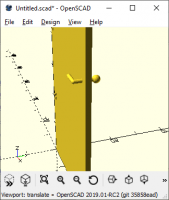
With$fs=0.2 to make nicer curves, here's what we get: