FIlling gaps between complex hollow objects

Is there a good way to fill in the spaces between hollow objects?
For instance if I have two torus's translated away from each other, how can
we fill in the gaps between them so they can print as a single unit, with
the center's of the torus's at the specified distance?
http://forum.openscad.org/file/t2113/zVwx9Un.png
http://forum.openscad.org/file/t2113/cixnwg5.png
I can't hull them together because it will fill in the torus's.
My real goal is to plot objects along a parabolic curve and fill the space
in between them, so I need to find a generic way to do this as the slope
between objects changes.
--
Sent from: http://forum.openscad.org/

My first thought would be to create a solid object independent of the tori
but describing the ultimately desired shape. That's probably the biggest
challenge. If you find that using hull causes everything to fill in, but the
outer shape is acceptable, use the hulled shape as the base solid.
Perform a difference between the hulled shape and the foundation tori
followed by removal of the center segments that the hull operation created.
As noted from the image, the angled tori will likely fill in the area
between the two especially in the Z direction. If this is not desired, it
complicates things, of course.
Just a notion.
--
Sent from: http://forum.openscad.org/
Hey Thanks, thats an idea.
I think hull is probably a no go with my current understanding of it. When
hulling objects translated on the Z axis I need just the space along the
curve filled in.
I can probably try and build a "negative" object of the hollow space to use
in a difference and worry about building out the shape of the curve with a
complex polyhedron. I guess I could even dispense with the difference
method and just build the polyhedron to include the hollow bits.
This https://github.com/Chocrates/keyboard/blob/master/demo.scad is the
actual generated scad of the objects I am trying to connect for reference.
--
Sent from: http://forum.openscad.org/

[ Oops resend from correct address. ]
On 12/29/2017 4:07 PM, Chocrates wrote:
Is there a good way to fill in the spaces between hollow objects?
For instance if I have two torus's translated away from each other, how can
we fill in the gaps between them so they can print as a single unit, with
the center's of the torus's at the specified distance?
http://forum.openscad.org/file/t2113/zVwx9Un.png
http://forum.openscad.org/file/t2113/cixnwg5.png
I can't hull them together because it will fill in the torus's.
My real goal is to plot objects along a parabolic curve and fill the space
in between them, so I need to find a generic way to do this as the slope
between objects changes.
Not that I would necessarily be able to make any helpful suggestions,
but I'm having a hard time understanding exactly what you mean.
What would the result look like?

On 2017-12-30 02:07, Jordan Brown wrote:
Not that I would necessarily be able to make any helpful suggestions,
but I'm having a hard time understanding exactly what you mean.
What would the result look like?
I have the same question. The main problem as I see it is that the
problem is not well defined, there are many ways of 'filling the gap'.
Carsten Arnholm

You can try to play around with projection and joining upp a bunch but its
pretty limited and still very hands on.
http://forum.openscad.org/file/t1678/connect.png
$fn=20;
for(r=[0:30:360])
rotate([0,r,0])translate([0,0,19])join(2)
{ rotate([0,15,0])translate([5,0,0])torus(1,3);
mirror([1,0,0])
rotate([0,15,0])translate([5,0,0])torus(1,3);}
module join(w){
children();
segs=4;
for(i=[0:w/segs:w])
{ planecutX(1+i, 1-(i/w)*0.8)
children(0);
planecutX(-1-i, 1-(i/w)*0.8)
children(1);}}
module planecutX(offs=0,s=0.75)
{rotate([0,-90,0])
translate([0,0,-offs])
mirror([0,0,min(0,sign(offs))])
linear_extrude( abs(offs),scale=max(0,s))
projection(cut = true) {
translate([0,0,offs])rotate([0,90,0])children();
//translate([0,0,-offs])rotate([0,90,0])children();
}}
module torus(r1=1,r2=3)
{rotate_extrude()
translate([r2,0,0])circle(r1);}
--
Sent from: http://forum.openscad.org/
Apologies, for a more concrete example, I have these housings that I would
like to connect together so they print as a single piece.
https://github.com/Chocrates/keyboard/blob/master/demo.scad
So connect together in this case means that for the object centered at the
origin, I would like to connect the edge at -x and -y with the object next
to it.
--
Sent from: http://forum.openscad.org/
ok sure thing
So to not go completely crazy i put all repeating code in modules.
The hull didn't work out as mentioned before.
http://forum.openscad.org/file/t1678/1.jpg
One way around is to make special versions of the key thing with
just the right edge and just the left edge and pair them up
with the convex hull operator.
http://forum.openscad.org/file/t1678/Capturwe.jpg
code here:
https://gist.github.com/TLC123/33a4fa73ff0ae028b1ad8ff85599e518
https://gist.github.com/TLC123/33a4fa73ff0ae028b1ad8ff85599e518
--
Sent from: http://forum.openscad.org/

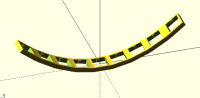
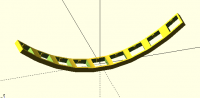
I haven't seen Torleif's code but from his images I think I had basically
the same idea.
I correct the arrangement of the frames in order to make them tangent to
the parabola.
And added two more frames just for fun.
a = 2/20/20; // parabola constant
step = 20;
xini = -80;
xend = 80;
for(x =[xini:step:xend]) {
position(x) frame();
if(x>xini)
hull(){ // left gap filling
position(x) slice( 19/2) frame();
position(x-step) slice(-19/2) frame();
}
}
module position(x) { // along the parabola
translate([-x, 0, axx])
rotate([0, atan(2ax), 0])
children();
}
// cut a slice of children
module slice(x=10) {
// x is the slice position
thickness = 0.1;
intersection(){
children();
translate([x,0,0]) cube([thickness,10000,10000],center=true);
}
}
module frame() {
union () {
difference () {
cube ([19, 19, 4.9], center=true);
cube ([15, 15, 10], center=true);
}
translate ([0, -7.125, 0]) frame_tappet();
translate ([0, 7.125, 0]) frame_tappet();
}
module frame_tappet()
rotate (a=90.0, v=[0, 0, 1])
rotate (a=180.0, v=[0, 1, 0])
difference () {
cube ([0.75, 2.9, 3.85], center=true);
translate ([0.5, 0, 3.85])
rotate (a=45.0, v=[0, 1, 0])
cube ([7.5, 3, 3.85], center=true);
}
}
2017-12-30 16:16 GMT-02:00 TLC123 torleif.ceder@gmail.com:
ok sure thing
So to not go completely crazy i put all repeating code in modules.
The hull didn't work out as mentioned before.
http://forum.openscad.org/file/t1678/1.jpg
One way around is to make special versions of the key thing with
just the right edge and just the left edge and pair them up
with the convex hull operator.
http://forum.openscad.org/file/t1678/Capturwe.jpg
code here:
https://gist.github.com/TLC123/33a4fa73ff0ae028b1ad8ff85599e518
https://gist.github.com/TLC123/33a4fa73ff0ae028b1ad8ff85599e518
--
Sent from: http://forum.openscad.org/
OpenSCAD mailing list
Discuss@lists.openscad.org
http://lists.openscad.org/mailman/listinfo/discuss_lists.openscad.org
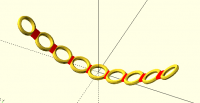
It works equally well with tori!
a = 2/20/20; // parabola constant
step = 20;
xini = -80;
xend = 80;
for(x =[xini:step:xend]) {
position(x) torus(2,9);
color("red")
if(x>xini)
hull(){ // left gap filling
position(x) slice( 9) torus(2,9);
position(x-step) slice(-9) torus(2,9);
}
}
module torus(r1=1,r2=3)
rotate_extrude() translate([r2,0,0])circle(r1);
Certainly the slice cut position (9 in this case) should be adjusted
appropriately for each object.
2017-12-30 16:44 GMT-02:00 Ronaldo Persiano rcmpersiano@gmail.com:
I haven't seen Torleif's code but from his images I think I had basically
the same idea.
I correct the arrangement of the frames in order to make them tangent to
the parabola.
And added two more frames just for fun.
a = 2/20/20; // parabola constant
step = 20;
xini = -80;
xend = 80;
for(x =[xini:step:xend]) {
position(x) frame();
if(x>xini)
hull(){ // left gap filling
position(x) slice( 19/2) frame();
position(x-step) slice(-19/2) frame();
}
}
module position(x) { // along the parabola
translate([-x, 0, axx])
rotate([0, atan(2ax), 0])
children();
}
// cut a slice of children
module slice(x=10) {
// x is the slice position
thickness = 0.1;
intersection(){
children();
translate([x,0,0]) cube([thickness,10000,10000],center=true);
}
}
module frame() {
union () {
difference () {
cube ([19, 19, 4.9], center=true);
cube ([15, 15, 10], center=true);
}
translate ([0, -7.125, 0]) frame_tappet();
translate ([0, 7.125, 0]) frame_tappet();
}
module frame_tappet()
rotate (a=90.0, v=[0, 0, 1])
rotate (a=180.0, v=[0, 1, 0])
difference () {
cube ([0.75, 2.9, 3.85], center=true);
translate ([0.5, 0, 3.85])
rotate (a=45.0, v=[0, 1, 0])
cube ([7.5, 3, 3.85], center=true);
}
}
2017-12-30 16:16 GMT-02:00 TLC123 torleif.ceder@gmail.com:
ok sure thing
So to not go completely crazy i put all repeating code in modules.
The hull didn't work out as mentioned before.
http://forum.openscad.org/file/t1678/1.jpg
One way around is to make special versions of the key thing with
just the right edge and just the left edge and pair them up
with the convex hull operator.
http://forum.openscad.org/file/t1678/Capturwe.jpg
code here:
https://gist.github.com/TLC123/33a4fa73ff0ae028b1ad8ff85599e518
https://gist.github.com/TLC123/33a4fa73ff0ae028b1ad8ff85599e518
--
Sent from: http://forum.openscad.org/
OpenSCAD mailing list
Discuss@lists.openscad.org
http://lists.openscad.org/mailman/listinfo/discuss_lists.openscad.org