

discuss@lists.openscad.org

OpenSCAD general discussion Mailing-list

View all threads

SVG import questions.

NH
nop head
Thu, Jun 18, 2020 1:05 PM

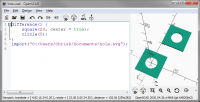
When I export a simple shape centered around the origin in SVG format and
then import it again it comes in with an offset, different for X and Y.

[image: image.png]
If I import it into InkScape it ends up with a corner at the origin.

[image: image.png]

Is there no standard for interpreting the coordinates?

Another problem I have is when I import a panel with holes that was made
from a PDF using InkScape it imports outlines instead of a solid.

[image: image.png]

What determines if a path is interpreted as an outline of a polygon or a
stroke with finite width?
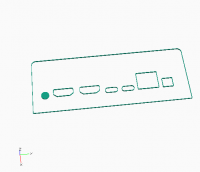
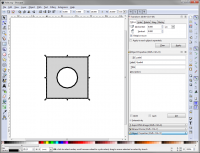
When I export a simple shape centered around the origin in SVG format and then import it again it comes in with an offset, different for X and Y. [image: image.png] If I import it into InkScape it ends up with a corner at the origin. [image: image.png] Is there no standard for interpreting the coordinates? Another problem I have is when I import a panel with holes that was made from a PDF using InkScape it imports outlines instead of a solid. [image: image.png] What determines if a path is interpreted as an outline of a polygon or a stroke with finite width?
T
Troberg
Thu, Jun 25, 2020 9:53 AM

I've been importing and exporting SVG files, using OpenSCAD, InkScape,
Scribus, LightBurn and a few other tools a lot recently, and it seems to me
that the file itself has no origin, at least not that any of them care
about, they all just use their own method (usually center, bottom left or
top left).

--
Sent from: http://forum.openscad.org/

I've been importing and exporting SVG files, using OpenSCAD, InkScape, Scribus, LightBurn and a few other tools a lot recently, and it seems to me that the file itself has no origin, at least not that any of them care about, they all just use their own method (usually center, bottom left or top left). -- Sent from: http://forum.openscad.org/
NH
nop head
Thu, Jun 25, 2020 10:22 AM

Well the viewport is supposed to give the origin indirectly, OpenSCAD seems
to set it correctly on export but interprets it wrongly on import. I am
surprised there isn't a test in the test suite that notices.

InkScape does seem to ignore it and makes the bottom left the origin. Also
if I convert it to DXF with https://cloudconvert.com/ it also puts the
bottom left on the origin.

It is probably a mess because SVG is designed to represent pictures, not
CAD data. I think OpenSCAD should be consistent with itself though.

On Thu, 25 Jun 2020 at 10:54, Troberg troberg.anders@gmail.com wrote:

I've been importing and exporting SVG files, using OpenSCAD, InkScape,
Scribus, LightBurn and a few other tools a lot recently, and it seems to me
that the file itself has no origin, at least not that any of them care
about, they all just use their own method (usually center, bottom left or
top left).

--
Sent from: http://forum.openscad.org/


OpenSCAD mailing list
Discuss@lists.openscad.org
http://lists.openscad.org/mailman/listinfo/discuss_lists.openscad.org

Well the viewport is supposed to give the origin indirectly, OpenSCAD seems to set it correctly on export but interprets it wrongly on import. I am surprised there isn't a test in the test suite that notices. InkScape does seem to ignore it and makes the bottom left the origin. Also if I convert it to DXF with https://cloudconvert.com/ it also puts the bottom left on the origin. It is probably a mess because SVG is designed to represent pictures, not CAD data. I think OpenSCAD should be consistent with itself though. On Thu, 25 Jun 2020 at 10:54, Troberg <troberg.anders@gmail.com> wrote: > I've been importing and exporting SVG files, using OpenSCAD, InkScape, > Scribus, LightBurn and a few other tools a lot recently, and it seems to me > that the file itself has no origin, at least not that any of them care > about, they all just use their own method (usually center, bottom left or > top left). > > > > -- > Sent from: http://forum.openscad.org/ > > _______________________________________________ > OpenSCAD mailing list > Discuss@lists.openscad.org > http://lists.openscad.org/mailman/listinfo/discuss_lists.openscad.org >
D
dpa
Thu, Jun 25, 2020 3:47 PM

I work with inkscape and have a setting (Viewbox X and Y=0, as I mentioned
here before) which is exactly what it should be!
The disadvantage is that the object is not made for "to look at".
Attached a simple circle around [0,0] with an unchanged document size (A4).
The preview (on mac) shows the 'empty' A4 sheet and I have to scroll down,
at the bottom left you can see a quarter circle.
In Inkscape this is also in the lower left, just where [0,0] is. In
OpenSCAD it is nicely centered, as expected with center at [0,0].
That's the thing about coordinates...

Am Do., 25. Juni 2020 um 11:54 Uhr schrieb Troberg <troberg.anders@gmail.com

:

I've been importing and exporting SVG files, using OpenSCAD, InkScape,
Scribus, LightBurn and a few other tools a lot recently, and it seems to me
that the file itself has no origin, at least not that any of them care
about, they all just use their own method (usually center, bottom left or
top left).

--
Sent from: http://forum.openscad.org/


OpenSCAD mailing list
Discuss@lists.openscad.org
http://lists.openscad.org/mailman/listinfo/discuss_lists.openscad.org

I work with inkscape and have a setting (Viewbox X and Y=0, as I mentioned here before) which is exactly what it should be! The disadvantage is that the object is not made for "to look at". Attached a simple circle around [0,0] with an unchanged document size (A4). The preview (on mac) shows the 'empty' A4 sheet and I have to scroll down, at the bottom left you can see a quarter circle. In Inkscape this is also in the lower left, just where [0,0] is. In OpenSCAD it is nicely centered, as expected with center at [0,0]. That's the thing about coordinates... Am Do., 25. Juni 2020 um 11:54 Uhr schrieb Troberg <troberg.anders@gmail.com >: > I've been importing and exporting SVG files, using OpenSCAD, InkScape, > Scribus, LightBurn and a few other tools a lot recently, and it seems to me > that the file itself has no origin, at least not that any of them care > about, they all just use their own method (usually center, bottom left or > top left). > > > > -- > Sent from: http://forum.openscad.org/ > > _______________________________________________ > OpenSCAD mailing list > Discuss@lists.openscad.org > http://lists.openscad.org/mailman/listinfo/discuss_lists.openscad.org >
D
dpa
Thu, Jun 25, 2020 3:58 PM

..so OpenSCAD import is fine.
I think OpenSCAD exports in a way for better "look at", moves the content
to >=0 (by adding some View x,y to it) so that the content appears on the
"light side"
If you import the attached svg in OpenSCAD and export it back to svg and
open it elsewhere you can see what I mean.

Am Do., 25. Juni 2020 um 17:47 Uhr schrieb dpa sc@pankd.de:

I work with inkscape and have a setting (Viewbox X and Y=0, as I mentioned
here before) which is exactly what it should be!
The disadvantage is that the object is not made for "to look at".
Attached a simple circle around [0,0] with an unchanged document size (A4).
The preview (on mac) shows the 'empty' A4 sheet and I have to scroll down,
at the bottom left you can see a quarter circle.
In Inkscape this is also in the lower left, just where [0,0] is. In
OpenSCAD it is nicely centered, as expected with center at [0,0].
That's the thing about coordinates...

Am Do., 25. Juni 2020 um 11:54 Uhr schrieb Troberg <
troberg.anders@gmail.com>:

I've been importing and exporting SVG files, using OpenSCAD, InkScape,
Scribus, LightBurn and a few other tools a lot recently, and it seems to
me
that the file itself has no origin, at least not that any of them care
about, they all just use their own method (usually center, bottom left or
top left).

--
Sent from: http://forum.openscad.org/


OpenSCAD mailing list
Discuss@lists.openscad.org
http://lists.openscad.org/mailman/listinfo/discuss_lists.openscad.org

..so OpenSCAD import is fine. I think OpenSCAD exports in a way for better "look at", moves the content to >=0 (by adding some View x,y to it) so that the content appears on the "light side" If you import the attached svg in OpenSCAD and export it back to svg and open it elsewhere you can see what I mean. Am Do., 25. Juni 2020 um 17:47 Uhr schrieb dpa <sc@pankd.de>: > I work with inkscape and have a setting (Viewbox X and Y=0, as I mentioned > here before) which is exactly what it should be! > The disadvantage is that the object is not made for "to look at". > Attached a simple circle around [0,0] with an unchanged document size (A4). > The preview (on mac) shows the 'empty' A4 sheet and I have to scroll down, > at the bottom left you can see a quarter circle. > In Inkscape this is also in the lower left, just where [0,0] is. In > OpenSCAD it is nicely centered, as expected with center at [0,0]. > That's the thing about coordinates... > > Am Do., 25. Juni 2020 um 11:54 Uhr schrieb Troberg < > troberg.anders@gmail.com>: > >> I've been importing and exporting SVG files, using OpenSCAD, InkScape, >> Scribus, LightBurn and a few other tools a lot recently, and it seems to >> me >> that the file itself has no origin, at least not that any of them care >> about, they all just use their own method (usually center, bottom left or >> top left). >> >> >> >> -- >> Sent from: http://forum.openscad.org/ >> >> _______________________________________________ >> OpenSCAD mailing list >> Discuss@lists.openscad.org >> http://lists.openscad.org/mailman/listinfo/discuss_lists.openscad.org >> >
NH
nop head
Thu, Jun 25, 2020 4:37 PM

So basically you can't display anything with negative coordinates without
shifting it in SVG?

The OpenSCAD export coordinates range from -10 to +10. The viewBox starts
at -10 and has an extent of 20, which seems correct to me. I would expect
to see the full circle, not a quarter, but I don't expect the circle to be
moved. I expect the viewPort to range from -10 to plus 10 and the circle
stay on the origin in InkScape.

OpenSCAD has an infinite viewport, so I think it should ignore the viewBox
on import. I have no idea why it doesn't treat X and Y the same either.

On Thu, 25 Jun 2020 at 16:59, dpa sc@pankd.de wrote:

..so OpenSCAD import is fine.
I think OpenSCAD exports in a way for better "look at", moves the content
to >=0 (by adding some View x,y to it) so that the content appears on the
"light side"
If you import the attached svg in OpenSCAD and export it back to svg and
open it elsewhere you can see what I mean.

Am Do., 25. Juni 2020 um 17:47 Uhr schrieb dpa sc@pankd.de:

I work with inkscape and have a setting (Viewbox X and Y=0, as I
mentioned here before) which is exactly what it should be!
The disadvantage is that the object is not made for "to look at".
Attached a simple circle around [0,0] with an unchanged document size
(A4).
The preview (on mac) shows the 'empty' A4 sheet and I have to scroll
down, at the bottom left you can see a quarter circle.
In Inkscape this is also in the lower left, just where [0,0] is. In
OpenSCAD it is nicely centered, as expected with center at [0,0].
That's the thing about coordinates...

Am Do., 25. Juni 2020 um 11:54 Uhr schrieb Troberg <
troberg.anders@gmail.com>:

I've been importing and exporting SVG files, using OpenSCAD, InkScape,
Scribus, LightBurn and a few other tools a lot recently, and it seems to
me
that the file itself has no origin, at least not that any of them care
about, they all just use their own method (usually center, bottom left or
top left).

--
Sent from: http://forum.openscad.org/


OpenSCAD mailing list
Discuss@lists.openscad.org
http://lists.openscad.org/mailman/listinfo/discuss_lists.openscad.org


So basically you can't display anything with negative coordinates without shifting it in SVG? The OpenSCAD export coordinates range from -10 to +10. The viewBox starts at -10 and has an extent of 20, which seems correct to me. I would expect to see the full circle, not a quarter, but I don't expect the circle to be moved. I expect the viewPort to range from -10 to plus 10 and the circle stay on the origin in InkScape. OpenSCAD has an infinite viewport, so I think it should ignore the viewBox on import. I have no idea why it doesn't treat X and Y the same either. On Thu, 25 Jun 2020 at 16:59, dpa <sc@pankd.de> wrote: > ..so OpenSCAD import is fine. > I think OpenSCAD exports in a way for better "look at", moves the content > to >=0 (by adding some View x,y to it) so that the content appears on the > "light side" > If you import the attached svg in OpenSCAD and export it back to svg and > open it elsewhere you can see what I mean. > > Am Do., 25. Juni 2020 um 17:47 Uhr schrieb dpa <sc@pankd.de>: > >> I work with inkscape and have a setting (Viewbox X and Y=0, as I >> mentioned here before) which is exactly what it should be! >> The disadvantage is that the object is not made for "to look at". >> Attached a simple circle around [0,0] with an unchanged document size >> (A4). >> The preview (on mac) shows the 'empty' A4 sheet and I have to scroll >> down, at the bottom left you can see a quarter circle. >> In Inkscape this is also in the lower left, just where [0,0] is. In >> OpenSCAD it is nicely centered, as expected with center at [0,0]. >> That's the thing about coordinates... >> >> Am Do., 25. Juni 2020 um 11:54 Uhr schrieb Troberg < >> troberg.anders@gmail.com>: >> >>> I've been importing and exporting SVG files, using OpenSCAD, InkScape, >>> Scribus, LightBurn and a few other tools a lot recently, and it seems to >>> me >>> that the file itself has no origin, at least not that any of them care >>> about, they all just use their own method (usually center, bottom left or >>> top left). >>> >>> >>> >>> -- >>> Sent from: http://forum.openscad.org/ >>> >>> _______________________________________________ >>> OpenSCAD mailing list >>> Discuss@lists.openscad.org >>> http://lists.openscad.org/mailman/listinfo/discuss_lists.openscad.org >>> >> _______________________________________________ > OpenSCAD mailing list > Discuss@lists.openscad.org > http://lists.openscad.org/mailman/listinfo/discuss_lists.openscad.org >
RW
Ron Wheeler
Thu, Jun 25, 2020 4:57 PM

This is one of those cases reading the manual has a value.

On 2020-06-25 11:47 a.m., dpa wrote:

I work with inkscape and have a setting (Viewbox X and Y=0, as I
mentioned here before) which is exactly what it should be!
The disadvantage is that the object is not made for "to look at".
Attached a simple circle around [0,0] with an unchanged document size
(A4).
The preview (on mac) shows the 'empty' A4 sheet and I have to scroll
down, at the bottom left you can see a quarter circle.
In Inkscape this is also in the lower left, just where [0,0] is. In
OpenSCAD it is nicely centered, as expected with center at [0,0].
That's the thing about coordinates...

Am Do., 25. Juni 2020 um 11:54 Uhr schrieb Troberg
<troberg.anders@gmail.com mailto:troberg.anders@gmail.com>:

 I've been importing and exporting SVG files, using OpenSCAD, InkScape,
 Scribus, LightBurn and a few other tools a lot recently, and it
 seems to me
 that the file itself has no origin, at least not that any of them care
 about, they all just use their own method (usually center, bottom
 left or
 top left).


 --
 Sent from: http://forum.openscad.org/

 _______________________________________________
 OpenSCAD mailing list
 Discuss@lists.openscad.org <mailto:Discuss@lists.openscad.org>
 http://lists.openscad.org/mailman/listinfo/discuss_lists.openscad.org

OpenSCAD mailing list
Discuss@lists.openscad.org
http://lists.openscad.org/mailman/listinfo/discuss_lists.openscad.org

--
Ron Wheeler
Artifact Software
438-345-3369
rwheeler@artifact-software.com

This is one of those cases reading the manual has a value. On 2020-06-25 11:47 a.m., dpa wrote: > I work with inkscape and have a setting (Viewbox X and Y=0, as I > mentioned here before) which is exactly what it should be! > The disadvantage is that the object is not made for "to look at". > Attached a simple circle around [0,0] with an unchanged document size > (A4). > The preview (on mac) shows the 'empty' A4 sheet and I have to scroll > down, at the bottom left you can see a quarter circle. > In Inkscape this is also in the lower left, just where [0,0] is. In > OpenSCAD it is nicely centered, as expected with center at [0,0]. > That's the thing about coordinates... > > Am Do., 25. Juni 2020 um 11:54 Uhr schrieb Troberg > <troberg.anders@gmail.com <mailto:troberg.anders@gmail.com>>: > > I've been importing and exporting SVG files, using OpenSCAD, InkScape, > Scribus, LightBurn and a few other tools a lot recently, and it > seems to me > that the file itself has no origin, at least not that any of them care > about, they all just use their own method (usually center, bottom > left or > top left). > > > > -- > Sent from: http://forum.openscad.org/ > > _______________________________________________ > OpenSCAD mailing list > Discuss@lists.openscad.org <mailto:Discuss@lists.openscad.org> > http://lists.openscad.org/mailman/listinfo/discuss_lists.openscad.org > > > _______________________________________________ > OpenSCAD mailing list > Discuss@lists.openscad.org > http://lists.openscad.org/mailman/listinfo/discuss_lists.openscad.org -- Ron Wheeler Artifact Software 438-345-3369 rwheeler@artifact-software.com
NH
nop head
Thu, Jun 25, 2020 5:24 PM

The manual leads to here:
https://www.w3.org/TR/SVG/coords.html#ComputingAViewportsTransform

When I go through that algorithm I get translate(0, 0) scale(1,1) which
should leave my geometry unchanged unless I am mistaken.

On Thu, 25 Jun 2020 at 17:57, Ron Wheeler via Discuss <
discuss@lists.openscad.org> wrote:

This is one of those cases reading the manual has a value.

On 2020-06-25 11:47 a.m., dpa wrote:

I work with inkscape and have a setting (Viewbox X and Y=0, as I mentioned
here before) which is exactly what it should be!
The disadvantage is that the object is not made for "to look at".
Attached a simple circle around [0,0] with an unchanged document size (A4).
The preview (on mac) shows the 'empty' A4 sheet and I have to scroll down,
at the bottom left you can see a quarter circle.
In Inkscape this is also in the lower left, just where [0,0] is. In
OpenSCAD it is nicely centered, as expected with center at [0,0].
That's the thing about coordinates...

Am Do., 25. Juni 2020 um 11:54 Uhr schrieb Troberg <
troberg.anders@gmail.com>:

I've been importing and exporting SVG files, using OpenSCAD, InkScape,
Scribus, LightBurn and a few other tools a lot recently, and it seems to
me
that the file itself has no origin, at least not that any of them care
about, they all just use their own method (usually center, bottom left or
top left).

--
Sent from: http://forum.openscad.org/


OpenSCAD mailing list
Discuss@lists.openscad.org
http://lists.openscad.org/mailman/listinfo/discuss_lists.openscad.org


OpenSCAD mailing listDiscuss@lists.openscad.orghttp://lists.openscad.org/mailman/listinfo/discuss_lists.openscad.org

--
Ron Wheeler
Artifact Software
438-345-3369rwheeler@artifact-software.com


OpenSCAD mailing list
Discuss@lists.openscad.org
http://lists.openscad.org/mailman/listinfo/discuss_lists.openscad.org

The manual leads to here: https://www.w3.org/TR/SVG/coords.html#ComputingAViewportsTransform When I go through that algorithm I get translate(0, 0) scale(1,1) which should leave my geometry unchanged unless I am mistaken. On Thu, 25 Jun 2020 at 17:57, Ron Wheeler via Discuss < discuss@lists.openscad.org> wrote: > This is one of those cases reading the manual has a value. > > On 2020-06-25 11:47 a.m., dpa wrote: > > I work with inkscape and have a setting (Viewbox X and Y=0, as I mentioned > here before) which is exactly what it should be! > The disadvantage is that the object is not made for "to look at". > Attached a simple circle around [0,0] with an unchanged document size (A4). > The preview (on mac) shows the 'empty' A4 sheet and I have to scroll down, > at the bottom left you can see a quarter circle. > In Inkscape this is also in the lower left, just where [0,0] is. In > OpenSCAD it is nicely centered, as expected with center at [0,0]. > That's the thing about coordinates... > > Am Do., 25. Juni 2020 um 11:54 Uhr schrieb Troberg < > troberg.anders@gmail.com>: > >> I've been importing and exporting SVG files, using OpenSCAD, InkScape, >> Scribus, LightBurn and a few other tools a lot recently, and it seems to >> me >> that the file itself has no origin, at least not that any of them care >> about, they all just use their own method (usually center, bottom left or >> top left). >> >> >> >> -- >> Sent from: http://forum.openscad.org/ >> >> _______________________________________________ >> OpenSCAD mailing list >> Discuss@lists.openscad.org >> http://lists.openscad.org/mailman/listinfo/discuss_lists.openscad.org >> > > _______________________________________________ > OpenSCAD mailing listDiscuss@lists.openscad.orghttp://lists.openscad.org/mailman/listinfo/discuss_lists.openscad.org > > > -- > Ron Wheeler > Artifact Software > 438-345-3369rwheeler@artifact-software.com > > _______________________________________________ > OpenSCAD mailing list > Discuss@lists.openscad.org > http://lists.openscad.org/mailman/listinfo/discuss_lists.openscad.org >
W
WillAdams
Thu, Jul 23, 2020 3:51 AM

Is this documented somewhere?

import("C:\Users\willa\Desktop\Design_Into_3D-master\box\fingerjoint\magazine\5_16_radius_half.svg");

I just tried it and didn't get anything.

I need to model a radiused endmill so that I can rotate extrude/revolve it
and not getting anything.

What about the previous technique of exporting a .scad file from Inkscape
using an extension such as:

https://github.com/fablabnbg/inkscape-paths2openscad

Does that still work in Inkscape 1.0?

It's a bit disconcerting to find:

https://inkscape.org/~arpruss/%E2%98%85openscad-cookie-cutter-file-output

but have the search:

https://inkscape.org/search/?q=openscad

come up empty.

William

--
Sent from: http://forum.openscad.org/

Is this documented somewhere? import("C:\Users\willa\Desktop\Design_Into_3D-master\box\fingerjoint\magazine\5_16_radius_half.svg"); I just tried it and didn't get anything. I need to model a radiused endmill so that I can rotate extrude/revolve it and not getting anything. What about the previous technique of exporting a .scad file from Inkscape using an extension such as: https://github.com/fablabnbg/inkscape-paths2openscad Does that still work in Inkscape 1.0? It's a bit disconcerting to find: https://inkscape.org/~arpruss/%E2%98%85openscad-cookie-cutter-file-output but have the search: https://inkscape.org/search/?q=openscad come up empty. William -- Sent from: http://forum.openscad.org/
L
lar3ry@sasktel.net
Thu, Jul 23, 2020 4:54 PM

On 22 Jul 2020 at 20:51, WillAdams via Discuss wrote:

What about the previous technique of exporting a .scad file from Inkscape
using an extension such as:
https://github.com/fablabnbg/inkscape-paths2openscad
Does that still work in Inkscape 1.0?

I just downloaded Inkscape 1.0, putting it into a separate directory so I can
run it in parallel. I did this because it looks like the Roland Cutstudio
extension is not compatible, or at least not mentioned in the release notes or
Wiki.

I think the only way to tell if any given extension works is to either look at the
repository or to try adding it to 1.0.

My first try at using 1.0 was pretty disappointing. I thought I'd try it on a few
things, and got at least one very strange result. I first tried text. After entering
it, changing the font, I tried to move it. I could only move it with the keyboard,
and not with the mouse.

When I get a little more time, I will try it out in more depth, but so far, I am
not impressed.

On 22 Jul 2020 at 20:51, WillAdams via Discuss wrote: > What about the previous technique of exporting a .scad file from Inkscape > using an extension such as: > https://github.com/fablabnbg/inkscape-paths2openscad > Does that still work in Inkscape 1.0? I just downloaded Inkscape 1.0, putting it into a separate directory so I can run it in parallel. I did this because it looks like the Roland Cutstudio extension is not compatible, or at least not mentioned in the release notes or Wiki. I think the only way to tell if any given extension works is to either look at the repository or to try adding it to 1.0. My first try at using 1.0 was pretty disappointing. I thought I'd try it on a few things, and got at least one very strange result. I first tried text. After entering it, changing the font, I tried to move it. I could only move it with the keyboard, and not with the mouse. When I get a little more time, I will try it out in more depth, but so far, I am not impressed.