discuss@lists.openscad.org

OpenSCAD general discussion Mailing-list

View all threads

making vases, perhaps with InkScape

N
NateTG
Fri, Feb 16, 2018 5:04 PM

Parkinbot wrote

Jon,

I think your project is just another example, why a more general interface
for linear_extrude() would make sense. Of course sweep/skin functionality
will also do as it provides the most general interface for extrusions.
...

I think it's also a good example of how the scope is endless.

Jon_Bondy wrote

...
I thought of creating the curves with Bezier curves inside OpenSCAD, but
most implementations are limited to 4 control points; and working in
OpenSCAD by typing in numbers could be both laborious and non-intuitive.
...

OpenSCAD may not be suitable for the sort of development process you're
looking for.

IIRC N-point bezier is not that hard to do.

function nbezier(points,t)=
1>=len(points)?
points[0]
:
nbezier(
[for(i=[0:len(points)-2]) points[i]t+points[i+1](1-t)],
t
);

module segment (a,b,r=0.1) {
d=(b-a);
phi=atan2(sqrt(d.xd.x+d.yd.y),d.z);
theta=atan2(d.y,d.x);
len=sqrt(d*d);
translate(a)
rotate(a=theta)
rotate(v=[0,1,0],a=phi)
cylinder(r=r,h=len);
}

list=[ [0,1,0],[4,-1,-4],[-5,-5,-5],[2,3,3],[5,5,0] ];

shape=[for (t=[0:0.05:1]) nbezier(list,t)];

for(i=[0:len(shape)-2]) {
segment(shape[i],shape[i+1]);
}

--
Sent from: http://forum.openscad.org/

Parkinbot wrote > Jon, > > I think your project is just another example, why a more general interface > for linear_extrude() would make sense. Of course sweep/skin functionality > will also do as it provides the most general interface for extrusions. > ... I think it's also a good example of how the scope is endless. Jon_Bondy wrote > ... > I thought of creating the curves with Bezier curves inside OpenSCAD, but > most implementations are limited to 4 control points; and working in > OpenSCAD by typing in numbers could be both laborious and non-intuitive. > ... OpenSCAD may not be suitable for the sort of development process you're looking for. IIRC N-point bezier is not that hard to do. function nbezier(points,t)= 1>=len(points)? points[0] : nbezier( [for(i=[0:len(points)-2]) points[i]*t+points[i+1]*(1-t)], t ); module segment (a,b,r=0.1) { d=(b-a); phi=atan2(sqrt(d.x*d.x+d.y*d.y),d.z); theta=atan2(d.y,d.x); len=sqrt(d*d); translate(a) rotate(a=theta) rotate(v=[0,1,0],a=phi) cylinder(r=r,h=len); } list=[ [0,1,0],[4,-1,-4],[-5,-5,-5],[2,3,3],[5,5,0] ]; shape=[for (t=[0:0.05:1]) nbezier(list,t)]; for(i=[0:len(shape)-2]) { segment(shape[i],shape[i+1]); } -- Sent from: http://forum.openscad.org/
J
jon
Fri, Feb 16, 2018 5:52 PM

Thanks for the n-point Bezier code!

On 2/16/2018 12:04 PM, NateTG wrote:

Parkinbot wrote

Jon,

I think your project is just another example, why a more general interface
for linear_extrude() would make sense. Of course sweep/skin functionality
will also do as it provides the most general interface for extrusions.
...

I think it's also a good example of how the scope is endless.

Jon_Bondy wrote

...
I thought of creating the curves with Bezier curves inside OpenSCAD, but
most implementations are limited to 4 control points; and working in
OpenSCAD by typing in numbers could be both laborious and non-intuitive.
...

OpenSCAD may not be suitable for the sort of development process you're
looking for.

IIRC N-point bezier is not that hard to do.

function nbezier(points,t)=
1>=len(points)?
points[0]
:
nbezier(
[for(i=[0:len(points)-2]) points[i]t+points[i+1](1-t)],
t
);

module segment (a,b,r=0.1) {
d=(b-a);
phi=atan2(sqrt(d.xd.x+d.yd.y),d.z);
theta=atan2(d.y,d.x);
len=sqrt(d*d);
translate(a)
rotate(a=theta)
rotate(v=[0,1,0],a=phi)
cylinder(r=r,h=len);
}

list=[ [0,1,0],[4,-1,-4],[-5,-5,-5],[2,3,3],[5,5,0] ];

shape=[for (t=[0:0.05:1]) nbezier(list,t)];

for(i=[0:len(shape)-2]) {
segment(shape[i],shape[i+1]);
}

--
Sent from: http://forum.openscad.org/


OpenSCAD mailing list
Discuss@lists.openscad.org
http://lists.openscad.org/mailman/listinfo/discuss_lists.openscad.org

--
Sent from my desktop computer.
I do not receive emails while away from my desk,
nor do I receive texts on my main phone number
(which is a land line).
If you know that I am on the road, please text me.
If you know that I am home, please email me.

Thanks for the n-point Bezier code! On 2/16/2018 12:04 PM, NateTG wrote: > Parkinbot wrote >> Jon, >> >> I think your project is just another example, why a more general interface >> for linear_extrude() would make sense. Of course sweep/skin functionality >> will also do as it provides the most general interface for extrusions. >> ... > I think it's also a good example of how the scope is endless. > > > Jon_Bondy wrote >> ... >> I thought of creating the curves with Bezier curves inside OpenSCAD, but >> most implementations are limited to 4 control points; and working in >> OpenSCAD by typing in numbers could be both laborious and non-intuitive. >> ... > OpenSCAD may not be suitable for the sort of development process you're > looking for. > > IIRC N-point bezier is not that hard to do. > > function nbezier(points,t)= > 1>=len(points)? > points[0] > : > nbezier( > [for(i=[0:len(points)-2]) points[i]*t+points[i+1]*(1-t)], > t > ); > > module segment (a,b,r=0.1) { > d=(b-a); > phi=atan2(sqrt(d.x*d.x+d.y*d.y),d.z); > theta=atan2(d.y,d.x); > len=sqrt(d*d); > translate(a) > rotate(a=theta) > rotate(v=[0,1,0],a=phi) > cylinder(r=r,h=len); > } > > > list=[ [0,1,0],[4,-1,-4],[-5,-5,-5],[2,3,3],[5,5,0] ]; > > shape=[for (t=[0:0.05:1]) nbezier(list,t)]; > > for(i=[0:len(shape)-2]) { > segment(shape[i],shape[i+1]); > } > > > > > > -- > Sent from: http://forum.openscad.org/ > > _______________________________________________ > OpenSCAD mailing list > Discuss@lists.openscad.org > http://lists.openscad.org/mailman/listinfo/discuss_lists.openscad.org > > -- Sent from my desktop computer. I do not receive emails while away from my desk, nor do I receive texts on my main phone number (which is a land line). If you know that I am on the road, please text me. If you know that I am home, please email me.
N
NateTG
Fri, Feb 16, 2018 8:27 PM

I made an error so that produces the bezier line reversing the order of the
vertices.  You can switch t and (1-t) to get the  version that goes in the
correct direction:

function nbezier(points,t)=
1>=len(points)?
points[0]
:
nbezier(
[for(i=[0:len(points)-2]) points[i]*(1-t)+points[i+1]*t],
t
);

I made an error so that produces the bezier line reversing the order of the vertices. You can switch t and (1-t) to get the version that goes in the correct direction: > function nbezier(points,t)= > 1>=len(points)? > points[0] > : > nbezier( > [for(i=[0:len(points)-2]) points[i]*(1-t)+points[i+1]*t], > t > ); -- Sent from: http://forum.openscad.org/
AB
Antonio Bueno
Fri, Feb 16, 2018 9:33 PM

In case you are still interested in drawing the "weird vase" in Inkscape...

Inkscape allows you to interpolate between two shapes. That detail was the
inspiration for this:

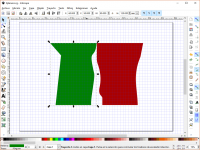
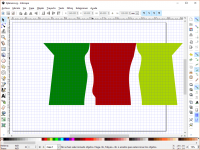
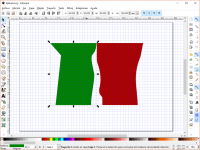
First, a couple of shapes: imagine the "weird vase" cut by the XY and the
YZ planes
[image: Imágenes integradas 1]

One of the shapes must be copied and mirrored
[image: Imágenes integradas 2]

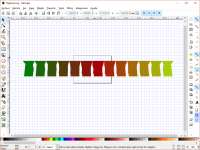
Then a couple of Inkscape's path interpolations, and save as SVG
[image: Imágenes integradas 3]

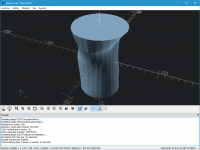
Importing the SVG file into OpenSCAD we can arrange the "planes" like this
[image: Imágenes integradas 4]

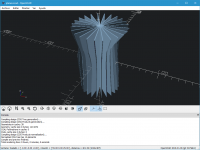
And cutting vertical slices and "hulling" each of them ends up like this
[image: Imágenes integradas 5]

This is the code:

width = 90;
height = 120;
planes = 13;

module plane(n) {
linear_extrude(height=1, center=true) intersection() {
translate([width*(n-floor(planes/2)), 0]) import(str(planes, "planes.svg"));
square([width, height], true);
}
}

module planes() {
for(i=[1:planes-1]) rotate([90, 0, 180/(planes-1)*i]) plane(i);
}

for(i=[-height/2:height/2]) hull() {
intersection() {
planes();
translate([0, 0, i]) cube([width, width, 1], true);
}
}

The attached file includes the .scad, the .svg and a rendered .amf

2018-02-16 18:52 GMT+01:00 jon jon@jonbondy.com:

Thanks for the n-point Bezier code!

On 2/16/2018 12:04 PM, NateTG wrote:

Parkinbot wrote

Jon,

I think your project is just another example, why a more general
interface
for linear_extrude() would make sense. Of course sweep/skin functionality
will also do as it provides the most general interface for extrusions.
...

I think it's also a good example of how the scope is endless.

Jon_Bondy wrote

...
I thought of creating the curves with Bezier curves inside OpenSCAD, but
most implementations are limited to 4 control points; and working in
OpenSCAD by typing in numbers could be both laborious and non-intuitive.
...

OpenSCAD may not be suitable for the sort of development process you're
looking for.

IIRC N-point bezier is not that hard to do.

function nbezier(points,t)=
1>=len(points)?
points[0]
:
nbezier(
[for(i=[0:len(points)-2]) points[i]t+points[i+1](1-t)],
t
);

module segment (a,b,r=0.1) {
d=(b-a);
phi=atan2(sqrt(d.xd.x+d.yd.y),d.z);
theta=atan2(d.y,d.x);
len=sqrt(d*d);
translate(a)
rotate(a=theta)
rotate(v=[0,1,0],a=phi)
cylinder(r=r,h=len);
}

list=[ [0,1,0],[4,-1,-4],[-5,-5,-5],[2,3,3],[5,5,0] ];

shape=[for (t=[0:0.05:1]) nbezier(list,t)];

for(i=[0:len(shape)-2]) {
segment(shape[i],shape[i+1]);
}

--
Sent from: http://forum.openscad.org/


OpenSCAD mailing list
Discuss@lists.openscad.org
http://lists.openscad.org/mailman/listinfo/discuss_lists.openscad.org

--
Sent from my desktop computer.
I do not receive emails while away from my desk,
nor do I receive texts on my main phone number
(which is a land line).
If you know that I am on the road, please text me.
If you know that I am home, please email me.


OpenSCAD mailing list
Discuss@lists.openscad.org
http://lists.openscad.org/mailman/listinfo/discuss_lists.openscad.org

--
Saludos,
Antonio
In case you are still interested in drawing the "weird vase" in Inkscape... Inkscape allows you to interpolate between two shapes. That detail was the inspiration for this: First, a couple of shapes: imagine the "weird vase" cut by the XY and the YZ planes [image: Imágenes integradas 1] One of the shapes must be copied and mirrored [image: Imágenes integradas 2] Then a couple of Inkscape's path interpolations, and save as SVG [image: Imágenes integradas 3] Importing the SVG file into OpenSCAD we can arrange the "planes" like this [image: Imágenes integradas 4] And cutting vertical slices and "hulling" each of them ends up like this [image: Imágenes integradas 5] This is the code: width = 90; height = 120; planes = 13; module plane(n) { linear_extrude(height=1, center=true) intersection() { translate([width*(n-floor(planes/2)), 0]) import(str(planes, "planes.svg")); square([width, height], true); } } module planes() { for(i=[1:planes-1]) rotate([90, 0, 180/(planes-1)*i]) plane(i); } for(i=[-height/2:height/2]) hull() { intersection() { planes(); translate([0, 0, i]) cube([width, width, 1], true); } } The attached file includes the .scad, the .svg and a rendered .amf 2018-02-16 18:52 GMT+01:00 jon <jon@jonbondy.com>: > Thanks for the n-point Bezier code! > > > > On 2/16/2018 12:04 PM, NateTG wrote: > >> Parkinbot wrote >> >>> Jon, >>> >>> I think your project is just another example, why a more general >>> interface >>> for linear_extrude() would make sense. Of course sweep/skin functionality >>> will also do as it provides the most general interface for extrusions. >>> ... >>> >> I think it's also a good example of how the scope is endless. >> >> >> Jon_Bondy wrote >> >>> ... >>> I thought of creating the curves with Bezier curves inside OpenSCAD, but >>> most implementations are limited to 4 control points; and working in >>> OpenSCAD by typing in numbers could be both laborious and non-intuitive. >>> ... >>> >> OpenSCAD may not be suitable for the sort of development process you're >> looking for. >> >> IIRC N-point bezier is not that hard to do. >> >> function nbezier(points,t)= >> 1>=len(points)? >> points[0] >> : >> nbezier( >> [for(i=[0:len(points)-2]) points[i]*t+points[i+1]*(1-t)], >> t >> ); >> >> module segment (a,b,r=0.1) { >> d=(b-a); >> phi=atan2(sqrt(d.x*d.x+d.y*d.y),d.z); >> theta=atan2(d.y,d.x); >> len=sqrt(d*d); >> translate(a) >> rotate(a=theta) >> rotate(v=[0,1,0],a=phi) >> cylinder(r=r,h=len); >> } >> >> >> list=[ [0,1,0],[4,-1,-4],[-5,-5,-5],[2,3,3],[5,5,0] ]; >> >> shape=[for (t=[0:0.05:1]) nbezier(list,t)]; >> >> for(i=[0:len(shape)-2]) { >> segment(shape[i],shape[i+1]); >> } >> >> >> >> >> >> -- >> Sent from: http://forum.openscad.org/ >> >> _______________________________________________ >> OpenSCAD mailing list >> Discuss@lists.openscad.org >> http://lists.openscad.org/mailman/listinfo/discuss_lists.openscad.org >> >> >> > -- > Sent from my desktop computer. > I do not receive emails while away from my desk, > nor do I receive texts on my main phone number > (which is a land line). > If you know that I am on the road, please text me. > If you know that I am home, please email me. > > > _______________________________________________ > OpenSCAD mailing list > Discuss@lists.openscad.org > http://lists.openscad.org/mailman/listinfo/discuss_lists.openscad.org > -- Saludos, Antonio
J
jon
Fri, Feb 16, 2018 10:27 PM

Very creative!

On 2/16/2018 4:33 PM, Antonio Bueno wrote:

In case you are still interested in drawing the "weird vase" in
Inkscape...

Inkscape allows you to interpolate between two shapes. That detail was
the inspiration for this:

First, a couple of shapes: imagine the "weird vase" cut by the XY and
the YZ planes
Imágenes integradas 1
Very creative! On 2/16/2018 4:33 PM, Antonio Bueno wrote: > In case you are still interested in drawing the "weird vase" in > Inkscape... > > Inkscape allows you to interpolate between two shapes. That detail was > the inspiration for this: > > First, a couple of shapes: imagine the "weird vase" cut by the XY and > the YZ planes > Imágenes integradas 1