

TP
Torsten Paul
Wed, Jan 31, 2018 10:29 PM
On 01/31/2018 10:52 PM, sibjo wrote:
I just got a SpaceMouse Pro since I'm spending quite some time
designing in OpenSCAD.
On Linux there's basically 3 options that should be possible.
HIDAPI
- not recommended as this needs root (or probably quite some
fiddeling with access rights)
SPACENAVD
- using the separate spacenavd daemon
- needs development package installed, on Debian that is called
libspnav-dev
JSDEV
- using normal Linux joystick interface
- only possible if spacenavd is not running
- if the mouse is picked up by the joystick driver, it should
show up in the "dmesg" kernel log output
What am I doing wrong? How do I get SpaceNav (or HIDAPI) to work?
For spacenavd (example for Debian/Ubuntu):
- apt install libspnavd-dev
- re-run qmake, this should pick up the client library
The joystick driver should be always available on Linux (we
currently lazily assume the dev stuff is always there)
Note that in the latest version, both the input driver needs
to be enabled in the Preferences and then also check the
drivers are enabled in the respective tab in Preferences.
To just give it a try, you could alternatively also check
the AppImage:
https://download.opensuse.org/repositories/home:/t-paul/AppImage/OpenSCAD-Branch-InputDriver-latest-x86_64.AppImage
Just download, make executable and run, it contains all the
needed files in a single package.
ciao,
Torsten.
On 01/31/2018 10:52 PM, sibjo wrote:
> I just got a SpaceMouse Pro since I'm spending quite some time
> designing in OpenSCAD.
>
On Linux there's basically 3 options that should be possible.
HIDAPI
- not recommended as this needs root (or probably quite some
fiddeling with access rights)
SPACENAVD
- using the separate spacenavd daemon
- needs development package installed, on Debian that is called
libspnav-dev
JSDEV
- using normal Linux joystick interface
- only possible if spacenavd is not running
- if the mouse is picked up by the joystick driver, it should
show up in the "dmesg" kernel log output
> What am I doing wrong? How do I get SpaceNav (or HIDAPI) to work?
>
For spacenavd (example for Debian/Ubuntu):
- apt install libspnavd-dev
- re-run qmake, this should pick up the client library
The joystick driver should be always available on Linux (we
currently lazily assume the dev stuff is always there)
Note that in the latest version, both the input driver needs
to be enabled in the Preferences and then also check the
drivers are enabled in the respective tab in Preferences.
To just give it a try, you could alternatively also check
the AppImage:
https://download.opensuse.org/repositories/home:/t-paul/AppImage/OpenSCAD-Branch-InputDriver-latest-x86_64.AppImage
Just download, make executable and run, it contains all the
needed files in a single package.
ciao,
Torsten.
S
sibjo
Thu, Feb 1, 2018 6:34 PM
Thank you Torsten! That did the trick with SPACENAVD!
I have three more questions:
1: I tried to get the buttons to work, some of them highlight in red when
pushed under "Buttons" and then I
can choose from the list what action I want. However, after closing
preferences (or even restart) none of the buttons work. What do I have to do
to make it work?
2: None of the settings under "Axis Mapping" seems to have any effect so I'm
guessing the settings are stored somewhere else. I had a quick look in
SpaceNavInputDriver.cc but I don't want to mess with anything I don't
understand. Where do I lower the sensitivity?
3: This is related to number 2 - I did a quick test in Blender with the
SpaceNav deamon installed. Any chance I can configure SpaceNav to work the
same way in OpenSCAD? (move the camera, not the object)
I did try the AppImage as well before compiling but none of the checkboxes
for DBus Joystick SpaceNav etc showed up.
Thanks!
/ Simon
--
Sent from: http://forum.openscad.org/
Thank you Torsten! That did the trick with SPACENAVD!
I have three more questions:
1: I tried to get the buttons to work, some of them highlight in red when
pushed under "Buttons" and then I
can choose from the list what action I want. However, after closing
preferences (or even restart) none of the buttons work. What do I have to do
to make it work?
2: None of the settings under "Axis Mapping" seems to have any effect so I'm
guessing the settings are stored somewhere else. I had a quick look in
SpaceNavInputDriver.cc but I don't want to mess with anything I don't
understand. Where do I lower the sensitivity?
3: This is related to number 2 - I did a quick test in Blender with the
SpaceNav deamon installed. Any chance I can configure SpaceNav to work the
same way in OpenSCAD? (move the camera, not the object)
I did try the AppImage as well before compiling but none of the checkboxes
for DBus Joystick SpaceNav etc showed up.
Thanks!
/ Simon
--
Sent from: http://forum.openscad.org/
TP
Torsten Paul
Thu, Feb 1, 2018 9:19 PM
On 02/01/2018 07:34 PM, sibjo wrote:
1: I tried to get the buttons to work, some of them highlight in
red when pushed under "Buttons" and then I can choose from the list
what action I want. However, after closing preferences (or even
restart) none of the buttons work. What do I have to do to make
it work?
Hmm, if the highlight works, it seems the buttons are actually
picked up. So it's strange that it's not working for the actions.
But then there were lots of changes lately, I'll see if I can
test that (just switching notebooks, so quite some setup still
going on...).
What's the "InputDriver" line in Help->LibraryInfo saying?
3: This is related to number 2 - I did a quick test in Blender with the
SpaceNav deamon installed. Any chance I can configure SpaceNav to work the
same way in OpenSCAD? (move the camera, not the object)
I don't know how Blender handles it. There's currently 2 options.
One changes the object, the other keeps the changes relative to
the viewport. Which one is used depends on the axis selection.
I did try the AppImage as well before compiling but none of the
checkboxes for DBus Joystick SpaceNav etc showed up.
Oh, oops, the spacenav lib might be missing there. I'll have to
check if it's possible to add this to the build. The other drivers
should be there though.
ciao,
Torsten.
On 02/01/2018 07:34 PM, sibjo wrote:
> 1: I tried to get the buttons to work, some of them highlight in
> red when pushed under "Buttons" and then I can choose from the list
> what action I want. However, after closing preferences (or even
> restart) none of the buttons work. What do I have to do to make
> it work?
>
Hmm, if the highlight works, it seems the buttons are actually
picked up. So it's strange that it's not working for the actions.
But then there were lots of changes lately, I'll see if I can
test that (just switching notebooks, so quite some setup still
going on...).
What's the "InputDriver" line in Help->LibraryInfo saying?
> 3: This is related to number 2 - I did a quick test in Blender with the
> SpaceNav deamon installed. Any chance I can configure SpaceNav to work the
> same way in OpenSCAD? (move the camera, not the object)
>
I don't know how Blender handles it. There's currently 2 options.
One changes the object, the other keeps the changes relative to
the viewport. Which one is used depends on the axis selection.
> I did try the AppImage as well before compiling but none of the
> checkboxes for DBus Joystick SpaceNav etc showed up.
>
Oh, oops, the spacenav lib might be missing there. I'll have to
check if it's possible to add this to the build. The other drivers
should be there though.
ciao,
Torsten.
S
sibjo
Thu, Feb 1, 2018 10:07 PM
Thanks for a quick reply!
Yes the buttons seem to be picked up, all except the rotation lock button
(and esc, shift, ctrl & alt).
What's the "InputDriver" line in Help->LibraryInfo saying?
It's saying:
InputDrivers: SpaceNavInputDriver*, JoystickInputDriver (and DBus also if
I've chosen that option)
I don't know how Blender handles it. There's currently 2 options.
One changes the object, the other keeps the changes relative to
the viewport. Which one is used depends on the axis selection.
Ok I understand but I don't understand why the Axis Mapping in preferences
is not taking effect?
Since last compilation some settings in general are not taking effect so I'm
currently forced to use sudo privileges, maybe that got something to do with
everything?
/ Simon
--
Sent from: http://forum.openscad.org/
Thanks for a quick reply!
Yes the buttons seem to be picked up, all except the rotation lock button
(and esc, shift, ctrl & alt).
>What's the "InputDriver" line in Help->LibraryInfo saying?
>
It's saying:
InputDrivers: SpaceNavInputDriver*, JoystickInputDriver (and DBus also if
I've chosen that option)
>I don't know how Blender handles it. There's currently 2 options.
>One changes the object, the other keeps the changes relative to
>the viewport. Which one is used depends on the axis selection.
>
Ok I understand but I don't understand why the Axis Mapping in preferences
is not taking effect?
Since last compilation some settings in general are not taking effect so I'm
currently forced to use sudo privileges, maybe that got something to do with
everything?
/ Simon
--
Sent from: http://forum.openscad.org/
TP
Torsten Paul
Fri, Feb 2, 2018 2:45 AM
On 02/01/2018 11:07 PM, sibjo wrote:
Yes the buttons seem to be picked up, all except the rotation
lock button (and esc, shift, ctrl & alt).
Maybe those are not handled by spacenavd, or we need to
do something else to support them. This is tricky to solve
without access to the hardware. Maybe we can try some
debugging later once the main features are working.
Ok I understand but I don't understand why the Axis Mapping in
preferences is not taking effect?
Are the axis indicators moving? I had to restart spacenavd
at some point. It might not be possible to connect to spacenavd
if another application is using it (or another instance of
OpenSCAD).
It looks ok for me, see screencast:
http://files.openscad.org/tmp/Screencast_02-02-2018_inputdriver.mp4
Script:
- Reset all axis mappings to None
- Move Axis 0
- Move Axis 5
- Select Translation-X to Axis 0
- Moves object in X
- Select Rotation-Z to Axis 5
- Rotate Object around Z
Note that events are only passed to the selected OpenSCAD
main window.
Since last compilation some settings in general are not
taking effect so I'm currently forced to use sudo privileges,
maybe that got something to do with everything?
That's odd. Admin should not be needed for compilation or
just running via ./openscad in the build directory.
Maybe you ran it earlier via sudo and it did overwrite
some file which now belongs to root.
ciao,
Torsten.
On 02/01/2018 11:07 PM, sibjo wrote:
> Yes the buttons seem to be picked up, all except the rotation
> lock button (and esc, shift, ctrl & alt).
>
Maybe those are not handled by spacenavd, or we need to
do something else to support them. This is tricky to solve
without access to the hardware. Maybe we can try some
debugging later once the main features are working.
> Ok I understand but I don't understand why the Axis Mapping in
> preferences is not taking effect?
>
Are the axis indicators moving? I had to restart spacenavd
at some point. It might not be possible to connect to spacenavd
if another application is using it (or another instance of
OpenSCAD).
It looks ok for me, see screencast:
http://files.openscad.org/tmp/Screencast_02-02-2018_inputdriver.mp4
Script:
- Reset all axis mappings to None
- Move Axis 0
- Move Axis 5
- Select Translation-X to Axis 0
- Moves object in X
- Select Rotation-Z to Axis 5
- Rotate Object around Z
Note that events are only passed to the selected OpenSCAD
main window.
> Since last compilation some settings in general are not
> taking effect so I'm currently forced to use sudo privileges,
> maybe that got something to do with everything?
>
That's odd. Admin should not be needed for compilation or
just running via ./openscad in the build directory.
Maybe you ran it earlier via sudo and it did overwrite
some file which now belongs to root.
ciao,
Torsten.
MF
Michael Frey
Fri, Feb 2, 2018 5:30 AM
Am 31.01.2018 um 23:29 schrieb Torsten Paul:
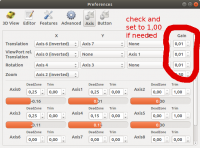
This seems to be a bit of an old build, that contains a known bug.
You have to set the gain for the axis manually to 1,00, as the default
gain is 0,01:
Unfortunately, this is also written to the preference file, meaning the
bug affects/transfer to other instances.
With Kind regards,
Michael Frey
Am 31.01.2018 um 23:29 schrieb Torsten Paul:
> To just give it a try, you could alternatively also check
> the AppImage:
> https://download.opensuse.org/repositories/home:/t-paul/AppImage/OpenSCAD-Branch-InputDriver-latest-x86_64.AppImage
This seems to be a bit of an old build, that contains a known bug.
You have to set the gain for the axis manually to 1,00, as the default
gain is 0,01:
Unfortunately, this is also written to the preference file, meaning the
bug affects/transfer to other instances.
With Kind regards,
Michael Frey
MF
Michael Frey
Fri, Feb 2, 2018 5:46 AM
Am 01.02.2018 um 19:34 schrieb sibjo:
2: None of the settings under "Axis Mapping" seems to have any effect so I'm
guessing the settings are stored somewhere else. I had a quick look in
SpaceNavInputDriver.cc but I don't want to mess with anything I don't
understand. Where do I lower the sensitivity?
The spaceNavInputDriver is not using the axis mapping feature.
The spaceNavInputDriver is directly effecting translation and rotation
of the view.
Therefor, I currently also do not know how to adjust the sensitivity
when using the spaceNavInputDriver.
3: This is related to number 2 - I did a quick test in Blender with the
SpaceNav deamon installed. Any chance I can configure SpaceNav to work the
same way in OpenSCAD? (move the camera, not the object)
When using the spaceNavInputDriver: No.
When using other drivers that are using our Axis Mapping: Sure.
I used to use the 3D mouse for openscad with the HidAPI Driver, but
starting OpenSCAD with sudo just to use the HidAPI driver really is not
a good solution. (the Linux HidApi Driver is more meant for developers,
so that we do not need to cross build the windows version.)
I did try the AppImage as well before compiling but none of the checkboxes
for DBus Joystick SpaceNav etc showed up.
The AppImage version is a bit old and dated.
"Back in those days" all drivers that where compiled, where always enabled.
The checkboxes to enable/disable specific drivers are pretty recent
additions.
With Kind regards,
Michael Frey
Am 01.02.2018 um 19:34 schrieb sibjo:
> 2: None of the settings under "Axis Mapping" seems to have any effect so I'm
> guessing the settings are stored somewhere else. I had a quick look in
> SpaceNavInputDriver.cc but I don't want to mess with anything I don't
> understand. Where do I lower the sensitivity?
The spaceNavInputDriver is not using the axis mapping feature.
The spaceNavInputDriver is directly effecting translation and rotation
of the view.
Therefor, I currently also do not know how to adjust the sensitivity
when using the spaceNavInputDriver.
> 3: This is related to number 2 - I did a quick test in Blender with the
> SpaceNav deamon installed. Any chance I can configure SpaceNav to work the
> same way in OpenSCAD? (move the camera, not the object)
When using the spaceNavInputDriver: No.
When using other drivers that are using our Axis Mapping: Sure.
I used to use the 3D mouse for openscad with the HidAPI Driver, but
starting OpenSCAD with sudo just to use the HidAPI driver really is not
a good solution. (the Linux HidApi Driver is more meant for developers,
so that we do not need to cross build the windows version.)
> I did try the AppImage as well before compiling but none of the checkboxes
> for DBus Joystick SpaceNav etc showed up.
The AppImage version is a bit old and dated.
"Back in those days" all drivers that where compiled, where always enabled.
The checkboxes to enable/disable specific drivers are pretty recent
additions.
With Kind regards,
Michael Frey
S
sibjo
Fri, Feb 2, 2018 6:48 PM
Thanks for your help guys!
Now I'm finally getting somewhere :)
I first tried to change some privileges but after a while I just searched
and deleted everything related to OpenSCAD and recompiled it and now the
settings work without being root.
Are the axis indicators moving? I had to restart spacenavd
at some point. It might not be possible to connect to spacenavd
if another application is using it (or another instance of
OpenSCAD).
It's a little strange because I can use the SpaceMouse to move (however it's
crazy sensitive) but when I'm in preferences the axis indicators are not
moving. Axis mapping settings don't change anything.
When using other drivers that are using our Axis Mapping: Sure.
I used to use the 3D mouse for openscad with the HidAPI Driver, but
starting OpenSCAD with sudo just to >use the HidAPI driver really is not a
good solution. (the Linux HidApi Driver is more meant for developers, >so
that we do not need to cross build the windows version.)
Good news then! I agree with you on running OpenSCAD as root is a bit of a
PITA but I tried HidAPI anyway. The axis indicators are moving with HidAPI
and the setting for axis mapping actually works! Well, almost... I got it to
work kind of like I want except that the "ViewPort rel.
Translation"-settings doesn't work at all which is sad because I'm almost
getting there.
About the Buttons:
Maybe those are not handled by spacenavd, or we need to
do something else to support them. This is tricky to solve
without access to the hardware. Maybe we can try some
debugging later once the main features are working.
After recompiling I got some strange news: no more highlights at all. No
matter what drivers I have activated I'm not getting any response from any
button anymore. weird..
/ Simon
--
Sent from: http://forum.openscad.org/
Thanks for your help guys!
Now I'm finally getting somewhere :)
I first tried to change some privileges but after a while I just searched
and deleted everything related to OpenSCAD and recompiled it and now the
settings work without being root.
>Are the axis indicators moving? I had to restart spacenavd
>at some point. It might not be possible to connect to spacenavd
>if another application is using it (or another instance of
>OpenSCAD).
It's a little strange because I can use the SpaceMouse to move (however it's
crazy sensitive) but when I'm in preferences the axis indicators are not
moving. Axis mapping settings don't change anything.
>When using other drivers that are using our Axis Mapping: Sure.
>I used to use the 3D mouse for openscad with the HidAPI Driver, but
starting OpenSCAD with sudo just to >use the HidAPI driver really is not a
good solution. (the Linux HidApi Driver is more meant for developers, >so
that we do not need to cross build the windows version.)
Good news then! I agree with you on running OpenSCAD as root is a bit of a
PITA but I tried HidAPI anyway. The axis indicators are moving with HidAPI
and the setting for axis mapping actually works! Well, almost... I got it to
work kind of like I want except that the "ViewPort rel.
Translation"-settings doesn't work at all which is sad because I'm almost
getting there.
About the Buttons:
>Maybe those are not handled by spacenavd, or we need to
>do something else to support them. This is tricky to solve
>without access to the hardware. Maybe we can try some
>debugging later once the main features are working.
After recompiling I got some strange news: no more highlights at all. No
matter what drivers I have activated I'm not getting any response from any
button anymore. weird..
/ Simon
--
Sent from: http://forum.openscad.org/
TP
Torsten Paul
Fri, Feb 2, 2018 7:46 PM
On 02/02/2018 06:30 AM, Michael Frey wrote:
This seems to be a bit of an old build, that contains a known bug.
Oh, indeed. I only checked the build date. But the build server did
not fetch new source. I force a rebuild...
ciao,
Torsten.
On 02/02/2018 06:30 AM, Michael Frey wrote:
> This seems to be a bit of an old build, that contains a known bug.
>
Oh, indeed. I only checked the build date. But the build server did
not fetch new source. I force a rebuild...
ciao,
Torsten.
MF
Michael Frey
Fri, Feb 2, 2018 9:23 PM
Am 02.02.2018 um 19:48 schrieb sibjo:
Thanks for your help guys!
Now I'm finally getting somewhere :)
You are very welcome.
Getting feedback is very valuable, especially as I mainly develop using
a Joystick with the Joystick driver under linux.
I first tried to change some privileges but after a while I just searched
and deleted everything related to OpenSCAD and recompiled it and now the
settings work without being root.
Are the axis indicators moving? I had to restart spacenavd
at some point. It might not be possible to connect to spacenavd
if another application is using it (or another instance of
OpenSCAD).
It's a little strange because I can use the SpaceMouse to move (however it's
crazy sensitive) but when I'm in preferences the axis indicators are not
moving. Axis mapping settings don't change anything.
The SpaceNavDriver is ignoring the settings. The SpaceNavDriver is
directly affecting the ViewPort.
Meaning: When you are using the SpaceNavDriver, the axis mapping has no
effect and the axis indicators have no function.
(I do not know whether this is a feature, a bug or an artifact from the
early development phase)
Good news then! I agree with you on running OpenSCAD as root is a bit
of a
PITA but I tried HidAPI anyway. The axis indicators are moving with HidAPI
and the setting for axis mapping actually works! Well, almost... I got it to
work kind of like I want except that the "ViewPort rel.
Translation"-settings doesn't work at all which is sad because I'm almost
getting there.
Could you please be more specific? Maybe we need yet an other kind of
translation.
The feature works for my use case (left thumbstick of a XBox360
Controller controlling the camera). I have one axis of the stick mapped
to ViewPort rel. Translation X and the other to Z.
ViewPort rel. Translation on Y has no effect when you are in orthogonal
view ().
When you are in perspective view (), the effect of "ViewPort rel.
Translation on Y" is similarly to zooming, but in a very strange way.
That the two relevant axis are X and Z (and not as a user might think X
and Y) has to do with the internal working of openSCAD.
Maybe we should hide the option to configure the "ViewPort rel.
Translation on Y".
(but as a developer, I have the tendency to leave in any potentially
useful feature - "ViewPort rel. Translation on Y" combined with the Zoom
can be used for a vertigo effect, which can be used to precisely match
the perspective of a photo with a render)
With Kind regards,
Michael Frey
Am 02.02.2018 um 19:48 schrieb sibjo:
> Thanks for your help guys!
>
> Now I'm finally getting somewhere :)
You are very welcome.
Getting feedback is very valuable, especially as I mainly develop using
a Joystick with the Joystick driver under linux.
> I first tried to change some privileges but after a while I just searched
> and deleted everything related to OpenSCAD and recompiled it and now the
> settings work without being root.
>
>> Are the axis indicators moving? I had to restart spacenavd
>> at some point. It might not be possible to connect to spacenavd
>> if another application is using it (or another instance of
>> OpenSCAD).
> It's a little strange because I can use the SpaceMouse to move (however it's
> crazy sensitive) but when I'm in preferences the axis indicators are not
> moving. Axis mapping settings don't change anything.
The SpaceNavDriver is ignoring the settings. The SpaceNavDriver is
directly affecting the ViewPort.
Meaning: When you are using the SpaceNavDriver, the axis mapping has no
effect and the axis indicators have no function.
(I do not know whether this is a feature, a bug or an artifact from the
early development phase)
> Good news then! I agree with you on running OpenSCAD as root is a bit
> of a
> PITA but I tried HidAPI anyway. The axis indicators are moving with HidAPI
> and the setting for axis mapping actually works! Well, almost... I got it to
> work kind of like I want except that the "ViewPort rel.
> Translation"-settings doesn't work at all which is sad because I'm almost
> getting there.
Could you please be more specific? Maybe we need yet an other kind of
translation.
The feature works for my use case (left thumbstick of a XBox360
Controller controlling the camera). I have one axis of the stick mapped
to ViewPort rel. Translation X and the other to Z.
ViewPort rel. Translation on Y has no effect when you are in orthogonal
view ().
When you are in perspective view (), the effect of "ViewPort rel.
Translation on Y" is similarly to zooming, but in a very strange way.
That the two relevant axis are X and Z (and not as a user might think X
and Y) has to do with the internal working of openSCAD.
Maybe we should hide the option to configure the "ViewPort rel.
Translation on Y".
(but as a developer, I have the tendency to leave in any potentially
useful feature - "ViewPort rel. Translation on Y" combined with the Zoom
can be used for a vertigo effect, which can be used to precisely match
the perspective of a photo with a render)
With Kind regards,
Michael Frey