Re: [OpenSCAD] Rotate relative, or make spokes

The issue here doesn't appear to be the rotation itself, but the
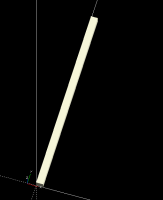
position of the cubes. A cube is created with it's lower-left corner at
the origin:
When this is rotated, the corner is rotated, and when you have several
of them, it looks "twisted."
What you probably want is to center the cube on the X axis only.
Currently, this must be done by manually translating the object by half
that dimension. In addition, you're having it extend along the Y axis.
To line it up with the circle polygon, it'll be easier if you extend it
along the X axis.
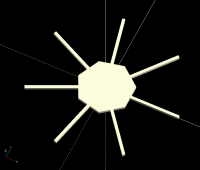
To create the center polygon, you can use a cylinder with the $fn
parameter to control the number of sides. All put together, you get
something like this:
And here's the updated code, with comments, for your modification.
NoArm = 7; // The number of arms / sides of the polygon
ArmWide = 3; // The width (short side) of the arms
ArmHigh = 3; // The height (along the Z axis) of the arms
ArmLong = 80; // The radial length of the arms
ArmsOnEdges = true; // Should the arms intersect the edge or vertices of
the polygon
CircRadius = 30; // The radius of the polygon
union() // Union isn't strictly necessary because everything at the top
level is implicitly unioned
{
for (i=[1:NoArm])
rotate([0,0,360/NoArm*i]) // Rotate the arm after it's centered
translate([0,-ArmWide/2,0]) // Center the arm around the X axis
cube([ArmLong, ArmWide, ArmHigh]); // Make the arm extend
along the X axis
rotate(ArmsOnEdges ? 180/NoArm : 0) // Rotate the polygon to it's
side if so desired
cylinder(h=ArmHigh, r=CircRadius, $fn=NoArm); // The polygon,
as a cylinder with a particular number of sides
}
Best,
~ Yona