Fwd: 3D to 2D

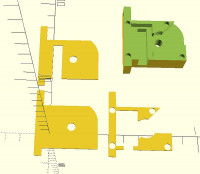
Thanks, Projection does it, in as much as can produce separate 'slices'
through the object. other than offsetting the slices slightly, can they
be combined into one dxf file?
module test(){
union(){
cube([40,40,20]);
cube ([20,20,30]);
}
}
//test();
module bot(){
projection() test();
}
module upper(){
projection(cut=true) translate([0,0,-30])test();
}
difference(){
bot();
translate([ 0.0001,0.0001,0]) upper();
}
On 17/02/2021 16:38, nop head wrote:
Use projection() to convert 3D to 2D.
On Wed, 17 Feb 2021 at 16:30, nbkhwjm <ke6rwj@gmail.com
mailto:ke6rwj@gmail.com> wrote:
 if you drop the Z parameter on the translates, and change Cube to
 Square it will be 2D, im not sure how that works for you since you
 need depth of cut...  also when you render it, its distinctly
 different looking..  like the attached picture...


 ------------------------------------------------------------------------
 Sent from the OpenSCAD mailing list archive
 <http://forum.openscad.org/> at Nabble.com.
 _______________________________________________
 OpenSCAD mailing list
 Discuss@lists.openscad.org <mailto:Discuss@lists.openscad.org>
 http://lists.openscad.org/mailman/listinfo/discuss_lists.openscad.org
 <http://lists.openscad.org/mailman/listinfo/discuss_lists.openscad.org>
OpenSCAD mailing list
Discuss@lists.openscad.org
http://lists.openscad.org/mailman/listinfo/discuss_lists.openscad.org
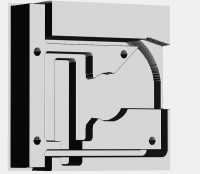
Well, I seem to have it working fine. I've produced the g-code for
milling the original part. using a 2mm slot drill for all of it - I
won't be machining this, having tested the concept in fdm printing from
an stl file.
It is 3 separate layers, but where pocketing occurs, extra boundaries
had to be added. This was easily done in my cad program. I imported the
dxf file from openscad, each 'layer' separated from the the others. I
edited the drawing where required, added extra boundaries, saved it as
dxf again. Then importing it to my deskcnc program, it was
straightforward to align the three layers on the origin, and
pocket/profile/drill the workpiece. If I had bothered, I could have
easily replaced the segmented curved corner with an arc in my cad
program, but for me, this g-code is good enough for a proof of concept.
Not sure I'll remember this process if I ever need to use it in anger.
On 17/02/2021 22:00, Ray West wrote:
Thanks, Projection does it, in as much as can produce separate
'slices' through the object. other than offsetting the slices
slightly, can they be combined into one dxf file?
module test(){
union(){
cube([40,40,20]);
cube ([20,20,30]);
}
}
//test();
module bot(){
projection() test();
}
module upper(){
projection(cut=true) translate([0,0,-30])test();
}
difference(){
bot();
translate([ 0.0001,0.0001,0]) upper();
}
On 17/02/2021 16:38, nop head wrote:
Use projection() to convert 3D to 2D.
On Wed, 17 Feb 2021 at 16:30, nbkhwjm <ke6rwj@gmail.com
mailto:ke6rwj@gmail.com> wrote:
 if you drop the Z parameter on the translates, and change Cube to
 Square it will be 2D, im not sure how that works for you since
 you need depth of cut...  also when you render it, its distinctly
 different looking..  like the attached picture...


 ------------------------------------------------------------------------
 Sent from the OpenSCAD mailing list archive
 <http://forum.openscad.org/> at Nabble.com.
 _______________________________________________
 OpenSCAD mailing list
 Discuss@lists.openscad.org <mailto:Discuss@lists.openscad.org>
 http://lists.openscad.org/mailman/listinfo/discuss_lists.openscad.org
 <http://lists.openscad.org/mailman/listinfo/discuss_lists.openscad.org>
OpenSCAD mailing list
Discuss@lists.openscad.org
http://lists.openscad.org/mailman/listinfo/discuss_lists.openscad.org