

Default color?

What is the default color that OpenSCAD uses for previews? That is,
if I want to reproduce that color with a color() statement, what
argument should I use?

On 19.03.22 17:44, Adrian Mariano wrote:
What is the default color that OpenSCAD uses for previews? That is,
if I want to reproduce that color with a color() statement, what
argument should I use?
In general, you can't as that depends on the color scheme and that's
not possible to read.
For the default color scheme it's:
color("#f9d72c")
https://github.com/openscad/openscad/blob/master/src/glview/ColorMap.cc#L44
ciao,
Torsten.

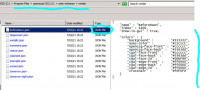
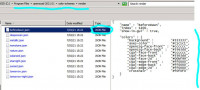
In case you don't know, the others schemes are in JSON files under "program files" & equivalent &
you can create your own:
-----Original Message-----
From: Torsten Paul [mailto:Torsten.Paul@gmx.de]
Sent: Sun, 20 Mar 2022 03:52
Subject: [OpenSCAD] Re: Default color?
On 19.03.22 17:44, Adrian Mariano wrote:
What is the default color that OpenSCAD uses for previews? That is,
if I want to reproduce that color with a color() statement, what
argument should I use?
In general, you can't as that depends on the color scheme and that's
not possible to read.
For the default color scheme it's:
color("#f9d72c")
ciao,
Torsten.
OpenSCAD mailing list
To unsubscribe send an email to discuss-leave@lists.openscad.org
--
This email has been checked for viruses by AVG.
https://www.avg.com
It seems kind of unlikely that someone would edit the color scheme to
change the default colors, so it's presumably reasonably safe to assume
that the default color scheme is in force. But if it's not, if someone
does edit the color scheme, then there's no way to color something with the
default color? It seems like there ought to be a color called "default" or
somesuch that would produce this color.
On Sat, Mar 19, 2022 at 7:08 PM MichaelAtOz oz.at.michael@gmail.com wrote:
In case you don't know, the others schemes are in JSON files under
"program files" & equivalent & you can create your own:
-----Original Message-----
From: Torsten Paul [mailto:Torsten.Paul@gmx.de]
Sent: Sun, 20 Mar 2022 03:52
Subject: [OpenSCAD] Re: Default color?
On 19.03.22 17:44, Adrian Mariano wrote:
What is the default color that OpenSCAD uses for previews? That is,
if I want to reproduce that color with a color() statement, what
argument should I use?
In general, you can't as that depends on the color scheme and that's
not possible to read.
For the default color scheme it's:
color("#f9d72c")
/blob/master/src/glview/ColorMap.cc#L44
ciao,
Torsten.
OpenSCAD mailing list
To unsubscribe send an email to discuss-leave@lists.openscad.org
http://www.avg.com/email-signature?utm_medium=email&utm_source=link&utm_campaign=sig-email&utm_content=emailclient Virus-free.
www.avg.com
http://www.avg.com/email-signature?utm_medium=email&utm_source=link&utm_campaign=sig-email&utm_content=emailclient
<#m_-3257495524339344410_DAB4FAD8-2DD7-40BB-A1B8-4E2AA1F9FDF2>
OpenSCAD mailing list
To unsubscribe send an email to discuss-leave@lists.openscad.org
On 20.03.22 00:19, Adrian Mariano wrote:
so it's presumably reasonably safe to assume that the
default color scheme is in force.
Nope. I'm always using the Tomorrow styles for both rendering and
editor. From the screenshots attached to github issues and posts on
twitter, it's safe to assume there's at least a good percentage of
people switching to other color schemes than the default Cornfield.
ciao,
Torsten.
How do you even learn this is possible other than by asking here?
Read the source?
The library function I'm writing---color an object but not its
children---requires a way to produce the default color. I guess I can
make a $default_color variable so users can fix it if they're using a
different scheme, but it seems like there ought to be a way to produce
the default color.
On Sat, Mar 19, 2022 at 8:52 PM Torsten Paul Torsten.Paul@gmx.de wrote:
On 20.03.22 00:19, Adrian Mariano wrote:
so it's presumably reasonably safe to assume that the
default color scheme is in force.
Nope. I'm always using the Tomorrow styles for both rendering and
editor. From the screenshots attached to github issues and posts on
twitter, it's safe to assume there's at least a good percentage of
people switching to other color schemes than the default Cornfield.
ciao,
Torsten.
OpenSCAD mailing list
To unsubscribe send an email to discuss-leave@lists.openscad.org
On 20.03.22 02:09, Adrian Mariano wrote:
How do you even learn this is possible other than by asking here?
Read the source?
Edit -> Preferences -> 3D View
ciao,
Torsten.

The colour scheme is set in preferences. I have never read the source code
to know that. And I don't use the default, I use Nature.
On Sun, 20 Mar 2022 at 01:10, Adrian Mariano avm4@cornell.edu wrote:
How do you even learn this is possible other than by asking here?
Read the source?
The library function I'm writing---color an object but not its
children---requires a way to produce the default color. I guess I can
make a $default_color variable so users can fix it if they're using a
different scheme, but it seems like there ought to be a way to produce
the default color.
On Sat, Mar 19, 2022 at 8:52 PM Torsten Paul Torsten.Paul@gmx.de wrote:
On 20.03.22 00:19, Adrian Mariano wrote:
so it's presumably reasonably safe to assume that the
default color scheme is in force.
Nope. I'm always using the Tomorrow styles for both rendering and
editor. From the screenshots attached to github issues and posts on
twitter, it's safe to assume there's at least a good percentage of
people switching to other color schemes than the default Cornfield.
ciao,
Torsten.
OpenSCAD mailing list
To unsubscribe send an email to discuss-leave@lists.openscad.org
OpenSCAD mailing list
To unsubscribe send an email to discuss-leave@lists.openscad.org
Hmm. I see. This means that a user wouldn't have a clue how to set a
$default_color variable. So I need to have the user specify the
color scheme in use and have a lookup table.
On Sat, Mar 19, 2022 at 9:12 PM Torsten Paul Torsten.Paul@gmx.de wrote:
On 20.03.22 02:09, Adrian Mariano wrote:
How do you even learn this is possible other than by asking here?
Read the source?
Edit -> Preferences -> 3D View
ciao,
Torsten.
OpenSCAD mailing list
To unsubscribe send an email to discuss-leave@lists.openscad.org
How do you even learn this is possible other than by asking here?
https://en.wikibooks.org/wiki/OpenSCAD_User_Manual/The_OpenSCAD_User_Interface
There are predefined color schemes that can be selected in the Preferences dialog.
https://en.wikibooks.org/wiki/OpenSCAD_User_Manual/Using_OpenSCAD_in_a_command_line_environment
--colorscheme arg =colorscheme: *Cornfield | Metallic | Sunset |
                          Starnight | BeforeDawn | Nature | DeepOcean |

                          Solarized | Tomorrow | Tomorrow Night | Monotone
https://en.wikibooks.org/wiki/OpenSCAD_User_Manual/Print_version#Chapter_7_--_Path_locations
-
render color schemes: [ResourcesPath]/color-schemes/render
-
editor color schemes: [ResourcesPath]/color-schemes/editor
-----Original Message-----
From: Adrian Mariano [mailto:avm4@cornell.edu]
Sent: Sun, 20 Mar 2022 12:10
To: OpenSCAD general discussion
Subject: [OpenSCAD] Re: Default colour?
How do you even learn this is possible other than by asking here?
Read the source?
The library function I'm writing---color an object but not its
children---requires a way to produce the default color. I guess I can
make a $default_color variable so users can fix it if they're using a
different scheme, but it seems like there ought to be a way to produce
the default color.
On Sat, Mar 19, 2022 at 8:52 PM Torsten Paul Torsten.Paul@gmx.de wrote:
On 20.03.22 00:19, Adrian Mariano wrote:
so it's presumably reasonably safe to assume that the
default color scheme is in force.
Nope. I'm always using the Tomorrow styles for both rendering and
editor. From the screenshots attached to github issues and posts on
twitter, it's safe to assume there's at least a good percentage of
people switching to other color schemes than the default Cornfield.
ciao,
Torsten.
OpenSCAD mailing list
To unsubscribe send an email to discuss-leave@lists.openscad.org
OpenSCAD mailing list
To unsubscribe send an email to discuss-leave@lists.openscad.org
--
This email has been checked for viruses by AVG.
https://www.avg.com