OpenSCAD programming of Bézier curves and surfaces

Hi all,
My message is also addressed to "Ronaldo" who scratched my post to reframe
some aspects of my personal OpenSCAD review.
"Ronaldo", you were right to do so and I thank you for it. Of course,
without experience with this software, I didn't pretend to make my code a
benchmark example. I'm not an acrobat in programming and mathematics ! ...
I didn't think I would go any further than the two experiences I showed in
my contact topic, but I changed my mind to see what you told me a little
better.
- Ok for the "hull ()": it does not interpolate linearly for the reasons
that you write and that I understand. So I do with ! ... - For the coding of the functions, I searched without success for a
documentation explaining all the programming tips. So So I drew
informations on the web and follows me inspired by doing a lot of tests. The
compilation caused me a lot of misery ! ... - I therefore tried to do a little better by treating this time the "Bézier
surfaces" aspect by only resuming the modeling of the engine cowls of
the air inlets of the "Fournier RF 4 D" aircraft since the entire
modeling was already done, unfortunately with my dubious programming.
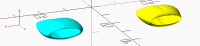
[image: image.png]
I attach the program code. It is autonomous and consists of :
-
the "formule_Bezier_3D ()" function which calculates a point on the
surface, -
the "Bezier_3D ()" module which draws the surface,
-
the code that defines the tiles of the surface from a single tile :
-
for a half cover (turquoise) followed by a symmetry,
- a quarter cover (yellow) followed by two symmetries.
1)° - The function "formule_Bezier_3D( )" :
/********************************************************************************************************************************
- ROUSSET Jean-Pierre : févier 2021
---===============================
La fonction "formule_Bezier_3D" exprime la formule de calcul d'une des
coordonnée rendue spécifie par l'index Appel : ------- tx = ...
; une valeur réelle comprise entre 0. et 1. du paramètre de
balayage en x ty = ... ; une valeur réelle
comprise entre 0. et 1. du paramètre de balayage en y index =
0 ou 1 ou 2 ; = 0 : retourne l'abscisse "x"
= 1 ; retourne l'ordonnée "y"
= 2 ; retourne la cote "z"
pc = [ [P00, P01, P02, P03] 1ère ligne de 4 coordonnées x ou y ou z
des points de contrôle de la surface , [P10, P11, P12,
P13] 2ème ligne de 4 coordonnées x ou y ou z des points de contrôle de
la surface , [P20, P21, P22, P23] 3ème ligne de 4
coordonnées x ou y ou z des points de contrôle de la surface
, [P30, P31, P32, P33] 4ème ligne de 4 coordonnées x ou y ou z des
points de contrôle de la surface ] ;
x ou y ou z = formule_Bezier_3D(tx, ty, index, pc) ;
où chaque chaque point de contrôle "pc"
pcij = [ [xpc0, xpc1, xpc2, xpc3], [ypc0, ypc1, ypc2, ypc3], [zpc0, zpc1,
zpc2, zpc3] ] --
- - -- | -1 3 -3 1 | | P00, P01, P02, P03 |
| -1 3 -3 1 | | ty^3 | P(tx,ty) = | tx^3 tx^2 tx 1 | * |
3 -6 3 0 | * | P10, P11, P12, P13 | * | 3 -6 3 0 | * | ty^2
| - - -- | -3 3 0 0 | | P20,
P21, P22, P23 | | -3 3 0 0 | | ty |
| 1 0 0 0 | | P30, P31, P32, P33 | | 1 0 0
0 | | 1 | --
--**************************************************************************************************************************/function
formule_Bezier_3D( tx, ty, index, pc) = let ( Tx = [ txtxtx, txtx, tx,
1.0 ] , Ty = [ tytyty, tyty, ty, 1.0 ] , mat_coef = [ [ -1,
3, -3, 1 ] , [ 3, -6, 3, 0 ] , [
-3, 3, 0, 0 ] , [ 1, 0, 0, 0 ]
] , extract = [ [pc[ 0][index] , pc[ 1][index] , pc[ 2][index] , pc[
3][index]] , [pc[ 4][index] , pc[ 5][index] , pc[
6][index] , pc[ 7][index]] , [pc[ 8][index] , pc[
9][index] , pc[10][index] , pc[11][index]] ,
[pc[12][index] , pc[13][index] , pc[14][index] , pc[15][index]]
] ) [ Tx * [ [ -1, 3, -3, 1 ] , [ 3, -6, 3, 0 ]
// !!!! ==> Si on n'explicite pas la matrice en la remplaçant
par "mat_coef" ..... , [ -3, 3, 0, 0 ] //
la compilation sort une erreur !!!.... , [ 1, 0, 0, 0 ]
] * extract * [ [ -1, 3, -3, 1 ]
, [ 3, -6, 3, 0 ]
, [ -3, 3, 0, 0 ] , [ 1,
0, 0, 0 ] ] *
Ty ];
In addition to looking for the syntax to code the function, I complained
about the error message given by the compiler which refused to specify the
name of the matrix "mat_coef" in the result. The error disappeared by
explaining it twice. ! ...
Thanks to the "let ()" instruction, I discovered the possibility of
programming inside a function. The function returns a matrix of one scalar. I
failed to return the scalar instead of the matrix (syntax errors) ! ...
The approach is surprising but it fuels another language ! ...
2)° - the module " Bezier_3D ()" :
/********************************************************************************************************************************
- ROUSSET Jean-Pierre - févvier 2021
Le module "Bezier_3D" génère un carreau de surface réglée par &-
points de contrôle dans l'espace.Séquence d'appel :------------------
Bezier_3D( rayon, tpasx, tpasy, matrice) ;
rayon = rayon de la sphère qui matérialise un point du carreau, txpas
= valeur comprise entre 0 et 1 du pas de balayage pour le domaine des
abscisses, typas = valeur comprise entre 0 et 1 du pas de balayage pour
le domaine des ordonnées, matrice = matrice des coordonnées des 16 points
de contrôle de lasurface 1ère ligne de 4 coordonnées x ou y ou
z des points de contrôle de la surface 2ème ligne de 4
coordonnées x ou y ou z des points de contrôle de la surface
3ème ligne de 4 coordonnées x ou y ou z des points de contrôle de la
surface 4ème ligne de 4 coordonnées x ou y ou z des points de
contrôle de la
surface*********************************************************************************************************************************/module
Bezier_3D( rayon, txpas, typas, matrice) { for (tx = [0
: txpas : 1.0001-txpas]) { //**** On balaye maintenant le long des
ordonnées : for (ty = [0 : typas : 1.001-typas]) { x00 =
formule_Bezier_3D( tx , ty , 0, matrice ) ; y00 =
formule_Bezier_3D( tx , ty , 1, matrice ) ; z00 =
formule_Bezier_3D( tx , ty , 2, matrice ) ; x01 =
formule_Bezier_3D( tx+txpas, ty , 0, matrice ) ; y01 =
formule_Bezier_3D( tx+txpas, ty , 1, matrice ) ; z01 =
formule_Bezier_3D( tx+txpas, ty , 2, matrice ) ; x10 =
formule_Bezier_3D( tx , ty+typas, 0, matrice ) ; y10 =
formule_Bezier_3D( tx , ty+typas, 1, matrice ) ; z10 =
formule_Bezier_3D( tx , ty+typas, 2, matrice ) ; x11 =
formule_Bezier_3D( tx+txpas, ty+typas, 0, matrice ) ; y11 =
formule_Bezier_3D( tx+txpas, ty+typas, 1, matrice ) ; z11 =
formule_Bezier_3D( tx+txpas, ty+typas, 2, matrice ) ; hull() {
translate([x00[0], y00[0], z00[0]]) sphere(r=rayon) ;
translate([x01[0], y01[0], z01[0]]) sphere(r=rayon) ;
translate([x10[0], y10[0], z10[0]]) sphere(r=rayon) ;
translate([x11[0], y11[0], z11[0]]) sphere(r=rayon) ; } } // => Fin
du for (ty = (0 : typas : 1.001-typas]) } // => Fin du for (tx = [0 :
txpas : 1.0001-txpas])} // => fin du module "Bezier_3D"*
Nothing more to say.
2)° - the body of the program :
/********************************************************************************************************************************
Début du traitement de la
maquette
************************************************************************************************************************///
Génération de tout le capot à partir du quart du capot suivi de deux
symétries : color([1,1,0]) translate([-20, 0, 0])
// pour décaler le
capot { translate([0,-100,-22.2]) Bezier_3D( rayon, txpas,
typas ,
quart_entree_air_moteur_gauche_superieure_x_000p0_000p0_x_000p0_006p0_y_109p0_109p0_y_124p0_124p0)
; translate([0,-100, 22.2]) mirror([0,0,1])
Bezier_3D( rayon, txpas, typas ,
quart_entree_air_moteur_gauche_superieure_x_000p0_000p0_x_000p0_006p0_y_109p0_109p0_y_124p0_124p0)
; mirror([1,0,0]) { translate([0,-100,-22.2])
Bezier_3D( rayon, txpas, typas ,
quart_entree_air_moteur_gauche_superieure_x_000p0_000p0_x_000p0_006p0_y_109p0_109p0_y_124p0_124p0)
; translate([0,-100, 22.2]) mirror([0,0,1])
Bezier_3D( rayon, txpas, typas ,
quart_entree_air_moteur_gauche_superieure_x_000p0_000p0_x_000p0_006p0_y_109p0_109p0_y_124p0_124p0)
; } } // Génération de tout le capot à partir de la moitié
du capot (un seul carreau) suivi d'une symétries :color([0,1,1])
translate([20,0,0]) { translate([0,-100,-22.2]) Bezier_3D( rayon,
txpas, typas ,
entree_air_moteur_gauche_x_000p0_000p0_x_000p0_006p0_y_109p0_109p0_y_124p0_124p0)
; mirror([1,0,0]) translate([0,-100,-22.2]) Bezier_3D(
rayon, txpas, typas ,
entree_air_moteur_gauche_x_000p0_000p0_x_000p0_006p0_y_109p0_109p0_y_124p0_124p0)
; }
In relation to the data, the two covers have been brought back near the
origin of the axes to see them better.
- I did introduce the use of the "Custumer". With the documentation,
it's very simple. However, I do not use it because, at each modification of
a single element, the calculation is restarted which is a little painful if
we have a succession of modifications to make. I prefer to modify directly
the flags of the program - Bézier surfaces allow an infinity of possibilities but remain however
delicate to manipulate because, among the 16 control points, 12 of them can
be easily determined, but the 4 others (P11, P12, P21 and P22) make it
possible to gauge the convexity of the surface which required some trial
and error, hence some imperfections. - Bézier surfaces of order 3 seem to me the most interesting, they are
most often used in CAD, because 3 is the minimum order which allows
inflection points. The tangents to the 4 anchor points are independent.
Cordially.
Lou Papet
Hi all,
I apologize for failing to provide part of my program, the one that defines
the data. Here they are below.
Regards,
Lou Papet
//34567890123456789012345678901234567890123456789012345678901234567890123456789012345678901234567890123456789012345678901234567890/********************************************************************************************************************************
- Rousset Jean-Pierre janvier 2021
  | test des surfaces de Bézier |
      -------------------------------     Ce test avec les surfaces de
Bézier fait suite à celle que j'ai réalisée avec le code "Fournier RF4
D.scad" dans laquelle,bien que l'objectif fut atteint, la programmation fut
un peu égratignée dans le forum OpenSCAD à cause de ma mécompréhension
decertains acpects du logiciel. Je me propose donc d'essayer d'utiliser
OpenSCAD un peu mieux. Ce n'est pas un programme de CAO, plotôt un modeleur
dans salogique dont j'ai pu récupérer de la documentation, parfois fort
difficilement voire pas du tout. L'avion n'est pas remodélisé
entièrement puisque déjà fait, seul le capot_moteur des entrées
d'air-moteur(pas les sorties)qui m'st apparu plus significatif : -
une première modélisation traite un quart d'entrées d'air comme le sont les
4 capots dans la réaité (en jaune), - une deuxième modélisation
traite un demi-capot d'entrées d'air théorique en une seule passes ( en
turquoise).
---===============================Principe
de génération de surfaces de Bézier
:---------------------------------------------- Arbitairement, il est
préféré des surfaces de Bézier d'ordre 3 donc cubiques générées à partir de
16 points de contrôle pourtraiter un carreau à 4 côtés. Elles sont définies
par le système paramétrique qui, étant donné les deux paramètres "tx"de
balayage des abscisses et "ty" de balayage des ordonnées (tous deux
évoluant entre 0 et 1, bornes comprises calcule lescoordonées du point de
la surface. On a ainsi le système paramétrique suivant dans l'espace
avec l'appel à la fonction : /
| x(tx,ty) = formule_Bezier_3D(tx, ty, 0, pc)
< y(tx,tx) = formule_Bezier_3D(tx, ty, 1, pc)
| z(tx,ty) = formule_Bezier_3D(tx, ty, 2,
pc) \ ou la fonction effectue le calcul
matriciel des surfaces de Beziier :
-- - - -- | -1 3 -3 1 | | P01 P02
P03 P04 | | -1 3 -3 1 | | ty^3 | P(tx,ty) = | tx^3 tx^2 tx
1 | * | 3 -6 3 0 | * | P11 P12 P13 P14 | * | 3 -6 3 0 |
- | ty^2 | - - -- | -3 3 0 0 | |
P21 P22 P23 P24 | | -3 3 0 0 | | ty |
| 1 0 0 0 | | P31 P32 P33 P34 | | 1 0
0 0 | | 1 | --
-- -- -- -- -- -- --et où tous les
"Pij" representent les coordonnées des 16 points de
contrôle.********************************************************************************************************************************//
---=============================
Les pramètres pour l'utilisation du
"Custumizer"
---=============================///**
Configuration du modèle :// -------------------------/* [- La
configuration du modèle :] ///Rayon de la sphère matérialisant un point de
la surface comme marqueur rayon
= 0.050 ;//Pas de balayage des courbes
(entre 0 et 1, bornes comprises) => Attention aux temps de calcul !...
txpas = 0.10
; typas
= 0.10
;/
---=============================
Définition des points de contrôle des
surface
---=============================///
le plan YoZ est le plan de symétrie de l'avion et on
regarde l'avion de derrière/ [- Définition des points de contrôle des
différentes courbes utilisées : ]
/quart_entree_air_moteur_gauche_superieure_x_000p0_000p0_x_000p0_006p0_y_109p0_109p0_y_124p0_124p0
= [ [ 0.00, 109.00, 22.20],[ 2.00, 109.00, 22.20],[ 4.00,
109.00, 22.20],[ 5.00, 109.00, 22.20] // P00 -> P03 , [
0.00, 113.60, 26.20],[ 5.00, 113.60, 27.00],[ 10.60, 113.60,
25.00],[ 10.60, 113.60, 22.10] // P10 -> P13 , [ 0.00,
124.00, 26.00],[ 0.00, 124.00, 26.00],[ 5.00, 124.00, 27.00],[
6.00, 124.00, 22.20] // P20 -> P23 , [ 0.00, 124.00, 24.00],[
0.00, 124.00, 24.00],[ 6.00, 124.00, 24.00],[ 6.00, 124.00,
22.10] // P30 -> P33 ]
;entree_air_moteur_gauche_x_000p0_000p0_x_000p0_006p0_y_109p0_109p0_y_124p0_124p0
= [ [ 0.00, 109.00, 22.20],[ 6.60, 109.00, 22.20],[ 6.60,
109.00, 22.20],[ 0.00, 109.00, 22.20] // P00 -> P03 , [
0.00, 113.60, 26.20],[ 12.00, 113.60, 28.00],[ 12.00, 113.60,
20.00],[ 0.00, 113.60, 19.00] // P10 -> P13 , [ 0.00,
124.00, 25.20],[ 12.00, 124.00, 23.00],[ 12.00, 124.00, 20.00],[
0.00, 124.00, 18.20] // P20 -> P23 , [ 0.00, 124.00, 24.00],[
8.00, 124.00, 24.00],[ 8.00, 124.00, 20.40],[ 0.00, 124.00,
20.40] // P30 -> P33 ] ;
Le jeu. 4 févr. 2021 à 10:11, Jean-Pierre Rousset loupapetjpr@gmail.com a
écrit :
Hi all,
My message is also addressed to "Ronaldo" who scratched my post to
reframe some aspects of my personal OpenSCAD review.
"Ronaldo", you were right to do so and I thank you for it. Of course,
without experience with this software, I didn't pretend to make my code a
benchmark example. I'm not an acrobat in programming and mathematics ! ...
I didn't think I would go any further than the two experiences I showed in
my contact topic, but I changed my mind to see what you told me a little
better.
- Ok for the "hull ()": it does not interpolate linearly for the
reasons that you write and that I understand. So I do with ! ...
- For the coding of the functions, I searched without success for a
documentation explaining all the programming tips. So  So I drew
informations on the web and follows me inspired by doing a lot of
tests. The compilation caused me a lot of misery ! ...
- I therefore tried to do a little better by treating this time the "*Bézier
surfaces*" aspect by only resuming the modeling of the engine cowls of
the air inlets of the "*Fournier RF 4 D*" aircraft since the entire
modeling was already done, unfortunately with my dubious programming.
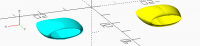
[image: image.png]
I attach the program code. It is autonomous and consists of :
- the "*formule_Bezier_3D ()*" function which calculates a point on
the surface,
- the "*Bezier_3D ()*" module which draws the surface,
- the code that defines the tiles of the surface from a single tile :


- for a half cover (turquoise) followed by a symmetry,
   - a quarter cover (yellow) followed by two symmetries.
1)° - The function "formule_Bezier_3D( )" :
/********************************************************************************************************************************
- ROUSSET Jean-Pierre : févier 2021
---===============================
La fonction "formule_Bezier_3D" exprime la formule de calcul d'une des
coordonnée rendue spécifie par l'index Appel : ------- tx = ...
; une valeur réelle comprise entre 0. et 1. du paramètre de
balayage en x ty = ... ; une valeur réelle
comprise entre 0. et 1. du paramètre de balayage en y index =
0 ou 1 ou 2 ; = 0 : retourne l'abscisse "x"
= 1 ; retourne l'ordonnée "y"
= 2 ; retourne la cote "z"
pc = [ [P00, P01, P02, P03] 1ère ligne de 4 coordonnées x ou y ou z
des points de contrôle de la surface , [P10, P11, P12,
P13] 2ème ligne de 4 coordonnées x ou y ou z des points de contrôle de
la surface , [P20, P21, P22, P23] 3ème ligne de 4
coordonnées x ou y ou z des points de contrôle de la surface
, [P30, P31, P32, P33] 4ème ligne de 4 coordonnées x ou y ou z des
points de contrôle de la surface ] ;
x ou y ou z = formule_Bezier_3D(tx, ty, index, pc) ;
où chaque chaque point de contrôle "pc"
pcij = [ [xpc0, xpc1, xpc2, xpc3], [ypc0, ypc1, ypc2, ypc3], [zpc0, zpc1,
zpc2, zpc3] ] --
- - -- | -1 3 -3 1 | | P00, P01, P02, P03 |
| -1 3 -3 1 | | ty^3 | P(tx,ty) = | tx^3 tx^2 tx 1 | * |
3 -6 3 0 | * | P10, P11, P12, P13 | * | 3 -6 3 0 | * | ty^2
| - - -- | -3 3 0 0 | | P20,
P21, P22, P23 | | -3 3 0 0 | | ty |
| 1 0 0 0 | | P30, P31, P32, P33 | | 1 0 0
0 | | 1 | --
--**************************************************************************************************************************/function
formule_Bezier_3D( tx, ty, index, pc) = let ( Tx = [ txtxtx, txtx, tx,
1.0 ] , Ty = [ tytyty, tyty, ty, 1.0 ] , mat_coef = [ [ -1,
3, -3, 1 ] , [ 3, -6, 3, 0 ] , [
-3, 3, 0, 0 ] , [ 1, 0, 0, 0 ]
] , extract = [ [pc[ 0][index] , pc[ 1][index] , pc[ 2][index] , pc[
3][index]] , [pc[ 4][index] , pc[ 5][index] , pc[
6][index] , pc[ 7][index]] , [pc[ 8][index] , pc[
9][index] , pc[10][index] , pc[11][index]] ,
[pc[12][index] , pc[13][index] , pc[14][index] , pc[15][index]]
] ) [ Tx * [ [ -1, 3, -3, 1 ] , [ 3, -6, 3, 0 ]
// !!!! ==> Si on n'explicite pas la matrice en la remplaçant
par "mat_coef" ..... , [ -3, 3, 0, 0 ] //
la compilation sort une erreur !!!.... , [ 1, 0, 0, 0 ]
] * extract * [ [ -1, 3, -3, 1 ]
, [ 3, -6, 3, 0 ]
, [ -3, 3, 0, 0 ] , [ 1,
0, 0, 0 ] ] *
Ty ];
In addition to looking for the syntax to code the function, I complained
about the error message given by the compiler which refused to specify the
name of the matrix "mat_coef" in the result. The error disappeared by
explaining it twice. ! ...
Thanks to the "let ()" instruction, I discovered the possibility of
programming inside a function. The function returns a matrix of one
scalar. I failed to return the scalar instead of the matrix (syntax
errors) ! ...
The approach is surprising but it fuels another language ! ...
2)° - the module " Bezier_3D ()" :
/********************************************************************************************************************************
- ROUSSET Jean-Pierre - févvier 2021
Le module "Bezier_3D" génère un carreau de surface réglée par &-
points de contrôle dans l'espace.Séquence d'appel :------------------
Bezier_3D( rayon, tpasx, tpasy, matrice) ;
rayon = rayon de la sphère qui matérialise un point du carreau, txpas
= valeur comprise entre 0 et 1 du pas de balayage pour le domaine des
abscisses, typas = valeur comprise entre 0 et 1 du pas de balayage pour
le domaine des ordonnées, matrice = matrice des coordonnées des 16 points
de contrôle de lasurface 1ère ligne de 4 coordonnées x ou y ou
z des points de contrôle de la surface 2ème ligne de 4
coordonnées x ou y ou z des points de contrôle de la surface
3ème ligne de 4 coordonnées x ou y ou z des points de contrôle de la
surface 4ème ligne de 4 coordonnées x ou y ou z des points de
contrôle de la
surface*********************************************************************************************************************************/module
Bezier_3D( rayon, txpas, typas, matrice) { for (tx = [0
: txpas : 1.0001-txpas]) { //**** On balaye maintenant le long des
ordonnées : for (ty = [0 : typas : 1.001-typas]) { x00 =
formule_Bezier_3D( tx , ty , 0, matrice ) ; y00 =
formule_Bezier_3D( tx , ty , 1, matrice ) ; z00 =
formule_Bezier_3D( tx , ty , 2, matrice ) ; x01 =
formule_Bezier_3D( tx+txpas, ty , 0, matrice ) ; y01 =
formule_Bezier_3D( tx+txpas, ty , 1, matrice ) ; z01 =
formule_Bezier_3D( tx+txpas, ty , 2, matrice ) ; x10 =
formule_Bezier_3D( tx , ty+typas, 0, matrice ) ; y10 =
formule_Bezier_3D( tx , ty+typas, 1, matrice ) ; z10 =
formule_Bezier_3D( tx , ty+typas, 2, matrice ) ; x11 =
formule_Bezier_3D( tx+txpas, ty+typas, 0, matrice ) ; y11 =
formule_Bezier_3D( tx+txpas, ty+typas, 1, matrice ) ; z11 =
formule_Bezier_3D( tx+txpas, ty+typas, 2, matrice ) ; hull() {
translate([x00[0], y00[0], z00[0]]) sphere(r=rayon) ;
translate([x01[0], y01[0], z01[0]]) sphere(r=rayon) ;
translate([x10[0], y10[0], z10[0]]) sphere(r=rayon) ;
translate([x11[0], y11[0], z11[0]]) sphere(r=rayon) ; } } // => Fin
du for (ty = (0 : typas : 1.001-typas]) } // => Fin du for (tx = [0 :
txpas : 1.0001-txpas])} // => fin du module "Bezier_3D"*
Nothing more to say.
2)° - the body of the program :
/********************************************************************************************************************************
Début du traitement de la
maquette
************************************************************************************************************************///
Génération de tout le capot à partir du quart du capot suivi de deux
symétries : color([1,1,0]) translate([-20, 0, 0])
// pour décaler le
capot { translate([0,-100,-22.2]) Bezier_3D( rayon, txpas,
typas ,
quart_entree_air_moteur_gauche_superieure_x_000p0_000p0_x_000p0_006p0_y_109p0_109p0_y_124p0_124p0)
; translate([0,-100, 22.2]) mirror([0,0,1])
Bezier_3D( rayon, txpas, typas ,
quart_entree_air_moteur_gauche_superieure_x_000p0_000p0_x_000p0_006p0_y_109p0_109p0_y_124p0_124p0)
; mirror([1,0,0]) { translate([0,-100,-22.2])
Bezier_3D( rayon, txpas, typas ,
quart_entree_air_moteur_gauche_superieure_x_000p0_000p0_x_000p0_006p0_y_109p0_109p0_y_124p0_124p0)
; translate([0,-100, 22.2]) mirror([0,0,1])
Bezier_3D( rayon, txpas, typas ,
quart_entree_air_moteur_gauche_superieure_x_000p0_000p0_x_000p0_006p0_y_109p0_109p0_y_124p0_124p0)
; } } // Génération de tout le capot à partir de la moitié
du capot (un seul carreau) suivi d'une symétries :color([0,1,1])
translate([20,0,0]) { translate([0,-100,-22.2]) Bezier_3D( rayon,
txpas, typas ,
entree_air_moteur_gauche_x_000p0_000p0_x_000p0_006p0_y_109p0_109p0_y_124p0_124p0)
; mirror([1,0,0]) translate([0,-100,-22.2]) Bezier_3D(
rayon, txpas, typas ,
entree_air_moteur_gauche_x_000p0_000p0_x_000p0_006p0_y_109p0_109p0_y_124p0_124p0)
; }
In relation to the data, the two covers have been brought back near the
origin of the axes to see them better.
- I did introduce the use of the "*Custumer*". With the documentation,
it's very simple. However, I do not use it because, at each modification of
a single element, the calculation is restarted which is a little painful if
we have a succession of modifications to make. I prefer to modify directly
the flags of the program
- Bézier surfaces allow an infinity of possibilities but remain
however delicate to manipulate because, among the 16 control points, 12 of
them can be easily determined, but the 4 others (P11, P12, P21 and P22)
make it possible to gauge the convexity of the surface which required some
trial and error, hence some imperfections.
- Bézier surfaces of order 3 seem to me the most interesting, they are
most often used in CAD, because 3 is the minimum order which allows
inflection points. The tangents to the 4 anchor points are independent.
Cordially.
Lou Papet
--
"Pourquoi faire simple quand on peut faire encore plus simple..." "Le plus
simple est de ne pas faire.....seulement si c'est possible !..."

Em qui., 4 de fev. de 2021 às 09:12, Jean-Pierre Rousset <
loupapetjpr@gmail.com> escreveu:
Hi all,
My message is also addressed to "Ronaldo" who scratched my post to
reframe some aspects of my personal OpenSCAD review.
Jean-Pierre,
As I said before, instead of computing a Bezier point of a curve or a
surface patch one coordinate at a time it is more concise, easier-to-read
and faster to explore the ability of OpenSCAD to operate on vectors and
matrices. With basic vector algebra calculus, the computation of Bezier
stuff may be expressed by shorter expressions. Besides, I generally prefer
to define more functions than modules because functions are flexible and
can be used in different circumstances for instance composing it with other
functions.
That being said, I will give you one way that Bezier functions and modules
could be defined so they are building blocks to a whole set of
applications. Although I prefer to define those functions recursively for
general degrees, I will express them here restricted to degree 3 as you did.
For Bezier curves:
function Bezier_curve_point(pc, u) = pc*[ (1-u)(1-u)(1-u) , 3u
(1-u)(1-u) , 3uu(1-u), uuu ];
module Bezier_curve(pc, n=20, width=.1) {
pts = [for(i=[0:n]) Bezier_curve_point(pc, i/n) ];
for(i=[0:n-1]) {
hull() {
translate(pts[i]) sphere(width);
translate(pts[i+1]) sphere(width);
}
}
}
In the function definition, *pc *should be the list of 4 "control points"
where a control point may be a number, a numerical vector of any dimension,
or even a matrix! The constraint here is that *pc *must be a uniform list
in the sense that any pair of its control points is summable (therefore
they should have the same dimension). That means we may use
Bezier_curve_point() to 2d or 3d curves. Or even higher dimension Bezier
curves.
In the module definition, *pc *is expected to be a point in 3d (in order to
have a legal translate()). The arg u should be a number (possibly in
the interval [0,1]), n an integer greater than zero and *width *a
positive number.
For Bezier surface patches:
function Bezier_patch_point(pc, u, v) = Bezier_curve_point(
Bezier_curve_point(pc, u), v);
module Bezier_patch(pc, n=20, thick=.1) {
pts = [for(i=[0:n]) [for(j=[0:n]) Bezier_patch_point(pc, i/n, j/n) ] ];
for(i=[0:n-1], j=[0:n-1]) {
hull() {
translate(pts[i][j]) sphere( d=thick );
translate(pts[i+1][j]) sphere( d=thick );
translate(pts[i][j+1]) sphere( d=thick );
translate(pts[i+1][j+1]) sphere( d=thick );
}
}
}
In all above, pc should be a bidimensional matrix of control points as
usually is seen in text books and papers. The main point here is the
definition of the function Bezier_patch_point() that explores a property of
Bezier surfaces and the ability of Bezier_curve_point() to operate with
matrices as control points.
About your code:
Although you have expressed the computation of a point on a Bezier surface
patch in a matrix form it doesn't lead to a more efficient (or neater) code
because you still break the computations down to coordinate level. I have
not had any compiler complaints by using *mat_coef *instead of a hard code
of it.
Ronaldo

On 2/4/2021 2:00 AM, Jean-Pierre Rousset wrote:
 I did introduce the use of the "/*Custumer*/". With the
 documentation, it's very simple. However, I do not use it because,
 at each modification of a single element, the calculation is
 restarted which is a little painful if we have a succession of
 modifications to make.
Uncheck "Automatic Preview", at the top left corner of the Customizer pane.
Em qui., 4 de fev. de 2021 às 09:12, Jean-Pierre Rousset <
loupapetjpr@gmail.com> escreveu:
For the coding of the functions, I searched without success for a
documentation explaining all the programming tips. So So I drew
informations on the web and follows me inspired by doing a lot of tests. The
compilation caused me a lot of misery ! ...
I forgot to give you some references. One reference for beginners is OpenSCAD
Tutorial https://en.wikibooks.org/wiki/OpenSCAD_Tutorial but it avoids an
introduction to function. You may find a detailed introduction to OpenSCAD
functions
https://en.wikibooks.org/wiki/OpenSCAD_User_Manual/User-Defined_Functions_and_Modules#Functions
in the OpenSCAD Manual https://en.wikibooks.org/wiki/OpenSCAD_User_Manual.
OpenSCAD functions benefit from the list comprehension resources
https://en.wikibooks.org/wiki/OpenSCAD_User_Manual/List_Comprehensions of
the language. In the Tips&Tricks section of the Manual
https://en.wikibooks.org/wiki/OpenSCAD_User_Manual/Tips_and_Tricks, you
may find some ideas for simple functions and modules.
Hi,
Many thanks, Ronaldo, for indicating me to a documentation reference on
OpenSCAD function coding.
I temper my initial opinion because, looking at the proposed codes, I
realize that OpenSCAD is not a CAD application but rather a one-pass
modeler.
Am I wrong ?..
Indeed, I understand that the software is first of all an interpreter
which analyzes the code provided to generate the mesh of the model in the
cache in order to be able to more easily manipulate it visually on the
screen and, possibly, to cut it into slices. to produce an STL file for 3D
printing. With each submission, the program regenerates the components that
change and it should be the same for the animations.
Therefore, I think I understand a little better why OpenSCAD does not
understand the instruction "i = i + 1" and refuses that we reassign a
variable.
Originally, was the code not entered directly on the keyboard ? ...
This would explain the concern to adjust the "language" for a better
contraction of operations and thus reduce the burden of manual input. I
will probably surprise you by admitting that, although I understand the
usefulness of it for this last reason, I am not a big friend of this kind
of coding. I know that it is very promising for many people, in order to
show the intellectual subtlety and the mastery of I do not know what
theoretical concept. For a lot of people, understanding the code isn't as
instantatly as you might think. It takes some learning to be familiar with
it. In OpenSCAD, it is rather the syntax of the instructions that bothered
me the most because there, you have to strictly follow the rules, otherwise
the program don't make the job.
I suppose that talking about a compiler implies that there was machine code
if it is real or pseudo-machine code if it is a super shell --- not at all
a virtual machine as claimed by thes Java'developers ---. In this case, a
compiler analyzes the two forms of writing, condensed and non-condensed,
which does the work for it, to produce mostly the same sequence of
assembler-instructions. Experiment yourself by setting yourself as basic
machine instructions on registers/index and memory, the "load", the
"store", the "add", the "mult", the "div", the "branch" and "branch on
condition" ! ...
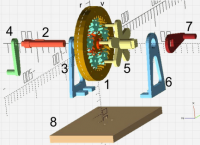
At Christmas 2019; I offered a "Creatily3D Ender 3" 3D printer to my
grandson, the half with my daughter. So I was able to carry out myself some
small experiments in particular the study of the "epicyclic train" based
on herringbone gears which works very well.
[image: image.png]
Only, after many tests, my enthusiasm was quickly limited by the quality of
the result. I recognize that the printer which was not given (!) is for the
general public therefore low-end ! ...
I must also modestly say, that after the age of 80, I do not much need such
a machine.
Best regards,
Lou Papet
Le ven. 5 févr. 2021 à 00:48, Ronaldo Persiano rcmpersiano@gmail.com a
écrit :
Em qui., 4 de fev. de 2021 às 09:12, Jean-Pierre Rousset <
loupapetjpr@gmail.com> escreveu:
For the coding of the functions, I searched without success for a
documentation explaining all the programming tips. So So I drew
informations on the web and follows me inspired by doing a lot of tests. The
compilation caused me a lot of misery ! ...
I forgot to give you some references. One reference for beginners is OpenSCAD
Tutorial https://en.wikibooks.org/wiki/OpenSCAD_Tutorial but it avoids
an introduction to function. You may find a detailed introduction to OpenSCAD
functions
https://en.wikibooks.org/wiki/OpenSCAD_User_Manual/User-Defined_Functions_and_Modules#Functions
in the OpenSCAD Manual
https://en.wikibooks.org/wiki/OpenSCAD_User_Manual. OpenSCAD functions
benefit from the list comprehension resources
https://en.wikibooks.org/wiki/OpenSCAD_User_Manual/List_Comprehensions
of the language. In the Tips&Tricks section of the Manual
https://en.wikibooks.org/wiki/OpenSCAD_User_Manual/Tips_and_Tricks, you
may find some ideas for simple functions and modules.
--
"Pourquoi faire simple quand on peut faire encore plus simple..." "Le plus
simple est de ne pas faire.....seulement si c'est possible !..."
http://www.avg.com/email-signature?utm_medium=email&utm_source=link&utm_campaign=sig-email&utm_content=webmail
Garanti
sans virus. www.avg.com
http://www.avg.com/email-signature?utm_medium=email&utm_source=link&utm_campaign=sig-email&utm_content=webmail
<#m_4988501025745247467_DAB4FAD8-2DD7-40BB-A1B8-4E2AA1F9FDF2>