

OpenSCAD Tutorial - Google Season of Docs

Em qui, 24 de out de 2019 às 18:34, Torsten Paul Torsten.Paul@gmx.de
escreveu:
On 24.10.19 19:23, Ronaldo Persiano wrote:
First, in my opinion, tutorial should not be as boring as
a manual might be by trying to explain all options of a
given language element.
Agreed. Is that looking at the old Wikibooks pages? The
current text in the PDFs is actually replacing that for
specifically this reason.
Maybe I should have not included that link in the first
place.
Yes, you are right. I had not accessed the PDFs before my comments. The
updated text is really what I would expect of a tutorial. Nice work.

tp3 wrote
A) Who is the "Customer"
There's no clear answer to that and we don't have any
means to track who is using OpenSCAD for what (nor are
there plans to do that).
Thank you for taking the trouble to consider my comments.
I did not envisage research into the present user profile, rather that the
"OpenSCAD folks" should now decide on the sort of future user the Tuturial
should be aimed at.
However as was said earlier, there is some kind of
"natural" focus on the 3D printing area due to a number
of reasons. 1) OpenSCAD was created to help with designing
RepRap style 3d printers 2) The Thingiverse customizer
may have introduced to quite a number of people doing
3d printing 3) OpenSCAD seems more suited to handle
smaller designs that may want to be shared and modified
in a straight forward way.
So 3D printing is probably some kind of focus area and
maybe also the main use case for explaining things in
the tutorial,
I hear what you say about "no clear answer" but then (it seems to me) you
yourself (in the piece I have quoted) have actually provided a very clear
answer which I would be very happy to see as the focus for the Tutorial.
Someone else has mentioned " a collection of "best practices" " and I would
certainly not be in favour of extending a beginner's tutorial to include
that sort of thing. However I can see that it may be very useful as a
separate document.
...R
--
Sent from: http://forum.openscad.org/

On 10/24/2019 10:23 AM, Ronaldo Persiano wrote:
First, in my opinion, tutorial should not be as boring as a manual
might be by trying to explain all options of a given language element.
[...]
The hardest part of any tutorial is cutting out all of the stuff that
the author knows and thinks is cool, to leave only those things that the
beginner needs to know at that point in their learning curve.
Have links off to the reference page for complete lists of options, but
have the tutorial stick pretty much to the minimum.
That said, what problems are people trying to correct from the tutorial
material at
http://www.tridimake.com/2014/09/how-to-use-openscad-tricks-and-tips-to.html
?
I found it pretty easy to learn from that.

I'd like to see some discussion of importing STLs, for example, and using
OpenSCAD to modify them. I have done this more times than I can count, and
it is very handy for making quick changes to objects that I would otherwise
have spent hours or days trying to design on my own.
I wonder why someone would say "Don't use Orthogonal view for screenshots".
Personally, I would say that screenshots (well, exported images) should be
oriented in the way that best illustrates the example being taught.
tp3 wrote
For instance, when discussing cylinders it could build
a Hanoi tower as an illustrative example using translate
even before translate have been formally introduced.
That's a great idea. I've added this to
https://github.com/openscad/openscad/wiki/OpenSCAD-Tutorial
which I just created trying to track the suggestions
discussed in this thread.
--
Sent from: http://forum.openscad.org/
I find the "Cheat Sheet" a very valuable resource, and it might be worthwhile
either having something similar in the tutorial area, or having pointers to
the tutorials in the Wikibooks User Manual.
OpenSCAD mailing list wrote
As far as the content is concerned, I wonder if there is rather too much
of
the "follow along". I suspect it may be challenging the reader's attention
span, especially with the modern tendency to expect everything in a
sound-bite. That might be alleviated with an index and a style that allows
the reader to skip to the parts that interest him or her.
--
Sent from: http://forum.openscad.org/

I wonder why someone would say "Don't use Orthogonal view for
screenshots".
Because it looks wrong as our eyes don't see things that way. I only use it
to check alignment. The only other program that seems to use it all the
time is NetFabb and it makes objects look distorted.
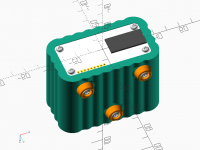
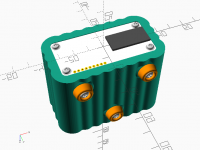
This looks realistic to me for a straight sided object:
[image: image.png]
This looks like the my object is tapered:
[image: image.png]
On Fri, 25 Oct 2019 at 07:48, lar3ry lar3ry@sasktel.net wrote:
I find the "Cheat Sheet" a very valuable resource, and it might be
worthwhile
either having something similar in the tutorial area, or having pointers to
the tutorials in the Wikibooks User Manual.
OpenSCAD mailing list wrote
As far as the content is concerned, I wonder if there is rather too much
of
the "follow along". I suspect it may be challenging the reader's
attention
span, especially with the modern tendency to expect everything in a
sound-bite. That might be alleviated with an index and a style that
allows
the reader to skip to the parts that interest him or her.
--
Sent from: http://forum.openscad.org/
OpenSCAD mailing list
Discuss@lists.openscad.org
http://lists.openscad.org/mailman/listinfo/discuss_lists.openscad.org

tp3 wrote
On 24.10.19 18:59, bradipao wrote:
What is missing, in my opinion, is a collection of "best
practices" to follow when trying to draw something more
than a few cubes and cylinders. How to start a drawing of
a complex object?
The last sentence already make clear that it's not part
of the tutorial. "How To" is a different style of document
which is important to have, but serves a different purpose
compared to a tutorial.
I agree with you, but from my experience and from experience of people I
have introduced to openScad, the "tutorial" about how to draw cubes,
cylinders and spheres and how to translate/rotate, takes the first 15
minutes of anyone proficient with at least one programming language. After
the first 15 minutes this kind of user is basically helpless on how to
manage a design slightly more complex than a few cubes and a cylinder.
If the final target of this effort is to fill gaps in documentation, those
are the topics not yet covered (in my opinion), whichever the way (tutorial
or how-tos).
--
Sent from: http://forum.openscad.org/
On 10/24/2019 11:58 PM, lar3ry wrote:
I find the "Cheat Sheet" a very valuable resource, and it might be worthwhile
either having something similar in the tutorial area, or having pointers to
the tutorials in the Wikibooks User Manual.
Yes, the cheat sheet is invaluable. Don't duplicate it. Do refer to
it, an in particular tell people that it's available from the Help menu.