discuss@lists.openscad.org

OpenSCAD general discussion Mailing-list

View all threads

OpenSCAD screen shots for fun and profit

M
mikeonenine@web.de
Sun, Oct 26, 2025 12:31 AM

Michael Marx (spintel) wrote:

When I export PDF or SVG, in Nightly first there is a dialogue box, after clicking OK (or with 2021), a Save As dialogue box opens to specify where to save.

You don't see the later?

No dialog box. Nothing. I click on PDF or SVG in the Export list, that box disappears and … nothing happens. only CSG and PNG work. That’s in Version 2021.01.

In Version 2025.05.30 I get dialog boxes with 3MF and PDF, but no explorer dialog box appears for where to save them. CSG and PNG work.

As some of these formats are for 3D printing, I also tried them out on a single 3D gear. No better.

Maybe I need to activate something?

Michael Marx (spintel) wrote: > When I export PDF or SVG, in Nightly first there is a dialogue box, after clicking OK (or with 2021), a Save As dialogue box opens to specify where to save. > > You don't see the later? No dialog box. Nothing. I click on PDF or SVG in the Export list, that box disappears and … nothing happens. only CSG and PNG work. That’s in Version 2021.01. In Version 2025.05.30 I get dialog boxes with 3MF and PDF, but no explorer dialog box appears for where to save them. CSG and PNG work. As some of these formats are for 3D printing, I also tried them out on a single 3D gear. No better. Maybe I need to activate something?
M
mikeonenine@web.de
Sun, Oct 26, 2025 12:47 AM

Jordan Brown wrote:

The command line would look something like:

openscad -o 2d.png --projection o --imgsize 8000,11000 --camera
0,0,100,0,0,0 2d.scad

Anything I put in the CLI just starts a search in the www!?

Jordan Brown wrote: > The command line would look something like: > > openscad -o 2d.png --projection o --imgsize 8000,11000 --camera > 0,0,100,0,0,0 2d.scad Anything I put in the CLI just starts a search in the www!?
MM
Michael Marx (spintel)
Sun, Oct 26, 2025 3:57 AM

No dialog box. Nothing. I click on PDF or SVG in the Export list, that box disappears and … nothing happens. only CSG and PNG work. That’s in Version 2021.01.

By 'that box' I presume you mean the Export sub-menu?

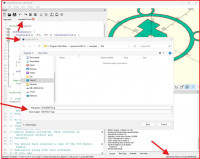
This is 2021 for me:

In Version 2025.05.30 I get dialog boxes with 3MF and PDF, but no explorer dialog box appears for where to save them.

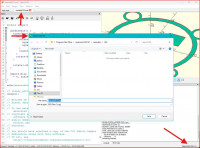
The save dialogue appears AFTER the first dialogue. This is 2025.10.10. I also suggest you get a newer nightly.

a. The SVG dialogue box:

b. The Save as dialogue:


From: Caddiy via Discuss [mailto:discuss@lists.openscad.org]
Sent: Sunday, October 26, 2025 11:32 AM
To: discuss@lists.openscad.org
Cc: mikeonenine@web.de
Subject: [OpenSCAD] Re: OpenSCAD screen shots for fun and profit

Michael Marx (spintel) wrote:

When I export PDF or SVG, in Nightly first there is a dialogue box, after clicking OK (or with 2021), a Save As dialogue box opens to specify where to save.

You don't see the later?

No dialog box. Nothing. I click on PDF or SVG in the Export list, that box disappears and … nothing happens. only CSG and PNG work. That’s in Version 2021.01.

In Version 2025.05.30 I get dialog boxes with 3MF and PDF, but no explorer dialog box appears for where to save them. CSG and PNG work.

As some of these formats are for 3D printing, I also tried them out on a single 3D gear. No better.

Maybe I need to activate something?
> No dialog box. Nothing. I click on PDF or SVG in the Export list, that box disappears and … nothing happens. only CSG and PNG work. That’s in Version 2021.01. By 'that box' I presume you mean the Export sub-menu? This is 2021 for me: > In Version 2025.05.30 I get dialog boxes with 3MF and PDF, but no explorer dialog box appears for where to save them. The save dialogue appears AFTER the first dialogue. This is 2025.10.10. I also suggest you get a newer nightly. a. The SVG dialogue box: b. The Save as dialogue: _____ From: Caddiy via Discuss [mailto:discuss@lists.openscad.org] Sent: Sunday, October 26, 2025 11:32 AM To: discuss@lists.openscad.org Cc: mikeonenine@web.de Subject: [OpenSCAD] Re: OpenSCAD screen shots for fun and profit Michael Marx (spintel) wrote: When I export PDF or SVG, in Nightly first there is a dialogue box, after clicking OK (or with 2021), a Save As dialogue box opens to specify where to save. You don't see the later? No dialog box. Nothing. I click on PDF or SVG in the Export list, that box disappears and … nothing happens. only CSG and PNG work. That’s in Version 2021.01. In Version 2025.05.30 I get dialog boxes with 3MF and PDF, but no explorer dialog box appears for where to save them. CSG and PNG work. As some of these formats are for 3D printing, I also tried them out on a single 3D gear. No better. Maybe I need to activate something?
MM
Michael Marx (spintel)
Sun, Oct 26, 2025 4:06 AM

BY CLI I hope you mean 'command prompt'

You either need to

  • 'cd' to the OpenSCAD installation directory,

  • make sure that directory is in your PATH environment variable or,

  • have that directory in front of 'openscad', ie : (including the "s where you have e.g. a space in
    a path)

"C:\Program Files\OpenSCAD (Nightly)/openscad" --help-export


From: Caddiy via Discuss [mailto:discuss@lists.openscad.org]
Sent: Sunday, October 26, 2025 11:48 AM
To: discuss@lists.openscad.org
Cc: mikeonenine@web.de
Subject: [OpenSCAD] Re: OpenSCAD screen shots for fun and profit

Jordan Brown wrote:

The command line would look something like:

openscad -o 2d.png --projection o --imgsize 8000,11000 --camera 0,0,100,0,0,0 2d.scad

Anything I put in the CLI just starts a search in the www!?

BY CLI I hope you mean 'command prompt' You either need to - 'cd' to the OpenSCAD installation directory, - make sure that directory is in your PATH environment variable or, - have that directory in front of 'openscad', ie : (including the "s where you have e.g. a space in a path) "C:\Program Files\OpenSCAD (Nightly)/openscad" --help-export _____ From: Caddiy via Discuss [mailto:discuss@lists.openscad.org] Sent: Sunday, October 26, 2025 11:48 AM To: discuss@lists.openscad.org Cc: mikeonenine@web.de Subject: [OpenSCAD] Re: OpenSCAD screen shots for fun and profit Jordan Brown wrote: The command line would look something like: openscad -o 2d.png --projection o --imgsize 8000,11000 --camera 0,0,100,0,0,0 2d.scad Anything I put in the CLI just starts a search in the www!?
MM
Michael Marx (spintel)
Sun, Oct 26, 2025 6:34 AM

BTW There is this Preference tab, check it:
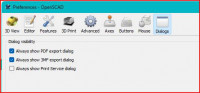
BTW There is this Preference tab, check it:
M
mikeonenine@web.de
Mon, Oct 27, 2025 4:56 AM

Michael Marx (spintel) wrote:

No dialog box. Nothing. I click on PDF or SVG in the Export list, that box disappears and … nothing happens. only CSG and PNG work. That’s in Version 2021.01.

By 'that box' I presume you mean the Export sub-menu?

Correct.

The save dialogue appears AFTER the first dialogue.

Not with mine. I’m lucky if I get the first dialogue. Your Version 2021.01 works (image001), why doesn’t mine?

Michael Marx (spintel) wrote: > > No dialog box. Nothing. I click on PDF or SVG in the Export list, that box disappears and … nothing happens. only CSG and PNG work. That’s in Version 2021.01. > > By 'that box' I presume you mean the Export sub-menu? Correct. > The save dialogue appears AFTER the first dialogue. Not with mine. I’m lucky if I get the first dialogue. Your Version 2021.01 works (image001), why doesn’t mine?
M
mikeonenine@web.de
Mon, Oct 27, 2025 5:17 AM

Michael Marx (spintel) wrote:

BY CLI I hope you mean 'command prompt'

CLI stands for Command Line Interface, as I have learned. I have seen CLI used in this forum.

You either need to

  • 'cd' to the OpenSCAD installation directory,

I have also learned that cd means change directory.

  • make sure that directory is in your PATH environment variable or,

But what is my PATH environment variable?

  • have that directory in front of 'openscad', ie : (including the "s where you have e.g. a space in
    a path)

"C:\Program Files\OpenSCAD (Nightly)/openscad" --help-export

I’ll have to experiment with that. I may have a further question.

Michael Marx (spintel) wrote: > BY CLI I hope you mean 'command prompt' CLI stands for Command Line Interface, as I have learned. I have seen CLI used in this forum. > You either need to > > * 'cd' to the OpenSCAD installation directory, I have also learned that cd means change directory. > * make sure that directory is in your PATH environment variable or, But what is my PATH environment variable? > * have that directory in front of 'openscad', ie : (including the "s where you have e.g. a space in > a path) > > "C:\\Program Files\\OpenSCAD (Nightly)/openscad" --help-export I’ll have to experiment with that. I may have a further question.
MM
Michael Marx (spintel)
Mon, Oct 27, 2025 5:52 AM

CLI is somewhat generic and when used can be used to mean Linux or Windows (or others), CLI can have a Linux flavour to some people. (IMHO)

Command Prompt, or AKA cmd.exe, or older DOS-box, is pretty Windows specific.

In command prompt, type:

set

It will list all your environment variables, you will see Path=<list of directories>

To change it, select System from the Control Panel, Advanced System settings, see the Environment Variables button, System variables.

If you add the OpenSCAD install directory to the end (separated by semicolon), you can just type openscad as a command.


From: Caddiy via Discuss [mailto:discuss@lists.openscad.org]
Sent: Monday, October 27, 2025 4:17 PM
To: discuss@lists.openscad.org
Cc: mikeonenine@web.de
Subject: [OpenSCAD] Re: OpenSCAD screen shots for fun and profit

Michael Marx (spintel) wrote:

BY CLI I hope you mean 'command prompt'

CLI stands for Command Line Interface, as I have learned. I have seen CLI used in this forum.

You either need to

  •  'cd' to the OpenSCAD installation directory,
    

I have also learned that cd means change directory.

  •  make sure that directory is in your PATH environment variable or,
    

But what is my PATH environment variable?

  •  have that directory in front of 'openscad', ie : (including the "s where you have e.g. a space in a path)
    

"C:\Program Files\OpenSCAD (Nightly)/openscad" --help-export

I’ll have to experiment with that. I may have a further question.

CLI is somewhat generic and when used can be used to mean Linux or Windows (or others), CLI can have a Linux flavour to some people. (IMHO) Command Prompt, or AKA cmd.exe, or older DOS-box, is pretty Windows specific. In command prompt, type: set It will list all your environment variables, you will see Path=<list of directories> To change it, select System from the Control Panel, Advanced System settings, see the Environment Variables button, System variables. If you add the OpenSCAD install directory to the end (separated by semicolon), you can just type openscad as a command. _____ From: Caddiy via Discuss [mailto:discuss@lists.openscad.org] Sent: Monday, October 27, 2025 4:17 PM To: discuss@lists.openscad.org Cc: mikeonenine@web.de Subject: [OpenSCAD] Re: OpenSCAD screen shots for fun and profit Michael Marx (spintel) wrote: BY CLI I hope you mean 'command prompt' CLI stands for Command Line Interface, as I have learned. I have seen CLI used in this forum. You either need to * 'cd' to the OpenSCAD installation directory, I have also learned that cd means change directory. * make sure that directory is in your PATH environment variable or, But what is my PATH environment variable? * have that directory in front of 'openscad', ie : (including the "s where you have e.g. a space in a path) "C:\Program Files\OpenSCAD (Nightly)/openscad" --help-export I’ll have to experiment with that. I may have a further question.
MM
Michael Marx (spintel)
Mon, Oct 27, 2025 5:58 AM

That does not sound healthy.

You could try uninstalling/reinstalling 2021.01.

You should also try a newer Nightly. https://openscad.org/downloads.html#snapshots

Note the first dialogue box is not in 2021.01, it only has the Export SaveAs dialogue.


From: Caddiy via Discuss [mailto:discuss@lists.openscad.org]
Sent: Monday, October 27, 2025 3:57 PM
To: discuss@lists.openscad.org
Cc: mikeonenine@web.de
Subject: [OpenSCAD] Re: OpenSCAD screen shots for fun and profit

Michael Marx (spintel) wrote:

No dialog box. Nothing. I click on PDF or SVG in the Export list, that box disappears and … nothing happens. only CSG and PNG work. That’s in Version 2021.01.

By 'that box' I presume you mean the Export sub-menu?

Correct.

The save dialogue appears AFTER the first dialogue.

Not with mine. I’m lucky if I get the first dialogue. Your Version 2021.01 works (image001), why doesn’t mine?

That does not sound healthy. You could try uninstalling/reinstalling 2021.01. You should also try a newer Nightly. https://openscad.org/downloads.html#snapshots Note the first dialogue box is not in 2021.01, it only has the Export SaveAs dialogue. _____ From: Caddiy via Discuss [mailto:discuss@lists.openscad.org] Sent: Monday, October 27, 2025 3:57 PM To: discuss@lists.openscad.org Cc: mikeonenine@web.de Subject: [OpenSCAD] Re: OpenSCAD screen shots for fun and profit Michael Marx (spintel) wrote: No dialog box. Nothing. I click on PDF or SVG in the Export list, that box disappears and … nothing happens. only CSG and PNG work. That’s in Version 2021.01. By 'that box' I presume you mean the Export sub-menu? Correct. The save dialogue appears AFTER the first dialogue. Not with mine. I’m lucky if I get the first dialogue. Your Version 2021.01 works (image001), why doesn’t mine?
RW
Rogier Wolff
Mon, Oct 27, 2025 9:22 AM

On Mon, Oct 27, 2025 at 05:17:10AM +0000, Caddiy via Discuss wrote:

Michael Marx (spintel) wrote:

BY CLI I hope you mean 'command prompt'

CLI stands for Command Line Interface, as I have learned. I have
seen CLI used in this forum.

So the short answer is: "Yes". The long answer is: "Yes, with CLI,
which stands for 'Command Line Interface' we mean command prompt."(*)

Roger. 

(*) Just saying "CLI stands for... " you leave those that don't know
wondering "but is there a difference?".

--
** R.E.Wolff@BitWizard.nl ** https://www.BitWizard.nl/ ** +31-15-2049110 **
** Verl. Spiegelmakerstraat 37 2645 LZ  Delfgauw, The Netherlands.
** KVK: 27239233    **
f equals m times a. When your f is steady, and your m is going down
your a** is going up.  -- Chris Hadfield about flying up the space shuttle.
**  'a' for accelleration.

On Mon, Oct 27, 2025 at 05:17:10AM +0000, Caddiy via Discuss wrote: > Michael Marx (spintel) wrote: > > > BY CLI I hope you mean 'command prompt' > CLI stands for Command Line Interface, as I have learned. I have > seen CLI used in this forum. So the short answer is: "Yes". The long answer is: "Yes, with CLI, which stands for 'Command Line Interface' we mean command prompt."(*) Roger. (*) Just saying "CLI stands for... " you leave those that don't know wondering "but is there a difference?". -- ** R.E.Wolff@BitWizard.nl ** https://www.BitWizard.nl/ ** +31-15-2049110 ** ** Verl. Spiegelmakerstraat 37 2645 LZ Delfgauw, The Netherlands. ** KVK: 27239233 ** f equals m times a. When your f is steady, and your m is going down your a** is going up. -- Chris Hadfield about flying up the space shuttle. ** 'a' for accelleration.