

discuss@lists.openscad.org

OpenSCAD general discussion Mailing-list

View all threads

rounding an edge?

K
Ken
Mon, Sep 28, 2026 2:09 AM

Below is part of a much larger project I have been working on for quite a while- what I would like is any hints or help to round off the remaining sharp edges on the "armrest cutaway", if indeed it is possible.
I have tried everything I know off, but cannot see any way of rounding the remaining sharp edges on that cutaway. I tried minkowski, but then got thoroughly lost trying to keep all the existing sizes correct- it has to stay /very/ close to it's current size as much else has to fit in and around it, and there are some sharp edges that have to stay that way.

include <BOSL2/std.scad>

 $fs = 0.4;
 $fn=$preview ? 60 : 128;

module driver_phone_box()
{
difference()
{
rotate ([0,0,0])
translate ([-37,-15,14.25])
cuboid([177.45,43,77], rounding = 2);
rotate ([0,0,0])
translate ([-37.2,-16,15.45])
cuboid([170.5,31,75], rounding = -2, edges=TOP);

//drivers finger cutaway
rotate([0,90,0])
translate([-53.5,-16.5,-124])
cyl(4, d=20, rounding = -2);

//charging slot
rotate ([0,0,0])
translate ([-24.2,-35.3,15.45])
cuboid([95,6,53], rounding = 1.5);

//phone case tag cutaway
rotate([0,0,0])
translate([-35,-5.5,20])
cuboid([30,18,100], rounding=1);

//armrest cutaway
rotate([90,0,0])
translate([47,50,30])
cuboid([20,20,40], rounding = 3);
}
}

driver_phone_box();

--
Thanks, Ken
bats059@gmail.com
https://vk7krj.com
https://vk7krj.com/running.html

A baby can be defined as an ego with a noise at one end and a smell at the other.
Your job as parents is to teach them to control all three.
My job as a grandad is to tell you how you are doing it all wrong!

Below is part of a much larger project I have been working on for quite a while- what I would like is any hints or help to round off the remaining sharp edges on the "armrest cutaway", if indeed it is possible. I have tried everything I know off, but cannot see any way of rounding the remaining sharp edges on that cutaway. I tried minkowski, but then got thoroughly lost trying to keep all the existing sizes correct- it has to stay */very/* close to it's current size as much else has to fit in and around it, and there are some sharp edges that have to stay that way. include <BOSL2/std.scad>  $fs = 0.4;  $fn=$preview ? 60 : 128; module driver_phone_box() { difference() { rotate ([0,0,0]) translate ([-37,-15,14.25]) cuboid([177.45,43,77], rounding = 2); rotate ([0,0,0]) translate ([-37.2,-16,15.45]) cuboid([170.5,31,75], rounding = -2, edges=TOP); //drivers finger cutaway rotate([0,90,0]) translate([-53.5,-16.5,-124]) cyl(4, d=20, rounding = -2); //charging slot rotate ([0,0,0]) translate ([-24.2,-35.3,15.45]) cuboid([95,6,53], rounding = 1.5); //phone case tag cutaway rotate([0,0,0]) translate([-35,-5.5,20]) cuboid([30,18,100], rounding=1); //armrest cutaway rotate([90,0,0]) translate([47,50,30]) cuboid([20,20,40], rounding = 3); } } driver_phone_box(); -- Thanks, Ken bats059@gmail.com https://vk7krj.com https://vk7krj.com/running.html ---------------------------------------- A baby can be defined as an ego with a noise at one end and a smell at the other. Your job as parents is to teach them to control all three. My job as a grandad is to tell you how you are doing it all wrong!
CC
Cory Cross
Mon, Sep 28, 2026 2:49 AM

You need more cuboid with negative rounding. Sometimes you have to union
two nearly-identical cuboid with differing rounding and edges lists.

Also, try building the full inner negative mold first. Use attach and
align to build it. Try to avoid rotate/translate, especially multiple
times.

I find it more productive to do something roughly shaped like this:

module inner_negative_mold() {
  cube() {
    attach(BACK,BACK) cuboid(rounding=-2);
    attach(LEFT,BACK) cuboid(rounding=-2);
   }
}

module driver_phone_box() {
  diff() {
    cube();
    tag("remove") attach(CENTER, CENTER) inner_negative_mold();
  }
}

Also lets me view and work on each module separately.

Cory

On 9/27/26 7:09 PM, Ken via Discuss wrote:

include <BOSL2/std.scad>

 $fs = 0.4;
 $fn=$preview ? 60 : 128;

module driver_phone_box()
{
difference()
{
rotate ([0,0,0])
translate ([-37,-15,14.25])
cuboid([177.45,43,77], rounding = 2);
rotate ([0,0,0])
translate ([-37.2,-16,15.45])
cuboid([170.5,31,75], rounding = -2, edges=TOP);

//drivers finger cutaway
rotate([0,90,0])
translate([-53.5,-16.5,-124])
cyl(4, d=20, rounding = -2);

//charging slot
rotate ([0,0,0])
translate ([-24.2,-35.3,15.45])
cuboid([95,6,53], rounding = 1.5);

//phone case tag cutaway
rotate([0,0,0])
translate([-35,-5.5,20])
cuboid([30,18,100], rounding=1);

//armrest cutaway
rotate([90,0,0])
translate([47,50,30])
cuboid([20,20,40], rounding = 3);
}
}

driver_phone_box();

You need more cuboid with negative rounding. Sometimes you have to union two nearly-identical cuboid with differing rounding and edges lists. Also, try building the full inner negative mold first. Use `attach` and `align` to build it. Try to avoid rotate/translate, especially multiple times. I find it more productive to do something roughly shaped like this: module inner_negative_mold() {   cube() {     attach(BACK,BACK) cuboid(rounding=-2);     attach(LEFT,BACK) cuboid(rounding=-2);    } } module driver_phone_box() {   diff() {     cube();     tag("remove") attach(CENTER, CENTER) inner_negative_mold();   } } Also lets me view and work on each module separately. Cory On 9/27/26 7:09 PM, Ken via Discuss wrote: > include <BOSL2/std.scad> > >  $fs = 0.4; >  $fn=$preview ? 60 : 128; > > module driver_phone_box() > { > difference() > { > rotate ([0,0,0]) > translate ([-37,-15,14.25]) > cuboid([177.45,43,77], rounding = 2); > rotate ([0,0,0]) > translate ([-37.2,-16,15.45]) > cuboid([170.5,31,75], rounding = -2, edges=TOP); > > //drivers finger cutaway > rotate([0,90,0]) > translate([-53.5,-16.5,-124]) > cyl(4, d=20, rounding = -2); > > //charging slot > rotate ([0,0,0]) > translate ([-24.2,-35.3,15.45]) > cuboid([95,6,53], rounding = 1.5); > > //phone case tag cutaway > rotate([0,0,0]) > translate([-35,-5.5,20]) > cuboid([30,18,100], rounding=1); > > //armrest cutaway > rotate([90,0,0]) > translate([47,50,30]) > cuboid([20,20,40], rounding = 3); > } > } > > driver_phone_box();
AM
Adrian Mariano
Mon, Sep 28, 2026 2:54 AM

Note that attach(CENTER,CENTER) doesn't do anything.  For this
construction align() may be easier to use than attach().  But definitely
all those random translates make the model incomprehensible and hard to
work with.

The other tool you can use is specifically subtracting masks to parts of
the model.  There are rounding masks in masks.scad you can check out.  That
can let you create more complex roundings on a cube.  And also
rounded_prism can be useful as it's significantly more flexible---but the
roundings are circular so it won't mate with cuboid roundings.

On Sun, Sep 27, 2026 at 10:50 PM Cory Cross via Discuss <
discuss@lists.openscad.org> wrote:

You need more cuboid with negative rounding. Sometimes you have to union
two nearly-identical cuboid with differing rounding and edges lists.

Also, try building the full inner negative mold first. Use attach and
align to build it. Try to avoid rotate/translate, especially multiple
times.

I find it more productive to do something roughly shaped like this:

module inner_negative_mold() {
cube() {
attach(BACK,BACK) cuboid(rounding=-2);
attach(LEFT,BACK) cuboid(rounding=-2);
}
}

module driver_phone_box() {
diff() {
cube();
tag("remove") attach(CENTER, CENTER) inner_negative_mold();
}
}

Also lets me view and work on each module separately.

Cory

On 9/27/26 7:09 PM, Ken via Discuss wrote:

include <BOSL2/std.scad>

$fs = 0.4;
$fn=$preview ? 60 : 128;

module driver_phone_box()
{
difference()
{
rotate ([0,0,0])
translate ([-37,-15,14.25])
cuboid([177.45,43,77], rounding = 2);
rotate ([0,0,0])
translate ([-37.2,-16,15.45])
cuboid([170.5,31,75], rounding = -2, edges=TOP);

//drivers finger cutaway
rotate([0,90,0])
translate([-53.5,-16.5,-124])
cyl(4, d=20, rounding = -2);

//charging slot
rotate ([0,0,0])
translate ([-24.2,-35.3,15.45])
cuboid([95,6,53], rounding = 1.5);

//phone case tag cutaway
rotate([0,0,0])
translate([-35,-5.5,20])
cuboid([30,18,100], rounding=1);

//armrest cutaway
rotate([90,0,0])
translate([47,50,30])
cuboid([20,20,40], rounding = 3);
}
}

driver_phone_box();


OpenSCAD mailing list
To unsubscribe send an email to discuss-leave@lists.openscad.org

Note that attach(CENTER,CENTER) doesn't do anything. For this construction align() may be easier to use than attach(). But definitely all those random translates make the model incomprehensible and hard to work with. The other tool you can use is specifically subtracting masks to parts of the model. There are rounding masks in masks.scad you can check out. That can let you create more complex roundings on a cube. And also rounded_prism can be useful as it's significantly more flexible---but the roundings are circular so it won't mate with cuboid roundings. On Sun, Sep 27, 2026 at 10:50 PM Cory Cross via Discuss < discuss@lists.openscad.org> wrote: > You need more cuboid with negative rounding. Sometimes you have to union > two nearly-identical cuboid with differing rounding and edges lists. > > Also, try building the full inner negative mold first. Use `attach` and > `align` to build it. Try to avoid rotate/translate, especially multiple > times. > > I find it more productive to do something roughly shaped like this: > > module inner_negative_mold() { > cube() { > attach(BACK,BACK) cuboid(rounding=-2); > attach(LEFT,BACK) cuboid(rounding=-2); > } > } > > module driver_phone_box() { > diff() { > cube(); > tag("remove") attach(CENTER, CENTER) inner_negative_mold(); > } > } > > > Also lets me view and work on each module separately. > > Cory > > On 9/27/26 7:09 PM, Ken via Discuss wrote: > > include <BOSL2/std.scad> > > > > $fs = 0.4; > > $fn=$preview ? 60 : 128; > > > > module driver_phone_box() > > { > > difference() > > { > > rotate ([0,0,0]) > > translate ([-37,-15,14.25]) > > cuboid([177.45,43,77], rounding = 2); > > rotate ([0,0,0]) > > translate ([-37.2,-16,15.45]) > > cuboid([170.5,31,75], rounding = -2, edges=TOP); > > > > //drivers finger cutaway > > rotate([0,90,0]) > > translate([-53.5,-16.5,-124]) > > cyl(4, d=20, rounding = -2); > > > > //charging slot > > rotate ([0,0,0]) > > translate ([-24.2,-35.3,15.45]) > > cuboid([95,6,53], rounding = 1.5); > > > > //phone case tag cutaway > > rotate([0,0,0]) > > translate([-35,-5.5,20]) > > cuboid([30,18,100], rounding=1); > > > > //armrest cutaway > > rotate([90,0,0]) > > translate([47,50,30]) > > cuboid([20,20,40], rounding = 3); > > } > > } > > > > driver_phone_box(); > > _______________________________________________ > OpenSCAD mailing list > To unsubscribe send an email to discuss-leave@lists.openscad.org
HW
Harvey white
Mon, Sep 28, 2026 4:28 PM

as far as Minkowski is concerned, and this is only what I think it does.

it starts at the origin of the object (this will be the second
argument), and in each direction (just consider the x,y,z), it adds,
point by point that object's radius to the basic shape.

So the main object is increased by the radius of the minkowski object
(say a sphere).

If you were to scale the main object by the ratio of the minkowski
object (same sphere), down, using scale and use (original
object/(minkowsk scale + original object)) as an argument, you should
get close.  I've done this on boxes and enclosures to get rounded corners.

Harvey

On 9/27/26 10:09 PM, Ken via Discuss wrote:

Below is part of a much larger project I have been working on for
quite a while- what I would like is any hints or help to round off the
remaining sharp edges on the "armrest cutaway", if indeed it is possible.
I have tried everything I know off, but cannot see any way of rounding
the remaining sharp edges on that cutaway. I tried minkowski, but then
got thoroughly lost trying to keep all the existing sizes correct- it
has to stay /very/ close to it's current size as much else has to
fit in and around it, and there are some sharp edges that have to stay
that way.

include <BOSL2/std.scad>

 $fs = 0.4;
 $fn=$preview ? 60 : 128;

module driver_phone_box()
{
difference()
{
rotate ([0,0,0])
translate ([-37,-15,14.25])
cuboid([177.45,43,77], rounding = 2);
rotate ([0,0,0])
translate ([-37.2,-16,15.45])
cuboid([170.5,31,75], rounding = -2, edges=TOP);

//drivers finger cutaway
rotate([0,90,0])
translate([-53.5,-16.5,-124])
cyl(4, d=20, rounding = -2);

//charging slot
rotate ([0,0,0])
translate ([-24.2,-35.3,15.45])
cuboid([95,6,53], rounding = 1.5);

//phone case tag cutaway
rotate([0,0,0])
translate([-35,-5.5,20])
cuboid([30,18,100], rounding=1);

//armrest cutaway
rotate([90,0,0])
translate([47,50,30])
cuboid([20,20,40], rounding = 3);
}
}

driver_phone_box();

Thanks, Ken
bats059@gmail.com
https://vk7krj.com
https://vk7krj.com/running.html

A baby can be defined as an ego with a noise at one end and a smell at the other.
Your job as parents is to teach them to control all three.
My job as a grandad is to tell you how you are doing it all wrong!


OpenSCAD mailing list
To unsubscribe send an email to discuss-leave@lists.openscad.org

as far as Minkowski is concerned, and this is only what I think it does. it starts at the origin of the object (this will be the second argument), and in each direction (just consider the x,y,z), it adds, point by point that object's radius to the basic shape. So the main object is increased by the radius of the minkowski object (say a sphere). If you were to scale the main object by the ratio of the minkowski object (same sphere), down, using scale and use (original object/(minkowsk scale + original object)) as an argument, you should get close.  I've done this on boxes and enclosures to get rounded corners. Harvey On 9/27/26 10:09 PM, Ken via Discuss wrote: > Below is part of a much larger project I have been working on for > quite a while- what I would like is any hints or help to round off the > remaining sharp edges on the "armrest cutaway", if indeed it is possible. > I have tried everything I know off, but cannot see any way of rounding > the remaining sharp edges on that cutaway. I tried minkowski, but then > got thoroughly lost trying to keep all the existing sizes correct- it > has to stay */very/* close to it's current size as much else has to > fit in and around it, and there are some sharp edges that have to stay > that way. > > > > include <BOSL2/std.scad> > >  $fs = 0.4; >  $fn=$preview ? 60 : 128; > > module driver_phone_box() > { > difference() > { > rotate ([0,0,0]) > translate ([-37,-15,14.25]) > cuboid([177.45,43,77], rounding = 2); > rotate ([0,0,0]) > translate ([-37.2,-16,15.45]) > cuboid([170.5,31,75], rounding = -2, edges=TOP); > > //drivers finger cutaway > rotate([0,90,0]) > translate([-53.5,-16.5,-124]) > cyl(4, d=20, rounding = -2); > > //charging slot > rotate ([0,0,0]) > translate ([-24.2,-35.3,15.45]) > cuboid([95,6,53], rounding = 1.5); > > //phone case tag cutaway > rotate([0,0,0]) > translate([-35,-5.5,20]) > cuboid([30,18,100], rounding=1); > > //armrest cutaway > rotate([90,0,0]) > translate([47,50,30]) > cuboid([20,20,40], rounding = 3); > } > } > > driver_phone_box(); > -- > Thanks, Ken > bats059@gmail.com > https://vk7krj.com > https://vk7krj.com/running.html > ---------------------------------------- > A baby can be defined as an ego with a noise at one end and a smell at the other. > Your job as parents is to teach them to control all three. > My job as a grandad is to tell you how you are doing it all wrong! > > _______________________________________________ > OpenSCAD mailing list > To unsubscribe send an email to discuss-leave@lists.openscad.org
JB
Jordan Brown
Mon, Sep 28, 2026 8:23 PM

On 9/28/2026 10:28 AM, Harvey white via Discuss wrote:

as far as Minkowski is concerned, and this is only what I think it does.

it starts at the origin of the object (this will be the second
argument), and in each direction (just consider the x,y,z), it adds,
point by point that object's radius to the basic shape.

Not the object's radius.  The object's shape.

Wikipedia has a formal explanation, but it's a bit hard to follow:
https://en.wikipedia.org/wiki/Minkowski_addition

Here's one way to look at it, in 2D:  you have shape A.  You have a
paintbrush in the shape of B.  Drag the paintbrush around the entire
perimeter of A, keeping the origin of the paintbrush on A's outline.

3D is similar, but with a harder-to-imagine 3D paintbrush.

If B is a circle, then it as you said:  add the radius.  But if B is
other than a circle, or if it's not centered on the origin, the result
is different.

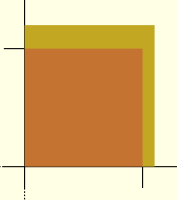
Here's a simple non-circle, not-centered example:

minkowski() {
     #square(10);
     square([1,2]);
}

In the picture below, the orange-ish is the original ten-unit square,
and the gold is the part that gets added.  Note that because the second
square is entirely up and right of the origin, stuff is added only to
the top right, and because the second square is taller than it is wide,
more is added on the top than on the right.

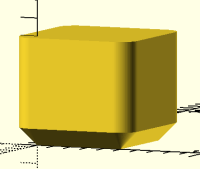
In 3D you can get useful effects from this, e.g. by adding a cone.

$fa = 1;
$fs = 1;

minkowski() {
     cube(50);
     cylinder(h=10, r1=0, r2=10);
}

If you were to scale the main object by the ratio of the minkowski
object (same sphere), down, using scale and use (original
object/(minkowsk scale + original object)) as an argument, you should
get close.  I've done this on boxes and enclosures to get rounded corners.

Scale won't do the right thing in the general case.  You really need an
offset operation, but we don't have 3D offset.

Say you have a [20,10] square.  You're adding a one-unit circle to it,
so you scale it by 18/20 to make it be 18 wide, so that when you add the
one-unit circle on each side you're back at 20. But it's only 10 tall,
so scaling it by 18/20 makes it be 9 tall, so when  you add the one-unit
circle on the top and bottom it's 11 tall.

Right now my brain isn't working well enough to come up with more simple
examples where it does the wrong thing, but they exist. Try, for
instance, a hollow box where you need to maintain both the outside
dimensions and the inside dimensions.
On 9/28/2026 10:28 AM, Harvey white via Discuss wrote: > as far as Minkowski is concerned, and this is only what I think it does. > > it starts at the origin of the object (this will be the second > argument), and in each direction (just consider the x,y,z), it adds, > point by point that object's radius to the basic shape. Not the object's radius.  The object's *shape*. Wikipedia has a formal explanation, but it's a bit hard to follow: https://en.wikipedia.org/wiki/Minkowski_addition Here's one way to look at it, in 2D:  you have shape A.  You have a paintbrush in the shape of B.  Drag the paintbrush around the entire perimeter of A, keeping the origin of the paintbrush on A's outline. 3D is similar, but with a harder-to-imagine 3D paintbrush. If B is a circle, then it as you said:  add the radius.  But if B is other than a circle, or if it's not centered on the origin, the result is different. Here's a simple non-circle, not-centered example: minkowski() { #square(10); square([1,2]); } In the picture below, the orange-ish is the original ten-unit square, and the gold is the part that gets added.  Note that because the second square is entirely up and right of the origin, stuff is added only to the top right, and because the second square is taller than it is wide, more is added on the top than on the right. In 3D you can get useful effects from this, e.g. by adding a cone. $fa = 1; $fs = 1; minkowski() { cube(50); cylinder(h=10, r1=0, r2=10); } > If you were to scale the main object by the ratio of the minkowski > object (same sphere), down, using scale and use (original > object/(minkowsk scale + original object)) as an argument, you should > get close.  I've done this on boxes and enclosures to get rounded corners. Scale won't do the right thing in the general case.  You really need an offset operation, but we don't have 3D offset. Say you have a [20,10] square.  You're adding a one-unit circle to it, so you scale it by 18/20 to make it be 18 wide, so that when you add the one-unit circle on each side you're back at 20. But it's only 10 tall, so scaling it by 18/20 makes it be 9 tall, so when  you add the one-unit circle on the top and bottom it's 11 tall. Right now my brain isn't working well enough to come up with more simple examples where it does the wrong thing, but they exist. Try, for instance, a hollow box where you need to maintain both the outside dimensions and the inside dimensions.
CC
Cory Cross
Mon, Sep 28, 2026 8:30 PM

On 9/27/26 7:54 PM, Adrian Mariano via Discuss wrote:

Note that attach(CENTER,CENTER) doesn't do anything.   For this
construction align() may be easier to use than attach(). But
definitely all those random translates make the model incomprehensible
and hard to work with.

Yeah, that's why I said "shaped", I would definitely have /something/
there, but I couldn't think what would be best so a put a placeholder :)

Cory

On 9/27/26 7:54 PM, Adrian Mariano via Discuss wrote: > Note that attach(CENTER,CENTER) doesn't do anything.   For this > construction align() may be easier to use than attach(). But > definitely all those random translates make the model incomprehensible > and hard to work with. Yeah, that's why I said "shaped", I would definitely have /something/ there, but I couldn't think what would be best so a put a placeholder :) Cory