

Newbie rotation confusion.

Having now subscribed to the mailing list hopefully this will now be posted.
Sorry if it's posted twice.
What I'm trying to do is understand how to get a cube at the origin with
it's corners on the axes.
Firstly, I tried rotating by 45° about x and y with no success.
I then rotated 45° about the X axis with
rotate(45,[1,0,0]){
color("cyan") cube(10,center=true);
}
and looked down the Y axis. What I see is this.
http://forum.openscad.org/file/t2335/cube1.png
I now realize that I'm not looking at a square anymore but a rectangle with
sides 10 and 14.14 (10 x root 2) and so to align the corners with the Z axis
I need to rotate by atan(1.414) = 54.7°.
I do this with
rotate(45,[1,0,0]){
rotate(54.7,[0,1,0]){
color("cyan") cube(10,center=true);
}
}
and the result is
http://forum.openscad.org/file/t2335/cube2.png
What am I doing wrong?
Is there a simple way to get a cube at the origin with it's corners on the
axes?
Mike.
--
Sent from: http://forum.openscad.org/

Is there a simple way to get a cube at the origin with it's corners on the
axes?
No it is physically impossible.
On 7 September 2018 at 10:06, Aurum pommie.mike@gmail.com wrote:
Having now subscribed to the mailing list hopefully this will now be
posted.
Sorry if it's posted twice.
What I'm trying to do is understand how to get a cube at the origin with
it's corners on the axes.
Firstly, I tried rotating by 45° about x and y with no success.
I then rotated 45° about the X axis with
rotate(45,[1,0,0]){
color("cyan") cube(10,center=true);
}
and looked down the Y axis. What I see is this.
http://forum.openscad.org/file/t2335/cube1.png
I now realize that I'm not looking at a square anymore but a rectangle with
sides 10 and 14.14 (10 x root 2) and so to align the corners with the Z
axis
I need to rotate by atan(1.414) = 54.7°.
I do this with
rotate(45,[1,0,0]){
rotate(54.7,[0,1,0]){
color("cyan") cube(10,center=true);
}
}
and the result is
http://forum.openscad.org/file/t2335/cube2.png
What am I doing wrong?
Is there a simple way to get a cube at the origin with it's corners on the
axes?
Mike.
--
Sent from: http://forum.openscad.org/
OpenSCAD mailing list
Discuss@lists.openscad.org
http://lists.openscad.org/mailman/listinfo/discuss_lists.openscad.org

On Fri, Sep 07, 2018 at 10:47:15AM +0100, nop head wrote:
Is there a simple way to get a cube at the origin with it's corners on the
axes?
No it is physically impossible.
Technically correct, but
rotate ([0,atan (sqrt(2)),0])
rotate ([0,0,45])
cube (40, center=true);
is what he was asking for.... I think.
Roger.
On 7 September 2018 at 10:06, Aurum pommie.mike@gmail.com wrote:
Having now subscribed to the mailing list hopefully this will now be
posted.
Sorry if it's posted twice.
What I'm trying to do is understand how to get a cube at the origin with
it's corners on the axes.
Firstly, I tried rotating by 45° about x and y with no success.
I then rotated 45° about the X axis with
rotate(45,[1,0,0]){
color("cyan") cube(10,center=true);
}
and looked down the Y axis. What I see is this.
http://forum.openscad.org/file/t2335/cube1.png
I now realize that I'm not looking at a square anymore but a rectangle with
sides 10 and 14.14 (10 x root 2) and so to align the corners with the Z
axis
I need to rotate by atan(1.414) = 54.7°.
I do this with
rotate(45,[1,0,0]){
rotate(54.7,[0,1,0]){
color("cyan") cube(10,center=true);
}
}
and the result is
http://forum.openscad.org/file/t2335/cube2.png
What am I doing wrong?
Is there a simple way to get a cube at the origin with it's corners on the
axes?
Mike.
--
Sent from: http://forum.openscad.org/
OpenSCAD mailing list
Discuss@lists.openscad.org
http://lists.openscad.org/mailman/listinfo/discuss_lists.openscad.org
OpenSCAD mailing list
Discuss@lists.openscad.org
http://lists.openscad.org/mailman/listinfo/discuss_lists.openscad.org
--
** R.E.Wolff@BitWizard.nl ** http://www.BitWizard.nl/ ** +31-15-2600998 **
** Delftechpark 26 2628 XH Delft, The Netherlands. KVK: 27239233 **
-- BitWizard writes Linux device drivers for any device you may have! --
The plan was simple, like my brother-in-law Phil. But unlike
Phil, this plan just might work.
A cube has 8 corners but there are only 6 points if one is on each half
axis.
An object with all corners on an axis has triangular faces and looks like
this:
On 7 September 2018 at 11:26, Rogier Wolff R.E.Wolff@bitwizard.nl wrote:
On Fri, Sep 07, 2018 at 10:47:15AM +0100, nop head wrote:
Is there a simple way to get a cube at the origin with it's corners on
the
axes?
No it is physically impossible.
Technically correct, but
rotate ([0,atan (sqrt(2)),0])
rotate ([0,0,45])
cube (40, center=true);
is what he was asking for.... I think.
Roger.
On 7 September 2018 at 10:06, Aurum pommie.mike@gmail.com wrote:
Having now subscribed to the mailing list hopefully this will now be
posted.
Sorry if it's posted twice.
What I'm trying to do is understand how to get a cube at the origin
with
it's corners on the axes.
Firstly, I tried rotating by 45° about x and y with no success.
I then rotated 45° about the X axis with
rotate(45,[1,0,0]){
color("cyan") cube(10,center=true);
}
and looked down the Y axis. What I see is this.
http://forum.openscad.org/file/t2335/cube1.png
I now realize that I'm not looking at a square anymore but a rectangle
with
sides 10 and 14.14 (10 x root 2) and so to align the corners with the Z
axis
I need to rotate by atan(1.414) = 54.7°.
I do this with
rotate(45,[1,0,0]){
rotate(54.7,[0,1,0]){
color("cyan") cube(10,center=true);
}
}
and the result is
http://forum.openscad.org/file/t2335/cube2.png
What am I doing wrong?
Is there a simple way to get a cube at the origin with it's corners on
the
axes?
Mike.
--
Sent from: http://forum.openscad.org/
OpenSCAD mailing list
Discuss@lists.openscad.org
http://lists.openscad.org/mailman/listinfo/discuss_lists.openscad.org
OpenSCAD mailing list
Discuss@lists.openscad.org
http://lists.openscad.org/mailman/listinfo/discuss_lists.openscad.org
--
** R.E.Wolff@BitWizard.nl ** http://www.BitWizard.nl/ ** +31-15-2600998 **
** Delftechpark 26 2628 XH Delft, The Netherlands. KVK: 27239233 **
-- BitWizard writes Linux device drivers for any device you may have! --
The plan was simple, like my brother-in-law Phil. But unlike
Phil, this plan just might work.
OpenSCAD mailing list
Discuss@lists.openscad.org
http://lists.openscad.org/mailman/listinfo/discuss_lists.openscad.org
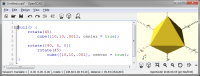
Thank you, it makes sense now. I'm thinking of the axis coming out of each
face and (incorrectly) visualized them coming out of the corners. Actually,
that double pyramid shape will achieve the effect I'm after.
I'm assuming cube(10,10,0.001) gives the pyramid.
Time to play some more.
Thanks all,
Mike.
--
Sent from: http://forum.openscad.org/
I'm assuming cube(10,10,0.001) gives the pyramid.
It gives approximately a square. The hull of that and one rotated 90
degrees gives the pyramid.
Hull only works on 3D shapes unfortunately.
On 7 September 2018 at 11:57, Aurum pommie.mike@gmail.com wrote:
Thank you, it makes sense now. I'm thinking of the axis coming out of each
face and (incorrectly) visualized them coming out of the corners. Actually,
that double pyramid shape will achieve the effect I'm after.
I'm assuming cube(10,10,0.001) gives the pyramid.
Time to play some more.
Thanks all,
Mike.
--
Sent from: http://forum.openscad.org/
OpenSCAD mailing list
Discuss@lists.openscad.org
http://lists.openscad.org/mailman/listinfo/discuss_lists.openscad.org

... I'm thinking of the axis coming out of each face and (incorrectly)
visualized them coming out of the corners. ...
You can do that with: 'cube([10,10,10],center=true)' or using a translation.
--
Sent from: http://forum.openscad.org/

The double pyramid shape is also known as an octahedron and is one of
the Platonic solids.
Here's another way to make one using "cylinders".
for (k = [0,1]) mirror([0,0,k])
cylinder(r1=1,r2=0,h=1, $fn=4);
Another alternative would be to construct one from points and faces
using the polyhedron module.
On Fri, Sep 7, 2018 at 5:58 AM Aurum pommie.mike@gmail.com wrote:
Thank you, it makes sense now. I'm thinking of the axis coming out of each
face and (incorrectly) visualized them coming out of the corners. Actually,
that double pyramid shape will achieve the effect I'm after.
I'm assuming cube(10,10,0.001) gives the pyramid.
Time to play some more.
Thanks all,
Mike.
--
Sent from: http://forum.openscad.org/
OpenSCAD mailing list
Discuss@lists.openscad.org
http://lists.openscad.org/mailman/listinfo/discuss_lists.openscad.org